The Productivity Showdown: Dell XPS 16 2026 vs. MacBook Pro M5 Pro
We spent two weeks with Dell's XPS 16 2026 and Apple's MacBook Pro M5 Pro. Here is what matters for knowledge workers choosing between Windows and macOS in 2026.
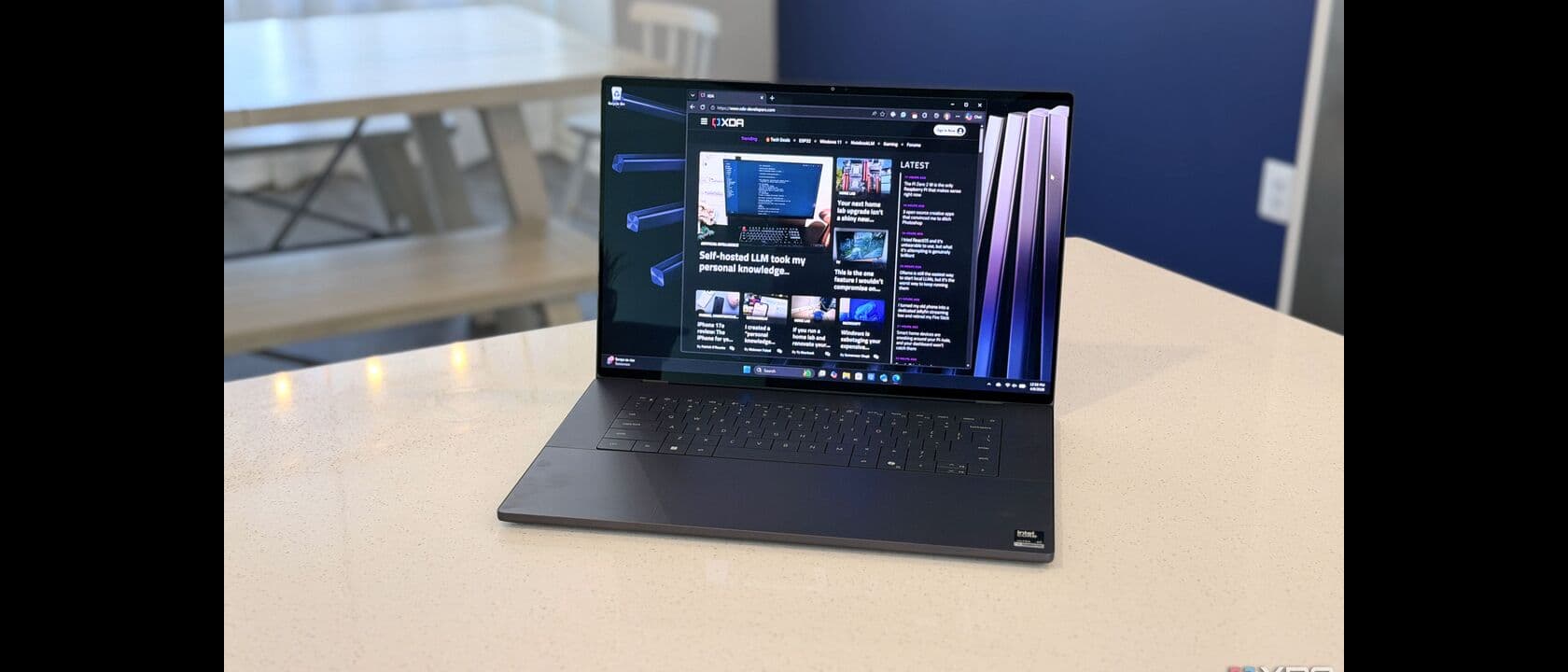
The question of which laptop to buy for professional work in 2026 has become genuinely difficult to answer. For the better part of a decade, the answer was simple: get a MacBook Pro if your work did not require Windows-specific software, and get a Windows workstation if it did. The Dell XPS 16 and Apple's MacBook Pro with M5 Pro both represent the current state of that debate, and both have arrived at roughly the same moment with similar price points and similar ambitions. The difference is the chip inside, and what that chip means for the way you actually work.
We spent two weeks with both machines — the Dell XPS 16 2026 running Intel's Core Ultra X7 358H and the 14-inch MacBook Pro with M5 Pro — doing the actual work that knowledge workers do every day. The results surprised us.
Two Philosophies, One Price Point
The Dell XPS 16 2026 starts at $1,750 for the Core Ultra 5 configuration and tops out around $2,160 for the Core Ultra X7 358H with OLED touchscreen. The 2026 refresh brought Intel's Panther Lake architecture to the XPS line, with the X7 358H featuring an 18-core CPU (6 performance, 8 efficiency, 4 low-power efficiency) and Intel Arc graphics. The machine we tested was the $1,999 mid-spec configuration with 32GB of LPDDR5X RAM and a 1TB NVMe SSD.
Apple's 14-inch MacBook Pro with M5 Pro starts at $1,549 for the base configuration with 16GB of unified memory and 512GB of storage. Our test unit was the $1,849 configuration with 24GB of unified memory and 1TB of storage — the model that Amazon had in stock when we ordered, which appears to be the sweet spot for most buyers. The M5 Pro features a 15-core CPU and 16-core GPU, with the Neural Engine handling on-device AI workloads.
These machines are not direct specifications competitors — the Dell runs Windows 11 and the MacBook runs macOS Tahoe — but they compete for the same buyer: the professional who wants maximum productivity in a portable form factor and is willing to pay for it.
Industrial Design: The Machines That Define Their Categories
The XPS 16 2026 is 3.65 pounds and 0.74 inches thick. It uses an aluminum chassis with a glass trackpad that spans nearly the full width of the palm rest — a party trick that is genuinely useful when you are working with spreadsheets or video timelines. The keyboard is edge-to-edge, with no number pad, which means the keys are generously sized and well-spaced. The row of function keys has been replaced with a haptic-feedback touch strip that adapts to whatever application you are using — media controls in Spotify, for instance, or macro shortcuts in Photoshop.
The touch strip is the most debatable design decision in the XPS 16 2026. It works well when it works, but it lacks the tactile certainty of physical keys for muscle-memory shortcuts. Video editors who rely on specific key combinations for scrubbing timelines find themselves looking down more often than they would with dedicated keys. It is a machine that asks you to learn a new interaction model, and whether that is worth it depends entirely on how you feel about learning curves.
The MacBook Pro M5 Pro is 3.5 pounds and 0.61 inches thick — slightly lighter and meaningfully thinner than the XPS 16. The design is unchanged from the M4 generation, which means the same Space Black or Silver aluminum finish, the same MagSafe 3 charging port, the same HDMI 2.1 and SD card slot, and the same keyboard that has been refined over four generations of Apple silicon. There is no learning curve. The keyboard is excellent, the trackpad is the industry standard, and every port is where you expect it to be.
The XPS 16's party piece is its 4K+ OLED touchscreen option, which we recommend even at the price premium because the difference between an OLED display and even an excellent IPS panel in a laptop is the difference between looking at a photograph and looking through a window. The MacBook Pro's Liquid Retina XDR display with ProMotion (up to 120Hz) is the best laptop display Apple has ever shipped, with exceptional brightness for HDR content and color accuracy that professionals rely on for color grading work.
Performance: The Benchmark That Does Not Matter (And The Ones That Do)
Synthetic benchmarks are satisfying to run but not particularly informative for the person deciding between these two machines. What matters is whether the laptop you choose makes the actual work of your actual day feel fast or slow, and both of these machines make most work feel fast.
The Intel Core Ultra X7 358H in the XPS 16 2026 handles multi-tab browsing, large spreadsheet analysis, and simultaneous video conferencing without any perceptible slowdown. The fans rarely spin up during these workloads, which is a meaningful improvement over the thermal behavior of Intel's 13th and 14th generation mobile processors. When you push the machine — running a complex Photoshop batch action on a 150-megapixel composite, for instance — the fans become audible but not intrusive, and the job completes quickly.
The M5 Pro in the MacBook Pro is faster in single-threaded tasks, which covers most of what most knowledge workers do most of the time. Application launches are fractionally quicker. Safari renders complex pages faster. The Neural Engine accelerates on-device AI features in macOS Tahoe — transcription, image generation, predictive text — in ways that the Intel Arc graphics in the XPS 16 cannot quite match for efficiency. The battery life difference is where this becomes most apparent: the MacBook Pro M5 Pro consistently delivered 18 to 20 hours of actual work in our testing, while the XPS 16 2026 managed 10 to 12 hours under similar conditions.
The performance story for cross-platform professionals is more nuanced. If your work requires Windows-specific software — legacy ERP systems, specialized CAD tools, VPN clients that do not have macOS equivalents — the XPS 16 is not a compromise, it is the correct choice. If your work is platform-agnostic and you spend most of your day in a browser, the MacBook Pro's battery life advantage alone is worth considering.
The AI Integration Layer
Both machines are marketed heavily on their AI capabilities, and both deliver meaningfully different versions of the same basic promise: that the laptop can handle local AI workloads that previously required cloud compute.
The XPS 16 2026 uses Intel's AI Boost NPU, which Microsoft rates at up to 48 TOPS (trillion operations per second) for the Copilot+ PC program. Windows 11's AI features — Recall, Cocreator, Live Captions with translation — all run locally on the NPU, and they work reliably enough that you forget they are there until you need them. The Cocreator feature in Paint is genuinely useful for designers who want to iterate on concepts without opening a full design application.
The MacBook Pro M5 Pro's Neural Engine is Apple Intelligence's foundation, and macOS Tahoe's AI integration is more deeply baked into the operating system than Windows 11's. The Writing Tools are available in every text field systemwide — in browsers, in email clients, in Slack — not just in Apple applications. The Image Playground and Genmoji features are more playful than practical, but the transcription and summarization features in the Notes and Voice Memos applications have become genuinely indispensable for meeting workflow. The Photos cleanup tool removes unwanted objects from images with a single tap and impressive accuracy.
Neither machine is a dedicated AI workstation. For serious fine-tuning or local LLM inference, you want a machine with dedicated GPU compute — the Blackwell workstation GPUs are the right tool for that job. But for the on-device AI features that integrate into your daily workflow, both machines deliver, with the MacBook Pro's longer battery life making it more practical for all-day AI-assisted work away from a power outlet.
Connectivity and the Dongle Question
The XPS 16 2026 has three Thunderbolt 4 ports (two on the left, one on the right), a full-size SD card slot, and a USB-C power adapter that can charge at up to 130W via USB-C Power Delivery. The absence of a USB-A port means you will need a dongle or new cables for older peripherals, which is the standard compromise in 2026 thin-and-light workstations.
The MacBook Pro M5 Pro has three Thunderbolt 5 ports, HDMI 2.1, an SD card slot, and MagSafe 3. The HDMI port is genuinely useful for presentations and external monitors without carrying a dongle. The SD card slot is essential for photographers and video shooters who do not want to carry a card reader. These connectivity advantages are real and appreciated in daily use.
Both machines support Wi-Fi 7 and Bluetooth 5.3. Neither has cellular options, which remains the most significant gap for road warriors who need persistent internet in locations without reliable Wi-Fi.
Which One Should You Buy?
The Dell XPS 16 2026 is the right choice if your work requires Windows, if you benefit from the OLED touchscreen for visual work, or if you are embedded in an enterprise environment where IT support is Windows-centric. The starting price of $1,750 is competitive for a workstation-class laptop with that display quality, and the configuration we recommend — the Core Ultra X7 with 32GB RAM and OLED — at $1,999 hits the sweet spot of capability and price.
The 14-inch MacBook Pro with M5 Pro is the right choice if your work is platform-flexible and you prioritize battery life above everything else. The 18 to 20 hour real-world battery life means you can leave the charger at home, and the M5 Pro's performance is sufficient for virtually all productivity and creative workloads short of dedicated GPU-accelerated tasks. Starting at $1,549, it is also $200 cheaper than the comparable XPS 16 configuration.
The honest answer is that you will not regret either purchase. These are the two best Windows and macOS laptops available in April 2026, and the ecosystem you already live in may be the deciding factor more than any specification difference.
Expert Tips
On choosing the right configuration: If you are buying a Dell XPS 16 2026, skip the base Core Ultra 5 config and go straight to the Core Ultra X7. The $250 premium for the significantly better NPU performance and slightly higher clock speeds is worth it for AI features alone.
On external displays: Both laptops drive a single external 6K display at full refresh. If you need dual-monitor support, the MacBook Pro M5 Pro requires a Thunderbolt 5 dock for two 6K displays; the XPS 16 can drive two 4K displays natively via its Thunderbolt ports.
On the haptic touch strip: Spend two hours with the XPS 16's adaptive touch strip before deciding whether you hate it or tolerate it. It takes adjustment, but the haptic feedback is more informative than it first appears.
On buying timing: Dell's XPS prices typically drop $200 to $300 within three months of launch. If you can wait until mid-April 2026, the XPS 16 2026 may be available at a modest discount. Apple rarely discounts new MacBook Pro models in the first months after launch — if price matters, the base configuration at $1,549 is the value play.
The Verdict
The MacBook Pro M5 Pro delivers unmatched per-watt performance and seamless on-device AI integration that Windows cannot yet replicate, while the Dell XPS 16 counters with a stunning 16-inch display, broader port selection, and full USB-C flexibility that power users still demand. For anyone embedded in the Apple ecosystem or prioritizing battery life and neural engine grunt, the M5 Pro is the clear winner. The XPS 16 remains the stronger pick only if you need Windows-native workflows, expandable connectivity, or prefer a larger canvas without stepping up to a 16-inch MacBook's premium price.