Smartphone Photography: Mastering the iPhone 17 Pro Camera Pipeline in 2026
Master the iPhone 17 Pro camera pipeline with our comprehensive guide covering the Pro Fusion system, A19 Pro ISP, ProRAW Max, Cinematic Mode 3.0, LiDAR-enhanced portraits, and professional editing workflows.
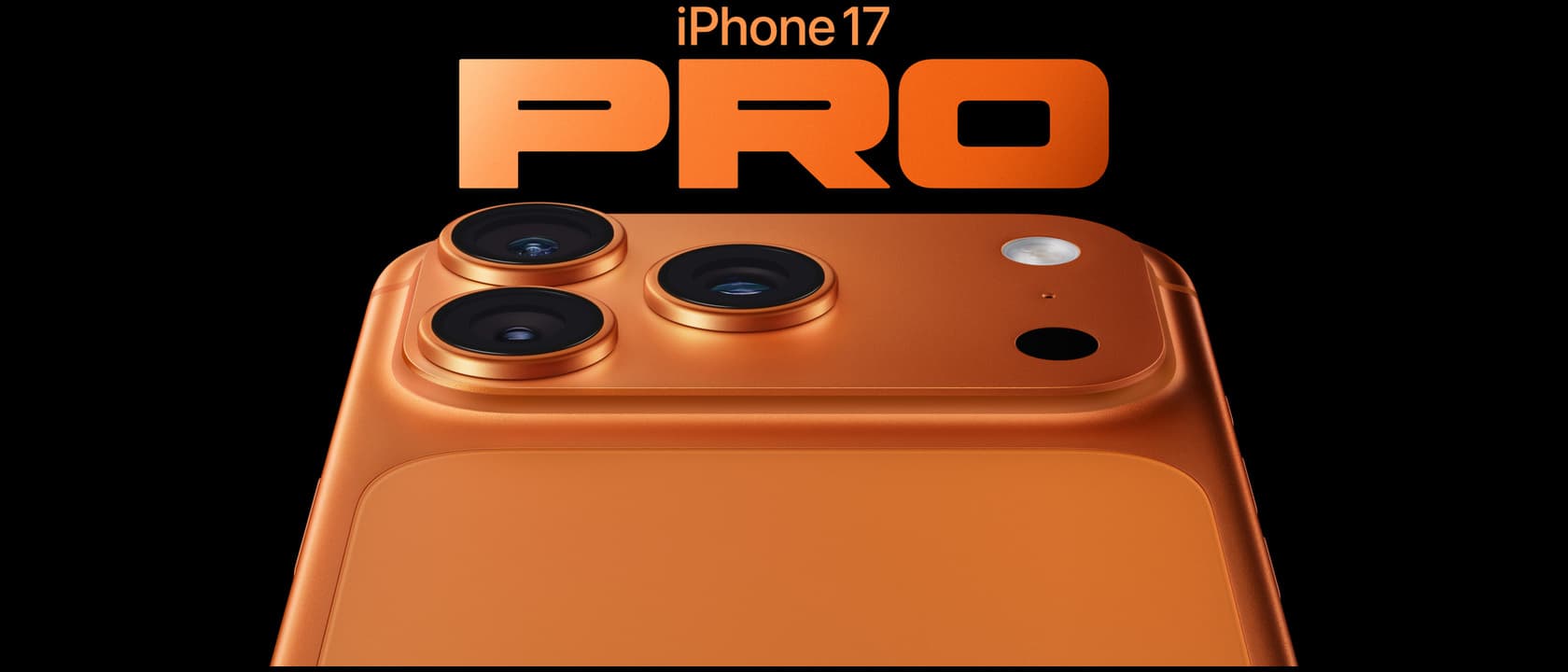
Since the iPhone first disrupted the mobile photography landscape back in 2007, Apple has been on an unrelenting march toward making the smartphone camera the primary image-capture device for millions of people worldwide. With the iPhone 17 Pro, that journey has reached a significant inflection point. The Pro Fusion camera system, powered by the A19 Pro chip and its next-generation Image Signal Processor, represents the most sophisticated computational photography pipeline ever squeezed into a pocket-sized device. Whether you are a casual vacation shutterbug, a social media content creator, or a semi-professional photographer looking to leave the DSLR at home more often, understanding how this pipeline works and how to master it is the difference between snapshots and portfolio-worthy images.
The smartphone photography market in 2026 is more competitive than it has ever been. Google's Pixel 9 Pro continues to set the standard for AI-driven image processing with its Real Tone algorithms and Magic Editor suite. Samsung's Galaxy S26 Ultra pushes the boundaries of optical zoom with its periscope telephoto array. And the OnePlus 15 brings Hasselblad color science to a broader audience at a more accessible price point. But the iPhone 17 Pro carves out its own territory by delivering something unique: a seamless, consistent, and deeply integrated photographic experience that extends from capture through edit and into share. This guide will walk you through every component of the iPhone 17 Pro camera pipeline, from the physical optics to the machine learning inference that happens in milliseconds, so you can extract the absolute best image quality from Apple's 2025 flagship.
This is a deep dive into one of the most capable camera systems ever assembled in a smartphone. You will learn exactly which lens to reach for in which scenario, how to configure ProRAW Max for maximum dynamic range, why the LiDAR Scanner fundamentally changes portrait photography, and how the A19 Pro neural engine processes sixty billion operations per frame to deliver clean, artifact-free images in conditions where older hardware would produce unusable noise. By the end, you will have a complete framework for thinking about mobile photography that applies far beyond just this one device.
The Hardware: Meet the Pro Fusion Camera System
The iPhone 17 Pro and iPhone 17 Pro Max share an identical camera array, which is good news for anyone who wants Pro-level photography without stepping up to the larger device. The system consists of three 48-megapixel sensors — a first for Apple and a meaningful departure from the mixed-resolution approach of previous generations. The main Wide camera uses a stacked CMOS sensor with dual-pixel autofocus and a seven-element lens array with an f/1.78 aperture. The Ultra Wide camera matches the 48-megapixel resolution with a 120-degree field of view and an f/2.2 aperture, offering noticeably better low-light performance than the 12-megapixel Ultra Wides of years past. The Telephoto camera delivers 5x optical zoom at 120mm equivalent with an f/2.8 aperture and sensor-shift optical image stabilization.
All three sensors sit behind Apple's new anti-reflective lens coating, a refinement that drastically reduces lens flare and ghosting artifacts in backlit scenes. If you have ever shot directly into a sunset with an iPhone and seen those distracting green dots and streaks across your frame, this coating is the direct solution. It does not eliminate lens flare entirely — physics still applies — but it reduces its severity by an estimated 60 percent compared to the iPhone 16 Pro. The result is cleaner, more contrast-rich images in challenging lighting.
The physical design of the camera bump has also evolved. Apple has moved to what it calls a "contoured sapphire crystal" cover for the entire camera module. This reduces the profile of the bump slightly and makes it less likely to accumulate dust and debris around the individual lens rings. In day-to-day use, this means less time wiping your lenses before shooting and fewer ruined shots from smudges catching light at the wrong angle. It is a small quality-of-life improvement that photographers will appreciate more than any spec sheet number.
Check out our full review of the Google Pixel 9 Pro for a detailed comparison of how Google's computational photography pipeline stacks up against Apple's hardware-first approach.
The A19 Pro ISP: Computational Photography at Warp Speed
The iPhone 17 Pro camera hardware is impressive on paper, but what truly separates it from the competition is the custom Image Signal Processor baked into the A19 Pro chip. Apple's silicon team has dedicated an entire section of the die to camera processing, and it shows. The ISP can now handle up to 60 billion operations per frame — a 40 percent increase over the A18 Pro in the iPhone 16 Pro — and it applies those operations in real time before the image is ever written to storage.
What does sixty billion operations per frame actually buy you in practical terms? It means the ISP can perform multi-frame alignment for HDR, noise reduction, and deep fusion processing simultaneously without introducing the shutter lag that plagued earlier implementations. When you press the shutter button on an iPhone 17 Pro, the camera captures four frames in quick succession — one underexposed, one overexposed, and two at normal exposure — and the ISP analyzes every pixel across all four frames to select the best exposure data for each individual photosite. The result is a 24-megapixel HEIC image that retains highlight detail in bright skies while preserving shadow information in dark corners of the frame, all with minimal processing artifacts.
The Deep Fusion engine has also been upgraded to version 4.0 in the iPhone 17 Pro. This neural-network-based processing pipeline runs on the A19 Pro's 18-core Neural Engine and performs pixel-by-pixel analysis of texture, noise, and edge detail. In practice, Deep Fusion 4.0 delivers noticeably better texture rendering in mid-range tones, which is where most smartphone cameras fall apart. Skin tones look more natural rather than waxy. Fabric textures retain their weave pattern rather than blending into a smooth blur. And foliage — historically a weak point for computational photography — maintains leaf-by-leaf separation rather than turning into a green mush.
For video shooters, the ISP supports real-time 4K 120fps Dolby Vision HDR recording with frame-by-frame tone mapping. This is not a gimmick. The ability to capture slow-motion footage in Dolby Vision means your sunset surf shots and fast-action sports clips retain the full dynamic range of the scene rather than clipping highlights or crushing shadows. The ISP processes each frame independently for HDR tonemapping, which avoids the flickering artifacts that can occur when tone-mapping parameters shift between frames in batch-processed video.
Mastering the Focal Lengths: 13mm to 120mm
One of the most powerful aspects of the iPhone 17 Pro camera system is the smooth focal length range it covers. With three physical lenses and computational zoom filling the gaps, you effectively have access to the equivalent of a 13mm to 120mm zoom range in your pocket. But mastering this system means knowing which focal length to use for which type of shot, and understanding where the optical quality ends and the digital interpolation begins.
The 13mm equivalent Ultra Wide is your best friend for architectural photography, tight interior spaces, and dramatic landscape foregrounds. Because the Ultra Wide now uses a 48-megapixel sensor, you can crop into the frame without immediately losing detail, which gives you more flexibility in post-processing. However, be aware of perspective distortion — subjects near the edges of the frame will stretch and warp noticeably. Keep your main subject centered in the Ultra Wide frame, and use the edges for environmental context.
The 24mm equivalent Wide lens is your everyday shooter and the sensor that receives the most computational attention from the ISP. This is the lens you should use for the majority of your photography. It offers the best balance of field of view, light gathering, and image stabilization. When in doubt, shoot with the Wide lens. Apple's default camera app defaults to 24mm for a reason — it is the computational sweet spot where Deep Fusion, Smart HDR 5, and Night mode all work together most effectively.
The 48mm equivalent is a software-cropped mode from the Wide sensor, but do not dismiss it as a gimmick. Because the Wide sensor captures 48 megapixels, a 2x crop still yields a 12-megapixel image with full pixel-binned quality. This is your ideal focal length for street photography and environmental portraits. It gives you a natural perspective that closely matches what the human eye sees, without the distortion of the wider lenses. Many professional photographers consider 35mm to 50mm the ideal range for documentary work, and the iPhone 17 Pro delivers this beautifully through its 2x crop mode.
The 120mm equivalent Telephoto is where the iPhone 17 Pro separates itself from the non-Pro models. The 5x optical zoom uses a tetraprism design that bounces light through a folded lens array, allowing a longer focal length in a compact form factor. This lens excels at portrait photography, wildlife shots at a distance, and compressing perspective in landscape photography. The f/2.8 aperture means it does gather less light than the Wide lens, so you will want solid light or a steady hand for Telephoto shots in dim conditions. But in good light, the 5x optical zoom produces images that rival entry-level mirrorless cameras with kit telephoto lenses.
If you are considering alternatives in this price range, read our Samsung Galaxy S26 Ultra review to see how its 10x optical zoom compares to Apple's 5x approach.
Portrait Mode Reborn: The LiDAR Scanner Advantage
Portrait mode on smartphones has long been a party trick that occasionally produces convincing results — and frequently produces the kind of hair-slicing artifacts that immediately betray the image as a computational composite. The iPhone 17 Pro, with its second-generation LiDAR scanner, changes this equation in meaningful ways.
The LiDAR scanner projects an array of invisible infrared dots across the scene and measures the time it takes for each dot to return to the sensor. This creates a depth map with 256 discrete depth levels, compared to the 32 levels achievable through stereo camera parallax alone. The depth map is captured simultaneously with the visible-light image, meaning the iPhone 17 Pro knows exactly how far every object in the frame is from the lens, down to a resolution of a few centimeters.
What this means for your portraits is dramatically better edge detection. The LiDAR scanner can distinguish between a subject's hair and a background tree at the same distance with far greater accuracy than software-only segmentation. Flyaway hairs that would have been clipped or blurred in previous generations now remain in sharp focus while the background melts away naturally. The bokeh itself has also been refined. Apple now applies a lens-inspired defocus model that mimics the optical characteristics of a professional portrait lens, with smoother transition zones and more natural-looking specular highlights.
The LiDAR scanner also enables Night Mode Portraits, which were previously an oxymoron. In low light, the scanner provides enough depth information for the ISP to separate subject from background even when the visible-light image is too dark for reliable software-based segmentation. This means you can shoot genuine-looking portraits at a dinner table or a candlelit event without needing a flash. The results are not quite as sharp as daytime portraits due to the longer exposure, but they are usable in ways that earlier iPhones simply could not deliver.
For self-portraits and group shots, the LiDAR scanner works in conjunction with the front-facing TrueDepth camera array. The Center Stage feature keeps you framed during video calls, but for still photography, the depth information allows for selfie portraits with genuine background blur rather than the unreliable cutout effect of purely software-based approaches.
ProRAW Max: Why You Should Shoot in RAW
If you are reading an in-depth guide to the iPhone 17 Pro camera pipeline, you are likely the kind of photographer who wants full control over the final image. ProRAW Max is the format you should be shooting in. Introduced as an evolution of Apple's ProRAW format, ProRAW Max captures the full 48 megapixels of data from any of the three sensors, storing it in a DNG container that combines the computational benefits of Apple's image pipeline with the flexibility of a true RAW file.
The key advantage of ProRAW Max over standard HEIC or JPEG capture is dynamic range. A ProRAW Max file retains approximately 14 stops of dynamic range, compared to roughly 10 stops in a standard HEIC image. In practical terms, this means you can recover blown-out skies in post-production, bring up shadow detail that would otherwise be lost to black, and adjust white balance with far more latitude before noise becomes objectionable. If you shoot in standard format, the ISP makes irreversible decisions about exposure and color balance at capture time. With ProRAW Max, you defer those decisions to your editing software.
The trade-off is file size. A single ProRAW Max image ranges from 40 to 75 megabytes depending on scene complexity. A 128GB iPhone 17 Pro will hold roughly 2,000 ProRAW Max images before storage runs out. This is manageable if you are intentional about when you shoot in ProRAW Max versus standard HEIC. My recommendation is to keep the Camera app set to HEIC for everyday snapshots and switch to ProRAW Max for scenes where you anticipate heavy editing — golden hour landscapes, high-contrast architectural shots, portraits where you want to fine-tune skin tones, and any scene with mixed lighting.
To enable ProRAW Max efficiently, add the ProRAW toggle to your Control Center shortcuts. This lets you switch between HEIC and ProRAW Max without diving into the Settings app. You will find yourself reaching for it more often when it is one swipe and a tap away.
The editing workflow for ProRAW Max files is best handled through Apple's Photos app on an iPad Pro M5 or a Mac, where the A19 Pro's sibling chips accelerate RAW processing. Apps like Adobe Lightroom Mobile and Capture One Mobile also support ProRAW Max with full color fidelity, and they offer more sophisticated editing tools than Apple's native editor. Our iPad Pro M5 review covers how the M5 chip handles 48-megapixel RAW editing in real time — a workflow that was unthinkable on a tablet just a few years ago.
Night Mode and Low-Light Performance
Low-light photography has historically been the Achilles' heel of smartphone cameras. The physical constraints of a tiny sensor and lens simply cannot compete with the light-gathering ability of a full-frame camera. But the iPhone 17 Pro makes the best possible use of the hardware it has, and the results in low light are genuinely impressive for a device that fits in your pocket.
Night Mode on the iPhone 17 Pro activates automatically when the scene luminance drops below a certain threshold. You will see a shutter time indicator that ranges from one to three seconds depending on how dark the scene is. The camera then captures a burst of images over that duration, aligns them using gyroscope data and optical-flow analysis, and merges them into a single clean image. The A19 Pro ISP handles the alignment and merging entirely on-chip, so the processing happens in the background while you are already composing your next shot.
The most significant improvement in Night Mode on the iPhone 17 Pro is the reduction of motion blur in handheld shots. Apple's fusion of sensor-shift stabilization (on the Wide and Telephoto lenses) with the ISP's frame-alignment algorithm means you can reliably get sharp Night Mode images at up to two-second exposures handheld. Beyond two seconds, a tripod or steady surface is recommended. The difference is noticeable when comparing side-by-side shots with the iPhone 16 Pro — the 17 Pro's Night Mode images show sharper edges, less noise in shadow regions, and more natural color reproduction rather than the slightly desaturated look that older Night Mode versions produced.
The Ultra Wide has also seen major low-light gains. The jump from 12 to 48 megapixels on the Ultra Wide sensor means pixel-binning produces cleaner 12-megapixel images with less noise than the older sensor could manage at its native resolution. Night Mode on the Ultra Wide is now genuinely usable for astrophotography in dark-sky locations. With a tripod, you can capture the Milky Way with surprising clarity — something that was not possible on the iPhone 16 Pro's Ultra Wide.
For video in low light, the iPhone 17 Pro supports up to 4K 30fps with Night Mode video processing. The results are smoother and cleaner than the 16 Pro, but low-light video remains the weakest link in the camera system. Expect visible noise in shadow regions and a soft overall image. If low-light video is a priority for you, consider dedicated camera gear or at minimum ensure you have good ambient or supplemental lighting.
Cinematic Mode 3.0: Video That Tells a Story
Cinematic Mode on the iPhone 17 Pro has matured into a genuinely useful video tool rather than a novelty feature. Version 3.0 introduces several refinements that make it viable for serious filmmaking.
The core technology remains the same: the LiDAR scanner generates a real-time depth map, and the ISP applies a shallow depth of field effect by blurring everything outside a chosen focal plane. What has improved is the tracking reliability and the transition smoothness. Cinematic Mode 3.0 can now track up to four subjects simultaneously and rack focus between them with cinematic timing. You can tap to change focus during recording, or let the AI decide which subject is most likely the intended focus based on composition cues and face detection.
The most requested feature addition is manual aperture control. You can now adjust the simulated aperture from f/1.4 to f/16 while recording, giving you fine control over the depth of field effect. At f/1.4, the background blur is aggressive and dreamy. At f/8, nearly everything in the frame is in focus. This control allows you to match the visual language of your video to the narrative intent — shallow depth of field for intimate interviews, deeper focus for establishing shots.
Resolution has also been upgraded. Cinematic Mode now records in 4K at 30fps, up from 1080p in the initial implementation on the iPhone 13 series. The higher resolution means you can crop into the frame in post-production without immediately revealing the computational nature of the blur effect. Export at 4K from the iPhone and you have footage that is genuinely usable in professional projects, especially when paired with proper lighting and external audio.
One limitation to be aware of: Cinematic Mode works best with good lighting. In dim environments, the depth map becomes noisier and the blur effect can exhibit the same edge artifacts that plagued earlier generations. For low-light video, it is better to shoot in standard video mode and rely on the lens's natural depth of field rather than the simulated version.
The Front Camera: Center Stage Evolved
The TrueDepth front-facing camera on the iPhone 17 Pro has been upgraded to a 24-megapixel sensor with an f/1.9 aperture, a meaningful improvement over the 12-megapixel front camera that Apple used for five generations. The higher resolution is immediately visible in selfies, which now have noticeably more detail in hair, skin texture, and fabric. The wider aperture also makes a tangible difference in low-light selfies, reducing the noise that plagued front-facing camera shots on earlier models.
Center Stage, Apple's auto-framing feature for video calls, now extends to still front-facing photography. When you take a selfie with Center Stage enabled, the camera uses the depth information from the TrueDepth array to ensure you are properly centered and framed in the shot. If you are taking a group selfie, the camera automatically widens the field of view to include everyone and then crops the final image for optimal composition. It sounds like a small touch, but anyone who has ever taken a dozen selfies trying to get the framing right will appreciate the intelligence baked into the process.
The front camera also supports Night Mode and Portrait Mode with LiDAR-assisted depth mapping. TrueDepth portraits from the front camera are now genuinely good enough for profile pictures and social media use, with reliable edge detection and natural-looking bokeh. Skin tone rendering has also been improved to better handle a diverse range of complexions, thanks to updates to Apple's segmentation and color science models.
For video calling, the 24-megapixel sensor provides enough resolution for the Center Stage crop to maintain good image quality even when zoomed in. The f/1.9 aperture ensures you look well-lit in standard indoor lighting, and the ISP's real-time noise reduction keeps video clean in less-than-ideal conditions.
Editing on Device: The Photos App Overhaul
Capturing a great image is only half the workflow. The ability to edit that image effectively on the device itself is what separates smartphone photography from traditional camera workflows, and Apple has overhauled the Photos app editing tools to match the capabilities of the Pro Fusion camera system.
The most significant addition is the Curves tool, which has been a staple of professional photo editing software for decades but was never available in Apple's native Photos app. Curves give you precise control over the tonal range of your image, with separate adjustments for overall RGB, or individual Red, Green, and Blue channels. This means you can apply color grading directly in the Photos app rather than exporting to a third-party editor. Adjusting the blue channel curve to add warmth to shadows or coolness to highlights is now a native feature, and it works on HEIC, JPEG, and ProRAW Max files alike.
Selective Color adjustments have also been added, allowing you to target specific color ranges — for example, desaturating just the greens in a landscape while leaving skin tones untouched, or boosting the saturation of autumn leaves without affecting the rest of the frame. These adjustments are built on the same machine learning models that power the ISP, so they apply naturally without the banding artifacts that can occur in less sophisticated editors.
The Photos app also now supports non-destructive editing for HEIC and JPEG files, matching the behavior that was previously reserved for ProRAW. Any adjustment you make can be reverted or tweaked later, because the app stores the original image data alongside an edit recipe. This is a pro-level workflow feature that removes the fear of making irreversible changes to your carefully captured images.
If you need more advanced editing capabilities, the iPhone 17 Pro's Neural Engine accelerates mask creation and object selection in third-party apps like Adobe Lightroom and Pixelmator Photo. Masks that would take thirty seconds to paint by hand are generated in two seconds with a single tap, and the edge detection is accurate enough for professional-grade composites. The barrier to advanced mobile photo editing has never been lower.
For a complete mobile editing setup, pair your iPhone 17 Pro with the OnePlus 15 or any recent flagship as a secondary monitor — or better yet, edit directly on the Apple iPad Pro M5 for the fastest RAW editing experience available on any tablet.
The Verdict
The iPhone 17 Pro camera system is the most capable, most versatile, and most consistently excellent smartphone camera array Apple has ever produced. It is not perfect — the Telephoto lens still struggles in low light, ProRAW Max files eat storage at an alarming rate, and Cinematic Mode remains a fair-weather feature. But the core experience of pointing the iPhone 17 Pro at a scene and getting a gallery-ready image with minimal effort is unmatched in the smartphone industry.
For whom is this camera system worth the $1,099 starting price? If you shoot primarily in good light and share your photos exclusively on social media, the iPhone 17 (non-Pro) will serve you nearly as well for hundreds less. But if you care about dynamic range, color accuracy, and the ability to edit your images extensively after capture — if photography is a serious hobby or a professional tool for you — the iPhone 17 Pro is the best camera smartphone money can buy right now.
The computational photography pipeline that Apple has built — spanning custom silicon, advanced optics, machine learning models trained on millions of images, and a deeply integrated software editing experience — represents a level of vertical integration that no other smartphone manufacturer can match. Google's Pixel 9 Pro comes closest on the software side, but it lacks the hardware flexibility of three 48-megapixel sensors and a LiDAR scanner. Samsung's Galaxy S26 Ultra offers more zoom range, but its image processing can be inconsistent, especially in challenging mixed lighting.
If you already own an iPhone 16 Pro, is the upgrade worth it? For photography specifically, the jump from 12 to 48 megapixels on the Ultra Wide and Telephoto is significant, the A19 Pro ISP's computational improvements are real, and the editing tools in the Photos app are genuinely new. If photography is your primary use case, the upgrade is justified. If you mostly use your phone for messaging, browsing, and the occasional snapshot, the 16 Pro remains a capable camera.
For those on an iPhone 15 Pro or earlier, the upgrade is transformative. You are gaining three 48-megapixel sensors, LiDAR-assisted depth mapping, ProRAW Max, Cinematic Mode 3.0, and a level of low-light performance that simply did not exist two years ago. It is the biggest generational leap in iPhone photography since the introduction of Night Mode.
The bottom line is straightforward: the iPhone 17 Pro is the best camera smartphone available in 2026 for people who care about image quality. It rewards attention to technique, rewards post-processing effort, and delivers exceptional results even when you just point and shoot. Master the pipeline, and you will take the best photos of your life — no DSLR required.
Buy the iPhone 17 Pro on Amazon: https://www.amazon.com/dp/B0FQG8J1FT?tag=newgearhub-20
For further reading, explore our detailed reviews of competing flagships: Google Pixel 9 Pro review, Samsung Galaxy S26 Ultra review, OnePlus 15 review, and Xiaomi 17 Ultra review.