Acer Swift 16 AI Review: A Stunning OLED Display and All-Day Battery at a Price That Defies Expectations
The Acer Swift 16 AI delivers a gorgeous 16-inch 2.8K OLED touchscreen, incredible all-day battery life, and a remarkably light 3.37-pound chassis at a sub-$800 sale price — but underwhelming speakers and a cramped keyboard layout keep it from perfection.
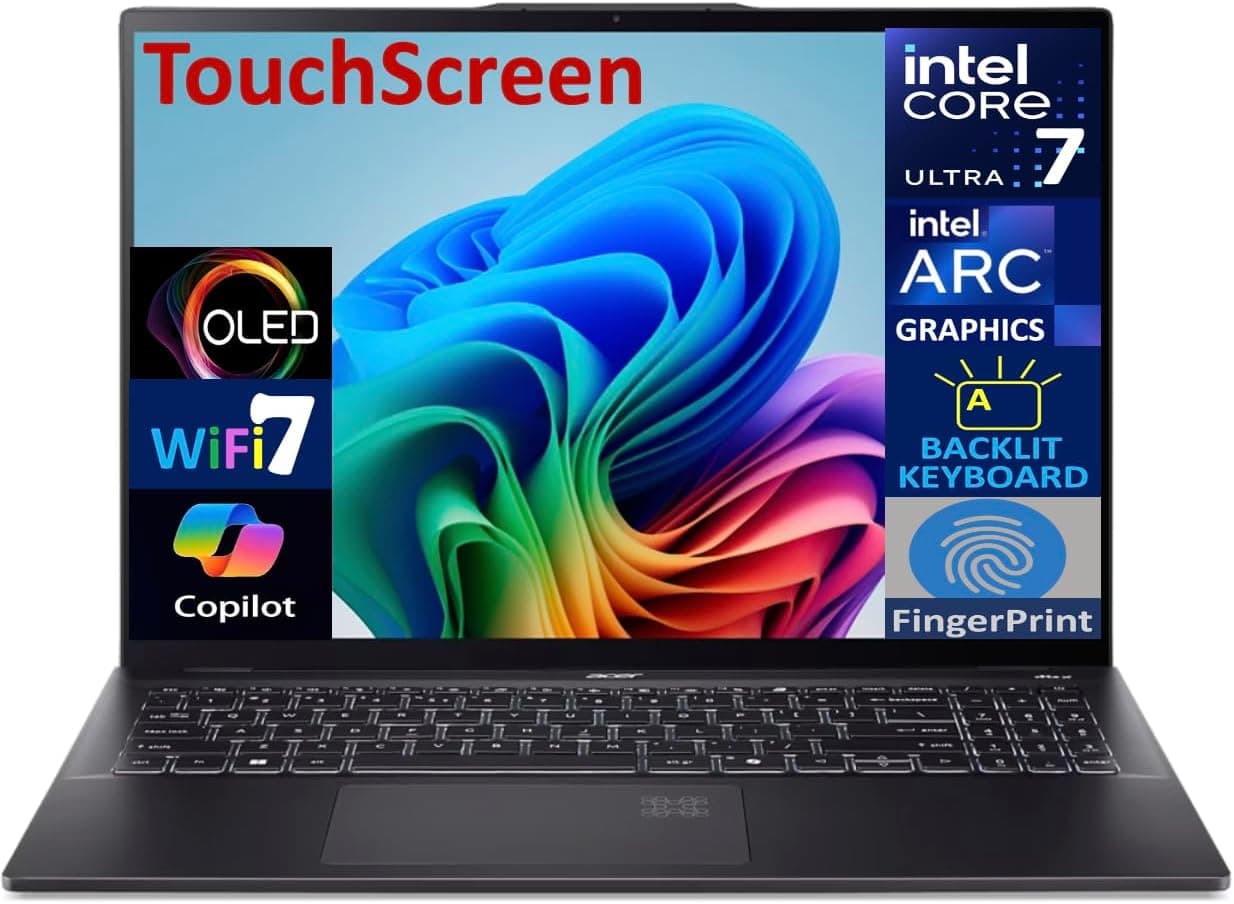
There comes a moment in every laptop buyer's journey where they have to make a choice: pay premium money for a brand-name ultrabook with a mediocre display, or settle for a budget machine that cuts corners everywhere it matters. Acer's Swift 16 AI (model SF16-51T) quietly inserts itself into that gap with a proposition that sounds almost too good to be true — a 16-inch OLED touchscreen, Intel's latest Lunar Lake processor, and a weight that would embarrass most 15-inch machines. After spending extended time with this laptop across productivity workflows, creative tasks, and everyday use, the picture that emerges is nuanced. The Swift 16 AI delivers stunning value in some areas while making a few baffling compromises in others, and understanding exactly where those trade-offs land will determine whether this is the right machine for you.
Design and Build Quality
The Swift 16 AI arrives in an all-metal chassis that Acer describes as "Ice Black," a finish that lands somewhere between dark silver and muted charcoal. It is, frankly, not the most exciting color in the world — it lacks the warm copper tones of the ASUS ZenBook S 16 or the sleek midnight blue of Samsung's Galaxy Book5 Pro 360. But what the exterior lacks in personality, it makes up for in practicality. The matte finish resists fingerprints reasonably well, and the overall build feels remarkably solid for a laptop that starts at well under $1,200.
At 3.37 pounds (1.53 kg) and just 0.63 inches thick, the Swift 16 AI is one of the lightest 16-inch laptops you can buy. For context, the HP Envy x360 16 weighs 3.9 pounds, the HP Spectre x360 16 tips the scales at 4.3 pounds, and even Apple's MacBook Pro 16 comes in at 4.8 pounds. Acer has achieved this weight reduction without resorting to plastic — the entire chassis is aluminum — and there is only mild flex when you press down on the keyboard deck or the lid. It is not tank-grade rigidity, but it is more than adequate for daily carry and travel use.
The laptop ships with a padded carrying sleeve in the box, which is a thoughtful inclusion that most manufacturers have stopped offering. It is a simple neoprene-style sleeve, but it saves you from having to buy one separately and underscores that Acer sees this as a portable-first machine.
One design decision that drew mixed reactions is the AI Activity Indicator — a small illuminated logo on the touchpad area that glows when the NPU is processing AI workloads. It is a genuinely distracting visual element during normal use, and好在 you can disable it through the AcerSense utility. It feels like a solution in search of a problem — a marketing checkbox that adds nothing to the user experience.
Display: The Star of the Show
If there is one reason to buy the Swift 16 AI, it is the display. The 16-inch OLED panel runs at 2880×1800 resolution (commonly called 3K or 2.8K) with a 120Hz refresh rate, and it is genuinely stunning. Color coverage sits at 100% sRGB, 100% DCI-P3, and 94% Adobe RGB — numbers that translate into real-world benefits for anyone doing photo editing, video color grading, or simply watching movies on this screen.
Brightness peaks at around 405 nits in SDR, which may sound modest compared to IPS displays that claim 500+ nits, but OLED's inherent contrast ratio more than compensates. With a black level of just 0.01 nits, the effective contrast ratio exceeds 28,000:1, meaning dark scenes in movies display with the kind of depth that LCD panels simply cannot replicate. The screen is DisplayHDR True Black 500 certified, and while HDR content does look good, it is not the brightest HDR display you will find — you will want to be in a moderately lit room for the best HDR experience.
The 120Hz refresh rate is a welcome inclusion that makes scrolling, window animations, and even cursor movement feel noticeably smoother than the 60Hz panels still found on many laptops in this price range. Touch input is responsive and well-calibrated, though the glossy finish means you will be wiping away fingerprints regularly.
Acer includes an OLED care section in their AcerSense app that recommends using dark mode, enabling a screen saver, and adjusting window transparency to minimize burn-in risk. These are standard precautions for OLED displays, but it is good that Acer makes them easily accessible rather than burying them in the Windows settings.
The one real weakness of the display is its reflectivity. In bright environments or near windows, the glossy finish produces noticeable glare, and the Oleophobic coating is not as effective as what you will find on a MacBook display. If you regularly work in direct sunlight, this is worth considering.
Performance: Intel's Lunar Lake Finds Its Footing
The Swift 16 AI is built around Intel's Core Ultra 7 256V processor from the Lunar Lake family. This is an 8-core, 8-thread chip (4 performance cores and 4 efficiency cores) running at up to 4.8GHz, paired with 16GB of LPDDR5X memory and Intel Arc 140V integrated graphics. It is part of Intel's new V-series lineup that prioritizes efficiency and battery life over raw multi-threaded performance.
In practice, the Core Ultra 7 256V delivers solid single-core performance that matches or exceeds more expensive laptops. PCMark 10 scores are competitive with the Dell XPS 14, and the Swift 16 AI actually posted the highest PCMark Storage score among its peers. Photoshop performance through PugetBench was similarly strong, making this a capable machine for creative workflows that are not heavily multi-threaded.
Where the processor shows its limitations is in sustained multi-threaded workloads. Cinebench R23 and Geekbench 6 multi-core scores lag behind H-class and HX-class processors, as well as Qualcomm's Snapdragon X Elite chips. If your workflow involves heavy video encoding, 3D rendering, or compiling large codebases, you will feel the difference compared to a Core Ultra 9 or a Ryzen AI 9 HX chip.
Graphics performance is more impressive than expected. The Intel Arc 140V integrated GPU handles casual and even mid-tier gaming with surprising competence. It outperformed all competitors with integrated graphics except the Dell XPS 14 (which pairs an Nvidia GeForce GPU). You will not be playing the latest AAA titles at high settings, but older games, indie titles, and even some competitive shooters are perfectly playable at medium settings and the display's native 2880×1800 resolution.
The NPU delivers 47 TOPS of AI processing power, comfortably exceeding Microsoft's 40 TOPS threshold for Copilot+ PC certification. In practical terms, this means Windows Studio Effects (auto-framing, eye contact, background blur) work smoothly during video calls, and on-device AI tasks run without relying on cloud processing. Acer also includes a handful of AI utilities — Acer Purified View for webcam enhancements, Acer LiveArt for background removal and artistic filters, and AlterView for dynamic wallpapers with optional head tracking. None of these are compelling enough to justify buying the laptop on their own, but they are harmless additions that do not get in the way.
Keyboard and Touchpad
The Swift 16 AI's keyboard is a mixed bag. The key travel is adequate with a firm, springy feel that makes for a pleasant typing experience — I recorded 110 WPM on MonkeyType, which is in line with what I achieve on most good laptop keyboards. White backlighting is clearly visible in low-light conditions, and the brightness can be adjusted across four levels.
The problems emerge when you look at the layout. The laptop includes a numeric keypad on the right side, which sounds useful for a 16-inch machine but is implemented with a cramped three-column layout that makes the narrow keys difficult to hit accurately. More frustratingly, the Home, End, Page Up, and Page Down keys are embedded in the numpad and require you to toggle Num Lock off to access them — a design choice that will annoy anyone who frequently navigates documents or code.
There is also no function lock toggle, meaning you have to choose between F1-F12 keys and media controls through the Fn key every time. This is a small but persistent friction point that compounds over hours of use.
The touchpad is adequate in size for a 16-inch laptop but feels small compared to competitors. The HP Omnibook Ultra Flip 14, a 14-inch laptop, has nearly double the touchpad real estate. Accuracy and responsiveness are fine, and Windows precision drivers ensure smooth gesture support, but users with larger hands may find themselves regularly reaching for an external mouse.
Acer has included a haptic touchpad on higher configurations of the Swift 16 AI, which — according to reviews from PCWorld — feels genuinely impressive with configurable haptic feedback. If your budget stretches to the $1,799 configuration with the Core Ultra 9 285H and Arc 140V graphics, you will get this upgrade. The base model reviewed here uses a traditional mechanical touchpad.
Battery Life: A Genuine All-Day Laptop
This is where the Swift 16 AI truly distinguishes itself. The combination of Intel's efficiency-focused Lunar Lake chip and a 70Wh battery delivers genuinely impressive endurance for a 16-inch OLED laptop.
PCMag recorded 20 hours and 12 minutes of video playback at 50% brightness and 60Hz refresh rate. TrustedReviews measured 14 hours and 45 minutes on PCMark 10's office battery benchmark. In real-world mixed use — web browsing, document editing, video streaming, and light photo editing — you can confidently expect 10 to 12 hours away from a charger. That is better than most 16-inch laptops and competitive with smaller ultrabooks.
Charging is handled via either of the two USB4/Thunderbolt 4 ports using the included 65W USB-C adapter. From empty, you can reach 50% charge in approximately 38 minutes, with a full charge taking around 95 minutes. That is brisk for a laptop of this size.
It is worth noting that running the display at 120Hz will reduce battery life compared to 60Hz mode, and HDR content draws more power than SDR. But even accounting for these factors, the Swift 16 AI delivers enough endurance to get through a full workday without hunting for an outlet.
Ports and Connectivity
Acer has provided a solid port selection that covers the vast majority of use cases:
- 2× USB4/Thunderbolt 4 (USB-C) — either can charge the laptop
- 2× USB-A 3.2 (5Gbps) — one on each side
- 1× HDMI 2.1
- 1× 3.5mm combo audio jack
The only notable omission is an SD card slot, which is frustrating for a laptop with a screen this good aimed at creative users. If you shoot photos or video and regularly transfer from SD cards, you will need a dongle. There is also no Thunderbolt 5, which is starting to appear on premium 2026 machines but is not yet common at this price point.
Wireless connectivity includes Wi-Fi 7 and Bluetooth 5.4, both of which are current-generation standards that provide excellent range and speed. Wi-Fi 7 delivers theoretical speeds up to 46 Gbps and improved performance in congested environments, making it a welcome forward-looking inclusion.
Audio: The Biggest Disappointment
If the display is the Swift 16 AI's greatest strength, the speakers are its most obvious weakness. The downward-firing stereo pair produces sound that is hollow, tinny, and entirely lacking in bass. CNET described it as "underpowered" and noted that it "ruins the Swift 16 AI's appeal as an entertainment laptop," which is particularly frustrating given how gorgeous movie content looks on that OLED panel.
DTS:X audio software is included with an equalizer and several presets (music, movies, gaming, voice), but no amount of processing can compensate for speakers this small and underpowered. Music sounds flat regardless of genre. Podcasts and voice calls are intelligible but lack richness. Movie soundtracks lose the impact that their low-frequency elements provide.
The practical implication is clear: if you want to enjoy media on the Swift 16 AI's exceptional display, you will need headphones or external speakers. This is not an unusual compromise in thin-and-light laptops — the MacBook Air's speakers are merely adequate, not great — but when the display is this good, the audio shortfall feels more acute.
Webcam and Biometrics
The 1440p webcam is a meaningful upgrade over the 720p cameras still found on many laptops, and it is further enhanced by Windows Studio Effects. AI-powered auto-framing keeps you centered during calls, eye contact adjustment makes it appear as though you are looking directly at the camera even when you are reading from your screen, and background blur works reliably in most lighting conditions.
However, there is no physical privacy shutter or webcam kill switch — an odd omission for a laptop positioned as a productivity tool. The IR sensor for Windows Hello facial recognition works reliably, even in dim lighting, and the fingerprint reader embedded in the power button provides a convenient alternative for quick unlocks.
Thermals and Noise
One of the most pleasant surprises with the Swift 16 AI is how quietly it operates. Even under sustained load, the cooling fan is barely audible, and the chassis stays cool to the touch. There is no fan whine during video calls, no thermal throttling during everyday productivity work, and the only time the fan becomes noticeable is during extended gaming or benchmark sessions.
This is a direct benefit of Intel's Lunar Lake architecture, which was designed from the ground up for thin-and-light devices. The performance-per-watt improvements mean the processor delivers competitive single-core performance while staying well within thermal limits.
Configuration Options and Value
The Swift 16 AI is available in several configurations, with the most common being:
- Intel Core Ultra 5 226V, 16GB RAM, 512GB SSD — starts around $849-$1,000 on sale
- Intel Core Ultra 7 256V, 16GB RAM, 1TB SSD — starts around $1,100-$1,200
- Intel Core Ultra 9 285H, 32GB RAM, 1TB SSD, Arc 140V — around $1,800
The value proposition is strongest in the mid-range configuration. At $1,100-$1,200, you are getting a 16-inch OLED touchscreen, 1TB of storage, and sufficient performance for most productivity and creative tasks. The base configuration with 512GB of storage feels stingy at a time when competitors are moving to 1TB as standard, and the top-tier configuration enters pricing territory where alternatives with discrete GPUs become more compelling.
Sales routinely drop the Swift 16 AI's price by $200-$400, making it one of the best value propositions in the 16-inch laptop category. Best Buy has offered it for as low as $800 during promotional periods, which is frankly remarkable for a machine with this display and build quality.
Competition and Context
The Swift 16 AI occupies an interesting position in the market. It is not trying to compete with the MacBook Pro 16 on performance, nor is it targeting the gaming crowd with the ASUS ROG Zephyrus G16. Instead, it fills a specific niche: professionals and students who want a large, beautiful display, solid productivity performance, genuine all-day battery life, and a reasonable price tag.
Against the ASUS ZenBook S 16 (around $1,500), the Swift 16 AI offers similar display quality but trades some performance headroom for better battery life and a significantly lower price. Against the MSI Prestige 16 AI Evo (around $1,400), the Acer gives up some CPU power but gains a superior OLED display and lighter weight. Against the Dell XPS 16 (starting at $1,500), the Swift 16 AI offers competitive performance at a notably lower price point, though the Dell's build quality and keyboard are superior.
The closest direct competitor is probably the Samsung Galaxy Book5 Pro 360, which offers similar specifications in a 2-in-1 form factor but at a $300-$400 premium. If you value the flexibility of a convertible design, Samsung's offering is worth considering, but for pure laptop value, the Acer has the edge.
Software and Bloatware
Acer's software approach is a mixed bag. AcerSense is genuinely useful, providing system health monitoring, power mode controls, battery charge limiting (which extends battery lifespan), and the OLED care recommendations mentioned earlier. On the flip side, the laptop ships with several pieces of bloatware: a Dropbox installer, several pre-installed game trials, and Acer Jumpstart, which delivers excessive notifications and was one of the first things I uninstalled.
Windows 11 runs cleanly after the bloatware is removed, and the Copilot+ certification means all of Microsoft's on-device AI features are available. The operating system's built-in AI tools — Live Captions, Cocreator in Paint, and the enhanced Windows Search — work as advertised, though they are not reason enough to choose this laptop over a non-Copilot+ alternative.
Who Should Buy the Acer Swift 16 AI
The Swift 16 AI is ideal for:
- Productivity-focused users who want the largest possible screen real estate without the back-breaking weight of a typical 16-incher. At 3.37 pounds, this is a laptop you can actually carry in a backpack all day without shoulder strain.
- Content consumers who prioritize display quality. Watching movies and TV shows on this OLED panel is a genuinely premium experience — provided you use headphones or external speakers.
- Students and professionals on a budget who need a reliable, well-built machine with excellent battery life for all-day classes or meetings.
- Photo editors who need accurate color on a large canvas. The 100% DCI-P3 coverage and factory calibration make this a legitimate option for Lightroom and Photoshop work.
You should look elsewhere if:
- Audio quality matters and you want a laptop that sounds as good as it looks. The HP Spectre x360 16 with its quad speakers is the better entertainment machine.
- You need serious multi-threaded performance for video encoding, 3D rendering, or large-scale compilations. Look at the Acer Swift X 16 or a workstation-class laptop instead.
- You need an SD card slot for photography workflows. The omission here is genuinely frustrating on a machine aimed at creative users.
- A cramped keyboard layout will bother you during long typing sessions. The narrow numpad and embedded navigation keys are an acquired taste at best.
The Bottom Line
The Acer Swift 16 AI is a laptop defined by its contradictions. It has one of the best displays you can find at any price point, but speakers that undermine that display's entertainment potential. It delivers exceptional battery life for a 16-inch machine, but its keyboard layout feels like it was designed by someone who never types. It offers outstanding value at its sale prices, but its AI branding oversells features that are still more novelty than necessity.
None of these contradictions are deal-breakers, and most of them reflect the kind of pragmatic trade-offs that make a $1,100 laptop possible. The display alone justifies the asking price, and the battery life, build quality, and portability make it a genuinely compelling option for anyone who does not need discrete graphics or studio-quality speakers. If you pair it with a decent set of headphones and an external mouse — reasonable accessories for any productivity-focused laptop — the Swift 16 AI delivers an experience that punches well above its weight class.
Pros
- Stunning 16-inch 2.8K OLED touchscreen with 120Hz refresh rate and 100% DCI-P3 coverage
- Exceptional battery life with 10-12 hours of real-world mixed use
- Incredibly light at 3.37 pounds for a 16-inch all-metal laptop
- Solid single-core performance from Intel Core Ultra 7 256V
- Outstanding value at sub-$800 sale pricing
Cons
- Downward-firing speakers are hollow and tinny — headphones or external speakers required
- Cramped numpad layout and embedded navigation keys frustrate during long typing sessions
- No SD card slot despite targeting creative users
- Limited multi-threaded performance for heavy video encoding or 3D rendering
- Glossy display produces noticeable glare in bright environments
Final Verdict
The Acer Swift 16 AI delivers a gorgeous 16-inch 2.8K OLED touchscreen, incredible all-day battery life, and a remarkably light 3.37-pound chassis at a sub-$800 sale price — but underwhelming speakers and a cramped keyboard layout keep it from perfection.