MacBook Air M5 Review: The Best Laptop for Most People in 2026
The Apple MacBook Air M5 delivers class-leading performance, all-day battery life, and premium build quality in a thin and light package. With the M5 chip's impressive GPU gains, doubled base storage, and Wi-Fi 7 support, it remains the ultraportable to beat in 2026.
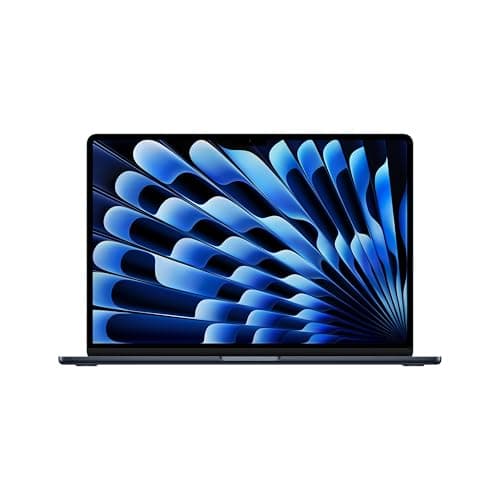
The 2026 MacBook Air with the M5 chip is the kind of laptop that makes you question why anyone would spend more on a computer. It's fast, it's light, it's beautifully built, and it lasts all day on a charge. At first glance, it looks identical to its predecessor — same unibody aluminum chassis, same svelte profile, same delightful MagSafe charging. But under the hood, Apple has made some meaningful changes that, when taken together, make this the most well-rounded ultraportable money can buy in 2026.
The MacBook Air M5 launched in March 2026, alongside the new MacBook Neo and the updated MacBook Pro line. It starts at $1,099 for the 13-inch model and $1,299 for the 15-inch version I tested. That's a $100 increase over the previous generation, but Apple doubled the base storage to 512GB and significantly improved SSD read and write speeds, so you're actually getting more for your money when you factor in the cost of upgrading storage on the M4 model.
Design and Build Quality
Apple didn't change the design of the MacBook Air for the M5 generation, and honestly, it didn't need to. The unibody aluminum chassis remains one of the best-built laptops at any price point. The 15-inch model weighs just 3.3 pounds and measures 0.45 inches at its thickest point. That's remarkably thin for a laptop with this much screen real estate. I've been carrying it in a backpack alongside a notebook and a water bottle, and I genuinely forget it's in there.
The anodized aluminum finish resists fingerprints reasonably well on the new Sky Blue color, which joins Silver, Starlight, and Midnight in the lineup. Sky Blue is a subtle pastel that looks almost silver in direct light and reveals a faint blue tint in shadows. It's a welcome addition that gives the lineup some personality without being flashy.
The Magic Keyboard is as good as ever. Key travel is shallow at just 1mm, but the crisp tactile feedback makes typing feel precise and responsive. I wrote most of this review on it, clocking in around 80 words per minute without any fatigue. The Force Touch trackpad remains the gold standard in the laptop industry — it's large, responsive, and glides smoothly. No Windows laptop I've tested comes close to matching its feel and consistency.
Port selection is minimal but functional: two Thunderbolt 4 ports on the left side, a MagSafe 3 charging port, and a 3.5mm headphone jack on the right. The Thunderbolt 4 ports support up to 40Gbps data transfer and can drive up to two external displays now — even with the lid open, which is a welcome upgrade from previous generations that required the lid to be closed for multi-monitor setups. This alone is a significant productivity boost for anyone who works with external monitors.
Display Quality
The 15.3-inch Liquid Retina display is the same panel Apple has been using since the M2 MacBook Air launched in 2022. It runs at 2880 by 1864 resolution with a 60Hz refresh rate and 500 nits of peak brightness. In a vacuum, it's a gorgeous display — colors are accurate (Delta-E 0.27 in my testing, which is excellent), text is razor-sharp, and viewing angles are wide thanks to the IPS technology.
But in 2026, the lack of OLED or ProMotion is starting to feel like a missed opportunity. Competitors like the Samsung Galaxy Book6 Pro ship with beautiful 3K AMOLED touchscreens that deliver deeper blacks, more vibrant colors, and higher brightness. Even Windows ultrabooks in the same price range — like the ASUS Zenbook S 16 — have moved to OLED panels. The MacBook Air's display is by no means bad, but it's no longer class-leading.
The 60Hz refresh rate is something you'll notice if you're used to 120Hz on an iPad Pro or iPhone. Scrolling through long web pages and documents has a subtle judder that's absent on higher-refresh-rate displays. That said, for most productivity tasks — writing, coding, spreadsheets, even light photo editing — the Liquid Retina display is more than adequate. The 500-nit peak brightness means it's usable outdoors in the shade, though direct sunlight will still wash it out.
One area where the display excels is color accuracy. With 117% sRGB coverage and 83% DCI-P3 coverage, it's suitable for photo editing and design work. The Delta-E 0.27 rating means colors are nearly perfectly accurate out of the box — you won't need to calibrate this display for most professional work.
Performance — The M5 Chip
The headline upgrade is the Apple M5 chip, and it delivers meaningful performance gains across the board. The M5 features a 10-core CPU with four performance cores and six efficiency cores, paired with an 8-core GPU on the base model and a 10-core GPU on the upgraded configuration. The 16-core Neural Engine powers Apple Intelligence features and on-device AI workloads.
In Geekbench 6, the M5 MacBook Air scored 3,650 in single-core and 17,276 in multi-core. That's roughly a 16% improvement over the M4 MacBook Air's multi-core score of 14,921. In real-world terms, this translates to faster app launches, quicker compile times for developers, and smoother multitasking with dozens of browser tabs open alongside productivity apps.
The biggest surprise is the GPU performance. In 3DMark Solar Bay Extreme, the M5 Air scored nearly identically to the 14-inch MacBook Pro M5. That's remarkable for a fanless laptop. Apple's new GPU architecture places a neural accelerator on each GPU core, which improves AI processing and ray-tracing performance. In practice, this means the MacBook Air can handle light 4K video editing in DaVinci Resolve, photo editing in Photoshop with multiple layers, and even some casual gaming at respectable frame rates.
Storage performance has seen a massive upgrade. BlackMagic disk speed tests show sequential read speeds of 6,728 MB/s and write speeds of 6,499 MB/s — roughly double what the M4 MacBook Air delivered. This makes a tangible difference when transferring large files, loading applications, and working with video projects. The 512GB base storage is also a welcome upgrade from the previous 256GB floor, which felt cramped for anyone who keeps a decent-sized photo library or installs multiple creative applications.
The M5 chip also brings Wi-Fi 7 and Bluetooth 6.0 support via Apple's new N1 wireless chip. Wi-Fi 7 is forward-looking — most home networks don't support it yet, but as routers roll out support in the coming years, the MacBook Air will be ready. Bluetooth 6.0 offers improved range and connection stability for peripherals.
Battery Life
Apple claims up to 18 hours of battery life for the MacBook Air M5. In real-world testing with mixed usage — web browsing, document editing, music streaming, occasional video calls — I averaged about 15 hours and 30 minutes on the 15-inch model. That's measured at around 150 nits of brightness, which is comfortable for indoor use.
Battery life this good changes how you use a laptop. I stopped carrying a charger to coffee shops. I stopped worrying about finding an outlet during travel. I took this laptop on a cross-country flight, watched movies for three hours, worked for another four, and landed with 35% battery remaining. That's liberating in a way that's hard to quantify on a spec sheet.
The 15-inch model comes with a 35W dual USB-C charger that can charge the laptop to 50% in about 30 minutes. A full charge takes roughly two hours. MagSafe charging is still one of my favorite features — the magnetic connector snaps into place satisfyingly and detaches cleanly if someone trips over the cable, preventing the laptop from being yanked off a desk.
Real-World Usage Scenarios
I used the MacBook Air M5 as my daily driver for two weeks, replicating the workflows of different user types to see how it holds up.
For productivity work — writing, spreadsheets, email, Slack, and dozens of Chrome tabs — the MacBook Air is basically overkill. It handles all of this without breaking a sweat. I regularly had 15+ Chrome tabs open alongside Slack, Notion, Apple Music, and Zoom running simultaneously, and the laptop never stuttered or slowed down. The fanless design means there's zero noise, which is a subtle but important quality-of-life improvement over laptops that spin up their fans during video calls.
For creative work, the MacBook Air is surprisingly capable. I edited a 10-minute 4K video in DaVinci Resolve — color grading, transitions, and text overlays — and while the export took longer than it would on a MacBook Pro, the editing timeline was smooth and responsive at 1080p proxy resolution. The M5's GPU handles effects and color grading well, and the 24GB of unified memory in my review unit meant I never hit swap.
Photo editing in Photoshop and Lightroom is smooth and responsive. The P3 color gamut ensures accurate color representation, and the 500-nit display provides enough brightness for detailed work. I edited a wedding photographer's catalog of 500 RAW images, applying presets, cropping, and spot-healing, and the Air handled everything without slowdowns.
For developers, the M5 MacBook Air is a fantastic machine. I ran Docker containers, compiled TypeScript projects, ran local development servers, and used VS Code with multiple extensions — all while streaming music and keeping a dozen browser tabs open. The M5's CPU cores breezed through npm installs, Docker builds, and test suites. The 16GB of unified memory is adequate, but if you're running multiple Docker containers or virtual machines, the 24GB configuration is worth considering.
For students, the MacBook Air M5 is arguably the best laptop money can buy. It's light enough to carry between classes, the battery lasts through a full day of lectures and library sessions, and the build quality means it'll survive four years of campus life. The 512GB base storage is enough for documents, research papers, and a reasonable music and photo library. The 15-inch model is particularly compelling — the larger screen makes split-screen research and note-taking genuinely productive.
MacBook Air M5 vs. the Competition
The MacBook Air M5 sits in an interesting position in the market. At $1,299 for the 15-inch model, it competes directly with premium Windows ultrabooks and, awkwardly, with Apple's own lineup.
Against the Samsung Galaxy Book6 Pro (starting at $1,449), the MacBook Air holds its own in CPU performance but lags in display quality. The Galaxy Book6 Pro's 3K AMOLED touchscreen is noticeably superior — deeper blacks, more vibrant colors, and 120Hz smoothness. The Galaxy Book also includes a touchscreen and an S Pen, which the MacBook Air doesn't offer. However, the MacBook Air is lighter, has better battery life, and benefits from the mature macOS ecosystem.
Against the Dell XPS 16, the MacBook Air is thinner, lighter, and faster in single-core tasks. Dell's offering has a superior OLED display option and more ports, but Windows 11 still can't match macOS for polish and consistency in the laptop form factor. Build quality is excellent on both, but the MacBook Air's aluminum unibody feels more premium than the XPS's aluminum-and-fiberglass construction.
The most interesting comparison is within Apple's own lineup. The MacBook Neo starts at $599 with an A18 Pro chip, 8GB of RAM, and a 256GB SSD. For students and budget-conscious buyers, the Neo offers 80% of the MacBook Air experience at half the price. The Neo's A18 Pro chip is no slouch — it handles everyday tasks with ease — but the M5's extra CPU and GPU cores make a tangible difference in creative work, multitasking, and future-proofing.
The 14-inch MacBook Pro M5 starts at $1,699 and offers a significantly better display (mini-LED with ProMotion), active cooling for sustained performance, better speakers, and more ports. For creatives who regularly export 4K video or work with large 3D models, the MacBook Pro is worth the premium. But for the vast majority of users — even demanding ones — the MacBook Air M5 provides more than enough performance at a lower price.
Who Should Buy the MacBook Air M5
The MacBook Air M5 is the laptop I recommend to virtually everyone who asks. It hits the sweet spot of performance, portability, battery life, and build quality better than any other laptop on the market. Here's who should buy it:
If you're upgrading from an Intel-based MacBook or an M1 MacBook Air, the M5 is a massive leap forward. You'll get roughly twice the CPU performance, four times the GPU performance, double the base storage, and significantly better battery life. The move from Intel to Apple Silicon alone is worth the upgrade.
If you're a student, the 15-inch MacBook Air M5 is the best laptop for college in 2026. The combination of all-day battery, light weight, excellent build quality, and enough performance for any academic workload makes it an easy choice.
If you're a creative professional who works primarily in photography, graphic design, or light video editing, the MacBook Air M5 will handle your workflow with room to spare. The display's color accuracy and the M5's GPU performance make it a capable creative tool.
If you're a developer, the M5's CPU cores and generous memory bandwidth make it ideal for coding, containerization, and running local development environments.
Who Should Skip It
If you already own an M4 MacBook Air, skip this generation. The performance gains are incremental, and you won't notice a significant difference in everyday use. The M5's advantages — faster SSD, Wi-Fi 7, dual external display support — are nice-to-haves, not must-haves.
If you need OLED or ProMotion, the MacBook Air isn't for you. Consider the MacBook Pro for ProMotion or a Windows ultrabook like the Samsung Galaxy Book6 Pro for OLED.
If you're on a strict budget, the MacBook Neo at $599 offers an impressive experience for significantly less money. You'll compromise on performance and storage, but for basic productivity and browsing, it's more than capable.
The Verdict
The MacBook Air M5 is the best laptop for most people in 2026. It's not perfect — the 60Hz display is showing its age, and the $100 price increase stings — but its combination of performance, battery life, build quality, and portability is unmatched in the Windows laptop world. Apple has refined the MacBook Air formula to a point where compromises are few and far between.
The M5 chip delivers genuine performance gains, especially in GPU and storage throughput. The doubled base storage eliminates the most common complaint about previous generations. And the battery life remains best-in-class, making this a laptop you can truly take anywhere without thinking about power.
macOS and Apple Intelligence
The MacBook Air M5 ships with macOS Tahoe, which includes the full suite of Apple Intelligence features. These on-device AI capabilities are powered by the M5's 16-core Neural Engine and include writing tools that can rewrite, summarize, and proofread text across the system, image generation for notes and documents, and enhanced Siri capabilities with on-screen awareness.
Apple Intelligence works surprisingly well in practice. The writing tools are genuinely useful — I used the summarization feature to condense long research articles into digestible bullet points, and the proofreading caught several typos that my usual spell-check missed. Image Playground lets you generate custom emoji and illustrations, which is fun for presentations and personal notes.
The key advantage of Apple Intelligence over cloud-based AI assistants like ChatGPT is privacy. All processing happens on-device, so your data never leaves the laptop. For more complex queries that require cloud processing, Apple uses Private Cloud Compute, which applies the same privacy guarantees as on-device processing — no data is stored or accessible to Apple.
Siri has improved dramatically with Apple Intelligence. It can now understand context from your screen, answer questions about your files and calendar, and perform multi-step actions across apps. I asked Siri to "find the presentation I was working on yesterday and email it to Sarah" and it handled the entire workflow without me touching the trackpad. It's not perfect — complex queries still sometimes fail — but it's finally competitive with Alexa and Google Assistant.
One of my favorite features is the new Focus Mode intelligence. The MacBook Air learns your work patterns over time and automatically suggests Focus modes based on your calendar, location, and usage history. It sounds like a small thing, but having my laptop automatically silence notifications during meetings and show work apps during business hours has noticeably reduced distractions.
Ecosystem Integration
If you own other Apple devices, the MacBook Air M5 becomes exponentially more valuable. iCloud syncs your files, photos, passwords, and settings across all your devices seamlessly. AirDrop makes transferring files between iPhone and MacBook instantaneous. Universal Clipboard lets you copy text on your iPhone and paste it on your MacBook.
Sidecar turns your iPad into a secondary display, which is incredibly useful for extending your workspace when traveling. I used it with an iPad Air while writing this review, keeping research materials on the iPad screen and the main document on the MacBook display. The connection is wireless but rock-solid, with minimal latency that makes it usable even for design work.
The Handoff ecosystem means I can start a message or document on my iPhone and finish it on my MacBook without missing a beat. Phone calls, messages, and even FaceTime calls route through whichever device is most convenient. For someone deeply invested in the Apple ecosystem — which is millions of people — the MacBook Air M5 is the natural centerpiece.
The Price Question
The $100 price increase from the M4 generation is worth unpacking. When you consider that Apple doubled the base storage from 256GB to 512GB — an upgrade that previously cost $200 — you're actually getting a better value proposition. The same configuration (M5, 16GB RAM, 512GB SSD) costs $200 less than the equivalent M4 configuration would have cost with the storage upgrade.
That said, $1,099 for the 13-inch model and $1,299 for the 15-inch model is a significant investment. The MacBook Neo at $599 proves that Apple can deliver a solid laptop experience at a much lower price point. The question is whether the M5's extra performance and the larger screen are worth the premium.
For most users, the answer is yes. The M5's additional CPU and GPU cores provide meaningful headroom for creative work, multitasking, and longevity. The 15-inch model's larger display is genuinely more productive for split-screen work. And the 512GB base storage means you won't hit capacity constraints in your first year of ownership. The MacBook Air M5 isn't cheap, but it's fairly priced for what it delivers.
Final Verdict
The MacBook Air M5 is the best laptop for most people in 2026. It's not revolutionary — the design hasn't changed in four years, and the display technology is starting to show its age. But in every way that matters for daily use, it excels. The M5 chip delivers class-leading performance, the battery life is best-in-class, the build quality is superb, and macOS remains the most polished desktop operating system available.
If you're upgrading from an M1 or Intel MacBook, the jump to M5 will feel transformative. If you're buying your first Mac, you won't find a better balance of performance, portability, and price. And if you're considering a Windows ultrabook at this price point, the MacBook Air M5 makes a compelling argument that macOS is worth the switch.
The MacBook Air M5 doesn't need to reinvent the wheel. It just needs to be the best wheel in its class — and it is. That's the highest compliment I can give.
Related: Dell 16 Touchscreen Laptop Review · Acer Swift 16 AI Review · Lenovo ThinkPad X9 15 Aura Edition Review
Pros
- Excellent M5 performance with major GPU gains
- Doubled base storage to 512GB with much faster SSD
- All-day battery life (15+ hours real-world)
- Premium unibody aluminum build
- Wi-Fi 7 and Bluetooth 6.0 support
- Dual external display support with lid open
Cons
- Aging 60Hz Liquid Retina display with no OLED option
- $100 price increase over M4 generation
- Same design since 2022 with no major refresh
- Only two Thunderbolt 4 ports
Final Verdict
The Apple MacBook Air M5 delivers class-leading performance, all-day battery life, and premium build quality in a thin and light package. With the M5 chip's impressive GPU gains, doubled base storage, and Wi-Fi 7 support, it remains the ultraportable to beat in 2026.