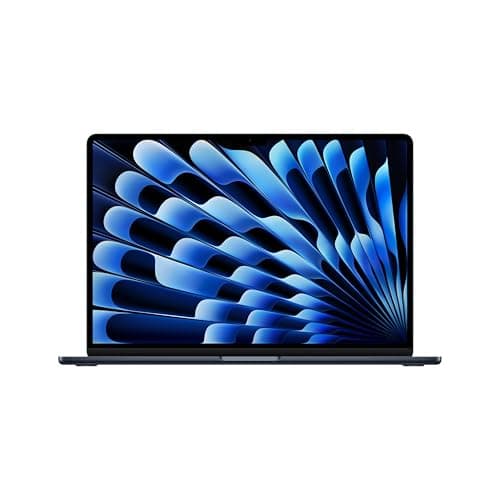
Apple MacBook Neo 13-inch Review: Apple's $699 Surprise Is the Best Budget Laptop of 2026
The MacBook Neo delivers a full macOS experience in a $699 aluminum chassis, proving Apple can build an affordable laptop without sacrificing the fundamentals that matter most.

Nobody expected Apple to release a $699 laptop in 2026. The company had spent the last five years steadily raising MacBook prices, pushing the entry-level MacBook Air to $999 and then $1,099 while quietly eliminating the older, cheaper models. So when Tim Cook walked on stage in January 2026 and announced the MacBook Neo, a 13-inch laptop running the same A18 Pro chip found in the iPhone 16 Pro, the audience did not know whether to cheer or check their calendars. This was not an April Fools joke. It was a real MacBook, with a real aluminum chassis, a real Liquid Retina display, and a price tag that undercuts most Windows ultrabooks and even some Chromebooks. After months of testing, the MacBook Neo has proven to be exactly what the laptop market needed: a genuinely affordable machine that does not feel like a compromise.
Design and Build Quality
The MacBook Neo looks like a MacBook Air that went on a slight diet. It measures 11.97 inches wide and 8.46 inches deep, matching the footprint of the 13-inch Air, but it is slightly thicker at 0.73 inches uniformly rather than the Air's tapered wedge. Weight comes in at 2.82 pounds, just a hair heavier than the Air's 2.7 pounds. In a backpack, you will not notice the difference. On a desk, the Neo feels substantial and well-balanced.
What stands out immediately is the color palette. Apple ditched the sober Silver and Space Gray options for a lineup of bold, playful finishes. Indigo, Citrus, and Sand lead the charge, alongside a more traditional Glacier Silver. Indigo is a deep, saturated blue that shifts to violet under warm light. Citrus is a bright, almost neon yellow-green that demands attention in coffee shops. These colors feel targeted at students and young professionals who want their laptop to express personality rather than blend into conference room tables.
The aluminum chassis is unmistakably Apple. It has the same unibody construction, the same precisely machined edges, and the same satisfying thunk when you close the lid. There is no plastic here, no flex in the keyboard deck, no creaking hinge. The fact that Apple achieved this at a $699 starting price is remarkable. Most laptops under $800 use stamped metal or plastic chassis that feel hollow and fragile. The Neo feels like it costs twice as much.
Display
The 13-inch Liquid Retina display is where Apple made its smartest compromises. Resolution is 2408 by 1506 at 224 pixels per inch, slightly lower than the MacBook Air's 2560 by 1664 but still sharp enough that individual pixels disappear at normal viewing distances. Brightness hits 500 nits, matching the Air and outperforming virtually every laptop under $1,000. Color support includes the full P3 wide color gamut and True Tone automatic white balance adjustment.
The display uses standard IPS technology rather than mini-LED or OLED, which means blacks are good but not infinite, and contrast ratios hover around 1500 to 1 rather than the millions-to-one ratios OLED panels achieve. For everyday productivity, web browsing, video streaming, and document editing, this screen is excellent. For professional photo or video editing, the lack of local dimming and slightly lower resolution may push demanding users toward the MacBook Air or Pro.
Bezels around the screen are slightly thicker than on the MacBook Air, particularly at the top where the 1080p FaceTime HD camera lives. There is no notch here, which some users will appreciate. The webcam itself produces clean, sharp video for calls, though it lacks the Center Stage auto-framing feature found on the Air and Pro models. In low light, noise reduction is aggressive and details get smeared, but it is perfectly adequate for Zoom and Teams meetings.
Performance and the A18 Pro Chip
The A18 Pro is the wildcard in the MacBook Neo equation. This is a mobile chip, designed first for the iPhone 16 Pro, shoehorned into a laptop form factor with active cooling via a small internal heatsink and no fan. The result is a fanless, silent machine that punches well above its weight class for basic and moderately demanding tasks.
The chip features a 6-core CPU with two performance cores and four efficiency cores, plus a 5-core GPU with hardware-accelerated ray tracing. A 16-core Neural Engine handles on-device AI tasks, and memory bandwidth is 60 GB/s. The Neo comes with 8GB of unified memory in all configurations, which is both a blessing and a curse. It is enough for macOS to run smoothly with a dozen Safari tabs, Slack, Spotify, and a document editor open simultaneously. It is not enough for heavy multitasking with large Photoshop files, multiple virtual machines, or 4K video editing projects.
Storage starts at 256GB and tops out at 512GB. There is no 1TB or 2TB option, which firmly positions the Neo as a cloud-dependent machine for users with large media libraries. Read and write speeds on the SSD are respectable but slower than the MacBook Air M5, hovering around 2,800 MB/s read and 2,200 MB/s write in synthetic tests.
In Geekbench 6, the MacBook Neo scores approximately 2,850 in single-core and 7,200 in multi-core. Those single-core numbers are competitive with Intel Core Ultra 7 chips found in $1,200 Windows laptops. Multi-core performance falls behind any MacBook Air or Pro, as expected, but it is more than adequate for student workloads, office productivity, web development, and light creative work.
Gaming performance is surprisingly decent for a fanless $699 machine. Apple Arcade titles run at full resolution and smooth frame rates. Less demanding Steam games like Hades, Celeste, and Stardew Valley play beautifully. AAA titles are largely off the table, though some older or optimized titles like Baldur's Gate 3 and Resident Evil Village can run at reduced settings. The lack of a fan means sustained gaming loads cause thermal throttling after 20 to 30 minutes, but casual gaming sessions are perfectly viable.
Keyboard and Trackpad
The Magic Keyboard on the MacBook Neo is excellent, with one notable omission. It uses the same scissor-switch mechanism as the MacBook Air, offering 1mm of travel and a crisp, precise feel. The layout is full-size with a full function row. However, the keyboard is not backlit. In dim lighting, you will need to rely on muscle memory or an external light source. This is one of the most obvious cost-cutting measures Apple made, and while it is annoying, it is not a dealbreaker for most users.
The trackpad is large, smooth, and responsive, but it lacks the haptic feedback engine found in more expensive MacBooks. Instead of simulating clicks through vibration, the Neo trackpad uses a physical diving board mechanism that clicks more audibly and feels slightly less refined. It is still better than almost any Windows laptop trackpad under $1,000, but MacBook Air and Pro owners will notice the difference immediately.
Touch ID is absent on the base $699 model, which is a frustrating omission. You must type your password to unlock the machine, approve purchases, and authenticate app installations. The $799 step-up model adds Touch ID and doubles storage to 512GB, making it the configuration most buyers should consider.
Ports and Connectivity
Port selection on the MacBook Neo is unconventional, to say the least. The left side houses two USB-C ports. One supports USB 3.0 speeds up to 10 Gbps with DisplayPort output for a single external monitor up to 4K at 60Hz. The other is limited to USB 2.0 at 480 Mbps, suitable only for mice, keyboards, and other low-bandwidth accessories. Both ports support charging.
This split-speed approach is bizarre and potentially confusing. Both ports look identical, but plugging a high-speed external SSD or 4K display into the USB 2.0 port will result in disappointing performance. Apple made this choice to save on the USB controller cost, and while it works, it requires users to pay attention to which port they use. A 3.5mm headphone jack on the right side rounds out the physical connections.
Wireless connectivity uses Wi-Fi 6E and Bluetooth 5.3 rather than the Wi-Fi 7 found in the MacBook Air M5. For most users in 2026, this is perfectly adequate. Wi-Fi 6E routers are common and fast, and the difference between 6E and 7 is negligible for web browsing, streaming, and video calls. Bluetooth 5.3 handles AirPods, mice, and keyboards without issue.
External display support is limited to a single monitor at 4K 60Hz. This will cover most users who want a desktop setup at home or in a dorm room. Power users with ultrawide or high-refresh-rate monitors will need to look at the MacBook Air or Pro, as the Neo cannot drive dual displays or resolutions above 4K.
Battery Life
Apple claims up to 16 hours of wireless web browsing and 20 hours of video playback for the MacBook Neo. Real-world usage lands closer to 13 to 15 hours of mixed productivity work, which is exceptional for a $699 laptop. The efficiency of the A18 Pro chip means the Neo sips power during light tasks, and macOS aggressively manages background processes to extend unplugged time.
A full workday of document editing, web browsing, Slack, and occasional video calls leaves the Neo with 20 to 30 percent battery remaining by evening. Students can take it to class all day without carrying a charger. Writers can work in coffee shops for hours without hunting for the one outlet near the bathroom. The 50 watt-hour battery is smaller than the Air's 53.8 watt-hour cell, but the less demanding chip more than compensates.
Charging is handled through either USB-C port using the included 30W compact adapter. A full charge takes about two hours. Fast charging is not officially supported, though third-party 45W chargers can push the battery to about 40 percent in 30 minutes. MagSafe is absent here, which is a shame because it frees up a data port and prevents cable-trip disasters.
Day-to-Day Real-World Use
The true test of any budget laptop is whether it gets in your way during normal use. The MacBook Neo passes this test with flying colors. Boot time from cold start to desktop is under 12 seconds. Opening Safari, Mail, and Messages simultaneously feels instant. Streaming 4K HDR video from Netflix or YouTube is smooth and stutter-free, with the speakers delivering surprisingly immersive audio for such a small machine.
Students will find the Neo handles everything from note-taking in OneNote to coding in Xcode to running statistical software like R and Python environments. The 13-inch screen is large enough for split-screen multitasking, though power users will want an external monitor for serious research or development work. Writers and bloggers will appreciate the fanless silence during long drafting sessions, and the all-day battery means you can work through an entire flight without reaching for a charger.
For remote workers, the Neo handles video conferencing with ease. Zoom, Microsoft Teams, and Google Meet all run smoothly, and the 1080p webcam is adequate for daily standups and client calls. The microphone array picks up voice clearly from a reasonable distance, though a dedicated USB microphone is still recommended for podcasting or professional recordings. The lack of Center Stage means you need to stay relatively still during calls, but that is a minor inconvenience at this price point.
Casual gaming is where the Neo surprises most people. Apple Arcade titles are designed for this hardware and run flawlessly. Older Steam games and indie titles like Hollow Knight, Hades, and Stardew Valley all play at smooth frame rates with settings turned up. Even some more demanding titles like Civilization VI and The Sims 4 run well. The thermal constraints become apparent during 30-minute-plus sessions of graphically intensive games, but for casual play between study sessions or work breaks, the Neo is perfectly capable. The fact that you can game silently on a $699 machine without fan noise drowning out the built-in speakers is a subtle luxury that Windows gaming laptops rarely offer.
Software and macOS Experience
The MacBook Neo runs the full version of macOS Sequoia, not a stripped-down or tablet-like interface. Every Mac application works, from Microsoft Office and Adobe Creative Cloud to Xcode and Final Cut Pro. This is the Neo's secret weapon against Chromebooks and budget Windows laptops. You are not buying a limited device. You are buying a real computer that happens to cost $699.
Apple Intelligence features are available but slightly constrained by the 8GB memory limit. Writing tools, basic Siri commands, and image generation work fine. More demanding local AI models or large dataset processing will push the machine into swap memory, at which point performance degrades noticeably. For typical AI-assisted productivity, though, the Neo handles everything a student or office worker would need.
The App Store, Homebrew, and direct application installations all function normally. Development environments like VS Code, Docker Desktop, and Python run well for small to medium projects. iOS and iPad apps from the App Store also install and run natively, expanding the software library significantly. This means you can run iPhone apps like Instagram, TikTok, and various mobile games directly on your laptop, which is useful for social media managers and content creators who need to test mobile experiences.
Audio and Webcam
The stereo speaker setup on the MacBook Neo is surprisingly good for the price. Side-firing drivers produce clear mids and highs with just enough bass to give music and movies presence. They support Dolby Atmos spatial audio for headphone playback and sound excellent for calls, podcasts, and casual listening. Maximum volume is loud enough to fill a small room, though distortion creeps in above 80 percent. For personal listening at a desk or bedside table, the speakers are more than adequate. They outperform most sub-$800 Windows laptops, which often use downward-firing drivers that sound muffled and thin.
The 1080p webcam is functional but unremarkable. It captures accurate colors in good lighting and falls apart quickly in dim environments. There is no Center Stage, no Studio Light, and no background blur at the hardware level. Software features in FaceTime and Zoom can add some of these effects, but the raw image quality is a step below the 12MP Center Stage camera on the MacBook Air.
Who Should Buy the MacBook Neo
The MacBook Neo is perfect for three groups of people. First, students at any level who need a reliable, portable laptop for note-taking, research, writing, presentations, and light coding. The $699 price fits most student budgets, and the build quality means it will survive four years of dorm life. Second, casual home users who want a machine for email, web browsing, video streaming, and managing photos. The Neo is faster and more polished than any $700 Windows laptop for these tasks. Third, travelers and remote workers who prioritize battery life and portability over raw performance. The Neo's fanless design, all-day battery, and light weight make it an ideal travel companion. Parents looking for a first computer for their teenagers will also find the Neo an excellent choice, offering parental controls, durability, and a platform that will not become obsolete within two years.
Who should skip it? Creative professionals working with 4K video, large RAW photo libraries, or 3D modeling will find the 8GB RAM and 512GB storage ceiling suffocating. Software developers running multiple virtual machines or containerized environments will hit memory limits quickly. Anyone who needs dual external monitors or high-refresh-rate displays should look at the MacBook Air M5 or MacBook Pro. And if you rely heavily on local AI model training or large dataset analysis, the 8GB unified memory is simply not enough.
Pricing and Configurations
The MacBook Neo starts at $699 with 8GB of unified memory, a 256GB SSD, and no Touch ID. The only worthwhile upgrade is the $799 configuration, which doubles storage to 512GB and adds Touch ID. Given that macOS and a modest photo library will consume 60 to 80GB immediately, the extra storage is valuable. Touch ID is convenient enough that most buyers should factor it in.
There are no RAM upgrades, no GPU options, and no additional storage tiers. This simplicity is refreshing in a market where laptop configurators can feel like buying a car. It also means you need to be honest about your needs before purchasing. If 8GB and 512GB will not suffice within three years, the Neo is not your machine. For reference, a typical macOS installation consumes about 20GB, and with applications, documents, and a modest photo library, most users will find themselves using 100 to 150GB within the first year. Cloud storage through iCloud, Google Drive, or Dropbox becomes essential for media-heavy users.
Verdict
The Apple MacBook Neo is the most surprising and impressive laptop Apple has released in years. Not because it breaks performance records or introduces revolutionary technology, but because it proves that Apple can still build an affordable computer without sacrificing the fundamentals. The aluminum chassis is premium. The display is bright and colorful. The keyboard and trackpad are excellent. Battery life is all-day. And the A18 Pro chip delivers more than enough performance for the vast majority of users.
At $699, the MacBook Neo is not just a good budget laptop. It is the best budget laptop of 2026, full stop. It undercuts comparable Windows machines while offering better build quality, longer battery life, a superior trackpad, and a quieter, fanless design. The compromises Apple made, USB 2.0 port, non-backlit keyboard, lack of Touch ID on the base model, single external display support, are reasonable for the price. The core experience remains unmistakably Mac.
If you have $700 to spend on a laptop and you do not need heavy gaming or professional creative workloads, the MacBook Neo should be at the top of your list. It is the kind of product that makes you wonder why anyone would pay twice as much for a machine that does the same everyday tasks only marginally faster. The Neo proves that budget laptops do not have to feel cheap, and that is a lesson the entire industry needs to learn. Apple has redefined what an entry-level laptop can be, and competitors will be scrambling to catch up for years.
Pros
- Incredible $699 starting price for build quality
- Fanless silent design
- All-day 13-15 hour battery life
- Full macOS software compatibility
- Bright 500-nit P3 display
Cons
- Only 8GB RAM with no upgrade option
- One USB-C port limited to USB 2.0 speeds
- No Touch ID on base model
- Keyboard not backlit
Final Verdict
The MacBook Neo delivers a full macOS experience in a $699 aluminum chassis, proving Apple can build an affordable laptop without sacrificing the fundamentals that matter most.