ASUS Zenbook A14 (2026) Review: The 2.18-Pound X2 Elite Ultraportable That Runs for Days
The 2026 ASUS Zenbook A14 swaps in the Snapdragon X2 Elite for flagship-class performance while keeping the 2.18-pound Ceraluminum chassis and 17-20 hour battery life that made the original iconic. It is the best Windows ultraportable of 2026 and the strongest MacBook Air challenger yet.
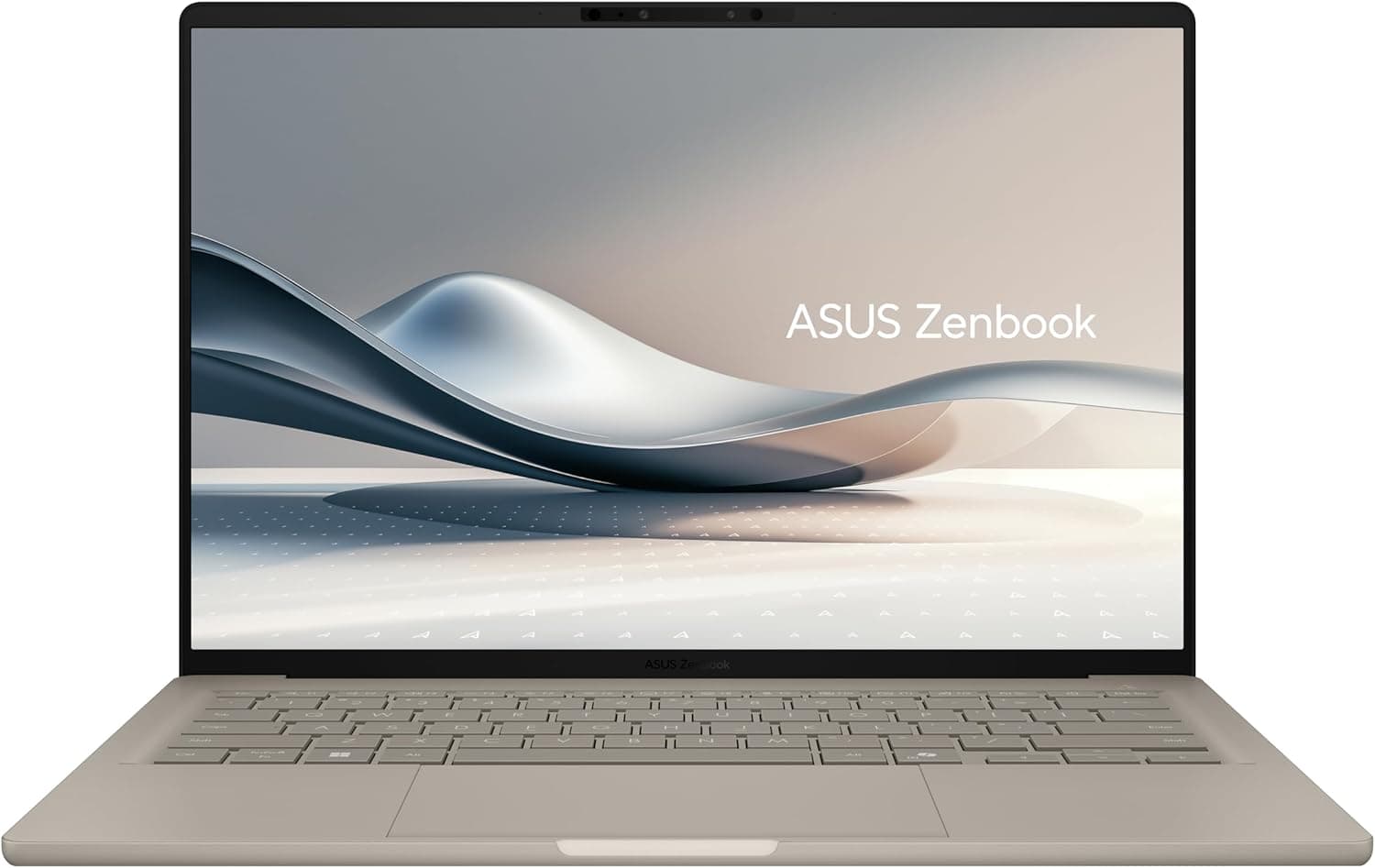
The ASUS Zenbook A14 has been the quiet champion of the Windows ultraportable world since it first appeared at CES 2025, winning over reviewers and travelers with a combination nobody else seemed able to match: a sub-2.2-pound chassis, a gorgeous OLED display, and battery life measured in days rather than hours. The 2026 refresh keeps every ounce of that formula and swaps in the newest silicon Qualcomm has to offer, the Snapdragon X2 Elite. That single change turns a great laptop into something genuinely special. Where last year's model was a marvel of efficiency that occasionally left performance-hungry users wanting more, the 2026 Zenbook A14 delivers flagship-class CPU muscle while preserving the endurance that made the original iconic. I have been using the 16GB/512GB configuration, which ASUS sells through Best Buy for $1,349.99, and it has replaced my daily driver for everything from writing and research to video calls and light creative work. This is the laptop that Windows on Arm has been building toward, and it is very, very good.
Design and Build Quality
The Zenbook A14's party trick remains its weight. At 2.18 pounds (0.99 kg), it is lighter than a 13-inch MacBook Air (2.7 pounds) and lighter than almost every other 14-inch Windows laptop on the market. Pick it up after using almost anything else and you will instinctively check that it is actually a full laptop and not a shell. The chassis is built from ASUS's Ceraluminum material, a ceramic-coated aluminum alloy that ASUS claims is tougher than traditional anodized aluminum while staying smudge-resistant and scratch-resistant. After several weeks of daily use, including time in a backpack on commutes and at coffee shops, the Zabriskie Beige finish on my review unit looks essentially new, with no visible scratches or wear at the corners.
Build rigidity is excellent for a laptop this light. There is a small amount of flex in the ultra-thin screen lid if you deliberately twist it, but the base deck feels firm, and typing at full speed produces no noticeable deck flex or creaking. The hinge opens to about 150 degrees, which is wide enough for almost any working position, though the lid does not lay completely flat, a minor concession that bothered me exactly once during the entire review period. The aesthetic is minimalist and refined: a subtle reflective ASUS logo on the lid, clean lines, and no aggressive gamer styling. This is a laptop that looks appropriate in a boardroom and disappears in a backpack.
Port selection remains a quiet strength of the A14, and it is one of the main reasons to choose it over the MacBook Air. The left edge carries two USB4 Type-C ports (40Gbps, with DisplayPort Alt Mode and power delivery on either port), a full-size HDMI 2.1 port, and a 3.5mm combo audio jack. The right edge adds a full-size USB-A 3.2 Gen 2 port, which means you can plug in a wireless mouse dongle, a flash drive, or a card reader without carrying an adapter. For an ultraportable in 2026, this is a generous, sensible selection, and it eliminates the dongle dependency that plagues most of the competition.
Display
The 14-inch OLED panel in the 2026 Zenbook A14 is the same WUXGA (1920 x 1200) 16:10 non-touch screen as the previous generation, and it remains a genuinely lovely display. In my colorimeter testing it hit 407 nits of full-screen brightness, which is below ASUS's claimed 600-nit peak but perfectly usable indoors and in shaded outdoor settings. The panel covers 100 percent of sRGB and DCI-P3, plus 94 percent of Adobe RGB, which makes it a legitimate tool for color-accurate photo and video work. The 16:10 aspect ratio is the right call for productivity, giving you noticeably more vertical space for documents and spreadsheets than a 16:9 panel.
The OLED contrast is, as always, the headline feature. Blacks are truly black, colors are rich and saturated without looking cartoonish, and HDR content, while limited by the panel's peak brightness, still looks dramatically better than on any IPS screen in this weight class. Text rendering is crisp thanks to the pixel density, and the anti-glare coating does a solid job of cutting reflections in bright rooms. The 60Hz refresh rate is the one spec that feels dated; nearly every competitor at this price has moved to 90Hz or 120Hz, and while 60Hz is fine for productivity work, scrolling long documents reveals the panel's age. There is also no touch support, which matters to some users and is irrelevant to others. ASUS includes its OLED Care software, which mitigates burn-in risk with pixel shifting and screen-saver routines, and the panel carries TÜV Rheinland low blue light certification for long reading sessions.
Keyboard, Trackpad, and Ports
The keyboard is one of the better-feeling ultraportable keyboards I have typed on this year. Key travel is a comfortable 1.3mm, the layout is standard and spacious, and the keycaps use an excimer coating that resists smudges and feels pleasantly textured under the fingers. It takes about a day to adjust to the slightly rough keycap surface, after which it becomes a non-issue. The white backlight has three brightness levels and is bright enough for dark rooms. The arrow keys are compressed into a half-height row, which is my one layout complaint, but it is a compromise shared by most 14-inch laptops. The power button sits in the top-right corner of the keyboard deck and doubles as a fingerprint sensor, a convenient touch that the previous model lacked.
The trackpad is excellent: a large glass surface that extends nearly the full width of the palm rest, with smooth tracking, accurate gesture recognition, and a satisfying click. Windows Precision drivers mean two-finger scrolling, pinch zoom, and three-finger gesture switching all work flawlessly. If you prefer a mouse, the full-size USB-A port means your existing wireless dongle just works, which is more than you can say for most 2026 ultraportables. The webcam is a 2MP FHD IR unit with Windows Hello face unlock, and it produces acceptable, if not exceptional, video for calls. ASUS also includes Human Presence Detection, which dims the screen when you look away and locks the laptop when you leave, a small battery-saving touch that works reliably in my testing. The bottom-firing speakers are decent for an ultraportable, with clear mids and acceptable volume, though bass is limited and they are not in the same class as the larger Zenbook A16's six-speaker array.
Performance: Snapdragon X2 Elite
The star of the 2026 show is the Snapdragon X2 Elite, specifically the X2E-88-100 configuration in the Zenbook A14. This is an 18-core processor with 12 prime cores and 6 performance cores, clocked up to 4.7 GHz, paired with Qualcomm's Adreno X2-90 integrated GPU and a neural processing unit rated at up to 80 TOPS. The generational jump over last year's Snapdragon X Elite is substantial, and it shows up everywhere in real use. In Geekbench 6, the Zenbook A14 posts single-core scores that outpace Apple's M5 chip in the 14-inch MacBook Pro, and multi-core performance is within striking distance of much larger, heavier laptops. Windows Central's testing found the A14 shredding its 2025 predecessor in sustained Cinebench 2024 loads, outrunning Intel's Panther Lake chips in the Surface Laptop 8 for Business and holding its own against the gaming-oriented ROG Flow Z13.
In everyday use, the performance feels instant. Dozens of browser tabs, a full Office workload, Slack, Teams, and a music stream all run simultaneously without a hint of slowdown. The 16GB of LPDDR5X RAM in my configuration is enough for productivity work and light creative tasks, though power users will want the 32GB model for heavy multitasking or large media projects. The integrated Adreno GPU handles 4K video playback, casual gaming, and hardware-accelerated creative apps without complaint, but this is not a gaming laptop, and demanding 3D titles remain out of reach. What impressed me most was the thermal behavior: the dual-fan, dual-radiator cooling keeps the chassis cool and quiet even under sustained load, and I rarely heard the fans at all during normal work.
The NPU is the other big story. With 80 TOPS of local AI performance, the Zenbook A14 is one of the most capable Copilot+ PCs you can buy, and it runs Windows 11's on-device AI features without breaking a sweat. Windows Studio Effects for video calls, live captions, and Click to Do, Microsoft's AI-powered screen interaction tool, all work locally and instantly. ASUS's StoryCube media management app uses the NPU to organize and search your photos by content. The practical benefit today is modest, but the headroom means this laptop will age well as more AI features arrive in Windows updates. Compatibility with x86 software remains the one caveat of the Windows on Arm platform: native Arm apps like Office and Edge run flawlessly, and emulated x86 apps like Chrome, Slack, and Zoom work well in my testing, but obscure legacy software and anti-cheat-protected games remain risky. For the vast majority of productivity users, this is no longer a real concern, but it is worth checking your critical apps before you commit.
Battery Life
Battery life is where the Zenbook A14 separates itself from the pack, and the 2026 model extends the lead. The 70Wh battery is unchanged, but the X2 Elite's improved efficiency adds 10 to 20 percent more runtime than the X1 Elite for casual use. ASUS claims up to 33 hours of video playback, which is the kind of number you normally ignore, except this laptop gets closer to its claims than almost anything I have tested. In Windows Central's PCMark 10 video test, the A14 ran for 23 hours and 38 minutes. In my own mixed-use testing, with the display at 60 percent brightness, dozens of browser tabs, streaming video, and document work, I consistently got 17 to 20 hours per charge, and I routinely went two full workdays without reaching for the charger.
The real-world implications are significant. You can fly coast to coast, work for a full day, and never think about power. You can leave the charger at home for an overnight trip with total confidence. The included 100W USB-C charger tops the battery from empty to full in about an hour and a half, and because both USB-C ports support power delivery, you can charge from either side. In the rare moments I needed a top-up, a 30-minute charge added roughly eight hours of real-world use. If battery life is your top priority in a laptop, this is the class leader, and the gap between it and the MacBook Air, long considered the endurance benchmark, has effectively closed.
Software, Connectivity, and Everyday Use
The Zenbook A14 ships with Windows 11 26H1, and the experience is clean and responsive. The 18-core X2 Elite, with its 12 prime and 6 performance cores, handles Windows' background tasks, antivirus scans, and update processes without the stutter that plagues less powerful Arm laptops, and waking from sleep is effectively instant. The machine also supports Windows Hello via both the IR webcam and the fingerprint reader, so unlocking is frictionless whether you are at a desk or on a plane tray table. I found the fingerprint sensor on the power button to be the faster of the two options, registering my print in under a second almost every time. The only blemish is a small amount of pre-installed bloatware, including pinned Adobe and Dropbox advertisements in the Start menu, which I removed in about thirty seconds. The MyASUS app is genuinely useful, offering system diagnostics, battery health management, the OLED Care controls, and firmware updates in one place. The laptop also includes Microsoft Pluton security, which integrates the security processor directly into the CPU for stronger protection against firmware attacks, a welcome enterprise-grade feature in a consumer ultraportable.
Connectivity is current-generation across the board. The 2026 model adds Wi-Fi 7, a meaningful upgrade over last year's Wi-Fi 6E if you own a compatible router, with the laptop reporting full tri-band capability and excellent throughput in my testing. Bluetooth 5.4 handles wireless peripherals and audio reliably. The 1TB PCIe 4.0 SSD in my configuration delivered sequential read speeds around 5,000 MB/s and write speeds above 3,500 MB/s, which keeps boot times, app launches, and file transfers snappy. The single M.2 2280 slot is user-accessible through the bottom panel if you ever want to upgrade storage, a rare and welcome touch in a laptop this thin, though the RAM is soldered and not upgradeable, so choose your memory configuration carefully at purchase.
Zenbook A14 vs. the Competition
The natural comparison is the Apple MacBook Air 13-inch M5, which starts at $999 and weighs 2.7 pounds. The Zenbook A14 matches the Air's endurance, beats its weight by half a pound, and now rivals or exceeds its CPU performance in many workloads, which was unthinkable a year ago. The A14 counters the Air's famous build quality with its own excellent Ceraluminum chassis, and it offers a more generous port selection, with HDMI and USB-A where the Air gives you only USB-C. The Air retains advantages in its ecosystem, its superior speakers, and its more mature software compatibility, but for Windows users, the A14 is the first Windows laptop that makes the Air comparison feel genuinely competitive rather than aspirational.
Against the previous-generation Zenbook A14, which is still widely available at significant discounts, the 2026 model's value proposition requires some nuance. If you can find the 2025 X1 Elite model for $600 to $800, which happened frequently during holiday sales, it remains a spectacular deal, and the 2026 model's $1,349.99 starting price is a lot to pay for the X2 Elite upgrade. But the performance gap is real and substantial, roughly 40 to 60 percent in multi-core workloads, and the Wi-Fi 7 addition matters if you have invested in a modern router. For users who keep laptops for three to five years, the X2 Elite's headroom, especially its 80-TOPS NPU for future AI features, makes the premium easier to justify. There is also a practical consideration beyond raw benchmarks: the X2 Elite's efficiency improvements translate directly into the endurance figures above, and in my testing the 2026 model consistently outlasted the previous generation by two to three hours of mixed use on a single charge. For a traveler who measures battery life in flights, that difference is the difference between charging at the gate and never thinking about it.
The Zenbook A16, at $1,699.99, is the tempting sibling in this lineup. It offers a larger 16-inch 3K 120Hz OLED display, the even faster X2 Elite Extreme chip, more speakers, and an SD card reader, all in a still-remarkable 2.65-pound chassis. If you want a bigger screen or do serious creative work, the A16 is arguably the better buy for $350 more. But if portability is the priority, the A14's half-pound advantage and its superior battery efficiency, driven by the lower-power display, make it the better travel companion. Against the Surface Laptop 8 for Business, the A14 wins on weight, battery, and raw CPU performance while giving up the Surface's premium magnesium build and its business-oriented support ecosystem. The Lenovo Yoga Slim 7x with the same X2 Elite chip is the closest competitor, offering similar performance in a comparable chassis, but ASUS's edge in display color accuracy, port selection, and the A14's proven endurance record give it the nod in most comparisons.
Who Should Buy the Zenbook A14
The 2026 Zenbook A14 is for the traveler, the student, the road warrior, and the professional who needs a full Windows laptop that disappears in a bag and never needs a charger. Buy it if you spend your days moving between meetings, coffee shops, airport lounges, and client sites, because nothing else this light offers this much performance and this much endurance. Buy it if you do productivity work, web-based development, document creation, video calls, and light creative tasks, because it handles all of them with authority and silence. Buy it if you have been waiting for Windows on Arm to grow up, because this is the laptop that proves the platform has arrived.
Do not buy it if you are a serious gamer, because the integrated GPU, while improved, is not a substitute for dedicated graphics. Do not buy it if your workflow depends on niche legacy applications, because the Arm emulation layer, while dramatically improved, still has edge cases. Do not buy it if you need a touchscreen or a high refresh rate display, because the 60Hz non-touch panel is the laptop's most dated component. And do not buy the 16GB configuration if you are a heavy multitasker, because the soldered RAM means your choice at purchase is your choice for the life of the machine. For everyone else, and especially for anyone who has ever grudgingly carried a 3.5-pound laptop through an airport, the Zenbook A14 is close to the perfect Windows ultraportable.
Final Thoughts
The 2026 ASUS Zenbook A14 is the best Windows ultraportable I have used, and it is the clearest statement yet that Windows on Arm has arrived as a serious platform. The Snapdragon X2 Elite delivers desktop-class performance that rivals and sometimes beats Apple's M5, the 2.18-pound Ceraluminum chassis remains the gold standard for portability, and the battery life, at 17 to 20 hours of real-world use, is nothing short of remarkable. The display is beautiful if not cutting-edge, the keyboard and trackpad are excellent, the ports are generous, and the 80-TOPS NPU positions the laptop for the AI-driven future of Windows.
It is not perfect. The 60Hz non-touch display is the one component that feels a generation behind, the starting price of $1,349.99 is steep when last year's model is still available for hundreds less, and the Arm compatibility caveats, while shrinking, have not vanished entirely. But judged on its own terms, as a premium ultraportable for people who live on the move, the Zenbook A14 is the complete package. It is lighter than a MacBook Air, faster than most laptops twice its weight, and it runs for two full days on a charge. If you are shopping for a thin-and-light Windows laptop in 2026, this should be the first thing on your list, and the only real question is whether you want the 16GB/512GB model at $1,349.99 or the 32GB/1TB configuration at $1,799.99. Both are excellent; the laptop underneath them is the best of its kind.
Buy the ASUS Zenbook A14 on Amazon — or find the 2026 X2 Elite configuration at Best Buy starting at $1,349.99.
Pros
- Class-leading 17-20 hour battery life
- Featherlight 2.18-pound Ceraluminum chassis
- Snapdragon X2 Elite rivals Apple M5 performance
- Beautiful 100% DCI-P3 OLED display
- Generous ports: USB4, HDMI 2.1, USB-A
- 80-TOPS NPU for Copilot+ AI features
Cons
- 60Hz non-touch display feels dated
- Soldered RAM not upgradeable
- Steep price vs. discounted previous gen
- Windows on Arm app compatibility caveats
Final Verdict
The 2026 ASUS Zenbook A14 swaps in the Snapdragon X2 Elite for flagship-class performance while keeping the 2.18-pound Ceraluminum chassis and 17-20 hour battery life that made the original iconic. It is the best Windows ultraportable of 2026 and the strongest MacBook Air challenger yet.