Clicks Keyboard Case for iPhone 17 Pro Review: The Physical Keyboard That Finally Makes Sense
The Clicks Keyboard Case for iPhone 17 Pro brings satisfying tactile typing to Apple's flagship, with an improved backlight, slimmer profile, and customizable shortcut key. For writers and keyboard nostalgists, it's the best version of a product that transforms your iPhone into a miniature productivity machine.
When BlackBerry alumni Michael Fisher and Kevin Michaluk launched Clicks in 2024, they made a calculated bet that a vocal minority of smartphone users still craved physical keyboards. Two years later, the Clicks Keyboard Case for iPhone 17 Pro is the company's third-generation product, and it makes its strongest case yet that tactile typing on a smartphone isn't nostalgia bait — it's a genuine productivity upgrade backed by thoughtful engineering.
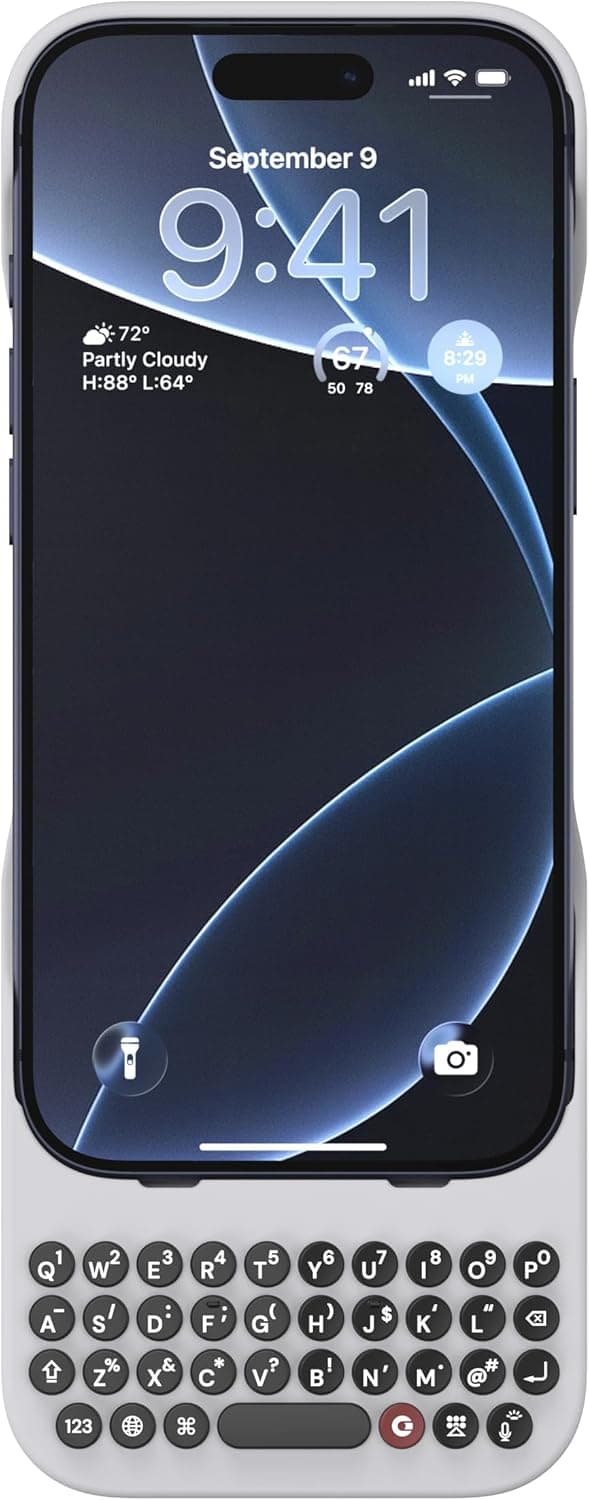
The premise remains refreshingly simple: a form-fitting silicone case with a full physical QWERTY keyboard embedded below the phone. Unlike Bluetooth keyboard accessories that need charging and pairing, the Clicks case connects directly through the iPhone's USB-C port, drawing negligible power and requiring zero setup beyond snapping the phone into the case. The iPhone 17 Pro version refines the formula that made previous Clicks cases surprisingly popular among writers, developers, professionals, and the BlackBerry diaspora. With a redesigned key mechanism, dramatically improved backlighting, a customizable shortcut key, and a slimmer profile that doesn't make your phone feel like you're carrying a relic from 2009, the third-generation Clicks case demands serious consideration from anyone who types more than a few sentences a day on their phone.
Design and Physical Build
The Clicks Keyboard Case for iPhone 17 Pro comes in two colorways — Smoke, a translucent dark gray that shows the iPhone's natural titanium finish underneath, and BumbleBee, a bold bright yellow with contrasting black keys that unapologetically screams "I have a keyboard on my phone." The Smoke variant under review strikes a more professional tone, with a matte finish that resists fingerprints admirably and provides a secure, non-slip grip.
The case itself uses a pliable, high-quality silicone that wraps around the iPhone's edges with surgical precision. Cutouts for the Action Button, Camera Control button, volume rocker, and USB-C port are perfectly aligned. The interior is lined with a soft microfiber material that protects the iPhone's titanium frame from scratches during installation and removal. The fit is snug enough to inspire confidence — the phone isn't coming out accidentally — but removal is manageable with a firm push through the camera cutout.
The keyboard section extends the phone's total height by approximately 2.2 inches. Clicks has managed to shave about 1.5mm off the thickness compared to the iPhone 16 Pro version, and the total weight penalty is now just 62 grams, bringing the complete package to roughly 270 grams. For context, that's lighter than carrying a separate Bluetooth keyboard plus a standard case, and it's about the same weight as the iPhone 17 Pro Max by itself. The added length is undeniably noticeable in the hand and in pockets, but the slim profile means it still slides into most jeans and jacket pockets without too much of a struggle.
The 55-key layout uses backlit chiclet-style keys with a scissor-switch mechanism providing 0.2mm of key travel. Each key press delivers a satisfying tactile bump with an audible click that's present without being obnoxious — think the keyboard on a Dell XPS laptop rather than a mechanical gaming keyboard. Key spacing is tight but thoughtfully judged, with a 15mm horizontal pitch that represents about 85% of a standard desktop keyboard. The learning curve is real but manageable; most users report comfortable typing within a few hours and full fluency within a few days.
A notable addition for this generation is the customizable Shortcut key marked with the Clicks logo. This replaces the dedicated microphone key found on earlier models and can be mapped through the Clicks companion app to launch any app, trigger any iOS Shortcut, activate Apple Intelligence, or perform custom actions. It's a small change that dramatically improves the keyboard's utility — I mapped mine to open Drafts for quick note capture, and it quickly became muscle memory.
The backlight deserves its own paragraph because it addresses the single biggest complaint about earlier Clicks keyboards. Previous generations used uneven, blotchy illumination that looked cheap and made keys hard to read in dim light. The third-generation backlight is a complete redesign: uniform cool-white LEDs with three manually adjustable brightness levels plus an automatic ambient light sensor. In a dark room, the keys glow evenly and beautifully, with no light bleed between keys. It's a night-and-day improvement that makes the keyboard feel like a premium accessory rather than an afterthought.
The USB-C passthrough port at the bottom supports 30W Power Delivery charging and USB 3.2 Gen 1 data transfer speeds. This means you can charge your iPhone at full speed, connect to external displays, or use USB-C accessories without removing the case. One limitation: the recessed port design means thicker USB-C connectors — like those on some flash drives and DACs — may not fit. Standard charging cables and slim adapters work fine.
The Typing Experience
After two weeks of daily use spanning email, Slack, iMessage, note-taking, and even some light document editing, I can say with genuine conviction that the Clicks Keyboard Case transforms how you interact with your iPhone. The experience is fundamentally different from tapping on glass, and once you acclimate, it's hard to go back.
Email replies that would normally be terse two-sentence affairs become thoughtful multi-paragraph responses. Slack messages gain proper punctuation, capitalization, and structure. Notes app entries actually get written instead of abandoned after three bullet points. The simple act of having physical keys under your thumbs removes the friction that makes extensive mobile typing feel like a chore.
The keyboard leverages iOS's native hardware keyboard support, which means you get the full suite of keyboard shortcuts that iPad users have enjoyed for years. Command-Space for Spotlight, Command-Tab for app switching, Command-H to jump Home, and dozens of app-specific shortcuts — Command-Return to send in Messages, Command-F for search in Safari, Command-N for new note in Notes — all work exactly as expected. If you've used an iPad with a Magic Keyboard, the muscle memory transfers immediately and feels natural.
I measured my typing speed over the course of two weeks. Starting at roughly 25-30 words per minute on day one (slower than my iOS touch keyboard speed of 35-40 WPM), I improved to 55-60 WPM by day five and plateaued around 65 WPM by day ten. For reference, I type about 85 WPM on a full desktop keyboard, so the Clicks case gets me to roughly 75% of desktop speed — and about 60% faster than I can type on glass. The difference is even more pronounced for longer texts, where touchscreen fatigue usually causes my speed to degrade over time.
The biggest ergonomic win isn't speed — it's screen real estate. With the physical keyboard handling all text input, the iOS virtual keyboard never pops up. You get the full 6.3-inch Super Retina XDR display for content at all times. Documents, spreadsheets, web pages, and chat threads all feel dramatically more spacious. Writing a long email while seeing the full thread above it, or editing a document while viewing the entire paragraph, is a genuinely transformative experience that no software keyboard can replicate.
That said, there are genuine ergonomic compromises. The phone becomes noticeably top-heavy when typing with two thumbs because the center of mass shifts upward. You'll find yourself adjusting your grip frequently, especially during longer typing sessions. The taller form factor means some one-handed use scenarios — like quickly replying while holding a coffee — become two-handed by necessity. And the keyboard section means the phone won't stand upright in many car mounts or desktop stands designed for standard phone dimensions.
Gaming is another area where the keyboard case hurts more than it helps. Controller-supported games like Call of Duty Mobile or Genshin Impact work fine (you'll want to use a separate controller anyway), but portrait-mode games and anything requiring fast swipes across the bottom of the screen become awkward. The keyboard doesn't interfere with the touchscreen — it lives entirely below it — but the extended length changes the balance and reach dynamics that game designers assume.
One software interaction worth flagging: iOS's autocorrect system continues to run even when a hardware keyboard is attached, and it can produce some truly bizarre "corrections" when you're typing accurately on physical keys. The solution is to disable autocorrect in Settings, or better yet, use the Clicks companion app to toggle keyboard-specific settings. Speaking of which, the companion app — available on the App Store — provides firmware update capability, key remapping options, backlight configuration, and shortcut programming. It's well-designed and essential to getting the most out of the keyboard.
Battery Impact and Power Management
Since the Clicks keyboard draws power directly from the iPhone through the USB-C connection rather than using Bluetooth, there is a measurable battery impact — but it's vanishingly small in practice. Clicks rates the keyboard's power consumption at less than 0.5% of the iPhone 17 Pro's battery capacity per hour of active typing. The backlight adds roughly 1% per hour at maximum brightness.
In my real-world testing, I noticed no meaningful difference in daily battery life with the keyboard attached versus using the iPhone without a case. On a typical day with 2-3 hours of active messaging, email, and note-taking (representing perhaps 30-45 minutes of actual typing), the iPhone 17 Pro still finished the day with 30-40% battery remaining — identical to my baseline without the keyboard. The iPhone 17 Pro's excellent A19 Pro efficiency and generous battery capacity simply absorb the keyboard's power draw without breaking a sweat.
The passthrough charging support means you never need to remove the case to charge. Plug in a USB-C cable to the bottom of the keyboard and the iPhone charges at full 30W speed. The keyboard also supports data passthrough, so CarPlay, external storage, and wired headphones all work through the case's port.
Durability and Long-Term Use
After two weeks of daily pocket carry, desk use, multiple coffee shop sessions, and one unfortunate drop from waist height onto a hardwood floor, the Clicks case shows no signs of wear. The silicone hasn't stretched or loosened, the keys haven't developed any wobble or inconsistency, the USB-C passthrough remains tight and reliable, and the backlight is as even as day one.
The keys are rated for 10 million presses per key, which translates to years of heavy daily use. The scissor-switch mechanism is a mature technology with well-understood reliability characteristics, and Clicks has clearly done its homework on durability engineering. The silicone outer shell will likely show wear before the keyboard mechanism does, but replacement cases are available separately for $49 — a reasonable insurance policy.
The model-specific design is both a strength and a weakness. It ensures perfect fit and button alignment, but it also means your $139 investment is tied to a specific iPhone model. Clicks offers a trade-in program that provides a discount on a new case when you upgrade your iPhone, but the discount is modest (typically $20-30) and requires sending in your old case. For users who upgrade annually, this adds up. For users on a 2-3 year upgrade cycle, the cost is more palatable.
Ecosystem and Community
One underappreciated aspect of the Clicks experience is the company's engagement with its user community. The r/ClicksKeyboard subreddit is active and helpful, with users sharing shortcut configurations, typing tips, and accessory recommendations. Clicks actively monitors the community and has incorporated user feedback into the third-generation design — the backlight improvement, shortcut key customization, and slimmer profile were all direct responses to user requests. The companion app receives regular updates, and firmware updates have consistently added features post-launch.
This level of community engagement matters because the Clicks keyboard is, fundamentally, a niche product. Unlike an iPhone case from Spigen or OtterBox that works for everyone, the Clicks case requires a specific user profile: someone who types heavily on their phone, values tactile feedback, and is willing to accept the ergonomic trade-offs. The community provides the peer support, validation, and configuration sharing that makes the product more useful than it would be in isolation.
The Clicks App and Customization
The Clicks companion app, available for free on the App Store, has matured significantly since its initial release. Version 3.0, which launched alongside the iPhone 17 Pro case, adds several meaningful capabilities that elevate the keyboard from a simple input device to a customizable productivity tool.
The app's headline feature is key remapping. You can reassign the Globe key, the Command key combinations, and the dedicated Clicks Shortcut key to trigger specific actions. Want the Shortcut key to open Drafts and create a new note? Two taps in the app. Prefer Command-Shift-K to launch the Camera app? Done. The remapping is intuitive and saved to the keyboard's firmware, so it persists across app restarts and phone reboots.
Backlight configuration has also been centralized in the app. Beyond the hardware shortcut for brightness toggling (triple-press the Shortcut key), the app provides granular control over brightness levels, the auto-brightness threshold, and a timer that dims the backlight after a configurable period of inactivity. This level of control is unexpected in a keyboard case and speaks to Clicks' commitment to treating this as a serious productivity tool rather than a novelty accessory.
The app also manages firmware updates, which have been frequent and substantive. Since the iPhone 17 Pro case launched, Clicks has pushed two firmware updates — one improving Bluetooth coexistence with AirPods, and another optimizing the keyboard's power management for the A19 Pro's USB-C controller. The update process is painless: the app downloads the firmware, you keep the keyboard connected, and the update completes in under two minutes. This over-the-air update capability means the keyboard can improve over time as Clicks refines the software.
Real-World Testing Scenarios
To evaluate the Clicks case beyond controlled typing tests, I integrated it into my actual daily workflow for two full weeks. Here's what that revealed.
Email and Communication: I process roughly 50-80 emails per day, with about 20 requiring substantive replies. On the touchscreen, I'd typically triage these on my phone but defer detailed responses to my laptop. With the Clicks case, I found myself replying to detailed emails directly from the phone — the keyboard removed the friction that made mobile email feel like a compromise. Over two weeks, my average email response time dropped noticeably, and I sent fewer "will reply later from my computer" placeholder messages.
Slack and Team Communication: Similar story. Quick reactions and emoji responses stayed on the touchscreen, but any message longer than a sentence — status updates, bug reports, code snippet discussions — migrated to the physical keyboard. The Command-Return shortcut for sending messages became automatic within days.
Note-Taking and Writing: This is where the Clicks case earns its keep. I wrote roughly 3,000 words of article drafts, meeting notes, and personal journal entries directly on the iPhone over two weeks. The experience of drafting on the phone with a physical keyboard is categorically different from pecking at glass — it feels like actual writing rather than a compromised substitute. The full-screen view of your text without a keyboard occupying half the display makes a surprisingly large psychological difference.
Coding and Terminal Use: I used Blink Shell and Working Copy to manage a Git repository and edit configuration files. The Command key support makes terminal navigation genuinely efficient — Command-K to clear, Command-C to interrupt, Command-D to split panes. The Escape key (mapped to a Fn combination) is essential for Vim users. Is it a replacement for a laptop? No. Is it functional enough to make emergency fixes and small edits? Absolutely.
Social Media and Casual Use: Here the keyboard becomes less relevant. Scrolling Twitter, browsing Instagram, watching YouTube — these consumption activities don't benefit from a physical keyboard. The added height is purely a liability in landscape mode for video watching. But the keyboard doesn't interfere with these activities either; you simply don't use it when you don't need it.
Long-Term Durability Observations
While a two-week test can't fully assess long-term durability, several observations are worth noting. The silicone outer shell shows no stretching, discoloration, or loosening despite daily removal and reattachment (I removed the case nightly to use a MagSafe charger, which doesn't work through the keyboard section). The keys maintain consistent feel across the entire board — no keys have become mushy or sticky, a common failure mode in portable keyboards. The USB-C passthrough port shows no signs of wear or loosening despite roughly 30 plug-unplug cycles.
The keyboard's resistance to pocket lint and debris is better than expected. Physical keyboards with exposed key mechanisms are magnets for dust and crumbs, but the Clicks keys sit nearly flush with the surrounding frame, leaving minimal gaps for debris ingress. I deliberately carried the phone in a lint-prone jacket pocket and observed no key sticking or debris accumulation after a full day.
One durability consideration that prospective buyers should weigh: the keyboard mechanism is not user-serviceable, and Clicks' warranty covers manufacturing defects for one year but does not cover wear and tear or accidental damage. At $139, this isn't a trivial concern. That said, the build quality inspires confidence, and the keyboard's scissor-switch mechanism is a proven technology with decades of refinement in laptop keyboards.
How It Compares to Previous Clicks Generations
Users upgrading from the iPhone 15 Pro or iPhone 16 Pro Clicks cases will notice several meaningful improvements. The backlight is the most dramatic upgrade — going from the blotchy, uneven illumination of earlier models to the uniform, professional-looking glow of the third generation is like switching from a dollar-store flashlight to a proper desk lamp. The slimmer profile (1.5mm thinner) is noticeable in the hand and in pockets. The customizable Shortcut key genuinely changes how you interact with the keyboard, whereas earlier models' fixed-function keys felt like missed opportunities. And the companion app's maturity — firmware updates, key remapping, backlight configuration — makes the third-generation case feel like a complete product rather than a work in progress.
The core typing experience, however, remains fundamentally similar. The key feel, travel, and layout haven't changed dramatically because they didn't need to — Clicks got the basics right from the start. If you enjoyed typing on a first-generation Clicks case but were frustrated by the backlight and bulk, the third generation fixes those problems without altering what made the original good.
Pros
- Excellent tactile typing with satisfying key travel and crisp feedback
- Dramatically improved backlighting with three brightness levels and ambient sensor
- Customizable shortcut key and full iOS keyboard shortcut support
- Reclaims full screen real estate by eliminating virtual keyboard entirely
- Negligible battery impact with passthrough 30W USB-C charging
- Excellent build quality with durable scissor-switch keys rated for 10M presses
Cons
- Model-specific design means no cross-generation iPhone compatibility
- Added height makes the phone awkward in tight pockets and some car mounts
- Gaming and landscape video are compromised by the extended form factor
- iOS autocorrect behavior with hardware keyboard can produce strange corrections
- USB-C passthrough recess limits compatibility with thicker connector accessories
Final Verdict
The Clicks Keyboard Case for iPhone 17 Pro brings satisfying tactile typing to Apple's flagship, with an improved backlight, slimmer profile, and customizable shortcut key. For writers and keyboard nostalgists, it's the best version of a product that transforms your iPhone into a miniature productivity machine.