EPOMAKER TH99 PRO Review: The 96% Keyboard That Earns Its Name
The EPOMAKER TH99 PRO is the best mechanical keyboard under $100, combining a premium gasket-mounted typing feel, LCD screen, metal knob, 10,000mAh battery, and hot-swappable switches in an attractive 96% layout.
Mechanical keyboards exist in a strange middle ground these days. The enthusiast market has fragmented into a thousand niche sub-communities, each convinced their switch type and mount style represents the pinnacle of typing enlightenment. Meanwhile, mainstream users are finally waking up to the fact that a good mechanical keyboard is one of the simplest upgrades you can make to your daily workflow. The EPOMAKER TH99 PRO — at $80.99 on Amazon — sits at exactly this intersection. It's a keyboard designed to appeal to both crowds simultaneously, and the fact that it mostly succeeds at both is genuinely impressive.
I've been typing on the TH99 PRO daily for the past few weeks, and I'm ready to talk about what makes it work — and where it falls short.
What Is the TH99 PRO, Exactly?
Before diving into the experience, let's establish what you're actually getting. The EPOMAKER TH99 PRO is a 96% layout wireless mechanical keyboard — meaning it crams 98 keys into a footprint that's only slightly larger than a traditional 75% board. The "96%" refers to the layout's inclusion of a compact numpad while maintaining arrow and navigation keys. If you're familiar with the concept, it fills the gap between the compact 75% boards that omit the numpad entirely and the full-size 100% boards that take up the better part of a desk.
The TH99 PRO's headline features include a built-in LCD screen, a metal volume knob, hot-swappable switches, a gasket-mounted build, tri-mode connectivity (2.4GHz wireless, Bluetooth 5.0, and USB-C wired), a 10,000mAh battery, per-key RGB lighting, and PBT keycaps. That's an extraordinary specification sheet for a keyboard priced under $100.
Unboxing: The Experience Starts Before You Type
The TH99 PRO arrives in EPOMAKER's standard branded packaging — nothing luxurious, but well-presented. Inside the box, you'll find the keyboard itself, a USB-A to USB-C cable, a 2.4GHz wireless receiver (magnetically stowed under the left kickstand — a clever design choice), a combination keycap and switch puller, a small packet of extra switches (Creamy Jade, in this case), and a multilingual quick-start guide.
The quick-start guide is functional but minimal. EPOMAKER directs users to its website for the full manual and the custom driver software.
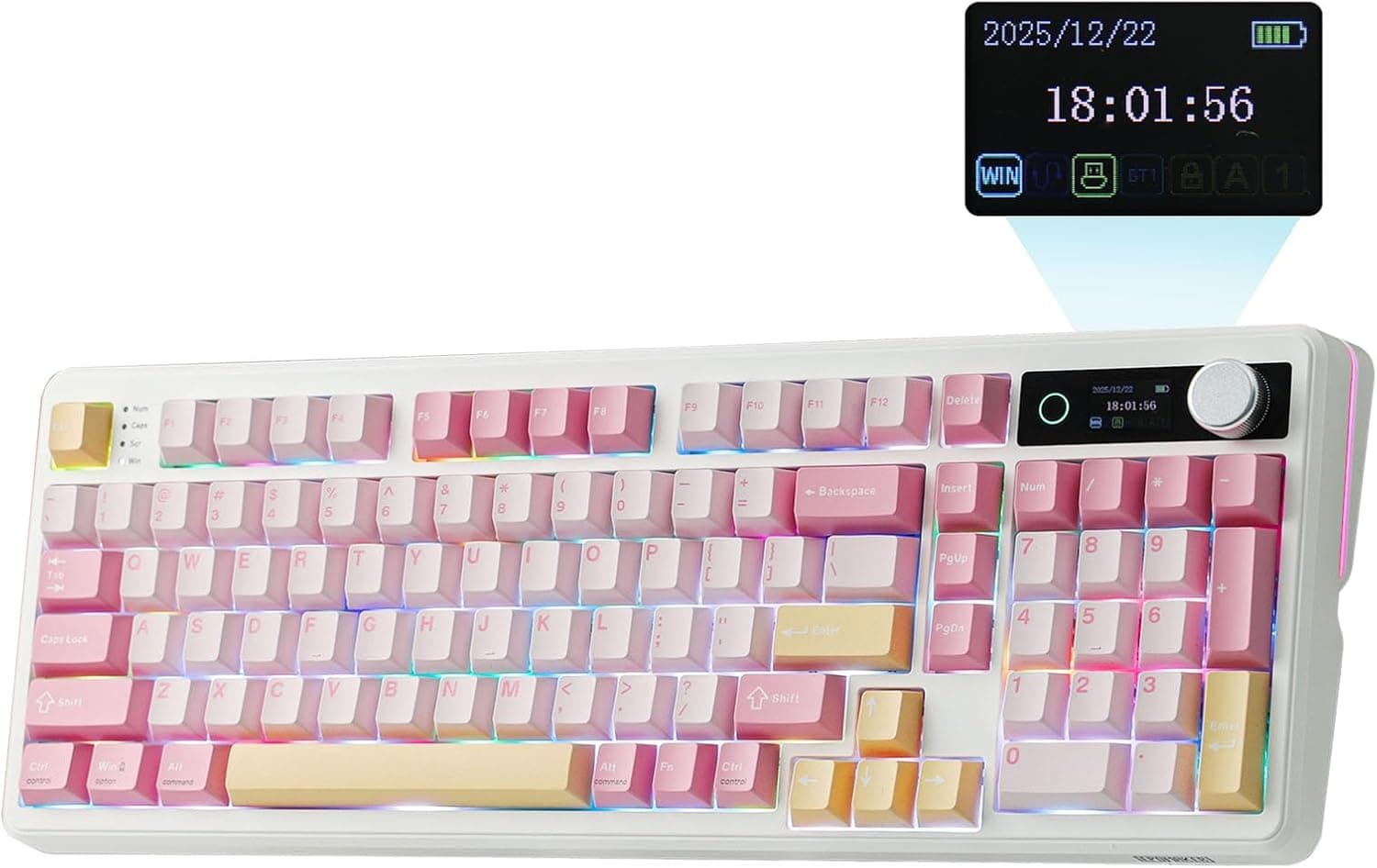
First impressions of the keyboard are positive. The TH99 PRO has real heft to it — 1.1kg (about 2.4 pounds) — which means it stays planted on your desk during intense typing or gaming sessions. The build quality feels solid, with no creaking or flex in the chassis. The Pink colorway with Creamy Jade switches is the review unit, and the contrast between the pink body and the white-cream keycaps is genuinely attractive. This is a keyboard that looks good on a desk, and it doesn't apologize for wanting to be seen.
Design and Build: Where Premium Meets Practical
The TH99 PRO's chassis is constructed from ABS plastic with a matte finish that resists fingerprints and smudges well. The top of the case features the integrated LCD screen in the upper left and the metal volume knob in the upper right. Both are functional design elements that elevate the keyboard from "nice peripheral" to "desk centerpiece."
The keycaps are PBT (polybutylene terephthalate) plastic, which is widely considered superior to ABS for keycap longevity. PBT resists the "shine" that develops on frequently-used keys over time, and the texture feels more matte and premium. The Cherry-profile keycaps have a sculpted design that follows the natural curve of your fingertips, and the legends are dye-sublimated, meaning they won't fade with use.
The stabilizers come pre-lubed from the factory. DIY stabilizer lubing is one of the most tedious aspects of mechanical keyboard ownership, and having it done right from the factory saves time and potential frustration.
The bottom of the keyboard features two-stage adjustable kickstands, allowing you to set the typing angle at 6, 8, or 10.5 degrees. The rubber feet on the bottom provide solid grip on a desk surface, even during aggressive typing.
Overall, the build quality punches well above the TH99 PRO's price point. This is a keyboard that feels like it costs more than it does.
The LCD Screen and Metal Knob: More Than Gimmicks
The 1.14-inch LCD screen above the arrow keys is the TH99 PRO's most distinctive feature. By default, it displays the current time and battery percentage, which is genuinely useful information to have at a glance. Tap the knob to cycle through different screens: a basic info display, an RGB control panel, and a GIF display mode.
The GIF mode is where things get fun. Using EPOMAKER's web-based software, you can upload short looping GIFs that play on the keyboard's screen. The obvious use cases are logos, anime characters, or simple animations that reflect your personality. The screen is small (128x64 pixels), so complex GIFs don't translate well, but simple, bold visuals work surprisingly well.
The metal volume knob is equally well-executed. Rotating it adjusts system volume with smooth, tactile increments. Pressing it mutes or unmutes audio. In the software, you can reassign the knob to control screen brightness, scroll speed, or even zoom levels. In the RGB control screen, the knob adjusts backlight brightness. It's a genuinely versatile input device that I found myself using constantly once I got used to its presence.
Both features work without any software installation — they're built into the keyboard's firmware. The software simply adds customization options.
Switches: The Creamy Jade Experience
The review unit came equipped with EPOMAKER's proprietary Creamy Jade switches, which are linear switches with a 45gf actuation force and 2.0mm total travel. "Linear" means there's no tactile bump or audible click when the switchactuates — it's a smooth, consistent press from top to bottom. These are generally considered the best switch type for gaming, and they're also popular for typing because they feel fast and require minimal force.
The Creamy Jade switches are pre-lubed from the factory, which reduces the scratchiness that can affect budget linear switches. The difference is noticeable — even before any additional break-in, the switches feel smooth and consistent across the board.
The alternative switch option is the Sea Salt Silent V2, which uses the same linear mechanism but with dampeners to reduce sound. If you share a workspace or office, the Silent switches are worth considering. The typing feel is nearly identical, but the acoustics are significantly quieter.
The keyboard supports both 5-pin and 3-pin switches, making it compatible with the vast majority of switches on the market. The hot-swap PCB means you can pull any switch out with the included puller and swap in a replacement without soldering.
Typing Feel: The Gasket Difference
The TH99 PRO uses a gasket-mounted construction, which means the switch plate is isolated from the case by silicone gaskets rather than being screw-mounted directly. This design absorbs vibrations and creates a softer, more cushioned typing feel — often described as "thocky" in mechanical keyboard circles.
In practice, typing on the TH99 PRO is a genuinely pleasant experience. The switches bottom out against a surface that absorbs harsh impacts, so there's no harsh bottoming-out sound or feel. The sound profile is deep and satisfying without being loud — quieter than a clicky board, but with more character than a standard membrane keyboard.
The layered sound-dampening system inside the case (PORON foam, IXPE switch pads, silicone dampeners) does its job well. There's no hollowness or reverb in the sound profile, which is a common issue with keyboards that have empty space inside the case.
Over weeks of heavy use, my typing speed and accuracy held steady. The keycaps are comfortable, the layout is intuitive, and the overall experience is fatigue-free even during marathon typing sessions.
The 96% Layout: The Right Compromise
The 96% layout is the TH99 PRO's most defining characteristic. At 40.9cm x 14.5cm, it's significantly more compact than a full-size keyboard while retaining nearly every key function. The only omission versus a 100% layout is the function row, which is compressed and merged with the number row.
The numpad is present and functional — essential for anyone who enters a lot of numbers, from accountants to programmers to spreadsheet warriors. The arrow keys and navigation cluster are preserved in a compact arrangement that doesn't require any learning curve.
For gaming, the layout is largely neutral. The compact form factor provides more room for mouse movement, which is the primary ergonomic benefit.
For Mac users, the TH99 PRO has a dedicated layout mode that swaps the Windows and Alt key positions to match Mac keyboards.
Connectivity: Three Modes, Zero Compromise
The TH99 PRO supports three connection modes:
2.4GHz Wireless: The included USB receiver provides a low-latency wireless connection ideal for gaming. EPOMAKER rates the polling rate at 1000Hz (1ms report rate), which is competitive with wired connections. In practice, the 2.4GHz mode felt indistinguishable from wired in terms of responsiveness.
Bluetooth 5.0: For a cleaner desk setup or when connecting to multiple devices, Bluetooth is available. The keyboard can pair with up to five devices and switch between them using Fn + Q/W/E/R.
USB-C Wired: For the lowest possible latency or when the battery is depleted, the USB-C port provides a direct wired connection.
Switching between modes is seamless. A small physical switch near the USB-C port selects between 2.4GHz, Bluetooth, and Off (wired mode).
Battery Life: A Genuine Standout
The 10,000mAh battery is the TH99 PRO's most impressive specification, and real-world performance doesn't disappoint. With RGB lighting on at moderate brightness, I consistently got 40+ hours of use. With RGB off, the battery lasts significantly longer.
The smart power management is a thoughtful feature. When the keyboard isn't actively connected, the RGB and screen automatically shut down after a few minutes. This prevents the battery from draining overnight.
Charging is via USB-C at up to 5W, which means a full charge takes several hours. This is the one area where the TH99 PRO shows its budget origins.
RGB Lighting: A Centerpiece Worth Customizing
The per-key RGB lighting is vibrant and customizable. The default animations (rainbow wave, color cycle, reactive effects) look great, but the real value is in the customization. The web-based software lets you set individual key colors, create complex multi-color effects, and adjust brightness, speed, and direction.
The RGB lighting adds a significant aesthetic dimension to the keyboard, especially in a dimly lit gaming setup. The light pipes in the PBT keycaps distribute the illumination evenly, without the hot spots that can plague ABS keycaps with shine-through legends.
For professional environments, the lighting can be set to a single color at low brightness, or turned off entirely. The keyboard looks professional even without the RGB, which isn't always the case with gaming peripherals.
Software: The Web-Based Chrome Driver
EPOMAKER's custom driver runs in any modern web browser — no downloadable executable required. This is both a strength and a limitation. The web approach means the software works identically on Windows and Mac, and there's no need to install anything.
The software interface is clean and intuitive. The main page shows a visual representation of the keyboard, and clicking any key opens a customization menu. You can remap any key to any function, including macros, media controls, and mouse actions.
One limitation: the software requires the keyboard to be connected via USB or 2.4GHz. Bluetooth connections don't provide the HID passthrough needed for the software to function.
Comparison: How Does It Stack Up
At $80.99 (with coupon pricing often bringing it below $76), the TH99 PRO undercuts most of its competitors in the feature-per-dollar equation.
vs. Keychron Q5 Max ($139): The Keychron is more expensive and uses a heavier, more industrial design. The Q5 Max has a similar feature set but lacks the LCD screen. The TH99 PRO wins on value and aesthetics.
vs. EPOMAKER TH80 V2 PRO ($71.99): The smaller 75% sibling is less expensive but omits the numpad entirely. If you don't need the numpad, the TH80 V2 PRO is an excellent alternative.
vs. NuPhy Field75 HE ($179): The NuPhy is significantly more expensive and uses Hall Effect magnetic switches. For everyone else, the TH99 PRO delivers 90% of the experience at less than half the price.
The Small Frustrations
No product is without trade-offs, and the TH99 PRO has a few worth noting:
No Windows Lock Key: The layout omits the Windows key lock function that some users rely on.
USB-C port position: The USB-C port is on the left side of the case, which can make cable management slightly awkward.
Software browser compatibility: The web-based software is clever, but Safari users may encounter issues with HID access.
No dedicated media keys: The function row doubles as media controls, which requires a two-hand operation to adjust volume.
These are minor criticisms for a keyboard at this price point.
Who Should Buy the TH99 PRO?
The EPOMAKER TH99 PRO is the right keyboard for:
Productivity users who want a numpad and full-size functionality in a compact form. Writers, accountants, data entry professionals, and anyone who spends hours typing will appreciate the comfort and versatility.
Gaming enthusiasts who want a feature-rich board without spending $150+. The hot-swappable switches, low-latency 2.4GHz connection, and per-key RGB deliver a solid gaming experience.
Enthusiasts looking to dip their toes in the mechanical keyboard world. The TH99 PRO offers enough customization to keep enthusiasts engaged, but it's approachable enough for newcomers.
Desk aesthetic obsessives who want their keyboard to look as good as it performs. The pink colorway is genuinely striking, and the LCD screen and knob add personality that most keyboards lack.
The Verdict: Best Keyboard Under $100, Period
At $80.99, the EPOMAKER TH99 PRO is one of the best values in the mechanical keyboard market today. It combines a premium typing feel, a useful feature set, an attractive design, and a generous battery into a package that costs significantly less than its feature set suggests it should.
The gasket-mounted build, pre-lubed switches, and excellent stabilizers make for a typing experience that rivals keyboards costing twice as much. The LCD screen and metal knob add genuine functionality rather than feeling like gimmicks. The hot-swappable PCB and extensive software customization mean this keyboard will evolve with your needs.
No, it's not perfect. Some corners were clearly cut to hit the price point, and power users may eventually want to upgrade specific components. But as a complete package — ready to use out of the box, capable of serving as a long-term typing or gaming workhorse — the TH99 PRO is extraordinarily hard to beat at this price.
Pros
- Exceptional value at $80.99 for the feature set
- Gasket-mounted build delivers premium typing feel
- LCD screen and metal volume knob add genuine utility
- 10,000mAh battery delivers 40+ hours with RGB on
- Hot-swappable PCB works with 3-pin and 5-pin switches
- Tri-mode connectivity (2.4GHz, BT5.0, USB-C)
Cons
- No dedicated media keys — requires Fn layer
- USB-C port on left side complicates cable routing
- 5W charging only despite large battery
Final Verdict
The EPOMAKER TH99 PRO is the best mechanical keyboard under $100, combining a premium gasket-mounted typing feel, LCD screen, metal knob, 10,000mAh battery, and hot-swappable switches in an attractive 96% layout.