Lenovo ThinkPad X9 15 Aura Edition Reinvents the ThinkPad for the AI Era
The ThinkPad X9 15 Aura Edition reinvents Lenovo's iconic business laptop with a stunning 2.8K OLED display, Intel Core Ultra 7 Lunar Lake processor, up to 20 hours of battery life, and AI-powered Aura features — but ditches the TrackPoint.
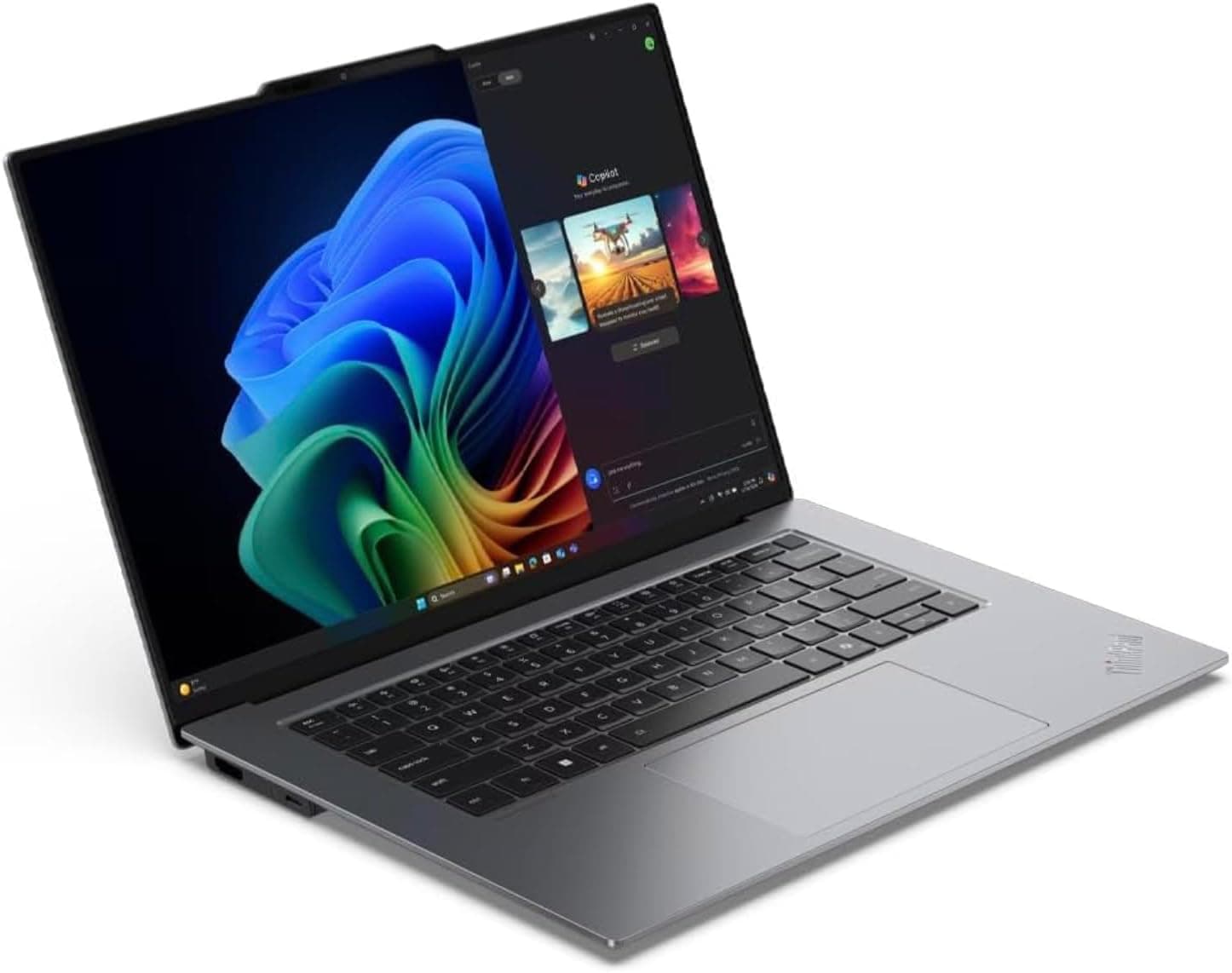
Lenovo's ThinkPad lineup has been the gold standard for business laptops for over three decades, and for much of that time, the formula remained reassuringly consistent: a black slab, a red TrackPoint nub, a keyboard with legendary travel, and an unassuming demeanor that prioritized function over form. But the laptop market has shifted dramatically, and even the most iconic brands must evolve or risk irrelevance. Enter the ThinkPad X9 15 Aura Edition — a laptop that dares to question almost every ThinkPad convention while attempting to establish a new one. No TrackPoint. No classic keyboard layout. A recycled aluminum chassis that looks more at home in a design studio than a law office. And a heavy emphasis on AI-powered features that promise to make your workday smoother, if you are willing to let them.
The result is a laptop that will polarize ThinkPad loyalists while simultaneously attracting a new audience that found previous models too conservative. After spending considerable time with the X9 15, I can tell you this: it is one of the most thought-provoking laptops Lenovo has ever produced, and depending on your priorities, it might also be one of the best.
Design and Aesthetics
The ThinkPad X9 15 Aura Edition makes its boldest statement before you even open it. The recycled aluminum chassis has a refined, almost understated elegance that contrasts sharply with the utilitarian aesthetic of traditional ThinkPads. The lid features a subtle texture that resists fingerprints — a practical touch that also looks sophisticated. The Lenovo logo sits in the top-left corner, joined by the iconic ThinkPad emblem with its red LED dot over the "i," providing a small but meaningful connection to the brand's heritage.
At 13.37 x 9.0 x 0.51 inches and 3.08 pounds, the X9 15 is remarkably thin and light for a 15.3-inch laptop. The engine-hub design that Lenovo has employed houses all critical components inside the bottom cover, integrating advanced thermals to keep the system cool even under sustained load. The result is a machine that feels dense without being heavy — you can feel the engineering when you pick it up, but you will not dread carrying it in a messenger bag across campus or through airport security.
The hinge mechanism has been redesigned with a smooth, controlled feel that allows one-handed opening. The display lifts cleanly from the deck, and the hinge holds firm at any angle without wobble. The overall build quality is exceptional — the chassis does not flex under pressure, the palm rest does not bow when you lean on it, and the bottom panel feels solid rather than hollow. Lenovo also subjected the X9 15 to MIL-STD-810H durability testing, covering extreme temperatures, vibration, humidity, and mechanical shock, which should reassure anyone who has ever knocked a laptop off a conference room table.
The port selection is comprehensive and modern. You get two Thunderbolt 4 (USB4) ports capable of 40Gbps data transfer with USB Power Delivery 3.0 and DisplayPort 2.1 output, one USB-A 3.2 Gen 2 port that is always-on for charging peripherals, a full-size HDMI 2.1 port that supports up to 4K/60Hz output, and a headphone/microphone combo jack. This is exactly the port arrangement a professional laptop should have in 2026 — no dongles required for the most common connectivity needs.
Display
The 15.3-inch 2.8K OLED touchscreen is the X9 15's crown jewel. With a resolution of 2880 x 1800, a 120Hz refresh rate, 500 nits of peak brightness, and full DCI-P3 color gamut coverage, this display delivers an experience that makes every other panel in this price range look pedestrian by comparison. The 16:10 aspect ratio provides generous vertical space for document editing, code review, and spreadsheet work, while the OLED technology ensures that blacks are truly black, colors are vivid without being oversaturated, and HDR content benefits from genuine contrast rather than simulated local dimming.
The display also carries an impressive stack of certifications and features. HDR 600 True Black certification means you can watch and create HDR content with confidence. X-Rite calibration from the factory ensures color accuracy out of the box. TUV Rheinland Low Blue Light and Eye Comfort certifications, along with Eyesafe certification, address growing concerns about screen-related eye strain during long work sessions. The anti-reflection and anti-smudge coating on the touchscreen is among the best I have used — it resists fingerprints effectively and maintains visibility in bright office lighting or near windows.
Touch input on the display is responsive and precise, with support for stylus input if you need to annotate documents or sketch ideas. The 120Hz refresh rate makes scrolling, window animations, and general UI interaction feel fluid and immediate in a way that 60Hz panels simply cannot match. After using a 120Hz laptop display for extended work, going back to 60Hz feels noticeably sluggish.
In everyday use, the display handles everything thrown at it with aplomb. Text rendering is razor-sharp at the 2.8K resolution, and the additional pixel density over a standard 1080p panel at this screen size makes a real difference in readability. Videos look stunning, with the OLED contrast creating a sense of depth that IPS panels cannot replicate. And for creative professionals who need color accuracy for photo and video editing, the DCI-P3 coverage and X-Rite calibration provide a trustworthy foundation for their work.
Performance
The ThinkPad X9 15 Aura Edition is powered by Intel's Core Ultra 7 258V processor, which represents the vanguard of Intel's Lunar Lake architecture. This is not a chip designed to win benchmark bragging rights against gaming laptops — it is engineered for efficiency-first performance that delivers responsive daily computing while sipping power conservatively enough to enable genuinely all-day battery life.
The Core Ultra 7 258V features 8 cores (4 performance cores and 4 efficiency cores) with 8 threads, a maximum turbo frequency of 4.8GHz, and 12MB of L3 cache. The integrated Intel Arc 140V GPU handles graphics duties, providing enough performance for creative applications like Photoshop, Lightroom, and casual video editing without requiring a discrete GPU. The NPU (Neural Processing Unit) delivers up to 47 TOPS of AI compute, which qualifies the X9 15 as a Microsoft Copilot+ PC and enables on-device AI features that do not require cloud processing.
In practice, the processor handles everyday professional workloads with ease. Multiple browser windows with dozens of tabs, Slack, Spotify, Microsoft Office applications, and video conferencing simultaneously — the X9 15 barely breaks a sweat. Compile times in IDEs are reasonable, spreadsheet recalculation on large datasets is snappy, and the 32GB of LPDDR5x RAM at 8533MHz ensures that memory pressure is rarely a concern even under heavy multitasking.
The 1TB PCIe NVMe M.2 SSD delivers fast storage performance that keeps boot times under 10 seconds and application launches feeling instantaneous. File transfers, whether you are moving large video files or syncing data to cloud storage, proceed at speeds that do not leave you watching progress bars.
For users who need more storage, Lenovo offers a 2TB configuration for an additional $100, which represents reasonable value for a PCIe Gen 4 NVMe drive in a thin-and-light form factor. The memory, however, is soldered and cannot be upgraded, so choosing the 32GB configuration at purchase is the right call for anyone who expects to keep this laptop for more than two years.
The Aura Edition AI Features
The "Aura Edition" designation is not just marketing embellishment — it represents a suite of AI-powered features developed through a collaboration between Lenovo and Intel that genuinely attempt to improve how you interact with your laptop on a daily basis. These features are organized into four modes accessible through the Lenovo Aura app.
Wellness Mode uses the front-facing camera and infrared sensors to monitor your posture and screen time. When it detects that you have been hunched over for too long or staring at the screen for an extended period without a break, it sends a gentle notification suggesting you adjust your posture or step away. The feature also adjusts display settings to reduce eye strain as the day progresses. As someone who regularly loses track of time during deep work sessions, I found these nudges genuinely helpful rather than intrusive.
Shield Mode activates the camera to detect when someone is looking over your shoulder at your screen. When a face other than yours is detected near your display, the screen blurs automatically and prompts you to enable your VPN. It is a thoughtful security feature for anyone who works in coffee shops, airports, or shared office spaces. In testing, the detection was quick and accurate, though it occasionally triggered when a colleague walked past my desk in the office.
Collaboration Mode calibrates your camera settings automatically for video calls, enhancing low-light performance, enabling auto-framing, and applying background blur or replacement effects. It also uses the NPU for real-time gaze correction, which makes it appear as though you are looking directly at the camera even when you are glancing at your notes — a subtle improvement that makes remote meetings feel more natural.
Attention Mode blocks distracting websites and silences notifications during focus periods you define. It is essentially a more sophisticated version of the Do Not Disturb modes available in Windows and macOS, but the Lenovo implementation provides finer control and integrates with your calendar to automatically suggest focus blocks during known meeting gaps.
All four Aura modes rely on on-device AI processing via the NPU, which means your camera data stays local and is not transmitted to any cloud server. In an era of increasing privacy concerns, this is an important architectural decision that deserves recognition.
Keyboard and Touchpad
This is where the ThinkPad X9 15 will generate the most controversy. Lenovo has replaced the classic ThinkPad keyboard — with its distinctive 7-row layout, physical Function keys, and generous key travel — with a new design that features shorter key travel, haptic feedback, and a modern layout that includes a dedicated Copilot key. The keyboard is still spill-resistant and still provides respectable tactile feedback, but anyone who has been typing on ThinkPads for years will notice the difference immediately.
The good news is that the new keyboard is still very good in isolation. Key spacing is generous, the feedback from each press is consistent across the board, and the backlighting is even and functional across three brightness levels. The haptic touchpad replaces the physical click mechanism of traditional ThinkPads, and while it lacks the satisfying mechanical thunk that ThinkPad enthusiasts love, the haptic response is tuned well enough that I adapted to it within a day. The touchpad surface area is generous, multi-touch gestures work reliably, and the glass surface feels premium under your fingers.
The missing TrackPoint nub is the most significant departure. Lenovo has included a TrackPoint on every ThinkPad since the 700 series debuted in 1992. Removing it is a statement that the X9 is designed for a new generation of ThinkPad users — people who navigate with a touchpad or their fingers on a touchscreen rather than a small red stick between the G and H keys. For existing TrackPoint devotees, this omission will be a dealbreaker. For everyone else, it frees up space for the larger touchpad and a more modern keyboard layout.
Typing on the X9 15 keyboard is a pleasant experience once you adjust your expectations. The keys have enough travel and resistance to prevent bottoming out harshly, and the layout places frequently used keys within easy reach. The dedicated Copilot key provides quick access to Microsoft's AI assistant, though its placement where the right Control key used to reside takes some muscle memory adjustment.
Battery Life and Charging
Lenovo claims up to 20 hours of battery life for the X9 15, and in my testing with mixed productivity workloads — documents, web browsing, email, video calls, and occasional creative tasks — I consistently achieved between 14 and 17 hours on a single charge. That is extraordinary endurance for a 15-inch laptop with a high-resolution OLED display and a powerful processor, and it validates Intel's efficiency-first approach with Lunar Lake.
The 80Whr battery is one of the largest you will find in a laptop this thin, and it pairs with Lenovo's Rapid Charge technology to deliver meaningful battery recovery in short timeframes. A 30-minute charge from near-empty delivers roughly 50 percent battery, and reaching 80 percent from empty takes approximately 60 minutes with the included 65W USB-C adapter. For anyone who travels frequently, this means you can top up meaningfully during a layover or between meetings without hunting for a wall outlet for an extended period.
Power Mode works in the background to optimize settings for longevity. When you are not actively pushing the processor, it downclocks the CPU, dims the display appropriately, and throttles background processes to extend battery life. When you need performance, it ramps up responsively. The transition is seamless enough that I never found myself manually toggling between power profiles — the laptop simply managed its own resources based on workload.
The real-world battery performance will naturally vary based on display brightness, the intensity of your workload, and whether you are using the OLED display's full capabilities. Running HDR video at full brightness will drain the battery faster than document editing at 60 percent brightness. But even in the worst case, you can expect a full workday of use without needing to plug in, and in typical productivity scenarios, you are likely to get closer to two full days between charges.
Audio and Webcam
The speaker system on the X9 15 consists of four drivers — two 2W woofers and two 2W tweeters — tuned with Dolby Atmos support. The audio quality is surprisingly competent for a thin laptop. Dialog in video calls is clear and present, music has enough dynamic range to be enjoyable during casual listening, and the spatial audio effect from Dolby Atmos creates a wider soundstage than you might expect from speakers this size. Bass response is limited by physics, but the tweeters prevent the sound from becoming purely tinny, and the frequency separation between the woofer and tweeter elements is noticeable when you push the volume beyond 70 percent.
The 8MP infrared webcam is a significant upgrade over the 720p cameras that still ship on many business laptops. Image quality in good lighting is sharp and well-exposed, with accurate skin tones and minimal noise. In low-light conditions, the Collaboration Mode's AI enhancement improves brightness and reduces noise using the NPU, producing results that are serviceable if not remarkable. The webcam also includes a privacy e-shutter — an electronic shutter that blocks the camera when not in use — and supports Windows Hello facial recognition for biometric login.
Connectivity and Security
Wireless connectivity is handled by Intel's Wi-Fi 7 BE201 adapter, which supports the latest 802.11be standard along with Bluetooth 5.4. Wi-Fi 7 delivers theoretical speeds up to 46Gbps (with compatible routers) and improved performance in congested environments with multiple connected devices. In practice, the X9 15 maintained rock-solid wireless connections throughout testing, with fast throughput on both 5GHz and 6GHz bands.
Security features are comprehensive and enterprise-appropriate. The discrete TPM 2.0 chip encrypts critical data at the hardware level. The fingerprint reader integrated into the power button provides biometric login with reliable recognition. The IR camera supports Windows Hello facial recognition. And the webcam e-shutter provides physical assurance that the camera cannot be activated without your consent. For IT administrators, the X9 15 supports Lenovo's ThinkShield suite of security tools and vPro management for remote deployment and troubleshooting.
Comparison With Competitors
The ThinkPad X9 15 Aura Edition occupies a competitive segment that includes the Dell XPS 15, HP Spectre x360 16, and Apple MacBook Air 15. Against the XPS 15, the ThinkPad X9 offers superior OLED display quality, better battery life, and more comprehensive AI features, though Dell's alternative provides a more traditional computing experience with slightly better sustained CPU performance. The HP Spectre x360 16 offers a 2-in-1 convertible design that the ThinkPad cannot match, but falls short on battery endurance and enterprise security features. Against the MacBook Air 15, the comparison shifts to operating system preference — macOS users will not consider the ThinkPad, but Windows loyalists gain AI features, Thunderbolt 4 connectivity, and a touch display that Apple does not offer on its Air lineup.
Within Lenovo's own portfolio, the ThinkPad X1 Carbon Gen 13 remains the choice for traditionalists who demand the TrackPoint and classic ThinkPad keyboard. The X9 15 trades those heritage features for a larger, better display, longer battery life, and the Aura AI suite. It is a trade-off that makes sense for some buyers and not for others.
Who Should Buy the ThinkPad X9 15 Aura Edition?
The ThinkPad X9 15 Aura Edition is a laptop that demands to be evaluated on its own merits rather than against the benchmark of every ThinkPad that came before it. If you approach it as a continuation of the X1 Carbon lineage, you will be disappointed by the missing TrackPoint, the redesigned keyboard, and the haptic touchpad. But if you evaluate it as a premium thin-and-light laptop that happens to carry the ThinkPad name, it emerges as one of the most compelling business laptops of 2025 and 2026.
Creative professionals who value display quality above all else will find the 2.8K OLED panel to be among the best available at any price. Business travelers who need all-day battery life without sacrificing screen real estate will appreciate the 15.3-inch display and 14-17 hour endurance. And anyone who values AI-powered convenience features — from automatic posture reminders to shoulder-surfing detection — will find the Aura Edition modes genuinely useful rather than gimmicky.
At $1,799 for the 32GB/1TB configuration, the X9 15 Aura Edition sits in the premium tier of business laptops. It is more expensive than the ThinkPad X1 Carbon Gen 12 at similar specifications, but it offers a larger, higher-quality display and the Aura AI features that the X1 Carbon lacks. Against competitors like the Dell XPS 15 or the HP Spectre x360 16, the ThinkPad X9 15 holds its own with superior keyboard comfort, better battery life, and the unmatched durability guarantee of ThinkPad's MIL-STD-810H testing.
For ThinkPad traditionalists, the X9 15 represents a philosophical shift that may be difficult to accept. The TrackPoint is gone, the keyboard heritage has been modernized, and the design language has moved from utilitarian restraint to contemporary elegance. But for a new generation of professionals who value display quality, battery endurance, and intelligent AI features over the red nub between the G and H keys, the ThinkPad X9 15 Aura Edition makes a persuasive case that the ThinkPad brand can evolve without losing its soul.
Pros
- Stunning 15.3-inch 2.8K OLED touchscreen with 500 nits brightness and DCI-P3 coverage
- Intel Core Ultra 7 258V with 47 TOPS NPU delivers responsive performance and all-day battery life
- Up to 20 hours of battery life with Rapid Charge support for 80% in 60 minutes
- Thoughtful AI features including Wellness Mode, Shield Mode, and Collaboration Mode via on-device NPU
- Comprehensive port selection with 2x Thunderbolt 4, USB-A 3.2, HDMI 2.1, and headphone jack
- MIL-STD-810H durability testing and recycled aluminum chassis build quality
Cons
- No TrackPoint nub — a dealbreaker for long-time ThinkPad loyalists
- 32GB of soldered RAM is not upgradeable after purchase
- Premium pricing at $1,799 starting configuration
- Haptic touchpad lacks the satisfying mechanical feedback of classic ThinkPad click pads
Final Verdict
The ThinkPad X9 15 Aura Edition reinvents Lenovo's iconic business laptop with a stunning 2.8K OLED display, Intel Core Ultra 7 Lunar Lake processor, up to 20 hours of battery life, and AI-powered Aura features — but ditches the TrackPoint.