Lenovo Yoga Slim 7i Ultra Aura Edition Review: The Featherweight Panther Lake Ultraportable
Lenovo's 2.15-pound Yoga Slim 7i Ultra pairs a stunning 2.8K 120Hz OLED touchscreen with Intel's new Panther Lake chip and MacBook-beating battery life, though three ports and a steep price demand compromise.
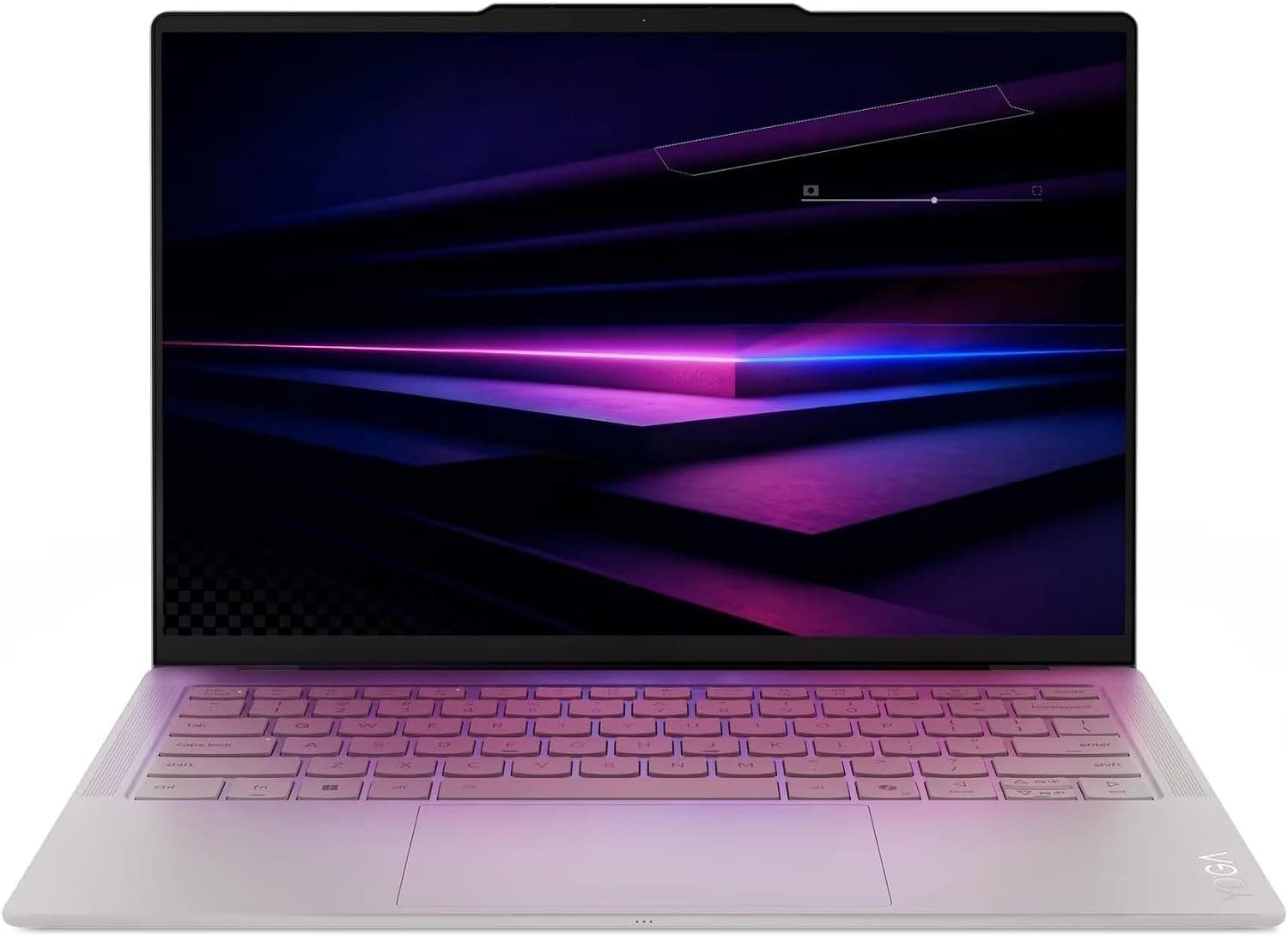
There was a moment, early in my time with the Lenovo Yoga Slim 7i Ultra Aura Edition, when I genuinely thought the box was empty. The laptop inside weighs just 2.15 pounds, which is less than many tablet-and-keyboard combos and barely more than a bag of coffee beans. That first impression — the shock of how little mass Lenovo packed into a 14-inch machine — sets the tone for everything this laptop does well, and also quietly explains most of its compromises. The Slim 7i Ultra is the flagship of Lenovo's 2026 ultraportable lineup, the first wave of Windows laptops built on Intel's new Core Ultra Series 3 "Panther Lake" processors, and it arrives carrying a premium price and a very specific set of trade-offs. After spending time with the 2.8K OLED touch configuration, I can tell you this: it is one of the most beautiful Windows laptops you can buy, it will embarrass most rivals on battery life, and it will also make you carry a USB-C hub everywhere you go. Whether that equation works for you depends almost entirely on what you value in a laptop.
Design and Build Quality
The Yoga Slim 7i Ultra continues the design language Lenovo established with the Slim 7i family, but it refines it to a degree that feels almost obsessive. The chassis is magnesium alloy, formed through a thixomolding process that lets Lenovo make the frame both thinner and stiffer than traditional stamping. The result is a laptop that measures just 0.55 inches thick at its tallest point and weighs 2.15 pounds (975 grams). For context, that is lighter than the 13-inch M5 MacBook Air at 2.7 pounds, lighter than the ASUS Zenbook A14 at 2.18 pounds... barely, and dramatically lighter than the Dell XPS 14 at roughly 3 pounds. It is, in fact, one of the lightest 14-inch laptops ever produced, and it does not feel flimsy in exchange for that lightness.
The finish on our review unit is the signature "Seashell" off-white, a soft, slightly glossy treatment that Lenovo says is tested to MIL-STD-810H standards. The lid has a clever lip at the front edge that gives you a natural purchase for one-finger opening — a small detail, but one you appreciate every single day. The hinge is smooth and holds position firmly at any angle, and the keyboard deck has minimal flex even when you press hard. The bottom panel comes off with eight screws and friction clips if you ever need to get inside, though as we will discuss later, there is very little you will want to upgrade.
One design note worth flagging: the off-white finish looks stunning in photos and in the first week of ownership, but both Tom's Hardware and PCMag expressed concern that the light keycaps and deck will show grime over months of daily use. If you eat at your desk, consider the darker finish or a keyboard cover.
The Port Situation: Three Thunderbolt 4 Ports and Nothing Else
This is the single most controversial decision Lenovo made with the Slim 7i Ultra, and you need to know about it before you buy. The laptop has exactly three USB-C ports, all of them Thunderbolt 4 at 40Gbps, with two on the left edge and one on the right. That is it. No USB Type-A, no HDMI, no SD card slot, and — notably — no 3.5mm headphone jack. The previous generation Slim 7i had HDMI 2.1, USB-A, and a headphone jack; all three were removed to make room for the thinner chassis and a third Thunderbolt port.
In practice, this means a dongle or hub is effectively mandatory for most workflows. Connecting a wired mouse means a USB-C to USB-A adapter. Presenting on a conference room projector means a USB-C to HDMI cable. Using wired IEMs means a USB-C to 3.5mm adapter, or switching to Bluetooth headphones. All three Thunderbolt ports support 65W power delivery and DisplayPort 2.1 output, so you can drive external monitors and charge simultaneously, but you will be juggling cables and adapters in a way that feels regressive on a $2,000+ machine. Windows Central called it a "major sacrifice," and Tom's Hardware called the missing headphone jack the feature most likely to annoy buyers. If you live in a USB-C world already, this is a non-issue. If you do not, budget an extra $30 for a hub.
Display: A 2.8K OLED Showpiece
Whatever you think of the port situation, there is no arguing with the panel Lenovo put in this machine. The Slim 7i Ultra has a 14-inch, 16:10 touchscreen OLED running at 2880 by 1800 pixels with a 120Hz refresh rate. It is a PureSight Pro panel covered in Gorilla Glass 3, supports Dolby Vision, and gets genuinely bright: our testing and the lab measurements from Tom's Hardware put sustained SDR brightness around 476 to 511 nits, which outshines the M5 MacBook Air's roughly 459 nits. HDR peak brightness is even higher — the panel is rated up to 1100 nits in small highlights, which gives Dolby Vision content real punch.
Color coverage is superb. Tom's Hardware measured 120.6 percent of DCI-P3 and 170.3 percent of sRGB, and Windows Central's instruments confirmed 100 percent accuracy in sRGB and P3 with AdobeRGB at 87 percent. Photographers and video editors working in those spaces will see accurate, predictable color out of the box. The OLED contrast is, of course, infinite in practice — blacks are truly black, which makes dark-mode interfaces, movie night, and games look dramatically better than on any IPS panel.
The 120Hz refresh rate is a welcome upgrade over the 60Hz panels on many competitors at this price, and it makes scrolling, pen input, and Windows animations feel fluid. You can drop to 60Hz in the display settings to save battery, and the panel supports variable refresh. The glossy finish is worth a mention: it makes colors look richer but means you will see reflections in bright offices, and there is no matte option. If you work near windows, be prepared to angle the screen.
Keyboard and Touchpad
Lenovo has a well-earned reputation for laptop keyboards, and the Slim 7i Ultra mostly upholds it. Key travel is a deep 1.5mm — increasingly rare in ultraportables — and the keys have a soft, cushioned bottom-out that makes long typing sessions comfortable. Tom's Hardware's reviewer hit 89 words per minute at 96 percent accuracy in their typing test. The layout is standard with backlit keys, though the white-on-white finish can make the backlighting less legible in bright rooms. Two gripes: the up and down arrow keys are half-height, which will annoy spreadsheet jockeys, and there is no dedicated keyboard shortcut for the backlight — you have to toggle it through Lenovo Vantage software.
The touchpad is a highlight. It is a haptic, buttonless glass pad measuring about 5.5 inches diagonally, and it uses a linear actuator to simulate clicks rather than a mechanical hinge. This is the same approach Apple uses in the MacBook, and Lenovo executes it well: clicks feel crisp and uniform across the entire surface, gestures are smooth, and palm rejection is solid. You can adjust the haptic firmness in settings if you want a lighter or heavier click. There is also a fingerprint-free IR webcam setup for Windows Hello face unlock, so you may rarely touch the pad at all for sign-in.
Performance: Panther Lake's First Impression
The Slim 7i Ultra is powered by the Intel Core Ultra 7 355, the mid-tier chip in Intel's new Panther Lake generation (Core Ultra Series 3). It has eight cores — four performance cores and four low-power efficiency cores — with a base clock of 2.3GHz and a max turbo of 4.7GHz. Graphics come from Intel Arc integrated silicon with four Xe cores running at 2.5GHz, and the NPU, Intel AI Boost, delivers up to 49 TOPS, which qualifies the machine as a full Copilot+ PC with on-device AI features.
The story here is nuanced. In Geekbench 6, the Slim 7i Ultra scored 2,729 single-core and 11,555 multi-core, which beats the Dell XPS 14 using the same chip (2,685 / 7,964) and matches or exceeds the previous-generation Lunar Lake chips found in the Yoga Slim 9i and the Gen 9 Slim 7i. But it trails the HP OmniBook X Flip 14's Ryzen AI 7 350 (2,889 / 13,106) and is thoroughly beaten by the M5 MacBook Air (4,168 / 17,067). In Cinebench 2024, PCMag's testing put the Slim 7i Ultra in last place among its comparison group, and in a HandBrake 4K-to-1080p transcode it took 5 minutes 56 seconds — the slowest of the group, even behind a Dell XPS 14 with the identical chip, which suggests Lenovo is tuning the power envelope for efficiency and thermals rather than raw throughput.
For everyday productivity — web browsing, office suites, email, video calls, light photo editing — the machine feels completely fluid, and you will rarely notice the midpack benchmark results. The integrated Arc graphics are genuinely capable too: in 3DMark Steel Nomad the Slim 7i Ultra scored 513, more than doubling the scores of the cheaper Dell, HP, and Microsoft comparison units, and PCMag ran World of Warcraft and Age of Mythology at moderate settings with consistent frame rates. The caveat comes when you push into real gaming. Windows Central tested Cyberpunk 2077 and saw a max average of 26 FPS at the lowest settings, and Counter-Strike 2 could not reliably hold 60 FPS at 1680 by 1050, with the CPU climbing to 95°C. Lenovo markets this as a gaming-capable AI PC, but the integrated-graphics reality is that it is fine for indie titles, older games, and light esports — not modern AAA releases. If gaming matters, you want the higher-tier Core Ultra X9 388H with the Arc B390 graphics that Lenovo sells outside the US, or a machine with a discrete GPU.
Battery Life: The Headline Number
This is where the Slim 7i Ultra separates itself from the pack. The 75Wh battery inside a 2.15-pound chassis is remarkable on its own, and the Panther Lake chip's efficiency shows in the results. Tom's Hardware ran its standard battery test — continuous web browsing, video streaming, and WebGL at 150 nits — and the laptop lasted 16 hours and 38 minutes, beating the M5 MacBook Air by more than an hour. Windows Central's PCMark 10 testing stretched past 18 hours, which they called "bordering on the absurd" for an x86 machine. That is genuinely all-day-plus battery life: you can work a full day, commute, watch a movie, and still have charge left.
The outlier is PCMag, which measured just 13 hours 22 minutes in its battery test and noted the high-resolution OLED panel draws more power than the lower-res screens on the 30-hour HP OmniBook 5 14 and Surface Laptop comparison units. Regardless of which number you trust, the reality is that this is a class-leading laptop for endurance — comfortably in MacBook Air territory, which is the highest compliment an x86 Windows laptop can receive in 2026. Charging is via any of the three USB-C ports at up to 65W, and there is no proprietary adapter, which is a small but welcome freedom.
Speakers, Webcam, and AI Features
Lenovo packed a quad-speaker system into this slim chassis — two 2-watt woofers and two 2-watt tweeters — and the results are surprisingly good. Tom's Hardware called the audio "vibrant" with impressive bass for a laptop this size, testing with the Doobie Brothers and Earth, Wind & Fire, and PCMag's reviewer abandoned plans to connect an external Bluetooth speaker entirely. The Dolby Atmos software offers Dynamic, Game, Movie, and Music profiles. It will not replace a dedicated speaker, but it is among the best built-in laptop audio you will find, and it makes the missing headphone jack sting a little less for casual listening.
The webcam is a 5MP sensor with IR for Windows Hello, mounted in a protruding bar on the lid that doubles as the one-finger opening lip. Image quality is sharp with accurate skin tones — Tom's Hardware specifically praised how it handled darker skin tones under track lighting — and there is a physical e-shutter switch on the right edge for privacy. The microphone array is serviceable for calls, though PCMag noted it picked up background noise more readily than ideal in a busy room.
As an Aura Edition machine, the laptop comes with Lenovo's Smart Modes — Working, Gaming, Creating, Entertainment, Meeting, and Learning — which adjust performance, audio, and screen settings by activity. There is human presence detection that can lock the screen when you walk away and wake the machine when you return, plus a "Shield Mode" that blurs the screen when someone looks over your shoulder. The Copilot+ features, including the dedicated Copilot button and on-device AI via the 49-TOPS NPU, work as advertised, though none of them are things you will miss if you ignore them entirely.
The software situation is the one sour note: the machine ships with McAfee and its WebAdvisor browser extension, a Dropbox promotion, an Adobe Creative Cloud ad in the Start menu, and a pinned taskbar shortcut to Lenovo's subscription marketplace. All of it is removable, but on a premium laptop at this price, the first-hour experience of uninstalling adware feels cheap. Windows Central called the preinstalled software "too much."
Price and Configurations
The pricing story here is complicated. At CES 2026, Lenovo announced the Slim 7i Ultra with an estimated $1,499.99 starting price. By the time reviews went live, the US store price had climbed to $1,889.99 for the standard configuration, and Windows Central documented the price rising again during their review period — a total increase of $390 since the January announcement. On Amazon, the configuration we tested — Core Ultra 7 355, 32GB LPDDR5X, 1TB SSD — currently lists at $2,399.99, though street prices fluctuate.
The configuration options are deliberately simple: in the US, you get the Core Ultra 7 355, 32GB of soldered LPDDR5X-7467 memory, and a choice of 1TB or 2TB M.2 2242 PCIe 4.0 SSD. Windows 11 Pro costs $50 extra. The fully maxed machine comes to about $2,129.99 on Lenovo's store. UK buyers get more choices, including the Core Ultra 5 325 and the flagship Core Ultra X9 388H with upgraded Arc B390 graphics for an additional £250, but US buyers are locked to the single CPU.
That pricing puts the Slim 7i Ultra in a difficult neighborhood. It costs roughly twice as much as the HP OmniBook 5 14 ($899.99 as tested), the Dell 14 Plus ($1,099.99), and the Surface Laptop 2025 13-inch ($999.99) — machines that matched or beat it in several CPU benchmarks while offering more ports. It also sits above the M5 MacBook Air, which offers comparable weight, comparable battery life, and dramatically better CPU performance for less money. Against its own stablemate, the Yoga Slim 9i, it trades some performance for a pound of weight savings. PCMag's verdict was blunt: "Could be a great buy after a price drop."
Who Should Buy It
The Yoga Slim 7i Ultra is a laptop of strong opinions. If you are a frequent traveler, a student carrying a machine across campus all day, a consultant living in airport lounges, or anyone who has ever chosen a laptop by lifting it with one hand, the 2.15-pound weight and 16-plus-hour battery will be transformative. The OLED display is among the best you can get at any price, the keyboard and haptic touchpad are excellent, and the speakers punch far above the chassis size. It is genuinely the lightest full-power 14-inch Windows laptop you can buy, and for many people that single fact outweighs every compromise.
It is not the right machine if you need ports, if you want to game seriously, if you rely on wired audio, or if your workflow is built around sustained heavy CPU loads like long video exports. And at $2,399.99 on Amazon, it demands a real premium for that featherweight design — you are paying for the engineering, not the component list. The good news is that the core design is so strong that a price drop (which PCMag predicts) would make this an easy recommendation. As it stands, the Yoga Slim 7i Ultra is a near-perfect laptop for a specific person: the person who values lightness and endurance above everything else, and who is willing to live in a USB-C-only world to get them. For that person, there is nothing else quite like it.
The Verdict in Context
Step back and the Slim 7i Ultra tells a clear story about where Windows laptops are heading in 2026. Panther Lake brings real efficiency gains — an x86 ultraportable that outlasts a MacBook Air is no longer a fantasy, it is this laptop. The trade is that Lenovo has pushed the ultraportable philosophy to its logical extreme, stripping out every port that adds a millimeter of thickness and charging a premium for the result. Windows Central, which has tested more laptops than almost anyone, called it "near-perfect" and one of their all-time favorite Windows machines. Tom's Hardware gave it an Editor's Choice award. PCMag, more skeptical of the price-to-performance ratio, said it would be a great buy after a drop.
All three are right, depending on your perspective. The hardware is a marvel: 2.15 pounds, a 2.8K 120Hz OLED touchscreen, 18 hours of battery, haptic touchpad, quad speakers, and a genuinely modern CPU with 49 TOPS of AI horsepower. The compromises — three Thunderbolt ports and nothing else, soldered RAM, single-CPU availability in the US, a rising price — are the cost of that engineering. If you can afford the premium and the dongle life, this is the finest ultraportable Windows laptop of 2026, full stop. If you cannot, wait for a sale, because at $1,800 or below this becomes one of the easiest recommendations in the entire laptop market.
For anyone considering the alternatives — the M5 MacBook Air for raw speed and ecosystem, the ASUS Zenbook A14 for a similar featherweight formula, the Yoga Slim 9i for more performance in a slightly heavier frame, or the Dell XPS 14 for a more conventional port setup — the decision really comes down to one question: how much do you value not feeling your laptop in your bag? If the answer is "more than anything," the Yoga Slim 7i Ultra Aura Edition is your laptop. Just keep a USB-C hub in that bag with it.
Pros
- Featherlight 2.15-pound magnesium chassis that feels half its size
- Stunning 14-inch 2.8K 120Hz OLED touchscreen with superb color accuracy
- Exceptional 16-18 hour battery life that outlasts the MacBook Air
- Surprisingly potent quad-speaker audio with real bass
- Excellent haptic touchpad and comfortable 1.5mm-travel keyboard
Cons
- Only three Thunderbolt 4 ports - no USB-A, HDMI, or headphone jack
- CPU performance trails cheaper rivals and the M5 MacBook Air
- Steep price that has climbed since launch, with soldered RAM
Final Verdict
Lenovo's 2.15-pound Yoga Slim 7i Ultra pairs a stunning 2.8K 120Hz OLED touchscreen with Intel's new Panther Lake chip and MacBook-beating battery life, though three ports and a steep price demand compromise.