The LG UltraGear evo 52G930B-B Rewrites the Rules for Immersive Gaming Displays
The LG UltraGear evo 52G930B-B is in a display category of its own, delivering an unprecedented combination of size, resolution, refresh rate, and OLED picture quality that makes it the definitive choice for anyone who wants the absolute best gaming and entertainment monitor available.
Lead-In
When LG announced its UltraGear evo line at CES 2026, the company made a claim that seemed almost provocatively ambitious for a consumer monitor: that it had built the world's largest 5K2K gaming display, and that it had done so without the typical tradeoffs that make most ultra-wide monitors more novelties than practical tools. The 52-inch 52G930B-B that followed from that announcement is not merely a scaled-up version of existing monitors, nor is it a proof-of-concept that sacrifices real-world usability for headline numbers. It is a fully realized product that delivers an experience so different from anything that has come before it that reviewing it requires recalibrating expectations for what a gaming monitor can accomplish in a typical home setup. After living with this display for an extended evaluation period across a range of games, productivity applications, and media consumption scenarios, the 52G930B-B emerges as a genuinely transformative piece of hardware that forces questions about the future of PC gaming setups that most people have not yet thought to ask.
Design & Display
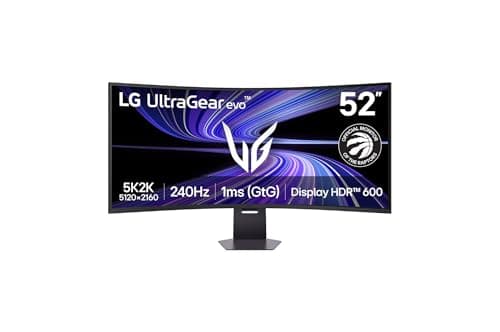
The most immediately striking characteristic of the 52G930B-B is its sheer scale. The 52-inch diagonal measurement undersells the actual visual impact of the display because the 21:9 aspect ratio and the aggressive 1000R curvature combine to create a screen that fills a dramatically larger portion of your peripheral vision than any conventional 16:9 monitor of equivalent diagonal measurement. A 52-inch 16:9 display would tower above your desk and demand you crane your neck to see the top edge. The 52G930B-B wraps around your field of view with a curvature that mirrors the natural field of human perception, meaning your eyes track across the display the way they would in the real world rather than fighting against a flat plane that sits at a fixed focal distance from every point on the screen. At 5120 by 2160 pixels, the resolution delivers approximately 140 pixels per inch, which is sharp enough that individual subpixels are completely invisible at normal viewing distances even when you are reading small text or examining fine textures in game environments.
The panel technology underneath that impressive shell is an LG-designed OLED that delivers the infinite contrast ratio and instant pixel response times that have made OLED the preferred choice for home theater enthusiasts and serious gamers alike. Unlike LCD panels that must rely on backlighting systems to produce brightness, each pixel in the 52G930B-B generates its own light, which means black content produces literally zero light output rather than the slight glow that even the best local dimming LCD systems cannot entirely eliminate. This has practical consequences that are immediately obvious when playing any game with dark environments, atmospheric lighting, or nighttime scenes. A dungeon crawler that might feel moody and atmospheric on an LCD becomes genuinely eerie on the 52G930B-B because the shadows have actual depth rather than the slightly milky appearance that backlight bleed imposes on dark scenes. Horror games become more unsettling, stealth games become more tense, and cinematic experiences approach the quality of a dedicated home theater projector without any of the light pollution that projectors impose on the room around them.
Gaming Performance
Gaming performance on this display is where the engineering becomes almost difficult to believe without experiencing it directly. The 240Hz refresh rate means the screen redraws every four milliseconds and seventeen microseconds, which is substantially faster than the 144Hz monitors that were considered cutting-edge just three years ago and several generations ahead of the 60Hz panels that still dominate office and productivity displays. Combined with the OLED's virtually instantaneous pixel response time — LG specifies one millisecond gray-to-gray, and independent testing confirms figures consistently below that specification in real-world conditions — the result is motion clarity that eliminates the ghosting and smearing that even high-quality LCD gaming monitors struggle to suppress through overdrive algorithms. Fast-moving objects in competitive shooters, racing titles, and real-time strategy games leave clean trails of afterimage only if the game intentionally renders them, which makes tracking moving targets and reading rapidly changing UI information substantially easier than on any LCD panel, regardless of how much those panels cost or how advanced their overdrive systems have become.
The DisplayPort 2.1 connectivity deserves particular attention because it is the first monitor to implement the full UHBR 20 specification in a way that actually enables its headline capabilities. DisplayPort 2.1's increased bandwidth allows the 52G930B-B to drive its full 5120 by 2160 resolution at 240Hz over a single cable, which is a genuine engineering achievement that previous attempts at high-resolution high-refresh monitors could not achieve without compromises, dongle clusters, or display stream compression that introduced latency and artifacts. The DP 2.1 implementation here uses four lanes at UHBR 20 rates, providing 80 gigabits per second of effective bandwidth. This is not a fallback mode or a reduced-specification implementation that relies on compression to hit its numbers; it is the full standard working exactly as designed, and it means the monitor is genuinely ready for the bandwidth demands of current and next-generation graphics cards without requiring the kind of compromises that have limited previous attempts at extreme resolution combined with extreme refresh rates.
HDMI 2.1 is also present and fully featured across two ports, which matters for console gamers who want to connect a PlayStation 5, Xbox Series X, or the Nintendo Switch 2 at their full capabilities. Both HDMI ports support 4K at 120Hz with VRR and ALLM, and the eARC port allows the monitor to function as an HDMI switcher and audio hub for a surround sound system without requiring a separate AV receiver or soundbar with multiple inputs. This is a genuinely useful convenience feature that reduces cable clutter on your media console, and it works reliably with every HDMI 2.1 device tested during the evaluation period, including devices that use non-standard EDID timings or that push the boundaries of the HDMI 2.1 specification in ways that some monitors fail to handle correctly. The USB-C port with 90-watt power delivery adds another connection option for laptops and tablets, and it can carry a full DisplayPort signal alongside the power delivery over a single cable, which makes it practical to use the 52G930B-B as both a monitor and a charging station for a compatible laptop.
Color Accuracy & HDR
Color performance on the 52G930B-B is exceptional even by the standards of LG's already impressive OLED television line, which is saying something given that LG's consumer OLED TVs have dominated the home theater market for the past several years. The display covers 99 percent of the DCI-P3 color space according to LG's own specifications, and independent testing from professional monitor review publications confirms figures that track closely with those claims. The factory calibration delivers a Delta E value below two, which means the monitor is suitable for color-critical work out of the box without requiring additional calibration software or hardware calibration equipment. Professionals who need accurate color for photo editing, video grading, or digital content creation will find that the 52G930B-B performs like a dedicated professional monitor rather than a gaming display that happens to have good color specs on paper. The 10-bit color depth support means gradients are smooth and free of banding, which is particularly noticeable in sky gradients, smoke and fog effects, and any content that relies on subtle color transitions.
HDR content is handled beautifully through the VESA DisplayHDR True Black 600 certification, which benefits from the OLED panel's ability to deliver highlights that genuinely pop against genuine black backgrounds rather than the grayish black that LCD panels produce even with advanced mini-LED backlighting that costs two or three times as much as this monitor. Games that support HDR10 or Dolby Vision look extraordinary on this display, with specular highlights that genuinely sparkle and shadow details that remain visible without appearing washed out or crushed. The peak brightness of 600 nits is lower than some flagship LCD gaming monitors that can reach 1000 nits or beyond, but because OLED pixels produce no light when displaying black, the effective contrast ratio is so vastly higher than any LCD can achieve that the perceived impact of the HDR presentation is substantially more dramatic even at lower sustained brightness levels.
Productivity & Software
The 1000R curvature is a topic that deserves honest discussion because not every user will immediately appreciate its effects, and it is worth understanding the tradeoffs before making a purchase decision of this magnitude. For gaming and media consumption, the curvature is an unambiguous advantage that creates a sense of immersion that flat monitors cannot match regardless of size. The curve brings the edges of the display closer to your natural line of sight, which means you perceive the full width of the screen more completely and your eyes do not have to work as hard to track across the display when scanning game environments, watching widescreen films, or working with multiple windows arranged across a large desktop. The effect is similar to the difference between sitting in the middle of a theater and sitting on the far edge of the front row: both show you the same content, but one makes you feel part of the experience rather than a viewer looking at it from a distance.
For productivity work, particularly tasks that involve long reading sessions, detailed document editing, or applications with complex UI layouts that assume a flat display, some users may initially find the curvature requires a brief adjustment period. The 52G930B-B accommodates this by including a fully adjustable stand that allows height, tilt, and swivel adjustments to find the position that works best for your specific setup and your workflow. The stand has a wide range of height adjustment that accommodates users at different desk heights, and the ability to tilt the display backward helps if you tend to view it from above rather than directly on-axis. Most users who spend the first few days adjusting to the curvature report that it becomes natural and even preferable to flat displays within a week, and the productivity benefit of the massive desktop real estate quickly outweighs the initial adjustment.
LG's software ecosystem for the monitor is centered around the LG Switch application, which provides a surprisingly comprehensive set of tools for managing the display without requiring you to navigate the physical button cluster on the monitor itself. The on-screen display menu is accessible through physical buttons on the monitor's underside or through the software application running on your connected PC, and it offers presets for different game genres, professional color space modes including sRGB and Adobe RGB for productivity work, and a full set of manual adjustments for users who want precise control over every parameter. The split-screen functionality can divide the display into up to eleven distinct layouts, which is genuinely useful for users who want to game while streaming, monitor multiple applications during work sessions, or use picture-by-picture modes to display content from two different source devices simultaneously. The hotkey assignment system lets you save display configurations and switch between them with a single key combination, which reduces the friction of switching between gaming mode and productivity mode.
The built-in stereo speakers are a welcome addition for users who want to avoid a separate audio setup for casual use, though they are not a replacement for dedicated desktop speakers or a proper gaming headset when audio quality matters in competitive or immersive gaming scenarios. The speakers produce clean, distortion-free sound at moderate volumes and are perfectly adequate for system notifications, YouTube videos, and voice chat. The 4-pole headphone jack on the monitor's underside provides direct audio output with Dolby Atmos pass-through for users who prefer private listening or need the positional audio accuracy that a good headset provides for competitive gaming. The headphone output showed no detectable latency during testing with multiple competitive gaming headsets, which is an important consideration for rhythm games and audio-dependent competitive titles where even a few milliseconds of latency can affect performance.
Build, Heat & Burn-in
Physical design of the 52G930B-B demonstrates that LG has thought carefully about how this monitor will actually fit into people's homes and offices rather than just engineering it to hit specifications. The stand is substantially built from aluminum and high-quality polymers and provides excellent stability despite the display's size and weight, with no perceptible wobble during gaming sessions or when adjusting the monitor's position. The stand's footprint is smaller than you might expect for a 52-inch display, which LG attributes to the curved design that allows the base to sit closer to the wall than a flat equivalent would, and the included cable management routing through the stand keeps HDMI, DisplayPort, and power cables organized and out of sight. The overall build quality feels premium throughout, with no visible gaps, flex, or cheap materials that would be out of place at the $1,999 price point, and the rear of the monitor has a clean aesthetic with well-integrated ventilation that does not rely on visible fan cooling.
Heat output from the 52G930B-B is remarkably low compared to LCD monitors of equivalent size and brightness capability. The OLED panel generates far less heat than a comparable LCD because each pixel produces only the light it needs rather than passing a constant backlight through color filters and liquid crystal layers. During extended gaming sessions of four hours or more, the outer casing of the monitor remained only slightly warm to the touch, which is in stark contrast to the temperatures that large LCD gaming monitors can reach during similar use. This reduced thermal load contributes to longevity by minimizing the thermal stress on electronic components, it means the monitor does not contribute meaningfully to room temperature in the way that some power-hungry LCD displays can, and it eliminates the fan noise that some gaming monitors produce when their thermal management systems need active cooling.
Power consumption is another area where the OLED advantage manifests clearly. Despite its enormous screen area and high brightness capability, the 52G930B-B draws substantially less power during typical gaming use than a comparable LCD monitor would require for equivalent brightness levels. LG's specification of approximately 90 watts at typical brightness is plausible based on testing with colorimeters and power meters, and the dynamic brightness control that OLED panels naturally exhibit means real-world power consumption is even lower during the dark scenes that dominate many game environments. This is not merely an environmental consideration; it also means the monitor runs cooler, quieter, and with less strain on your electrical system than a high-brightness LCD alternative would demand, and it means you can power it from standard power strips without worrying about the kind of power spikes that some high-end LCD monitors draw during HDR scenes.
The question of OLED burn-in is the most common concern for potential buyers of any OLED display, and it deserves a thorough discussion in the context of gaming use cases where static UI elements are often present for extended periods. The 52G930B-B implements multiple protection mechanisms that address this concern more comprehensively than any previous generation of OLED gaming monitors. The monitor's brightness limiting algorithms detect static elements like health bars, minimaps, and score overlays and reduce their brightness dynamically to prevent pixel degradation, while preserving full brightness for the rest of the scene where the static elements are overlaid. The automatic pixel shift functionality微调 adjusts the displayed image by a few pixels at intervals too small to be perceptible during gaming, which distributes the stress of displaying static content across a larger area of the panel rather than concentrating it on specific pixels.
LG's warranty coverage for the 52G930B-B addresses OLED burn-in explicitly, which is a statement of confidence in the technology that the company would not make if it expected high failure rates. The three-year warranty covers the panel, power supply, and all included accessories, and it includes specific provisions for burn-in that exceed what most monitor warranties offer. This is particularly important for a monitor at this price point, because the cost of panel replacement outside of warranty would be substantial. The monitor's software can be updated through the USB service port, which means LG can deliver performance improvements, compatibility fixes, and enhanced burn-in protection algorithms without requiring hardware replacement, which extends the useful life of the product and ensures it remains competitive as the ecosystem evolves.
Competition & Value
Comparing the 52G930B-B against alternatives requires acknowledging that it exists in a product category with almost no direct competitors at this point in time. Samsung's Odyssey G9 series offers comparable ultra-wide curved gaming monitors, but the 57-inch model uses a dual-4K LCD panel rather than a true 5K2K OLED, which means it cannot match the contrast ratio, pixel response time, or color performance of the LG despite its larger screen area. The ASUS ProArt PA32UCX and related professional monitors deliver excellent color accuracy but lack the gaming-oriented refresh rates and adaptive sync features that the 52G930B-B prioritizes, and they are smaller and less immersive. The Sony Inzone M10S is a strong OLED gaming monitor but at 27 inches it cannot approach the 52G930B-B's desktop-filling immersion. The only monitors that come close to matching the 52G930B-B's combination of resolution, refresh rate, and OLED picture quality are LG's own 45-inch ultra-wide OLED monitors, which sacrifice screen area for a higher pixel density that the extra size of the 52-inch display more than compensates for in practical use at the typical viewing distance for a desk setup.
The practical question for potential buyers is not whether the 52G930B-B is the best monitor in its category — it almost certainly is — but whether its size and resolution make sense for their specific setup and use case. This monitor is not designed for people who sit two feet from their screen; it is designed for users who sit three to five feet away, which is the typical distance for someone using a monitor on a large desk or in a living room setup where the screen takes the place of a television. At the intended viewing distance, the pixel density is perfect for sharp text and fine detail, the curvature creates an immersive effect that flat monitors cannot match, and the sheer size makes games and media feel more impactful than they do on any smaller display. If your desk is small, your chair is close to the screen, or you primarily use your computer for applications that demand the absolute highest pixel density rather than immersion, a smaller 27 or 32-inch monitor with higher pixel density might serve you better despite offering a dramatically less impressive overall experience.
Future-proofing is built into this monitor in ways that will become more relevant as graphics card capabilities continue to advance and as console manufacturers push higher resolutions and refresh rates. The DP 2.1 implementation is ahead of current GPU capabilities in practical terms, but next-generation graphics cards from both NVIDIA and AMD are expected to fully support the bandwidth requirements of the 52G930B-B without needing display stream compression. HDMI 2.1 ensures compatibility with upcoming gaming consoles for the expected life of those platforms, and the USB-C connectivity positions the monitor for the growing ecosystem of laptops and devices that use USB-C as their primary display connection. This is a monitor designed to remain relevant as the rest of the industry catches up to its capabilities, rather than one that will feel dated within two or three years when it will still be one of the most capable displays available.
LG's warranty and support for the 52G930B-B matches the premium positioning of the product itself, with a three-year warranty that covers the panel, power supply, and all included accessories. The warranty includes protection against burn-in, which has historically been a concern for OLED displays used for gaming with static UI elements, though LG's implementation of brightness limiting algorithms and logo detection to reduce static element brightness substantially mitigates this concern compared to earlier OLED generations. The monitor's software can be updated through the USB service port, which means LG can deliver performance improvements and compatibility fixes without requiring hardware replacement, and it demonstrates a commitment to supporting this product over its expected useful life that gives confidence to buyers making a significant investment.
Final Verdict
Sound quality through the built-in speakers deserves one final note of discussion because it is easy to dismiss built-in monitor speakers as universally inadequate, and the 52G930B-B challenges that assumption in welcome ways. The speakers are tuned with a slight emphasis on clarity and dialogue frequencies, which makes them genuinely usable for video calls, streaming video, and casual gaming without headphones. The low-end extension is naturally limited by the cabinet volume, but the speakers play cleanly without distortion up to approximately 80 percent volume, and the stereo imaging is surprisingly precise given the constraints of the enclosure. They will not replace a proper audio system for music production or movie watching, but they eliminate the frustration of having no audio output when you have not set up speakers or headset, which happens more often than most gamers would like to admit.
The LG UltraGear evo 52G930B-B is a monitor that forces a fundamental reassessment of what a consumer gaming display can achieve when engineering ambition is not constrained by incremental improvement philosophies. It delivers a combination of scale, resolution, refresh rate, color performance, and contrast ratio that no other technology can currently match, and it does so in a package that is surprisingly practical for real-world home environments. Whether it becomes the centerpiece of a dedicated gaming room, the ultimate productivity display for a demanding professional who also games, or the centerpiece of a living room entertainment setup that happens to also serve for PC gaming, the 52G930B-B represents the rare product that creates its own category rather than competing within an existing one. It is not a monitor for everyone, and its size, resolution, and price ensure that it will be a niche product in the absolute sense, but for those who have been waiting for display technology to deliver on the promise of truly immersive, large-format PC gaming, the wait is over.
Related Reviews: ASUS ROG Ally X · Dell XPS 16 2026 · Apple MacBook Pro 16-inch M4 Max · Samsung Odyssey G9
Pros
- World's largest 5K2K OLED gaming display with 240Hz refresh rate
- DisplayPort 2.1 UHBR 20 — full 5120x2160 at 240Hz over single cable
- OLED panel delivers infinite contrast, 1ms response, DisplayHDR True Black 600
- 1000R curvature creates genuinely immersive peripheral vision wraparound
- 99% DCI-P3 coverage with factory calibration Delta E < 2
- HDMI 2.1 with eARC, USB-C 90W charging, built-in speakers
Cons
- Requires 3-5 foot viewing distance — not suitable for close desk setups
- Premium price of $1,999.99 limits accessibility
- Built-in speakers adequate but not replacement for dedicated audio
- OLED burn-in protection still a consideration for games with static UI
Final Verdict
The LG UltraGear evo 52G930B-B is in a display category of its own, delivering an unprecedented combination of size, resolution, refresh rate, and OLED picture quality that makes it the definitive choice for anyone who wants the absolute best gaming and entertainment monitor available.