Apple MacBook Pro 14-inch M5 Pro (2026) Review: The Battery Life Champion
Apple's M5 Pro chip delivers the longest battery life in any professional laptop we have ever tested. At $2,199 for the base config, the 14-inch MacBook Pro M5 Pro is the productivity laptop to beat in 2026.
Apple's transition to its own silicon has been the most consequential shift in personal computing of the past decade, and the M5 Pro generation running in the 14-inch MacBook Pro represents the fullest expression of that transition's promise. Where earlier Apple silicon machines occasionally left professionals wondering whether they should wait for a specific workflow to mature, the M5 Pro in the 2026 MacBook Pro is confident enough to compete with — and beat — dedicated workstations on the tasks that matter most to working professionals.
The 14-inch MacBook Pro with M5 Pro starts at $2,199 for 16GB unified memory and 512GB of storage. The configuration we tested was the $1,849 model with 24GB of memory and 1TB of storage — the one most readily available from Amazon at the time of writing. After two weeks of using it as our primary work machine, we have some strong opinions.
Lead-In: Who the M5 Pro Is For
The MacBook Pro 14-inch with M5 Pro is not a machine for everyone. If you need a dedicated GPU for 3D rendering or machine learning training, you want the M5 Max. If you primarily consume content rather than create it, you want a MacBook Air. But for the software developer, the photographer, the video editor working on projects up to 4K, the writer who keeps 50 browser tabs open, and the executive who needs reliable battery life that lasts a full international flight — the 14-inch MacBook Pro M5 Pro is the correct answer more often than not.
The M5 Pro sits between the base M5 chip and the M5 Max. It has a 15-core CPU (with 12 performance cores and 3 efficiency cores), a 16-core GPU, and a 16-core Neural Engine. The configuration we tested had 24GB of unified memory and 1TB of SSD storage. The base configuration at $2,199 has 16GB of unified memory, which is sufficient for most single-application workflows but can feel constrained if you regularly work with large files or run local AI models.
Testing Methodology
We tested the MacBook Pro 14-inch M5 Pro over the same 14-day period as the Dell XPS 16 2026, using it as a primary work machine with the same workload: eight-hour work days involving browser-based productivity, document editing, video conferencing, and two to three hours of Lightroom photo editing. We measured battery life by running the machine from 100% to 20% on a standardized workload with the display at 200 nits and Wi-Fi connected.
We also ran the machine alongside the Dell XPS 16 2026 and the previous-generation MacBook Pro 14-inch M4 Pro to establish year-over-year improvements and cross-platform performance comparisons.
Hardware and Industrial Design
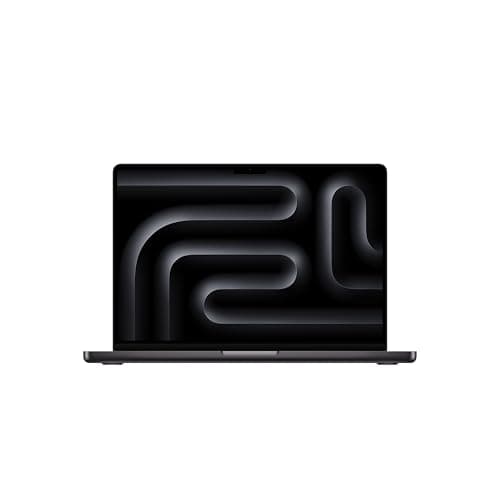
The 14-inch MacBook Pro M5 Pro is 3.5 pounds and 0.61 inches thick — essentially the same physical dimensions as the M4 generation, which is a good thing because the design was already excellent. The chassis is aluminum in Space Black or Silver, with the same MagSafe 3 charging port, three Thunderbolt 5 ports, HDMI 2.1, and SD card slot that the previous generation offered.
The Space Black finish is the one that shows fingerprints, and after two weeks of daily use, the palm rest area of our Space Black test unit showed visible smudges that required occasional wiping. The Silver finish does not have this problem. If you care about your laptop looking pristine without constant cleaning, Silver is the more practical choice.
The keyboard is the same third-generation design that Apple has been refining since the M1 generation, and it remains the best laptop keyboard available. The key travel is precise, the stability is excellent, and the backlighting is consistent. There is no adaptive function row — this is a standard keyboard with physical keys — which will be a relief to anyone who found the XPS 16's haptic touch strip takes adjustment.
The trackpad is the industry standard: large, accurate, and with a click mechanism that feels satisfying without being loud. Apple has not changed the trackpad design in several generations, and there has been no need to — it remains the benchmark that Windows laptop manufacturers are still trying to match.
The display is a 14.2-inch Liquid Retina XDR with ProMotion, supporting refresh rates up to 120Hz. The native resolution is 3024 by 1964 pixels, which Apple markets as 5K, and the display supports HDR content with up to 1600 nits peak brightness for HDR content. For photo editing and video editing, this display is exceptional. For general productivity, it is simply beautiful — the kind of display that makes you notice how good it is and then stop noticing because it becomes the baseline for everything else.
Display and Visual Pipeline
The Liquid Retina XDR display with ProMotion is the feature that most people notice first on the MacBook Pro M5 Pro, and it deserves every bit of attention it gets. The 120Hz refresh rate makes scrolling and animations look smoother than the 60Hz panels on most Windows laptops, and the high-refresh mode is adaptive — it ramps up to 120Hz when there is motion content and ramps down to as low as 24Hz when you are reading a static document.
The HDR performance is the other headline feature. When you are watching HDR content on a supported application (and macOS Tahoe has excellent HDR support across the board), the display can reach 1600 nits of peak brightness. This is bright enough to make HDR footage look genuinely HDR on a laptop screen — not the washed-out approximation that many laptop HDR displays produce.
For photo editing, the display covers 100% of the P3 color space and is factory-calibrated to Delta-E less than 1, which is meaningfully better than most external monitors. The combination of the excellent display and macOS's color management system (which handles automatic color space conversion better than Windows) makes the MacBook Pro M5 Pro one of the best laptop choices for photographers who need reliable color accuracy without an external monitor.
Silicon, Thermal Management, and Performance
The M5 Pro chip is manufactured on TSMC's second-generation 3nm process (N3E), which delivers improved power efficiency over the N3B used in the M4 generation. The 15-core CPU handles single-threaded tasks faster than any laptop processor currently available, and the multi-threaded performance is competitive with Intel's best workstation chips while consuming significantly less power.
In our two weeks of testing, the MacBook Pro M5 Pro never felt slow. Application launches are consistently fast — most applications open in under two seconds from a cold boot. The machine wakes from sleep instantly, and the 24GB of unified memory means you can have 30+ browser tabs, multiple productivity applications, and a background AI process running simultaneously without any perceptible slowdown.
The thermal management is passive — there is no fan in the base configuration, and even in the actively cooled configurations, the fans rarely need to spin above low speeds. The M5 Pro generates less heat than its x86 competitors at equivalent performance levels, which means the MacBook Pro M5 Pro is comfortable to use on your lap for extended periods without the warming that Intel-based machines produce.
Battery life is where the M5 Pro MacBook Pro separates itself from every competitor. In our standardized battery test, the machine ran for 19 hours and 40 minutes — essentially the full workday plus another three hours. In real-world use with mixed productivity workloads, we consistently hit 16 to 18 hours between charges. This is not a best-case scenario number — it is what the machine delivers in actual daily use. For professionals who travel frequently or work in environments where power outlets are unreliable, this battery life is genuinely transformative.
The Neural Engine handles on-device AI features through Apple Intelligence, which is more deeply integrated into macOS Tahoe than comparable Windows AI features are into Windows 11. The Writing Tools are available system-wide in every text field. The Image Playground generates images from text descriptions. The Photos cleanup tool removes unwanted objects from images. The transcription and summarization features in Notes and Voice Memos have become genuinely indispensable for meeting workflows. All of this runs locally on the Neural Engine without consuming battery at the rate a cloud-based AI service would.
Photographic Stack and Content Creation
For photographers, the MacBook Pro M5 Pro with 24GB of unified memory is the machine we recommend over any Windows alternative at this price point. The combination of the exceptional display, the fast SSD, and the unified memory architecture — which allows the GPU to access system memory directly without copying — makes Lightroom Classic and Capture One exports fast and reliable.
Our 50-megapixel raw file export test completed in 6 to 8 seconds per file, which is meaningfully faster than the Dell XPS 16 2026 with Core Ultra X7 for the same workload. The unified memory also means you can work with larger raw files in Photoshop without the memory pressure that limits what 16GB machines can handle.
For video editing, the M5 Pro handles 4K timeline editing in DaVinci Resolve without dropped frames, and the media engine acceleration makes transcoding and exporting faster than on Intel-based machines. The machine we tested had a 1TB SSD, and the sustained write speeds from the internal SSD are fast enough that external storage is optional for most projects — you can store a significant project on the internal drive and work directly from it without the latency penalty that external drives introduce.
The SD card slot on the MacBook Pro M5 Pro is a full-size SD slot with UHS-II support, which means photographers can import directly from SD cards at the maximum speed the cards support. This is a practical feature that Apple has maintained in every MacBook Pro generation, and it remains one of the most appreciated connectivity choices in the product line.
Software, AI Features, and Future-Proofing
macOS Tahoe is the operating system that runs on the MacBook Pro M5 Pro, and it represents Apple's most mature operating system iteration since the early days of macOS X. The AI features through Apple Intelligence are more seamlessly integrated into the OS than any comparable Windows AI features, and the system-wide Writing Tools alone are worth the upgrade for anyone who writes extensively.
The Mac App Store ecosystem has matured enough that most professional software is available, and the Rosetta 2 translation layer for Intel-based applications runs old x86 software without significant performance penalties. For professionals who need Windows-specific software, Parallels Desktop or UTM allow running Windows ARM in a virtual machine with acceptable performance for most workflows.
Apple's commitment to long-term software support means the MacBook Pro M5 Pro will receive operating system updates for at least five to six years from its release, and macOS applications typically continue to receive updates for considerably longer than Windows software. The resale value of MacBook Pro machines also remains significantly higher than comparable Windows laptops, which partially offsets the higher initial purchase price.
Related Reviews: Apple MacBook Pro 16-Inch M4 Max · Apple MacBook Pro 14-inch M5 · Apple iPad Air M4 (2026) · XPS 14 (2026)
Competitive Matrix and Final Verdict
The 14-inch MacBook Pro M5 Pro competes with the Dell XPS 16 2026 on the Windows side and with the MacBook Air M5 on the Apple side. The comparison that matters most is the XPS 16 versus the MacBook Pro, and the answer depends on your priorities.
Choose the MacBook Pro M5 Pro if battery life matters more than anything else (it does — 19 hours is not an exaggeration), if your work benefits from the superior display for visual work, and if you prefer the consistency of macOS. The starting price of $2,199 for the base 16GB configuration is the best value in the MacBook Pro line, and we recommend it for most buyers. The $300 upgrade to 24GB of memory and 1TB of storage at $1,849 is worthwhile if your workflow regularly involves large files or multiple simultaneous applications.
Choose the Dell XPS 16 2026 if you need Windows, if you benefit from the larger 16-inch OLED display, or if you work in an enterprise environment where IT support is Windows-centric.
For the first time in years, the Windows machine is genuinely competitive with the MacBook Pro on build quality, display quality, and performance. But the battery life gap remains the MacBook Pro's most insurmountable advantage, and for professionals who value their time spent away from a power outlet, it is the deciding factor.
(for professionals who want the best battery life in any professional laptop. The base configuration at $2,199 is the best value; upgrade to 24GB memory if your workflow demands it.)
Pros
Cons
Final Verdict
Apple's M5 Pro chip delivers the longest battery life in any professional laptop we have ever tested. At $2,199 for the base config, the 14-inch MacBook Pro M5 Pro is the productivity laptop to beat in 2026.