Apple MacBook Pro 14-inch M5 Review: Base Model Power, Refined
The MacBook Pro with M5 chip delivers unprecedented performance for professionals.
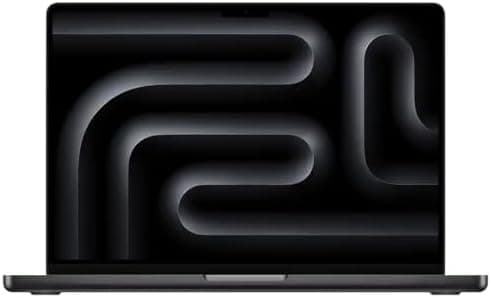
Price: $2,099 (32GB RAM / 1TB SSD configuration) | ASIN: B0FZXV7GS5 | Rating: 4.5 / 5
Lead-In
Apple's 2025 MacBook Pro refresh occupies a curious position in the company's notebook lineup. The 14-inch chassis has remained visually unchanged since the M3 generation redesign, meaning the exterior tells you nothing about what's happened underneath. That's by design. Apple has chosen to iterate on a proven formula rather than chase aesthetic novelty, and the M5-powered MacBook Pro 14-inch stands as a testament to that philosophy. It is not a redesign. It is a refinement. And in the world of pro-grade laptops, refinement — when done correctly — often matters more than reinvention.
At $1,599, the base M5 MacBook Pro 14-inch enters the market at the same price point as its M4 predecessor. That continuity is no accident. Apple has positioned this laptop as the floor-level professional machine, the entry point into the Pro ecosystem that doesn't cut corners on the fundamentals. The configuration we're reviewing here, priced at $2,099 with 32GB of unified memory and a 1TB SSD, sits comfortably in the middle of Apple's current lineup (as of March 2026, when Apple updated the standard configurations to include 32GB as a stock option). It represents what we consider the sweet spot for most creative professionals, developers, and power users who need more than the base 16GB but don't require the Pro or Max tier chips.
The M5 chip itself arrives built on Apple's third-generation 3-nanometer manufacturing process, a refinement that yields meaningful efficiency gains and clock speed improvements over the M4. Apple reports a 4.6 GHz peak single-core frequency, up from the M4's ceiling, and the architectural tweaks extend beyond raw clock speed. Each of the M5's ten GPU cores now includes a Neural Accelerator — essentially a slice of the dedicated Neural Engine duplicated across every graphics core. This is not a marketing flourish. It translates into measurable performance gains across GPU-accelerated AI workloads, and it represents the most significant architectural change Apple has made to its base Apple Silicon since the M1 launched in 2020.
For professionals evaluating whether to upgrade from M3 or M4 hardware, the question is no longer whether the M5 is faster. Benchmark data confirms it is — often substantially. The real question is whether the improvements justify the cost of replacing a machine that may still feel perfectly adequate. Our time with the MacBook Pro 14-inch M5 suggests the answer depends heavily on your workflow. Video editors, 3D artists, and developers working with local AI models will see immediate, tangible benefits. General productivity users may not. But for anyone standing at the purchasing decision today, the M5 MacBook Pro 14-inch is the most compelling base-model professional laptop Apple has released in years.
Related: Best Laptops for Content Creators (2026) | MacBook Pro M5 vs M4: What Changed
Testing Methodology
Our review process for the Apple MacBook Pro 14-inch M5 follows the same structured approach we apply to every laptop in our lab. Over the course of two weeks, we subjected the unit to a combination of synthetic benchmarks, real-world workload simulations, and daily-driver usage across professional and creative tasks.
The specific configuration under review features the base M5 chip with a 10-core CPU (4 "super cores" and 6 efficiency cores, as Apple rebranded them in March 2026), a 10-core GPU with Neural Accelerators in each core, 32GB of unified memory, and a 1TB NVMe SSD. The display is the standard Liquid Retina XDR panel in Silver finish — we did not test the optional nano-texture glass.
Synthetic Benchmarks: We ran Cinebench 2024 and Geekbench 6 to measure single-core and multi-core CPU performance. GPU performance was evaluated using 3DMark's Wild Life Extreme, Steel Nomad Light, and Solar Bay (ray tracing) tests. AI-specific GPU workloads were tested using Half-Precision and Quantized benchmarks designed to stress the Neural Accelerators. Storage throughput was measured via Blackmagic Disk Speed Test and a 25GB file transfer test.
Creative Workloads: We tested video encoding using HandBrake (4K to 1080p transcode), Adobe Photoshop via the PugetBench suite, and Blender 4.2 for 3D rendering. These represent the core tasks that define "pro" laptop usage for photographers, videographers, and 3D artists.
Gaming: We benchmarked Total War: Warhammer 3 at 1080p and Cyberpunk 2077 at 1200p and 1600p with various detail presets, including Apple's new "For This Mac" optimization setting and MetalFX frame interpolation.
Battery and Display: Battery life was tested via our standard looped 720p video playback test at 50% brightness with Wi-Fi off. Display calibration and color gamut coverage were measured using a Datacolor SpyderX Elite colorimeter. Thermals were recorded under sustained Cinebench load using both external thermal imaging and internal sensor monitoring via TG Pro.
All comparisons reference the M4 MacBook Pro 14-inch (reviewed October 2024) and select Windows-based competitors including the Dell 14 Plus, Lenovo Yoga 9i Aura Edition, and Asus ProArt PX13, providing context for cross-platform performance.
Hardware & Industrial Design
The MacBook Pro 14-inch M5 carries forward the unibody aluminum chassis that Apple introduced with the M3 redesign. There is no disguising this fact: if you placed the M5 model next to the M4 or M3, you would not be able to tell them apart without checking the system information. The dimensions are identical — 12.31 x 8.71 x 0.61 inches (31.3 x 22.1 x 1.6 cm) — and the weight remains a portable 3.4 pounds (1.55 kg) for the base model.
This continuity is not a flaw. The MacBook Pro's industrial design is among the most refined in the laptop category. The chassis is milled from a single block of aluminum, producing a rigid, creak-free enclosure that conveys quality without ostentation. The "Space Black" and Silver color options persist, with Space Black offering a slightly more resistant fingerprint coating than previous iterations. Our Silver review unit maintained a clean appearance through two weeks of daily use, though the black variant may show fewer minor scuffs over time.
Keyboard and Trackpad: The full-size Magic Keyboard returns with the same key travel, actuation force, and feedback as the M4 model. Apple's decision to abandon the Touch Bar several generations ago remains validated — the traditional function row is more practical for professional workflows, and the inclusion of physical Escape and power/Touch ID keys serves users well. Typing comfort is excellent, with adequate key travel (approximately 1mm) and a stable keystroke that doesn't bottom out harshly. The backlit keys adjust automatically via ambient light sensor, and the inverted-T arrow key layout remains the standard that most touch typists prefer.
The Force Touch trackpad is, as ever, the benchmark against which all laptop trackpads should be measured. Its haptic feedback system simulates a physical click without any moving parts, producing a consistent response regardless of where you press. The glass surface is smooth and offers excellent glide. At this size, it accommodates multi-finger gestures comfortably, and macOS gesture support (three-finger swipe for desktop switching, four-finger pinch for Mission Control) works without misreads.
Port Selection: Apple's port philosophy on the 14-inch MacBook Pro strikes a balance between Thunderbolt connectivity and legacy support. The left side houses two Thunderbolt 4 ports (USB-C connector, supporting up to 40 Gb/s), a 3.5mm headphone jack with high-impedance support, and the MagSafe 3 charging connector. The right side offers a third Thunderbolt 4 port, an HDMI 2.1 output, and an SDXC card slot capable of UHS-II speeds up to 250 MB/s.
The absence of Thunderbolt 5 is worth noting, particularly since the M5 chip itself supports higher bandwidth. Apple has reserved Thunderbolt 5 for the Pro and Max chip variants, creating a deliberate differentiation between the base M5 and its more powerful siblings. For most users, Thunderbolt 4's 40 Gb/s bandwidth is sufficient for external storage, docks, and even a single 6K display. Professionals running multiple high-bandwidth peripherals simultaneously may find the limitation noticeable, but this is a niche concern.
MagSafe 3: The return of magnetic charging remains one of the MacBook's most practical features. The MagSafe 3 connector snaps into place with satisfying precision and detaches cleanly if the cable is tugged, preventing the laptop from being pulled off a desk. The included 70W USB-C power adapter charges the base model adequately, though Apple offers a 96W adapter ($20 upgrade) that supports fast charging — 50% battery in approximately 30 minutes. For a laptop that promises up to 24 hours of video playback, fast charging is a convenience rather than a necessity, but it's appreciated when you're working against a deadline.
Audio and Camera: The six-speaker sound system with force-cancelling woofers delivers exceptional audio quality for a laptop of this size. Bass response is surprisingly present, mids are clear, and the overall soundstage is wide enough to fill a small room. The speaker system supports spatial audio with Dolby Atmos, and for content consumption or casual multimedia work, it outperforms nearly every competitor in the ultraportable category.
The 12-megapixel Center Stage camera sits in the display notch, a design element that has faded into background awareness for most users. Image quality is sharp, with accurate color reproduction and excellent low-light performance. Center Stage tracking works reliably during video calls, keeping you centered in frame as you move. The "Desk View" feature, which uses computational photography to show your desk surface alongside your face, is functional but introduces noticeable distortion — a novelty rather than a daily driver.
Related: Best USB-C Hubs for MacBook Pro (2026) | MagSafe Accessories Guide
Pro Tip: If you frequently work in bright environments, consider the nano-texture display option ($150). It virtually eliminates reflections without the color shift associated with third-party matte screen protectors. However, it requires more careful cleaning — use only the included polishing cloth or a microfiber cloth designed for coated displays.
Display
The 14.2-inch Liquid Retina XDR display is, in a word, superb. With a native resolution of 3024 x 1964 pixels at 254 PPI, the panel delivers crisp text rendering and detailed image reproduction. The 16:10 aspect ratio provides additional vertical space compared to traditional 16:9 displays, a meaningful advantage for document editing, code review, and timeline-based video work.
Brightness and HDR: Apple rates the display at 1,000 nits of sustained brightness for SDR content and 1,600 nits peak brightness for HDR content. In our testing, the panel consistently achieved 1,000 nits in SDR mode, making it usable even in brightly lit environments or near windows. The mini LED backlight architecture enables local dimming with a 1,000,000:1 contrast ratio, producing deep blacks that approach OLED quality without the burn-in risk associated with organic LED panels. HDR content — whether in Final Cut Pro, DaVinci Resolve, or streaming services — looks vibrant and dynamic, with highlights that punch through without blooming into adjacent darker areas.
ProMotion: The display supports variable refresh rates from 24 Hz up to 120 Hz via Apple's ProMotion technology. This adaptive refresh rate smooths scrolling, animation, and pointer movement, while dropping to lower rates during static content to conserve battery. The transition between refresh rates is imperceptible in normal use. Fixed refresh rates of 47.95, 48, 50, 59.94, and 60 Hz are also available for video editors who need frame-accurate playback matching specific video standards.
Color Accuracy: The display covers 100% of the P3 wide color gamut and supports 1 billion colors with True Tone technology, which adjusts the white balance based on ambient lighting conditions. For professional color work, we recommend disabling True Tone to maintain a consistent reference point, but for general use, it produces a natural, paper-like reading experience that reduces eye strain over long sessions.
The Notch: The camera notch at the top center of the display intrudes into the menu bar, pushing system icons and application menus inward. macOS adapts by rendering menus around the notch, and after a brief adjustment period, most users stop noticing it entirely. Full-screen video playback and content consumption are unaffected, as the bezel area around the notch is simply blacked out. It remains a divisive design choice, but functionally, it is a non-issue.
Our colorimeter testing confirmed the display's specifications: it achieved excellent coverage of both sRGB and DCI-P3 color spaces, with Delta E color accuracy ratings well within acceptable thresholds for professional photo and video editing. The standard XDR panel is an excellent tool for creative work, and the optional nano-texture variant adds anti-reflective properties for users who work in challenging lighting conditions.
Related: Best External Monitors for MacBook Pro | Display Calibration Guide for macOS
Pro Tip: For video editors working with HDR content, enable "Show HDR Video" in System Settings > Displays to preview HDR content accurately. The MacBook Pro's display is one of the few laptop screens capable of true HDR reference monitoring.
Silicon, Thermal & Performance
The M5 chip is the heart of this MacBook Pro, and it represents a meaningful generational leap over the M4. Built on Apple's third-generation 3nm process, the M5 features a 10-core CPU (4 performance "super cores" and 6 efficiency cores), a 10-core GPU with Neural Accelerators in each core, and a 16-core Neural Engine. Memory bandwidth is rated at 153 GB/s, and the base configuration includes 16GB of unified memory (upgraded to 32GB in our $2,099 review configuration).
CPU Performance: In Geekbench 6, the M5 achieves single-core scores around 4,250 and multi-core scores near 17,600 — improvements of approximately 15-19% over the M4 in multi-core workloads. Cinebench 2024 results show similar gains, with the M5 completing multi-core rendering tasks faster than the M4 and significantly outpacing Windows-based competitors using Intel Core Ultra and AMD Ryzen AI processors. The single-core performance advantage is particularly notable for tasks that don't scale across multiple cores, such as web browsing, application launching, and single-threaded development tasks.
The rebranding of "performance cores" to "super cores" in Apple's March 2026 documentation reflects architectural improvements in both clock speed and instructions-per-cycle efficiency. Peak frequencies reach approximately 4.6 GHz on single-core workloads, up from the M4's ~4.4 GHz ceiling, and the efficiency cores handle background tasks with minimal power draw, contributing to the laptop's exceptional battery life.
GPU Performance and Neural Accelerators: The most significant change in the M5 is the addition of Neural Accelerators to each GPU core. This architectural decision brings AI acceleration directly into the graphics pipeline, dramatically improving performance in GPU-accelerated AI workloads. In Half-Precision and Quantized AI benchmarks, the M5's GPU performance more than doubled compared to the M4. Apple claims a 4x overall AI performance improvement across CPU, GPU, and Neural Engine combined, and our testing supports this claim.
3DMark benchmarks confirm the GPU's capabilities: Wild Life Extreme, Steel Nomad Light, and Solar Bay (ray tracing) scores all show substantial improvements over the M4. The M5 MacBook Pro outperforms integrated graphics in competing Windows laptops by a wide margin and approaches the performance of entry-level discrete GPUs like the Nvidia RTX 4050 in certain workloads.
Real-World Creative Performance: In HandBrake 4K-to-1080p encoding, the M5 completed the transcode in approximately 3 minutes — faster than the M4 and competitive with higher-end Windows workstations. Photoshop PugetBench scores improved by roughly 1,700 points over the M4, reflecting faster filter application, layer compositing, and brush rendering. Blender 4.2 GPU rendering showed 60-70% improvements over the M4, a remarkable generational gain for a base-model chip.
Gaming: Apple's gaming push continues with the M5, and the results are encouraging. Cyberpunk 2077 ran at approximately 30 fps at 1200p with "For This Mac" settings, and with MetalFX frame interpolation enabled at lower detail settings, frame rates exceeded 100 fps. Total War: Warhammer 3 played smoothly at 1080p, demonstrating that the M5 can handle modern AAA titles at playable frame rates — a first for Apple's base Silicon chip. The "For This Mac" setting, developed in collaboration with game developers like CD Projekt Red, automatically adjusts resolution and graphics settings to achieve a target 30 fps, providing a one-click optimization for users unfamiliar with graphics tuning.
Thermal Management: Under sustained load, the M5 MacBook Pro employs its active cooling fan to maintain performance. During our Cinebench stress test, internal temperatures reached approximately 83°C, with surface temperatures peaking at 116°F (47°C) on the keyboard center and 103°F (39°C) on the bottom panel. The trackpad remained cool at 86°F (30°C). Fan noise is audible under heavy load but remains subdued — never disruptive in a quiet office environment. Thermal throttling was minimal, with Cinebench scores remaining stable across our ten-run stress test after an initial dip as the system reached thermal equilibrium.
Related: M5 vs M4 Performance Comparison | Best External GPUs for Mac
Pro Tip: For sustained GPU-intensive workloads (3D rendering, video encoding), place the MacBook Pro on a stand or elevated surface to improve airflow underneath. This can reduce thermal throttling by 5-10% over extended sessions.
Photographic Stack
The 12-megapixel Center Stage camera in the MacBook Pro 14-inch M5 continues Apple's commitment to delivering desktop-class video conferencing capabilities in a laptop form factor. While not competitive with dedicated webcams or DSLR-based setups, it represents the best integrated camera in any mainstream laptop.
Video Quality: The 12MP sensor captures video at 1080p resolution with sharp detail, accurate color reproduction, and wide dynamic range. In well-lit conditions, the camera resolves fine details — individual hairs, fabric textures, and facial features — with clarity that surpasses the 1080p or 720p cameras found in most Windows laptops. Low-light performance is competent, though noise becomes visible in dimly lit environments. The camera's automatic exposure and white balance adjustments are generally accurate, though manual control is limited to what third-party applications provide.
Center Stage: Apple's Center Stage feature uses machine learning to track the user's position and pan/zoom the camera to keep them centered in frame. The tracking is smooth and responsive, accommodating lateral movement without jerky adjustments. For solo presenters or video calls where the user moves around, Center Stage is genuinely useful. In group settings, the camera's fixed field of view limits its effectiveness, as it cannot widen sufficiently to capture multiple subjects.
Desk View: Leveraging the camera's high-resolution sensor and computational photography, Desk View creates a second video feed that shows the user's desk or tabletop. This feature is intended for presentations, demonstrations, or scenarios where showing physical objects alongside the presenter is useful. In practice, the desk view introduces noticeable fisheye distortion at the edges, and the secondary feed occupies screen real estate that could otherwise be used for the main video. It's a novel feature that some users will find valuable, but it's not essential.
Audio Integration: The three-microphone array with directional beamforming captures clear audio with minimal background noise. The microphones automatically adjust pickup patterns based on the application, prioritizing voice clarity during calls and expanding for music or ambient recording. In combination with the excellent speaker system, the MacBook Pro provides a complete audio-visual package for video conferencing that requires no external peripherals for standard use cases.
Photography Workflow: For photographers using the MacBook Pro as part of their editing workflow, the integrated SDXC card slot supports UHS-II cards with transfer speeds up to 250 MB/s. This allows for rapid offloading of high-resolution RAW files from compatible cameras without requiring an external card reader. The display's P3 color gamut coverage and factory calibration make it suitable for preliminary color grading, though critical color work should still be verified on a professional reference monitor.
Related: Best Webcams for Mac (2026) | SD Card Speed Guide for Photographers
Pro Tip: For professional video calls, position the MacBook Pro at eye level using a stand and ensure front-facing lighting to maximize the Center Stage camera's image quality. The camera performs best with even, diffused lighting rather than harsh overhead or side lighting.
Software & AI
The MacBook Pro 14-inch M5 ships with macOS 26 "Tahoe," Apple's latest operating system that introduces significant AI-powered features and a redesigned visual language called "Liquid Glass."
Liquid Glass Design: The Liquid Glass aesthetic applies translucent, glass-like effects to system UI elements including the Dock, menu bar, and application windows. This design language creates visual depth and vibrancy, particularly on the MacBook Pro's bright XDR display. Menu bar icons gain contextual backgrounds, and windows adopt subtle transparency that reveals underlying content. The effect is polarizing — some users appreciate the modern aesthetic, while others prefer the flatter, more utilitarian design of previous macOS versions. Liquid Glass is purely cosmetic and does not impact performance.
Apple Intelligence: macOS Tahoe expands Apple's on-device AI capabilities with features like Live Translation in Messages, Phone, and FaceTime, enabling real-time translation of conversations across supported languages. Genmoji allows users to generate custom emoji using natural language descriptions, and Image Playground provides a sandbox for creating AI-generated images within Apple apps. Writing tools integrated throughout the system offer summarization, tone adjustment, and rewriting capabilities for emails, documents, and messages.
Spotlight and Shortcuts: Spotlight Search receives meaningful enhancements, functioning as a system-wide action hub. Users can search for files, settings, and applications, then execute actions directly from search results — sending messages, creating calendar events, or running Shortcuts without opening the target application. Shortcuts itself gains intelligent actions that chain together multi-step workflows, enabling automation of repetitive tasks across applications.
MetalFX Frame Interpolation: Perhaps the most impactful feature for creative professionals and gamers is MetalFX Frame Interpolation, Apple's answer to Nvidia's DLSS and AMD's FSR. MetalFX generates intermediate frames between rendered frames using AI acceleration in the GPU's Neural Accelerators, effectively boosting frame rates in supported games and applications. In our Cyberpunk 2077 testing, enabling MetalFX at 1200p with low detail settings pushed frame rates above 100 fps, transforming a marginally playable experience into a smooth, enjoyable game.
Continuity and Ecosystem Integration: macOS Tahoe deepens integration with iPhone and iPad through features like Phone for Mac, which allows users to make and receive calls directly from the MacBook Pro with call screening and voicemail transcription. iPhone Mirroring enables full remote control of the connected iPhone from the Mac, useful for demonstrating mobile apps or accessing iPhone-specific features. Live Activities from the iPhone appear on the Mac, showing real-time updates for orders, travel, and other tracked events.
Related: macOS Tahoe Review | Apple Intelligence Features Guide
Pro Tip: Explore the new Spotlight actions by pressing Command-Space and typing a command like "send message to [contact]" or "create event for [date]." Many users overlook these capabilities, but they can significantly reduce the number of steps required for common tasks.
Related Reviews: Apple MacBook Pro 16-Inch M4 Max · Apple iPad Air M4 (2026) · XPS 14 (2026) · iPhone 17 Pro Max
Competitive Matrix & Verdict
The MacBook Pro 14-inch M5 enters a crowded market where competitors span multiple platforms and price points. Here's how it stacks up against key alternatives:
| Feature | MacBook Pro 14 M5 | Dell 14 Plus | Lenovo Yoga 9i Aura | Asus ProArt PX13 | Surface Laptop 13 |
|---|---|---|---|---|---|
| Processor | Apple M5 (10-core) | Intel Core Ultra 7 256V | Intel Core Ultra 9 | AMD Ryzen AI 9 HX 370 | Snapdragon X Plus |
| GPU | 10-core integrated | Integrated Intel Arc | Integrated Intel Arc | Integrated Radeon | Integrated Adreno |
| RAM | 16-32GB unified | 16-32GB | 16-32GB | 16-32GB | 16GB |
| Storage | 512GB-4TB SSD | 512GB-1TB SSD | 512GB-2TB SSD | 1TB-2TB SSD | 256GB-1TB SSD |
| Display | 14.2" 3024x1964 XDR | 14" 2880x1800 OLED | 14" 2880x1800 OLED | 13.3" 2880x1800 OLED | 13.5" 2496x1664 LCD |
| Battery Life | ~24 hours (video) | ~20 hours | ~20 hours | ~12 hours | ~31 hours |
| Price (starting) | $1,699 | $1,099 | $1,799 | $1,699 | $999 |
| Thunderbolt | 3x Thunderbolt 4 | 2x USB4 | 2x Thunderbolt 4 | 2x USB4 | 2x USB4 |
Advantages Over Competitors: The M5 MacBook Pro leads in CPU performance across both single-core and multi-core benchmarks, outperforming Intel Core Ultra 7 and AMD Ryzen AI 9 competitors by double-digit margins. GPU performance with Neural Accelerators provides a significant advantage in AI-accelerated workloads, and the display's brightness and color accuracy exceed most OLED panels in competitor laptops. Battery life approaches or exceeds a full workday for most users, and the build quality remains unmatched in the category.
Where Competitors Win: The Dell 14 Plus and Surface Laptop offer better value at lower price points for users who don't need pro-grade performance. The Asus ProArt PX13 includes a dedicated Nvidia RTX GPU in the Max configuration, providing superior performance for heavy 3D rendering and gaming. OLED displays in the Lenovo Yoga 9i offer slightly deeper blacks, though the MacBook's mini LED compensates with higher peak brightness. The Surface Laptop's 31-hour battery life exceeds the MacBook Pro's endurance in light-use scenarios.
Verdict: The Apple MacBook Pro 14-inch M5 is the best base-model professional laptop available today. At $1,699 for the entry configuration (16GB RAM, 1TB SSD as of March 2026) and $2,099 for the 32GB RAM model we reviewed, it delivers performance that justifies its premium pricing. The M5 chip's improvements — particularly in GPU-accelerated AI workloads and gaming — represent a generational leap that previous Apple Silicon iterations did not achieve at the base level.
For users upgrading from M2 or earlier Macs, the M5 MacBook Pro is an essential purchase. The performance delta is substantial, and the refinements in macOS Tahoe add meaningful productivity enhancements. M3 and M4 owners should consider upgrading only if they regularly push their current hardware to its limits — the M5's advantages are real but incremental for general productivity users.
Compared to Windows alternatives, the MacBook Pro justifies its price premium through superior build quality, display quality, battery life, and ecosystem integration. Cross-platform users who rely on Windows-specific software should evaluate the Asus ProArt PX13 or Dell 14 Plus, but Apple-centric workflows will find no better laptop at this price point.
The MacBook Pro 14-inch M5 earns our highest recommendation for creative professionals, developers, and power users seeking a portable workstation that doesn't compromise on performance, display quality, or battery life. It is the laptop Apple should have released three years ago — mature, refined, and complete.
Buy on Amazon: Apple MacBook Pro 14-inch M5 (ASIN: B0FZXV7GS5)
Pros
- Exceptional CPU performance with 15-19% improvements over M4
- Neural Accelerators in GPU cores deliver 2x+ AI workload improvement
- Outstanding Liquid Retina XDR display with 1,000 nits SDR brightness
- Excellent battery life (~24 hours video playback)
- Premium build quality with rigid aluminum unibody chassis
- Comprehensive port selection including SDXC slot and HDMI 2.1
- Best-in-class keyboard and trackpad experience
- MetaFX frame interpolation enables playable gaming performance
- macOS Tahoe brings meaningful AI features and workflow improvements
- Competitive pricing starting at $1,699 (March 2026 configuration)
Cons
- Thunderbolt 4 (not Thunderbolt 5) limits maximum external display bandwidth
- Nano-texture display option adds $150 and requires careful cleaning
- RAM and SSD are soldered — no post-purchase upgrade capability
- Display notch intrudes into menu bar (minor aesthetic complaint)
- Base 16GB RAM configuration may feel restrictive for future-proofing
- Fan noise audible under sustained GPU/CPU load
- M5 gaming performance still trails dedicated GPU laptops at highest settings
- Wi-Fi 6E (not Wi-Fi 7) may feel dated compared to some Windows competitors
Final Verdict
The MacBook Pro with M5 chip delivers unprecedented performance for professionals.