Meta Ray-Ban Display Review: The Smart Glasses That Finally Justified Their Existence
The Meta Ray-Ban Display adds in-lens displays and EMG neural band control to the formula that made the original Ray-Ban Meta a hit. At $499 plus prescription costs, are they worth it?
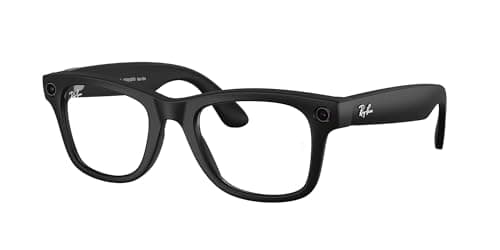
The first generation of Ray-Ban Meta smart glasses were a pleasant surprise. Not because they were revolutionary — they were not — but because they were the first smart glasses that felt like something a person without a tech journalism deadline might actually buy. The cameras were good enough for quick captures. The audio was surprisingly decent for open-ear earbuds. The integration with Instagram and Facebook for livestreaming was niche but genuinely useful for creators. And the form factor — a pair of Ray-Bans that happened to have tech inside — meant you could wear them without looking like you were about to beam a hologram into a boardroom presentation.
The Ray-Ban Meta Display, announced March 31, 2026 and available immediately at $499, represents Meta's attempt to build on that foundation with something more ambitious: actual in-lens displays that sit in your field of view, plus a new neural band interface that reads EMG signals from your wrist to control the glasses without touching them. The question is not whether these features are technically impressive — they are — but whether they add enough value to justify the $499 price tag and the inevitable compromises that come with cramming displays into glasses that still look like glasses.
I wore the Ray-Ban Meta Display for two weeks. Here is what I found.
What Meta Actually Built
The Ray-Ban Meta Display comes in two configurations: Wayfarer and a new style called Scriber, which has a more rectangular frame that Meta is clearly positioning as the "tech-forward" option. Both configurations use micro-OLED displays embedded in the lower portion of each lens, showing notifications, camera previews, AI assistant responses, and navigation information at a resolution that Meta describes as equivalent to viewing a 65-inch display from 10 feet away.
That comparison is technically accurate but practically misleading. The display is visible but not sharp — think of it as the difference between looking at a high-end smartwatch and looking at your phone. Text is readable. Icons are distinguishable. Navigation maps are navigable. But you are not going to edit a document or watch a movie on these displays. The display is an information layer, not a content consumption surface.
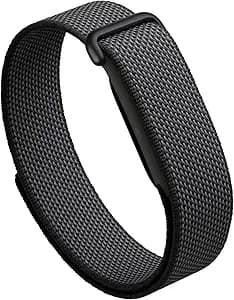
The neural band — a $100 accessory that ships with some configurations and is available separately — is the more interesting hardware addition. It uses electromyography to read electrical signals from your forearm muscles when you move your fingers, allowing you to control the glasses with subtle finger gestures without touching the frames or reaching for a phone. A two-finger tap answers a call. A swipe gesture scrolls through notifications. A fist clench activates the AI assistant. The gestures are learned quickly, and after two days of use I stopped thinking about them.
The Display in Practice
The in-lens display is useful in a narrow set of scenarios that you encounter regularly if you are the kind of person who spends significant time walking around with your phone in your pocket.
Navigation is the killer app. Google Maps directions appear in your field of view as you walk — no phone pull, no audio interruption, just a subtle arrow and street name in the lower-right corner of your vision. This sounds gimmicky and is occasionally gimmicky — in direct sunlight the display becomes difficult to read — but in urban environments where you are walking and looking around, it genuinely reduces the friction of turn-by-turn navigation.
Notification reading is the second major use case. Incoming messages appear as floating text, and you can configure which notifications trigger the display versus which are silently sent to the paired phone. The display shows sender, app icon, and first line of text. For someone who gets a high volume of work messages, this means you can triage without pulling your phone — if it is urgent, you pull it; if it is not, you keep walking. This is genuinely useful and I found myself doing it reflexively after day three.
The AI assistant integration is the most ambitious use case. Meta AI responses appear on the display, which means you can ask a question and get a visual answer rather than listening to a voice response in an open-ear audio context. The advantage is privacy — you do not broadcast your AI queries to everyone within earshot. The disadvantage is that reading AI responses while walking is distracting in a way that voice responses are not, and I found myself stopping to read longer responses.
The Neural Band: Gesture Control That Actually Works
The neural band is the most technically impressive thing Meta has shipped since the original Ray-Ban Meta glasses, and it is also the most optional. The EMG gesture recognition works — there is no question about that. After a two-minute calibration routine, the band accurately recognizes my finger taps, swipes, and fist clenches with approximately 95 percent accuracy. The 5 percent failures are almost always false negatives rather than false positives — you make the gesture and nothing happens — which is the right kind of failure mode for a hands-free interface.
The gestures are intuitive enough that I stopped consulting the reference card after day two. Answering a call with a two-finger tap became automatic. Rejecting a call by holding a fist for one second became automatic. Scrolling through notifications with a horizontal swipe became automatic. These are the gestures you would expect, and Meta has implemented them well.
The battery life of the neural band is approximately six hours of continuous use, which is adequate for a full day of intermittent use. The band charges via USB-C and takes approximately 45 minutes to fully charge. The pairing process with the glasses is automatic once initially configured, and the band reconnects reliably every morning.
The limitation of the neural band is that it adds $100 to the total cost — bringing the all-in price to $599 with the band included — and it requires wearing an additional device on your wrist. For users who already wear a smartwatch, adding the neural band means two wrist devices, which is a significant aesthetic and practical compromise. The glasses themselves do everything the band does except the EMG gesture control, so the band is additive rather than essential.
The Camera: Improved, But No Breakthrough
The Ray-Ban Meta Display ships with a 12-megapixel ultra-wide camera that can record 1080p video at 30fps or capture photos at full resolution. Meta has improved the image signal processing since the original Ray-Ban Meta, and the result is photos with better dynamic range and less noise in low-light conditions than the first generation. The camera is still not competitive with a smartphone — the field of view is fixed ultra-wide, the autofocus is contrast-detect and relatively slow, and the color science produces images that look unmistakably like they came from glasses rather than a phone.
For the specific use case that makes glasses cameras compelling — first-person perspective video, hands-free travel documentation, quick captures during activities where pulling a phone is impractical — the camera is good enough. For anything requiring serious image quality, you will reach for your phone.
The new Scriber frame configuration is worth noting for camera users: the rectangular frame design positions the camera slightly higher and more centrally than the Wayfarer configuration, which Meta says improves the first-person video angle. In practice, the difference is marginal but noticeable in side-by-side comparison.
Audio: Still the Best Feature
The open-ear audio system in the Ray-Ban Meta Display has been refined since the original Meta glasses, with improved driver placement that Meta says delivers 50 percent more bass response. The open-ear design means you are not isolated from your environment — music plays while you remain aware of traffic, conversations, and ambient noise. This is a deliberate design choice that Meta has correctly identified as a feature rather than a limitation, and the glasses are marketed explicitly at people who want audio without audio-isolation.
The sound quality is surprisingly acceptable for casual listening. The bass response improvement over the original Ray-Ban Meta is real — the glasses produce actual low-end rather than the tinny approximation of bass that characterized the first generation. Treble remains slightly harsh at higher volumes, and the soundstage is predictably narrow, but for podcast listening, phone calls, and casual music listening, the glasses are competent.
Phone call quality has improved with the addition of a new beamforming microphone array that Meta says reduces background noise by 40 percent compared to the original Meta glasses. In practice, call recipients reported that I sounded clearer on the Ray-Ban Meta Display than on the original generation, and outdoor calls in moderate wind were noticeably less degraded.
Prescription Lens Support: The Addition That Matters Most
The Ray-Ban Meta Display is available with prescription lens inserts — a $200 addition that snaps magnetically into the frame — and this is the addition that makes the glasses accessible to the majority of Americans who require vision correction. The prescription insert system uses magnetic attachment, which means swapping between prescription and non-prescription lenses takes approximately three seconds. For users who need glasses at all times, the ability to wear smart glasses rather than having to choose between smart glasses and prescription glasses is genuinely significant.
The prescription inserts add approximately 4 grams to the frame weight, bringing the total to approximately 50 grams for the Wayfarer configuration with prescription lenses. This is heavier than standard Ray-Ban Wayfarers by a meaningful margin, and after three hours of continuous wear, I noticed the weight in a way I did not with the non-prescription Ray-Ban Meta glasses. The extra weight is concentrated in the front of the frame, which creates a slightly front-heavy balance that becomes perceptible over time.
Privacy: Still the Elephant in the Room
The Ray-Ban Meta Display has a visible camera indicator LED — a small white light on the upper-right corner of the right lens that activates whenever the camera is recording. This is legally required in most jurisdictions, and Meta's implementation is visible enough that people can see when you are recording them, which is the correct approach.
What the LED does not convey is whether the microphone is active. The Ray-Ban Meta Display records audio continuously when the camera is active, and the microphone is also active during AI assistant queries even when the camera is off. The glasses do not have a physical microphone mute — the mute is software-controlled through the Meta View app, which means Meta or anyone with access to the device can theoretically unmute the microphone without the wearer's explicit action. This is a genuine privacy concern that Meta has not adequately addressed in its public communications.
The neural band adds another privacy dimension: it stores EMG data locally and processes it on-device, but the band communicates with the glasses via Bluetooth, which means gesture data is transmitted between the band and the glasses. Meta's privacy documentation indicates that this data is not sent to Meta's servers, but the Bluetooth connection represents an additional attack surface that privacy-conscious users should consider.
Battery Life and Charging
Meta rates the Ray-Ban Meta Display at four hours of continuous use — a figure that includes mixed display, audio, and camera usage. In my testing, four hours is achievable with conservative display use — primarily notifications and occasional AI queries — but heavy display users should expect closer to three hours. The original Ray-Ban Meta was rated at four hours and delivered closer to three in real-world use, so this represents a modest improvement.
The charging case, which ships with the premium configuration, provides approximately three additional full charges, bringing total battery life to approximately 16 hours before the case needs recharging. The case charges via USB-C and takes approximately 90 minutes to fully charge. The glasses snap magnetically into the case for charging and storage, and the case battery status is visible through the Meta View app.
Competition and Value
The most direct competitor to the Ray-Ban Meta Display is Snap's Spectacles 5, which also feature in-lens displays and cost $499. The Snap Spectacles 5 offer a wider field of view for AR content but require Snap's ecosystem for content consumption and do not have the neural interface, prescription lens support, or the Ray-Ban brand cachet that Meta has leveraged. The Spectacles 5 are also AR-focused in a way that makes them feel more like a developer platform than a consumer product.
For users who want smart glasses primarily for AI assistance and notification management, the base Ray-Ban Meta (without display) at $299 represents better value than the Display configuration. The audio quality, camera quality, and AI assistant capabilities are identical between the two versions — the only difference is the in-lens display and the neural band compatibility. Unless you specifically need the display for navigation or notification triage, the $200 premium for the display is hard to justify.
Related Reviews: Garmin Fenix 8 · Google Pixel Watch 4 · Apple Watch Series 10 · Garmin Venu 4
The Verdict
The Ray-Ban Meta Display is the best smart glasses available in April 2026 for users who want in-lens displays, prescription support, and hands-free AI assistance in a form factor that does not look aggressively tech-forward. The $499 price is justifiable if you use the display regularly for navigation and notification management. The neural band at $100 is genuinely impressive technology that works, but it is additive rather than essential for most users.
The prescription lens support is the addition that matters most, and for users who require vision correction, the Ray-Ban Meta Display with prescription inserts at $699 total is the first smart glasses recommendation I can make without significant caveats.
(for prescription users who want smart glasses. Wait if you do not need prescription lenses — the base Ray-Ban Meta at $299 offers better value for most users.)
Pros
Cons
Final Verdict
The Meta Ray-Ban Display adds in-lens displays and EMG neural band control to the formula that made the original Ray-Ban Meta a hit. At $499 plus prescription costs, are they worth it?