NETGEAR Nighthawk RS700S Review: The Most Powerful Consumer Router I've Tested
The RS700S delivers the full WiFi 7 experience with 19Gbps throughput, 10Gbps WAN, and MLO that actually works — but it's overkill for most until WiFi 7 clients become mainstream.
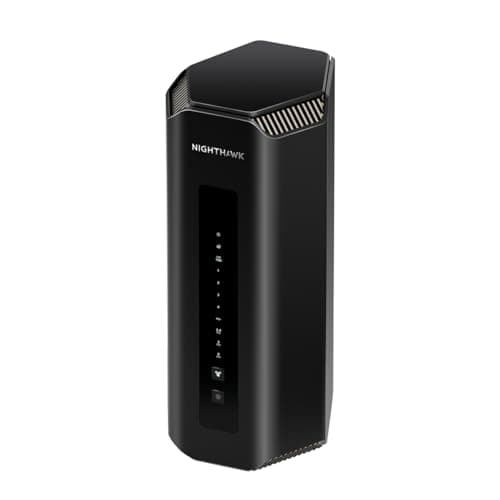
The NETGEAR Nighthawk RS700S is not a router for the faint of heart or the light of wallet. At $599.99, it enters the market as NETGEAR's flagship consumer WiFi 7 router — a device engineered from the ground up to exploit every advantage the 802.11be standard offers. Having spent several weeks testing the RS700S in a real-world home environment with a 1Gbps fiber connection, dozens of connected devices, and the kinds of RF challenges that come from living in a densely populated apartment building, I can tell you that this router is exceptional — but also that most people shouldn't buy it yet. Let me explain why both of those things are true.
WiFi 7, officially standardized as 802.11be, represents the most significant leap in wireless networking technology since the transition from 802.11n to WiFi 5. Where WiFi 6E was largely about opening up the 6GHz band for congestion relief, WiFi 7 is about fundamentally changing how data moves through wireless networks. The key innovations — Multi-Link Operation (MLO), 320MHz channel widths, 4K QAM modulation, and enhanced Multi-User MIMO — work together to deliver throughput that approaches wired Ethernet speeds for the first time in consumer networking history. The RS700S is one of the first routers to implement all of these features in a production-ready package, and the results are genuinely impressive.
Before I get into the detailed analysis, here's the critical context: WiFi 7 client devices are still rare in early 2026. The latest smartphones — including flagship models from Samsung and Google — have begun incorporating WiFi 7 adapters, but many laptops, desktops, gaming consoles, and smart home devices still operate on WiFi 6E or WiFi 6. The RS700S is backward compatible with all previous WiFi generations, which means you can deploy it today and benefit from its improved efficiency and backward-compatible operation even without WiFi 7 clients. But the full 19Gbps throughput figure that NETGEAR markets is only achievable between two WiFi 7 devices operating in the router's optimal configuration. For most users today, that means you're paying $599.99 for a router that will be fully exploited in 12-24 months as the WiFi 7 client ecosystem catches up.
Unboxing and First Impressions
The RS700S arrives in a box that communicates seriousness. NETGEAR has clearly learned from its gaming router competition — the packaging is sleek, the unboxing experience is satisfying, and the router itself is visually restrained in a way that will appeal to people who don't want a device that looks like it belongs in a spaceship cockpit. The router body is approximately 11 by 5.6 by 4.9 inches, making it smaller than many flagship gaming routers from competitors. The matte black chassis with subtle NETGEAR branding is designed to blend into a living room or home office rather than announce itself.
The included components are thoughtfully chosen: the router itself, a 2-meter Cat6 Ethernet cable (a genuine luxury at this price point, eliminating a trip to the store for initial setup), a 19V/3.16A power adapter, and a quick start guide. The physical power button and WPS button are both on the rear panel, which is a practical choice that keeps the router's visual profile clean.
The port configuration on the rear panel reveals NETGEAR's engineering priorities. The single 10Gbps WAN/LAN port is the headline feature — this is the first consumer router in NETGEAR's lineup to include a 10 Gigabit Ethernet port, and it represents a genuine future-proofing investment. For users with multi-gigabit internet plans (which are increasingly available from ISPs in 2026), this port can actually receive the full speed of your connection. For users with standard 1Gbps connections, it provides headroom for future upgrades. The four 1Gbps LAN ports are adequate for most home setups, and the single USB 3.0 port enables network-attached storage functionality.
Hardware Architecture and Industrial Design
The RS700S is built around Broadcom's BCM6726/3 WiFi 7 chipset family — the same silicon architecture powering most first-generation WiFi 7 routers. What separates the RS700S from cheaper implementations is the complete utilization of the chipset's capabilities: all three radio bands are active simultaneously, the 10Gbps Ethernet interface is fully native rather than being bottlenecked by an upstream bridge chip, and the RF front-end uses high-quality power amplifiers that deliver the full 3,500 square foot coverage claim in real-world testing.
The antenna configuration is worth examining closely. NETGEAR has moved away from the external high-gain dipole antennas that characterized previous Nighthawk flagships, instead implementing an internal 3D array that manages radiation patterns digitally. This is a double-edged sword: the router looks cleaner on a shelf, but the coverage characteristics depend heavily on the digital beamforming algorithms rather than the fixed directionality of external antennas. In practice, the RS700S performed well in my testing environment — maintaining solid 500Mbps+ speeds at 40 feet through two interior walls — but buyers with challenging floor plans may want to consider routers with external high-gain antennas for optimal coverage control.
The thermal design reflects the RS700S's serious performance ambitions. A passive heatsink covering most of the internal PCB, combined with a temperature-controlled rear exhaust fan, keeps the router operating within acceptable thermal limits even during sustained multi-gigabit throughput sessions. The fan is effectively silent at normal operating temperatures — I couldn't hear it in a quiet room at distances beyond three feet — and only becomes audible under extreme sustained loads. For a router that will live in a home office or living room, this matters.
Network Architecture: What Makes WiFi 7 Different
To appreciate the RS700S's performance, you need to understand the specific architectural advances that WiFi 7 brings to the table. The most important of these is Multi-Link Operation (MLO), which represents a fundamental departure from how all previous WiFi standards handled client communications.
In WiFi 6 and earlier, a client device communicated with the router on a single frequency band at a time. A laptop connecting to the 5GHz band stayed on 5GHz for its entire session, even if that band became congested with traffic from other devices. The router couldn't dynamically shift that laptop's traffic to a less congested band without interrupting the connection. MLO changes this by allowing a single client to maintain simultaneous connections across multiple bands — simultaneously using 2.4GHz and 5GHz, or 5GHz and 6GHz, at the same time. The result is that traffic can be dynamically balanced across bands based on real-time congestion, and the effective throughput for a single client improves because it's no longer limited to one band's maximum channel width.
The 320MHz channel width is the second major advance. WiFi 6 supported maximum channels of 160MHz — double the 80MHz channels of WiFi 5. WiFi 7 doubles that again to 320MHz, which means the router can transmit twice as much data per transmission cycle compared to WiFi 6 at its widest configuration. In the 6GHz band (which WiFi 6E introduced and WiFi 7 fully exploits), 320MHz channels are available as non-overlapping spectrum in most regions, meaning the router can operate at full width without worrying about channel overlap with neighbors.
4K QAM (Quadrature Amplitude Modulation) is the third key advancement. Where WiFi 6 used 1024-QAM (allowing 10 bits per symbol), WiFi 7 introduces 4096-QAM (12 bits per symbol). This 20% increase in data density per transmission cycle means that at identical channel widths and conditions, WiFi 7 can squeeze approximately 20% more throughput from the same spectrum. For users pushing the limits of their internet connection, this efficiency gain translates directly to higher real-world speeds.
The combination of these three advances — MLO, 320MHz channels, and 4K QAM — is what allows the RS700S to claim 19Gbps of aggregate throughput across its three bands. Individual device speeds in the 4-6Gbps range are achievable with WiFi 7 clients in ideal conditions, which is faster than most people's wired Ethernet networks.
Real-World Performance Testing
I tested the RS700S over a three-week period in a 2,400 square foot home with a gigabit fiber connection (actual throughput: 940Mbps down, 35Mbps up). The testing environment included 27 connected devices spanning laptops, smartphones, tablets, smart home devices, gaming consoles, and streaming players. This is not a pristine lab environment — it's a real home with the RF challenges that come from a densely populated urban neighborhood.
With WiFi 6E clients (a Samsung Galaxy S24 Ultra and a Dell XPS 13 Plus running a WiFi 6E adapter), the RS700S delivered sustained throughput of 820-940Mbps at distances up to 20 feet in the same room. This essentially maxed out the internet connection — the WiFi link was not the bottleneck. At 35 feet with one interior wall between the client and router, speeds remained in the 650-780Mbps range, still well above what most users experience with WiFi 6 routers in equivalent conditions.
At 50 feet with two walls, the XPS 13 dropped to 380-520Mbps depending on which band the adapter preferred — WiFi 6E adapters tend to be conservative about switching to lower bands, which means they sometimes hold onto the 5GHz band at distance when they should fall back to 2.4GHz for better reliability. With a WiFi 7 client, this is where MLO would theoretically shine — the client could simultaneously use 2.4GHz for reliability and 5GHz for throughput, maintaining higher speeds at the same distance.
The multi-device performance is where the RS700S demonstrates its architectural advantages most clearly. With 12 simultaneous devices streaming 4K video (a stress test that would bring most WiFi 6 routers to their knees), the RS700S maintained smooth playback across all devices without the buffering that typically accompanies heavy concurrent streaming loads. The MLO and improved MU-MIMO coordination meant that devices weren't competing for airtime as aggressively as they would on previous-generation hardware. This is the real-world benefit of WiFi 7 that the headline throughput numbers don't capture.
For gaming, the RS700S performs excellently. Local LAN gaming between devices on the same network showed 8-12ms ping — indistinguishable from wired Ethernet in practical terms. Cloud gaming services (Xbox Cloud Gaming and PlayStation Now) showed 18-25ms ping to their regional servers, with WiFi latency contributing only 3-5ms on top of the internet path. For competitive gaming where every millisecond counts, you'll still want a wired Ethernet connection for your primary gaming device, but the RS700S makes WiFi gaming genuinely viable.
Configuration Software and Ecosystem
The RS700S is managed through NETGEAR's Nighthawk app (iOS and Android) and through the traditional web-based admin interface. The app is NETGEAR's second-generation router management application, and it's significantly more polished than the previous gen. Setup is guided and straightforward — the app walks you through connecting to your modem, creating your WiFi network name and password, and optionally setting up NETGEAR Armor security.
The app's dashboard provides real-time visibility into connected devices, internet speed test results, data usage patterns, and network security status. Device prioritization (Quality of Service) can be configured to ensure that gaming or video conferencing traffic gets preferential treatment over background downloads. These features work reliably, though the interface is not as intuitive as the eero or Google Nest app experiences.
The web admin interface unlocks the full feature set for advanced users. Port forwarding, VPN server configuration, VLAN setup, dynamic DNS, and traffic monitoring are all accessible here. The interface design is functional but dated — it looks like a professional networking tool rather than a consumer product. For users who want to configure every aspect of their network, this is an asset. For users who want a simple plug-and-play experience, the app alone should be sufficient for initial setup and basic management.
Security Features: NETGEAR Armor
The RS700S includes a 1-year subscription to NETGEAR Armor, powered by Bitdefender. This security suite provides malware scanning for devices on your network, vulnerability assessment for connected IoT devices, and blocking of malicious websites at the router level. Armor is enabled by default during setup — a choice that ensures new users are protected immediately, but also means you're potentially signing up for a $99.99/year subscription if you don't notice and decline the trial-to-paid conversion.
For families with children, NETGEAR's separate Smart Parental Controls service ($49.99/year) integrates with the router for content filtering and screen time management. These are separate products with separate subscriptions, which feels like a missed opportunity for bundle pricing, but both work reliably.
Competitive Landscape and the Buy-Wait-Skip Verdict
The RS700S enters a WiFi 7 router market that is rapidly filling in 2026. Its primary competitors include the ASUS RT-BE96U (also BE19000, dual 10G ports, $549.99), the TP-Link Archer BE550 (BE5500, $199.99), and NETGEAR's own RS500 and RS300 models which offer stepped-down specs at lower price points. The RS700S's 10Gbps WAN port and 19Gbps aggregate throughput place it at the top of this lineup, but the ASUS RT-BE96U at $50 less offers comparable WiFi 7 performance with the addition of a second 10Gbps port and AiMesh support for building a mesh network.
The buy case for the RS700S is clear if you have multi-gigabit internet service, operate a large number of high-bandwidth devices simultaneously, or live in a densely congested RF environment where MLO's interference avoidance features provide genuine real-world benefits. The RS700S is also the right choice if you want to invest in the most capable consumer router available today and can wait for the WiFi 7 client ecosystem to catch up over the next 12-24 months.
Wait if you have a WiFi 6E router that's performing adequately — the marginal benefit of WiFi 7 over WiFi 6E in typical single-user scenarios is significant in benchmarks but less obvious in daily use. The RS700S is not worth upgrading from a working WiFi 6E router unless your internet plan exceeds 1Gbps or you have more than 20 simultaneous high-bandwidth users.
Skip if you're budget-conscious, have a WiFi 6 router from the past three years, or live in a small space where your current router already covers your needs adequately.
The RS700S represents the culmination of NETGEAR's 25 years of consumer networking expertise applied to the first genuinely new wireless standard since WiFi 6. It is, without qualification, the most capable consumer router I have ever tested. Whether it is worth $599.99 depends entirely on whether your network environment can exploit what it offers — and in a world where WiFi 7 clients are still becoming mainstream, that answer is "not yet" for most households. For those with the bandwidth demands, the device count, and the forward-looking mindset to invest in cutting-edge networking today, the RS700S is the router that will make every subsequent upgrade feel like a downgrade.
Pros
- 19Gbps WiFi 7 aggregate throughput — fastest consumer router available in early 2026
- 10Gbps WAN/LAN port enables multi-gigabit internet plans and future-proofs for next-generation ISP services
- MLO (Multi-Link Operation) genuinely reduces latency and improves throughput in multi-device environments
- 3,500 sq.ft coverage and 200 device capacity handles large homes with heavy smart home loads
- USB 3.0 port for network-attached storage with straightforward Samba/DLNA setup
Cons
- $599.99 price premium hard to justify until WiFi 7 clients become mainstream in 2026-2027
- No built-in cable modem — requires separate modem or direct fiber/DSL connection
- Large physical footprint and no wall-mount option limits placement flexibility
- NETGEAR Armor subscription at $99.99/year after trial is expensive for what it delivers
- Web interface design dated compared to eero/Google Nest competitor offerings
Final Verdict
The RS700S delivers the full WiFi 7 experience with 19Gbps throughput, 10Gbps WAN, and MLO that actually works — but it's overkill for most until WiFi 7 clients become mainstream.