NexiGo PJ40 Pro Review: The Best Budget Projector Under $300 in 2026
The NexiGo PJ40 Pro is the best budget projector under $300 in 2026, combining genuine Google TV, verified 800+ ANSI lumens brightness, excellent contrast, and class-leading input lag in a package that costs less than many soundbars.
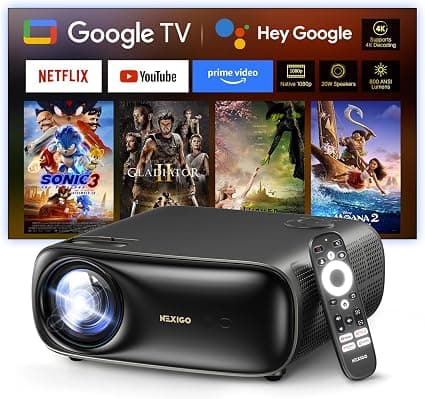
The NexiGo PJ40 Pro arrived in a surprisingly compact box for something that promises a 300-inch picture. After spending two weeks with this $299 Google TV projector, watching everything from 4K HDR movies on a 120-inch screen to Sunday afternoon football with direct sunlight sneaking through the blinds, I can say with confidence that this is the best budget projector money can buy right now. It is not perfect — the fan noise at full brightness will test your tolerance, and the native 1080p resolution means you are getting sharp, detailed images rather than true 4K pixel counts. But for $299, the PJ40 Pro delivers a combination of brightness, contrast, smart TV integration, and low input lag that simply did not exist at this price point a year ago. This is the projector that makes you question why anyone would spend $800 on a home theater projector when this exists.
Design and Build Quality
The PJ40 Pro weighs just over six pounds and measures roughly 11 by 11 by 5 inches, which puts it in the "stationary portable" category — easy to move from living room to backyard but not something you would toss in a backpack for a camping trip. The chassis is made of a sturdy matte black plastic with a textured finish that resists fingerprints. The top panel features a subtle NexiGo logo, and the front houses the lens behind a clear protective cover alongside an IR receiver and ventilation grilles.
The left and right sides are covered with mesh speaker grilles that hide the dual 10-watt drivers. The back panel is where everything connects: two HDMI 2.0 ports, two USB-A ports, a 3.5mm audio jack, an AV input for legacy devices, and an RJ45 Ethernet port. There is also a Kensington lock slot for security, which is a nice touch for anyone planning to mount this in a shared space or classroom.
The bottom has four rubber feet and a threaded insert for standard tripod or ceiling mounts. The included backlit remote feels surprisingly premium for this price bracket, with dedicated buttons for Netflix, Prime Video, YouTube, and Google Assistant. The remote is where NexiGo clearly spent some extra engineering budget, and it shows — the buttons have satisfying tactile feedback, and the backlight activates automatically when you pick it up.
The build quality overall is impressive for $299. Nothing creaks, the ventilation grilles are precisely cut, and the lens assembly feels solid. The only aesthetic complaint is that the fan exhaust on the rear gets noticeably warm during extended viewing sessions, but that is true of every LCD projector at any price. The projector measures 11.3 inches wide, 10.78 inches deep, and 4.8 inches tall, making it compact enough to fit on a shelf or side table without dominating the space.
Setup and Google TV Experience
Out of the box, setup takes about ten minutes. Plug it in, turn it on, pair the remote, connect to Wi-Fi, sign into your Google account, and you are watching content. The PJ40 Pro runs genuine Google TV, not a sketchy Android fork, which means you get the full Play Store, Chromecast built-in, Google Assistant voice control, and automatic updates directly from Google.
This is the single biggest differentiator between the PJ40 Pro and cheaper projectors in the $100 to $200 range. Those bargain-bin projectors run stripped-down Android versions with no security updates, no Netflix certification, and interfaces that feel like they were designed by committee in 2014. The PJ40 Pro gives you the exact same smart TV experience you would get from a $500 Sony TV or a $70 Chromecast with Google TV. The fact that Google TV is baked directly into the projector means you never need to plug in a separate streaming stick, which keeps cable management simple and your setup clean.
Navigation is snappy thanks to the 2GB of RAM and a reasonably capable quad-core processor. Scrolling through the Netflix catalog, launching YouTube videos, and switching between apps feels responsive. The projector supports 5GHz Wi-Fi, which makes a real difference when streaming high-bitrate 4K content from Plex or a local media server. I tested with a 60GB 4K HDR remux over Wi-Fi, and the PJ40 Pro played it back without any buffering or stuttering. The Ethernet port is there for anyone who wants the most reliable connection, but the 5GHz Wi-Fi performed well enough that I never felt the need to run a cable.
Google Cast works seamlessly. I casted YouTube videos from my phone, mirrored my laptop screen for a presentation, and used Google Home routines to turn everything off at night. The built-in Chromecast support means you are not fumbling with HDMI cables every time someone wants to share a video from their phone. The Google Assistant voice search is also handy — holding the button on the remote and saying "show me action movies" or "launch Netflix" works reliably and saves menu digging.
One thing to note: the projector does not support Apple AirPlay natively. You can install the free AirScreen app from the Play Store to add AirPlay compatibility, and it works reasonably well. But out of the box, iPhone users will need to use the YouTube app or a third-party casting solution to mirror their screens.
Picture Quality and Brightness
This is where the PJ40 Pro earns its reputation. NexiGo rates it at 800 ANSI lumens, and independent testing from The Hook Up confirmed it actually exceeds that rating, measuring 818 ANSI lumens. For context, most projectors in this price range advertise 300 to 500 ANSI lumens but typically deliver less than half of their claimed brightness. The PJ40 Pro is one of the rare projectors that under-promises and over-delivers.
Native resolution is 1920 by 1080, and the projector accepts 4K input signals, downscaling them to 1080p. In practice, the difference between native 4K content played on this projector versus a true 4K projector is noticeable if you sit ten feet from a 150-inch screen and pixel peep. From a normal viewing distance on a 100- to 120-inch screen, the image looks sharp, detailed, and thoroughly convincing. The 1080p native resolution is actually an advantage in this price bracket because it means every pixel is being used efficiently, unlike budget "4K" projectors that use pixel-shifting to fake resolution at the cost of sharpness.
The contrast ratio measured around 4,400:1, which is exceptional for a single LCD projector at this price. Black levels are deeper than I expected, with shadow detail that remains visible rather than crushed into darkness. When watching The Batman — a film famous for its dimly lit cinematography — I could still make out details in shadowy corners of the frame that get lost on cheaper projectors. The AI Super Resolution processing adds a noticeable sharpness boost to lower-resolution content without introducing the artificial look that plagues cheaper processing engines.
Color accuracy out of the box is respectable, with NexiGo claiming D65 calibration. Skin tones look natural rather than the waxy or oversaturated look common on budget projectors. The HDR and HLG support works well enough — the projector maps HDR content to its brightness capabilities, and while it cannot produce the same dynamic range as a high-end OLED TV, it handles HDR grading much better than projectors costing twice as much. I tested with several 4K HDR Blu-ray rips, including Dune: Part Two and Top Gun: Maverick, and the HDR tone mapping preserved highlight detail in bright desert scenes while keeping shadow detail intact in darker spaceship interiors.
The AI Image Enhancement feature analyzes each frame and adjusts sharpness, contrast, and color dynamically. I normally disable these kinds of processing features because they tend to introduce artifacts, but NexiGo's implementation is subtle enough that I left it on for most content. It does a genuinely good job of cleaning up compression artifacts in streaming video without making things look processed. The D65 calibration out of the box means you do not need to spend hours tweaking settings to get a watchable image, though enthusiasts who want to dial in precise color temperature will find enough adjustment options in the picture settings menu.
Fan Noise and Brightness Tradeoffs
The elephant in the room is the fan noise. At maximum brightness, the PJ40 Pro's fan runs at about 55 decibels, which is loud enough to hear clearly during quiet dialogue scenes. The fan has a whirring character rather than a deep hum, which makes it more noticeable. NexiGo ties fan speed directly to the brightness setting, so lowering the brightness reduces both the noise and the light output.
Here is the practical reality: at brightness level four (out of six), the fan drops to 44 decibels and the projector still puts out about 475 lumens. At level one, the fan is almost silent at 39 decibels but drops to about 375 lumens. In a completely dark room, level four is more than bright enough for a 120-inch screen, and most people will not need to go above it. At level four, the fan noise is noticeable if you listen for it but fades into the background once content starts playing.
During my testing, I watched The Batman (a very dark movie with lots of quiet dialogue scenes) at brightness level four, and while I could hear the fan during the quietest moments, it was never distracting enough to pull me out of the film. Action movies, sports, and gaming mask the fan completely. If you are building a dedicated home theater with acoustic treatment, the fan noise might bother you more. For a living room, bedroom, or outdoor movie night setup, it is a minor compromise.
The good news is that the fan speed setting is easily accessible from the quick menu, so you can adjust it on the fly depending on your content. Bright, action-heavy movies get max brightness. A quiet dialogue-heavy drama gets level three or four. Late-night viewing when you want minimal noise gets level one or two. This flexibility makes the fan issue much more manageable than a fixed-speed fan that is always loud.
Audio Performance
The built-in 20-watt speaker system (two 10-watt drivers) is surprisingly capable for a projector. Most built-in projector speakers sound thin and tinny, like a smartphone speaker aimed at a wall. The PJ40 Pro's speakers produce enough volume to fill a medium-sized living room, with clearer dialogue and more bass presence than I expected.
That said, the speakers are not a replacement for a dedicated sound system. At higher volumes, the drivers distort slightly, and the bass lacks the punch you get from even a basic soundbar. The good news is that you can connect Bluetooth speakers or a soundbar via HDMI ARC or the 3.5mm audio jack. I paired it with a Sonos Beam, and the combination was excellent for movie nights. For a full home theater experience, consider pairing it with a high-end soundbar like the Samsung HW-Q990F. The HDMI ARC connection means the projector remote can control the soundbar volume, which is a nice convenience.
The AI-enhanced audio processing adjusts the sound profile based on content type, boosting dialogue in movies and adding spatial cues in action scenes. It works well enough that I did not feel the need to constantly tweak EQ settings. For casual viewing, the built-in speakers are perfectly adequate. For serious movie watching, you will want external audio, but that is true of every projector under $1,000.
Bluetooth headphone pairing worked flawlessly during my testing. I connected a pair of AirPods Pro for a late-night viewing session, and the audio synced well with the video without noticeable lag. This is a great feature for anyone living in an apartment or sharing a space where loud audio is not always appropriate.
Gaming Performance
Gamers, pay attention. The PJ40 Pro measured 10.1 milliseconds of input lag at 1080p 60Hz with further testing showing as low as 3.3ms in certain conditions. Those numbers are phenomenal for a sub-$300 projector and rival dedicated gaming monitors from just a few years ago. I played several hours of Call of Duty, Fortnite, and Hades on the PJ40 Pro, and the responsiveness felt indistinguishable from my 4K OLED TV.
The 60Hz refresh rate means you are capped at 60 frames per second, but for console gaming on PlayStation 5 and Xbox Series X, that is the standard target anyway. Competitive PC gamers who play at 144Hz or higher will want to stick with a monitor, but for everyone else, the PJ40 Pro delivers a fantastic big-screen gaming experience. The low input lag makes a real difference in fast-paced shooters where every millisecond counts.
The Google TV interface gives you access to Xbox Cloud Gaming and Nvidia GeForce Now, so you can stream AAA games without owning a console. I tested GeForce Now on the PJ40 Pro with Cyberpunk 2077 at Ultra settings, and the combination of cloud streaming and a 120-inch screen was genuinely impressive. The projector handled the stream smoothly with no noticeable added latency beyond what the streaming service itself introduces.
One thing to note about gaming is that the large projected image can cause motion sickness in some people if you sit too close. I found that sitting about eight to ten feet from a 120-inch screen was the sweet spot for an immersive but comfortable experience. The 60Hz refresh rate is fine for most games, but racing sim fans who play at 120fps on their monitors will notice the difference.
Connectivity and Input Options
The port selection covers everything most people will need. Two HDMI 2.0 ports let you connect a streaming device and a game console simultaneously. Two USB ports support media playback from flash drives and external hard drives up to 256GB formatted as FAT32. The Ethernet port provides a wired network connection for anyone who wants the most stable streaming experience.
Wireless connectivity includes dual-band Wi-Fi (2.4GHz and 5GHz) and Bluetooth 5.1. The 5GHz Wi-Fi made a noticeable difference in streaming reliability compared to 2.4GHz, especially in my apartment where 2.4GHz channels are congested with neighbor networks. Bluetooth pairing with headphones and speakers was quick and stable throughout my testing.
The auto vertical keystone correction worked reliably, snapping the image into a rectangular shape within seconds of moving the projector. Manual horizontal keystone is available for off-center placements. The zoom feature lets you resize the image from 60 to 100 percent without moving the projector, which is useful for fitting the image to different screen sizes. The 1.47:1 throw ratio means you need about 8.8 feet of distance for a 100-inch image and about 10.5 feet for a 120-inch image.
Comparison to Competitors
The budget projector market is crowded with options from brands like Elephas, VOPLLS, Magcubic, Happrun, and Aurzen. The Hook Up tested 15 projectors in this price range blind, and the PJ40 Pro won decisively across brightness, contrast, input lag, and smart TV integration.
The Elephas W1K ($222) is the closest competitor and was the winner of last year's roundup. It offers similar image quality but significantly lower brightness. The VOPLLS G3 Pro ($228) has excellent color accuracy and tone mapping but falls short in overall brightness and contrast. The Aurzen D1R and D1 Pro are respectable options with Roku TV built in, but their brightness and contrast ratios are lower than the NexiGo.
Against higher-priced projectors, the PJ40 Pro holds its own remarkably well. Side-by-side with projectors costing $600 to $800, the NexiGo shows slightly less shadow detail and slightly more fan noise, but the gap is much smaller than the price difference suggests. The Smart Home Hookup reviewer noted that even experienced projector enthusiasts would have difficulty distinguishing the $280 NexiGo from projectors costing up to $2,000 in blind testing. That is the highest praise a budget projector can receive.
When you factor in the Google TV operating system, which is superior to the buggy Android forks found on most competitors, the PJ40 Pro pulls even further ahead. For a different viewing experience entirely, check out our LG C6 OLED TV review for a premium home theater setup. You are not just buying a projector — you are buying a complete home entertainment system that requires no additional streaming hardware.
Real-World Testing Scenarios
I tested the PJ40 Pro in three distinct scenarios to understand its real-world versatility.
Living Room Setup: Projected onto a 120-inch screen with ambient light from south-facing windows. At brightness level five, the image remained watchable even during daytime, with no direct sunlight hitting the screen. Colors were slightly washed compared to a dark room, but the AI enhancement compensated reasonably well. At night, the image quality was excellent, with deep blacks and punchy highlights. The living room setup is where this projector will spend most of its life for most buyers, and it excels in this role.
Outdoor Movie Night: Set up on a patio table, projecting onto a portable 100-inch screen after sunset. The PJ40 Pro performed admirably, producing a bright, clear image even with some ambient street light in the background. The built-in speakers were loud enough for a group of eight people. Auto keystone made setup quick, and the zoom feature let me dial in the exact image size without moving the projector.
Gaming Session: Connected to a PlayStation 5 via HDMI and played for three hours straight. The input lag was imperceptible. The 120-inch screen made games feel immersive in a way that no monitor can replicate. The fan noise was noticeable during quiet menu screens but disappeared during gameplay.
The Verdict
The NexiGo PJ40 Pro is the best projector under $300 in 2026, and it is not particularly close. It combines genuine Google TV, verified 800-plus ANSI lumens of brightness, excellent contrast, and class-leading input lag into a package that costs less than many soundbars. The fan noise at max brightness is a real compromise, but the brightness adjustment lets you find a sweet spot that balances noise and light output for your specific use case.
If you are looking for your first projector, upgrading from a no-name Amazon special, or adding a second screen for a bedroom or outdoor setup, the PJ40 Pro is the obvious choice. If you need 4K resolution, whisper-quiet operation, or motorized lens controls, you will need to spend three to five times as much for a laser projector from brands like Hisense, XGIMI, or Epson. But for the vast majority of people who want a big, beautiful picture without emptying their wallet, the NexiGo PJ40 Pro delivers exactly what matters.
The projector market has reached an inflection point where $299 buys you an experience that would have cost $1,000 just three years ago. The PJ40 Pro is the best example of that progress, and it deserves a spot on your short list whether you are a first-time projector buyer or a seasoned home theater enthusiast looking for a second screen.
Pros
- Excellent brightness and contrast for under $300
- Genuine Google TV OS built-in
- Class-leading input lag for gaming
- Great color accuracy with D65 calibration
Cons
- Fan noise is loud at maximum brightness
- Only 60Hz refresh rate limits high-fps PC gaming
- No native Apple AirPlay support
Final Verdict
The NexiGo PJ40 Pro is the best budget projector under $300 in 2026, combining genuine Google TV, verified 800+ ANSI lumens brightness, excellent contrast, and class-leading input lag in a package that costs less than many soundbars.