reMarkable Paper Pro Move Review: Premium Portable Note-Taking in Your Pocket
The reMarkable Paper Pro Move is the most portable full-featured digital notebook available. Its compact size makes it a genuine always-with-you device, and the writing experience is uncompromised despite the smaller screen. At $499, it is the right choice for anyone who wants reMarkable quality in a pocket-sized format.
Introduction
Portable note-taking has always been a compromise between convenience and capability. Small notebooks fit in pockets but offer limited writing space. Large notebooks provide room to think but require dedicated bags. reMarkable's Paper Pro Move ($499) attempts to resolve this tension with a compact 7.3-inch color e-ink display that promises to put a full-featured digital notebook in your jacket pocket.
At $499, the Paper Pro Move undercuts its larger sibling, the Paper Pro Bundle, by $180. You get the same color e-ink technology and the same Marker Plus stylus, but in a smaller, more mobile form factor. The question is whether the portability trade-off is worth it, or whether the Move's compact screen undermines the core writing experience that makes reMarkable devices compelling.
This review is based on hands-on use of the Paper Pro Move as a primary note-taking device over a two-week period. It has been used in meetings, on commutes, and for personal journaling and sketching. The goal is to understand whether the Move is a genuine portable productivity tool or a compromised version of a concept that works better in a larger format.
Design and Hardware
Compact Industrial Design
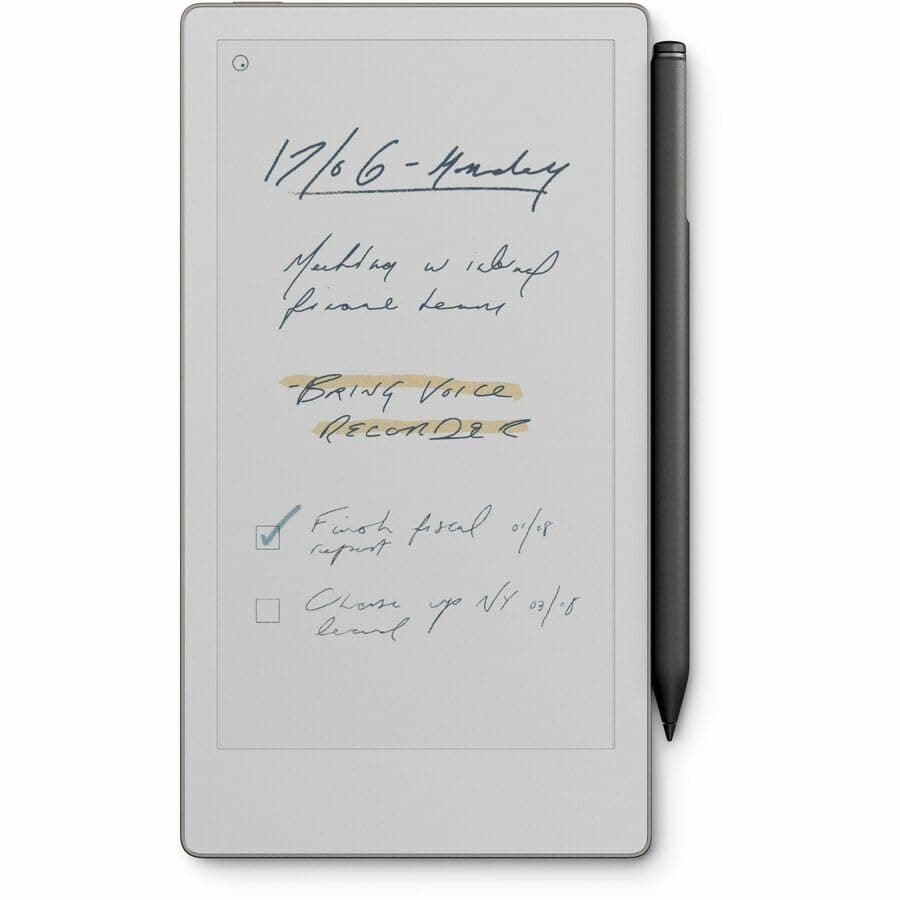
The Paper Pro Move is immediately notable for how small it is. At approximately 195mm tall and 136mm wide, it is roughly the dimensions of a small paperback novel—significantly smaller than a standard Moleskine notebook and light enough to forget it is in your pocket. At around 370 grams (with the Marker Plus attached), it adds minimal weight to daily carry.
The chassis uses the same matte gray material as its larger sibling, with a build quality that feels solid and premium. There are no creaks or flex in the body, and the overall construction suggests durability despite the thin profile. The Move feels like a precision instrument rather than a consumer gadget, which is consistent with reMarkable's overall design philosophy.
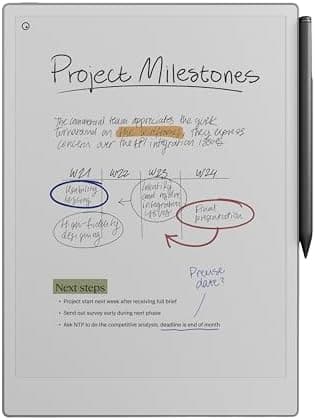
The 7.3-inch display is surrounded by a comfortable bezel that provides grip without feeling wasteful of screen real estate. The screen itself is the same Canvas Color e-ink technology as the Paper Pro—a muted, desaturated color palette like colored pencils on paper. The display is not designed to compete with LCD or OLED panels on vibrancy; it is designed to add a functional layer of color to handwritten notes and document annotations.
The resolution is 954 x 1696 pixels in portrait orientation. On a 7.3-inch display, this produces approximately 300 pixels per inch—a higher pixel density than the 11.8-inch Paper Pro due to the smaller screen size at similar pixel count. Text and lines appear sharp and crisp, and the writing surface is comfortable without visible pixelation.
Marker Plus Stylus
The Paper Pro Move includes the Marker Plus stylus at no additional cost, which is a meaningful inclusion given the $129 standalone price of the pen. The built-in eraser on the rear cap is genuinely useful, and the seamless switching between pen and eraser modes remains one of the best stylus design decisions in the market. Pressure sensitivity at 4,096 levels provides natural line variation. Tilt support enables shading effects.
The smaller screen size of the Move does affect how the stylus is used. Writing in portrait orientation provides a comfortable experience similar to writing in a small Field Notes-style notebook. Writers who prefer landscape orientation can rotate the device, which effectively doubles the horizontal writing width.
Port Selection and Connectivity
The Move charges via USB-C, which has become the standard across consumer electronics and is welcome here. The single USB-C port handles both charging and data transfer, which means you cannot charge and connect to a computer simultaneously without a hub—a minor inconvenience.
There is no headphone jack and no speaker, which is consistent with the device's focus on writing rather than media consumption. There is no cellular connectivity option—the Move connects exclusively via Wi-Fi, which is appropriate for a device whose primary purpose is document management in home, office, and classroom environments.
Writing Experience
The Core Proposition
reMarkable has staked its entire brand on the proposition that writing by hand on a digital surface should feel indistinguishable from writing on real paper. The Paper Pro Move delivers on this promise more completely than any competing device. The textured e-ink surface provides genuine resistance and friction, the stylus latency is imperceptible during normal writing speed, and palm rejection works flawlessly. When you write on the Move, you are writing—not operating a computer.
The 7.3-inch screen size is the central question for any potential buyer. Is it enough? The answer depends heavily on your use case, and it is worth examining honestly.
For meeting notes, to-do lists, quick sketches, and daily journaling, the Move's screen is genuinely adequate. The writing area in portrait orientation provides approximately the same space as a standard index card or a small sticky note, which is sufficient for discrete thoughts, short entries, and quick captures. If your note-taking style favors brevity—bullet points, short sentences, quick diagrams—the Move's screen never feels constraining.
For academic note-taking, long-form journaling, or any use case where you need to capture extended prose or complex diagrams, the screen can feel cramped. Writing full paragraphs requires a smaller font or abbreviated handwriting, and the absence of a wide margin means you are working with the full width of the page without the option to reserve space for annotations. Rotating to landscape helps, but the Move's landscape width still falls short of the writing space available on the 11.8-inch Paper Pro.
The practical implication is that Move users may need to be more deliberate about starting new pages—a habit that is both a limitation and a virtue. Shorter, more focused entries encourage concision and make documents easier to review later. The device subtly incentivizes organizing thoughts into discrete, searchable units rather than producing sprawling, disorganized notebook pages.
Color in Practice
The addition of color to the Move's display deserves specific attention in the context of the compact format. On a small screen, color becomes more important as an organizational tool because space for visual differentiation is at a premium. The ability to assign colors to different subjects, projects, or note types on the Move is genuinely useful for maintaining visual order in a compact format.
The muted color palette works well on the Move. Color-coded highlights, category tags, and layered sketches are all readable on the smaller display, and the reduced vibrancy of e-ink color means there is no harsh contrast that would be distracting on a compact screen.
Reading on the Move
The Move is marketed as a portable note-taking device, but its e-ink display makes it an excellent e-reader as well. The 7.3-inch screen is similar in dimensions to a large paperback, which makes it comfortable for reading novels, short stories, and long-form articles. The adjustable frontlight extends reading into evening hours, and the e-ink display's lack of blue light emission reduces sleep disruption compared to LCD tablets or phones.
PDF support is available, but the 7.3-inch display makes working with standard letter-size PDFs a challenge. Documents designed for 8.5" x 11" pages require significant zooming and panning to read comfortably, and annotation of PDFs on the Move is functional but not ideal. The Move is better suited to documents originally designed for smaller formats—ePub ebooks, formatted articles, and short-form content.
The built-in browser allows you to clip web articles for offline reading, which is one of reMarkable's most useful features. You can send any web page to your reMarkable library, where it is reformatted for the e-ink display and made available for reading and annotation.
Software Ecosystem
The Move runs the same reMarkable OS as the Paper Pro, which means the software experience is consistent across the product line. The home screen, document management system, handwriting recognition, and organizational tools are identical on both devices.
The handwriting-to-text conversion feature works the same on both devices, and the accuracy is good for legible handwriting. The system supports folders, tags, and a unified search that spans your entire library. The reMarkable apps for iOS, Android, macOS, and Windows provide access to your notes across platforms, and the cloud sync keeps everything current across devices.
The subscription question is also the same: the reMarkable Connect subscription ($2.99/month or $29.99/year) unlocks the full feature set, including cloud sync across unlimited devices, advanced integrations, and the complete reMarkable Connect ecosystem. Without a subscription, cloud sync is limited to three devices.
Battery Life
Battery performance on the Move is exceptional, as it is on all e-ink devices. reMarkable rates the Move at approximately two weeks of typical use, and this estimate is achievable with moderate daily writing and reading.
In practice, heavy users who write for several hours daily may find themselves charging every 10 days or so, while lighter users can easily go two weeks or more between charges. The USB-C charging port means you can use the same cable as most modern laptops and phones.
Compare this to a standard tablet, which typically requires charging every one to two days of active use. For a device that is supposed to be always available for notes, the Move's extended battery life is a meaningful advantage.
Comparison with Alternatives
Versus reMarkable Paper Pro (11.8-inch)
The obvious comparison for the Paper Pro Move is its larger sibling. The Paper Pro costs $180 more and offers approximately 60% more screen real estate. For users who will primarily write at a desk or in a dedicated workspace, the larger display is worth the premium.
However, for users who want a portable device that goes everywhere with them, the Move is the better choice. The difference in portability between the two devices is not incremental—it is categorical. The Move fits in a jacket pocket; the Paper Pro requires a bag. If portability is the priority, the Move wins decisively.
Versus iPad mini with Apple Pencil
The iPad mini (9th generation, $499) is the Move's most direct competitor in terms of size and price. The iPad mini offers a backlit LCD display, full iOS functionality, access to the App Store, and Apple Pencil support.
However, the writing experience on an iPad—even with a quality matte screen protector—fundamentally differs from the Move. The iPad's glass surface lacks the tactile authenticity of the Move's textured e-ink display. The iPad's backlit display causes more eye strain during extended writing sessions. And the iPad mini's constant notifications create distractions that the Move's deliberately limited interface eliminates.
If you want a device for writing and reading, the Move's focus is an advantage. If you want a device that can do everything, the iPad mini is more capable.
Versus BOOX Palma 2
The BOOX Palma 2 (approximately $399) is a smartphone-form-factor e-ink device that runs full Android. It is smaller than the Move (6.13-inch display), runs Android apps, and has a camera.
The Move is larger, offers a better writing experience with stylus support, and provides more screen real estate for both reading and note-taking. The writing experience on the Palma 2 is limited to finger input or a separately purchased stylus, which is not as refined as the Marker Plus.
Versus Traditional Notebooks
At $499 plus the cost of a subscription, the Move is significantly more expensive than even premium notebooks. A $20 premium notebook used daily might last six months, which means the Move would need to replace $120-$200 worth of notebooks per year to break even over five years—achievable for heavy note-takers but not guaranteed.
The advantage of the Move over physical notebooks is digital: searchable notes, cloud sync, handwriting-to-text conversion, and the ability to back up everything to the cloud. For professionals who lose notebooks or struggle to organize handwritten material, the Move's digital workflow offers concrete productivity gains.
Portability as a Philosophy
The Paper Pro Move is not simply a smaller Paper Pro—it represents a philosophy of portable productivity. The device is designed for capture: quick notes in meetings, sketches on the go, reading during commutes, and the kind of asynchronous, on-demand note-taking that happens throughout the day rather than at a dedicated desk.
The Move's size forces a certain discipline in note-taking. With limited screen space, users are encouraged to be concise, to use the Marker Plus's color coding for organization, and to create shorter, more focused entries that are easier to review and search later. This is not a limitation of the hardware—it is a design philosophy that aligns with the device's name: the Move is for capturing thoughts when you are in motion.
Related Reviews: Surface Pro 10 · Galaxy Tab S10 FE · Galaxy Tab A11+ · OnePlus Pad 3
Conclusion
The reMarkable Paper Pro Move is the best compact digital notebook available today. Its 7.3-inch color e-ink display provides enough writing space for practical daily use while maintaining a form factor that genuinely fits in a pocket. The Marker Plus stylus is included at no extra cost and delivers the best writing feel of any stylus on the market. The battery life is exceptional, the build quality is premium, and the software ecosystem is mature and reliable.
At $499, it undercuts the larger Paper Pro by a meaningful margin while delivering most of the writing experience in a fraction of the size. For professionals and students who want a digital notebook that goes everywhere with them, the Move is the right choice.
The Move is not trying to be a tablet. It is not trying to replace your phone or your laptop. It is trying to be the best possible tool for capturing handwritten thoughts, sketches, and annotations in a portable format—and it succeeds. If that is what you need, the Paper Pro Move is worth every dollar of its premium price.
Pros
- Genuine pocket portability for a digital notebook
- Excellent writing feel with color support
- Marker Plus stylus included at no extra cost
- Exceptional battery life (2+ weeks)
- Focused, distraction-free interface
- Color e-ink enhances note organization on compact screen
Cons
- Cramped writing space for extended prose or complex diagrams
- Small screen limits PDF annotation usability
- No expandable storage
- Subscription required for full ecosystem access
- Weak pen magnetic attachment
Final Verdict
The reMarkable Paper Pro Move is the most portable full-featured digital notebook available. Its compact size makes it a genuine always-with-you device, and the writing experience is uncompromised despite the smaller screen. At $499, it is the right choice for anyone who wants reMarkable quality in a pocket-sized format.