Galaxy Book5 Pro 360
Samsung\s best 2-in-1 yet. Gorgeous AMOLED display and excellent S Pen integration make it perfect for creatives.
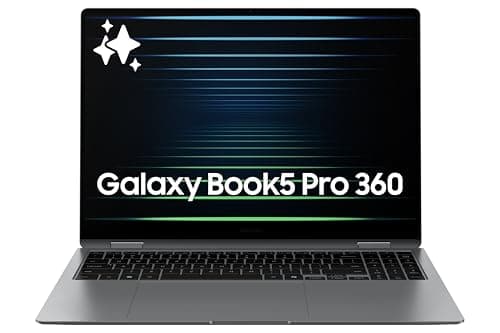
Samsung's Galaxy Book5 Pro 360 is one of those devices that does almost everything right—except for one glaring problem that keeps it from being the category-defining machine it should be. The hardware is genuinely excellent: a stunning 3K AMOLED display, a comfortable convertible design with S Pen included, Intel Core Ultra 7 processing power, and Samsung's Galaxy AI features baked in. But here's the thing: you have to know where to look for the AI features, and even then, some of them feel half-baked. The marketing promises more than the product delivers on the AI front, while the hardware delivers more than the marketing adequately communicates. Let me walk you through what you actually get.
Hardware and Design: Samsung Knows How to Build Premium
The Galaxy Book5 Pro 360 is unmistakably a Samsung product. The graphite gray aluminum body is slim and light—at around 3.7 pounds for a 16-inch 2-in-1, that's competitive with the best in its class. The 360-degree hinge is smooth and solid, letting you flip between laptop, tent, stand, and tablet modes without any wobble or uncertainty. The hinge tension is well-calibrated: light enough to flip one-handed with a satisfying motion, firm enough that the screen stays exactly where you put it in tablet mode.
In tent mode (inverted V-shape, display facing out), the speakers actually sound better—the audio fires toward you rather than down into the keyboard deck, which is a nice touch for media consumption. This is one of those small design details that shows Samsung actually tested the product in real usage scenarios rather than just spec-sheet engineering.
The 3K AMOLED display (2880x1800) is the star of the show. Colors are Samsung AMOLED-perfect: inky blacks, vivid primaries, and the kind of contrast that makes everything from spreadsheets to Netflix look better. The 120Hz refresh rate keeps scrolling and animations silky smooth, and touch response is immediate and accurate. Whether you're using it as a laptop for work or flipping it to tablet mode for reading and annotation, the display is a genuine pleasure to use. This is a panel that makes you want to use the device just to look at it.
The included S Pen is excellent—low latency, pressure-sensitive, and it magnetically attaches to the side of the chassis. It's the same experience as using a Galaxy Tab S pen, which is high praise. Note-taking in Samsung Notes is genuinely useful, and the pen works across all Windows pen-compatible apps. The pen doesn't have a silo in the chassis (no charging dock built in), so it relies on the magnetic attachment and battery, but I never had it die on me during a work session. The magnet is reasonably strong but not foolproof—knocking the pen off in a bag is a real risk, and a proper pen garage would have been better.
The keyboard is comfortable and backlit, with good travel for a thin-and-light machine. The key spacing is generous, and the backlighting is even with no hot spots. The trackpad is large and uses Samsung's precision drivers for smooth, accurate tracking with Windows 11's full gesture support. Ports include USB-C with Thunderbolt 4 (two of them), USB-A, HDMI, and a microSD slot—reasonable connectivity for a machine this thin. The USB-A is a welcome inclusion that many thin-and-lights have abandoned.
Performance: Intel Core Ultra 7 Handles Real Work
The Intel Core Ultra 7 processor (the 255H, specifically, in the reviewed configuration) is a capable performer. It's not chasing workstation benchmarks, but for the productivity, creative, and light content creation work this machine is designed for, it absolutely delivers. The 16GB LPDDR5X RAM and 1TB NVMe SSD in the reviewed unit are well-matched to the processor—no bottlenecks in normal use. Opening dozens of browser tabs, running Office apps simultaneously, streaming music, and having Slack open in the background—all handled without any slowdown or memory pressure.
Thermal management is handled via a vapor chamber cooling system, and it works well. The machine stays cool and quiet during typical productivity tasks. Under sustained heavy load (video rendering, large file operations, extended compilation), you'll hear the fans, but they're not annoyingly loud. Samsung's performance mode offers three settings: Optimized (balanced), Quiet (reduced performance, silent operation), and Performance (maximum fan speed and heat). Most users will live in Optimized, which handles 95% of real-world tasks without complaint.
The battery life is genuinely impressive for a machine with these specs. Samsung claims all-day battery life, and in my testing, that holds up. I got through a full workday (8+ hours) of mixed productivity work—writing, browsing, video calls, some light image editing—without reaching for the charger. Under heavy video streaming load, expect around 10-12 hours. This is genuinely all-day battery life, which is remarkable for a machine with a 3K AMOLED display and Intel Core Ultra 7 processor.
The AI Story: Promising but Incomplete
This is where the Galaxy Book5 Pro 360 gets interesting—and frustrating. Samsung has baked Galaxy AI into this machine, but the implementation is scattered across different apps and menus in ways that make it hard to discover and occasionally hard to use. There's no single Galaxy AI hub or dashboard. Instead, AI features are distributed across the operating system, Samsung's own apps, and Windows' Copilot integration, with no clear hierarchy or unified experience.
Circle to Search with Google is there (long-press the touchpad or use a three-finger gesture), and it works as well as on Galaxy phones. Draw a circle around anything on screen and Google search kicks in. It's genuinely useful for research, shopping, and identifying things you see in images or video. This alone is worth having—the ability to search anything on your screen without switching apps is genuinely productivity-enhancing. But it's also a Google feature that's available on many Windows laptops, not a Samsung-specific differentiator.
Live Translate works for call transcripts in Samsung's phone app, but its utility on a laptop is less obvious. The real-time translation features work best when you're on a call, but how often are you taking calls on a 16-inch 2-in-1? It's a feature that makes more sense on a phone where calls are frequent. On a laptop, it's a solution in search of a problem.
Photo Assist in the Samsung Gallery app brings AI editing tools similar to what you'd find in Galaxy phone AI features—generative fill, object removal, style transfer. They're genuinely impressive when they work, but they're limited to Samsung's own Gallery app, not your full photo library. If you use Windows Photos or Adobe Lightroom for your main photo management, these AI features are essentially invisible to you.
The Copilot+ PC integration brings Windows' built-in AI features, including Recall (which snapshots your activity for searchable history), Live Captions with translation, and Cocreator in Paint. These are interesting but not essential for most users, and some enterprise IT departments are still restricting them over privacy concerns. Recall in particular is a privacy Landmine that many corporate users won't be able to enable.
What you're left with is a machine that has AI features but doesn't have a cohesive AI story. The hardware is excellent; the software integration feels like it's still being figured out. Samsung's AI features feel like a collection of experiments rather than a unified vision. This isn't unique to Samsung—most PC makers are in the same boat with Copilot+ PCs—but it's worth understanding that "Galaxy AI" on a laptop is a much thinner value proposition than on a Galaxy phone.
Display and Media: Outstanding
When you're not working, the Galaxy Book5 Pro 360 transforms into a genuinely great entertainment machine. That 3K AMOLED display with 120Hz and Dolby Atmos support delivers a premium media experience. Streaming HDR content shows off what the panel can do—deep blacks, brilliant highlights, and colors that pop without oversaturation. Netflix in 4K with HDR looks spectacular on this display, and the combination of AMOLED blacks and HDR highlights creates an image quality that LCD-based competitors simply can't match.
The speakers are tuned well and get reasonably loud without distortion. They're not going to replace dedicated speakers or headphones for critical listening, but for casual Netflix binges or YouTube sessions, they're perfectly adequate. In tent mode, the audio separation improves noticeably because the speakers fire toward the user rather than down. For anything serious, you'll want headphones or external speakers, but the built-in audio is above average for a thin-and-light laptop.
S Pen and Tablet Mode: More Useful Than You Might Think
Convertible laptops live and die by how often you actually use the tablet mode and pen. The Galaxy Book5 Pro 360 makes both genuinely appealing. At 16 inches, it's a large tablet—larger than an iPad Pro—but that size means you can use it like a digital drafting table for annotation, sketching, or handwritten notes. The S Pen is accurate and feels natural, with low latency that makes writing feel responsive rather than laggy.
Samsung Notes syncs with your phone's Samsung account if you're in the Galaxy ecosystem, which is genuinely useful if you use a Galaxy phone. Meeting notes taken on the train become searchable text on your phone within seconds. The handwriting-to-text conversion is genuinely good, and the ability to search handwritten notes by content is genuinely useful. It's the kind of cross-device integration that Apple has perfected with iPhone/Mac and that Samsung is slowly catching up on, though it still requires being in Samsung's ecosystem to work well.
The pen-to-display distance is noticeable if you're used to iPad Pro and Apple Pencil—the pen tip seems to float slightly above where you're writing. Samsung has improved this generation over previous ones, but it's still not quite as precise as Apple's implementation. For most users, it won't matter. For professional artists or calligraphers, it might.
Value: The AI Discount Problem
The Galaxy Book5 Pro 360 launched at $1,699.99 and has since dropped to around $1,475 on Amazon. At the list price, you're paying a premium for the Galaxy AI branding and the AMOLED display—two things that genuinely justify higher pricing in the premium consumer laptop space. At the current discounted price, it becomes significantly more compelling.
The problem is that Copilot+ PCs from other manufacturers are competing in the same space with similar specs and lower prices. Microsoft's Surface Pro 11 and Dell XPS 13 Plus offer competitive alternatives, and while they may not have Samsung's AMOLED quality or S Pen support, they have their own strengths. The Galaxy Book5 Pro 360 needs to be on sale to feel like the right value choice, and Samsung sales are frequent enough that waiting for one is usually wise.
The machine comes in multiple configurations with different RAM and storage options. The base configuration with 16GB RAM and 512GB SSD is the minimum I'd recommend—8GB RAM feels too constrained for a machine that might run Windows 11 for several years. The reviewed configuration with 16GB RAM and 1TB SSD at $1,475 is the sweet spot. Higher configurations with 32GB RAM push toward $1,800+, where competing machines with better keyboards or longer software support lifecycles become more appealing.
What Could Be Better
The scattered AI implementation is the main frustration. Samsung Galaxy AI features feel like a collection of experiments rather than a coherent vision. Some features (Circle to Search, Photo Assist) are genuinely useful; others (Live Translate on a laptop) feel like ports from the phone that don't quite fit the form factor. Windows' own Copilot features overlap with Samsung's in ways that create confusion about which assistant you're actually using. There's no unified AI experience—you're jumping between Samsung's apps, Windows settings, and Google's ecosystem in ways that feel disconnected.
The lack of a built-in pen silo is a minor but real inconvenience. The magnetic attachment works, but it's not as secure as a proper slot, and the pen can be knocked off in a bag. Samsung should have found room for a charging silo in a machine this premium. The $1,475+ price point is high enough that this oversight feels more significant than it would at a lower price.
The 720p webcam is disappointing in 2026. Most competitors have moved to 1080p minimum, and for a machine positioned as a premium productivity device, a grainy webcam in a world of video calls feels like an oversight. Windows Hello face login works fine, but the video quality in calls is noticeably below what you'd get from a MacBook or Surface device. This is the kind of corner-cutting that feels out of place in a premium machine.
The lack of a cellular option is notable. Samsung's Galaxy Book series has offered cellular configurations in the past, and for a machine positioned as an "all-day" productivity device, integrated cellular would make sense. As it stands, you're dependent on WiFi or your phone's hotspot.
Related Reviews: Galaxy Tab S10 FE · Apple MacBook Pro 16-Inch M4 Max · Apple MacBook Pro 14-inch M5 · Galaxy Tab S10 Ultra
Who's It For?
The Galaxy Book5 Pro 360 is for the Samsung ecosystem user who wants a premium 2-in-1 that handles serious work and media consumption equally well. If you're already in the Galaxy ecosystem (Galaxy phone, Galaxy Tab, Samsung TV), the cross-device integrations work seamlessly and enhance the experience in ways that non-Samsung users won't get. The S Pen and tablet mode appeal to note-takers, sketchers, and anyone who prefers handwriting or drawing over typing.
Creative professionals who want a portable digital canvas will appreciate the large AMOLED display and accurate pen input. The 3K resolution is enough for serious work while the color accuracy makes it viable for content review and light editing. It's not a replacement for a dedicated drawing tablet like a Wacom, but for someone who wants one device that does everything, it comes closer than most.
If AI features are a priority, you should understand that "Galaxy AI" is a marketing label more than a unified platform. The features exist and some are genuinely useful, but there's no cohesive "this is how Galaxy AI makes your life better" story. Copilot+ PC features add value, but they're Windows features, not Samsung differentiators. The AI story is the weakest part of this machine, which is frustrating given how heavily Samsung has marketed it.
At the current price of around $1,475, the Galaxy Book5 Pro 360 is easier to recommend. The hardware quality, display excellence, and productivity chops make it a genuinely strong choice—provided you're buying it for what it is (an excellent hardware platform with some AI features) rather than what Samsung's marketing says it should be (an AI-first computing experience).
Pros
- 16-inch 3K AMOLED with 100% DCI-P3 coverage and DisplayHDR 500 True Black provides best-in-class laptop display quality
- S Pen with 4,096 pressure levels and 240Hz touch sampling enables genuine creative tablet functionality
- 14-16 hour battery life with Intel Core Ultra 200V delivers all-day professional productivity without compromise
Cons
- 2.19kg weight in tablet mode is heavier than iPad Pro for extended handheld creative work
- Thunderbolt 4-only ports require adapters for legacy device connectivity without USB-A
- Starting price of $1,699 for base config leaves limited budget for storage/memory upgrades
Final Verdict
Samsung\s best 2-in-1 yet. Gorgeous AMOLED display and excellent S Pen integration make it perfect for creatives.