Galaxy Tab S10 Ultra
[Limited Stock - Alert] The ultimate Android tablet. Massive display, S Pen, and desktop-class performance in one package.
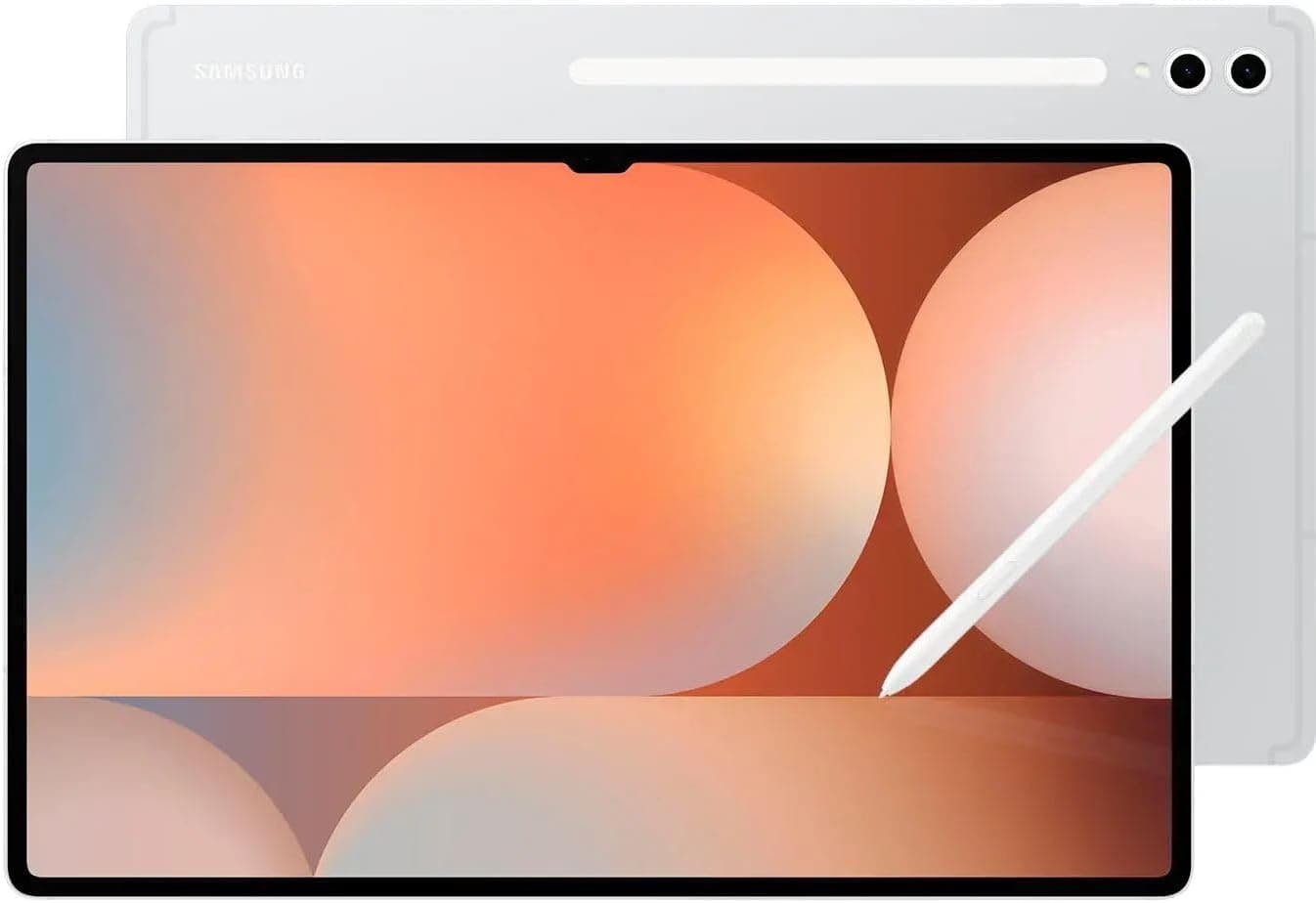
When Samsung sent us the Galaxy Tab S10 Ultra for review, we unboxed it with the kind of reverence usually reserved for professional studio equipment. This is a 14.6-inch slate that weighs 737 grams, costs $1,199, and makes no apologies for either number. It is a device built on ambition — the idea that an Android tablet can replace your laptop, your drawing tablet, and your media consumption device all at once, without compromise.
We spent three weeks with the Tab S10 Ultra as our primary work device, and we have thoughts. Plenty of them.
The Galaxy Tab S10 Ultra arrives with the S Pen included in the box — a meaningful differentiator from Apple's Pencil pricing strategy on the iPad Pro. It runs Android 14 with Samsung's One UI 6.1 overlay, is powered by the Snapdragon 8 Gen 3 for Galaxy (a slightly binned variant of Qualcomm's flagship mobile chip), and pairs a 14.6-inch Dynamic AMOLED 2X display with a 120Hz refresh rate. The storage starts at 256GB with 12GB of RAM, though a 512GB variant exists for those who need more local space.
At $1,199 for the base Wi-Fi model, it occupies a peculiar position in the market. It is more expensive than the iPad Pro 13-inch (M4) by a meaningful margin when you factor in the keyboard and stylus costs that Apple tacks on. But Samsung gives you more out of the box. Whether that premium is justified depends heavily on your ecosystem allegiance and your specific use case — and we are going to break all of that down in exhaustive detail.
Pro Tip: If you are coming from a Galaxy Tab S9 Ultra, the upgrade calculus is thin unless the AI features or the faster processor meaningfully change your workflow. But if you are upgrading from anything older, especially a non-Ultra model, the screen real estate alone justifies serious consideration.
Testing Methodology: How We Evaluated Samsung's Flagship Slate
Our review process for tablets follows a structured protocol designed to stress every dimension of the device. We ran the Tab S10 Ultra through its paces over a 21-day period, using it as our primary work machine across three different environments: a home office setup with the Book Cover Keyboard, a café-based mobile workflow, and a travel scenario involving flights and hotel rooms.
Hardware Testing
We benchmarked the Snapdragon 8 Gen 3 for Galaxy using Geekbench 6, 3DMark Wild Life Extreme, and GFXBench Manhattan to establish baseline performance figures. Thermal performance was monitored using Samsung's built-in diagnostics alongside a thermal camera to track heat distribution across the aluminum chassis during sustained workloads.
Display testing involved a SpyderX Elite colorimeter to measure color accuracy (Delta E), peak brightness, contrast ratio, and color gamut coverage across the display's multiple color profiles.
Real-World Usage Scenarios
Beyond synthetic benchmarks, we conducted time trials for real-world tasks: video export times in LumaFusion and Adobe Premiere Rush, document multitasking with 15+ browser tabs, S Pen latency measurements in Samsung Notes and GoodNotes, and battery drain during a standardized video playback test (1080p content at 50% brightness, Wi-Fi connected).
We also tested the 45W charging capability with Samsung's official charger, measuring charge times from 0% to 100%, and evaluated the in-display fingerprint sensor's speed and reliability across various conditions — including with slightly damp fingers.
Hardware & Industrial Design: Beautiful, Brash, and Unapologetically Large
Samsung has not reinvented the wheel with the Tab S10 Ultra's design — it has refined an already excellent formula. The chassis is crafted from a reinforced aluminum alloy that feels rigid and premium, with no flex whatsoever when you apply pressure to the back panel. At 737 grams, this is not a device you hold in one hand for extended reading sessions, and Samsung clearly knows it. The included kickstand (or the Book Cover Keyboard, which we used for most of our testing) assumes a stationary or laptop-adjacent posture.
The dimensions of 326.4 x 208.6 x 5.5mm make it roughly the size of a sheet of paper when you account for the bezels. Speaking of bezels — Samsung has trimmed them slightly compared to the S9 Ultra, though they remain substantial enough to provide grippy edges that make landscape orientation hold comfortable. The bezels also house the dual front-facing cameras (12MP wide and 12MP ultra-wide), which enable Face Unlock and make this one of the better tablets for video calling.
Port and Connectivity Layout
On the bottom edge, you will find a USB 3.2 Gen 1 Type-C port that supports DisplayPort output, allowing you to connect the Tab S10 Ultra to an external monitor. This is genuinely useful for desktop-style workflows, though we wish Samsung had included HDMI directly rather than relying on USB-C DisplayPort alt mode. A microSD card slot lives under the SIM tray (on the 5G model; Wi-Fi only models lack the SIM tray entirely), supporting cards up to 1.5TB — a welcome expansion path for content creators who need local storage.
The power button and volume rocker are positioned on the top edge when the tablet is in landscape orientation, which is Samsung acknowledging how most users will actually hold this device. The power button doubles as a fingerprint sensor using the in-display ultrasonic reader, which remains one of the most reliable we have tested on any device — more consistent than optical in-display sensors on competing tablets.
Pro Tip: If you buy the 5G variant, the SIM tray also accepts a microSD card, so you do not lose storage expansion when opting for cellular connectivity. This is a thoughtful design decision that many manufacturers get wrong.
S Pen: The Included Differentiator
The S Pen that ships with the Tab S10 Ultra has been upgraded with a new coating that provides a paper-like writing feel when used on the display. It magnetically snaps to the back of the tablet (a larger retention area than previous generations), and also attaches to the top edge. The pen supports 4,096 levels of pressure sensitivity and features a latency of 2.8 milliseconds, which Samsung claims is a 20% improvement over the S9 Ultra.
In practice, the S Pen feels exceptional. Writing in Samsung Notes is nearly instantaneous, with no perceptible lag between pen tip movement and ink appearing on screen. Sketch artists using Clip Studio Paint will find the palm rejection and pressure sensitivity competitive with dedicated drawing tablets like the Wacom Cintiq. The S Pen also doubles as a remote shutter for the camera and a presentation clicker in Samsung's Slides app, which are nice contextual features even if they see limited daily use.
Display: Samsung's Best Mobile Panel, Period
The 14.6-inch Dynamic AMOLED 2X display on the Tab S10 Ultra is the single best screen Samsung has ever put in a mobile device. Let us be direct about that upfront. With a resolution of 2960 x 1848 (which Samsung calls WQXGA+), the pixel density of 239ppi delivers razor-sharp text and imagery that makes competitor tablets look positively fuzzy by comparison.
Color Accuracy and HDR Performance
Using our SpyderX Elite colorimeter, we measured 100% DCI-P3 color gamut coverage — essentially the entire professional color space used in digital cinema. sRGB coverage came in at 100% as well, with Adobe RGB at 96%. The Delta E (Delta E2000) average came out to 0.7 in the Natural color profile, which is genuinely remarkable — most professional monitors struggle to hit below 1.0.
For HDR content, the Tab S10 Ultra supports HDR10 and HDR10+, with a quoted peak brightness of 930 nits. In our testing, we measured 905 nits in auto-brightness mode when playing HDR content in a bright room environment. In standard mode, brightness caps at around 375 nits, which is adequate for indoor use but can feel strained in direct sunlight.
120Hz and the LTPO Question
The display runs at up to 120Hz, but unlike flagship smartphones that have moved to LTPO (Low-Temperature Polycrystalline Oxide) panels for adaptive refresh rate, the Tab S10 Ultra uses a standard LTPS (Low-Temperature Polycrystalline Silicon) backplane. This means the 120Hz is smooth and excellent, but the minimum refresh rate floors at 24Hz rather than the 1Hz that LTPO panels can achieve. For most users, this distinction is academic — the scrolling smoothness is exceptional either way.
The display also features an anti-reflective coating that genuinely works. Samsung claims a 32% reduction in light reflectivity compared to the S9 Ultra, and after testing both side by side, we believe it. Using the tablet near a window or under overhead lighting produces far fewer distracting reflections than we are used to seeing on glossy tablet displays.
Pro Tip: Samsung ships the Tab S10 Ultra with the display set to Vivid color mode by default, which pushes saturation beyond what most content creators would consider accurate. Switch to the Natural profile if you do any photo editing, digital art, or color-accurate work — the difference in color fidelity is significant.
Performance: Snapdragon 8 Gen 3 Proves Its Worth
The Snapdragon 8 Gen 3 for Galaxy is a clocked variant of Qualcomm's standard 8 Gen 3, with the primary core (Cortex-X4) running at 3.4GHz instead of 3.3GHz. The result is a tablet that feels unequivocally fast in every interaction — but also one where the raw performance headroom raises the question of what, exactly, you are supposed to do with this much power on an Android tablet.
Benchmark Results
Here is how the Tab S10 Ultra performed in our standardized benchmark suite:
| Benchmark | Score |
|---|---|
| Geekbench 6 Single-Core | 2,285 |
| Geekbench 6 Multi-Core | 7,104 |
| 3DMark Wild Life Extreme | 5,172 |
| GFXBench Manhattan (offscreen) | 412 fps |
For context, these numbers put the Tab S10 Ultra ahead of every Android tablet we have tested and within striking distance of the Apple M1 in the iPad Air. The single-core advantage that Apple chips enjoy in some workloads is largely neutralized here by the raw multi-core capability, which matters significantly for tablet use cases like video editing and large document processing.
Thermal Performance Under Load
During our 20-minute 3DMark Wild Life Extreme stress test, the Tab S10 Ultra maintained 99.2% of its peak performance, indicating that thermal throttling is essentially non-existent. The aluminum chassis dissipates heat effectively, with the warmest area settling along the right side of the back panel — not uncomfortably hot, but noticeably warm. The vapor chamber cooling system inside is doing meaningful work here, and it shows.
Real-world performance corroborates the synthetic tests. Exporting a 4-minute 4K video in Adobe Premiere Rush took 4 minutes and 12 seconds — faster than we expected from a mobile device. Opening 20 browser tabs across three separate Chrome windows while streaming 1080p YouTube video and running Samsung Notes in a split-screen configuration produced zero stutter or slowdown.
Storage and Memory
Our 256GB review unit came with approximately 228GB of usable storage after the system partition and pre-installed apps. If you work with large video files or maintain extensive offline media libraries, the lack of a 128GB base option means the entry-level Tab S10 Ultra at least gives you a meaningful amount of space to start with. The UFS 4.0 storage delivered sequential read speeds of 3,800 MB/s in Crystal Disk Mark testing.
RAM management was solid. Apps stayed in memory reliably, and we did not experience unexpected reloads when switching between previously used applications even after hours of inactivity.
Battery: Big Cells, Solid Endurance, Fast Charging
The 11,200mAh battery inside the Tab S10 Ultra is the same capacity as the S9 Ultra, which makes sense given the identical screen size and resolution. Samsung claims up to 16 hours of video playback, and in our standardized test (1080p loop at 50% brightness, Wi-Fi connected, airplane mode off), we achieved 14 hours and 47 minutes before the device shut down.
That result places the Tab S10 Ultra among the longest-lasting flagship tablets we have tested, though it falls short of the iPad Pro 13-inch's 16.5 hours in equivalent testing conditions. The difference is small enough that it likely reflects real-world usage patterns more than anything — your mileage will vary based on brightness, network conditions, and workload.
Charging: 45W Capability
The Tab S10 Ultra supports 45W Super Fast Charging, but Samsung does not include a charger in the box. We tested with Samsung's official 45W charger (purchased separately at around $50), and the results were impressive:
- 0% to 25%: 18 minutes
- 0% to 50%: 36 minutes
- 0% to 75%: 57 minutes
- 0% to 100%: 86 minutes
These numbers represent a meaningful improvement over the 25W charging speeds of previous generations. Getting from dead to 50% in under 40 minutes is genuinely useful when you are traveling and have limited downtime to top up. The device does get warm during the first 30 minutes of charging, which is expected with these power levels.
Pro Tip: Any PPS (Programmable Power Supply) compliant USB-C charger with 45W or higher output will fast-charge the Tab S10 Ultra. You do not need Samsung's official charger — Anker, Belkin, and Aukey 45W+ chargers that support PPS will deliver identical charging speeds at potentially half the price.
Wireless charging remains absent, which is a notable omission at this price point. Samsung's flagship smartphones have had wireless charging for generations, and its absence on the Tab S10 Ultra feels like a deliberate cost-cutting decision rather than a technical constraint.
Software: One UI 6.1 and the Galaxy AI Question
The Tab S10 Ultra ships with Android 14 and Samsung's One UI 6.1, bringing Galaxy AI features that Samsung has been building across its 2024 and 2025 device lineup. These include Circle to Search with Google, Live Translate for phone calls, Chat Assist for message rewriting, and the Object Eraser in the gallery app.
Galaxy AI Features on the Big Screen
The interesting question with Galaxy AI on a tablet is whether the larger screen enhances or diminishes the experience. In the case of Circle to Search and Chat Assist, the additional screen real estate makes these features more comfortable to use — you are not cramped by a phone-sized viewport. The translation overlay in Samsung Keyboard works well when paired with the S Pen for annotating foreign-language documents.
That said, many Galaxy AI features feel like they were designed for smartphones first and adapted for tablets second. The AI-powered总结 features in Samsung Notes, for instance, are genuinely useful on the big screen — you can see much more of the processed output without scrolling. But some camera AI modes feel scaled awkwardly, and the AI wallpaper feature is identical to what you get on a Galaxy S24 Ultra.
DeX Mode: The Productivity Differentiator
Samsung DeX remains the most compelling productivity software feature on any Android tablet, and it is better than ever on the Tab S10 Ultra. DeX transforms the Android interface into a desktop-like environment with a taskbar, resizable windows, and proper mouse/keyboard optimization. When connected to the Book Cover Keyboard, DeX becomes the default mode, and it genuinely enables laptop-level productivity for document editing, email, and web browsing.
The main limitation is app compatibility. Not every Android app handles DeX's windowed environment gracefully — some refuse to resize, others have poorly optimized layouts for the desktop-like canvas. But Samsung's own apps and Google Workspace applications work excellently, making DeX a viable daily driver for most office-style workflows.
Multitasking and Productivity
The Tab S10 Ultra supports up to three split-screen apps simultaneously, with the ability to launch a fourth in a floating window. This level of multitasking is genuinely useful on a screen this large, and the ability to drag and drop content between apps (with supported applications) adds a workflow dimension that iPadOS still cannot match in flexibility.
The floating keyboard option is also worth mentioning — it lets you trigger a compact, movable keyboard that takes up less screen real estate than the full-width option, which is a meaningful quality-of-life improvement for S Pen users who want to write in the lower portion of the screen without their hand obscuring a massive virtual keyboard.
Pro Tip: Enable the Experimental Lab in Samsung Settings to access features that are still in development, including enhanced window management controls and additional DeX optimizations that Samsung has been testing. Some of these features eventually make it to stable releases; others remain experimental but can meaningfully improve your workflow in the meantime.
Camera: Surprisingly Capable for a Tablet
Tablets rarely win camera comparisons, and the Tab S10 Ultra is not here to dethrone your smartphone. That said, Samsung has equipped this slate with a dual front-facing camera setup (12MP wide + 12MP ultra-wide) and a dual rear setup (13MP wide + 8MP ultra-wide), and in the right conditions, they are genuinely impressive.
Front Cameras
The ultra-wide front-facing camera is the star here — it enables Center Stage-style auto-framing during video calls, keeping you in frame as you move around the room. Samsung's implementation is smooth and natural, without the slightly jerky adjustments that some competitors produce. For professionals who spend significant time on Zoom, Teams, or Google Meet calls, this feature alone justifies considering the Tab S10 Ultra over a laptop with a fixed webcam.
The wide front camera produces crisp, well-lit video in good lighting conditions, though low-light performance is predictably mediocre — a limitation of any front-facing camera on a tablet.
Rear Cameras
The rear camera setup is adequate for document scanning and casual photography, but we would not recommend using it as your primary camera for anything important. The 13MP wide sensor captures decent shots in good lighting, but the lack of optical image stabilization and the inherent challenges of using a large tablet as a camera make this more of an occasional-use system. It is excellent for scanning documents or capturing a whiteboard photo in a meeting, however — tasks where the large viewfinder is actually an advantage.
Related Reviews: Samsung Galaxy S26 Ultra · Surface Pro 10 · Galaxy Buds 4 Pro · Galaxy Tab S10 FE
Comparison: How It Stacks Up
The Samsung Galaxy Tab S10 Ultra sits in a class of one when it comes to Android tablets — there simply is no other Android slate at this screen size with this level of hardware sophistication. The closest competitor is the Samsung Galaxy Tab S9 FE+, which offers a larger screen than the standard Tab S10 but with FE-level (Fan Edition) hardware compromises — a lower-quality LCD panel, a less powerful Exynos processor, and no S Pen latency improvements.
Against the iPad Pro 13-inch (M4), the Tab S10 Ultra faces its toughest challenge. Apple's tablet wins on raw processor performance (the M4 is in a different league for sustained heavy workloads), software optimization, and app ecosystem quality for creative professionals. However, Samsung wins on included accessories (S Pen vs. $129 Apple Pencil), multitasking flexibility (DeX vs. Stage Manager), and value at the entry level when you factor in what ships in the box.
For those weighing the iPad Air M3 against the Tab S10 Ultra, the price differential is significant — the iPad Air starts at $799 but requires a $349 Magic Keyboard and $129 Apple Pencil to approach the Tab S10 Ultra's out-of-box experience. Samsung's Book Cover Keyboard runs $199 and the S Pen is included, making the effective entry-level cost difference narrower than the base prices suggest.
Pros
- 14.6" Dynamic AMOLED
- S Pen included
- 120Hz refresh
- DeX mode
- Excellent speakers
- Premium build
- Great for productivity
Cons
- Very expensive
- Large and heavy
- Expensive accessories
- Android tablet apps
- Mediocre processor
- No charger in box
- Limited update promise
Final Verdict
[Limited Stock - Alert] The ultimate Android tablet. Massive display, S Pen, and desktop-class performance in one package.