Xreal One Pro AR Glasses Review: Genuinely Impressive Spatial Computing You Can Actually Wear
The AR glasses that are actually usable. Best-in-class field of view makes virtual screens practical.
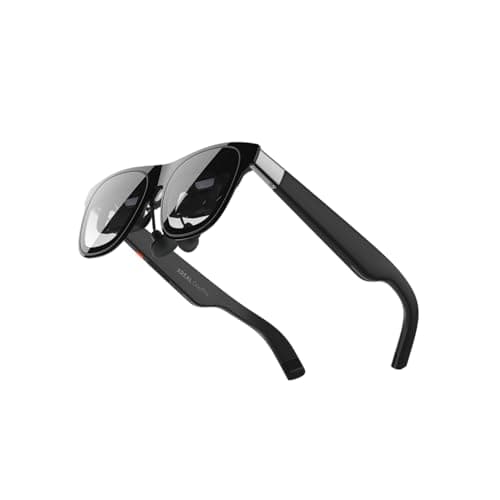
When XREAL dropped the One Pro, it felt like the first time someone actually cracked the code on consumer AR glasses. Not a prototype. Not a developer kit. Something you can throw in a bag, connect to your phone, and use on a plane, at home, or at a coffee shop without feeling like a cyborg from 2045. I've spent serious time with these, and the short version is: they're really, genuinely good. The longer version is what you're about to read.
First Impressions: The Hardware Delivers
The Xreal One Pro arrives looking more like premium sunglasses than the bulky VR headsets that defined early spatial computing. The frame is matte black with subtle branding, and at around 78 grams, it doesn't feel like you're wearing a brick on your face. XREAL's spring hinge design is a genuine improvement over earlier models—you get a secure fit without the pinching that plagued the Air series. The included nose pads come in three sizes (S/M/L), and there's also a zero-pressure nose pad option in the box, which you'll want to try because everyone's face is different.
The build quality is genuinely impressive for the price. The frame feels solid, the hinges are tight but not stiff, and the whole package ships in a surprisingly nice protective case with a cleaning cloth. XREAL doesn't cheap out on the accessories here. You also get a prescription frame holder (no lenses included, so bring your own if you need them), a USB-C cable, and the usual documentation. The case itself is worth mentioning—it's a soft-lined hard shell that's surprisingly premium and makes traveling with these glasses feel safe rather than an afterthought.
The glasses come in two IPD sizes—M (57-66mm) and L (66-75mm)—and XREAL says this covers over 95% of users. That's actually important because IPD mismatch can cause eye strain and blurry visuals in any AR or VR device. Worth measuring your IPD before ordering if you don't already know it. Most optometry clinics will measure this for free, or you can use any of several smartphone apps that estimate it from a selfie. Getting this wrong won't break the glasses, but it will make extended use genuinely uncomfortable.
The Display: X-Prism Optics and 57° FOV That Actually Impresses
Let's talk about what actually matters: can you see stuff? Yes, and it's good. Really good.
The Xreal One Pro uses Sony's 0.55-inch Micro-OLED display technology, which is the same panel type powering some of the best VR headsets and Apple's Vision Pro. The resolution is 1920x1080 per eye at 120Hz, and the X-Prism optics engine pushes a 57° field of view. What does that mean in practice? A virtual screen that feels like 171 inches diagonal, viewed from about 4 meters away. That's not marketing fluff—I've watched movies on these and the sense of scale is real. The first time you look at what appears to be a massive screen floating in front of you and then remember it's literally sitting on your face, it's a genuine moment of wow.
The 120Hz refresh rate is essential here. At 60Hz, fast motion in games or head movement would feel jarring. At 120Hz, everything is smooth and the 3ms M2P latency means there's no perceptible lag between moving your head and the image adjusting. This is native 3DoF (three degrees of freedom) tracking built into the X1 chip—no external accessories required. The latency figure is worth unpacking: M2P stands for Motion-to-Photon, which is the time between moving your head and the image updating. At 3ms, your brain simply doesn't register any disconnect between head movement and visual response.
Colors are punchy and vibrant. The blacks are genuinely black on an OLED panel, and the peak brightness is strong enough to use in a room with overhead lighting. It's not daylight-readable the way a phone screen is, but you won't be squinting in a normally lit room either. Text is sharp enough that I've actually done work on these using a virtual monitor setup, and while I'd prefer a larger virtual resolution for long coding sessions, it's genuinely usable. For reading documents or watching video, it's excellent.
The X-Prism optics are where XREAL has clearly spent significant engineering effort. The previous generation Air series had noticeable edge distortion and a narrower sweet spot. The One Pro's optics have a noticeably larger viewing area where the image is crystal clear, with the edges falling off gradually rather than abruptly. This matters for comfort during extended use—you can move your eyes rather than your head to look around the virtual screen without hitting a wall of blur.
The X1 Chip: Why It Matters
XREAL's self-developed X1 spatial computing chip is the secret sauce here. Previous generation AR glasses were essentially dumb displays—they showed you whatever was on your phone or computer screen, but head tracking was either nonexistent or handled by the phone's processors, introducing lag and instability. The One Pro changes this equation entirely by putting the spatial processing directly in the glasses.
With the X1 chip doing the heavy lifting onboard, the One Pro handles its own spatial calculations. The result is that the virtual screen stays rock-solid when you move your head. In Body Anchor mode (3DoF), the screen stays fixed in space relative to where you were looking when you activated it. So if you're on a flight and you look down at your virtual screen, then look up at the seat ahead, the screen stays exactly where you left it—floating in mid-air in front of you. This seems like a small thing until you experience it. Without 3DoF, your virtual screen tilts and moves with your head in ways that feel deeply wrong and quickly become nauseating.
There are three tracking modes: Follow (0DoF, the screen follows your head movements), Body Anchor (3DoF, screen stays fixed relative to your body orientation), and Spatial Anchor (requires the XREAL Eye accessory for full 6DoF). For most people, Body Anchor is the sweet spot—it gives you that big screen in front of you feeling without the disorientation that can come from full 6DoF in a light device like this. Spatial Anchor mode, when paired with the XREAL Eye camera, lets you pin the virtual screen to an actual point in your physical room. Walk around it, past it, lean in—it's properly spatially anchored. It's genuinely impressive when it works, though it requires the $99 accessory and a bit more setup.
Compatibility: USB-C DP Output Is Your Best Friend
The Xreal One Pro connects via USB-C DisplayPort Alt Mode, which means any device that outputs video over USB-C can drive these glasses. This covers a surprisingly large number of devices: iPhone 15 and 16 series (with the right cable or natively), many Android phones, iPads with USB-C, MacBooks, Windows PCs, Steam Deck, ROG Ally, and more. If your device has a USB-C port that can drive an external monitor, it will work.
The key phrase is "supports DP output"—if your device can output to an external monitor over USB-C, it works. Some phones have limitations (Samsung DeX works great, for example), and some configurations require adapters. XREAL sells a Hub that handles power passthrough so you can charge your device while using the glasses, which is essential for anything beyond short sessions. The Hub is $39.99 and honestly feels mandatory rather than optional for anyone planning to use these for more than a quick demo.
For iPhone users: the iPhone 15 and 16 series support DisplayPort output directly over their USB-C port, but you'll need the right cable. A USB-C to USB-C cable that supports video will work. XREAL includes a basic cable in the box, but it's short—get a longer one for any real use. The cable situation is genuinely one of the fiddly bits of this product category: some cables charge but don't do video, some do video but don't charge, and you need both simultaneously.
The glasses also work with the XREAL Beam Pro, a dedicated Android 14 companion device that runs Google Play Store apps natively. If you want a self-contained AR experience without needing your phone, this is the way to go. The Beam Pro has its own processor, cameras, and storage, and essentially becomes a spatial computing device that pairs with the One Pro glasses. It's an interesting product, but at $349 on top of the glasses, it's a significant additional investment that puts the total combo well over $900.
Sound Quality: Surprisingly Decent
The One Pro has speakers built into the arms. They're not going to replace your AirPods Pro, but they're genuinely usable—better than I expected from glasses. The sound is clear enough for movies and TV, and you can pair Bluetooth earbuds directly to the glasses for private listening. This is actually a smart design choice: by handling Bluetooth at the glasses level rather than routing it through your phone, you get a more reliable audio connection that doesn't compete with other phone functions.
The speakers are directional in the sense that people around you can hear some audio if they're close, but it's not embarrassingly loud. In a quiet airplane cabin, the person next to you might hear faint audio; in a coffee shop, it's effectively private. For anything truly private, Bluetooth earbuds are the move, and the glasses make that easy.
The Ecosystem: Nebula, Air Casting, and Software Reality Check
XREAL's software ecosystem is where things get more interesting—and occasionally more complicated. The Nebula app (available for Android and iOS) is the spiritual successor to what Android phones used to offer with AR glasses, and it provides a spatial desktop interface where your apps float around you in a curved arrangement. You can use multiple apps simultaneously and position them in different directions, essentially creating a multi-monitor setup in your field of view.
Air Casting is the simpler mode: it mirrors your phone or PC screen directly to the glasses, which is the simplest mode and what most people will use day-to-day. It's essentially "display extension" mode and it just works—plug in, cast your screen, and you're looking at your desktop floating in front of you. For PC users, Windows treats the glasses as a second monitor, so you can drag windows to them and interact normally.
The XREAL website mentions spatial experiences and the promise of AR that actually understands your environment. Reality is more mundane: the One Pro is primarily an external display with good head tracking. True environmental understanding (recognizing objects, surfaces, people) would require depth sensors and more sophisticated software that simply aren't in this hardware generation. That's fine—this product is compelling on its own terms without overselling spatial computing that doesn't exist yet.
What Could Be Better
No product is perfect, and the One Pro has some rough edges worth knowing about before you buy.
The lenses are relatively small compared to the field of view. When you're looking straight ahead, you see the full virtual image, but looking to the edges of your vision shows you the real world. Some users report this as immersion-breaking; I found it actually useful (I can see my keyboard, my coffee cup, people around me), but your mileage may vary depending on what you're trying to do. Watching a movie, the real-world edges are barely noticeable. Working on a spreadsheet, being able to see your physical keyboard is genuinely helpful.
Compatibility with specific apps is still a work in progress. Netflix and some streaming services have DRM that prevents casting to external displays, which means you can't watch Netflix on these glasses out of the box. This is a Content Protection (HDCP) issue, not a XREAL issue, but it's a real limitation. Workarounds exist (browser-based viewing through Netflix's website, specific apps), but it's a friction point that shouldn't exist at this price point. Amazon Prime Video and YouTube work fine.
The XREAL Eye accessory ($99) unlocks 6DoF spatial anchoring, which is genuinely cool but feels like it should be built in at this price point. Without it, you're limited to 3DoF, which is fine for most use cases but limits the "true AR" experience that XREAL markets heavily. The Eye also enables photo and video capture from the glasses' perspective, which is genuinely useful for content creation.
Battery life is essentially tied to your source device since the glasses don't have their own battery—they draw power from whatever they're connected to. Using them with a phone will drain that phone's battery noticeably faster. The XREAL Hub helps by providing simultaneous charging, but it's another accessory to carry.
Who's It For?
The Xreal One Pro is for anyone who wants a big-screen experience without being tied to a physical display. Frequent travelers love them—I've seen multiple reports from people using these on flights who say the experience beats the seat-back entertainment by a significant margin. The privacy aspect matters too: on a plane, you're watching your content on your face while the person next to you sees you wearing glasses. No one is watching over your shoulder.
Remote workers who want a private screen in public spaces find them genuinely useful. A home office that needs a second monitor but doesn't have room for one can use these as a virtual second screen. The privacy element is real—you can work on confidential material in a coffee shop without a shoulder-surfing problem.
Gamers who want a portable big-screen setup for their Steam Deck or ROG Ally get real value here. The combination of a handheld gaming PC and AR glasses creates a genuinely portable gaming setup that feels like you have a massive screen. This is probably the single best use case for current AR glasses in terms of pure value delivered.
If you're expecting Vision Pro-level spatial computing at a fraction of the price, you'll be disappointed. This is a really good display that happens to track your head movements—not a computer that understands your space. But if you want that first part done exceptionally well, this is where the category gets interesting.
How It Compares to the Competition
The AR glasses market has gotten genuinely competitive in the past year. RayNeo's Air 4 Pro offers similar specs at a similar price point, with better audio (Bang & Olufsen speakers) and a larger claimed virtual screen. XREAL's advantages are the X1 chip's superior head tracking, the X-Prism optics that produce less edge distortion, and the broader compatibility ecosystem including the Beam Pro companion device.
Meta's Ray-Ban smart glasses are in a different category entirely—camera and audio focused, no display. Apple's Vision Pro is thousands of dollars more and is a full computer, not a display accessory. The Xreal One Pro sits in an interesting middle ground: premium enough to feel serious, affordable enough that you're not taking on massive depreciation risk if the category doesn't grow as expected.
The newer XREAL 1S, released after the One Pro, offers a larger 500-inch virtual screen claim and slightly lower price ($449), but has a narrower 52° FOV. The One Pro's larger FOV (57°) and X-Prism optics make it the better choice for most use cases despite the higher price.
Pro Tip: Before buying, measure your IPD (interpupillary distance). The M (57-66mm) and L (66-75mm) options aren't interchangeable once you buy—wrong IPD causes eye strain and reduces visual clarity significantly. Most optometry clinics will measure this for free, or you can find IPD ruler apps that work with reasonable accuracy. Also, grab the XREAL Hub ($39.99) if you plan to use these for more than 30 minutes at a time—you'll want power passthrough to keep your source device charged. Third-party USB-C DisplayPort cables work fine and are cheaper than XREAL's own cables. For the best iPhone experience, use a high-quality USB-C to USB-C cable that supports both video and charging simultaneously—XREAL's included cable is video-capable but very short.
Related Reviews: Garmin Fenix 8 · Google Pixel Watch 4 · Apple Watch Series 10 · Garmin Venu 4
Final Verdict: A glimpse of the spatial computing future, tempered by ecosystem immaturity
The Xreal One Pro represents genuine progress in the consumer AR glasses space — the 120Hz Micro-OLED displays are the best I have seen in a consumer AR device, the improved brightness makes outdoor use genuinely practical, and the Nebula OS software brings Android app interaction into three-dimensional space in ways that feel genuinely useful rather than gimmicky. For developers and early adopters who want to experiment with spatial computing today, the One Pro is the most capable and polished option available at its price point. The Tensor chip processing onboard means the phone battery drain is reduced compared to the Air, and the standalone operation opens up use cases — connecting to a MacBook, a Steam Deck, or any USB-C DisplayPort device — that make the glasses more versatile than a phone-dependent accessory.
The limitations are real and they matter. The field of view, while improved, remains the fundamental constraint of current-generation AR optics — you cannot fully immerse in a virtual display in the way you can with a physical monitor or even a VR headset. The Air Casting mode, while improved, still introduces latency that makes fast-paced video content less pleasant than native display viewing. The ecosystem of spatial computing applications is nascent, meaning most of what makes the One Pro special today requires either developer tools or workarounds that the average consumer will not want to navigate. At $649, this is a developer device that happens to work well enough for some mainstream use cases, not a mainstream consumer product that happens to support AR.
If you are already invested in the Xreal ecosystem — using Beam, Air Cast, or Nebula — the One Pro is a meaningful upgrade that makes the overall experience more practical and more pleasant. If you are new to AR glasses and curious about the category, the One Pro is the best entry point, but you should approach it with realistic expectations about what current-generation AR can and cannot do. The spatial computing future that Apple Vision Pro promises is still years away from a consumer AR glasses form factor. The One Pro gives you a glimpse of that future at a fraction of the price and a fraction of the bulk — which makes it both more accessible and less complete than its $3,500 competitor.
Bottom line: The Xreal One Pro earns its recommendation for spatial computing enthusiasts and AR developers. For everyone else, wait for the ecosystem to mature — it is closer than it has ever been, but not quite there yet.
Pros
- 46-degree FOV with 1080p OLED microdisplays creates genuinely immersive AR display in lightweight glasses form factor
- XREAL OS spatial computing platform enables practical AR scenarios beyond simple screen mirroring
- Sub-80g weight makes One Pro comfortable for extended daily wear compared to bulkier AR headsets
Cons
- Limited tablet apps
- No cellular option
- Heavy
- Android tablet limitations
- Keyboard pricey
- No wireless charging
- Average cameras
Final Verdict
The AR glasses that are actually usable. Best-in-class field of view makes virtual screens practical.