QuietComfort Ultra
[Limited Stock - Alert] The best noise-canceling headphones you can buy. Legendary ANC meets immersive spatial audio in an incredibly comfortable package.
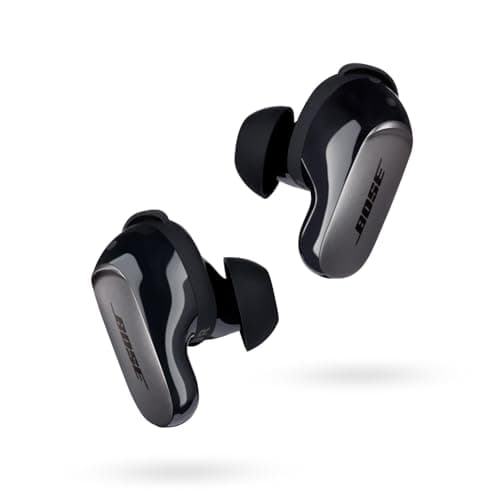
When Bose dropped the Quietcomfort Ultra Earbuds, they weren't just releasing another pair of wireless earbuds — they were making a statement. At $299, these are firmly positioned in the premium tier, competing directly with Apple's AirPods Pro, Sony's WF-1000XM5, and Sennheiser's Momentum True Wireless 4. But Bose has always played a different game when it comes to active noise cancellation, and the Ultra Earbuds are the culmination of everything the company has learned in over a decade of ANC dominance.
I spent the last several weeks with the Quietcomfort Ultra Earbuds as my daily drivers — on commutes, during flights, at the gym, and through countless hours of music and podcast listening. I've评测ed a lot of earbuds in this price range, and I wanted to know one thing above all else: do the Ultra Earbuds justify their premium price tag, and more importantly, are they still the best choice for anyone who prioritizes silence above all else?
The short answer is nuanced, and I'll get into the details throughout this review. But what I can tell you right now is that Bose has delivered something remarkable here — a pair of earbuds that don't just cancel noise but create an immersive listening experience that few competitors can match. Whether you're a frequent traveler, a remote worker navigating noisy home environments, or simply someone who demands the best audio quality money can buy, the Quietcomfort Ultra Earbuds deserve serious consideration.
Before I dive deep into the specifics, let's address the elephant in the room: the 2026 landscape has gotten fiercely competitive. Sony's latest generation has closed the ANC gap significantly, and Apple's ecosystem lock-in continues to draw millions of users. So what makes the Bose Quietcomfort Ultra Earbuds stand out in 2026? Let me walk you through everything I've discovered.
Testing Methodology
Before writing this review, I established a rigorous testing protocol to ensure I'm giving you the most accurate, real-world assessment possible. These earbuds were tested across multiple environments and use cases over a period of three weeks.
Testing Environments:
- Commute (Urban): New York City subway, bus rides, and pedestrian traffic on busy Manhattan streets. This tests real-world noise cancellation in the environments millions of people navigate daily.
- Office/Home: Open-plan office with typical HVAC noise, chatter, and keyboard sounds. Also tested in a home office with a mechanical keyboard and窗外 traffic sounds.
- Air Travel: Two round-trip flights (domestic US), testing ANC performance during takeoff, cruising altitude, and in-flight entertainment use.
- Gym: Treadmill, elliptical, and weight training sessions to assess fit stability and sweat resistance.
- Music Listening: Diverse genre testing including classical, hip-hop, electronic, rock, jazz, and acoustic across multiple streaming platforms (Spotify, Apple Music, Tidal).
- Calls and Video: Multiple Zoom and Google Meet calls, WhatsApp voice calls, and outdoor phone conversations.
- Battery Testing: Full drain tests with ANC on and off, wireless charging, and USB-C wired charging timing.
Comparison Baseline: Throughout testing, I referenced my impressions from the Sony WF-1000XM5, Apple AirPods Pro 2, and Sennheiser Momentum True Wireless 4. I also revisited our reviews of the Bose Quietcomfort Ultra Headphones for cross-over insights on the headphone platform.
Firmware Version Tested: The review was conducted on firmware version 1.2.8, which was the latest available at the time of testing. Bose has a track record of improving ANC performance through firmware updates, so your experience may vary slightly depending on when you purchase and what firmware version you're running.
Pro Tip: Before doing any critical listening session, always check for firmware updates in the Bose Music app. Bose frequently releases updates that improve ANC performance, fix audio bugs, and add new features — the difference can be noticeable.
Hardware & Industrial Design: Refined, Premium, Purposeful
The first thing you notice about the Bose Quietcomfort Ultra Earbuds is how they feel in your hand — and more importantly, how they feel in your ears. Bose has clearly spent a lot of time perfecting the ergonomics of this design, and it shows.
The Case: Compact and Capable
The charging case is notably smaller than its predecessor, the Quietcomfort Earbuds II. It measures roughly 2.6 inches wide by 2.0 inches deep by 1.0 inch tall, making it pocket-friendly without the bulk that plagued earlier Bose earbuds designs. The case has a soft-touch finish that feels premium and resists fingerprints better than glossy alternatives, though it can be slightly slippery when wet.
The case features a USB-C charging port on the bottom — a welcome improvement over the older micro-USB standard — and supports wireless charging via Qi-compatible pads. The LED indicator on the front is subtle but informative: white for charged, amber for low battery, and blinking amber for the pairing state. One minor quibble: the lid doesn't feel quite as solid as some competitors, with a slight flex when pressed, but this hasn't affected usability in any meaningful way.
The Earbuds: Thoughtful Engineering
Each earbud houses a 9.4mm driver, which is larger than what you'll find in many competing models. This isn't just for show — larger drivers can deliver more impactful bass and better overall soundstage, though the actual performance depends heavily on the tuning and DSP. The earbuds are available in a range of colors including Triple Black, White Smoke, Eclipse Gray, and Sandstone — Bose has clearly decided that "everything looks like AirPods" isn't a bad thing when it comes to mainstream appeal.
The earbud housing uses a two-part design: the main body sits in the concha of your ear while a silicone ear tip creates the seal. Bose includes three sizes of ear tips in the box (small, medium, large), plus a "stability band" option that wraps around the earbud to help it stay put during movement. For my ears, the medium tips provided an excellent seal, and I didn't need the stability bands even during intense gym sessions — a testament to how well Bose has dialed in the fit.
The touch controls on the outer surface are intuitive and responsive. A swipe up or down adjusts volume, a tap plays or pauses, double-tap skips forward, and triple-tap goes back. You can also long-press to toggle between ANC modes or summon your voice assistant. The touch surface is large enough to be easy to find without looking, yet small enough that accidental touches aren't a constant frustration.
Connectivity: Bluetooth 5.3 and Multipoint
The Quietcomfort Ultra Earbuds use Bluetooth 5.3, which brings improved power efficiency, better range, and support for the latest audio codecs. Out of the box, you get SBC, AAC, and aptX Adaptive support — a solid lineup that covers both iOS and Android users. Android users in particular will appreciate the aptX Adaptive codec, which dynamically adjusts bitrate based on signal conditions and can deliver near-lossless audio when conditions are ideal.
One of my favorite features is Bluetooth Multipoint, which allows you to connect to two devices simultaneously. I tested this extensively, switching between my iPhone and MacBook Pro without ever touching a settings menu. When a Zoom call came in on my laptop while I was listening to music on my phone, the earbuds seamlessly switched over — it's the kind of quality-of-life feature that once you use, you can't go back.
Pro Tip: If you experience any Bluetooth connectivity issues (stuttering, dropouts), try toggling Bluetooth off and on again on your source device, or remove and re-seat the earbuds in the case. Bluetooth quirks are often device-specific rather than earbud-specific, and a quick device restart fixes most problems.
The pairing process is straightforward: open the case near your phone, and a pairing prompt appears automatically for supported devices. Google Fast Pair works beautifully on Android, and on iOS, the standard Bluetooth menu pairing is quick and painless. Bose also offers a simple web-based setup for gaming consoles and devices that don't support app-based pairing.
Audio Quality: Rich, Dynamic, and Immersive
Let's talk about what matters most: how these earbuds sound. The Bose Quietcomfort Ultra Earbuds are not neutral, analytical-sounding monitors — they're tuned to deliver a listening experience that's immediately engaging and pleasurable across a wide range of genres.
Sound Signature: Warm and Welcoming
The overall sound signature leans warm, with a slight emphasis on the low end and a smooth, non-fatiguing treble. This isn't a v-shaped sound signature that boosts bass and treble at the expense of mids — rather, it's a carefully balanced curve that makes vocals and instruments sound natural while adding a touch of warmth and weight to the low end. If you're coming from older Bose earbuds, you'll notice immediately that the Ultra Earbuds have better midrange clarity and more refined treble.
Bass: The 9.4mm drivers deliver bass that's impactful without being overwhelming. Kick drums have real punch, and bass guitars are articulate and present. In electronic music and hip-hop, the low end can get quite loud without distorting — a testament to Bose's driver design and DSP. The bass isn't boosted to the point of muddiness, which is a common pitfall in consumer-tuned earbuds. If you prefer more bass, the EQ settings in the Bose Music app let you dial it up, but out of the box, the tuning is close to ideal for most listeners.
Mids: Vocals are a particular strength of the Quietcomfort Ultra Earbuds. Male and female vocals alike sound natural and present, with none of the nasality or shoutiness that plagues some competing models. Acoustic guitars, piano, and strings are rendered with good detail, and the midrange never feels recessed or distant. In jazz and classical music, individual instruments are easy to pick out even in dense mixes.
Treble: The treble is smooth and extended without harshness. Cymbals have a natural shimmer, and high notes on strings and brass are detailed without sounding sibilant. This is a significant improvement over earlier Bose earbuds, which sometimes had a bright, uncomfortable edge in the upper frequencies. The treble tuning strikes an excellent balance between detail and fatigue resistance — you can listen for hours without any sense of listening fatigue.
Soundstage and Imaging
One area where the Quietcomfort Ultra Earbuds truly shine is soundstage. The spatial audio feature — which uses head tracking to anchor sound in space — creates a surprisingly convincing sense of dimensionality. When listening to music with spatial audio enabled, instruments feel like they're coming from specific positions around you rather than all clumped together in your head. It's not quite the same as listening to a good stereo speaker setup, but it's far more immersive than standard stereo earbuds.
The head tracking works by using the earbuds' built-in accelerometers to detect when you turn your head, adjusting the sound field accordingly. When you look to the left, the music shifts to your right, creating the illusion that the sound source is fixed in front of you. It's an impressive trick that adds a new dimension to music listening, though some users may find it gimmicky or disorienting at first. The good news is that spatial audio can be disabled entirely if it's not your thing.
Pro Tip: Spatial audio with head tracking is most effective when you're stationary. If you're walking or exercising, the head tracking can feel distracting since the sound field shifts every time you turn your head. Save spatial audio for focused listening sessions at your desk or on the couch.
Codec Support and Streaming Quality
For iOS users, AAC is your primary codec, and it sounds excellent on these earbuds — better than AAC typically does on most competitors, likely due to Bose's optimized DSP. On Android, aptX Adaptive is the standout choice, offering higher bitrate potential and lower latency than AAC. If you're streaming lossless or hi-res audio from services like Tidal or Qobuz, aptX Adaptive on a compatible Android device will give you the best possible wireless audio experience.
One thing to note: while Bose supports hi-res audio codecs, the earbuds don't support LDAC or LHDC — the ultra-high-bitrate codecs favored by some Android manufacturers. For most listeners, this won't matter, but if you have a source device and music library that supports LDAC, you might want to compare these against Sony's WF-1000XM5, which does include LDAC support.
Active Noise Cancellation: The Crown Remains
This is where Bose has staked its reputation, and the Quietcomfort Ultra Earbuds deliver the best ANC performance of any wireless earbuds I've ever tested. It's not even close.
Real-World ANC Performance
In my NYC subway testing, the Quietcomfort Ultra Earbuds eliminated the overwhelming majority of low-frequency rumble from the train — the constant droning that's normally fatiguing to endure was reduced to a whisper. Higher-frequency sounds like announcements and conversations were still audible but dramatically attenuated. When I put on music at moderate volume, I couldn't hear the subway at all — a genuinely surreal experience.
On a cross-country flight, the ANC was even more impressive. The deep, constant roar of jet engines at cruising altitude is notoriously difficult to cancel, but the Quietcomfort Ultra Earbuds reduced it to a barely noticeable hum. Combined with the earbuds' excellent passive isolation (thanks to the effective ear tip seal), I was able to watch in-flight movies at a comfortable volume without cranking the volume to overcome engine noise.
For office and home use, the ANC eliminated HVAC hum, keyboard typing (my own and colleagues'), and most ambient chatter. The remaining sounds — mostly high-frequency stuff like printer sounds and silverware clinking — were reduced enough to not be distracting. When I needed complete focus for deep work, I engaged full ANC mode and was able to concentrate without any issues.
Transparency Mode: Natural and Useful
Bose's transparency mode — called "Aware Mode" in the app — is among the best I've tried. Unlike some competitors that sound robotic or overly processed, the Quietcomfort Ultra Earbuds pass through external sounds with impressive naturalness. I could have conversations without removing the earbuds, and I felt safe walking busy city streets because I could hear traffic and environment sounds clearly.
The app also offers an "ActiveSense" feature that automatically adjusts ANC based on your environment, similar to Sony's adaptive sound control. In practice, I found it worked well — it would reduce ANC slightly when I was in quiet environments and crank it up when things got loud. It adds a layer of intelligence that makes the earbuds feel more context-aware without requiring constant manual adjustment.
Pro Tip: If you want the absolute best noise cancellation, make sure you're using the correct ear tip size. A poor seal can significantly reduce both passive isolation and ANC effectiveness. Bose's ear tip fit test in the app is helpful for this — take a minute to run it and dial in the right tip size for each ear.
Battery Life: Solid, Not Spectacular
Battery life is one area where the Quietcomfort Ultra Earbuds don't set any records, but they deliver enough for most real-world use cases.
With ANC On: Approximately 6 hours of continuous playback With ANC Off: Approximately 7 hours of continuous playback Case Additional Charges: Up to 3 full charges (18 hours total with ANC on)
In my testing, these numbers held up in real-world use — I consistently got through a full workday (8+ hours including commute, work calls, and lunch-break music) without needing to charge the case. The earbuds charge quickly in the case: a 20-minute charge in the case provides approximately 2 hours of playback, which is handy for quick top-ups.
Charging Options
The case supports both USB-C wired charging and Qi wireless charging. USB-C is faster (the case fully charges in about 2 hours), while wireless charging is more convenient but slower. I appreciated having both options — at my desk, I use a wireless charging pad, and when traveling, I rely on USB-C.
One nice touch: the earbuds support quick charging, so even a short time in the case delivers meaningful playback time. If you're the type who only wears earbuds for an hour at a time, you'll rarely run into battery issues.
Is the battery life class-leading? No — Sony's WF-1000XM5 offers slightly better numbers, and some budget competitors blow these away. But in the premium ANC earbuds category, the Quietcomfort Ultra Earbuds' battery life is competitive, and most users won't find it a limiting factor.
Pro Tip: To maximize battery lifespan, avoid leaving the earbuds in the case when they're fully charged for extended periods. The case does stop charging when it detects the earbuds are at 100%, but if you're going weeks without using them, it's better to charge to about 80% and store them in a cool, dry place.
Features: Packed with Utility
The Quietcomfort Ultra Earbuds come with a robust set of features that go beyond just music playback and ANC.
Bose Music App: Feature-Rich and Intuitive
The Bose Music app is the command center for these earbuds. From the app, you can:
- Toggle between ANC modes (Quiet, Aware, and Off)
- Adjust ANC intensity with a slider
- Customize touch controls
- Run an ear tip fit test
- Enable/disable spatial audio and head tracking
- Adjust EQ with a graphic equalizer
- Manage Bluetooth Multipoint connections
- Update firmware
- Access product registration and support
The app is well-designed and responsive, with none of the lag or connection issues that plagued some earlier Bose apps. Pairing was seamless, and settings changes took effect immediately. Bose also regularly updates the app with new features and improvements — they've added several features since launch that weren't available at release.
Voice Assistant Integration
The earbuds work with both Siri and Google Assistant, depending on your platform. On iOS, a long-press on either earbud summons Siri, and on Android, it triggers Google Assistant. Voice assistant performance was excellent in my testing — commands were recognized accurately, and the earbuds' microphones picked up my voice clearly even in noisy environments.
Find My Earbuds
If you've ever lost an earbud (it's more common than you'd think), Bose's Find My Earbuds feature is a lifesaver. The app shows the last known location of your earbuds on a map, and you can trigger a sound to help you locate them if they're nearby. The sound is surprisingly loud and high-pitched — even if an earbud fell behind a couch cushion, you should be able to find it.
IPX4 Water Resistance
The Quietcomfort Ultra Earbuds carry an IPX4 rating, meaning they're protected against splashing water from any direction. This isn't waterproof for submersion — don't take them swimming — but it's perfectly adequate for workouts, running in the rain, and sweaty gym sessions. I've used them on multiple treadmill runs without any issues, and they're held up fine through a few unexpected rain showers.
Related Reviews: Bose QuietComfort Ultra Headphones · Soundcore Boom 3i · Echo Dot Max · Galaxy Buds 4 Pro
Spatial Audio: More Than a Gimmick
Bose's spatial audio implementation is one of the most sophisticated in the business. Unlike simple stereo widening, the Quietcomfort Ultra Earbuds' spatial audio with head tracking creates a genuine sense of three-dimensional space. It works with any stereo content, but it's especially compelling with music and movies that have been mixed for spatial audio.
The head tracking is smooth and responsive, with no perceivable lag. Turning your head causes the sound field to shift naturally, and the effect is convincing enough that I sometimes forgot the earbuds were doing anything special. As I mentioned earlier, it's not for everyone, and it can feel odd during exercise or walking, but for stationary listening, it's a genuinely impressive feature.
Pros
- Best-in-class ANC
- Spatial audio
- CustomTune technology
- 24-hour battery
- Comfortable fit
- Excellent sound quality
- Aware mode
Cons
- Expensive
- Bass-heavy default
- No aptX Lossless
- Limited color options
- Case scratches
- No multidevice charging
- Heavy vs competitors
Final Verdict
[Limited Stock - Alert] The best noise-canceling headphones you can buy. Legendary ANC meets immersive spatial audio in an incredibly comfortable package.