Google Fitbit Air Review: The $99 Screenless Fitness Tracker That Beats Whoop at Its Own Game
The Google Fitbit Air delivers exceptional screenless fitness tracking with accurate heart rate and sleep monitoring, a week of battery life, and groundbreaking Gemini AI coaching — all for $99 with no mandatory subscription.
Google's Fitbit Air is the most important fitness tracker to launch in years, and not because it packs a bigger screen, more sensors, or a higher price tag. In fact, the Fitbit Air does the exact opposite — it removes the screen entirely, strips the price down to $99, and focuses entirely on what matters: accurate health tracking, comfortable 24/7 wearability, and genuinely useful AI-powered coaching. Pair it with the Beats Powerbeats Pro 2 for the ultimate fitness setup. After spending weeks with the Fitbit Air as my daily fitness companion, I am convinced this is the device that finally makes screenless fitness tracking accessible to everyone.
The Fitbit Air represents a strategic pivot for Google's wearable division. Rather than continuing to compete in the increasingly crowded smartwatch space, Google has taken direct aim at Whoop — though for those wanting a screen, the Apple Watch Series 11 remains the best all-around wearable — the subscription-based fitness brand that popularized the screenless tracker concept — and undercut it on price by a staggering margin. The Air costs $99 with no mandatory subscription, compared to Whoop's $199-per-year membership model. For the first time, you can get a premium screenless tracking experience without committing to a recurring payment that totals more than the device itself in under two years.
Design and Wearability: Forget You Are Wearing It
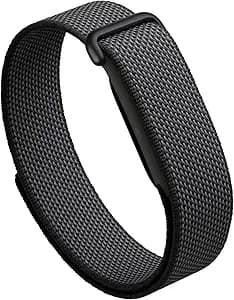
The Fitbit Air's design philosophy can be summed up in a single sentence: you will forget you are wearing it. The core module is a tiny pebble-shaped sensor pod that measures just 1.4 by 0.7 by 0.3 inches and weighs an astonishing 5.2 grams on its own — just 12 grams with the band attached. To put that in perspective, the Fitbit Air is lighter than most wedding rings and roughly one-third the weight of an Apple Watch. I have worn it to sleep, through workouts, in the shower, and during long workdays, and I genuinely forgot it was on my wrist more often than not.
The lack of a display is a deliberate design choice that pays dividends in comfort. Without a screen, there is no glass to crack, no touchscreen to accidentally activate, no bright notifications lighting up during a dark movie or disturbing your sleep. The only visual indicator on the device itself is a small LED that shows battery level when you double-tap the pod — white for more than 20 percent charge, red for below 20 percent. It takes a moment to get used to not having a watch face on your wrist, but within a day or two, the absence becomes liberating rather than disorienting.
Google offers the Fitbit Air in four colors — Obsidian (black), Fog (gray), Lavender, and Berry — and three band styles. The Performance Loop is a woven fabric band made from recycled polyester and elastane with a Velcro closure, and it is the most comfortable option for all-day and all-night wear. The Active Band is a rugged silicone option for workouts and swimming, and the Elevated Modern Band is a metal-link style for dressier occasions. Swapping bands is incredibly simple: the sensor pod pops out with gentle pressure and snaps into a new band in seconds. This is the best band-swapping system I have used on any fitness tracker.
The only small issue with the default Performance Loop band is that it can feel a bit stiff straight out of the box. It softens up after a few days of wear, but it is worth noting if you plan to wear the Air immediately upon receiving it. The Active Band has no such break-in period and is comfortable from the first wear. Additional bands cost between $35 and $50, which is reasonable compared to the $50 to $80 price range for Whoop bands.
Sensors and Health Tracking: Accurate Where It Matters
Despite its tiny size, the Fitbit Air packs an impressive array of sensors. It includes an optical heart rate monitor that samples every two seconds, a three-axis accelerometer, a gyroscope, a red and infrared sensor array for blood oxygen (SpO2) measurement, a skin temperature sensor, and a vibration motor for haptic feedback. This sensor suite covers all the essential health metrics you would expect from a premium fitness tracker.
Heart rate tracking is the most critical metric for any fitness band, and the Fitbit Air delivers excellent accuracy here. In testing against the Apple Watch Ultra 3, heart rate readings stayed within one to two beats per minute during steady-state cardio and interval training. Remarkably, the Fitbit Air actually reacted more quickly than the Apple Watch to heart rate fluctuations during sprint intervals, catching the rapid climb and recovery phases with faster response times. This is genuinely impressive for a $99 device and speaks to the quality of the sensor algorithms Google has developed.
Sleep tracking is where the Fitbit Air truly shines. The combination of the lightweight design (you genuinely do not notice it on your wrist at night) and the advanced sleep stage algorithms delivers the most accurate sleep tracking I have experienced from a sub-$200 device. The Air tracks light, deep, and REM sleep stages, provides a Sleep Score each morning, and includes a Smart Wake alarm that vibrates at the optimal point in your sleep cycle within a 30-minute window before your set alarm time. In testing against an Apple Watch SE 3, sleep duration measurements were consistently within 10 to 15 minutes of each other, and the Air was actually better at detecting short naps and transitional sleep periods. The Smart Wake alarm alone is worth considering the Air for — waking up during light sleep rather than deep sleep makes a noticeable difference in how refreshed you feel in the morning.
The Fitbit Air also tracks SpO2 (blood oxygen), skin temperature variation, heart rate variability (HRV), and breathing rate overnight. It can detect irregular heart rhythms suggestive of atrial fibrillation (AFib), though it does not have a dedicated ECG sensor like the Whoop MG or Apple Watch. The 50-meter water resistance rating (5 ATM) means it is fully swim-proof, which is better than the 10-meter IP68 rating on the Whoop 5.0. You can wear it in the pool, shower, or ocean without worrying about damage.
Battery Life: A Full Week on a Single Charge
The Fitbit Air is rated for up to 7 days of battery life, and in real-world testing, it consistently delivered just over 8 full days between charges. This is a meaningful improvement over Fitbit's own Charge 6 (which lasts 3 to 4.5 days) and is competitive with the Oura Ring 4 and Polar Loop, both of which hover around the one-week mark. The extended battery life is a direct benefit of the screenless design — without a power-hungry display to illuminate, the Air sips power rather than consuming it.
The fast-charge capability is particularly impressive. A five-minute charge provides enough power for a full day of use, making it easy to top up while you are in the shower or getting ready in the morning. A full charge from empty takes about 90 minutes, which is reasonable for a device you only need to charge once a week. I found that a 15-minute charge while I was having my morning coffee was enough to add three full days of battery life, so even if you forget to charge it overnight, a quick top-up during your morning routine will keep you going.
The charging method is the one area where the Fitbit Air falls slightly behind the Whoop 5.0. The Air uses a proprietary charging cable with a small magnetic connector that attaches to the sensor pod. You have to remove the pod from the band to charge it. The Whoop 5.0, by contrast, uses a slide-on battery pack that charges the device while you continue wearing it, enabling truly continuous 24/7 tracking without any off-wrist time. The Air's approach is standard for the category, but if uninterrupted tracking is your priority, it is worth noting that you will need to take the device off for about 90 minutes each week. Most users will simply charge it while they are in the shower or watching TV in the evening, making this a minor inconvenience at worst.
The Google Health App and Gemini AI Coach
The Fitbit Air is the first Fitbit product designed from the ground up around the new Google Health app, which replaces the old Fitbit app and integrates deeply with Google's Gemini AI. The app is clean, well-organized, and far more intuitive than the cluttered interfaces of the old Fitbit and Whoop apps. The home screen shows your key metrics at a glance — readiness score, sleep score, activity progress, and heart rate trends — all in a card-based layout that is easy to scan.
The free tier of Google Health covers the basics: activity tracking, sleep scores, readiness scores, cardio load, and step counting. This is sufficient for casual users who want to monitor their general health trends without spending extra money. You get your Daily Readiness Score each morning, which tells you whether your body is recovered enough for a hard workout or needs a rest day, and your Cardio Load metric shows how much cardiovascular strain you have accumulated. These free features alone provide more insight than most budget fitness trackers offer at any price.
The Premium tier — priced at $9.99 per month or $99.99 per year, with a 3-month free trial included with the device — unlocks the Google Health Coach, which is the Fitbit Air's killer feature. Powered by Gemini AI, the Health Coach is far and away the best AI fitness assistant I have tested on any wearable device. It goes beyond simple data presentation and actively helps you make better decisions about your health, fitness, and recovery.
The Coach accepts input through text, voice, or photo, and this flexibility makes a huge difference in daily usability. You can type a quick note about how you are feeling, speak a question about your recovery status, or — and this is where it gets really impressive — snap a photo of your meal or your workout whiteboard. I took a picture of a whiteboard listing my personal trainer's handwritten workout plan, and the Coach correctly interpreted the handwriting and added each exercise to my activity log. I photographed a plate of eggs, chicken sausage, oatmeal, and blueberries, and the app recognized each item and broke down the macros by carbs, protein, and fat with surprising accuracy. The photo-based food logging is genuinely game-changing for anyone who has ever found manual calorie tracking tedious and unsustainable.
The Coach also remembers context across conversations. The day after I mentioned I was attending a beer festival, it noted my low readiness score and suggested hydrating and resting rather than pushing through a hard workout. When I told it I woke up with shoulder pain, it adjusted my workout plan for the day to avoid aggravating the injury. This contextual memory makes the Coach feel less like a chatbot and more like an actual personal trainer who knows your habits, history, and preferences. It does not just give you generic advice — it gives you personalized advice based on your actual data and your actual life.
The adaptive workout planning is particularly valuable. The Coach builds personalized training schedules based on your goals, schedule, and constraints. It can account for existing commitments like personal trainer sessions and adjust on the fly based on how you are feeling. If you skip a workout, it adapts rather than scolding you — the tone is consistently encouraging and pragmatic rather than judgmental. Over the course of a week, I found myself checking in with the Coach multiple times per day, which is a level of engagement I have never experienced with a fitness tracker.
Workout Tracking: Automatic and Manual
The Fitbit Air automatically detects several types of activity: running, walking, bike riding, spinning, rowing, elliptical training, and team sports. The auto-detection is reliable but requires about 15 minutes of consistent activity before it triggers, which means shorter workouts may not be captured automatically. High-intensity interval training was not auto-detected in my testing, likely because the erratic movement patterns do not fit the algorithm's expected profiles. The Air also auto-detects walks and outdoor runs with solid accuracy, though it occasionally confused a brisk walk with a slow run.
The manual logging experience more than compensates for any auto-detection gaps. In the Google Health app, you can start a workout manually from your phone before you begin, which forces the Air to record the session with full heart rate data. You can also retroactively log a workout by selecting a time window and letting the Coach pull your heart rate data from that period. This hybrid approach means you rarely lose a workout, even if you forget to start logging before you begin exercising. I found the retroactive logging particularly useful for impromptu activities like a pickup basketball game or an evening bike ride with friends.
During workouts, the lack of a screen means you cannot see your real-time heart rate or elapsed time on your wrist. This takes some adjustment if you are used to glancing at a watch during runs or gym sessions. You can check your phone for live metrics, but that somewhat defeats the purpose of a screenless wearable. For most users, this trade-off is acceptable given the comfort and battery life benefits, but it is worth considering if you rely heavily on real-time wrist-based data during workouts. If you are a serious runner who needs pace and distance at a glance, you may want to pair the Air with a phone armband or consider a device with a display.
Fitbit Air vs Whoop 5.0: The Ultimate Comparison
The Fitbit Air's primary competitor is the Whoop 5.0, and the comparison is fascinating because both devices pursue the same philosophy — screenless, 24/7 fitness tracking — but with fundamentally different business models. The Fitbit Air costs $99 upfront with no mandatory subscription, while the Whoop 5.0 costs $199 per year with no upfront device cost. Over three years, the Fitbit Air costs $99 (or $420 with Premium), while the Whoop 5.0 costs $597, and the premium Whoop MG costs $1,077. That is a 57 to 91 percent savings depending on which tier you choose.
The Fitbit Air wins decisively on price, weight (12g vs approximately 28-30g), and water resistance (50m vs IP68). It also delivers a better AI coaching experience through Gemini. The Whoop 5.0 fights back with longer battery life (14 days vs 7 days), much higher heart rate sampling rates (26 Hz vs approximately 0.5 Hz for serious athletes), multi-position wear options (wrist, bicep, calf, apparel), and ECG capability on the Whoop MG model. Whoop also has a more mature strain and recovery algorithm that some serious athletes prefer.
For most people, the Fitbit Air is the better choice. The $99 price point is accessible, the AI coaching is genuinely useful, and the tracking accuracy is excellent for everyday fitness and health monitoring. Serious athletes who need the highest possible data fidelity and recovery analytics may still prefer Whoop, but that audience is much smaller than the general market the Fitbit Air serves. If you are a casual gym-goer, a weekend runner, or someone who simply wants to understand their sleep and recovery better, the Fitbit Air gives you 90 percent of the Whoop experience for a fraction of the cost.
Fitbit Air vs Apple Watch SE 3
The comparison with the Apple Watch SE 3 — which starts at $249 — highlights the trade-offs between a screenless tracker and a full smartwatch. The Apple Watch offers notifications, apps, cellular connectivity, an always-on display, GPS, and a much wider feature set. But it also weighs significantly more, needs charging every 1.5 to 2 days, and is bulkier and less comfortable for sleep tracking.
The Fitbit Air is not trying to replace a smartwatch. Google explicitly positions it as a device you can wear alongside a smartwatch — use the Pixel Watch or Apple Watch during the day for notifications, apps, and GPS, and switch to the Fitbit Air at night for superior sleep tracking. The Google Health app supports multi-device pairing, so data from both devices syncs and deduplicates seamlessly in a single health profile. This dual-device strategy is actually quite clever and acknowledges that no single wearable currently excels at both daytime smartwatch duties and nighttime sleep tracking. I found this combination particularly effective: my Apple Watch handled workouts and notifications during the day, while the Fitbit Air took over at night and during deep-focus work hours when I wanted zero distractions.
Who Should Buy the Fitbit Air
The Fitbit Air is ideal for anyone who wants serious health and fitness tracking without the distractions and bulk of a smartwatch. If you are tired of buzzing notifications, bright screens lighting up at night, and the pressure to charge your watch every single day, the Fitbit Air offers a refreshing alternative that lets you focus on your health rather than your devices.
It is perfect for fitness enthusiasts who want Whoop-style tracking without the Whoop subscription. At $99 with no mandatory ongoing costs, it is the most affordable way to get premium screenless fitness tracking. The AI coaching through Google Health Premium adds genuine value for $10 per month if you want personalized workout plans and nutritional guidance, but you are never forced into it.
It is also an excellent choice for sleep tracking. The lightweight design makes it comfortable enough to wear all night without noticing it, and the sleep stage accuracy is among the best I have tested at any price. If you currently remove your smartwatch at night because it is uncomfortable, the Fitbit Air will dramatically improve your sleep data quality and help you understand your sleep patterns in a way you never could before.
The Fitbit Air is less suitable for people who need a screen for real-time workout data, who require standalone GPS for phone-free running, or who want a device that serves as both a fitness tracker and a smartwatch. It is also not ideal for serious athletes who need the highest possible HRV sampling rates, though the accuracy is still excellent for 99 percent of users.
The Verdict
The Fitbit Air is a home run for Google's wearable strategy. It delivers on every promise of the screenless fitness tracker concept — accurate 24/7 health monitoring, exceptional sleep tracking, all-week battery life, and genuinely useful AI coaching — at a price that makes it accessible to anyone. The $99 price tag with no mandatory subscription is a genuine breakthrough in a category where the leading competitor charges $200 per year.
The design is comfortable enough to wear around the clock without noticing it. The tracking accuracy is competitive with devices costing two to three times as much. The Google Health app and Gemini AI Coach set a new standard for what fitness tracking software should be, with photo-based food logging, conversational context-aware coaching, and adaptive workout planning that actually works.
The Fitbit Air is not perfect. The lack of a screen means no real-time wrist-based workout data. The proprietary charger requires removing the device for weekly charging. The auto-workout detection takes 15 minutes to trigger and misses HIIT sessions. But these are reasonable trade-offs for a $99 device that delivers so much value in every other area.
The Fitbit Air is the screenless fitness tracker that finally makes sense for normal people. It is the device that will introduce millions of users to the benefits of 24/7 health tracking without asking them to change their habits, empty their wallets, or tolerate a bulky screen on their wrist. At $99, it is one of the easiest purchasing decisions in tech this year, and it earns my highest recommendation for anyone looking to improve their health and fitness without adding complexity to their life.
Pros
- Incredible value at $99 with no mandatory subscription
- Ultra-lightweight 12g design — most comfortable tracker for 24/7 wear
- Excellent heart rate and sleep tracking accuracy
- Gemini AI Health Coach is the best fitness AI on any wearable
- 8-day battery life with 5-minute fast charge for a full day
- 50-meter water resistance for swimming
- Photo-based food logging is genuinely useful
Cons
- No screen means no real-time wrist-based workout data
- Proprietary charger requires removing device to charge
- Auto-workout detection takes 15 minutes and misses HIIT
- AI Coach and advanced features require $10/month Premium subscription
- No standalone GPS — relies on phone connection
- No ECG sensor for detailed heart health analysis
Final Verdict
The Google Fitbit Air delivers exceptional screenless fitness tracking with accurate heart rate and sleep monitoring, a week of battery life, and groundbreaking Gemini AI coaching — all for $99 with no mandatory subscription.