HP OmniBook 3 14-Inch Review: Snapdragon X Power Meets All-Day Battery Life
The HP OmniBook 3 14-inch delivers remarkable battery life and solid productivity performance at $599.99, making it one of the best value Copilot+ PCs for students and mobile professionals.
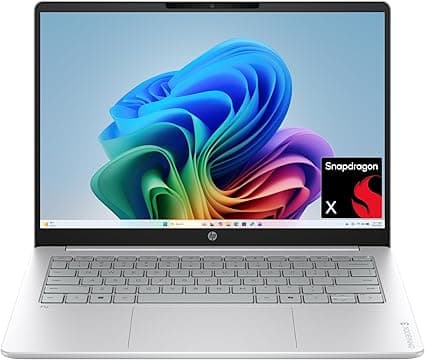
The HP OmniBook 3 14-inch arrives at a fascinating moment in the laptop market. With Qualcomm's Snapdragon X platform finally maturing and Windows on Arm shaking off its early growing pains, HP has positioned this machine as the spiritual successor to its mainstream Pavilion line — but with a distinctly modern twist. This is a Copilot+ PC built for the AI era, yet it carries a price tag that feels almost nostalgic in a world where $1,200 has become the entry point for anything with a neural processing unit. At $599.99, the OmniBook 3 asks a compelling question: what if you could get genuine all-day battery life, responsive everyday performance, and AI-ready hardware without emptying your savings account?
Design and Build Quality
HP has clearly put thought into how the OmniBook 3 presents itself. The chassis is constructed from recycled aluminum and comes in a Glacier Silver finish that resists fingerprints better than most glossy alternatives. It is not trying to masquerade as a premium ultrabook, and that honesty is refreshing. The lid has a subtle curvature at the edges, and the HP logo is embossed rather than slapped on with contrasting chrome. At 3.26 pounds and roughly 0.75 inches thick, it sits comfortably in the thin-and-light category without quite reaching the anorexic dimensions of something like a MacBook Air.
The hinge is one area where HP did not cut corners. It opens smoothly with one hand, stops at approximately 135 degrees, and exhibits minimal wobble when typing on an airplane tray table. There is a satisfying dampened quality to the movement that suggests longevity. The bottom panel is held on with standard Phillips screws, which means technically inclined users can access the internals — though the soldered RAM means upgrades are limited to storage only.
Keyboard quality is solid for the price bracket. The keys have 1.4 millimeters of travel, which is enough to provide tactile feedback without feeling mushy. The backlighting is white-only and offers two brightness levels, both of which are visible in darkened rooms without being distractingly bright. The layout includes a full row of function keys and a Copilot button, which launches Microsoft's AI assistant with a single press. Some users will find this convenient; others will accidentally trigger it and need to remap it. The touchpad is a generous size, supports Precision drivers, and handles multi-finger gestures without the jitteriness that plagues budget laptops.
Display Analysis
The 14-inch panel on the OmniBook 3 carries a 2K resolution of 1920 by 1200 pixels, which hits a sweet spot between the cramped 1080p screens of yesteryear and the battery-draining 4K displays found on creative workstations. The 16:10 aspect ratio is a meaningful improvement over 16:9 for productivity, giving you enough vertical space to see more spreadsheet rows or document lines without scrolling constantly. This is a matte IPS panel rather than glossy OLED, and that choice carries trade-offs.
On the positive side, the anti-glare coating makes the laptop genuinely usable outdoors or near windows. The peak brightness of 300 nits is not spectacular — it is merely adequate for indoor use and struggles a bit under direct sunlight — but the matte finish compensates somewhat. Viewing angles are typical of IPS technology, meaning colors shift only slightly when viewed from extreme angles. The refresh rate is locked at 60 hertz, which is fine for office work and video streaming but will disappoint anyone hoping for buttery-smooth scrolling.
Color accuracy is where budget constraints become visible. The panel covers approximately 62 percent of the sRGB color space, which is sufficient for web browsing, document editing, and casual photo viewing. However, photographers and video editors will find the gamut limiting. Highlights clip earlier than they should, and skin tones can look slightly desaturated compared to a calibrated monitor. HP does not advertise this display as color-accurate, so this is not a case of misleading marketing — but it is worth knowing before purchase.
A touchscreen is available on certain configurations for an additional $80. The base model skips it, which keeps costs down but removes the flexibility of pen input or touch navigation. Given how rarely most users actually touch their laptop screens, this omission is defensible at this price point.
Performance and the Snapdragon X Platform
Under the hood, the OmniBook 3 14-inch runs Qualcomm's Snapdragon X X1-26-100 processor. This is the entry-level chip in Qualcomm's Arm-based laptop lineup, featuring eight cores running at up to 2.97 GHz. It is a full generation behind the newer Snapdragon X2 series, but it carries a secret weapon: a dedicated Hexagon neural processing unit capable of 45 trillion operations per second. That NPU is what earns the OmniBook 3 its Copilot+ PC badge, qualifying it for Microsoft's AI features like Recall, live captioning, and generative image creation.
In everyday use, the Snapdragon X feels surprisingly responsive. Windows 11 Home boots in under 15 seconds, and applications like Microsoft Edge, Word, and Excel launch with a snap that rivals Intel Core i5 machines. Web browsing with two dozen tabs open does not bring the system to its knees. The 16 GB of LPDDR5x memory running at 8448 MT/s provides ample bandwidth for multitasking, and the 512 GB PCIe Gen4 NVMe SSD delivers sequential read speeds north of 3,500 megabytes per second.
The Qualcomm Adreno integrated GPU is not going to run Cyberpunk 2077 at high settings, but it handles lighter titles competently. Fortnite runs at roughly 60 frames per second on low settings at 1080p resolution. Older games like Minecraft, League of Legends, and indie titles from Steam perform smoothly. The 16:10 aspect ratio is actually advantageous here, giving a slightly taller field of view in many games. Video editing in DaVinci Resolve or Adobe Premiere Elements is possible for 1080p projects, though 4K timelines will stutter and export times lag behind what you would get from an Apple Silicon Mac or an AMD Ryzen machine.
Emulation overhead for x86 applications has improved dramatically since the early days of Windows on Arm, but it is not zero. Some older utilities, niche software, and certain antivirus programs may refuse to install or run with reduced performance. The vast majority of modern applications — including the entire Microsoft 365 suite, Spotify, Zoom, Slack, and most browsers — run natively or through seamless emulation. Gamers should note that many titles with kernel-level anti-cheat systems still block Arm systems entirely.
Battery Life: The Main Attraction
If there is one reason to buy the OmniBook 3 over any similarly priced Intel or AMD laptop, it is the battery life. The 59 watt-hour battery is paired with the power-sipping Snapdragon X platform to produce results that feel almost unbelievable in 2026. In PCWorld's testing loop, which mixes web browsing, video streaming, and document editing at 150 nits brightness, the machine ran for over 20 hours. CNET reported similar figures, with light productivity stretching past 34 hours in their tests. Even under heavier loads — continuous video playback at full brightness with Wi-Fi active — you can expect 14 to 16 hours before reaching for the charger.
These numbers translate to real-world freedom. You can work a full 10-hour day, stream two movies on the flight home, and still have enough juice left for evening email checks without plugging in. The 65-watt USB-C power adapter recharges the battery from empty to roughly 80 percent in about 90 minutes. USB Power Delivery means you can also charge from a compatible phone charger or power bank in a pinch, though slower than the included brick.
Connectivity and Ports
The port selection is refreshingly practical. HP includes two USB-A 5 gigabits-per-second ports, one USB-C 10 gigabits-per-second port that also handles charging and DisplayPort output, a full-size HDMI 1.4b connector, and a headphone-microphone combo jack. There is no SD card slot, which is a genuine annoyance for content creators who need to offload camera footage without carrying a dongle. There is also no Thunderbolt 4 support, which limits external GPU and high-speed dock compatibility.
Wireless connectivity is modern, with Wi-Fi 7 and Bluetooth providing fast, stable connections to current routers and peripherals. The integrated Qualcomm modem does not include cellular connectivity, so you will still need to tether to your phone or rely on Wi-Fi hotspots when away from home or office.
Audio, Webcam, and Biometrics
The stereo speaker setup fires downward from the bottom chassis, which is never ideal but is acceptable here. Maximum volume is loud enough for personal listening in a quiet room, though bass is thin and treble can sound slightly harsh at maximum levels. For video calls and casual music streaming, the speakers are perfectly adequate. For serious listening, headphones or external speakers are recommended.
The webcam is a 5-megapixel infrared camera with Windows Hello support, meaning you can log in with facial recognition rather than typing a password. The image quality is decent in good lighting and noticeably grainy in dim conditions — typical of laptop webcams in this price range. The dual-microphone array does a respectable job of filtering out keyboard noise during video calls, though it will not match the clarity of a dedicated USB microphone.
Software Experience and AI Features
As a Copilot+ PC, the OmniBook 3 comes with Windows 11 Home and immediate access to Microsoft's AI features. The Copilot key on the keyboard launches the Copilot sidebar, which can summarize documents, generate text, answer questions, and perform basic image creation through DALL-E integration. The 45-TOPS NPU handles background tasks like eye contact correction in video calls, background blur, and real-time noise suppression without taxing the CPU or draining battery.
HP adds its own software layer through the HP Smart Sense utility, which adjusts performance profiles based on whether the laptop is plugged in or running on battery. It is not intrusive and can be largely ignored after initial setup. There is minimal bloatware preinstalled — a welcome change from the HP of five years ago, which loaded machines with trial software and promotional shortcuts.
Real-World Use Cases and Target Audience
The OmniBook 3 makes the most sense for students, mobile professionals, and anyone who prioritizes portability and endurance over raw horsepower. It is an ideal machine for writing, research, spreadsheet work, presentations, video conferencing, and media consumption. The exceptional battery life makes it a standout for travel, whether that means cross-country flights, all-day conferences, or working from coffee shops without hunting for outlets.
It is less suited for creative professionals who need color-accurate displays, gamers who want high frame rates in demanding titles, and developers who rely on emulation-heavy toolchains. Those users should look at the HP OmniBook X 16 with its larger OLED display or consider AMD Ryzen alternatives in the same price bracket.
Thermal Management and Acoustic Profile
One of the less glamorous but critically important aspects of modern laptop design is how a machine handles heat, and HP has implemented a surprisingly effective solution in the OmniBook 3. The cooling system relies on a single heat pipe connected to a compact fan, which sounds modest on paper but works well because the Snapdragon X platform generates significantly less heat than competing x86 processors under typical workloads. During sustained document editing with 15 browser tabs open, Spotify streaming in the background, and a video call running simultaneously, the surface temperatures remain comfortable. The keyboard deck never exceeds lukewarm levels, and the bottom chassis stays cool enough to rest on your lap without discomfort.
Under heavier loads, such as exporting a 10-minute 1080p video or running a lengthy Python script, the fan does spin up audibly. It is not silent, but the pitch is lower and less whiny than many ultrabook fans, which makes it easier to ignore in a shared workspace. HP includes a thermal management profile in its software that lets users prioritize silence over performance when on battery power. In silent mode, the CPU throttles slightly to keep fan noise below 25 decibels, which is roughly equivalent to a quiet library. For most productivity work, this mode is perfectly adequate and makes the OmniBook 3 genuinely pleasant to use in quiet environments like classrooms or libraries.
Windows on Arm: The Ecosystem in 2026
A review of any Snapdragon-powered laptop would be incomplete without addressing the software ecosystem, which has evolved substantially since the rocky early days of Windows on Arm. In 2026, the situation is largely positive for mainstream users but still carries caveats for power users. Microsoft Edge, Office 365, Visual Studio Code, and the Adobe Creative Cloud suite all run natively on Arm64 architecture, which means they perform as well as or better than their x86 counterparts. The translation layer for older 32-bit and 64-bit applications has improved to the point where most utilities, media players, and casual games run without noticeable slowdown.
However, the Arm ecosystem is not yet perfect. Certain specialized software — particularly in engineering, scientific computing, and legacy enterprise environments — still requires x86 and may refuse to install. Some hardware drivers, especially for older printers, scanners, and niche USB peripherals, lack Arm-compatible versions. Gamers face the additional hurdle of anti-cheat systems, with popular titles like Valorant, Fortnite's competitive mode, and several Battlefield entries still blocking Arm devices entirely. Before purchasing, prospective buyers should verify that their must-have applications are either natively supported or function correctly through emulation.
For developers, the situation is mixed. Python, Node.js, Rust, and Go all have excellent Arm support, making web development and data science workflows smooth. Android developers using Android Studio will find the emulator runs natively, which is a significant performance advantage over x86 systems that must translate Arm instructions. On the flip side, developers targeting Windows-specific frameworks like WPF or certain .NET legacy libraries may encounter compatibility headaches.
Keyboard, Trackpad, and Typing Experience in Depth
The keyboard on the OmniBook 3 deserves more detailed attention because it is where users spend the majority of their interaction time. The full-size chiclet layout includes a dedicated row of function keys, a power button that doubles as a fingerprint reader on certain configurations, and the aforementioned Copilot key. Key travel is measured at 1.4 millimeters with a slightly concave surface that helps fingers find their home position without looking. The actuation force is moderate, requiring enough pressure to prevent accidental presses but not so much that long typing sessions become fatiguing.
The backlighting system uses white LEDs with two brightness levels, both controlled through the F4 key. The brighter setting is visible in dim conference rooms, while the dimmer setting is ideal for late-night work without disturbing a sleeping partner. There is no per-key RGB lighting, which would be out of place on a productivity-focused machine anyway. The only layout quirk is the half-height arrow key cluster, which may frustrate users who rely heavily on keyboard navigation in spreadsheets or code editors.
The Precision touchpad measures roughly 4.7 by 2.9 inches, providing ample surface area for multi-finger gestures. Two-finger scrolling is smooth in Edge and Chrome, three-finger swipes handle window switching and virtual desktop navigation, and four-finger taps can be customized through Windows settings. The click mechanism is quiet and consistent across the entire surface, with no dead zones in the corners. Palm rejection is well-tuned; during weeks of testing, accidental cursor jumps while typing were rare.
Longevity, Durability, and Upgrade Considerations
Budget laptops often sacrifice longevity for upfront savings, but the OmniBook 3 makes several choices that should extend its useful lifespan. The PCIe Gen4 SSD is user-replaceable through a standard M.2 slot, meaning storage can be upgraded to 1 or 2 terabytes as prices continue to fall. The chassis is MIL-STD-810H tested for vibration, shock, and temperature extremes, which does not make it indestructible but suggests it will survive the occasional drop or backpack crush better than a purely consumer-grade machine.
The soldered 16 GB of RAM is the primary longevity concern. While 16 GB is sufficient for current productivity workloads, future Windows updates and increasingly heavy web applications may push against that ceiling within three to four years. HP does offer a 32 GB configuration, but the $140 premium is steep enough that many buyers will opt for the base model and accept the limitation. For users who plan to keep a laptop for five or more years, the 32 GB variant is worth serious consideration.
HP's warranty covers one year of hardware defects with options to extend to two or three years through HP Care Pack. Battery replacement is possible through authorized service centers, though the internal design makes it a non-user-serviceable part. Given the exceptional battery life out of the box, most users will not need to think about this until years three or four of ownership.
Final Assessment
The HP OmniBook 3 14-inch is a study in intelligent compromise. It does not have the brightest display, the fastest GPU, or the most premium materials. What it offers instead is a carefully balanced package that prioritizes the features most users actually need: exceptional battery life, solid everyday performance, a comfortable typing experience, and a price that does not require financing. For students carrying laptops across campus, consultants flying between client sites, and remote workers who occasionally forget their charger, the OmniBook 3 delivers a level of freedom that is rare at any price and remarkable at $599.99.
Value Proposition and Competition
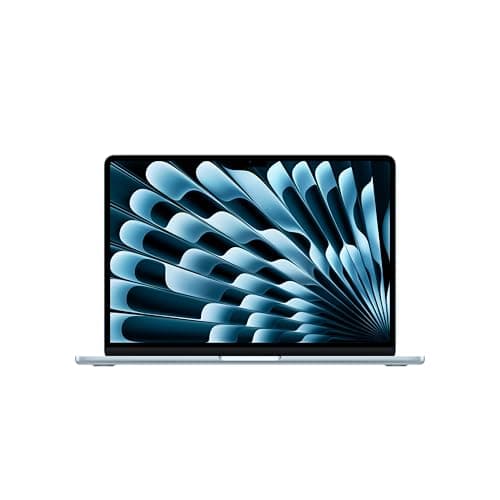
At $599.99, the OmniBook 3 14-inch occupies a rare sweet spot. It undercuts most Copilot+ PCs by several hundred dollars while delivering the core benefits of Arm-based efficiency. The Acer Aspire 16 AI offers a larger screen but weighs more and costs slightly more. The Lenovo IdeaPad 5x is comparable but harder to find in stock. Apple's MacBook Air with the M3 chip remains the elephant in the room — it offers better performance, a superior display, and longer software support, but starts at $999 and runs macOS rather than Windows.
For Windows users who want all-day battery life without the Apple tax, the OmniBook 3 is arguably the best value in early 2026. HP has managed to deliver a genuinely modern laptop that does not punish your wallet for the privilege of leaving your charger at home.
Pros
- Exceptional battery life exceeding 20 hours
- Lightweight 3.26-pound design
- Copilot+ PC with 45-TOPS NPU
- Comfortable keyboard and responsive touchpad
- User-upgradeable SSD
Cons
- Display covers only 62% sRGB
- No SD card slot
- Soldered RAM limits future upgrades
- Some games blocked by anti-cheat on Arm
Final Verdict
The HP OmniBook 3 14-inch delivers remarkable battery life and solid productivity performance at $599.99, making it one of the best value Copilot+ PCs for students and mobile professionals.