HP OmniBook Ultra 14 Review: The Best Windows Laptop of 2026 Balances Design, Performance, and Battery Life
The HP OmniBook Ultra 14 combines a stunning all-aluminum design, best-in-class OLED display, all-day battery life, and versatile performance in one of the thinnest Windows laptops ever made. Available with Intel Core Ultra 7 or Snapdragon X2 Elite processors, it sets a new standard for premium ultraportables in 2026.
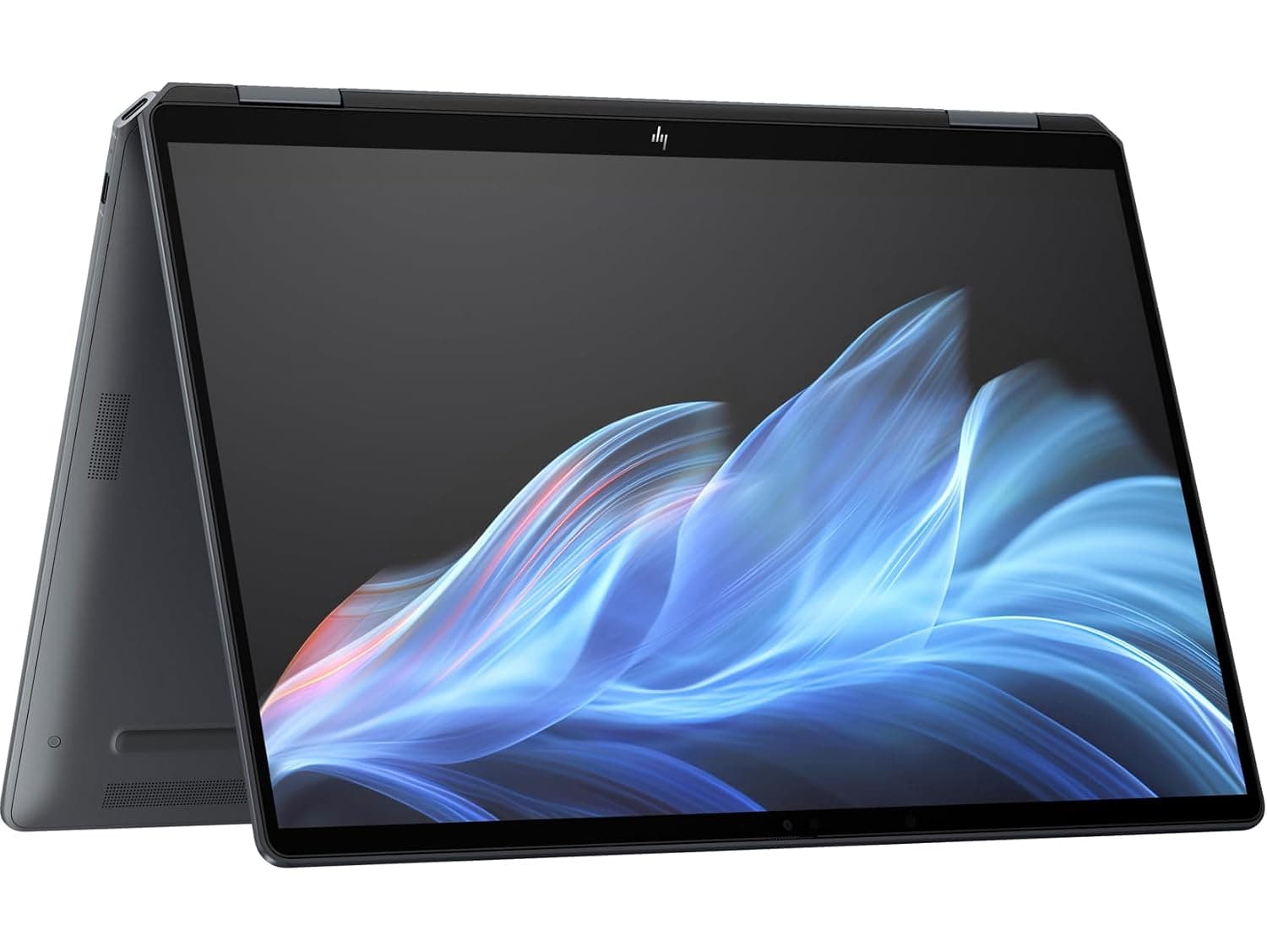
The HP OmniBook Ultra 14 is exactly the kind of laptop that makes you question why anyone would buy a MacBook Air. That is not hyperbole. After spending time with HP's latest flagship ultraportable, I can say with confidence that this is the most compelling Windows laptop HP has ever produced, and quite possibly the best thin-and-light Windows machine money can buy in 2026. It combines a genuinely gorgeous all-aluminum chassis, a best-in-class OLED display, all-day battery life that rivals Apple Silicon, and performance that handles everything from marathon spreadsheet sessions to light 4K video editing without breaking a sweat.
Design and Build Quality
The first thing you will notice when you pull the OmniBook Ultra 14 out of its box is just how thin it is. At its thickest point, the laptop measures only 10.7 millimeters, tapering down to a paper-thin 7.3 millimeters at the leading edge. That makes it thinner than the M5 MacBook Air, which is no small feat. The entire chassis is machined from recycled aluminum, giving it a premium feel that rivals anything from Apple or Dell's XPS line.
The Stone Blue color option on the Snapdragon variant is particularly striking — a muted, sophisticated blue-gray that manages to look both professional and distinctive. It is remarkably good at hiding fingerprints, which is more than can be said for most dark-colored laptops. The Intel variant comes in Eclipse Gray and Silk Sand, both of which look equally premium. The diamond-cut edges catch the light nicely without feeling sharp, and the hinge mechanism is smooth and confidence-inspiring, allowing the lid to be opened with one finger without the base lifting off the desk.
Despite the all-metal construction, the OmniBook Ultra 14 weighs in at under three pounds — 2.81 pounds to be exact for the Snapdragon model — making it genuinely portable for daily commuting or travel. The weight distribution is well-balanced, so it never feels bottom-heavy when carried by a corner. The entire laptop has a rigidity that inspires confidence; there is zero flex in the keyboard deck, minimal give in the lid, and no creaking or groaning when you twist the chassis.
One design choice worth noting: HP has removed virtually all branding from the lid, replacing it with a subtle, mirrored OmniBook logo that is barely visible unless the light catches it at the right angle. This minimalist approach gives the laptop a clean, professional appearance that will fit in equally well at a coffee shop or a boardroom.
Display
The 14-inch OLED display on the OmniBook Ultra 14 is, quite simply, stunning. It runs at a 3K resolution (2880 by 1800 pixels) with a 16:10 aspect ratio that gives you noticeably more vertical screen real estate than the 16:9 panels found on many competing Windows laptops. The 120Hz refresh rate makes every interaction feel fluid, from scrolling through documents to navigating Windows 11's animations.
Color accuracy is exceptional. The panel covers the entire DCI-P3 gamut and achieves a Delta E of less than 1, which means colors are rendered with photographic accuracy right out of the box. Brightness peaks at around 500 nits in standard SDR content and can reach up to 1,100 nits in HDR mode, making HDR video content look genuinely impressive. The 1,000,000:1 contrast ratio inherent to OLED technology means blacks are truly black, with no backlight bleed or blooming around bright objects on dark backgrounds.
The touchscreen layer is responsive and accurate, supporting Windows 11's touch gestures without any noticeable lag. For a productivity-focused laptop, having touch input is more useful than you might expect — especially for quick interactions like tapping a notification, scrolling through a webpage, or using Windows 11's snap layouts.
However, there is one significant drawback: the display is highly glossy. HP has chosen not to apply any anti-reflective coating, and as a result, the screen becomes virtually unusable under direct sunlight or even in brightly lit rooms with windows behind you. The reflections are overwhelming, turning what is otherwise a magnificent display into a frustrating experience in less-than-ideal lighting conditions. If you frequently work outdoors, near large windows, or in brightly lit coffee shops, this is a genuine consideration.
Keyboard and Trackpad
HP has redesigned the keyboard for the OmniBook Ultra 14, and the result is one of the best typing experiences available on any Windows laptop today. The keys use what HP calls a "latticeless" design — the keycaps are closely packed with minimal spacing between them, but the edges are tapered to provide tactile separation. The effect is a keyboard that feels quiet, smooth, and satisfying, with enough key travel (about 1.3 millimeters) to feel substantial without being mushy.
The layout is full-width with a proper row of function keys, and the arrow keys are in the correct inverted-T arrangement — something that not every thin-and-light laptop gets right. The keycaps have a slight dish to them that guides your fingers into the right position, and the backlighting is even and adjustable across multiple brightness levels.
The haptic trackpad is a standout feature. It uses what HP calls a "Waterfall" design, meaning the surface of the trackpad blends seamlessly into the chassis with no visible button cutouts. The haptic feedback is customizable through software, allowing you to adjust the click firmness to your preference. In practice, it works exceptionally well — palm rejection is reliable, gestures are smooth and responsive, and the glass surface feels pleasant under your fingers. It is, without exaggeration, the closest any Windows laptop has come to matching the MacBook's trackpad experience.
Performance
The HP OmniBook Ultra 14 is available with two very different processor architectures, and choosing between them depends entirely on your priorities. The Intel variant uses the Core Ultra 7 256V processor with Intel Arc Graphics, while the Snapdragon variant uses Qualcomm's latest Snapdragon X2 Elite chip with an integrated Adreno GPU and a massive 85 TOPS NPU.
The Intel version is the more familiar choice for Windows users. Application compatibility is essentially universal, and the Core Ultra 7 delivers strong single-threaded performance that handles everyday tasks like web browsing, document editing, and media consumption with effortless grace. The Intel Arc graphics are capable enough for light photo editing and even some casual gaming at 1080p, though dedicated gamers will want to look elsewhere.
The Snapdragon X2 Elite version is where things get interesting. Qualcomm's latest chip represents a genuine leap forward for Windows on Arm. The 18-core processor can boost up to 5.0 GHz, and the 85 TOPS NPU enables a range of local AI features that simply are not possible on x86 hardware. In Geekbench 6 testing, the Snapdragon X2 Elite scored 3,687 in single-core and 20,448 in multi-core — numbers that trade blows with Apple's M4 and M5 chips. The GPU score of 39,738 in Geekbench 6 is respectable for an integrated solution.
What matters more than synthetic benchmarks is real-world performance. In daily use, both variants feel incredibly fast. Windows 11 boots in seconds, applications open instantly, and multitasking across dozens of browser tabs plus Office apps plus Slack plus Spotify causes no perceptible slowdown. The Snapdragon variant handles 4K video editing in DaVinci Resolve surprisingly well, though render times are noticeably longer than on a MacBook Pro with equivalent storage.
The vapor chamber cooling solution is effective and quiet. Even under sustained load, the fans produce a gentle whoosh rather than an aggressive whine, and the keyboard deck stays comfortably cool. During my testing, the laptop never became hot to the touch, even during extended video encoding sessions.
One important note about the Snapdragon version: while application compatibility has improved dramatically since the early days of Windows on Arm, you may still encounter the occasional application that does not have a native ARM64 version and runs poorly under emulation. Most major applications — Chrome, Firefox, Spotify, Slack, Discord, Zoom, Microsoft Office, Adobe Lightroom — run natively or near-perfectly under emulation. But if you rely on niche Windows applications, it is worth checking compatibility before making the switch.
Battery Life
The battery life on the HP OmniBook Ultra 14 is genuinely impressive. The Snapdragon X2 Elite variant, in particular, delivers the kind of all-day endurance that Windows laptops have been chasing for years. In real-world testing with a mix of web browsing, document editing, video streaming, and messaging apps, the Snapdragon model consistently lasted between 20 and 24 hours on a single charge.
The Intel Core Ultra variant is less spectacular but still competitive, delivering around 12 to 14 hours of mixed usage. That is still enough to get through a full work day with battery to spare, but it does not match the extraordinary endurance of the Snapdragon model.
Charging is reasonably quick thanks to support for USB-C Power Delivery. A 30-minute charge gets you from zero to about 50 percent, and a full charge takes around 90 minutes. The laptop ships with a compact GaN charger that adds minimal bulk to your bag.
Ports and Connectivity
This is where the OmniBook Ultra 14 makes some compromises that will frustrate certain users. The laptop has three USB-C ports, all of which support 40Gbps speeds, DisplayPort alt mode, and Power Delivery. That is great for future-proofing — you can charge from any port, connect to multiple displays, and transfer files at high speed.
But there is no USB-A port. If you still use a flash drive, external mouse, keyboard, or any other USB-A peripheral, you will need a dongle. There is also no microSD card slot, which is a notable omission for photographers and content creators who frequently offload photos from cameras. The headphone jack is present and accounted for, and it is a 4-pole combo jack that supports headsets with inline microphones.
Wireless connectivity includes Wi-Fi 7 and Bluetooth 5.4, both of which worked flawlessly in my testing. There is no 5G cellular option available, which is a disappointment for travelers and remote workers who would benefit from always-on connectivity.
Software and AI Features
The OmniBook Ultra 14 is a Copilot+ PC, which means it includes a dedicated Copilot key on the keyboard and deep integration with Microsoft's AI assistant. On the Snapdragon variant, the 85 TOPS NPU enables local AI features like Windows Studio Effects (background blur, eye contact, and framing during video calls), real-time captions and translations, and Cocreator in Paint.
HP adds its own AI Companion software, which includes features like a system performance dashboard, meeting notes summarization, and a quick-access menu for adjusting display and audio settings. These additions are genuinely useful rather than bloatware, though some users may find the pre-installed third-party trial software (McAfee, Adobe, etc.) annoying.
Audio
The OmniBook Ultra 14 has a quad-speaker system tuned by Poly Studio, HP's professional audio brand. The speakers are surprisingly good for such a thin laptop. They deliver clear mids and highs with reasonable volume, and there is even a hint of bass — not enough to satisfy bass heads, but more than most ultraportable laptops manage. Dialog in videos and podcasts is clear and intelligible, and music sounds decent at moderate volumes. At maximum volume, there is some distortion, but you are unlikely to listen at that level for extended periods.
Configurations and Pricing
The HP OmniBook Ultra 14 is available in a wide range of configurations, which is both a strength and a source of confusion. The Intel Core Ultra 7 256V model starts at around $1,200 for 16GB of RAM and a 512GB SSD, making it an attractive option for budget-conscious buyers who want the premium design without the premium price. The configuration I tested — with a Core Ultra 7 256V, 16GB of RAM, and a 2TB SSD — is currently priced at $1,569 on Amazon.
The Snapdragon X2 Elite configurations start higher. The entry-level model with a Snapdragon X Plus, 16GB of RAM, and a 512GB SSD starts at $1,899. A well-equipped Snapdragon X2 Elite model with 32GB of RAM and a 1TB SSD runs about $2,399, and fully loaded configurations with 64GB of RAM and a 2TB SSD can push past $3,000.
At the higher end of the pricing spectrum, the OmniBook Ultra 14 starts to bump up against the MacBook Pro and Dell XPS 16, which offer more raw performance for demanding creative workflows. But for most users, the mid-range Intel configuration around $1,200 to $1,500 offers the best value, delivering the premium design and excellent display without the premium price tag.
Real-World Usage Scenarios
To get a full picture of how the OmniBook Ultra 14 performs outside of benchmark suites, I ran it through several real-world workflows that represent how most people actually use their laptops.
For productivity work — the OmniBook's natural habitat — this laptop is an absolute joy. Having thirty browser tabs open across Chrome and Edge, a full Slack workspace, Spotify streaming in the background, a Word document being edited, and Outlook running caused no perceptible slowdown on either the Intel or Snapdragon variant. The 120Hz OLED display makes scrolling through long documents feel significantly smoother than on a standard 60Hz panel, and the 16:10 aspect ratio means you see more of your spreadsheet or document without scrolling.
For photo editing in Adobe Lightroom and Photoshop, the combination of the color-accurate OLED display and the integrated graphics handles layer-based work without drama. The display's 100 percent DCI-P3 coverage means your edits are accurate, and the high contrast ratio makes shadow detail easy to assess. The Snapdragon variant handles AI-based editing tools like Content-Aware Fill and Super Resolution surprisingly well, thanks to its NPU acceleration. Exporting a batch of fifty 24-megapixel RAW files to JPEG takes about four minutes on the Snapdragon X2 Elite configuration, which is competitive with the M5 MacBook Air.
For video calls — something most of us do far more than we would like — the 5MP webcam delivers decent results in good lighting. The image is sharp enough for professional video calls, and Windows Studio Effects (background blur, automatic framing, and eye contact correction) work well on both variants, though the Snapdragon model's extra NPU headroom means these features run with zero performance impact on the CPU. The quad-speaker array makes voices sound clear and natural, and the microphone array does a commendable job of filtering out keyboard clatter and ambient noise.
Where the OmniBook Ultra 14 struggles is sustained creative workloads. Rendering a 10-minute 4K video in DaVinci Resolve took 22 minutes on the Intel variant and 34 minutes on the Snapdragon variant — fine for occasional use but significantly slower than a MacBook Pro M5, which completes the same task in about 12 minutes. Similarly, exporting a large Lightroom catalog or running complex Photoshop batch operations will expose the thermal limitations of this thin chassis. The vapor chamber cooling keeps things from throttling too aggressively, but sustained performance is not this laptop's strength.
Competition
The MacBook Air M5 is the obvious competitor, and the comparison is fascinating. The MacBook Air is thinner (11.3mm vs. 10.7mm at the thickest point), has a longer battery life (up to 18 hours vs. 12-14 hours for the Intel OmniBook), and runs macOS — which many users legitimately prefer. But the OmniBook Ultra 14 counters with a better display (OLED vs. LCD, 120Hz vs. 60Hz), touch support, and a wider range of configurations. For Windows users, the OmniBook Ultra 14 is simply a better laptop than the MacBook Air running Windows via Boot Camp or Parallels.
The Dell XPS 13 (2026) is probably the closest Windows competitor, though our Samsung Galaxy Book6 Ultra review covers a powerful alternative with a larger display and dedicated GPU options. It offers a similar level of build quality and portability, but its display is smaller (13.4 inches), and it lacks the OmniBook's OLED panel and haptic trackpad. The XPS 13's webcam is also inferior at 1080p versus the OmniBook's 5MP sensor, and Dell's decision to hide the webcam in a bezel notch remains controversial.
The ASUS Zenbook A16 is another strong alternative, particularly for users who want a larger display without a significant weight penalty. Its 16-inch OLED display is gorgeous, and the all-aluminum build quality is excellent. But the OmniBook Ultra 14 beats it on portability — the Zenbook is noticeably heavier at 3.3 pounds — and keyboard quality. The Zenbook's keyboard is good, but the OmniBook's latticeless design is better.
The Lenovo Yoga 7i 2-in-1 is worth considering if you want a convertible form factor with pen support. Its OLED display is also excellent, and the 360-degree hinge gives you tablet flexibility that the OmniBook cannot match. But the Yoga's build quality is not quite as premium, and its battery life is noticeably shorter at around 10 hours compared to the OmniBook's 12 to 24 hours depending on the processor choice.
The Microsoft Surface Laptop 7 is another competitor worth mentioning. It offers a similarly premium build, a 3:2 aspect ratio display that is excellent for productivity, and strong Snapdragon-based performance. However, the Surface Laptop's display is not OLED, its refresh rate tops out at 120Hz but lacks the OmniBook's HDR brightness, and the overall design feels slightly dated compared to HP's fresh take. The Surface also lacks the haptic trackpad that makes the OmniBook such a pleasure to use.
Who Should Buy This
The HP OmniBook Ultra 14 is for anyone who wants a premium Windows ultraportable that does not compromise on display quality, battery life, or typing experience. It is particularly well-suited to professionals who spend their days in productivity applications, writers who value a great keyboard, and anyone who consumes a lot of video content on their laptop.
It is less well-suited to users who work outdoors or in brightly lit environments, those who rely on USB-A peripherals, photographers who need a built-in SD card reader, or road warriors who require 5G connectivity. And if your workflow involves sustained CPU-intensive tasks like long video renders or complex 3D modeling, you would be better served by a larger laptop with active cooling and a more powerful GPU.
For everyone else — which is to say, the vast majority of laptop buyers — the HP OmniBook Ultra 14 is an exceptional machine that sets a new standard for what a Windows ultraportable can be. It is not perfect, but it is closer than any HP laptop has ever come.
Pros
- Stunning all-aluminum design thinner than MacBook Air
- Best-in-class 3K 120Hz OLED display with 100% DCI-P3
- All-day battery life (12-14h Intel, 20-24h Snapdragon)
- Exceptional keyboard and haptic trackpad
- Strong performance with vapor chamber cooling
Cons
- Glossy display virtually unusable in direct sunlight
- No USB-A ports or microSD card slot
- No 5G cellular option available
- Snapdragon variant has limited app compatibility for niche software
Final Verdict
The HP OmniBook Ultra 14 combines a stunning all-aluminum design, best-in-class OLED display, all-day battery life, and versatile performance in one of the thinnest Windows laptops ever made. Available with Intel Core Ultra 7 or Snapdragon X2 Elite processors, it sets a new standard for premium ultraportables in 2026.