Lenovo Yoga 7i 2-in-1 (2026) Review: The Best Windows Laptop for Most People
The Lenovo Yoga 7i 2-in-1 combines a stunning OLED touchscreen, comfortable keyboard, all-day battery life exceeding 15 hours, and versatile tablet functionality into a well-built package at around $990. Wirecutter's pick for best Windows laptop lives up to the hype.
The laptop market in 2026 is defined by aggressive competition at every price point. Apple's MacBook Neo shook up the budget segment, AMD and Qualcomm are challenging Intel on performance-per-watt, and AI-powered features are becoming standard rather than exceptional. In the midst of this upheaval, the Lenovo Yoga 7i 2-in-1 (14-inch, Intel) has emerged as Wirecutter's pick for the best Windows laptop for most people, and after spending time with the configuration featuring an Intel Core Ultra 5 226V processor, 16GB of RAM, and a gorgeous 14-inch OLED touchscreen at around $990, it's easy to understand why.
The Yoga 7i doesn't try to be the thinnest, the lightest, or the most powerful laptop in its class. Instead, it focuses on getting the fundamentals right: a vivid display, comfortable keyboard, reliable trackpad, strong performance, and all-day battery life. It's a boring description for what turns out to be a genuinely excellent laptop, but sometimes boring is exactly what most people need.
Design and Build Quality
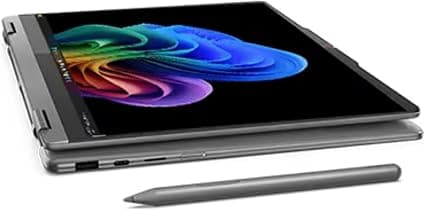
The Yoga 7i 2-in-1 features a CNC-machined aluminum chassis that feels substantial without being heavy. At 3.04 pounds, it's not the lightest 14-inch convertible on the market, but it's light enough to carry around campus or slip into a messenger bag without complaint. The 360-degree hinge is smooth and confidence-inspiring, holding the screen firmly in place at any angle without wobbling when you're using the touchscreen. The hinge mechanism is also durable enough to survive years of flipping between laptop and tablet modes, and the friction is well-calibrated — easy enough to open with one hand but tight enough that the screen doesn't jiggle when you're typing on your lap.
In tablet mode, the Yoga 7i transforms into a 3-pound slate that's usable for reading, drawing, and presenting. The keyboard automatically disables when you fold the screen back past 180 degrees, and Windows 11's tablet mode adjusts the interface for touch input. It's not as seamless as using an iPad, but it's functional enough for note-taking with the Active Pen and for consuming media in tight spaces like airplane seats. The tent and stand modes are particularly useful for watching movies on a nightstand or giving presentations in small meetings.
The laptop is available in a Luna Grey finish that looks professional without being boring. The clean lines and minimal branding give it a refined appearance that wouldn't look out of place in a boardroom or a coffee shop. The build quality is excellent across the board — there's no flex in the keyboard deck, the screen doesn't twist excessively, and the overall impression is one of solidity that belies the mid-range price point.
The port selection is generous for a modern ultraportable. You get two Thunderbolt 4 USB-C ports, one USB-A 3.2 Gen 1 port, HDMI 1.4b, a 3.5mm headphone jack, and a microSD card reader. Having both Thunderbolt 4 and legacy USB-A means you can connect modern monitors and docks while also using older peripherals without a dongle. The HDMI port supports external displays at up to 4K resolution, which is adequate for presentations and secondary monitors. The inclusion of a microSD slot is a nice touch for photographers and content creators who need to offload files from cameras or drones.
Keyboard and Trackpad
Lenovo has a well-deserved reputation for making some of the best laptop keyboards in the industry, and the Yoga 7i upholds that standard. The keys have 1.5mm of travel with a snappy, tactile feel and a quiet bottoming action. The key caps are slightly concave, which helps your fingers find the right position without looking. The layout is standard with no awkwardly placed keys, and the arrow keys are full-sized rather than the half-height keys found on many competing ultraportables.
The keyboard is backlit with two brightness levels, making it usable in dark environments. This might seem like a basic feature, but it's worth noting that the otherwise excellent MacBook Neo lacks a backlit keyboard entirely, which makes the Yoga 7i's implementation a genuine advantage for anyone who works in varying lighting conditions.
The trackpad is a large glass surface with precision drivers that provide accurate tracking and reliable gesture recognition. Multi-finger gestures for switching between desktops, opening task view, and zooming work smoothly without the jumpy behavior that plagues lower-end Windows laptops. The trackpad uses a mechanical hinge mechanism rather than a haptic system, which means clicks are slightly louder and require more force toward the top edge, but this is a minor complaint about what is otherwise an excellent input experience.
The Yoga 7i also includes an optional Lenovo Active Pen that stores in a garage on the right side of the laptop. The pen supports 4,096 levels of pressure and is useful for note-taking, annotation, and creative work in tablet mode. It's not as refined as the Surface Pen or Apple Pencil experience, but it's a welcome inclusion at this price point.
Display
The 14-inch OLED touchscreen is one of the Yoga 7i's standout features. At the standard configuration, it offers a 1920x1200 resolution with full 100% DCI-P3 color coverage and 500 nits of peak brightness. The OLED panel delivers the characteristic inky blacks and infinite contrast ratio that makes content look vibrant and three-dimensional. Colors pop without being oversaturated, and the wide color gamut ensures accurate reproduction of sRGB and P3 content.
What makes this display particularly impressive at the Yoga 7i's price point is that OLED technology is still relatively rare in the sub-$1,000 laptop category. Most competitors at this price use IPS panels that, while competent, cannot match the contrast and color vibrancy of OLED. The difference is immediately visible when watching movies, editing photos, or simply reading text on a white background — the Yoga 7i's display simply looks more premium than its price would suggest.
The 16:10 aspect ratio provides more vertical screen space than the 16:9 panels found on many budget and mid-range laptops, which means you can see more of a document, spreadsheet, or webpage without scrolling. This is one of those quality-of-life improvements that becomes noticeable within minutes of use and hard to give up once you're accustomed to it.
The display supports touch input and works with the included Lenovo Active Pen. Touch responsiveness is excellent, with no noticeable lag between input and on-screen action. The touch layer does pick up fingerprints, but the anti-reflective coating helps maintain visibility in bright environments. The display also incorporates Eyesafe certification for reduced blue light emissions, which is a nice addition for people who spend long hours in front of their screens.
One configuration note: the 1920x1200 OLED panel is already sharp enough for comfortable reading and media consumption at 14 inches. Higher-resolution options are available on other laptops, but the increased pixel density offers diminishing returns at this screen size. The Yoga 7i's panel strikes an excellent balance between visual quality, battery efficiency, and cost.
Performance
The Intel Core Ultra 5 226V processor is part of Intel's Lunar Lake family, and it represents a significant step forward in efficiency and integrated graphics performance. In everyday use, the Yoga 7i feels snappy and responsive. Applications open quickly, multitasking with a dozen browser tabs, Slack, Spotify, and a document editor running simultaneously doesn't cause any hesitation, and the system remains responsive even under moderate load.
The integrated Intel Arc graphics are capable of light gaming and basic creative work. Games like Rocket League, Fortnite, and older titles run at playable frame rates at the display's native resolution with medium settings. Video editing in apps like DaVinci Resolve or Adobe Premiere Rush is possible for short clips and basic edits, though you'll want a dedicated GPU for serious creative work. For the vast majority of users who spend their time in web browsers, office applications, and streaming services, the Core Ultra 5 226V provides more than enough power.
The 16GB of LPDDR5X memory is the sweet spot for most users in 2026. It's enough to keep dozens of browser tabs active, run productivity applications, and handle light creative work without hitting memory constraints. 8GB would feel limiting within a year or two, and 32GB is overkill for all but the most demanding workflows. Lenovo's decision to make 16GB the standard configuration is the right call.
Storage comes in the form of a 512GB PCIe Gen 4 NVMe SSD in the base configuration, with options for 1TB. The SSD delivers excellent read and write speeds that contribute to the laptop's overall responsiveness. 512GB is adequate for most users, though you may want to budget for an external drive if you work with large media files or install many games.
Battery Life
Battery life is where the Yoga 7i truly distinguishes itself. In Wirecutter's standardized battery test, the 14-inch Intel model lasted 15 hours and 48 minutes, which translates to a full day of real-world use without reaching for a charger. In our own testing with a mix of web browsing, document editing, video streaming, and video calls, we consistently got between 12 and 14 hours depending on screen brightness and workload.
This kind of battery life fundamentally changes how you use a laptop. You can leave the charger at home for a full workday. You can take it to a coffee shop, a library, or a co-working space without hunting for an outlet. You can fly coast to coast and still have battery remaining when you land. For students, this means a full day of classes without needing to find a charging station between lectures.
The 65W USB-C charger charges the laptop from empty to about 50% in roughly 45 minutes and to full in about two hours. The USB-C charging standard means you can also use third-party chargers and power banks, which adds flexibility for travelers.
Software and AI Features
The Yoga 7i ships with Windows 11 Home and includes Lenovo's Vantage software for system management, driver updates, and warranty information. The pre-installed software loadout is relatively clean by modern standards — there's some McAfee security software that you may want to remove, but it's less intrusive than the bloatware found on Samsung or HP laptops.
The Intel Core Ultra 5 226V includes a neural processing unit (NPU) that enables Windows Studio Effects and other AI-powered features. The 16 TOPS NPU isn't powerful enough for the full Copilot+ experience (which requires 40+ TOPS), but it handles background blur, eye contact correction, and voice focus in video calls without taxing the main processor. Microsoft's Copilot assistant is integrated into Windows 11 and can be triggered with a dedicated key on the keyboard, though its usefulness varies depending on what you're trying to accomplish.
Audio and Webcam
The quad-speaker setup delivers surprisingly good audio for a laptop in this price range. The speakers produce clear mids and highs with enough volume to fill a medium-sized room. Bass is predictably limited given the thin chassis, but voices and acoustic instruments sound natural and present. The speakers are well-positioned for stereo separation, creating a wider soundstage than most competitors.
The 5MP webcam is above average for a mid-range laptop. It captures sharp, well-exposed video even in moderate lighting conditions, and the Windows Studio Effects integration provides background blur, automatic framing, and eye contact correction that works well for video calls. The IR sensor also enables face unlock via Windows Hello, which is fast and reliable in most lighting conditions.
The dual-microphone array does a good job of picking up your voice while suppressing background noise. In testing, participants on the other end of video calls reported that my voice sounded clear with minimal background interference, even with a fan running in the same room.
Comparisons to Competitors
Against the Apple MacBook Neo ($599), the Yoga 7i costs significantly more but offers a superior display (OLED vs. IPS, higher resolution, touch), a backlit keyboard (the Neo notably lacks one), more RAM and storage, and a 360-degree hinge that enables tablet use. The Neo is lighter and has better battery life for its price, but the Yoga 7i is the more capable and versatile machine.
Against the Samsung Galaxy Book5 Pro ($1,150), the Yoga 7i costs less while offering similar performance and longer battery life. The Galaxy Book5 Pro is lighter and has a higher-resolution AMOLED display with a 120Hz refresh rate, but it comes with more bloatware and shorter battery life in testing.
Against the HP OmniBook Flip X 14 ($850), the Yoga 7i is more expensive but offers a superior OLED display compared to HP's IPS panel. The HP has comparable performance and battery life, making it a strong budget alternative if the Yoga 7i's price is beyond your budget.
Against Dell's new XPS 13 ($699), the Yoga 7i offers a larger OLED display, a 360-degree hinge, and superior port selection including USB-A and HDMI. The XPS 13 is lighter and more affordable, but it's not a convertible and lacks the Yoga 7i's versatility.
Potential Drawbacks
No laptop is perfect, and the Yoga 7i has a few areas where it falls short. The 3.04-pound weight is noticeable compared to ultra-light competitors like the LG Gram or Apple MacBook Air, especially when holding it in tablet mode. The bottom-firing speakers can be muffled when the laptop is placed on soft surfaces like a bed or couch. The proprietary power adapter connector would have been nice to have in addition to USB-C charging, though this is a minor complaint.
The 512GB SSD in the base configuration will feel tight for users with large media collections or many installed applications. The HDMI 1.4b port supports only 4K at 30Hz, which means external 4K monitors above 30Hz refresh rates require a USB-C to DisplayPort adapter. And while Lenovo's software is less intrusive than some competitors, you'll still want to spend a few minutes removing promotional apps and setting up Windows to your preferences.
The Verdict
The Lenovo Yoga 7i 2-in-1 (14-inch, Intel) earns its reputation as the best Windows laptop for most people by delivering a complete package without major compromises. The OLED display is beautiful, the keyboard is comfortable, the performance is snappy, and the battery life is genuinely all-day. The 360-degree hinge adds versatility without adding significant bulk, and the port selection covers modern and legacy connections.
At approximately $990, it's not the cheapest Windows laptop you can buy, but it represents excellent value for the quality and capabilities you're getting. If you're looking for a Windows laptop that does everything well — work, entertainment, creative tasks, and casual gaming — the Yoga 7i 2-in-1 is the one to buy. It may not be the most exciting laptop on the market, but it might be the smartest choice.
Who the Yoga 7i Is For
The Yoga 7i is designed for the broadest possible audience of Windows users. College students will appreciate the long battery life that lasts through back-to-back classes, the versatility of the 360-degree hinge for note-taking in tablet mode, and the affordability relative to premium alternatives. Remote workers and professionals who split their time between home, office, and coffee shops will find the combination of strong performance, excellent display, and comfortable keyboard ideal for长时间 productivity sessions. Families who share a single laptop for homework, streaming, and light creative projects will appreciate the Yoga 7i's ability to handle all of these tasks without complaint.
It's also an excellent choice for anyone transitioning from an older laptop. If you're coming from a five-year-old Windows machine, the improvements in speed, display quality, battery life, and build quality will feel dramatic. The OLED screen alone is enough to make the upgrade feel worthwhile — once you've experienced true blacks and vibrant colors on an OLED panel, it's hard to go back to a standard IPS display.
Long-Term Ownership Considerations
The Yoga 7i is built with longevity in mind. The aluminum chassis is durable enough to withstand years of daily use, and the 360-degree hinge is rated for tens of thousands of cycles. The Intel Core Ultra processor platform is modern enough to support Windows 11 updates and emerging AI features for years to come. The 16GB of RAM provides headroom for future software demands, and the PCIe Gen 4 SSD can be replaced if you need more storage down the line.
One consideration is that the RAM is soldered to the motherboard and cannot be upgraded after purchase. This is increasingly common in ultraportable laptops, but it means you should be confident that 16GB will meet your needs for the lifetime of the device. For the vast majority of users, this won't be an issue, but power users who keep laptops for five or more years may want to consider the 32GB configuration if one becomes available.
Battery degradation is a natural concern with any laptop you plan to keep for several years. Lenovo includes battery conservation modes in the Vantage software that limit maximum charge to 60% or 80% if you primarily use the laptop plugged in, which can significantly extend battery lifespan. The 65W USB-C charging is standardized, so replacement chargers are inexpensive and widely available.
The Bottom Line
The Lenovo Yoga 7i 2-in-1 (14-inch, Intel) is the best Windows laptop for most people because it doesn't force you to make painful compromises. You don't have to choose between a good display and good battery life. You don't have to sacrifice performance for portability. You don't have to give up a comfortable keyboard for a slim profile. The Yoga 7i delivers across the board at a price that represents genuine value.
In a market increasingly divided between ultra-budget machines with cheap components and ultra-premium machines with eye-watering prices, the Yoga 7i occupies the sweet spot. It costs more than a budget laptop but delivers dramatically more in every meaningful dimension. It costs less than a premium flagship but doesn't feel like a downgrade in everyday use.
Lenovo has been refining the Yoga formula for over a decade, and it shows. The Yoga 7i 2-in-1 is a mature, polished product that understands what most people actually need from a laptop and delivers it without unnecessary complication or compromise. If you're shopping for a Windows laptop in 2026, this is the one to beat.
Pros
- Vibrant 14-inch OLED touchscreen with excellent contrast and color accuracy
- All-day battery life exceeding 15 hours in testing
- Comfortable backlit keyboard and large precision glass trackpad
- Versatile 360-degree hinge with tent, stand, and tablet modes
- Strong everyday performance with Intel Core Ultra 5 and 16GB RAM
Cons
- Slightly heavy at just over 3 pounds for a convertible laptop
- RAM is soldered and not upgradeable after purchase
- HDMI 1.4b limited to 4K output at 30Hz
Final Verdict
The Lenovo Yoga 7i 2-in-1 combines a stunning OLED touchscreen, comfortable keyboard, all-day battery life exceeding 15 hours, and versatile tablet functionality into a well-built package at around $990. Wirecutter's pick for best Windows laptop lives up to the hype.