MSI MAG 272UP QD-OLED X24 Gaming Monitor Review
The MSI MAG 272UP QD-OLED X24 democratizes 4K OLED gaming with Samsung's 4th-gen QD-OLED panel, 240Hz refresh rate, and exceptional motion clarity — all at a disruptive $729 price that undercuts every competitor.
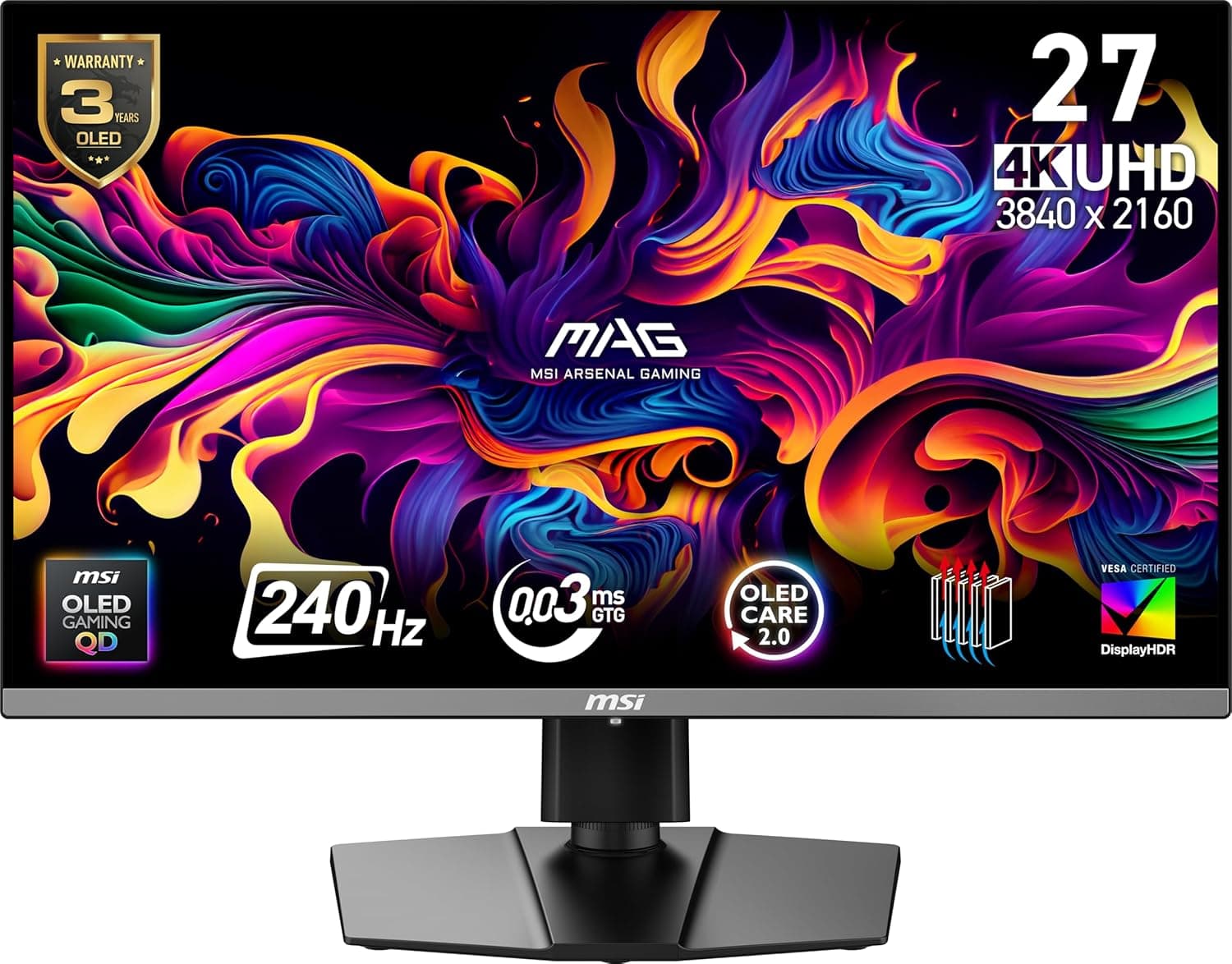
The 4K OLED gaming monitor has long been the holy grail of PC gaming displays — infinite contrast, perfect blacks, vibrant colors, and motion clarity that no LCD can touch. The problem has always been price. If you wanted a 4K OLED with a decent refresh rate in 2025, you were looking at $900 minimum, and often well north of $1,000 for premium models from Asus, Alienware, or LG. MSI set out to change that equation with the MAG 272UP QD-OLED X24, and at $729 it's the cheapest 4K 240Hz OLED you can buy today. More importantly, it's actually good.
The MAG 272UP X24 uses Samsung's fourth-generation QD-OLED panel, the same core technology found in displays that cost $200 to $300 more. It's a 26.5-inch (27-inch class) flat panel with a 3840x2160 UHD resolution, 240Hz refresh rate, and a 0.03ms gray-to-gray response time that's effectively instantaneous. The headline here is that MSI has managed to undercut the competition on price by trimming features that most gamers don't need — no USB hub, no KVM switch, no DisplayPort 2.1, no 98W USB-C charging — while preserving the panel quality that actually determines your visual experience. It's a trade-off that makes a lot of sense for the target audience.
Design and Build Quality
The MAG 272UP follows MSI's current design language, which is refreshingly understated. The all-black chassis avoids the aggressive gamer aesthetic of RGB strips and angular bezels that characterized MSI monitors a few years ago. Instead, you get a clean, professional-looking display that would look equally at home in a design studio as in a gaming setup. The bezels are thin on three sides, giving it a frameless appearance that works well in multi-monitor configurations.
The stand is where MSI cut some corners to hit the price point, and the compromises show. It's a solid plastic foot with a textured finish that provides stable support, but it lacks the premium weight and feel of the metal stands found on the more expensive MPG 272URX. The ergonomics are excellent despite the materials — you get 110mm of height adjustment, 30 degrees of swivel in either direction, 20 degrees of tilt, and a 90-degree pivot for portrait mode. VESA 100x100 compatibility means you can easily mount it on an arm if the stand's build quality bothers you.
The input panel is recessed on the bottom edge and faces downward, which makes cable management straightforward but plugging in cables a minor exercise in blind groping. You get two HDMI 2.1 ports with full 48Gbps bandwidth, one DisplayPort 1.4a, and one USB-C port with DisplayPort Alt Mode and 15W power delivery. The USB-C port is notably cut down from the 98W version on the MPG 272URX — it's enough to charge a phone or keep a laptop from draining during use, but it won't run a MacBook Pro at full power. There are no USB data ports, no KVM switch, and no headphone jack passthrough.
The OSD is controlled via a five-way joystick on the bottom bezel, which is responsive and intuitive. The menu system is well-organized across eight tabs, covering everything from basic brightness and contrast to OLED Care settings, crosshair overlays, and color temperature adjustments. MSI's Gaming OSD app lets you control these settings from Windows as well, which is convenient for adjustments during gameplay.
Panel Performance — The Star of the Show
Let's be clear about what matters most: the panel itself is excellent, and it's the same fourth-generation Samsung QD-OLED used in monitors that cost hundreds more. The 4K resolution at 27 inches gives you roughly 166 pixels per inch, which is sharp enough that individual pixels disappear at normal viewing distances. Text rendering is dramatically improved over earlier QD-OLED panels thanks to Samsung's improved subpixel layout, though it's still not quite as crisp as a high-end IPS panel for productivity work.
The most immediately striking aspect of the display is the contrast. OLED's per-pixel lighting means blacks are truly black — not the dark gray you get from even the best IPS panels with local dimming, but absolute absence of light. This translates into an effectively infinite contrast ratio (1.5 million to 1 on paper, real-world infinity) that makes HDR content look transformative. Stars against a black sky, shadow details in dark game environments, the letterbox bars in widescreen movies — everything gains a dimensionality that LCD simply cannot reproduce.
Brightness in SDR mode maxes out at around 264 nits, which is adequate for indoor use but not exceptional. If you're coming from a high-end LCD monitor that pushes 400-500 nits in SDR, the OLED will initially look dimmer in well-lit rooms. The trade-off is that those 264 nits are consistent across the entire screen regardless of how much bright content is displayed, thanks to the QD-OLED panel's excellent average picture level (APL) stability. WOLED panels from LG tend to dim significantly when large portions of the screen are bright; the MAG 272UP holds its luminance much more steady, which is a meaningful real-world advantage.
HDR Performance
HDR is where the MAG 272UP truly shines. MSI offers three HDR modes: True Black 400, Peak 1000 Nits, and EOTF Boost. True Black 400 is the VESA-certified mode and delivers accurate EOTF tracking with minimal roll-off, producing 400 nits of full-screen brightness with the inky blacks that OLED is known for. Peak 1000 mode pushes brightness to over 1,000 nits in small highlight areas (1-2% of the screen), which makes specular highlights like sun reflections, explosions, and neon signs pop with impressive intensity.
The Peak 1000 mode does introduce some panel dimming in brighter scenes — it's a limitation of the fourth-generation panel that fifth-generation panels have largely addressed. MSI's EOTF Boost mode is designed to compensate for this, and it's generally successful at maintaining brightness while preserving highlight detail. In practice, I found myself switching between True Black 400 and Peak 1000 depending on the content. True Black 400 is more consistent for general gaming and desktop use, while Peak 1000 with EOTF Boost is the way to go for HDR movies and visually stunning games like Cyberpunk 2077 or Alan Wake 2.
Color performance is outstanding across the board. The panel covers 99% of DCI-P3, 95.6% of Adobe RGB, and 75% of Rec.2020 out of the box, with a native 10-bit color depth that eliminates any risk of color banding in gradients. The wide color gamut makes games and movies look vibrant without appearing cartoonish — reds are rich, greens are deep, and the QD-OLED's quantum dot layer produces a broader color volume than WOLED panels can achieve, particularly in bright highlights.
The Calibration Story
The MAG 272UP's default factory calibration is the monitor's most significant weakness. Out of the box, the white balance is noticeably warm, averaging around 5827K against a target of 6500K. The gamma tracks high at 2.341, which crushes shadow detail and makes darker scenes look heavier than they should. Color accuracy is decent but not exceptional, with deltaE values in the 3-5 range for some colors — fine for gaming, but not suitable for color-critical work without calibration.
The good news is that these issues are fixable. By adjusting the OSD's custom white balance settings to Red 94, Green 99, Blue 100, I was able to bring the greyscale tracking much closer to the 6500K target, with deltaE dropping well below 2. The sRGB emulation mode clamps the gamut effectively but inherits the same warm color balance and high gamma, so it's not a one-button fix. If you have a calibration tool like a Datacolor Spyder or X-Rite i1Display Pro, the panel responds well to calibration and delivers stellar results across the board after profiling.
This is the monitor's biggest missed opportunity. A $729 display should ship with better factory calibration, especially when competitors like the Dell Alienware AW2725Q and Gigabyte MO27U2 deliver more accurate out-of-box color. If you're comfortable with manual OSD adjustments or own a calibration tool, the MAG 272UP's underlying panel capability matches or exceeds those competitors. If you want great color straight from the box without any tweaking, you might prefer to spend the extra $100-150 on a better-calibrated alternative.
Motion Clarity and Gaming Performance
This is where the MAG 272UP is virtually unmatched at its price. The combination of 4K resolution, 240Hz refresh rate, and OLED's instantaneous pixel response produces motion clarity that IPS and VA panels simply cannot replicate. There is zero visible ghosting across the entire refresh rate range — no overshoot, no inverse ghosting, no smearing. The 0.03ms G2G response time means pixels transition fully within a single frame at 240Hz, which is a physical impossibility for LCD technology.
Using the OSRTT (Open Source Response Time Tool) testing methodology, the MAG 272UP consistently produced clean transitions at every target refresh rate from 60Hz to 240Hz. The jump from 120Hz to 240Hz is particularly noticeable in fast-paced competitive titles like Valorant, Overwatch 2, and Call of Duty. At 120Hz, moving objects have a perceptible blur trail that your brain learns to filter out. At 240Hz on OLED, that blur effectively disappears — motion is clean, sharp, and easy to track, which translates into better aim and faster target acquisition.
Input lag is equally impressive, averaging 2.11ms at 240Hz. That's just over half the duration of a single frame (4.17ms at 240Hz), which is effectively imperceptible. Even at lower refresh rates, the input lag remains competitive, hitting around 4ms at 120Hz and 8ms at 60Hz. For context, most gamers can't perceive input lag below 15-20ms, so the MAG 272UP's numbers are purely academic in the best possible sense.
Variable refresh rate support is comprehensive, with both G-Sync Compatible and AMD FreeSync Premium Pro certification. I tested with both an Nvidia RTX 5090 and an AMD Radeon RX 9070 XT, and both worked flawlessly with no flickering or frame-skipping across the entire VRR range. The 48-240Hz VRR window covers the vast majority of real-world frame rates, and LFC (Low Framerate Compensation) kicks in below 48Hz to maintain tear-free gameplay.
Connectivity and Ecosystem
The connectivity situation is where the MAG 272UP's budget positioning is most apparent. DisplayPort 1.4a requires Display Stream Compression (DSC) to drive 4K at 240Hz with 10-bit color, which is visually lossless but adds a tiny amount of latency. HDMI 2.1 ports are full-bandwidth at 48Gbps each, supporting 4K 120Hz without DSC for console gaming. The USB-C port supports DP Alt Mode but only delivers 15W of power delivery, which limits its usefulness for laptop connectivity.
The lack of USB data ports means you can't use the monitor as a USB hub for peripherals, and the absence of a KVM switch means you'll need a separate solution for sharing a keyboard and mouse between a desktop and a laptop. These are legitimate compromises versus the MPG 272URX and other premium competitors, but they're also the kind of features that many gamers simply don't use. If you run a single desktop PC with a dedicated keyboard and mouse, you'll never notice they're missing.
OLED Care and Burn-In
MSI includes its OLED Care 2.0 suite of features designed to mitigate the risk of permanent burn-in, which is the primary long-term concern with any OLED monitor. The system includes pixel shift, which periodically moves the image by a few pixels to prevent static elements from burning in; panel protect, which runs a pixel refresh cycle after a set number of hours; and a taskbar detection feature that dims static Windows UI elements.
The monitor also includes a 3-year warranty that covers burn-in, which is MSI's way of signaling confidence in the fourth-generation QD-OLED's longevity. Third-generation panels already showed marked improvement over first- and second-generation in terms of burn-in resistance, and fourth-generation panels are better still thanks to improved organic material formulations and better heat dissipation. With reasonable care — hiding the taskbar, using a dark wallpaper, letting the panel protect cycle run — the MAG 272UP should last for years without visible degradation.
Comparison to Other 4K OLEDs
The MAG 272UP's primary competition comes from two directions: the premium 4K OLEDs it undercuts on price, and the value 1440p OLEDs that are even cheaper but lower resolution.
MSI MPG 272URX — The direct-upgrade sibling adds DisplayPort 2.1 (no DSC needed), 98W USB-C charging, two USB data ports, and a KVM switch. It also ships with better factory calibration. At around $950, it's $220 more expensive. Whether that's worth it depends entirely on whether you need those features. For most gamers, it's not.
Dell Alienware AW2725Q — Dell's 4K QD-OLED is priced at $899 and offers slightly better factory calibration and Dell's premium support. It uses the same fourth-generation panel but locks you into a single HDMI 2.1 port and lacks USB-C entirely. The MAG 272UP offers better connectivity for the same class of panel at a significantly lower price.
Gigabyte MO27U2 — At $799, Gigabyte's offering splits the difference between the MAG 272UP and the MPG 272URX. It includes USB data ports and better calibration but has a less intuitive OSD and fewer gaming features. The MAG 272UP's OSD and gaming toolkit are superior, making it a better choice for dedicated gamers.
1440p 360Hz+ OLEDs — Monitors like the MSI MAG 272QP X50 offer 1440p at 500Hz for around $649. They provide even better motion clarity at the cost of resolution. For competitive esports players, the higher refresh rate at 1440p may be preferable. For anyone who plays a mix of single-player and multiplayer games, 4K 240Hz is the more versatile choice.
Who Should Buy It
The MSI MAG 272UP QD-OLED X24 is for the gamer who wants the best possible image quality without spending $900+. It's for anyone who's been waiting for a 4K OLED that costs roughly the same as a high-end IPS monitor, because that's what this is — a $729 4K 240Hz OLED that matches or exceeds the image quality of $1,000+ displays.
It's not for you if you need USB hub functionality, KVM switching, or high-power USB-C charging, or if you want flawless factory calibration straight out of the box. It's also not for you if you primarily play competitive esports titles and would benefit more from a 1440p 500Hz OLED at a similar price.
The Fourth-Generation QD-OLED Difference
Samsung's fourth-generation QD-OLED panels represent the most mature iteration of the technology to date, and the improvements over previous generations are substantial. The most noticeable upgrade is in peak brightness — third-generation QD-OLED panels topped out around 250 nits in SDR and 1,000 nits peak in HDR, while fourth-generation panels use improved organic materials that achieve the same brightness with lower power consumption and less heat generation. This translates directly into better longevity, which is critical for a monitor you expect to use for 5-7 years.
The subpixel layout has also been refined. Early QD-OLED panels used a triangular RGB subpixel arrangement that produced visible fringing on text, particularly on white backgrounds. Fourth-generation panels use a more rectangular layout that reduces this fringing significantly, though it's not entirely eliminated. In practice, text on the MAG 272UP looks clean at normal viewing distances — I can read code and documents without eye strain — but if you're coming from a high-density IPS display like a 27-inch 5K studio monitor, the difference is noticeable. For a gaming-focused display, it's a non-issue.
The anti-reflective coating is another generational improvement. Earlier QD-OLED panels had a slightly purple tint to their reflections in bright rooms, which was distracting in well-lit environments. The fourth-generation coating is more neutral, reducing reflections without the color shift. It's not as effective as LG's matte WOLED coating at diffusing direct light, but it preserves the QD-OLED's contrast advantage by keeping blacks black even in ambient light.
Real-World Gaming Experience
I spent three weeks using the MAG 272UP as my primary gaming monitor, rotating through a mix of competitive shooters, single-player epics, and strategy games to get a full picture of its capabilities. The results were consistently impressive, with a few caveats worth noting.
In Call of Duty: Black Ops 7, the combination of 4K resolution and 240Hz refresh rate provides a meaningful competitive advantage. At 4K, distant enemies are rendered with enough detail that you can identify them at ranges where 1440p would show only a few blurry pixels. The motion clarity at 240Hz means tracking targets during rapid aim adjustments leaves no ghosting trail behind, making it easier to land shots during flick movements. I saw a measurable improvement in my accuracy stats compared to my previous 1440p 165Hz IPS monitor, which is not something I can say about most display upgrades.
In Cyberpunk 2077 with full path tracing enabled, the MAG 272UP's HDR performance transforms the visual experience. Driving through Night City at night with the Peak 1000 mode active — neon signs reflecting off wet pavement, headlight beams cutting through fog — is genuinely stunning. The OLED's infinite contrast ratio makes the difference between light and shadow feel physically real in a way that no LCD, even with mini-LED backlighting, can replicate. The 4K resolution provides enough pixel density that DLSS Quality mode at 1440p internal resolution looks nearly native, allowing you to maintain high frame rates without compromising image quality.
Civilization VII is an unexpected showcase for the MAG 272UP's strengths. The 4K resolution makes the UI text crisp and readable even when zoomed out, and the wide color gamut brings the game's map aesthetics to life. The instantaneous pixel response eliminates the ghosting that LCDs produce when scrolling across the map, making the whole experience feel more responsive. It's the kind of improvement you don't notice until you go back to an LCD, at which point it's impossible to unsee.
Detailed Connectivity Analysis
Let me spend a bit more time on the connectivity, because it's the area where MSI made the most controversial cuts. The single DisplayPort 1.4a connection is adequate for single-monitor setups but creates complications for multi-monitor configurations. If you're running a second high-resolution display, you'll need to ensure your GPU has enough DisplayPort outputs to handle both. The HDMI 2.1 ports provide full 48Gbps bandwidth, which means they can drive 4K at 120Hz with 10-bit HDR at full RGB chroma without DSC — identical to what you'd get from a PlayStation 5 or Xbox Series X. For console gaming, these ports are perfect.
The USB-C port's 15W power delivery is the most disappointing omission. On the MPG 272URX, the USB-C port delivers 98W, enough to charge and run a MacBook Pro as a single-cable docking solution. The MAG 272UP's 15W port can barely maintain a phone's charge level during use — it won't charge a laptop at all, and it won't fast-charge a tablet. This limits the monitor's usefulness as a productivity hub for laptop users who want to connect with a single cable. For a desktop gaming setup where your PC handles all the connections, it's irrelevant, but it's worth noting if you plan to use the monitor with a laptop.
Value Analysis: What You Get for $729
To understand why the MAG 272UP is important, you need to look at the 4K OLED gaming monitor market as it existed before its release. The cheapest 4K OLED options were the Dell Alienware AW2725Q at $899 and the Gigabyte MO27U2 at $799, both using the same Samsung fourth-generation panel. Neither offered better connectivity than the MAG 272UP — the Alienware has fewer ports, and the Gigabyte's USB-C is similarly limited — but both shipped with better factory calibration and more premium build quality.
MSI's $729 price point is not just a discount; it's a deliberate market repositioning. The MAG 272UP is priced to compete with premium 4K IPS gaming monitors like the Asus ROG Swift PG27UQ and the LG 27GP950, which cost $700-800. By offering a 4K OLED at the same price as last-generation IPS displays, MSI is betting that most buyers will prefer OLED's superior image quality over IPS's slightly better text clarity and higher peak brightness in SDR. It's a bet that pays off for the vast majority of users, because OLED's advantages in contrast, color, and motion clarity are immediately obvious, while the differences in text rendering and peak brightness require side-by-side comparison to appreciate.
Ergonomics and Daily Usability
The stand may be plastic, but it's functionally excellent. The 110mm height range covers everything from a low desk setup to a raised monitor arm position, and the 30-degree swivel makes it easy to share your screen with a coworker or teammate. The tilt range is generous enough to accommodate different viewing angles, and the pivot rotates cleanly into portrait mode for coding, document reading, or social media management.
The power supply is external, which is both good and bad. It's good because it keeps heat out of the monitor chassis and makes the display itself thinner. It's bad because the power brick is fairly large and adds another component to manage in your cable arrangement. The brick measures roughly 6 inches by 2 inches by 1 inch, which is comparable to a typical laptop power adapter. Plan for it when setting up your desk.
Bottom Line
The MSI MAG 272UP QD-OLED X24 democratizes 4K OLED gaming in a way that no monitor before it has managed. The panel quality is exceptional, the motion clarity is best-in-class, and the price is disruptive. MSI cut the right corners — removing unnecessary connectivity features and accepting a mediocre factory calibration — to deliver the panel itself at a price that undercuts every competitor. With a few minutes of OSD adjustment or a proper calibration, this monitor punches well above its price class. At $729, it's the standard by which all value-oriented 4K gaming monitors will be measured this year.
Pros
- Best value 4K 240Hz OLED on the market at $729
- Excellent 4th-gen QD-OLED panel with near-infinite contrast and 99% DCI-P3 coverage
- Zero ghosting and exceptional motion clarity with 0.03ms response time
- Full HDMI 2.1 bandwidth (48Gbps) for console gaming at 4K 120Hz
- Comprehensive ergonomic adjustments including height, swivel, tilt, and pivot
- 3-year warranty covering OLED burn-in
Cons
- Factory calibration is too warm (5827K) and gamma is too high (2.341) out of the box
- No USB data ports, KVM switch, or DisplayPort 2.1
- USB-C power delivery limited to 15W — won't charge laptops
- Plastic stand feels less premium than competitors at similar prices
Final Verdict
The MSI MAG 272UP QD-OLED X24 democratizes 4K OLED gaming with Samsung's 4th-gen QD-OLED panel, 240Hz refresh rate, and exceptional motion clarity — all at a disruptive $729 price that undercuts every competitor.