OnePlus Pad Go 2 Review: A Solid Budget Tablet with a Gorgeous Display
The OnePlus Pad Go 2 delivers an excellent 12.1-inch 120Hz display and all-day battery life at a reasonable $319.99, making it one of the best Android tablets for media consumption in 2026, despite thermal throttling and a limited accessory ecosystem.
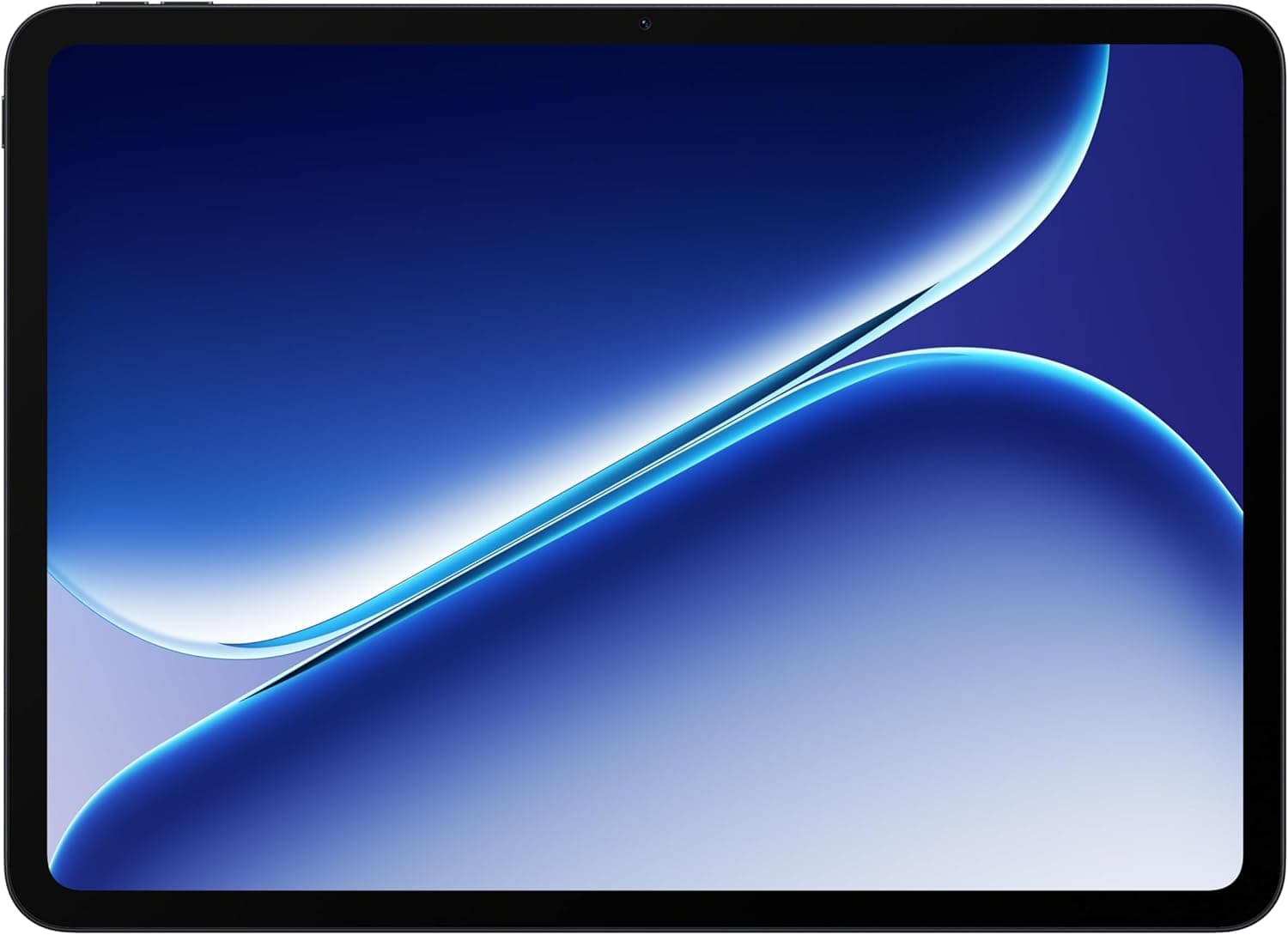
The Android tablet market has seen a resurgence in 2026, with manufacturers finally delivering compelling alternatives to Apple's iPad lineup. The Apple iPad Pro M5 remains the gold standard, but Android tablets like this OnePlus offer a different value proposition. OnePlus enters this competitive arena with the Pad Go 2, a mid-range tablet that aims to deliver a premium media consumption experience without the premium price tag. Priced at $319.99, the Pad Go 2 sits in a sweet spot between budget tablets and flagship devices, offering a large 12.1-inch Dolby Vision display, a massive 10,050mAh battery, and the latest Android 16 with OxygenOS 16. After spending significant time with this device across various scenarios—from streaming and casual gaming to note-taking with the optional Stylo pen—it's clear that OnePlus has made some smart decisions and some puzzling compromises.
Design and Build Quality
The OnePlus Pad Go 2 adopts a familiar design language that will immediately register with anyone who has seen a modern Android tablet. The aluminum unibody construction gives it a solid, premium feel that belies its mid-range positioning. At just 6.8mm thin and weighing 597 grams, it is remarkably portable for a 12.1-inch device. The Shadow Black color option—the only choice available in the US market—is understated and professional, with a matte finish that resists fingerprints reasonably well.
However, the design is not without its cost-cutting tells. The bezels surrounding the display are noticeable, resulting in an 88.5% screen-to-body ratio that lags behind the competition. When you place the Pad Go 2 next to an iPad Air M4 or a Samsung Galaxy Tab S10 FE, the thicker borders are immediately apparent. They are not egregious by any means—they provide a comfortable handhold for landscape usage—but they do make the device look like it belongs to a previous generation of tablets.
The port selection is adequate for the price point. You get a USB-C port for charging and data transfer, but the 3.5mm headphone jack has been omitted, which may disappoint users who prefer wired audio. There is no fingerprint sensor either—face unlock through the front-facing camera is your only biometric option, and it works reliably in good lighting but struggles in dim environments. The quad-speaker array is positioned for landscape usage, with two speakers firing from each side. This configuration works well for movie watching and gaming, delivering stereo separation that is genuinely impressive for a tablet at this price.
Display Quality and Media Consumption
The standout feature of the OnePlus Pad Go 2 is undoubtedly its display. The 12.1-inch IPS LCD panel delivers a resolution of 2800 by 1980 pixels, resulting in a crisp 283 pixels per inch. Text looks sharp, images have good detail, and the 7:5 aspect ratio—a compromise between the traditional 16:9 widescreen and 4:3 productivity ratios—works surprisingly well for both reading and video watching.
The 120Hz refresh rate is the highlight here, and it makes everything from scrolling through social media feeds to navigating the Android interface feel fluid and responsive. OnePlus has implemented adaptive refresh rate technology, though it is not as sophisticated as the LTPO panels found on more expensive devices. Still, the difference between this and the standard 60Hz panels found on budget tablets is night and day. Once you experience 120Hz on a tablet, it is genuinely difficult to go back.
Dolby Vision support ensures that HDR content from streaming services like Netflix, Disney+, and Apple TV+ looks vibrant and punchy. The display reaches up to 900 nits of peak brightness in high brightness mode, which is sufficient for indoor use and surprisingly usable outdoors under shaded conditions. Direct sunlight is still a challenge—the IPS panel's reflectivity becomes apparent—but this is true of almost every tablet in this price bracket.
Color reproduction is another strong suit. The 12-bit color depth (8-bit panel with 4-bit FRC) and 98% DCI-P3 coverage give the display some real pop. Skin tones look natural, and the color saturation can be adjusted in the display settings to suit personal preference. The vibrant color output makes this an excellent device for photo editing in apps like Snapseed and Lightroom, though the 8-megapixel camera on the back is not something you will want to use for capturing images in the first place.
Performance and Daily Usage
Under the hood, the OnePlus Pad Go 2 is powered by the MediaTek Dimensity 7300-Ultra, a mid-range chip built on a 4nm process. It features an octa-core CPU configuration with four Cortex-A78 performance cores clocked at 2.5GHz and four Cortex-A55 efficiency cores at 2.0GHz, paired with a Mali-G615 MC2 GPU. This is not a flagship chipset, and the performance profile reflects that positioning.
For everyday tasks like web browsing, email, social media, and video streaming, the Pad Go 2 handles everything with aplomb. The 8GB of LPDDR5X RAM is sufficient for keeping a dozen Chrome tabs open while switching between Spotify, Slack, and YouTube without noticeable slowdowns. The 128GB of UFS 3.1 storage provides fast read and write speeds, and the dedicated microSD card slot means you can expand storage up to an additional 1TB—a welcome feature that is becoming increasingly rare.
The story changes when you push the tablet harder. Demanding 3D games like Call of Duty: Mobile and PUBG Mobile run at medium settings with acceptable frame rates, but the experience is far from the buttery smoothness you would get on a device with a Snapdragon 8-series chip. More importantly, the Pad Go 2 appears to engage thermal throttling under sustained loads. GeekBench 6 scores confirm what HotHardware's testing discovered: the Dimensity 7300-Ultra hits a performance ceiling quickly, and the device scales back power to manage heat and preserve battery life. This means that long gaming sessions or extended photo editing workflows will experience occasional stutters.
Streaming games through Xbox Game Pass or NVIDIA GeForce Now is a different story. Since the heavy lifting happens on remote servers, the Pad Go 2 handles game streaming beautifully, delivering smooth gameplay at 1080p. The 120Hz display combined with Wi-Fi 6 connectivity ensures low latency and responsive controls when your network connection is solid.
Battery Life and Charging
The 10,050mAh battery is one of the Pad Go 2's strongest selling points. In real-world usage, this translates to impressive endurance. With mixed usage—streaming video for two hours, browsing the web for three hours, reading ebooks for an hour, and casual gaming for 30 minutes—the Pad Go 2 consistently lasted two full days before needing a charge. In more intensive scenarios involving continuous video playback at 50% brightness, the tablet delivered around 12 to 13 hours, which is excellent for this category.
Charging is handled by OnePlus's 33W SuperVOOC technology. While this is a step down from the 67W and 100W charging speeds found on OnePlus phones, it is still competitive for the tablet category. A full charge from empty takes about two hours. The first 30 minutes gets you to roughly 45 percent, enough for several hours of mixed use. The tablet also supports reverse wired charging, meaning you can use it as a power bank to top up your phone or earbuds in a pinch—a neat party trick.
A particularly thoughtful addition is bypass charging, which was added via a software update. When you are gaming or streaming while plugged in, the tablet powers the system directly from the charger rather than cycling through the battery. This reduces heat buildup and extends the long-term health of the battery. It is the kind of feature that shows OnePlus is thinking about longevity, even on a mid-range device.
Software and User Experience
The OnePlus Pad Go 2 ships with Android 16 layered with OxygenOS 16, and this is one of the tablet's strongest assets. OxygenOS has matured into one of the most polished Android skins, and the tablet-optimized version takes full advantage of the large display. The interface feels clean, responsive, and thoughtfully laid out.
Open Canvas multitasking is the standout software feature. A two-finger swipe down from the top activates split-screen mode, allowing you to run two apps side by side. A four-finger pinch gesture opens floating windows for quick tasks like replying to a message while watching a video. The Smart Sidebar—accessible by swiping from the right edge—provides quick access to frequently used apps, screenshot tools, and screen recording. These gestures feel intuitive and work reliably, which is more than can be said for some competing tablet interfaces.
OnePlus has also integrated a suite of AI features. The OnePlus AI assistant can write, translate, summarize, and take voice notes. Google Gemini is built in for more advanced queries and generative tasks. Google Photos AI editing tools are available for enhancing your photos. These features work well in practice, though they are largely cloud-based and require an internet connection for the heavy lifting.
The update commitment is solid: five years of Android OS updates and six years of security patches. This puts the Pad Go 2 on par with Samsung's mid-range tablets and ahead of many competitors. However, there is a practical caveat here. Given the mid-range hardware, the tablet's performance in years four through six will likely relegate it to basic media consumption and web browsing rather than demanding productivity tasks. The software updates are still valuable for security reasons, but the hardware ceiling is real.
Accessories: Stylo and Folio Case
OnePlus offers two first-party accessories for the Pad Go 2: the Stylo and the Folio Case. The Stylo is a pressure-sensitive pen with 4,096 levels of pressure sensitivity and low latency that makes it feel reasonably responsive for note-taking and sketching. It supports screen-off memo for jotting down quick notes without waking the device, and the button on the barrel can be programmed for shortcuts.
The problem is that neither the Stylo nor the Folio Case uses magnets for attachment. The Folio Case holds the tablet through friction and a flap design, while the Stylo needs to be tucked into a slot on the Folio Case's flap. This is a noticeable cost-cutting measure, and it means the Stylo is far easier to misplace or lose compared to the Samsung Galaxy Tab S10 FE, which includes a magnetically attached S Pen in the box. If you plan to use the Stylo regularly, the Folio Case is essential simply to have a dedicated place to store it.
The Folio Case itself is a basic stand cover. It offers no keyboard integration, which means typing-intensive work will require a separate Bluetooth keyboard. At $44.99, the Folio is priced competitively, but the lack of a keyboard option limits the Pad Go 2's productivity potential compared to Samsung's keyboard book covers or Apple's Magic Keyboard Folio.
Camera Performance
The camera system on the OnePlus Pad Go 2 is best described as functional. The 8-megapixel rear camera captures acceptable images for document scanning and the occasional whiteboard photo, but the results are soft, lack dynamic range, and struggle in anything other than bright, even lighting. Video recording tops out at 1080p at 30 frames per second, which is adequate for video calls but not much else.
The 8-megapixel front-facing camera is similarly limited on paper, but it performs its primary function—video calling—reasonably well. The wide-angle lens captures a decent field of view for group calls, and the image processing keeps skin tones natural. Low-light video calls are noisy, but that is par for the course at this price point.
The real story with the cameras is that OnePlus clearly chose to allocate its BOM budget elsewhere, and that was the right decision. Nobody buys a $320 tablet for its photography capabilities, and the quality is sufficient for the use cases that matter on a tablet: video calls, document scanning, and the occasional quick snapshot of a whiteboard or product label.
Audio Performance and Connectivity
Audio quality is a critical component of the media tablet experience, and the OnePlus Pad Go 2 handles this responsibility with a well-tuned quad-speaker array. The four speakers are arranged for landscape use, with two firing from the left edge and two from the right. This configuration delivers genuine stereo separation that makes a noticeable difference when watching movies or playing games. Voices are clear and centered, while ambient sounds and music have a spacious quality that creates an immersive experience far beyond what most tablets in this price range can manage.
The Bluetooth 5.4 implementation deserves special mention for its codec support. The Pad Go 2 supports SBC, AAC, aptX, aptX HD, and LDAC. For users with compatible headphones, LDAC at 990kbps delivers near-lossless wireless audio that rivals wired connections. This level of codec support is rare on mid-range tablets and speaks to OnePlus's commitment to media quality. The tablet also supports multipoint Bluetooth, allowing you to connect headphones and a keyboard simultaneously without re-pairing.
On the connectivity front, the OnePlus Pad Go 2 includes Wi-Fi 6 for fast wireless networking. In real-world testing, the tablet sustained transfer speeds of over 600Mbps on a Wi-Fi 6 network, which is sufficient for 4K video streaming, large file downloads, and smooth cloud gaming. The USB-C port supports USB 2.0 speeds, which is adequate for charging and connecting peripherals but not ideal for transferring large files to external storage. The 5G variant adds a physical SIM slot, providing cellular connectivity for users who need internet access on the go. Notably, there is no eSIM support, which is an omission worth considering if you prefer digital SIM provisioning.
Display Technology Deep Dive
The OnePlus Pad Go 2's display deserves a closer technical examination because it is the component that most defines this tablet's character. The 12.1-inch IPS LCD panel operates at a resolution of 2800 by 1980 pixels, with a pixel density of 283 PPI that makes text and images appear sharp at normal viewing distances. The 7:5 aspect ratio is an interesting choice—it is slightly wider than the 4:3 ratio used by Apple's iPads, making it better suited for widescreen video content while retaining enough vertical space for comfortable web browsing and document reading.
Color accuracy is a strong point. The display covers 98 percent of the DCI-P3 color gamut, which is the standard used in digital cinema and HDR video content. This means that movies mastered in DCI-P3 will display with accurate, vibrant colors without the washed-out look that occurs on panels with narrower gamut coverage. The 12-bit color processing capability, achieved through 8-bit + FRC dithering, enables smooth gradients across the 68 billion color palette. Banding artifacts—where visible lines appear between color transitions in skies or gradients—are virtually absent.
Brightness performance is solid for a mid-range IPS panel. The 900-nit peak in high brightness mode provides enough luminance for comfortable viewing in most indoor environments, including brightly lit living rooms and near windows. The display's anti-reflective coating helps maintain contrast in challenging lighting conditions, though direct sunlight remains difficult—a limitation shared by virtually all LCD tablets at this price.
The 120Hz refresh rate is the feature that transforms the user experience from good to excellent. Every interaction benefits: scrolling through Twitter feeds is silky smooth, app opening and closing animations feel crisp, and navigating the multitasking interface is responsive. The adaptive refresh rate technology helps balance smoothness with battery life, automatically reducing to 60Hz for static content like reading articles or viewing photos. This intelligent switching is seamless and contributes to the excellent battery life figures noted in the testing section.
Comparison to Competitors
The OnePlus Pad Go 2 enters a competitive field that includes the Apple iPad 11th generation, the OnePlus 15 (for those who prefer a phone+tablet combo from the same brand), the Samsung Galaxy Tab S10 FE, and the OnePlus Pad Go 2's own predecessor. Each of these alternatives presents a different value proposition.
The Apple iPad 11 is the elephant in the room. At a similar price point—frequently on sale for under $300—the iPad 11 offers the A16 Bionic chip, which outperforms the Dimensity 7300-Ultra in both CPU and GPU tasks. The iPad also benefits from a vastly superior tablet app ecosystem, with thousands of apps specifically optimized for the larger display. Where the Pad Go 2 wins is display size and battery life. The 12.1-inch screen is significantly larger than the iPad's 10.9-inch display, and the 10,050mAh battery outlasts the iPad by several hours in real-world usage. The 120Hz refresh rate on the Pad Go 2 also makes scrolling feel smoother compared to the iPad's 60Hz panel.
The Samsung Galaxy Tab S10 FE is perhaps the Pad Go 2's most direct competitor. Both devices target the same user: someone who wants a large-screen Android tablet without spending flagship money. The Tab S10 FE has the advantage of the included S Pen with magnetic attachment, superior software support through Samsung's DeX mode, and the mature ecosystem of Samsung Notes. The Pad Go 2 counters with a larger display (12.1 inches vs 10.9 inches), a higher resolution panel, and the 120Hz refresh rate that the Tab S10 FE lacks. The battery life is also notably better on the OnePlus device.
Against the original OnePlus Pad Go, the Pad Go 2 represents a meaningful generational improvement. The display is larger and brighter, the processor is faster and more efficient, the battery capacity has increased, and the addition of a dedicated microSD slot and physical SIM support (on the 5G model) addresses two of the main complaints about the first-generation device.
Who Should Buy the OnePlus Pad Go 2
The OnePlus Pad Go 2 is a compelling option for specific types of users. If your primary use case is media consumption—streaming Netflix, browsing social media, reading ebooks, and light web browsing—this tablet delivers an excellent experience at a reasonable price. The 12.1-inch 120Hz display is genuinely good for the category, the quad speakers are solid, and the battery life means you can go days between charges.
Students who need a device for note-taking, reading textbooks, and basic productivity will find value here, especially when paired with the Stylo. The Open Canvas multitasking makes it possible to have a textbook open on one half of the screen and notes on the other, and the long battery life means it will survive a full day of classes without needing a charge.
If your needs extend to demanding gaming, professional photo or video editing, or heavy multitasking with dozens of apps, the Pad Go 2 will leave you wanting more. The thermal throttling under sustained loads and the mid-range GPU limit what this tablet can do. At $319.99, it occupies a specific niche—if you need the performance of an iPad Air M4 or a Galaxy Tab S10 Ultra, you will need to spend considerably more money.
Final Verdict
The OnePlus Pad Go 2 is a tablet that knows exactly what it wants to be: a media consumption powerhouse that delivers a fantastic display experience and all-day battery life without breaking the bank. It makes smart compromises to hit its price point—the cameras are basic, the processor is mid-range, and the accessory ecosystem lacks polish—but the core experience where it matters most is genuinely good.
The display is the star of the show, and combined with the excellent battery life, it creates a device that excels at its primary purpose: letting you watch, read, and browse for hours without reaching for a charger. OxygenOS 16 is polished and feature-rich, and the update commitment provides peace of mind for long-term ownership. The thermal throttling is a real limitation, and the lack of a fingerprint sensor and magnetic pen attachment are frustrating omissions, but these are the trade-offs you accept at this price.
At $319.99, the OnePlus Pad Go 2 represents strong value for the right user. It is not a laptop replacement and it will not satisfy power users, but as a companion device for entertainment and light productivity, it punches well above its weight. If your tablet usage revolves around streaming, reading, and browsing, this is one of the best Android options you can buy in 2026.
Pros
- Vibrant 12.1-inch 120Hz Dolby Vision display with excellent color accuracy
- Exceptional battery life with 10,050mAh capacity and bypass charging
- Clean Android 16 with OxygenOS 16 and strong multitasking via Open Canvas
- Bluetooth 5.4 with LDAC support for high-resolution wireless audio
- Dedicated microSD slot for expandable storage
Cons
- Thermal throttling under sustained gaming loads limits performance
- No fingerprint sensor or 3.5mm headphone jack
- Thick bezels and 88.5% screen-to-body ratio look dated
- Stylo and Folio Case lack magnetic attachment, pen easily lost
Final Verdict
The OnePlus Pad Go 2 delivers an excellent 12.1-inch 120Hz display and all-day battery life at a reasonable $319.99, making it one of the best Android tablets for media consumption in 2026, despite thermal throttling and a limited accessory ecosystem.