Samsung Galaxy S26 Ultra Review: The Privacy-First Flagship That Redefines Android Excellence
The Galaxy S26 Ultra brings an innovative Privacy Display, brighter camera lenses, and Samsung's most ambitious AI toolkit yet. With a starting price of $1,299, it's the best Android phone money can buy in 2026 — though battery life and missing Qi2 magnets hold it back from perfection.
Samsung Galaxy S25 Edge Review: Thin Is a Feature, Not a Compromise Galaxy S26 Ultra Review: The Privacy-First Flagship That Redefines Android Excellence
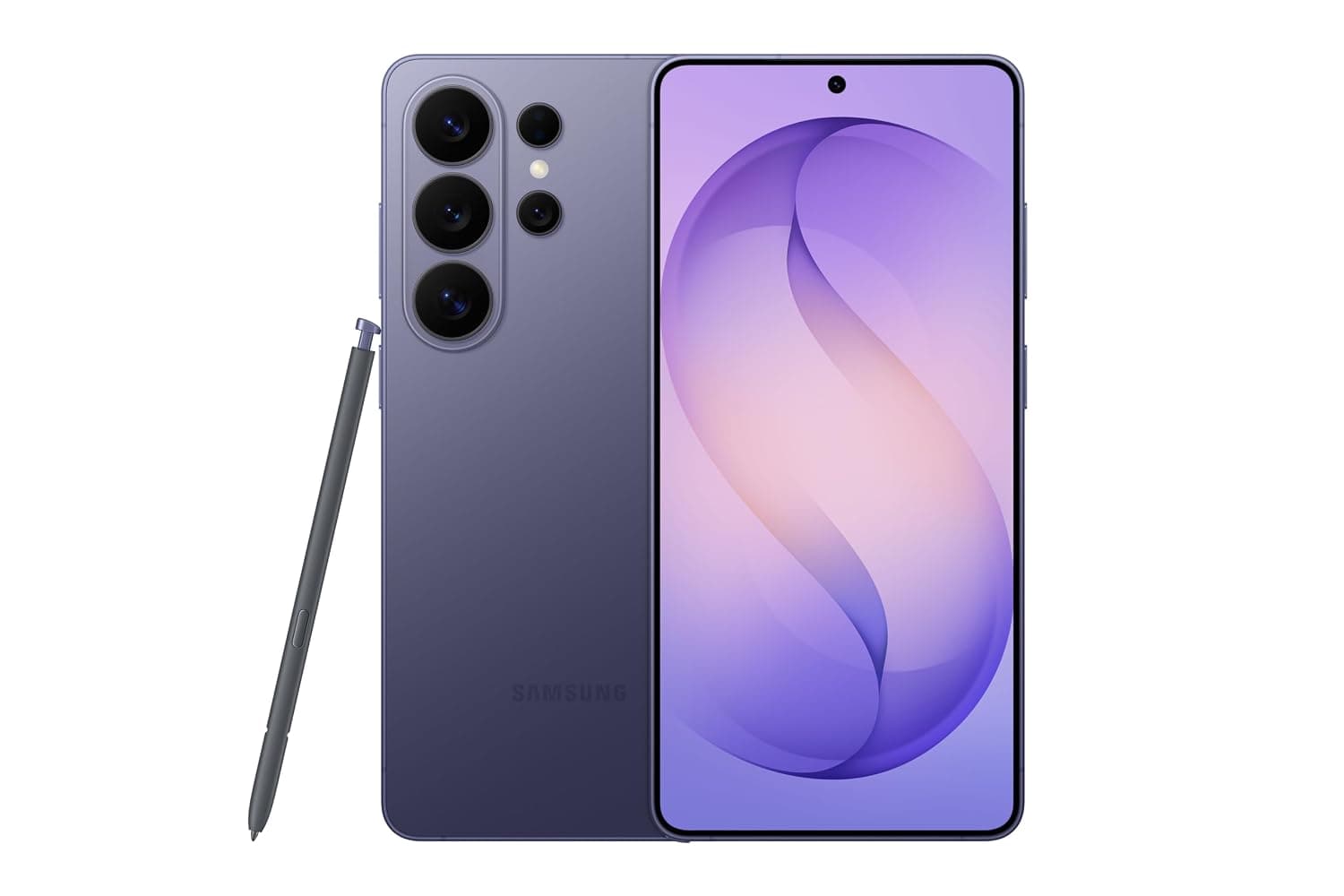
The Samsung Galaxy S26 Ultra arrives at a fascinating inflection point for smartphones. After years of iterative camera bumps and spec sheet refinement — where each new model offered marginally better processors and slightly improved sensors but little in the way of genuine innovation — Samsung has delivered something genuinely new with the S26 Ultra. The headline feature is a privacy display that actively shields your screen from prying eyes, but that's just the beginning. Brighter camera lenses, faster 60W charging, Samsung's most ambitious AI toolkit yet, and a redesigned chassis that trades titanium for recycled aluminum make this the most significant Ultra update in years.
At $1,299 for the base 256GB model, the S26 Ultra commands flagship pricing that puts it in direct competition with the iPhone 17 Pro Max, Google Pixel 9a Review: The Midrange Phone That Punches Above Its Weight Pixel 10 Pro XL, and OnePlus 15. Having spent considerable time with the Cobalt Violet review unit — testing it across San Francisco's foggy mornings, dimly lit restaurants, and chaotic transit systems — I'm ready to break down every detail, from the controversial material swap to the surprisingly effective agentic AI features that Samsung claims will change how we interact with our phones.
Design, Display, and the Privacy Display Trade-Off
The first thing you'll notice picking up the Galaxy S26 Ultra is how much more manageable it feels compared to the S25 Ultra. Samsung has slimmed the profile to just 7.9mm — that's 0.4mm thinner than last year — and trimmed the weight to 214 grams, or about 5 grams lighter than its predecessor. These may seem like small numbers on paper, but in hand, the difference is noticeable. The S26 Ultra no longer feels like a heavy slab threatening to pull down your pocket. It's the most comfortable Ultra to hold since the Note 20 Ultra.
The switch from a titanium frame to Armor Aluminum has been controversial in enthusiast circles. Titanium, after all, was a major talking point when Apple introduced it with the iPhone 15 Pro, and Samsung adopted it for the S25 Ultra. But there's a method to Samsung's apparent madness. The company claims aluminum is more sustainable — it's easier to recycle and has a lower manufacturing carbon footprint — and the weight savings contribute to the overall ergonomic improvement. In practice, the phone feels every bit as premium as the S25 Ultra. The Armor Aluminum is robust, the Gorilla Armor 2 glass on the front and back feels scratch-resistant, and the overall build quality meets the exacting standards you'd expect from a $1,300 device.
The rounded corners finally give the Ultra a unified design language with the standard S26 and S26+, which is a welcome change from the boxy, Note-inspired aesthetic that defined previous generations. The camera bump, however, has grown more pronounced — it's large enough that the phone wobbles noticeably when placed on a flat surface, and it catches lint from pockets with frustrating regularity. The S Pen slot on the bottom-left has also been a source of minor frustration. The stylus sits slightly proud of the frame, making it easy to accidentally eject when sliding the phone into a tight pocket.
That 6.9-inch Dynamic AMOLED 2X display remains absolutely gorgeous. We're looking at a 3120x1440 resolution at 498 pixels per inch with a 120Hz variable refresh rate that dynamically adjusts from 1Hz for always-on display content to 120Hz for smooth scrolling and gaming. Peak brightness hits 2,600 nits, making it easily readable under direct California sun — I had no trouble checking maps while walking down Market Street on a cloudless July afternoon. The colors are vibrant without being oversaturated; Samsung seems to have finally calibrated its flagship display for accuracy rather than eye-popping excess, and the difference is appreciated.
Now let's talk about the elephant in the room: the Privacy Display. This is genuinely innovative technology. Samsung has engineered a screen using dedicated narrow-angle pixels that dramatically narrow the viewing cone, making it nearly impossible for someone sitting next to you on a plane, train, or coffee shop to read what's on your screen. I tested this extensively on BART during commute hours, and it works precisely as advertised. The person next to me could see that I was looking at my phone, but the content of my emails, messages, and browsing was completely illegible.
The implementation is thoughtful and actually useful — something I cannot say for most "privacy" features on smartphones. You can enable Privacy Display globally from Quick Settings, toggle it per-app (I have mine set for banking apps, email, password entry, and messaging), or limit it to notification pop-ups only. The per-app setting is the killer feature here. Having my banking apps automatically switch to privacy mode without any manual intervention feels like the kind of friction-reducing design we should expect from modern flagships.
There is, however, a trade-off, and it's significant enough that potential buyers need to understand it before pulling the trigger. Even with Privacy Display turned off — meaning the hardware privacy mode is disengaged — the screen exhibits noticeably narrower viewing angles than the Galaxy S25 Ultra or the standard S26. Colors shift when you tilt the phone even 30 degrees off-axis, and the glass seems more reflective, increasing glare in bright environments. Tom's Guide measured the S26 Ultra's HDR brightness at 1,806 nits and SDR at 1,209 nits, compared to 1,860 and 1,231 on the S25 Ultra — a small but measurable reduction. When Privacy Display is actively engaged, the screen appears dimmer and slightly muted, with reduced contrast that's especially noticeable when viewing photos or video content.
For most people, the privacy benefit will outweigh these compromises. In a world where shoulder-surfing is a legitimate security concern, having hardware-level screen privacy is a meaningful advantage. But if you frequently share your screen with others to show photos, collaborate on documents, or watch video content at off-angles, it's worth considering whether the S26+ or standard S26 might serve you better — they use the same brilliant display technology without the Privacy Display's optical compromises.
Cameras: Brighter Lenses, Better Photos, Same Versatility
The Galaxy S26 Ultra retains the same sensor configuration as the S25 Ultra — a 200-megapixel main sensor, a 50-megapixel ultrawide, a 50-megapixel 5x telephoto, and a 10-megapixel 3x telephoto — but the lenses themselves have been significantly upgraded, and the difference is visible in nearly every shooting scenario. The main camera now opens to f/1.4, a substantial jump from the f/1.7 aperture on the S25 Ultra, allowing 47 percent more light to reach the sensor. The 50-megapixel telephoto lens gets a 38 percent brighter aperture as well. These are not trivial spec bumps — they fundamentally change what the camera can do in challenging light.
In practice, this translates to dramatically better low-light photography. Night shots that would have required a multi-second exposure on the S25 Ultra now resolve cleanly in a fraction of a second. I tested this extensively in San Francisco's notoriously dim bars and restaurants, and the results were consistently impressive. A shot of the interior of Vesuvio Cafe in North Beach — a space lit primarily by warm incandescent bulbs and neon signs — came out clean, well-exposed, and free of the motion blur that would have plagued earlier Samsung phones. Comparing side-by-side with the iPhone 17 Pro Max, the S26 Ultra consistently delivers brighter, more detailed images in very dark scenes: think alleyways at midnight, dimly lit parking garages, or nighttime cityscapes from Twin Peaks.
Daylight photography remains excellent, with the S26 Ultra maintaining its commanding lead as the zoom champion. Shots at 5x and 10x optical zoom are stunningly sharp, revealing detail that other phones simply cannot resolve. I photographed the Golden Gate Bridge from Crissy Field at 10x zoom and the result looked like it could have been taken with a dedicated camera. Even digital zoom up to 30x produces usable results — fine for social media sharing or identifying distant objects. At 100x Space Zoom, you're firmly in "party trick" territory, but the fact that Samsung can make a 100x zoom shot recognizable as a specific building or landmark at all is impressive engineering. The moon shots have also improved; the AI processing is more restrained, producing natural-looking results rather than the slightly fake over-processed feel of previous generations.
The ultrawide camera benefits from improved color consistency with the main sensor, addressing a longstanding complaint about Samsung phones where switching between lenses would produce jarring color shifts. Skin tones are more natural — a particular strength when photographing people in mixed lighting — skies render with accurate blues rather than that slightly synthetic Samsung look, and the dynamic range has been extended noticeably. Highlights don't blow out as readily, and shadow detail is better preserved.
Portrait mode has received incremental improvements. Edge detection is more reliable, especially with complex subjects like curly hair or glasses. The blur rendering is natural and pleasing, though I still prefer the iPhone 17 Pro Max's portrait processing for its slightly more filmic quality. Macro mode, accessed through the ultrawide lens, is excellent for close-up shots of flowers, food, or textures, with sharp detail and minimal distortion.
Video recording gets the biggest upgrade thanks to Horizon Lock. This feature uses the 8K sensor's oversampling to keep your footage perfectly level, even when you're spinning the phone around or capturing action footage. In my testing, it outperforms the iPhone 17 Pro Max's stabilization by a meaningful margin — walking shots look gimbal-smooth rather than the slightly bouncy stabilized footage you get from Apple's latest. I tested this while walking down the Embarcadero at a brisk pace, and the footage was steady enough that I could read street signs and building names without any of the micro-jitters that plague unstabilized video.
Low-light video has also improved significantly. Samsung's AI-scrubbed Nightography processing reduces noise without making footage look artificial, and shadow detail is cleaner. The improved Action Video mode oversamples the 8K sensor to produce steadier 4K footage, and the results are competitive with Apple's Action Mode.
The front-facing 12-megapixel camera remains adequate rather than excellent. Selfies are fine in good light — skin tones are natural, and the portrait mode works well — but the camera gets soft and slightly distorted in the wider crop mode. The video call quality is good, with reliable face tracking and reasonable background separation. It's not a bad camera by any means, but in a $1,299 phone, I'd expect a more competitive front-facing experience, particularly compared to the Pixel 10 Pro XL's excellent selfie camera.
Performance: The Fastest Android Chipset Gets Faster
Under the hood, the Galaxy S26 Ultra packs Qualcomm's Snapdragon 8 Elite Gen 5 for Galaxy, paired with 12GB of RAM in the base model (256GB and 512GB configurations) and 16GB in the 1TB version. This is the fastest Android chipset available in 2026, and it shows in every interaction. Apps open instantly, multitasking between a dozen apps is seamless with no reloading, and even demanding games like Wuthering Waves, Genshin Impact, and Call of Duty Mobile run at maximum graphics settings without a hint of stutter or frame drop.
Samsung's larger vapor chamber cooling keeps thermals in check. During extended gaming sessions — I played Wuthering Waves for an hour straight — the phone gets warm around the camera bump area but never uncomfortably hot. Throttling is minimal, with benchmark scores remaining consistent across multiple runs rather than dropping off after the first one. This is a phone that doesn't just benchmark well; it maintains that performance under sustained load.
Connectivity is comprehensively future-proofed. The S26 Ultra supports 5G on both mmWave and sub-6GHz (C-band) frequencies, Wi-Fi 7, Bluetooth 6.0 with LE Audio support, UWB for precise location tracking, NFC for contactless payments, and dual eSIM support alongside a physical nano-SIM slot. I tested mmWave on Verizon's San Francisco network and hit download speeds of 652 Mbps with 217 Mbps upstream — competitive with the iPhone 17 Pro Max on the same network. Wi-Fi 7 performance is equally impressive, reaching 844 Mbps on a compatible TP-Link router.
The Snapdragon 8 Elite Gen 5 also brings significant AI processing improvements. The on-device NPU handles AI tasks without relying on cloud processing, which means faster responses and better privacy for features like Photo Assist, real-time translation, and voice transcription.
Battery Life and Charging: The Mixed Bag
The battery situation is where the S26 Ultra gets complicated. The 5,000mAh cell is the same capacity Samsung has been using since the S21 Ultra, while competitors — particularly Chinese brands like OnePlus and Xiaomi — have moved to 6,000mAh, 7,000mAh, and even larger batteries. In PCMag's video streaming test over 5G, the S26 Ultra lasted 15 hours and 5 minutes. That's a respectable number, and it comfortably exceeds the Google Pixel 10 Pro XL's 12 hours and 35 minutes, but it's significantly behind the iPhone 17 Pro Max's 32 hours and 11 minutes or the OnePlus 15's 26 hours and 11 minutes.
In my mixed usage — which included email, messaging, social media, about an hour of YouTube, 30 minutes of navigation, and moderate camera use — the phone comfortably gets through a full day with about 15 to 20 percent remaining when I plug it in around midnight. Heavy users will need a top-up before bed, especially if gaming or shooting video is part of the daily routine. The absence of a silicon-carbon battery, which could have boosted capacity without increasing physical size, is a missed opportunity that Samsung's engineers will need to address in the next generation.
Charging has finally received a meaningful upgrade, however. The S26 Ultra supports 60-watt wired charging, filling the battery from zero to 100 percent in about an hour — a significant improvement over the S25 Ultra's 45W charging, which took about 75 minutes for a full charge. A 30-minute charge gets you from zero to about 57 percent, which is enough for a full day of moderate use. Wireless charging tops out at 25 watts, which is fine for overnight top-ups but not fast enough for quick daytime charges.
The lack of built-in Qi2 magnets is the charging story's most frustrating chapter. Samsung has deliberately omitted the magnetic alignment ring that Apple popularized with MagSafe and that the Qi2 standard now supports. The official rationale — that 98 percent of users use cases anyway, and that the magnets would have required space needed for the larger vapor chamber — feels like a thin excuse for a cost-cutting measure. If you want to use magnetic accessories like car mounts, battery packs, or wallet attachments, you'll need to buy a third-party case with built-in magnets. For a phone launching in 2026 with a $1,299 starting price, this omission feels increasingly inexcusable, and it's one of the few areas where Apple and Google have a clear advantage.
Software and AI: The Age of Agentic Computing
The Galaxy S26 Ultra runs Android 16 with Samsung's One UI 8.1 on top, and it's the best Android experience currently available on any phone. Samsung continues to offer the deepest customization options of any major manufacturer — from the Good Lock module suite to the Edge Panels to the extensive theme and icon pack support. Combined with Samsung's promise of seven years of OS updates and security patches, this phone will remain current and secure well into the early 2030s.
The big story here is agentic AI. Samsung calls it "AI for the real world," and for once, the marketing matches the experience. Now Nudge provides contextual suggestions based on your conversations — if someone texts you asking about lunch availability, a Calendar button appears in the messaging app. If they share an address, a Maps shortcut pops up. If a package tracking number is mentioned, a link to the tracking page appears. Samsung's AI is watching your conversations, but it does so entirely on-device, and the suggestions are genuinely useful rather than creepy.
Automated App Actions take this a step further. You can ask the phone to book an Uber, order DoorDash, set a reminder, or create a calendar event using natural language, and Gemini handles the entire workflow. The feature launched during my testing period, and I found it surprisingly reliable. I asked the phone to "order my usual coffee from the Blue Bottle on Market Street for pickup in 20 minutes," and it navigated through the DoorDash app, identified my usual order based on history, set the correct location, and presented me with a confirmation screen. Samsung has been careful to require user confirmation before any purchase or booking, which strikes the right balance between convenience and control.
Circle to Search has been upgraded to search entire outfits in a single action — just circle a shirt, and it identifies the shirt, pants, and shoes in the photo, providing shopping links for each. It's a small but meaningful improvement that makes Google's best AI feature even better.
Photo Assist in the Samsung Gallery app has become one of my favorite AI tools. You can select a photo and type or speak edits like "make it daytime," "remove the shadow on the left," or "turn this dog into a cartoon," and the results are surprisingly high quality. The AI understands scene context remarkably well. I edited a photo of my friend at a dim evening restaurant into what looked like a bright daytime shot, and the lighting, shadows, and colors were all adjusted realistically rather than looking like a bad HDR filter. All AI-edited photos are watermarked, which is a responsible approach to transparency, and the watermark is subtle enough not to ruin the image.
The Bixby and Perplexity integration is also worth noting. Bixby can now summarize webpages and multiple browser tabs, answer specific questions about content (like "what are the five biggest upgrades over the S25 Ultra?"), and provide contextual information without leaving the current app. It's still not as polished as Google Assistant for general queries, but it's useful for research and browsing.
The fragmentation issue is real, though. Samsung's AI features are spread across Google Photos, Samsung Gallery, Gemini, Bixby, and various One UI menus, and it's not always clear which app handles which task. I found myself opening the wrong app multiple times — trying to use Photo Assist when I was in Google Photos, or activating Gemini when I meant to use Bixby for a device-specific task. Samsung needs to consolidate this experience into a more cohesive whole, but the underlying AI capabilities are genuinely impressive and represent the most useful implementation of smartphone AI I've seen in 2026.
S Pen and Productivity: Still Unique
The S Pen returns, slightly slimmer to match the new chassis. It still lives in its silo on the bottom-left of the phone, though it doesn't sit quite flush with the frame, making it a bit too easy to accidentally eject — I popped it out twice while removing the phone from my pocket. For note-taking, sketching, document annotation, and navigating One UI, the S Pen remains a unique productivity advantage that no other flagship can match. The Air Actions — using the S Pen as a remote shutter for the camera, controlling music playback, or navigating presentations — work reliably and add genuine utility.
Creative Studio is the new AI-powered addition to the S Pen experience. You can sketch a rough drawing and use AI prompts to transform it into a realistic image. I sketched a crude dinosaur shape, typed "T-Rex in a prehistoric jungle," and the result was a surprisingly credible digital painting. It's more of a novelty than a productivity tool, but it's a fun demonstration of where on-device AI generation is heading.
The Competition: How the S26 Ultra Stacks Up
The iPhone 17 Pro Max is the S26 Ultra's most obvious and direct rival. Apple's flagship offers dramatically better battery life — more than double in some standardized tests — a more polished, tightly integrated ecosystem experience, and superior video stabilization in certain scenarios. The A19 Pro chip is competitive with the Snapdragon 8 Elite Gen 5, and iOS 20 continues to refine Apple's already excellent mobile OS. But the S26 Ultra fights back with a more versatile camera system, especially at zoom ranges beyond 5x where the iPhone simply cannot compete. The S Pen is a unique productivity advantage that no iPhone can match. The Privacy Display is a genuinely useful innovation that Apple has not answered. And for users who value customization, Samsung's One UI offers a breadth of personalization options that iOS simply cannot match.
The Google Pixel 10 Pro XL offers the cleanest Android experience with the best AI features from Google itself. The Tensor G5 chip is competitive in AI tasks but lags behind the Snapdragon in raw GPU performance, making it less suitable for demanding gaming. Google's camera processing remains excellent, particularly for still photography, and the Pixel-exclusive features like Call Screening and Hold for Me are genuinely useful daily. But the Pixel can't match Samsung's hardware versatility, display quality, or accessory ecosystem.
The OnePlus 15 delivers class-leading battery life with its massive 6,100mAh battery and 100W charging, and it undercuts the S26 Ultra significantly on price. But the camera system, while improved, still can't match Samsung's versatility, especially at zoom ranges. The software experience is cleaner than One UI but lacks the depth of customization and the S Pen support.
Should You Buy the Galaxy S26 Ultra?
If you're coming from an S24 Ultra or older, the upgrade is absolutely worth it. You're getting significantly better low-light photography, faster charging, a brighter and more feature-rich display, the Privacy Display innovation, and Samsung's most useful AI features yet. The performance jump from the Snapdragon 8 Gen 3 to the Elite Gen 5 is substantial, and the seven-year update commitment means this phone will last you well into the next decade.
If you own an S25 Ultra, the upgrade decision is harder. The improvements are real but incremental in most areas. The brighter camera lenses make a meaningful difference in low light, the 60W charging is noticeably faster, and the Privacy Display is genuinely innovative. But the S25 Ultra's titanium build feels more premium, its display has better viewing angles, and the AI features are coming to the S25 Ultra via software updates. Unless privacy is a primary concern, I'd recommend waiting for the S27 Ultra.
For creative professionals who need the S Pen for note-taking and document annotation, who regularly shoot at long zoom ranges, or who work with their phone in public spaces where screen privacy matters, the Galaxy S26 Ultra remains unmatched. It's not a phone for everyone — the camera bump wobble, the missing Qi2 magnets, and the battery life that trails the competition are real compromises that some buyers will find unacceptable. But for those who value the complete package of versatility, customization, and innovation, the Galaxy S26 Ultra is the best Android phone of 2026, and that's an achievement worth celebrating.
Pros
- Innovative Privacy Display effectively blocks shoulder surfing
- Brighter f/1.4 main camera lens delivers exceptional low-light photos
- Best zoom camera system of any smartphone in 2026
- Horizon Lock video stabilization outperforms iPhone 17 Pro Max
- Agentic AI features like Now Nudge and Automated App Actions genuinely useful
- S Pen remains a unique productivity advantage
- 60W wired charging is a meaningful upgrade from previous generation
Cons
- Privacy Display compromises viewing angles and brightness
- Battery life lags behind iPhone 17 Pro Max and OnePlus 15
- No built-in Qi2 magnets for magnetic accessories
- Camera bump causes significant wobble on flat surfaces
- S Pen slot doesn't sit flush with the frame
- AI features fragmented across multiple apps and assistants
Final Verdict
The Galaxy S26 Ultra brings an innovative Privacy Display, brighter camera lenses, and Samsung's most ambitious AI toolkit yet. With a starting price of $1,299, it's the best Android phone money can buy in 2026 — though battery life and missing Qi2 magnets hold it back from perfection.