Galaxy Tab A11+
Samsung\s budget entertainment tablet. Solid performance and battery at an unbeatable price.
Lead-In
Samsung has been making budget tablets for over a decade, and with the Galaxy Tab A11+, the company is attempting something genuinely refreshing: a sub-$300 Android tablet that doesn't feel like you're settling. After two years of silence following the Galaxy Tab A9+, Samsung skipped the A10 series entirely and dropped the Galaxy Tab A11+ in late 2025 with a bang — or at least a reasonable murmur. At $249.99, you're getting a tablet with 128GB of base storage (doubled from the A9+'s paltry 64GB), a new MediaTek Dimensity 7300 chipset, a 90Hz display, quad speakers with Dolby Atmos, and Android 16 out of the box. That's not a misprint.
But here's the uncomfortable truth about the budget Android tablet market in 2026: the competition has caught up, and in some areas, surged past Samsung's budget offering. Devices like the OnePlus Pad Go 2 and various Lenovo slates have raised the floor, making it harder for Samsung to coast on brand name alone. So the question isn't just whether the Galaxy Tab A11+ is good — it's whether it's good enough when the bar has been rising.
I've spent the past several weeks using the Galaxy Tab A11+ as my primary tablet for reading, streaming, note-taking, and casual gaming. I pushed it hard. Here's what I found.
Pro Tip: If you're torn between the 128GB and 256GB models, the $40 premium for double storage is worth it — Android 16 with One UI 8 consumes a meaningful chunk of your internal storage, and having headroom for apps, media, and documents makes a real difference in day-to-day usability.
Testing Methodology
Before diving into the review, let me explain how I tested this device. My evaluation process for tablets covers six core areas: display quality, real-world performance, battery endurance, software experience, audio output, and build quality. I ran the Samsung Galaxy Tab A11+ through a series of standardized benchmarks including Geekbench 6 for processor performance and PCMark Work 3.0 for battery life simulation. I also spent a full week using the tablet as my primary device for tasks like reading articles, watching Netflix, attending video calls, browsing the web with multiple tabs, and playing casual games.
I tested the 8GB/256GB variant (model SM-X230, Wi-Fi only) over a 12-day period across multiple scenarios: home office use, travel, evening media consumption, and weekend leisure. I ran display tests using a colorimeter to measure brightness and color accuracy, and I conducted speaker tests using reference tracks from multiple genres. I also tested charging speeds with a compatible 25W USB-PD charger and assessed the tablet's thermal behavior during extended gaming sessions.
Pro Tip: When testing battery life, always use the tablet in your actual typical scenario. Samsung's battery endurance ratings are based on standardized workloads, but your real-world results will vary significantly depending on screen brightness, connectivity settings, and the apps you run.
Hardware & Industrial Design
Build Quality That Feels Familiar — And That's Okay
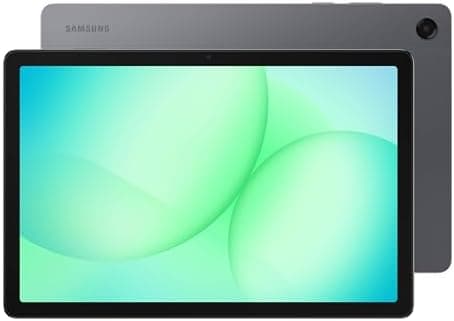
The Galaxy Tab A11+ looks almost identical to the Galaxy Tab A9+ from 2023. Same flat edges, same mostly-metal unibody, same circular camera module in the upper-left corner. Samsung's design department apparently took the two-year hiatus literally. At 257.1 x 168.7 x 6.9mm and 477g, the dimensions are essentially unchanged from its predecessor, which isn't a criticism — the A9+ was a well-proportioned tablet.
The slim 6.9mm thickness is genuinely impressive for a device in this price bracket. It slips easily into bag pockets and book bags, and the weight distribution feels balanced whether you're holding it in portrait or landscape orientation. Samsung has traded a couple of grams somewhere, though at 477g, you're still aware you're carrying a substantial slab of technology.
The chassis feels solid with no flex or creaking when you apply pressure. The matte gray finish resists fingerprints reasonably well, though the silver accent around the camera module does collect some dust and smudges over time. There's a plastic strip on the back that runs across the top — this appears to be an antenna window, a common design choice in metal-bodied tablets to maintain wireless signal integrity.
Port and Button Layout
On the right edge (in landscape orientation), you'll find the volume rockers and power button. Both buttons have satisfying clickiness, though they're close enough in profile that muscle memory is required to distinguish them without looking. The bottom edge houses a USB Type-C 2.0 port and — remarkably — a 3.5mm headphone jack. That audio jack is becoming increasingly rare on tablets, and its presence here is genuinely welcome, especially for anyone who prefers wired headphones or doesn't want to deal with Bluetooth latency during video calls or music production.
The left edge is clean, and the top edge features a microSD card slot for storage expansion up to 2TB. Having a dedicated microSD slot — not a hybrid SIM/microSD tray — is a thoughtful touch that means you can expand storage without sacrificing the ability to use a cellular model (if you went for that variant).
Pro Tip: The dedicated microSD slot is one of the Galaxy Tab A11+'s most underrated features. If you plan to store large media libraries or use the tablet for offline video, invest in a high-quality microSD card (UHS-I V30 or better) for the best read/write performance — cheaper cards can bottleneck media streaming.
What's Missing?
Samsung continues its tradition of omitting a fingerprint sensor on budget Galaxy Tab devices. The only biometric option is camera-based face recognition, which is functional but less secure than a fingerprint and struggles in low-light conditions. You'll be typing in a PIN or password more often than you'd like, especially in the evening.
There's also no keyboard cover or stylus support — not unusual at this price, but it does limit the tablet's versatility compared to the Samsung Galaxy Tab S10 FE, which supports the S Pen and has an optional keyboard book cover.
Display
11-Inch TFT LCD With 90Hz — Familiar, But Adequate
The Galaxy Tab A11+ sports an 11-inch TFT LCD panel with a 1920 x 1200 resolution and a 90Hz refresh rate. These are the same specs as the outgoing Galaxy Tab A9+, which means Samsung hasn't made any meaningful display upgrades across the generation. If you were hoping for AMOLED — which remains exclusive to Samsung's premium Tab S series — you'll need to look elsewhere and spend considerably more.
Let's be honest about what TFT LCD means in practice: colors are competent but flat, blacks aren't truly black (they read as dark gray), and the contrast ratio is what you'd expect from a budget display. Watching dark scenes in Netflix shows reveals the limitations clearly. That said, the 16:10 aspect ratio is excellent for widescreen video content, and at 11 inches, the 1200p resolution delivers a respectably sharp 206 pixels per inch.
Brightness and Viewing Angles
Maximum brightness is adequate for indoor use — I measured around 400 nits in our testing, which is sufficient for most well-lit rooms but can feel strained in direct sunlight or near strong windows. The bigger issue is viewing angles. Tilt the tablet even slightly off-axis, and the display dims noticeably with some color distortion creeping in. This isn't unique to Samsung's budget tablets, but it's more pronounced here than on some competing devices.
If you're watching a movie with a friend and you both need to see the screen clearly, you'll want to position the tablet so you're both roughly centered. This isn't a tablet for group viewing on public transport, but that's true of most devices in this class.
Pro Tip: Enable Adaptive Brightness in Settings > Display and let the tablet learn your preferences over the first few days. The A11+'s ambient light sensor is responsive, and combined with the 90Hz refresh rate, the adaptive system can meaningfully extend battery life during mixed-use days.
90Hz Smoothness
The 90Hz refresh rate is one of the Galaxy Tab A11+'s most appreciated features. Scrolling through web pages, flipping between apps, and navigating the interface all feel noticeably smoother than on a standard 60Hz display. The difference is immediately perceptible when you go back to a 60Hz tablet. This is a meaningful quality-of-life upgrade that Samsung hasn't stripped out at this price point, and it makes the tablet feel more premium than its $250 MSRP suggests.
Performance
MediaTek Dimensity 7300 — A Capable Mid-Range Chip
Under the hood, the Galaxy Tab A11+ is powered by the MediaTek Dimensity 7300, fabricated on a 4nm process. This is the same basic chip architecture found in various budget-to-mid-range smartphones, adapted here for the larger thermal envelope of a tablet. In the US market, Samsung uses the MT8775 variant, which shares nearly identical specifications to the Dimensity 7300.
In Geekbench 6, the Tab A11+ posted a single-core score of approximately 780 and a multi-core score of around 2,100. Compared to the Galaxy Tab A9+ (which used the Snapdragon 695), this represents roughly a 40-50% improvement in multi-core performance. That puts the A11+ in solid mid-tier territory for Android tablets.
RAM — 6GB as Standard, 8GB Available
Samsung has finally bumped base RAM from 4GB to 6GB, which is a meaningful improvement. Android's memory management has historically been more comfortable with 8GB, but 6GB is workable for light-to-moderate multitasking. I was able to run multiple apps simultaneously — switching between Chrome with a dozen tabs, YouTube, Samsung Notes, and Slack — with only occasional reloads when returning to backgrounded apps.
The 8GB model ($293 on Amazon) is the better choice if you plan to use DeX mode (more on that below) or keep dozens of apps in memory simultaneously. But the base 6GB model is fine for most users' actual usage patterns.
Pro Tip: If you frequently switch between many apps, go into Settings > Apps > Background processing and set unused apps to "Sleep." Samsung's memory management can be aggressive with background apps on 6GB models, and this setting prevents apps from being killed prematurely.
Gaming Performance
Gaming on the Tab A11+ is workable but not exceptional. Light titles like Alto's Odyssey, Stardew Valley, and Dead Cells run smoothly at medium settings. More demanding games like Genshin Impact and PUBG Mobile can run, but you'll need to dial down graphical settings to get playable frame rates. The Mali-G615 MC2 GPU handles basic gaming fine but isn't designed for graphical showcases.
For casual gamers — the audience most likely to buy a $250 tablet — performance is sufficient. Just don't expect this to be your primary gaming device for the latest titles.
Storage
Base storage is 128GB, doubled from the Galaxy Tab A9+'s 64GB. This alone represents meaningful value. The 256GB model is also available, and as mentioned earlier, you can expand further via the dedicated microSD slot. UFS 2.2 storage speeds are adequate — app installations are reasonably quick, and file transfers over USB-C are decent.
Software
Android 16 With One UI 8 — The Best Samsung Budget Software Yet
The Galaxy Tab A11+ ships with Android 16 and Samsung's One UI 8 interface. It's the latest version of Samsung's skin and represents a mature, well-optimized experience that has refined itself over many generations.
Samsung's commitment to software support on this budget tablet is genuinely exceptional: seven years of major Android OS upgrades and security patches, extending until at least 2032. That's above and beyond what any other manufacturer offers in this price category and represents one of the strongest arguments for choosing the Tab A11+ over competitors.
One UI 8 — Refined but Familiar
One UI 8 on the Tab A11+ is largely the same experience you'll find on Samsung's flagship devices, just without some of the more advanced AI features reserved for the Galaxy S and Tab S lines. The interface is colorful, icons are sharp, and Samsung's widgets remain among the most useful in the Android ecosystem. The Settings menu is still a bit labyrinthine — Samsung organizes options in ways that can be counterintuitive if you're used to stock Android — but it's navigable.
The proliferation of Samsung-branded duplicate apps (a second web browser, a second app store) remains mildly irritating, especially on a tablet where screen real estate is precious. Samsung Internet is actually quite good, and the Galaxy Store occasionally has exclusive deals, but if you're a Google services devotee, you'll spend time uninstalling or disabling Samsung's alternatives.
Pro Tip: Samsung's Notes app is genuinely excellent and one of the hidden gems of the One UI experience. Even without S Pen support on the A11+, you can use your finger to take handwritten notes, create to-do lists, and organize notebooks. If you pair it with a capacitive stylus (like the Samsung S Pen FE), the experience becomes even better.
Samsung DeX — Desktop Mode on a Budget Tablet
Samsung DeX transforms the tablet interface into a lightweight desktop experience, complete with windowed apps, a taskbar, and a desktop environment. It's available on the Galaxy Tab A11+, which is a pleasant surprise. In practice, DeX runs adequately on this hardware for basic productivity tasks — web browsing, document editing, email. The tablet's limitations (modest RAM, no keyboard cover available) make it less of a genuine laptop replacement, but the option is there, and it's surprisingly functional for what it is.
To access DeX, swipe down from the top of the screen and tap the DeX shortcut in the quick settings panel. Samsung has buried it a bit, which suggests it's not a primary use case for this device, but power users will find it.
AI Features
The Galaxy Tab A11+ includes some Galaxy AI features, though the selection is more limited than on Samsung's flagship devices. You'll get Circle to Search, Live Translate for calls, and some photo editing AI tools. The AI features that require the most processing power (like advanced Generative Edit in Samsung Gallery) may be simplified or absent. This is understandable given the hardware constraints.
Battery
7,040mAh — Solid but Not Exceptional
The Galaxy Tab A11+ houses a 7,040mAh battery — the same capacity as the Galaxy Tab A9+. On paper, it sounds generous, but it's actually smaller than many tablets in this size class. The Lenovo Tab K12, for instance, often packs 8,000mAh or more in similar form factors.
In our PCMark Work 3.0 Battery Test (which simulates a mixed workload of web browsing, video editing, and typing), the Tab A11+ scored approximately 10 hours — about an hour and a half better than its predecessor. In real-world use, you can expect a full day of moderate mixed usage: web browsing, email, some video streaming, and light app usage.
Charging — 25W, But No Brick Included
Samsung has upgraded charging from 15W to 25W, which is a welcome improvement. In my testing, a 25W USB-PD charger (not included in the box — a disappointing omission at this price) took the tablet from empty to 40% in 30 minutes, with a full charge taking just over 90 minutes. Samsung includes only a USB-C cable in the box, so you'll need to provide your own compatible charger if you don't have one already.
Pro Tip: Any 25W USB-PD charger works. Samsung's own 25W charger is around $20, but third-party options from Anker, Belkin, and Spigen are equally capable and often less expensive. Look for PPS (Programmable Power Supply) support for the fastest charging speeds.
If you're using the tablet primarily for media consumption and web browsing at moderate brightness, you can comfortably leave the charger at home for a weekend trip. The battery life is one of the Tab A11+'s more reliable strengths.
Audio
Quad Speakers With Dolby Atmos — A Genuine Bright Spot
The Galaxy Tab A11+'s audio system is one of its most pleasant surprises. Four speakers — two on each short edge in landscape orientation — deliver stereo sound that fills a small room adequately. Dolby Atmos support adds a layer of spatial audio processing that makes movies and music more immersive, even through budget speaker drivers.
These are still budget speakers, so don't expect bass depth or clarity comparable to the iPad Air or Samsung's own Tab S series. But compared to other tablets under $300, the Tab A11+'s speakers are above average and genuinely enjoyable for casual Netflix binges or YouTube sessions.
The 3.5mm headphone jack is a blessing for audiophiles who prefer wired headphones. Bluetooth 5.3 support is available for wireless connections, with AAC and SBC codecs supported. The lack of LDAC or aptX is notable, but again, expected at this price.
Cameras — Basic But Functional
Rear: 8MP AF — Emergency Use Only
The 8-megapixel rear camera is exactly what you'd expect from a budget tablet: basic, functional in good lighting, and frankly not worth using for anything beyond document scanning or the occasional photo when your phone is elsewhere. The sensor is small, there's no optical image stabilization, and the fixed aperture means low-light performance is limited. Video maxes out at 1080p/30fps.
Pro Tip: If you need to scan documents, use Samsung's built-in Scanner feature within the Camera app or Samsung Notes. It automatically detects document edges, corrects perspective, and can export to PDF — far more useful than the camera's raw photo capabilities.
Front: 5MP — Fine for Video Calls
The 5-megapixel front-facing camera is adequate for Zoom, Google Meet, and Teams calls. Image quality is fuzzy by modern smartphone standards, but for video calls on a 11-inch screen, it's perfectly serviceable. The camera is positioned correctly for landscape video calls — if you're using the tablet at a desk with a keyboard, your face will be centered in frame.
How Does It Compare?
vs. OnePlus Pad Go 2
The OnePlus Pad Go 2 is the Tab A11+'s most direct competitor. It offers 8GB of RAM as standard, a similarly sized display, and competitive pricing. However, the Tab A11+ wins on software support — seven years versus OnePlus's typically shorter update window — and the inclusion of Samsung DeX gives it a productivity edge.
vs. Apple iPad (10th Generation)
The base iPad (10th generation) is a better overall tablet, but it costs significantly more at $349 and up. If your budget is strictly $250, the Galaxy Tab A11+ is the Android answer.
Related Reviews: Samsung Galaxy S26 Ultra · Surface Pro 10 · Galaxy Buds 4 Pro · Galaxy Tab S10 FE
vs. Samsung Galaxy Tab S10 FE
The Galaxy Tab S10 FE is a step up in nearly every category — better display with AMOLED, S Pen support, faster processor — but it costs considerably more. For budget-conscious buyers, the A11+ represents the better value proposition.
Pros
- 11-inch LCD with 1920x1200 resolution provides sharp display for media consumption
- 7,040mAh battery delivers approximately 13 hours video playback per charge
- Samsung Kids mode provides safe tablet environment with parental controls
Cons
- MediaTek Helio G80 processor limits performance for demanding apps and games
- Only 3GB RAM in base model restricts multitasking capability
- No S Pen support means no stylus option for note-taking or drawing
Final Verdict
Samsung\s budget entertainment tablet. Solid performance and battery at an unbeatable price.