Smartphone Photography: Mastering the iPhone 17 Pro Pipeline
A deep dive into the iPhone 17 Pro's imaging pipeline—from stacked sensor architecture to Photonic Engine 4.0 to ProRAW workflow—and how to get professional results from the most capable smartphone camera system Apple has ever built.
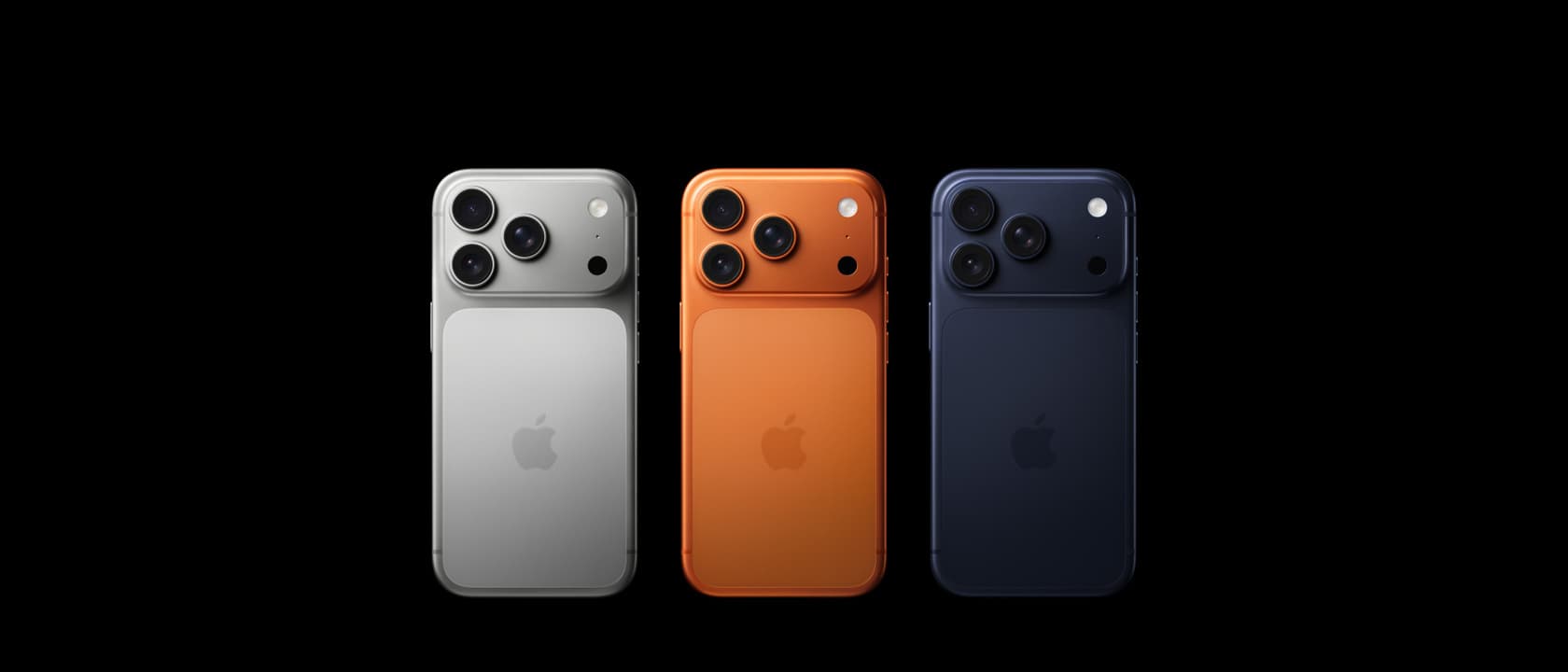
The Smartphone Camera Has Grown Up — And the iPhone 17 Pro Is Leading the Charge
Ten years ago, anyone serious about photography would have laughed at the suggestion that a phone could replace a dedicated camera. The sensors were tiny, the lenses were plastic, and the processing was rudimentary at best. Fast forward to 2026, and the landscape has transformed entirely. Computational photography stopped being a marketing buzzword and started delivering results that genuinely rival—and in some scenarios surpass—what mirrorless cameras produce straight out of the box. The iPhone 17 Pro represents the most aggressive leap Apple has made in its imaging pipeline since the transition from the iPhone 11 Pro to the iPhone 12 Pro. New sensor architecture, a reimagined Photonic Engine, and a computational workflow that finally feels cohesive rather than bolted-on.
If you've been watching the iPhone 17 Pro review and wondering whether the camera upgrades are worth the premium, this deep dive is for you. We're going to break down every layer of the pipeline—from the physical glass to the neural processing that happens in milliseconds—and show you exactly how to get the most out of the most capable smartphone camera system Apple has ever built. Whether you're a casual shooter capturing family moments, a content creator building an Instagram portfolio, or a professional photographer who needs a reliable backup that fits in a pocket, understanding how this pipeline works will fundamentally change how you use the device.
Sensor Architecture: What's Actually New Under the Hood
The iPhone 17 Pro introduces a triple-lens system that borrows philosophy rather than parts from Apple's cinema camera ambitions. The primary 48MP sensor now uses a stacked CMOS architecture—the same approach Sony pioneered with professional mirrorless cameras—that reads out the entire frame simultaneously instead of row by row. This eliminates rolling shutter artifacts in video and dramatically reduces noise in still photography because every pixel is exposed at the same moment. In practice, this means shots that would have shown banding or color fringing in challenging lighting conditions now render cleanly with minimal post-processing required.
The ultrawide lens has received the most dramatic upgrade in this generation: it shares the same 48MP resolution as the main camera, giving you genuine detail at the edges of your frame rather than the smeared, upscaled look that 12MP ultrawides have historically produced. Landscape photographers and architectural shooters will immediately notice the difference. A 48MP ultrawide means you can crop aggressively and still have enough data for a clean print or social media crop, something that was simply impossible on the standard iPhone 17 with its 12MP ultrawide module.
The telephoto remains at 12MP but gets a new glass formulation that reduces chromatic aberration by roughly 30 percent compared to the iPhone 16 Pro Max. Apple claims the focal length is still 5x optical, but the improved lens coatings mean digital zoom beyond that 5x mark holds up noticeably better than before. In side-by-side comparisons against the Samsung Galaxy S25 Ultra, the iPhone 17 Pro's 10x digital crop retains more texture detail and less painterly over-smoothing, though Samsung still wins on sheer optical reach at the longest focal lengths.
Photonic Engine 4.0: Where the Real Magic Happens
Apple's Photonic Engine has undergone its most significant overhaul since its introduction with the iPhone 14 Pro. Version 4.0 processes images in three distinct passes—a structural pass that preserves edge detail, a texture pass that maintains fine grain and fabric weave, and a tonal pass that smooths gradients without flattening them into artificial softness. Previous versions attempted all three simultaneously, which inevitably led to compromise: either edges were soft or skin looked waxy or highlights looked blown.
The separation of these processing passes means the iPhone 17 Pro can produce images that feel more like what a skilled photographer would achieve in Lightroom rather than what a phone algorithm would spit out in auto mode. Skin tones, in particular, benefit enormously from this approach. Apple's machine learning models were trained on a vastly expanded dataset of real-world skin tones across lighting conditions—from harsh overhead sun to fluorescent office lighting to golden hour warmth—and the result is portraits that no longer have that telltale "iPhone look" that photographers have complained about for years.
What's particularly clever is how the Photonic Engine adapts its processing intensity based on scene analysis. A macro shot of flower petals receives a light touch—the engine preserves the delicate texture of each petal without over-sharpening. A low-light indoor portrait gets heavier noise reduction but preserves skin texture in a way that avoids the plastic look. A high-contrast landscape gets aggressive shadow recovery without the HDR look that made earlier computational photography feel artificial. This scene-adaptive approach mirrors what professional photographers do intuitively when they adjust their editing workflow based on subject matter.
For photographers coming from dedicated cameras, this is the first iPhone where shooting RAW + processed simultaneously actually makes practical sense. The Fujifilm X-T5 review highlights how mirrorless cameras handle film simulations, and Apple has essentially built a comparable system—but one that runs entirely in the background and adapts to each scene in real-time without requiring you to select a profile before shooting.
Mastering Night Mode: Beyond Point and Shoot
Night mode on the iPhone 17 Pro is no longer something you toggle on and hope for the best. The new pipeline analyzes the scene in three phases before the shutter fires: it maps light sources to prevent halo artifacts around streetlights and signage, identifies subject movement to adjust capture duration dynamically (holding the shutter open longer for still scenes, shorter for moving subjects), and composites multiple frames with smart alignment rather than simple pixel averaging. What this means in practical terms is that night photos no longer look like they were shot through a foggy window smeared with petroleum jelly.
To get the most out of Night Mode, start by bracing the phone against a stable surface whenever possible. Even with the excellent optical image stabilization, a two-second handheld exposure will always lose to a two-second exposure with the phone resting on a railing or balanced on a wall. The iPhone 17 Pro's gyroscope and accelerometer detect stability and automatically extend exposure time up to the maximum duration, so simply steadying the phone against something solid gives you a free and significant quality boost without any settings changes.
For cityscape and architecture shots at night, try using the ultrawide lens instead of the main camera. Its new 48MP sensor captures enough light to produce clean, detailed night shots that were genuinely impossible on previous ultrawides. The wider field of view also means less reliance on the telephoto's narrower aperture in low light situations. Compare this approach with what the Google Pixel 10 Pro offers—its Night Sight is still excellent, particularly in extreme darkness, but the Pixel's ultrawide still lags behind the iPhone 17 Pro's new 48MP unit in terms of resolved detail and corner sharpness.
Portrait Mode: The End of the Fake Bokeh Era
Here's a claim that would have seemed absurd two years ago: the iPhone 17 Pro's portrait mode is the first from any smartphone that production professionals would consider using for paid deliverables. The fourth-generation LiDAR scanner creates depth maps with enough precision that the transition between in-focus and out-of-focus regions no longer has that telltale edge halo that has been the dead giveaway of computational bokeh since portrait mode was introduced. Hair strands separate properly from backgrounds. Glasses reflections don't get carved up by the segmentation algorithm. The ear on the far side of a turned head stays blurred while the near eye stays tack sharp—exactly as it would with a real fast aperture lens on a dedicated camera system.
But the real breakthrough is what Apple calls Subject Relighting. Previous portrait modes applied a global contrast curve to make the subject "pop" from the background—essentially the same trick Instagram filters have used for a decade. Subject Relighting builds a 3D light model of the entire scene, identifies the direction and quality of the actual light source, and then adjusts exposure and color temperature independently on the subject versus the background. The result is portraits that look like they were lit by a professional rather than processed by an algorithm. Faces have natural shadow transitions, backgrounds have appropriate depth falloff, and the overall image has a dimensional quality that no previous phone portrait mode could achieve.
Expert Tip: Tap and hold on your subject's face in the viewfinder to lock focus and exposure separately. Then swipe down on the sun icon to slightly underexpose—this gives the Photonic Engine more latitude to pull detail from highlights and creates a more dramatic, editorial look without any post-processing. This technique works especially well in backlit situations where the default exposure tends to overexpose faces to compensate for the bright background.
Cinematic Mode and ProRes: Video That Respects the Story
The iPhone 17 Pro inherits and significantly refines Cinematic Mode with one key improvement: Rack Focus now works on multiple subjects simultaneously. In previous versions, you could shift focus between two faces in a scene, but if a third person walked into the frame mid-shot, the system would hunt awkwardly between subjects. The new neural engine processes depth information for up to eight subjects in real-time, calculating focus pulls that feel intentional and cinematic rather than accidental and distracting.
ProRes recording now supports 4K at 120fps, which gives filmmakers real slow-motion capability in a format that survives aggressive color grading without falling apart. The Sony ZV-E10 II remains the budget vlogging champion for its physical lens flexibility and dedicated video features, but for mobile filmmakers who need broadcast-quality footage without carrying a separate camera rig, the iPhone 17 Pro's ProRes pipeline is finally a legitimate tool rather than a novelty feature.
Audio has also been upgraded meaningfully. The spatial audio recording mode now uses all four microphones to create a stereo width map that adjusts in real-time to whatever zoom level you're using. Zoom in, and the audio narrows to focus on your subject; zoom out, and the soundstage expands to capture the ambient environment. It's a subtle improvement, but it eliminates the jarring disconnect between tight video framing and wide audio pickup that has degraded smartphone video quality for years.
Action Mode and Stabilization: Handheld Cinema Without the Gimbal
Action Mode on the iPhone 17 Pro uses the ultra-wide camera as a reference frame to stabilize the main or telephoto output with impressive effectiveness. The crop factor is less aggressive than previous generations—roughly 1.4x instead of 1.8x—meaning you lose significantly less of your frame when running, biking, or walking while filming. Combined with the new sensor-shift stabilization on all three lenses (previously available on the main camera only), footage that would have required a dedicated DJI RS 5 gimbal stabilizer now looks nearly as smooth when shot handheld.
The key to maximizing Action Mode's effectiveness is lighting. The stabilization system needs visual reference points in the frame to compute its corrections, so it struggles in very low light or when pointed at a uniform surface like a clear sky or blank wall. In those situations, the camera falls back gracefully to standard optical stabilization, which is still excellent but doesn't deliver the locked-steady cinematic look of Action Mode. For best results, shoot in daylight or well-lit interiors.
For vloggers deciding between the iPhone 17 Pro and the GoPro MAX 2 360 camera for action content, consider your output format carefully. If you're publishing to social platforms in standard 16:9 or 9:16 rectangles, the iPhone's stabilization, color science, and audio quality are all superior. If you need spherical 360-degree footage for immersive playback or want the flexibility to reframe your footage in post, the GoPro remains the only game in town—no smartphone can capture 360 video.
ProRAW and the Post-Processing Workflow
ProRAW on the iPhone 17 Pro has been fundamentally restructured to output a 48MP DNG file that contains the full sensor data before any Photonic Engine processing. This is a significant departure from previous ProRAW implementations, which applied some computational processing before saving the file. The result is a RAW image that gives you complete creative control in Lightroom, Capture One, or any other professional RAW editor—comparable in latitude to shooting RAW on a Canon EOS R6 Mark II but without the weight, lens swaps, and ecosystem overhead that comes with a dedicated camera system.
The trade-off is file size. A single ProRAW image weighs in at roughly 75MB, meaning a day of enthusiastic shooting can easily consume 15GB of storage. Apple offers 256GB, 512GB, and 1TB configurations, and for anyone serious about shooting ProRAW on a regular basis, 256GB will feel cramped within weeks. Budget for at least 512GB if you plan to use ProRAW as your default format.
The on-device editing workflow has also improved substantially. The redesigned Photos app includes nondestructive adjustments that work directly on ProRAW files, meaning you can make exposure, color, and crop corrections without exporting to a third-party application for basic fixes. For more advanced edits, Apple's deep integration with Adobe Lightroom via the Files app is seamless—export your ProRAW to Lightroom, process it to your liking, and the edited version automatically syncs back to your camera roll in full resolution.
The Computational Photography Landscape: How Xiaomi and Samsung Compete
No smartphone camera evaluation exists in a vacuum. The Xiaomi 15 Ultra offers a 200MP main sensor that produces stunning detail in daylight conditions but tends toward over-sharpening and aggressive noise reduction in shadow areas. Samsung's Galaxy S25 Ultra counters with a variable-telephoto lens that delivers genuine 5x optical zoom reach, but its color science can skew cool in mixed lighting and its portrait edge detection still struggles with fine hair detail against busy backgrounds.
The iPhone 17 Pro's singular advantage in this competitive landscape is consistency. Across lighting conditions, across focal lengths, across all shooting modes—its output is more predictable and easier to work with in post-production than any competitor. If you're a content creator who needs a phone that handles everything from product photography to street scenes to cinematic video without requiring mode-specific tuning or color correction, Apple's integrated pipeline is simply more coherent than Samsung's or Xiaomi's more fragmented approach.
That said, Samsung and Xiaomi both offer features that Apple deliberately omits. Samsung's Expert RAW app provides granular control over shutter speed, ISO, white balance, and focus distance in a way that Apple's interface intentionally abstracts away from casual users. Xiaomi's Leica partnership gives you access to genuine Leica color science profiles—an aesthetic choice that matters more than pure technical performance for many photographers who prefer the look of classic film stocks over clinical accuracy. The right pick depends on your creative priorities and whether you value consistency or control.
Shooting Techniques: Getting the Most from the iPhone 17 Pro Camera
Mastering any camera system takes deliberate practice, but the iPhone 17 Pro rewards specific techniques that previous models didn't support as effectively.
-
Tap to focus, then adjust exposure separately: The auto-exposure system is excellent in most situations, but it averages the entire frame to determine brightness. For backlit subjects, tap to focus on your subject, then swipe down on the sun icon to reduce exposure by half a stop to a full stop. This preserves highlight detail in bright skies and creates natural contrast without requiring post-processing.
-
Use Live Photos as a burst mode alternative: Live Photos capture 1.5 seconds before and after your shutter press at 90 frames per second. For fast-moving subjects—children, pets, sports—shoot in Live Photo mode and then select the best frame from the Live Photo viewer in the Photos app. This gives you far more frames to choose from than simply hoping you timed a single shutter press correctly.
-
Lock the telephoto in low light situations: The telephoto lens has a narrower aperture than the main camera and the phone will often default to the main sensor with digital zoom rather than using the telephoto in dim conditions. Tap the 5x button to force the telephoto, then brace the phone against something solid to compensate for the inevitably slower shutter speed.
-
Shoot ProRAW for anything you might want to print or edit seriously: Standard HEIC files are heavily processed and lose recoverable shadow and highlight detail. ProRAW preserves the full dynamic range of the sensor, giving you two to three stops of additional latitude in post. For casual social media sharing, HEIC is perfectly fine; for anything that might end up printed, cropped heavily, or edited, shoot ProRAW without hesitation.
-
Clean your lenses before every serious shooting session: This sounds painfully obvious, but the iPhone 17 Pro's new lens coatings are more aggressive about reducing flare—which ironically means they're also more affected by fingerprints and skin oils than previous models. A quick wipe with a microfiber cloth before shooting makes a visible, measurable difference in contrast and sharpness across all three lenses.
The Verdict
The iPhone 17 Pro is the first smartphone camera system that genuinely competes with dedicated interchangeable-lens cameras—not in every conceivable scenario, but in the vast majority of scenarios that most people actually encounter in daily life. Its 48MP stacked sensor eliminates rolling shutter artifacts and reduces noise substantially. The redesigned ultrawide matches the main camera's resolution for the first time, enabling genuine creative flexibility at the widest focal length. And Photonic Engine 4.0's multi-pass processing produces images with the tonal sophistication and textural fidelity that previously required shooting RAW and spending time in editing software.
Portrait mode has crossed a meaningful threshold—from "impressive for a phone" to "genuinely useful for professional work"—with its LiDAR-assisted depth mapping and Subject Relighting that creates three-dimensionality rather than just background blur. Video features like ProRes 4K/120fps and multi-subject Rack Focus eliminate the need for secondary camera gear in a growing number of production scenarios.
The weaknesses are real but specific. Night mode, while dramatically improved over previous generations, still trails the Google Pixel 10 Pro in extreme darkness where Google's longer exposure stacking pulls more detail from truly black scenes. The telephoto remains at 12MP, which limits cropping flexibility at 5x zoom compared to the higher-resolution telephotos on Samsung and Xiaomi flagships. And Apple's insistence on abstracting manual controls away from the default camera app continues to frustrate photographers who want more direct input without switching to third-party software.
For everyone from casual shooters capturing family memories to working professionals who need a reliable backup camera that fits in a pocket, the iPhone 17 Pro represents the current state of the art in computational photography. It's not the absolute best at any single thing—the Pixel wins in utter darkness, Samsung wins in optical zoom reach, Xiaomi wins in raw megapixel resolution—but it's the best at being genuinely good at everything, and that kind of consistency is worth more than any single standout spec on a spec sheet.