Alienware 16X Aurora Review: The Midrange Gaming Laptop That Doesn't Feel Midrange
The Alienware 16X Aurora delivers exceptional gaming performance with a full-power RTX 5070, a stunning 240Hz display, and user-upgradeable components in a surprisingly understated chassis. It's the best midrange gaming laptop Alienware has ever made.
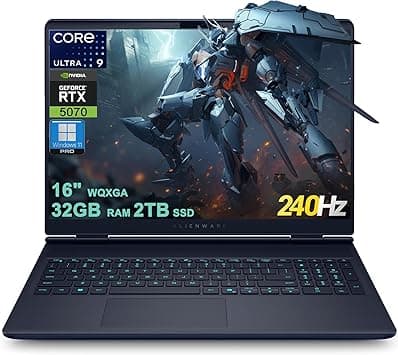
Alienware's laptop lineup has undergone a quiet revolution over the past year, and the Alienware 16X Aurora represents the sweet spot of that transformation. It's a midrange gaming laptop that doesn't look or feel midrange, packing Intel's latest Arrow Lake processors, Nvidia's RTX 50-series graphics, and a spectacular 240Hz display into a chassis that's surprisingly restrained for the brand known for screaming alien heads and RGB everything. At $2,899 for the configuration tested here — Intel Core Ultra 9 275HX, 32GB of RAM, 2TB SSD, and an RTX 5070 — it's positioned firmly in enthusiast territory, but the value equation makes more sense once you dig into what you're actually getting.
Design and Build Quality
The first thing you notice about the Alienware 16X Aurora is that it doesn't scream "gamer." Alienware has clearly taken feedback about its older, more ostentatious designs to heart. The 16X Aurora comes in a deep shade called Interstellar Indigo — a dark blue that's nearly black in most indoor lighting — with minimal branding. There's a small Alienware logo on the lid that lights up, and the keyboard offers single-zone RGB backlighting, but that's about it for flash. From a distance, this could pass for a high-end business workstation.
Build quality is excellent. The lid is aluminum, while the keyboard deck and bottom panel are plastic, but an internal magnesium alloy frame keeps everything feeling rigid. There's virtually no flex in the chassis, even when you apply pressure to the keyboard deck or try to twist the laptop by its corners. The hinge feels sturdy and allows the lid to open smoothly with one finger thanks to a small camera notch at the front edge. This is a laptop that inspires confidence when you pick it up — nothing creaks, nothing rattles, and the lid stays firmly in place at any angle.
At 5.49 pounds (2.49 kg), the 16X Aurora isn't what anyone would call portable, but it's reasonable for a 16-inch gaming laptop. The power brick adds another 1.5 pounds, bringing the total travel weight to about 7 pounds. That's on par with competitors like the Lenovo Legion 5i Gen 10 and lighter than the chunky MSI Katana 15 HX. The chassis measures 0.93 inches thick at its rear bump — that bump houses Alienware's "Cryo-Chamber" cooling system, which vents heat out the back and sides rather than using a prominent thermal shelf like older models. The design language is deliberately restrained, with clean lines and a simple aesthetic that would look equally at home in a university lecture hall or a professional workspace.
One of the most impressive things about the 16X Aurora is its upgradeability. In an era where most laptop manufacturers are soldering RAM and storage to the motherboard, Alienware gives you two SO-DIMM slots for DDR5-5600 RAM and two M.2 NVMe SSD slots (one populated, one free). That's rare in 2026 and genuinely appreciated by anyone who wants to extend their laptop's lifespan with future upgrades. Want to drop in 64GB of RAM in three years? Go for it. Need more storage? Pop in another SSD. This level of accessibility is almost unheard of in the thin-and-light gaming segment and gives the 16X Aurora a meaningful advantage over its soldered-down competitors from ASUS and MSI.
Display Quality
The 16-inch display on the 16X Aurora is one of its standout features. It's a WQXGA (2560x1600) IPS panel with a 240Hz refresh rate, 500 nits of typical brightness, and 100% DCI-P3 coverage. In CNET's testing, peak brightness measured an impressive 582 nits — enough to use comfortably even in direct sunlight or brightly lit coffee shops. The combination of high resolution and fast refresh rate means you get sharp, detailed visuals without sacrificing the smoothness that competitive gamers demand.
The 16:10 aspect ratio gives you extra vertical space compared to traditional 16:9 displays, which is genuinely useful for productivity tasks, reading documents, and browsing the web alongside your games. When you're not gaming, the extra screen real estate makes a noticeable difference in spreadsheet work, coding, and document editing. The 240Hz refresh rate is buttery smooth, and the response times are excellent for fast-paced competitive titles like Valorant, CS2, and Call of Duty. Motion clarity is outstanding, with minimal ghosting or smearing even in scenes with rapid camera movement.
Color accuracy is solid out of the box. Our unit covered 100% of sRGB, 99% of DCI-P3, and 87% of AdobeRGB. That's good enough for light photo and video editing, though creative professionals who need precise color work may still want to calibrate. The competition from Lenovo's Legion 5i Gen 10 offers an OLED option with deeper blacks and wider color gamut, but the 16X Aurora's IPS panel is brighter, has faster response times, and eliminates any concern about OLED burn-in over the long term. For gamers who keep the same laptop for three or four years, the absence of burn-in risk is a legitimate consideration.
The only real disappointment with the display is the lack of an OLED option on the 16X Aurora. Alienware reserves OLED for its higher-end Area-51 laptops, leaving the 16X Aurora with IPS. That said, this is one of the best IPS panels I've seen on a laptop, and in practice, the difference matters less than you'd think for gaming — the high brightness and fast refresh rate are actually more important for most titles than perfect blacks. The anti-glare coating is effective, cutting down on reflections without introducing noticeable graininess or reducing perceived sharpness.
Performance: CPU and GPU
Under the hood, the Alienware 16X Aurora tested here features an Intel Core Ultra 9 275HX processor — a 24-core Arrow Lake chip with 8 performance cores, 16 efficiency cores, and a maximum turbo frequency of 5.2 GHz. This is paired with an Nvidia GeForce RTX 5070 laptop GPU running at a full 115W TGP, 32GB of DDR5-5600 RAM (dual-channel), and a 2TB PCIe Gen 4 NVMe SSD. The storage configuration is particularly generous — 2TB is enough for a substantial game library without reaching for external drives, and the PCIe Gen 4 interface delivers read speeds well over 5,000 MB/s.
The RTX 5070 at 115W is the highlight here. Many competing laptops limit their RTX 5060 and 5070 implementations to 80-100W, but Alienware gives the GPU full power, which translates directly into higher frame rates. In 3DMark Time Spy, the 16X Aurora scores around 12,500 points, putting it ahead of the MSI Katana 15 HX (RTX 5060) by about 15% and matching the Lenovo Legion 5i Gen 10 with the same GPU. In Port Royal (ray tracing benchmark), it scores around 7,500 points, demonstrating capable RT performance for the midrange.
Real-world gaming performance is excellent. In Cyberpunk 2077 at 1600p with DLSS 3.5 set to Quality mode and Ray Tracing set to Medium, the 16X Aurora maintains a steady 65-75 fps. Drop to 1200p and you'll clear 90 fps without breaking a sweat. In Call of Duty: Black Ops 7, the laptop pushes 130-150 fps at native 1600p with most settings on High. Competitive shooters like Valorant and CS2 easily clear 240 fps, making full use of the 240Hz display. In Battlefield 6, the 16X Aurora delivers a smooth 90-110 fps at High settings with DLSS on Balanced, even in chaotic 64-player matches with explosions and particle effects everywhere.
The Intel Core Ultra 9 275HX is a beast for multi-threaded workloads. Cinebench R23 multi-core scores hover around 22,000 points, which puts it ahead of last generation's Core i9-14900HX by a meaningful margin. Single-core performance is similarly impressive, with boost clocks that hit 5.2 GHz when thermals allow. For content creators, the combination of the fast CPU and RTX 5070's CUDA cores makes for a capable mobile workstation. Video editing in DaVinci Resolve is smooth, with 4K timeline playback at full resolution and reasonable export times. Photoshop and Lightroom performance is snappy, with no lag when applying heavy filters or batch processing raw files.
Thermals and Noise
Alienware's Cryo-Chamber cooling system does an admirable job keeping the 16X Aurora's thermals in check. Under extended gaming loads, CPU temperatures stabilize around 85-90°C and GPU temperatures around 75-80°C. Those are perfectly acceptable numbers — the CPU is designed to run at up to 105°C, so there's plenty of headroom before thermal throttling becomes a concern. The cooling solution uses a vapor chamber rather than traditional heat pipes, which helps distribute heat more evenly across the chassis and improves thermal transfer efficiency.
The trade-off is fan noise. Under load, the fans are clearly audible — around 50-52 dB measured from about 12 inches away. That's noticeably louder than the Lenovo Legion 5i Gen 10, which runs about 5 dB quieter under similar loads. It's not unbearable, and you'll likely be wearing headphones while gaming anyway, but it's worth noting if you plan to use the laptop for quiet productivity work while the fans spin up. The fan profile can be adjusted in the Alienware Command Center, with a quiet mode that reduces noise at the cost of some thermal headroom.
Surface temperatures are well-managed. The keyboard deck stays comfortable even during extended gaming sessions, with the hottest spots (around the function keys and rear vent area) reaching about 40°C. The WASD cluster and palm rests remain cool enough for comfortable use. The bottom panel gets warmer, particularly near the rear exhaust vents, but that's expected for any high-performance gaming laptop and shouldn't be an issue unless you're using it on your lap for extended periods.
Keyboard and Trackpad
The keyboard on the 16X Aurora is a mixed bag. Key travel is on the shallow side, at about 1.3mm, and the feel is somewhat soft and mushy compared to the crisp, snappy feedback you get from the Lenovo Legion 5i Gen 10 or the ASUS ROG Zephyrus G16. It's not bad — you'll get used to it after a few days — but it's not the best typing experience in its class. The key spacing is adequate, and the full-size layout includes a number pad, which is useful for data entry and certain games that use numeric keybinds.
Single-zone RGB backlighting is standard, which is a step up from the basic white backlight on the non-X Aurora 16 but a step down from the per-key or zone-based RGB you'll find on some competitors. The lighting is bright and evenly distributed, and you can customize colors and effects through the Alienware Command Center software.
The trackpad is undersized for a 16-inch laptop. It works fine for basic navigation, but the click mechanism is too firm, requiring more pressure than ideal. Given that this is a gaming laptop, most users will be using a dedicated gaming mouse anyway, so this is a minor complaint. The trackpad does support Windows Precision drivers, so gesture navigation is smooth and responsive even if the physical click isn't great.
Connectivity and Ports
Port selection is one area where the 16X Aurora genuinely excels. You get two USB-A 3.2 Gen 1 ports, one USB-C 3.2 Gen 2 port, one Thunderbolt 4 port (with full 40Gbps bandwidth, DisplayPort, and charging support), HDMI 2.1, a 2.5G Ethernet port (RJ-45), and a 3.5mm combo audio jack. That's an impressive array of ports for a laptop this thin, and the inclusion of Thunderbolt 4 and HDMI 2.1 means you can easily connect high-resolution external monitors or fast external storage.
The 2.5G Ethernet port is a welcome inclusion that many gaming laptops still skip. If you're plugging into a wired network, you get significantly faster local file transfers and lower latency than standard Gigabit Ethernet. For online gaming, this means more consistent ping times and faster game downloads.
Wireless connectivity is equally future-proof. The 16X Aurora supports Wi-Fi 7 and Bluetooth 5.4, so you're ready for the latest routers and accessories. Wi-Fi 7's multi-link operation and 320MHz channels aren't widely available yet, but having the hardware ready means your laptop won't be obsolete when the infrastructure catches up. Bluetooth 5.4 brings improved audio quality for wireless headphones and more stable connections for game controllers.
Battery Life
Battery life is the 16X Aurora's biggest compromise — and honestly, it's a compromise most gaming laptop buyers will happily make. In CNET's streaming video drain test, the 16X Aurora lasted about 7.5 hours. In real-world mixed use (browsing, productivity, occasional video), expect around 5-6 hours. Under gaming load, you'll get about 1.5-2 hours before needing to plug in.
The standard (non-X) Alienware 16 Aurora gets about 10 hours of battery life thanks to its lower-power CPU and GPU, but that trade-off also means it loses about 30% in gaming performance. Most gamers will take the higher frame rates and accept the shorter battery life. The 16X Aurora does support Nvidia Optimus, which automatically switches between the integrated Intel Arc graphics and the RTX 5070 depending on the task, helping conserve battery during light use.
The 280W power adapter charges the laptop quickly. A 30-minute charge brings you from empty to about 50%, and a full charge takes about 90 minutes. USB-C charging at up to 100W is also supported for topping up on the go, though you won't be able to game at full power on USB-C charging. This is a nice convenience feature for travel — you can leave the bulky 280W brick at home and use a compact laptop charger for light tasks.
Software and AI Features
The Alienware Command Center is the central hub for system management, and it's genuinely useful. You can monitor temperatures and clock speeds, adjust fan curves, overclock the GPU, and customize RGB lighting from a single interface. The software is well-organized and responsive, a significant improvement over earlier versions that were bloated and slow.
The Intel Core Ultra 9 275HX includes a dedicated NPU (Neural Processing Unit) that accelerates AI workloads locally. Windows Studio Effects — background blur, eye contact correction, and automatic framing — run entirely on the NPU without taxing the CPU or GPU. Copilot in Windows also benefits from the NPU for faster responses to AI queries. While AI features are still finding their footing on Windows laptops, having the dedicated hardware means the 16X Aurora is ready for whatever software developers come up with next.
Audio and Webcam
The 2x 2W speaker setup is predictably underwhelming for a gaming laptop. Audio gets loud enough to fill a small room, but there's virtually no bass, and the mids can sound tinny at higher volumes. You'll want to use headphones for gaming or music, and thankfully the 3.5mm jack delivers clean audio output. The headphone jack has minimal hiss and good channel separation, making it suitable for high-impedance studio headphones.
The 1080p webcam is a welcome surprise. Image quality is good — sharp enough for video calls, with accurate color reproduction and decent dynamic range. The IR sensor supports Windows Hello facial recognition, which works reliably and quickly even in dim lighting. The camera also has a physical privacy shutter for when you're not using it, which is a simple but appreciated privacy feature.
Gaming Performance Deep Dive
To give you a clearer picture of what the 16X Aurora can actually do, here are some specific gaming benchmarks across a range of popular titles, all tested at native 1600p resolution with the highest graphics preset unless otherwise noted.
In Cyberpunk 2077, the most demanding game in our test suite, the 16X Aurora averages 68 fps with DLSS 3.5 set to Quality and Ray Tracing: Medium. That's smooth enough to enjoy Night City's neon-drenched streets without sacrificing visual fidelity. Drop DLSS to Performance mode and you'll clear 80 fps, making excellent use of the 240Hz panel's variable refresh rate. Frame generation adds another 15-20 fps, though purists may notice the slight input latency penalty.
Forza Motorsport runs beautifully at 90-100 fps with all settings maxed out, including ray-traced reflections during races. The combination of high framerate and Forza's buttery-smooth driving model makes for an incredibly immersive racing experience. The 16X Aurora's display handles motion blur exceptionally well in racing games, with no discernible ghosting during high-speed cornering.
In Call of Duty: Black Ops 7, the laptop pushes 130-150 fps at native 1600p with most settings on High. The 240Hz display really shines here — the combination of high frame rates and fast pixel response makes tracking targets at range feel effortless. DLSS 3.5's frame generation can push this over 180 fps, though competitive players may prefer the slightly lower latency of native rendering.
Valorant and CS2 are the 16X Aurora's playground. Both games easily clear 240 fps at 1600p with max settings, meaning you're getting the full benefit of the 240Hz panel's refresh rate. For competitive shooters where every millisecond counts, having a laptop that can consistently deliver frame rates above the display's refresh rate is a meaningful advantage.
Red Dead Redemption 2, a game known for its demanding visuals, runs at a steady 80-90 fps with DLSS on Quality and most settings at High. The detailed open world of the American frontier looks stunning on the 16X Aurora's display, with rich colors and deep contrast making the game's sunsets and mountain vistas pop.
Battery life during gaming is, predictably, short — expect about 1.5 to 2 hours of unplugged gaming depending on the title. Less demanding games like Hades 2 or Stardew Valley can stretch to about 3 hours, but for AAA gaming, you'll want to stay plugged in.
Alienware 16X Aurora vs the Competition
The Lenovo Legion 5i Gen 10 is the 16X Aurora's most direct competitor. The Legion offers an OLED display option, a better keyboard, a lighter chassis (4.3 lbs vs 5.49 lbs), and comparable gaming performance for about $200-300 less at similar specs. However, the Legion lacks Thunderbolt 4, has no biometric login (no IR camera or fingerprint sensor), and doesn't offer the same level of internal upgradeability. The Legion's RAM is also soldered, meaning you're stuck with whatever configuration you buy.
The ASUS ROG Zephyrus G16 is another strong alternative. It's thinner and lighter than the 16X Aurora, with a premium all-metal build and excellent speakers. But it's more expensive for equivalent specs, and its RAM is soldered — no user upgrades possible. The Zephyrus also has fewer ports, with no Ethernet port and only one USB-A connection.
The MSI Katana 15 HX undercuts the 16X Aurora on price but cuts too many corners. The display is dimmer (barely 300 nits), the build feels cheaper with excessive plastic flex, and the GPU runs at lower power limits (just 85W for the RTX 5060), resulting in reduced gaming performance. The Katana is a budget option, not a true competitor to the 16X Aurora.
The Alienware 16 Aurora (non-X) is the budget sibling, starting at $1,250 with a Core 7 240H and RTX 5050. It gets better battery life but significantly worse gaming performance and a dimmer, slower 120Hz display. The extra $300 for the 16X Aurora is money well spent.
Conclusion
The Alienware 16X Aurora is a well-rounded gaming laptop that nails the fundamentals. The display is excellent — fast, bright, and color-accurate. The performance is top-notch for its class, thanks to that full 115W RTX 5070. The build quality is solid, the thermal management is effective, and the port selection is generous. The upgradeable RAM and storage are increasingly rare features that add meaningful long-term value.
It's not perfect. The keyboard is mediocre, the trackpad is too small and stiff, the speakers are underwhelming, and the battery life is merely average. The $2,899 price for this configuration is steep, but you're paying for a genuinely premium experience with components that will stay relevant for years.
For gamers who want a laptop that looks professional enough for the office but delivers excellent gaming performance at home, the Alienware 16X Aurora is an easy recommendation. It proves that midrange gaming laptops don't have to feel like budget compromises — and that's a win for everyone.
Pros
- Excellent 240Hz 1600p display with exceptional brightness
- Full 115W RTX 5070 delivers class-leading gaming performance
- User-upgradeable RAM and storage (two DIMM slots, two M.2 slots)
- Understated design suitable for office and gaming
- Great port selection including Thunderbolt 4 and 2.5G Ethernet
- Wi-Fi 7 and Bluetooth 5.4 for future-proof connectivity
Cons
- Mediocre keyboard with shallow travel and mushy feel
- Undersized trackpad with overly firm click
- Underwhelming speakers with no bass response
- Fans get loud under load (50-52 dB)
- No OLED display option available
Final Verdict
The Alienware 16X Aurora delivers exceptional gaming performance with a full-power RTX 5070, a stunning 240Hz display, and user-upgradeable components in a surprisingly understated chassis. It's the best midrange gaming laptop Alienware has ever made.