ASUS ROG Swift OLED PG32UCDM3 Review: The Best 32-Inch Gaming Monitor Gets Even Better
The ASUS ROG Swift OLED PG32UCDM3 brings BlackShield film, a Neo Proximity Sensor, and third-generation QD-OLED technology to create the most practical and visually stunning 32-inch 4K gaming monitor on the market.
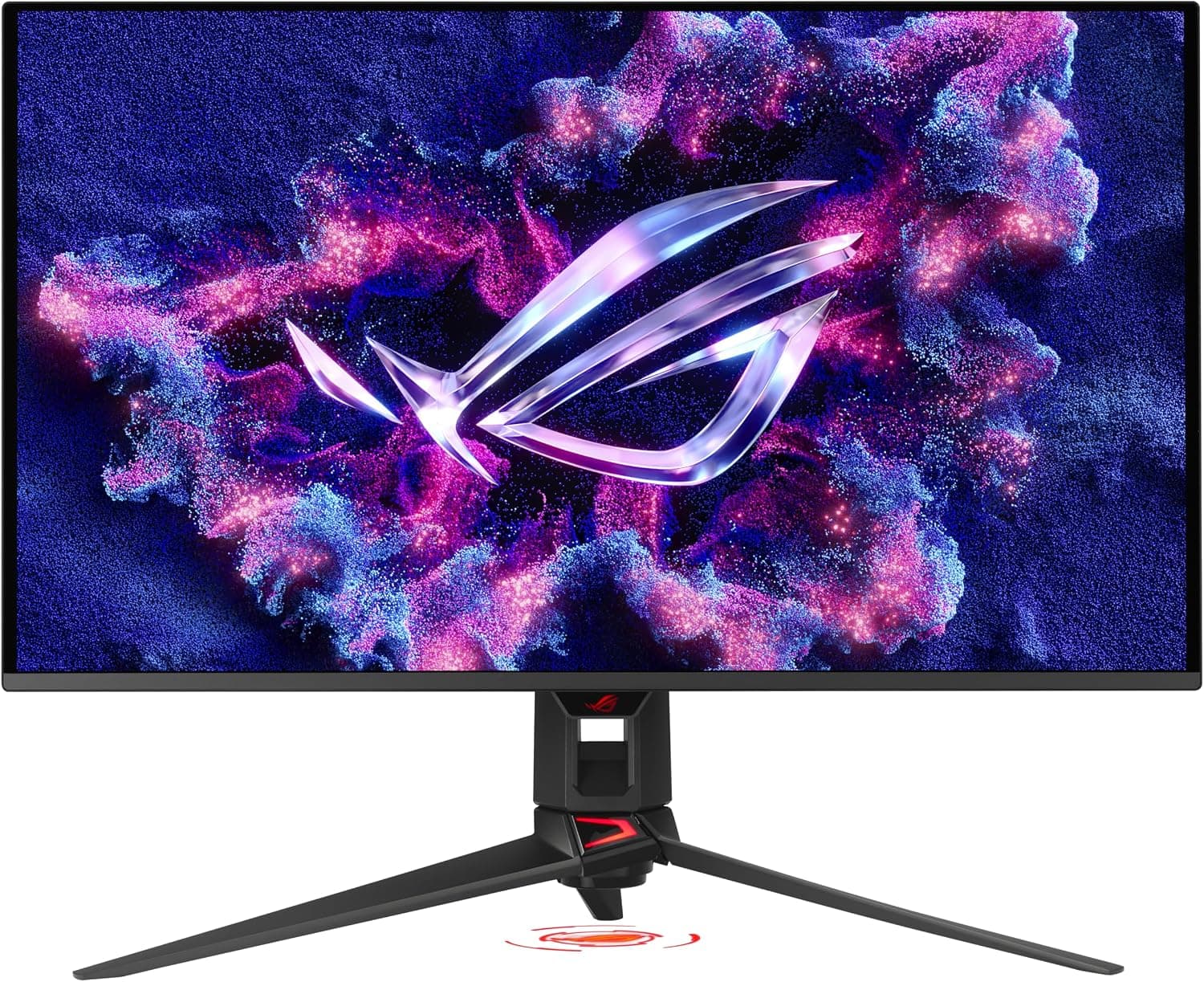
The premium gaming monitor market has seen fierce competition in recent years, with OLED technology finally maturing to the point where it genuinely outclasses traditional LCD panels in almost every measurable way. ASUS has been at the forefront of this transition with its ROG Swift OLED lineup, and the third-generation PG32UCDM3 represents the most refined expression of that vision yet. At $1,300, this 32-inch 4K QD-OLED monitor competes with the best displays on the market while addressing the lingering complaints that kept previous OLED generations from being truly universal recommendations. After spending several weeks with the PG32UCDM3 as my primary display for gaming, creative work, and daily productivity, I can say with confidence that ASUS has delivered something special — a monitor that takes an already brilliant formula and fixes nearly every remaining pain point.
ASUS ROG Swift OLED PG32UCDM3 Review: The Best 32-Inch Gaming Monitor Gets Even Better
Design and Build Quality
The PG32UCDM3 inherits the same sleek, minimalist design language that ASUS established with the first-generation PG32UCDM, and that is hardly a complaint. The monitor features a nearly frameless design that makes the 31.5-inch viewable screen area feel even more immersive, with slim bezels that disappear into your peripheral vision during gaming sessions. The chassis is predominantly constructed from a combination of high-grade plastics and magnesium alloy in key structural areas, giving it a premium feel without adding unnecessary weight. The entire assembly weighs in at around 8.5 kilograms with the stand attached, which is reasonable for a 32-inch monitor of this caliber.
The included stand deserves special mention. It offers 110 millimeters of height adjustment, 15 degrees of swivel in either direction, and a tilt range of -5 to +20 degrees. The movements are smooth and well-damped, with no wobble even in the fully extended position. VESA mounting is supported with a standard 100 by 100 millimeter pattern for those who prefer a monitor arm, and the VESA adapter plate is included in the box rather than sold separately — a small courtesy that not every manufacturer extends.
One of the smartest design decisions ASUS made with this generation is integrating the power supply directly into the monitor chassis. There is no bulky external power brick to hide under your desk — just a single power cable running from the wall to the monitor. This might seem like a small detail, but anyone who has dealt with the tangle of cables behind a high-end gaming setup will appreciate the cleaner installation. The monitor also includes a built-in tripod socket machined directly into the stand column, a thoughtful addition for streamers who want to mount a webcam or microphone directly above the screen without an external arm cluttering the desk.
The rear of the monitor features ASUS's signature ROG lighting, including a projection lamp that casts the ROG logo onto your desk surface. It is tastefully implemented and can be turned off entirely through the OSD if you prefer a more subdued aesthetic. The rear panel also houses a cable management channel that keeps wires organized and out of sight. Build quality throughout is excellent, with tight panel gaps and a solid, confidence-inspiring feel when you adjust the display position.
The BlackShield Film: A Genuine Breakthrough
The headline feature of the PG32UCDM3, and the primary reason to choose it over the previous generation, is the new BlackShield film applied to the QD-OLED panel. This is not a minor iterative improvement — it solves two of the most persistent complaints about quantum dot OLED monitors in a single stroke, and it fundamentally changes the practical usability of the technology in real-world environments.
First, the BlackShield film increases the panel's surface hardness by 2.5 times compared to standard QD-OLED panels. Early QD-OLED adopters quickly learned that the panels were surprisingly fragile, with some users reporting scratches from routine cleaning using microfiber cloths. The PG32UCDM3's panel feels significantly more robust, and while I would still recommend using only a clean, dry microfiber cloth for cleaning, the improved durability means you do not have to treat the screen with kid gloves. This improvement alone addresses one of the biggest practical objections potential buyers had about QD-OLED technology.
Second, and more importantly, the BlackShield film dramatically improves perceived black levels in rooms with ambient lighting. One of the fundamental limitations of QD-OLED technology has always been that the quantum dot layer produces a slight purple or magenta tint when exposed to bright ambient light, which washes out black levels and reduces contrast in well-lit rooms. If you have ever used a QD-OLED monitor with a desk lamp on or near a window, you know exactly the effect I am describing — blacks that should be deep and inky take on a subtle purple hue that diminishes the overall image quality. The BlackShield film diffuses this effect by altering how ambient light interacts with the quantum dot layer, improving perceived black levels by up to 40 percent according to ASUS's internal testing.
In real-world use, the difference is immediately apparent. With a desk lamp positioned two feet from the monitor or sunlight streaming through an east-facing window in the morning, the PG32UCDM3 maintains deep, inky blacks that its predecessors simply could not achieve under identical conditions. This alone makes the upgrade worthwhile if you use your monitor in anything less than a completely dark room, and it makes the PG32UCDM3 the first QD-OLED monitor I would comfortably recommend to someone who does not have a dedicated, light-controlled gaming space.
The film also improves reflection handling, though it is important to note that this is still a glossy panel at heart. The BlackShield treatment reduces the severity of reflections rather than eliminating them entirely, so users with windows behind their desk will still see some glare in bright conditions. However, the improvement over previous QD-OLED panels is substantial enough that I no longer feel the need to draw the blinds before launching a dark game like Alan Wake 2 or a horror title.
Display Performance and Image Quality
Let me be direct about this: the PG32UCDM3 delivers some of the best image quality I have ever seen from a computer monitor, period. The third-generation Tandem QD-OLED panel produces 4K resolution at 3840 by 2160 across 31.5 inches, resulting in a pixel density of approximately 140 pixels per inch that makes individual pixels invisible at normal viewing distances. Text rendering, a traditional weak point of OLED monitors due to sub-pixel layout issues, is excellent here thanks to the standard RGB stripe sub-pixel layout, which works perfectly with Windows ClearType for sharp, color-fringing-free text. This is a critical detail for anyone who spends significant time reading or writing on their monitor.
Color performance is spectacular. The panel covers 99 percent of the DCI-P3 color gamut right out of the box, with true 10-bit color depth that eliminates banding in gradients. Delta E values measure under 2 in the default Racing Mode, and calibration brings that down to under 1 — a level of accuracy that qualifies the monitor for professional color-critical work. Tom's Hardware testing found that the monitor achieves visually perfect grayscale tracking out of the box, with gamma tracking the 2.2 standard almost exactly at a measured value of 2.22. The default grayscale error of 2.27 dE is visually imperceptible even to trained eyes, and post-calibration errors drop to just 0.78 dE, placing it among the most accurate displays ever tested.
What this means in practice is that the PG32UCDM3 is not just a gaming monitor — it is fully qualified as a reference display for photo and video editing. The ability to switch between wide gamut DCI-P3 and sRGB modes with independent calibration settings means you can use this monitor for professional creative work without compromise. I spent several days editing photographs in Adobe Lightroom and grading video in DaVinci Resolve, and the monitor delivered consistent, accurate color that matched my reference prints and broadcast monitor output with negligible deviation. ASUS has essentially eliminated the distinction between gaming and professional displays with this panel, and that is a remarkable achievement at this price point.
HDR performance is equally impressive. The monitor is certified for VESA DisplayHDR 500 True Black, which means it delivers genuine black levels that LCD monitors simply cannot approach. When an HDR scene calls for a starfield, a dark cave, or the void of space, the pixels producing black areas are literally turned off, resulting in infinite contrast that makes even the best Mini LED displays look gray by comparison. Peak brightness reaches around 1,000 nits in small HDR highlights, which is sufficient for a convincingly punchy HDR experience without the aggressive tone mapping that plagues some competitors. The Uniform Brightness feature, exclusive to ROG monitors, locks the peak brightness to prevent the sudden dimming that occurs when large bright windows appear on screen, making the monitor consistently usable for professional work without distracting luminance shifts.
Gaming Performance
At 4K resolution with a 240Hz refresh rate and 0.03 millisecond gray-to-gray response time, the PG32UCDM3 is about as fast as monitors get in 2026 without stepping into esports-specific 500Hz territory. The 240Hz refresh rate provides buttery smooth motion clarity that makes 60Hz feel sluggish and 120Hz feel merely adequate by comparison. The 0.03ms response time eliminates ghosting and motion blur entirely — there is no perceptible smearing behind fast-moving objects in competitive shooters like Counter-Strike 2 or Call of Duty, and the OLED's instantaneous pixel response means that motion looks cleaner than even the best fast-IPS LCD panels can manage, regardless of their refresh rate.
Variable refresh rate support includes both G-Sync Compatibility and FreeSync Premium Pro, covering the full range of modern GPUs from both Nvidia and AMD. In my testing with an RTX 5090, frame rates remained smooth and tear-free across a wide range of titles, from fast-paced esports games running at the full 240Hz to visually demanding single-player titles that hovered in the 60 to 90 fps range at maximum settings with ray tracing enabled. The DisplayPort 2.1a connection provides full 80 Gbps of bandwidth, which means 4K at 240Hz with 10-bit color and HDR can be driven simultaneously without needing Display Stream Compression. This is genuinely future-proof connectivity that will serve you well through multiple GPU upgrade cycles.
The monitor includes several AI-enhanced gaming features that are genuinely useful rather than gimmicky. The AI Crosshair dynamically changes the reticle color to maintain visibility against any background. AI Shadow Boost automatically brightens dark areas of the game map so you can spot enemies hiding in shadows without washing out the rest of the image. These features run on the monitor's built-in hardware and add no perceptible input lag, unlike software-based solutions that can introduce latency.
For competitive players who prefer a smaller effective screen size, the monitor supports aspect ratio control that simulates 24.5-inch or 27-inch displays. This is a thoughtful addition for esports titles where a smaller field of view can reduce eye movement and improve reaction times, and it is implemented with proper black bars rather than stretching or distorting the image.
Burn-In Prevention: A Comprehensive Approach
OLED burn-in remains the single biggest concern for anyone considering an OLED monitor as a daily driver, and ASUS has addressed this with the most comprehensive burn-in prevention suite I have seen on any consumer display. The centerpiece is the Neo Proximity Sensor, a hardware sensor that detects when you step away from your desk. When you leave, the monitor automatically switches to a black screen to prevent static elements from burning in. When you return, the display instantly wakes. The detection distance is customizable through the OSD, so it works whether you have a deep or shallow desk, and the sensitivity is adjustable to prevent false triggers from minor movements.
Beyond the proximity sensor, the OLED Care Pro suite includes pixel cycling and compensation routines that run automatically during standby, screen movement that micro-shifts the image by a few pixels on a timer to prevent static element burn-in, boundary detection that dims the borders next to black bars in letterboxed movies, a screen saver that activates after user-defined inactivity periods, logo brightness adjustment that dims static channel logos and HUD elements, taskbar detection that dims the Windows taskbar area, and target mode that dims everything except a single pinned window. The combination of hardware and software protections gives me genuine confidence that this monitor will maintain its image quality for years of regular mixed-use operation, and ASUS backs it with a standard three-year warranty that covers the panel.
Connectivity and Ergonomics
The port selection on the PG32UCDM3 is comprehensive and thoughtfully arranged for a modern multi-device setup. You get DisplayPort 2.1a with full UHBR20 bandwidth, two HDMI 2.1 ports with 48 Gbps each supporting full HDMI 2.1 features including variable refresh rate and auto low latency mode, and a USB-C port that supports DisplayPort Alt Mode and delivers 90 watts of power delivery. The USB-C port is particularly useful if you frequently connect a laptop, as it can charge the laptop while carrying the display signal over a single cable — a genuinely convenient feature for hybrid workers who switch between desktop and laptop during the day.
The monitor functions as a USB hub with multiple downstream USB-A and USB-C ports, allowing you to connect peripherals directly to the monitor and switch them between connected devices. The integrated KVM functionality works smoothly, automatically switching keyboard and mouse control to whichever input source is active. The DisplayWidget Center software allows full control over monitor settings through your mouse rather than the OSD joystick, and it supports automatic firmware update notifications and the ability to export and import display settings — a thoughtful touch for users who maintain specific configurations for different game genres or workflow types.
Comparison to Competitors
Against the previous-generation PG32UCDM, the PG32UCDM3 offers meaningful improvements in panel durability, black levels in bright rooms, and burn-in prevention. If you already own the first-generation model, the BlackShield film and Neo Proximity Sensor are compelling upgrade reasons, particularly if you use your monitor in a well-lit room or have been concerned about long-term OLED durability.
Against the LG 32GS95UE, which uses a WOLED panel, the PG32UCDM3 delivers higher color volume and vibrancy thanks to the quantum dot layer. LG's monitor offers a unique dual-resolution mode that can switch to 1080p at 480Hz, which competitive esports players might prefer, but the PG32UCDM3's superior image quality, color accuracy, and more comprehensive burn-in prevention make it the better choice for anyone who plays a mix of competitive and single-player games while also doing creative work.
Against the Dell Alienware AW3225QF, the PG32UCDM3 matches it on panel quality but adds the BlackShield film, the Neo Proximity Sensor for burn-in prevention, and more comprehensive connectivity including DisplayPort 2.1a with full bandwidth. The Dell is often available at a lower price, but the PG32UCDM3 justifies its premium with these tangible quality-of-life improvements that meaningfully affect daily use.
Real-World Usage and Daily Experience
Using the PG32UCDM3 as a daily driver for both work and play revealed just how well-rounded this monitor is. During the workday, I used it for coding in Visual Studio Code, writing in Google Docs, managing email and Slack, and occasional video calls. The 4K resolution at 32 inches provides plenty of screen real estate for side-by-side windows without scaling issues, and text clarity is excellent thanks to the RGB stripe sub-pixel layout. The monitor can comfortably display four windows in a grid layout at readable sizes, which is genuinely useful for multitasking-heavy workflows.
The 90-watt USB-C charging proved invaluable during the workday. A single cable connected to my Dell XPS 16 carried both the display signal and enough power to keep the laptop charged through a full day of productivity tasks, eliminating cable clutter and making it easy to switch between work and gaming setups. The integrated KVM functionality meant that my keyboard and mouse connected to the monitor automatically switched between my desktop and laptop depending on which input was active, a convenience that I quickly came to rely on.
In the evenings, switching to gaming mode was seamless. The monitor remembered my gaming-specific settings, including brightness, contrast, and the AI features I had configured, and switching inputs or enabling HDR was quick through either the OSD joystick or the DisplayWidget software. The built-in aspect ratio control allowed me to switch to a 27-inch effective size for competitive shooters where I prefer a more focused field of view, then back to full 32 inches for immersive single-player titles.
Fan noise is worth mentioning. The PG32UCDM3 includes an internal fan for cooling the electronics, and while it is quiet enough to be inaudible during gaming with speakers or headphones, in a dead-silent room during light productivity use, I could hear a faint whirring from about 18 inches away. It is not distracting — not anything like the fans in some high-end Mini LED monitors — but it is present, and buyers who require absolute silence should be aware of it.
Power Consumption and Efficiency
Given the monitor's brightness capabilities and the integrated power supply, power consumption is reasonable. At typical SDR brightness levels of around 200 nits, the monitor draws approximately 48 watts. With HDR content at peak brightness, consumption can spike to around 85 watts, particularly during bright HDR scenes with large areas of the screen lit up. In standby mode with the Neo Proximity Sensor active, consumption drops to under one watt. These figures are competitive for a 32-inch 4K OLED monitor and represent an improvement over the previous generation thanks to the more efficient third-generation QD-OLED panel.
Should You Buy It
The ASUS ROG Swift OLED PG32UCDM3 is expensive at $1,300, but it delivers a combination of image quality, gaming performance, practical features, and long-term durability that no other monitor on the market can match in a single package. If you are looking for a single monitor that excels at both competitive gaming and professional creative work, that handles well-lit rooms as well as dark ones, and that includes the burn-in protection to give you confidence in a long-term purchase, this is the monitor to buy.
The BlackShield film alone makes this the most practical QD-OLED monitor ever released, and ASUS has otherwise left no box unchecked. From the integrated power supply to the 90-watt USB-C charging to the comprehensive OLED Care Pro suite, every detail has been thoughtfully considered and executed with precision. If you have the budget and want the best 32-inch gaming monitor money can buy in 2026, the PG32UCDM3 is the clear choice.
Pros
- Stunning 4K QD-OLED image quality with 99% DCI-P3 coverage
- BlackShield film improves black levels in bright rooms and increases scratch resistance 2.5x
- Excellent color accuracy qualifies as a reference monitor for creative work
- 240Hz refresh rate with 0.03ms response time for butter-smooth gaming
- DisplayPort 2.1a with full 80Gbps bandwidth and USB-C 90W power delivery
- Comprehensive OLED Care Pro with Neo Proximity Sensor for burnout prevention
Cons
- Premium pricing at $1,300 may be steep for some budgets
- No built-in speakers for desktop audio
- Glossy panel still shows reflections in very bright rooms despite BlackShield improvement
Final Verdict
The ASUS ROG Swift OLED PG32UCDM3 brings BlackShield film, a Neo Proximity Sensor, and third-generation QD-OLED technology to create the most practical and visually stunning 32-inch 4K gaming monitor on the market.