DJI Mic Mini Review: Professional Wireless Audio for $79 That Fits in Your Pocket
The DJI Mic Mini delivers professional-quality wireless audio in a package 65% smaller than the Mic 2 at a fraction of the price, with 48-hour total battery life and dead-simple setup — though the lack of internal recording and headphone monitoring limits its professional appeal.
Wireless microphones have followed a predictable trajectory over the past few years: each generation gets a little smaller, a little more reliable, and a little more expensive. DJI, a company most people associate with drones and camera gimbals, has been quietly disrupting that trajectory since it entered the audio market. The DJI Mic 2 earned widespread praise for bringing professional-quality wireless audio to creators at a reasonable price, and now the company is pushing the formula further with the DJI Mic Mini — a system that is dramatically smaller, significantly cheaper, and surprisingly capable for content creators who do not need every bell and whistle.
After spending over six months with the DJI Mic Mini across vlogs, client shoots, and on-the-road pieces, the picture that emerges is nuanced. This is not simply a cheaper version of the Mic 2 with features stripped out. It is a thoughtfully designed product that makes different trade-offs in pursuit of a different kind of user — someone who values simplicity, portability, and above all else, reliability. Whether those trade-offs align with your workflow will determine whether the Mic Mini is a smart purchase or a frustrating compromise.
What You Get and What It Costs
The DJI Mic Mini is available in several configurations, which makes comparing prices a little confusing if you are shopping quickly. Here is how it breaks down:
- 2 TX + 1 RX + Charging Case — $169 MSRP, currently $79 at Amazon (the configuration tested here)
- 2 TX + 1 Mobile RX — $89 MSRP (for direct smartphone connection without traditional receiver)
- 1 TX + 1 RX — $89 MSRP (single-person recording, no charging case)
- 1 TX + 1 Mobile RX — $45 MSRP (most affordable entry point)
- Additional transmitter — $59 each (available in Arctic White or Infinity Black)
- Lightning adapter — $19 (separate purchase)
The pricing reflects a deliberate strategy. At full MSRP, the 2 TX + 1 RX + Charging Case bundle is exactly half the price of the DJI Mic 2 with charging case ($349). At the current Amazon sale price of $79, it costs less than a quarter of what you would pay for the Mic 2 — a price point that puts it firmly in impulse-buy territory for anyone creating content with their phone.
This pricing also positions the Mic Mini below Rode's Wireless ME ($149) and Shure's MoveLink system ($129), making it one of the most affordable dual-transmitter wireless systems from a major manufacturer. The trade-off, as we will explore, is that you sacrifice some professional features that those alternatives offer.
Size and Weight: The Word "Mini" Is Earned
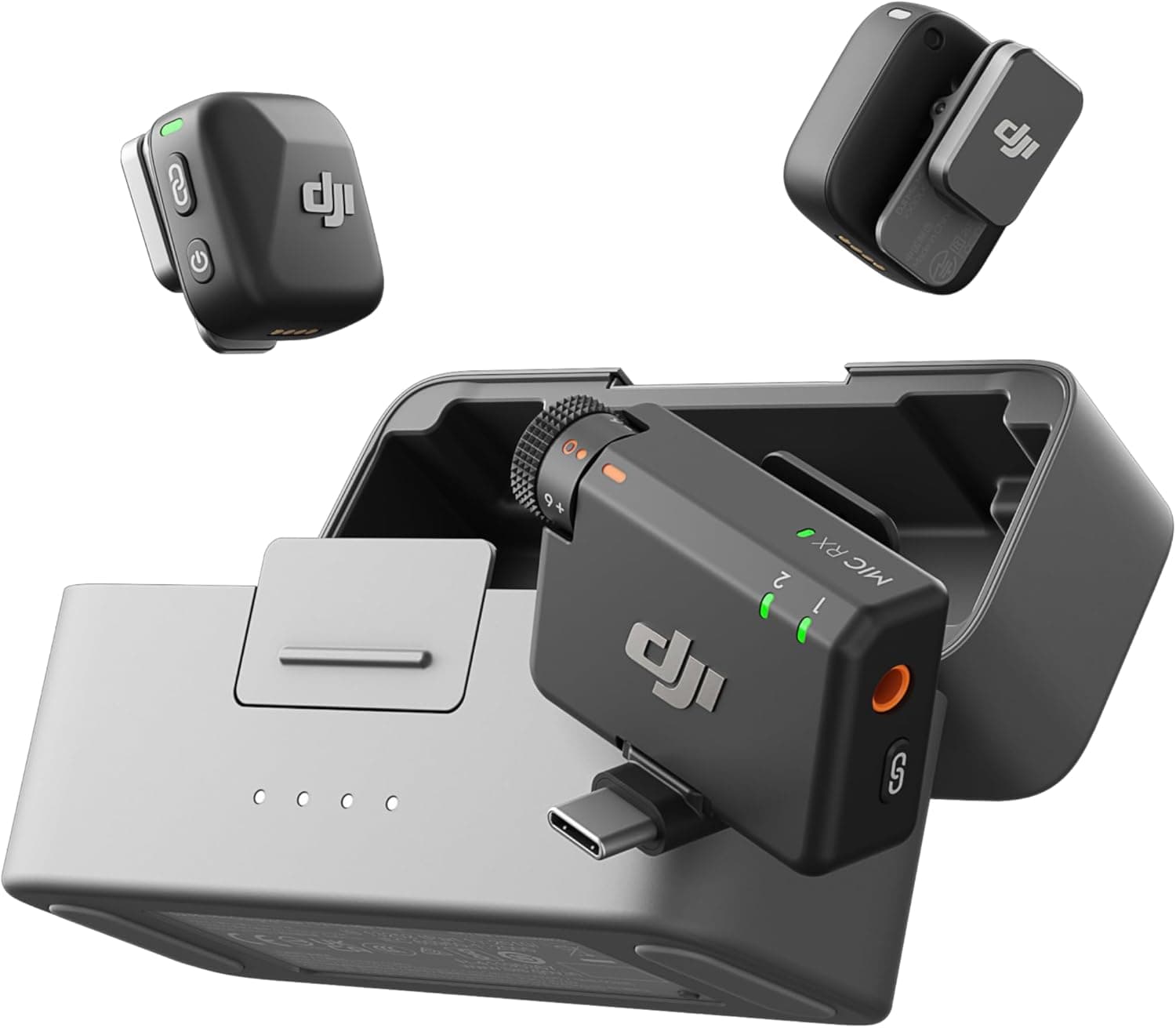
The most immediately striking thing about the Mic Mini is how small it is. Each transmitter measures just 1.05 × 1.03 × 0.63 inches and weighs only 0.35 ounces — roughly the size of a quarter and lighter than most lapel pins. Compared to the DJI Mic 2 transmitters (1.81 × 1.57 × 0.86 inches, 0.99 oz), the Mic Mini transmitters are 65% smaller and 64% lighter. If you have ever felt self-conscious about a wireless mic clipping to your shirt like a small electronic name tag, the Mic Mini addresses that concern so thoroughly that it practically disappears.
The receiver is similarly compact at 1.83 × 1.17 × 0.76 inches and 0.63 oz. It plugs directly into a USB-C port (or Lightning port via adapter) on your phone, camera, or computer, and it is small enough to forget it is there. Unlike the Mic 2 receiver, which features a touchscreen for adjusting settings, the Mic Mini receiver has no screen at all — just three LED status lights and a stepped gain dial running from -12dB to +12dB.
The charging case measures 3.78 × 1.61 × 2.34 inches and weighs 4.9 oz, which is compact enough to slip into any pocket but slightly larger than you might expect for a product with "Mini" in the name. It locks closed with a magnetic clasp, holds 3.6 additional charges, and charges from empty to full in about two hours. Is it pocketable? Yes. Will you wish it were a bit smaller? Also yes, particularly if you are used to the AirPods-style cases that have set our expectations for tiny charging enclosures.
Setup and Ease of Use: Plug In and Record
One of the strongest arguments for the DJI Mic Mini is how little setup it requires. Open the charging case, and the receiver turns on automatically. Plug it into your recording device. Grab the transmitters, which also turn on automatically when removed from the case. Start recording. That is the entire workflow, and it works the first time and every time because the transmitters and receiver are pre-paired from the factory.
This plug-and-play simplicity is not accidental — it reflects DJI's understanding that many Mic Mini users will be content creators who do not want to fiddle with audio settings before hitting record. There is no frequency scanning, no channel selection, no pairing process. You charge it, you plug it in, and it works.
For users who do want more control, the DJI Mimo app (available on iOS, with Android support) provides access to noise cancellation settings, recording modes (mono or stereo), safety track recording at -6dB, low-cut filtering, clipping control, and power behavior adjustments. The app requires account creation, which is a minor annoyance, but the settings you configure in the app persist on the device even when you are not connected to it.
The Mimo app offers fewer granular controls than the Mic 2 system. You cannot adjust headphone volume directly, lock physical controls on the transmitter, or configure LED behaviors. These omissions reflect the Mini's positioning as a streamlined product for users who do not need fine-grained control, but they mean that professionals accustomed to the Mic 2's flexibility will feel the difference.
Direct Bluetooth Pairing: The DJI Ecosystem Advantage
One of the most compelling features of the Mic Mini — and one that distinguishes it from competitors like Rode and Shure — is the ability to pair transmitters directly with other DJI devices without needing the receiver at all. Supported products include:
- Osmo Action 5 Pro
- Osmo Action 4
- Osmo Pocket 3
- DJI Neo drone
If you already own one of these devices, you can buy a single transmitter for $59 and pair it directly via Bluetooth. This eliminates the receiver entirely from your kit, reduces the number of things you need to charge and carry, and provides the same audio quality in a more integrated package.
This is not just a convenience feature — it is an ecosystem play that makes the Mic Mini significantly more valuable if you are already invested in DJI's content creation tools. It also means that even if you buy the full bundle with a receiver, you have the flexibility to use the transmitters independently when the situation calls for it.
Audio Quality: Punching Well Above Its Weight
The Mic Mini uses 48kHz/24-bit recording with an omnidirectional condenser capsule, and the results are genuinely impressive for a system this small and this affordable. Oral recordings come through with clarity and warmth that rival the Mic 2 in most conditions, with natural vocal reproduction and minimal self-noise.
In testing across multiple devices — an iPhone 16 Pro Max, an iPad Pro, a Samsung Galaxy Z Fold 6, and a Sony A6700 camera — the audio quality was consistently clean and professional-sounding. Voice recordings had presence and intelligibility, with a frequency response that suitably covers the 100Hz to 20kHz range for speech. There is a slight presence boost in the upper midrange that helps vocals cut through background noise, which is a sensible design choice for a lapel microphone.
The system handles a variety of recording scenarios well. Indoor interviews in quiet rooms sound professional, with minimal coloration and good presence. Outdoor recordings benefit from the included windscreens, which effectively tame plosives and light breezes. Conference calls and podcast setups capture clear audio from multiple participants when using both transmitters.
Where the audio quality shows its limitations compared to the Mic 2 is in the absence of internal recording. The Mic 2 transmitters can record audio directly to internal storage, providing a backup in case of wireless interference or connection drops. The Mic Mini has no internal storage and no USB-C port on the transmitters — they can only record when paired with a phone, camera, or receiver. This is a meaningful limitation for professional workflows where redundancy matters.
Noise Reduction: Two Levels of Passive and Active Protection
The Mic Mini offers multiple layers of noise management, and understanding how they work together is key to getting the best results.
Physical windscreens are included in the box and attach to each transmitter with a snug friction fit. They are effective at reducing plosives (hard "p" and "b" sounds that cause popping), light breezes, and the airflow caused by walking or running. They will not save you from a car horn or a sustained 20 mph wind, but for most indoor and moderate outdoor use, they work well.
Basic noise cancellation (the default setting) uses DSP processing to reduce moderate environmental noise — passing cars, air conditioning hum, and similar low-to-mid frequency interference. It works transparently enough that you can leave it on permanently without noticeable artifacts in quiet environments.
Strong noise cancellation kicks the processing up significantly and is effective at reducing crowd noise, heavy traffic, and the interior sound of a moving vehicle. It does introduce a slight compression effect that reduces the natural dynamics of the recording, but the trade-off is often worth it when you are recording in genuinely noisy environments.
Safety track records a second audio channel at -6dB, providing a safety net against unexpected volume spikes that might clip the primary track. It works seamlessly in post-production — you simply use the safety track wherever the main track clips.
Low-cut filtering attenuates frequencies below a selectable threshold, which is useful for eliminating low-frequency rumble from machinery, air conditioning, or traffic. Combined with the physical windscreens and active noise cancellation, you have a comprehensive toolkit for managing environmental noise.
The one missing feature that professionals will notice is the lack of low-latency monitoring. There is no headphone jack on the receiver for real-time audio monitoring, which means you cannot listen to your audio as it is being recorded. For most casual and semi-professional use cases, this is not a problem — you trust the system to capture what it captures and adjust in post. But for live broadcast, live streaming, or any scenario where you need to confirm audio quality in real time, this is a real limitation.
Battery Life: A Full Work Week of Recording
The Mic Mini's battery performance is one of its strongest selling points and a meaningful advantage over most competitors.
- Transmitter: Up to 11.5 hours per charge
- Receiver: Up to 10.5 hours per charge
- Charging case: Stores 3.6 additional full charges
- Total system runtime: Approximately 48 hours before you need to find a wall outlet
Those transmitter numbers are particularly impressive. The Rode Wireless ME offers about 7 hours, and most budget wireless systems max out around 6-8 hours. Getting 11.5 hours from a transmitter the size of a quarter is a genuine engineering achievement, and it means you can record an entire day of content without worrying about battery life.
The quick-charge feature is also worth noting. Just five minutes of charging in the case gives you approximately one hour of recording time from a transmitter. In practice, this means you can keep shooting with minimal downtime — swap a depleted transmitter for a charged one from the case, drop the dead one in, and by the time you need it again, it will have enough juice for another hour.
The receiver charges from 0 to 100% in 100 minutes, and the charging case goes from empty to full in about 2 hours. These are reasonable times that will not leave you waiting when you need to get back to recording.
Range: Stable at Distance
DJI claims a maximum transmission range of 400 meters (approximately 1,312 feet) for the Mic Mini, which is the same figure quoted for the Mic 2. In practice, the achievable range depends heavily on your environment:
- Line of sight, outdoor: 200-300 meters is realistic before audio drops or artifacts appear
- Indoor, through walls: 30-50 meters is typical, with audio quality degrading as you add walls and interference
- Crowded urban areas: Range can be significantly reduced by competing 2.4GHz signals
The Mic Mini uses DJI's proprietary wireless protocol over 2.4GHz, which provides frequency hopping to avoid interference. In testing, I experienced no audio dropouts within 30 meters in indoor environments, which covers the vast majority of real-world use cases. The wireless connection proved stable and reliable across all the devices I tested it with.
One important caveat: the "400 meters" claim should be understood as an absolute maximum under ideal conditions, not something you should expect to achieve regularly. For most content creation workflows — interviews, vlogs, presentations — the actual range you need will be well within the Mic Mini's capabilities.
Comparison: Mic Mini vs. Mic 2 vs. Competition
Understanding how the Mic Mini stacks up against the Mic 2 and key competitors is essential for making the right purchase decision.
Against the DJI Mic 2 ($349 with charging case): The Mic 2 offers a touchscreen receiver for real-time monitoring and settings, internal recording on the transmitters (up to 14 hours of onboard storage), a 3.5mm input on each transmitter for external lavalier mics, and more granular app controls. The Mic Mini has none of these features. But the Mic Mini is dramatically smaller, significantly cheaper (especially at the current $79 sale price), and delivers comparable audio quality for direct-to-device recording. If you need internal recording, external lav support, or real-time monitoring, the Mic 2 is worth the premium. If you mainly record to a phone or camera and prioritize portability, the Mic Mini is the smarter choice.
Against the Rode Wireless ME ($149): Rode's system offers a similar level of simplicity and includes a feature the Mic Mini lacks — the receiver doubles as a microphone, allowing for two-way recording. However, the Mic Mini is significantly smaller, offers better battery life (11.5 hours vs. 7 hours per transmitter), and costs much less at current prices. The Rode has slightly warmer audio character that some users prefer, but the Mic Mini's noise cancellation is more effective.
Against the Hollyland Lark M2 ($99): The Lark M2 is closer in size and price but offers a more complicated app experience and shorter battery life (about 8 hours per transmitter). The Mic Mini is easier to set up, more reliable in its wireless connection, and benefits from DJI's broader product ecosystem.
Against the Saramonic Blink 500 ProX ($169): The Blink 500 ProX offers internal recording and a touchscreen receiver but costs more than twice the Mic Mini's sale price and has shorter battery life. It is a better choice for professionals who need those features, but overkill for most casual creators.
Build Quality and Durability
The Mic Mini's build quality is excellent for its price point. The transmitters and receivers feel solid despite their tiny size, with a textured matte finish that resists scratches and provides grip. The magnetic clip on each transmitter holds securely on most fabrics, and there is an additional magnetic puck for attachment to metal surfaces or clothing without clips.
The charging case has a satisfying magnetic closure and rubberized interior that holds the components snugly. The four LED status lights on the case provide clear battery level indication, and the USB-C charging port is conveniently placed on the side rather than the bottom.
I have been using the Mic Mini for over six months across various environments — indoor studios, outdoor locations in humid and dusty conditions, and everyday carry in a backpack pocket — and there are no signs of wear on any component. The transmitters have survived being dropped onto concrete floors without damage, and the charging case has held up to being tossed into bags alongside cameras and tripods.
The included carrying pouch is basic but functional. It holds the charging case, both transmitters, the receiver, and all four windscreens, but it does not provide much protection beyond keeping everything together. Most users will probably just pocket the charging case and leave the pouch at home.
Who Should Buy the DJI Mic Mini
The Mic Mini is ideal for:
- Mobile content creators who shoot primarily with their phone and want dead-simple, plug-and-play audio that dramatically improves on their phone's built-in microphone. The difference between a phone's internal mic and the Mic Mini is not subtle — it is the difference between "obviously recorded on a phone" and "this sounds like a real production."
- DJI ecosystem users who already own an Osmo Action 5 Pro, Osmo Action 4, Osmo Pocket 3, or DJI Neo. For you, a $59 transmitter is all you need to add professional-quality wireless audio to your setup.
- Vloggers and streamers who need a compact, reliable wireless system for one- or two-person recording. The plug-and-play setup means you can hit record within seconds of arriving at a location.
- Budget-conscious creators who want professional audio quality without the $300+ investment of a full Mic 2 system. At $79 for the full 2 TX + 1 RX + Charging Case bundle, the Mic Mini is priced below most wired lavalier systems of comparable quality.
- Educators and professionals who need to record lectures, interviews, or presentations and want something that requires zero audio expertise to set up and use.
You should look elsewhere if:
- You need internal recording on the transmitters for backup audio or offline recording. The Mic Mini can only record when paired with a phone or camera.
- You require real-time monitoring of your audio through headphones while recording. The receiver lacks a headphone jack, and there is no low-latency monitoring option.
- You want to use external lavalier microphones with the transmitters. There is no 3.5mm input on the Mic Mini transmitters — you are limited to the built-in capsule.
- You need a system that works with older cameras that only accept 3.5mm input without an adapter. The receiver's 3.5mm output requires a cable, and while DJI includes one, it is an extra piece to manage.
The Verdict on Value
At its MSRP of $169, the DJI Mic Mini with charging case is a solid value that undercuts the Mic 2 by half while delivering comparable audio quality and superior portability. At the current Amazon price of $79, it is one of the best values in all of audio equipment — not just wireless microphones, but audio equipment generally.
For $79, you get two professional-quality wireless transmitters, a USB-C receiver, a charging case that provides 48 hours of total runtime, windscreens, adapters, and a carrying pouch. That is less than what most people spend on a single decent wired lavalier microphone, and the audio quality you get from the Mic Mini is genuinely competitive with systems costing three or four times as much.
The limitations are real — no internal recording, no headphone monitoring, no external lav input — and they matter more to some workflows than others. A broadcast journalist who needs redundant audio recording will find the lack of onboard storage disqualifying. A wedding videographer who needs to monitor audio in real time through headphones will need the Mic 2 or a different system entirely. But for the vast majority of content creators, vloggers, educators, and anyone who wants dramatically better audio with minimal effort, the Mic Mini's trade-offs are more than acceptable for what you gain in size, simplicity, and price.
DJI has not just made a cheaper Mic 2. They have made a fundamentally different product for a different user — someone who values the 80% solution that takes 10 seconds to set up over the 100% solution that takes 10 minutes. And in most real-world scenarios, 80% is more than enough to produce content that sounds professional, clear, and polished. The Mic Mini is, without exaggeration, the most accessible entry point into quality wireless audio that has ever existed at this price point.
Related: Insta360 Link 2 Pro Review · Dji Flip · Dj Pocket 3
Pros
- Incredibly compact — transmitters are 65% smaller and 64% lighter than DJI Mic 2
- Impressive 11.5-hour transmitter battery life with 48-hour total system runtime
- Dead-simple setup — open the case, plug in, and record with zero pairing required
- Genuinely professional audio quality with 48kHz/24-bit recording
- Unbeatable value at $79 for the full 2 TX + 1 RX + Charging Case bundle
Cons
- No internal recording on transmitters — no backup if wireless connection drops
- No headphone jack on receiver for real-time audio monitoring
- No 3.5mm input for external lavalier microphones
- DJI Mimo app requires account creation and offers fewer controls than Mic 2
Final Verdict
The DJI Mic Mini delivers professional-quality wireless audio in a package 65% smaller than the Mic 2 at a fraction of the price, with 48-hour total battery life and dead-simple setup — though the lack of internal recording and headphone monitoring limits its professional appeal.