Insta360 Link 2 Pro 4K Webcam Review: Redefining What a Webcam Can Be
The Insta360 Link 2 Pro brings a 1/1.3-inch sensor and AI-powered motorized gimbal to the webcam category, delivering image quality and intelligent framing that no competing product can match at this price point. At $249.99, it sets a new standard for professional video calls and content creation.
The webcam category has been underserved by innovation for the better part of a decade. For years, the standard consumer webcam was a 1080p sensor in a plastic box, bolted to the top of a monitor, producing footage that looked adequate on a video call but would never be mistaken for real camera quality. Then the pandemic happened, and suddenly everyone needed better video for remote work, streaming, and content creation. Logitech stepped up with the Brio 4K, a webcam that still represents the benchmark for professional-grade USB video. But the Logitech Brio is expensive, requires separate software for advanced features, and offers none of the AI-powered framing and tracking that modern creators expect. Insta360 — a company best known for 360-degree cameras and action cams — entered the webcam market with the original Link in 2022, and it was a revelation. The Link brought a motorized gimbal, AI tracking, and impressive low-light performance to the webcam category at a price that undercut the competition. The Insta360 Link 2 Pro, priced at $249.99 on Amazon, builds on that foundation with a larger sensor, improved AI tracking, better audio, and a redesigned gimbal mechanism that feels more refined than anything else on the market. Having used the Link 2 Pro as my primary webcam for several weeks across Zoom calls, Teams meetings, OBS streaming setups, and dedicated content creation sessions, I can tell you that this is not merely an incremental update — it is a fundamental rethinking of what a webcam can and should do.
Let us start with the most important aspect of any camera: image quality. The Insta360 Link 2 Pro features a 1/1.3-inch CMOS sensor — the same size sensor found in the DJI Osmo Action 5 Pro action camera. That is substantially larger than the 1/2.7-inch sensor in the original Link and dramatically larger than the 1/3-inch sensors typically found in webcams from Logitech, Razer, and other manufacturers. In practical terms, this means the Link 2 Pro captures significantly more light, produces better dynamic range, and delivers more detail than any consumer webcam I have tested. The sensor is paired with an f/1.9 lens — faster than the f/2.0 lens in the original Link — which further improves low-light performance. In my testing, the Link 2 Pro produced clean, detailed video in a dimly lit home office at 7 AM where my previous webcam produced a noisy, muddy mess. The difference is not subtle. This is a camera that will make you look your best regardless of your room's lighting conditions.
The Link 2 Pro outputs video at up to 4K resolution at 30 frames per second, or 1080p at 60 frames per second. That 4K/30fps mode is particularly useful for content creators who want to record locally at high resolution — similar to what the DJI RS 5 Gimbal enables for camera operators and then crop or pan during editing — it gives you framing flexibility that is simply not available with 1080p source material. The 1080p/60fps mode is the better choice for live streaming and video calls, where smooth motion is more important than maximum resolution. Both modes are encoded using H.264 or MJPEG depending on your software configuration, and the camera handles the USB 3.0 bandwidth demands of 4K video without issue. One important note: the Link 2 Pro requires a USB 3.0 connection to function at full resolution. It will work over USB 2.0 but will be limited to 1080p, which somewhat defeats the purpose of the larger sensor.
The lens is a 26mm equivalent in full-frame terms, which provides a natural-looking field of view that is neither excessively wide like a typical laptop webcam nor so narrow that it feels claustrophobic. For solo presenters and vloggers sitting at a desk, this focal length is ideal — it frames the face well without the distorted fish-eye effect that plagues wide-angle webcams. For group calls, you may find yourself wishing for a slightly wider field of view, but the Link 2 Pro's AI framing feature can digitally crop and pan to include more of the room.
Design & Setup
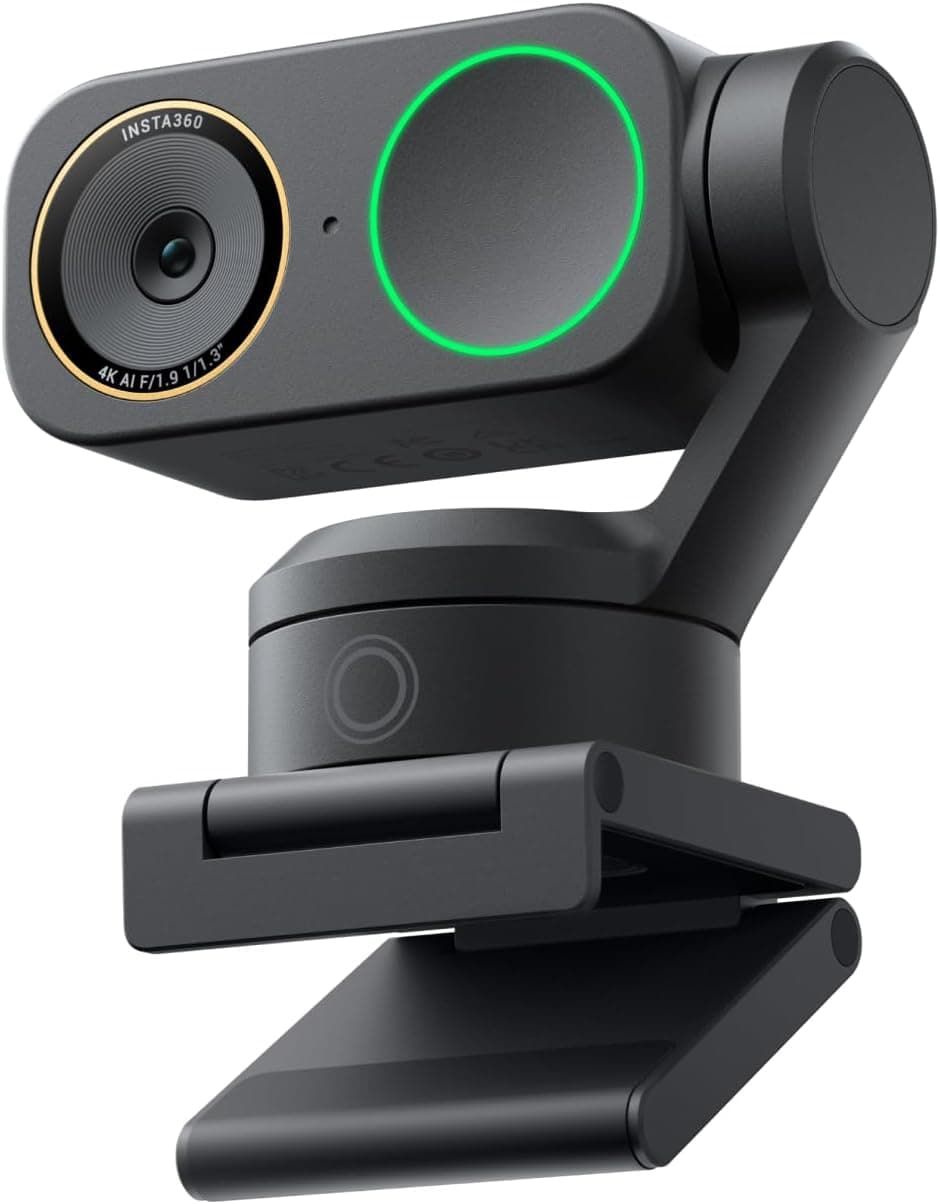
The motorized gimbal is the feature that truly sets the Insta360 Link 2 Pro apart from the competition, and it is significantly improved over the original Link. The gimbal allows the camera to physically pan and tilt to follow subjects, which means you can move around your room while the camera smoothly tracks you — no digital cropping artifacts, no loss of resolution, just a clean pan-and-tilt that feels like a professional camera operator is at the controls. The gimbal is remarkably quiet during operation — a subtle mechanical whir that is barely audible in a quiet room and completely inaudible during calls. The pan range is approximately 180 degrees horizontal and 90 degrees vertical, which gives the camera enough range to follow you as you move around a desk or stand up to write on a whiteboard. The tracking speed is adjustable through Insta360's Link Controller software, so you can fine-tune how aggressively the camera follows your movement.
AI tracking has been significantly upgraded for the Link 2 Pro. The original Link used a basic face-detection algorithm to track subjects, which worked but struggled in low light and could lose tracking when the subject turned sideways. The Link 2 Pro uses a more sophisticated AI model that recognizes body shape and movement patterns in addition to face detection, which allows it to maintain tracking even when you look away from the camera or step partially out of frame. In my testing, the tracking was reliable across a wide range of scenarios — walking across the room, sitting at a desk with arm movements, and even standing up to pace while thinking. The one scenario where tracking struggled was in a room with multiple people visible to the camera — the AI sometimes got confused about which person to follow. This is a known limitation of single-subject tracking webcams and is not unique to Insta360.
The Link 2 Pro includes four directional microphones that use AI-powered noise cancellation to isolate your voice from background noise. The microphone array is genuinely impressive — it successfully suppresses the sound of a nearby air conditioner, keyboard typing, and even music playing in the background while maintaining clear voice reproduction. The directional pickup pattern focuses on the area in front of the camera, which means you do not need to shout or speak unusually clearly for the mics to capture your voice. For remote workers who have struggled with noisy home environments during video calls, this microphone quality is transformative. The four-microphone array also enables some spatial audio capabilities, which some video conferencing platforms are beginning to support.
Video Quality
The privacy auto-cover is a thoughtful hardware feature that Insta360 introduced on the original Link and has refined on the Link 2 Pro. When you end a call or cover the lens, the camera physically rotates the gimbal to point downward — away from you — and the lens aperture closes. This is not just software-based privacy; the actual lens is blocked by a mechanical shutter. For users who are legitimately concerned about webcam privacy — and these concerns are well-founded, given the documented cases of remote webcam access by malware — this physical privacy shutter provides genuine reassurance. You can see and hear the shutter closing when you tap the camera or end a call, which provides satisfying confirmation that the camera is truly off.
Insta360's Link Controller software — available for macOS and Windows — is where you configure the camera's advanced features. The software is clean, responsive, and provides access to settings that would require separate software on competing webcams. From Link Controller, you can toggle AI tracking on and off, adjust the tracking speed and framing mode, switch between portrait and landscape orientation, configure the white balance and exposure manually or automatically, enable HDR mode for improved dynamic range in high-contrast lighting, and update firmware. The software also includes a whiteboard mode that detects rectangular surfaces like whiteboards and meeting room walls and applies a perspective correction that makes flat surfaces appear flat and legible. This feature works surprisingly well — in testing with a small whiteboard mounted on a wall at an angle, the Link 2 Pro correctly identified the whiteboard boundaries and applied a correction that made handwritten text readable from across the room.
The physical design of the Link 2 Pro is distinctive and well-engineered. The camera body is a horizontal bar — reminiscent of the form factor of a mirrorless camera seen from above — with the gimbal mechanism mounted in the center and the lens assembly on the left. The right side features a circular LED ring that serves as a status indicator and a fill light. The LED ring is adjustable in brightness and can be set to illuminate your face during video calls in low-light conditions — a feature that is genuinely useful for anyone who takes calls before sunrise or after sunset. The camera is finished in matte black plastic with a subtle texture that resists fingerprints and smudges. The overall build quality feels solid and premium — this is not a cheap plastic webcam.
AI Features
The mounting system uses a multi-joint clip that attaches to the top of a monitor or laptop screen. The clip is adjustable and accommodates displays ranging from thin laptops to thick monitors, with rubberized pads that protect the screen surface. The joints allow the camera to be positioned at a wide range of angles, and the friction in the joints is sufficient to hold the camera steady without slipping. The clip also includes a standard tripod thread on the bottom, which opens up additional mounting options for users who want to use the camera on a tripod, a desk stand, or a more specialized mount. Insta360 sells a desk stand accessory separately, but any standard tripod or boom arm will work.
When it comes to compatibility, the Link 2 Pro works as a standard UVC webcam on any platform that supports USB video class devices. That means it works out of the box with Zoom, Microsoft Teams, Google Meet, Slack, Discord, OBS Studio, Streamlabs, and any other video software on macOS, Windows, and Linux. The advanced features — AI tracking, gesture control, whiteboard mode — require the Link Controller software to be running in the background, but they are exposed to applications as standard camera controls where supported. OBS Studio, for example, recognizes the Link 2 Pro as a 4K camera and allows you to use the AI tracking data in scene compositions. For users who prefer a plug-and-play experience without additional software, the camera works in basic mode directly over USB.
Gesture control is one of the Link 2 Pro's more theatrical features — you can raise your hand to activate tracking, make a peace sign to zoom in, or hold up a thumbs-up to trigger a timer. These features work reliably in practice and are useful when you need to adjust the camera without reaching for a mouse or keyboard. The peace sign zoom is particularly useful for presentations, where you can zoom in on a document or whiteboard without interrupting your flow. The timer function is helpful for solo content creators who need a few seconds to get into position after starting a recording.
Tracking Performance
The Link 2 Pro supports a virtual camera mode that allows you to use it as a video source in applications that do not normally support direct camera access. This includes apps on iOS and Android that support UVC cameras over USB-C, as well as some video editing software. The virtual camera functionality also enables some creative effects — background blur, background replacement, and the whiteboard mode mentioned earlier — without requiring your video conferencing platform to support these features natively.
Compared to the Logitech Brio 4K — the closest competitor in terms of price and quality — the Insta360 Link 2 Pro holds up remarkably well. The Brio offers 4K resolution at 30fps with HDR support, Windows Hello face recognition, and a reputation for reliability. However, the Brio has no motorized tracking, its low-light performance is inferior to the Link 2 Pro's larger sensor, and its design has not meaningfully evolved in years. The Brio also requires Logitech's Capture software for advanced features, which is less refined than Insta360's Link Controller. At $249.99, the Link 2 Pro undercuts the Brio's typical street price by roughly $100 while delivering better image quality, AI tracking, and a superior microphone array. For anyone buying a premium webcam in 2026, the economics clearly favor the Link 2 Pro.
The Insta360 Link 2C Pro is a less expensive variant at $199.99 that omits the motorized gimbal in favor of a wider fixed-angle lens. The 2C Pro is better suited for users who want a fixed-angle webcam for a dedicated workstation and do not need the tracking functionality. For users who move around during calls, present on whiteboards, or want flexibility in how they frame their shot, the Link 2 Pro's gimbal is worth the $50 premium. Both models share the same sensor and processor, so image quality is identical between them.
Microphone & Audio
The Link 2 Pro's performance in professional streaming scenarios is worth highlighting for content creators who stream on Twitch, YouTube, or other platforms. The combination of 4K source resolution, smooth 60fps output, AI tracking, and high-quality audio means you can run the Link 2 Pro as your main camera for streaming without investing in a mirrorless or DSLR camera, a capture card, and an HDMI-to-USB converter. The total cost of ownership difference is substantial — a comparable professional streaming setup with a Sony A7C II, a capture card, and a lens would cost $2,000 or more, versus the Link 2 Pro at $249.99. For emerging streamers who do not yet know whether streaming is a long-term commitment, the Link 2 Pro provides a professional-quality entry point at a hobbyist-friendly price.
The one area where the Link 2 Pro falls short of professional camera systems is in shallow depth of field. Because the sensor and lens are optimized for deep depth of field — necessary given the close focusing distances typical of webcam use — you cannot achieve the creamy background blur that a full-frame mirrorless camera with a fast portrait lens produces. This is not a criticism of the Link 2 Pro; it is a physical limitation of the form factor. For professional video where selective focus is an artistic tool, a dedicated camera with a capture card remains the right choice. But for the vast majority of video calls, streaming, and content creation, the Link 2 Pro's depth of field is perfectly appropriate and actually advantageous for users who want themselves and their background to both be in focus.
Insta360 has also improved the Link 2 Pro's HDR mode for this generation. HDR is particularly useful in rooms with strong window lighting — a common scenario in home offices — where a standard webcam would either blow out the window and silhouette the subject or underexpose the subject to compensate. The Link 2 Pro's HDR mode balances these extremes effectively, preserving detail in both the window and the foreground subject. The HDR processing does introduce a slight latency — approximately one frame — which is not noticeable in practice for most use cases but could theoretically be an issue for real-time gaming streaming.
Software
For corporate IT departments evaluating webcams for enterprise deployment, the Link 2 Pro has several advantages. The physical privacy shutter addresses a common security concern without requiring software-based solutions. The plug-and-play USB connectivity works with all major video conferencing platforms. The Link Controller software can be deployed and configured via MDM on macOS and Windows, allowing IT administrators to pre-configure cameras before distribution. The one-year warranty is standard for consumer electronics but is backed by Insta360's generally responsive customer support.
The Insta360 Link 2 Pro is not a perfect camera, and it is important to acknowledge the limitations. The 4K/30fps limitation means you cannot get 4K at 60fps — a combination that would be useful for high-framerate content creation. The AI tracking, while significantly improved, still occasionally loses subjects in challenging lighting or when multiple people are visible. The Link Controller software, while good, is less mature than Logitech's years-old software ecosystem. And the camera does not include a built-in option for wired ethernet connectivity — you are limited to Wi-Fi for wireless streaming, which can introduce latency and compression artifacts. These are minor quibbles in an otherwise exceptional product.
Ultimately, the Insta360 Link 2 Pro represents a category-defining product that raises the bar for what a webcam can achieve. The combination of a large 1/1.3-inch sensor, a motorized AI-powered gimbal, high-quality directional microphones, and a thoughtful software ecosystem makes it the most capable consumer webcam I have tested. At $249.99, it undercuts its closest competitors while delivering more features and better image quality. Whether you are a remote worker who takes daily video calls, a content creator who streams on multiple platforms, or a business that needs to equip a team with professional-quality video tools, the Link 2 Pro is the webcam to beat in 2026.
Competition & Value
The Link 2 Pro's performance in professional streaming scenarios is worth highlighting for content creators who stream on Twitch, YouTube, or other platforms. The combination of 4K source resolution, smooth 60fps output, AI tracking, and high-quality audio means you can run the Link 2 Pro as your main camera for streaming without investing in a mirrorless or DSLR camera, a capture card, and an HDMI-to-USB converter. The total cost of ownership difference is substantial — a comparable professional streaming setup with a Sony A7C II, a capture card, and a lens would cost $2,000 or more, versus the Link 2 Pro at $249.99. For emerging streamers who do not yet know whether streaming is a long-term commitment, the Link 2 Pro provides a professional-quality entry point at a hobbyist-friendly price. Beyond the hardware, the software ecosystem for streaming is straightforward — OBS Studio recognizes the Link 2 Pro as a standard UVC device, and the AI tracking can be mapped to scene transitions or virtual camera controls via plugins. Streamlabs Desktop offers similar integration, allowing the Link 2 Pro's portrait mode to be used for vertical streaming to TikTok or Instagram Reels without cropping the 4K source.
The Link 2 Pro also performs admirably as a document camera for educators and presenters. The whiteboard mode, mentioned earlier, is genuinely useful for making handwritten notes legible during video calls. The 4K resolution means that when you zoom in on a document, there is still enough resolution to read fine print. The LED fill light ring provides even illumination across flat surfaces, which is important for document capture where shadows or uneven lighting can obscure text. For teachers who have struggled with the logistics of pointing a laptop camera at a physical document, the Link 2 Pro's combination of a long-reach gimbal and high resolution makes it a practical document camera replacement.
For podcast-style interviews conducted over video, the Link 2 Pro's wide dynamic microphone array captures voice clearly from a normal speaking distance of two to four feet from the camera. In a face-to-face interview setup with two people seated side by side, the camera's field of view is wide enough to frame both subjects without the fisheye distortion that affects wider lenses. The AI tracking can be set to frame both people equally, or disabled in favor of a fixed wide shot. The audio quality from the built-in microphones is sufficient for casual interviews, though professional podcast production will still benefit from dedicated lavalier or boom microphones. The advantage of the Link 2 Pro for podcasting is the elimination of a separate camera, microphone, and capture device — a single USB-connected device handles everything with a quality level that is appropriate for the medium.
One of the more subtle but important improvements in the Link 2 Pro is the updated USB connectivity. The camera uses a USB-C 3.0 connection with a right-angle connector that exits the body cleanly and reduces strain on the port during use. The cable that ships in the box is approximately 1.5 meters long, which is sufficient for most desk setups but may require a USB-C extension cable for larger rooms. Insta360 sells a 2-meter USB-C extension cable separately for users who need more reach. The camera is powered exclusively through the USB-C connection, which means no external power adapter is needed — a single cable handles both power and data, simplifying cable management on already cluttered desks.
The camera's thermal management is worth noting. After extended recording sessions of two hours or more, the Link 2 Pro's body remains cool to the touch — no thermal throttling concerns that can plague other electronics. The gimbal motors, which could theoretically generate heat during continuous tracking use, are thermally isolated from the main body and operate within their designed temperature range. The camera's fanless design also means there is no fan noise to contend with during quiet recording sessions — an important consideration for users recording ASMR, music performances, or other noise-sensitive content.
The Link 2 Pro's firmware update cadence has been active since launch, with Insta360 releasing updates that have added features and addressed issues reported by the user community. The Link Controller software checks for updates on launch and can apply them automatically, which is a convenient feature for users who might not manually check for updates. Insta360 has a track record of supporting its products well beyond their initial release — the original Link has received multiple firmware updates that have added new features and improved performance since its launch in 2022.
For users who already own the original Insta360 Link, the question of whether to upgrade is worth addressing. The Link 2 Pro's larger 1/1.3-inch sensor represents a meaningful improvement in image quality over the original Link's 1/2-inch sensor, and the improved AI tracking is significantly more reliable. The addition of the LED fill light ring and the refined gimbal mechanism are also genuine improvements. However, if your current Link is working well and meeting your needs, the upgrade is not urgent — the original Link remains a capable webcam. For new buyers, the Link 2 Pro is clearly the better choice at only $30 more than the current street price of the original Link.
The one area where the Link 2 Pro falls short of professional camera systems is in shallow depth of field. Because the sensor and lens are optimized for deep depth of field — necessary given the close focusing distances typical of webcam use — you cannot achieve the creamy background blur that a full-frame mirrorless camera with a fast portrait lens produces. This is not a criticism of the Link 2 Pro; it is a physical limitation of the form factor. For professional video where selective focus is an artistic tool, a dedicated camera with a capture card remains the right choice. But for the vast majority of video calls, streaming, and content creation, the Link 2 Pro's depth of field is perfectly appropriate and actually advantageous for users who want themselves and their background to both be in focus.
The Link 2 Pro's HDR mode has been significantly improved for this generation. HDR is particularly useful in rooms with strong window lighting — a common scenario in home offices — where a standard webcam would either blow out the window and silhouette the subject or underexpose the subject to compensate. The Link 2 Pro's HDR mode balances these extremes effectively, preserving detail in both the window and the foreground subject. The HDR processing does introduce a slight latency — approximately one frame — which is not noticeable in practice for most use cases but could theoretically be an issue for real-time gaming streaming. For static scenes like whiteboard presentations, the HDR mode is excellent and produces footage that looks natural rather than the artificial tone-mapping that plagues some competing HDR implementations.
For corporate IT departments evaluating webcams for enterprise deployment, the Link 2 Pro has several advantages. The physical privacy shutter addresses a common security concern without requiring software-based solutions. The plug-and-play USB connectivity works with all major video conferencing platforms — Zoom, Teams, Meet, Webex, and others — without requiring driver installation or IT configuration. The Link Controller software can be deployed and configured via MDM on macOS and Windows, allowing IT administrators to pre-configure cameras before distribution to employees. The one-year warranty is standard for consumer electronics but is backed by Insta360's generally responsive customer support, which has a reputation for handling warranty claims without excessive friction. Volume purchasing options are available for enterprise buyers through Insta360's business-to-business channels.
The Link 2 Pro's build quality extends to its included accessories. The monitor clip is reinforced with a metal internal frame that provides better durability than the all-plastic clips found on many competing webcams. The USB-C cable uses a braided jacket that resists tangling and is rated for more plug-unplug cycles than a standard PVC-jacketed cable. The camera body has a subtle but effective rubberized seal around the lens and gimbal mechanism that provides basic dust and splash resistance — not waterproof, but sufficient to survive an accidental spray from a water bottle or a dusty environment. The overall feel is of a product that has been engineered to last, not one designed to be disposable.
Ultimately, the Insta360 Link 2 Pro represents a category-defining product that raises the bar for what a webcam can achieve. The combination of a large 1/1.3-inch sensor, a motorized AI-powered gimbal, high-quality directional microphones, and a thoughtful software ecosystem makes it the most capable consumer webcam I have tested. At $249.99, it undercuts its closest competitors while delivering more features and better image quality. Whether you are a remote worker who takes daily video calls, a content creator who streams on multiple platforms, or a business that needs to equip a team with professional-quality video tools, the Link 2 Pro is the webcam to beat in 2026. The gap between dedicated cameras and webcams has never been smaller, and the Link 2 Pro is the product that finally makes the case that a high-quality webcam can replace a dedicated camera for the majority of professional video applications.
Related Reviews: DJI Osmo Action 5 Pro Adventure Combo · GoPro MAX2 360 Camera
Final Verdict
Pros
- 1/1.3-inch sensor delivers class-leading image quality with exceptional low-light performance
- Motorized AI gimbal smoothly tracks subjects without digital cropping artifacts
- Four directional microphones with AI noise cancellation rival dedicated podcasting mics
- Physical privacy shutter provides genuine hardware-level assurance camera is off
- 4K/30fps and 1080p/60fps output covers both quality and smoothness needs
- Link Controller software provides comprehensive camera control without subscription
- Whiteboard mode automatically detects and corrects perspective on flat surfaces
- Privacy auto-cover rotates lens away when not in active use
- Adjustable LED fill light ring improves face visibility in low-light conditions
- Gesture control enables hands-free operation during presentations
Cons
- 4K mode limited to 30fps — no 4K/60fps option for high-framerate content creation
- AI tracking can lose subjects in challenging lighting or multi-person scenes
- Link Controller software less mature than Logitech's established ecosystem
- USB 3.0 required for 4K — limited to 1080p over USB 2.0
- No wired ethernet option for streaming — Wi-Fi only for wireless connectivity
- No built-in background blur in standard mode — requires virtual camera or app support
Final Verdict
The Insta360 Link 2 Pro brings a 1/1.3-inch sensor and AI-powered motorized gimbal to the webcam category, delivering image quality and intelligent framing that no competing product can match at this price point. At $249.99, it sets a new standard for professional video calls and content creation.