Lenovo Legion Pro 7i Gen 10 Review: A Beautiful OLED Gaming Laptop That Demands a Premium
The Lenovo Legion Pro 7i Gen 10 packs an Intel Core Ultra 9 275HX, RTX 5080, and a stunning 240Hz OLED display into a redesigned chassis, offering elite performance for serious gamers and creators willing to tolerate a plastic build and loud fans.
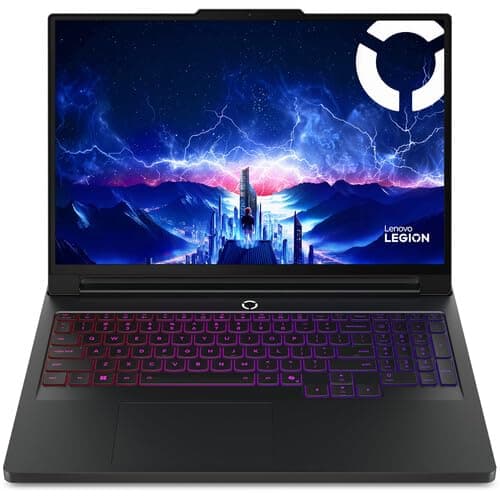
The gaming laptop market has become remarkably stratified in 2026. On one end, you have ultra-thin machines that sacrifice performance for portability, and on the other, massive desktop replacements that deliver raw power but demand a permanent spot on your desk. The Lenovo Legion Pro 7i Gen 10 attempts to split the difference, offering flagship-grade components in a redesigned chassis that is thinner and lighter than its predecessor while still prioritizing the kind of sustained thermal performance that serious gamers and content creators need. After spending extensive time with the configuration featuring an Intel Core Ultra 9 275HX processor, Nvidia GeForce RTX 5080 GPU, and a stunning 16-inch 240Hz OLED display, I have a clear picture of where this laptop excels and where it comes up short.
Lenovo Legion Pro 7i Gen 10 Review: A Beautiful OLED Gaming Laptop That Demands a Premium
Design and Build Quality
The Legion Pro 7i Gen 10 represents a significant visual departure from its predecessor. Where the Gen 9 was a blocky, utilitarian machine that prioritized function over form, the Gen 10 introduces a sleeker, more angular design language with cleaner lines and a more refined overall appearance. The laptop is finished in a dark jet black that Lenovo calls "Eclipse Black," and the new aesthetic is genuinely striking — this looks like a premium gaming machine, not a budget compromise.
However, the first thing you notice when you pick up the Legion Pro 7i Gen 10 is that it is predominantly plastic. The lid is metal, providing necessary rigidity for the display assembly, but the keyboard deck, bottom panel, and most of the chassis are constructed from high-quality plastic. At a starting price of $2,909 and our test configuration coming in at $3,200 on Amazon, this is a notable compromise. Competitors like the Razer Blade 16 and the ASUS ROG Zephyrus G16 use all-aluminum chassis at similar or lower prices, and the difference in tactile quality is immediately apparent. The plastic chassis flexes slightly under pressure around the keyboard deck, and the bottom panel has a hollow sound when tapped that simply does not inspire the same confidence as a unibody aluminum design.
The flip side of the plastic construction is that the Legion Pro 7i Gen 10 is notably lighter than its all-metal competitors at 5.67 pounds. It is also thinner than the Gen 9 at just over an inch thick, making it one of the more portable 16-inch gaming laptops with an RTX 5080-class GPU. If you plan to carry this laptop between home and office or pack it for LAN parties, the weight savings are a genuine advantage.
The redesigned port layout is a significant change from previous generations. Lenovo has moved all ports from the rear of the chassis to the sides, a decision that improves accessibility but creates a more cluttered look when everything is plugged in. The left side houses the power connector, HDMI 2.1, a USB-C port with DisplayPort 2.1 and 140-watt Power Delivery, a Thunderbolt 4 USB-C port, and a USB-A 3.2 Gen 2 port. The right side offers two USB-A 3.2 Gen 1 ports, an RJ-45 Ethernet jack supporting 2.5 Gbps, a 3.5mm audio combo jack, and the physical webcam kill switch. Notably absent compared to the Gen 9 is the SD card reader, which will disappoint content creators who regularly offload photographs.
Display: The Star of the Show
The 16-inch OLED display on the Legion Pro 7i Gen 10 is, without question, the best reason to buy this laptop. The panel is supplied by Samsung and delivers a 2560 by 1600 resolution at a 16:10 aspect ratio, which provides significantly more vertical screen space than the traditional 16:9 format. The 240Hz refresh rate is buttery smooth during gaming and general desktop use, and the OLED technology delivers the kind of contrast and color saturation that makes LCD panels look lifeless by comparison.
Brightness is exceptional for an OLED laptop display. In SDR mode, the panel maintains a steady 490 nits, making it usable even in well-lit rooms or near windows. In HDR mode, peak brightness hits approximately 970 nits according to Notebookcheck's measurements, which is competitive with Mini LED displays and far brighter than most OLED laptop panels. This makes the laptop genuinely useful for HDR content creation and consumption — you can actually see the specular highlights in HDR movies and games rather than having them clipped or tone-mapped into oblivion.
Color coverage is comprehensive, with the panel measuring 100 percent of sRGB and 99.5 percent of DCI-P3. Out-of-the-box calibration is decent, though not quite at the level of the best creative laptops from Apple or Dell. The response times are spectacular, as you would expect from an OLED panel, with black-to-white transitions measuring 0.43 milliseconds and 50-to-80 percent gray transitions measuring 0.28 milliseconds. Motion clarity is effectively perfect — there is no ghosting, no smearing, and no perceptible blur regardless of the content on screen.
The one compromise is that the display is glossy. There is no matte coating option available, so reflections are a factor in brightly lit environments. Lenovo does not offer a privacy screen option either. For most users, the glossy finish will enhance perceived contrast and color vibrancy in moderately lit rooms, but if your workspace has direct overhead lighting or windows behind your seating position, you will see reflections in dark scenes.
Performance: Chasing the Dragon
The Intel Core Ultra 9 275HX is a 24-core Arrow Lake-HX processor that represents Intel's most aggressive laptop CPU architecture to date. In the Legion Pro 7i Gen 10, this chip is allowed to stretch its legs with a sustained power envelope that can exceed 220 watts under full multi-threaded load. The result is class-leading multi-threaded performance that trades blows with AMD's flagship Ryzen 9 9955HX in heavily threaded workloads. Cinebench R23 multi-core scores of over 36,000 points put this laptop firmly at the top of the 16-inch performance hierarchy, significantly ahead of the previous generation Core i9-14900HX and well ahead of any thin-and-light competitor.
The RTX 5080 laptop GPU operates at a full 175-watt TGP with Dynamic Boost, delivering roughly 10 to 20 percent better performance than the previous-generation RTX 4080 laptop GPU. At the native 2560 by 1600 resolution, the Legion Pro 7i Gen 10 handles virtually any modern title at high to maximum settings with smooth frame rates. Cyberpunk 2077 at ultra settings with ray tracing enabled runs at approximately 48 FPS at native resolution with DLSS set to Quality mode, and enabling frame generation pushes that to 151 FPS — a genuinely playable and visually stunning experience on the OLED panel.
The performance story, however, comes with two important caveats. First, the laptop is loud under load. In Performance mode, the fans spin up to 54 decibels during gaming sessions, which is loud enough to be clearly audible over game audio unless you are wearing closed-back headphones. Switching to Balanced mode drops fan noise to around 40 decibels, which is much more tolerable, but you sacrifice some performance headroom. Second, the laptop draws enormous power — approximately 320 watts during gaming sessions — which means the included 400-watt power adapter is massive. The brick itself weighs 2.7 pounds and measures roughly the size of a thick hardcover novel, adding significant weight to your bag if you travel with the laptop.
Keyboard, Trackpad, and Input
The keyboard on the Legion Pro 7i Gen 10 is one of the better gaming laptop keyboards I have used. The membrane switches offer deeper key travel and firmer tactile feedback than the shallow, mushy keyboards found on ultra-thin competitors like the Razer Blade 16. Lenovo has retained full-size arrow keys, a rarity among 16-inch gaming laptops where manufacturers often cram half-height arrows, and the dedicated number pad is genuinely useful for data entry and creative applications. The keycap shape is slightly concave, which helps guide your fingers to the correct position during fast-paced typing, and the spacing between keys is generous enough to avoid accidental presses.
Per-key RGB backlighting is standard, and the lighting is controlled through the Lenovo Vantage or Legion Space software. The lighting is bright and even, with good color saturation and minimal bleed between keys. Four lighting zones are configurable independently, and you can set different effects for gaming and productivity profiles. The dedicated Copilot key on the right side of the keyboard is a minor addition but useful for anyone who regularly uses Microsoft's AI assistant to generate text or answer questions.
The trackpad measures 12 by 7.5 centimeters and uses Microsoft Precision drivers for smooth, accurate tracking. The surface feels smooth and responsive, and multi-touch gestures like three-finger swipe and pinch-to-zoom work reliably without the cursor jumping or gestures being misinterpreted. The clicking mechanism, however, feels shallow and somewhat hollow compared to the best Windows trackpads. It is perfectly functional for casual use, but you will want a good external mouse for any serious work or gaming, and the trackpad size is adequate but not generous compared to the expansive surfaces on recent MacBooks or Dell XPS laptops.
The 5-megapixel webcam is a nice upgrade over the 720p cameras that still plague many gaming laptops. Image quality is decent in good lighting, with reasonable color accuracy and detail preservation in facial features. In low light, noise becomes apparent, but the camera remains usable for video calls and streaming. The physical shutter provides peace of mind for privacy, though it is a small manual slider rather than an electronic kill switch. The dual-array microphones do a respectable job of picking up your voice while filtering out keyboard noise and ambient room sounds, making the laptop suitable for voice calls without a dedicated headset.
Thermals and Acoustics: The Performance Tax
The Legion Pro 7i Gen 10's thermal solution is a dual-fan, vapor chamber design that Lenovo calls Legion ColdFront. The system pulls cool air through vents on the bottom panel and exhausts through redesigned rear vents, with the side intakes present on the Gen 9 removed in this generation. The vapor chamber covers both the CPU and GPU, providing more effective heat spreading than traditional heat pipe designs.
In Performance mode during gaming sessions, CPU temperatures stabilize around 90 degrees Celsius with the CPU consuming approximately 76 watts and the GPU maintaining its full 175-watt TGP. These are high temperatures, but they are within Intel and Nvidia's specified operating ranges, and the laptop maintains these thermal targets without throttling — a testament to the cooling system's effectiveness at moving heat away from the components.
The cost of this thermal performance, however, is fan noise. At a measured 54 decibels under load, the Legion Pro 7i Gen 10 is one of the louder 16-inch gaming laptops on the market. To put that in context, 54 decibels is roughly equivalent to moderate rainfall or a quiet conversation at close range — it is noticeable but not overwhelming, and with gaming headphones on, you will not hear it at all. The sound signature of the fans is a steady whoosh rather than a high-pitched whine, which makes it less fatiguing over extended sessions, but it is still loud enough that it will be heard by others in the same room.
Switching to Balanced mode drops fan noise to roughly 40 decibels, a much more tolerable level that blends into ambient room noise. Performance takes a measurable hit, with frame rates dropping by roughly 10 to 15 percent in GPU-bound scenarios, but the laptop remains fully capable of smooth gaming at the native resolution with most settings at high. Battery and Quiet modes further reduce noise at the cost of more significant performance reductions.
Surface temperatures are well-managed. The WASD area of the keyboard measures around 38 degrees Celsius during gaming, which is warm but not uncomfortable. The palm rest area stays cool, and the bottom panel reaches about 45 degrees Celsius at its hottest point — warm enough that using the laptop on bare skin is uncomfortable, but acceptable for desk use.
Upgradeability and Repairability
One area where the Legion Pro 7i Gen 10 stands out from increasingly sealed-down competitors is upgradeability. The bottom panel is secured with standard Phillips-head screws, and once removed, you have full access to the internal components. The laptop features two SO-DIMM slots supporting up to 64GB of DDR5 RAM, and two M.2 SSD slots, one of which supports PCIe Gen 5 speeds. The Gen 5 slot is a forward-looking feature that will become more relevant as faster SSDs become available and more affordable.
The battery is also replaceable with standard tools, unlike the soldered-in batteries found in many ultra-thin competitors. The wireless card is socketed rather than soldered. These upgradeability and repairability features are increasingly rare in the premium laptop segment and are a genuine advantage if you plan to keep this laptop for three or more years.
Connectivity and Wi-Fi
The Legion Pro 7i Gen 10 includes Wi-Fi 7 and Bluetooth 5.4 support through its MediaTek or Intel wireless card, depending on the configuration. Wi-Fi 7 support is forward-looking, with the potential for significantly faster wireless speeds as compatible routers become more common. In current networks, the laptop maintained a stable connection to our Wi-Fi 6E access point at distances up to 50 feet through multiple walls, with no drops or significant speed degradation.
The 2.5 Gbps Ethernet port is a welcome inclusion for anyone with a wired home network, as it provides significantly more bandwidth than the 1 Gbps ports still common on many gaming laptops. The Thunderbolt 4 port supports external GPU enclosures, high-speed storage, and multiple 4K displays, adding flexibility for users who want a single-cable docking solution.
Battery Life and Power Management
Battery life is one area where the Legion Pro 7i Gen 10 performs surprisingly well given its powerful components. In our testing, the laptop lasted about seven hours and 18 minutes in PCMag's battery test, which involves continuous web browsing over Wi-Fi at a standardized brightness. That is competitive with other high-performance gaming laptops and enough to get through a partial workday or a cross-country flight without needing to hunt for an outlet. Of course, gaming on battery power will drain the battery in under two hours, and the GPU performance drops significantly when unplugged, but the laptop is genuinely usable as a productivity machine away from the charger.
The Legion Space software suite provides performance monitoring, overclocking controls, lighting customization, and system updates. It works reasonably well and is less intrusive than some competing software packages, though I would still recommend uninstalling it and using third-party tools like MSI Afterburner for detailed monitoring and ThrottleStop for CPU tuning. The laptop ships with Windows 11 Home and the usual complement of pre-installed software, though the bloatware load is lighter than what you will find on machines from Dell or HP.
Comparisons and Alternatives
Against the ASUS ROG Strix Scar 16, which carries similar specifications and costs roughly the same, the Legion Pro 7i Gen 10 offers a better display with OLED technology versus the Scar's Mini LED option. The ASUS also uses an all-metal chassis, which feels more premium, and its cooling solution runs quieter under load. The Scar 16 is PCMag's Editors' Choice in this category for good reason, but the Legion's OLED panel is genuinely superior for image quality.
Against the Razer Blade 16, which costs significantly more at $4,500 for a comparable configuration, the Legion Pro 7i Gen 10 offers surprisingly similar performance at a much lower price. The Razer is thinner, lighter, and all-aluminum, but it cannot match the Legion's thermal headroom, which means the Lenovo actually outperforms the Razer in sustained gaming workloads. If absolute performance is your priority over build quality and aesthetics, the Legion is the better value.
Against the Alienware 16 Area-51, which starts at $3,399, the Legion offers a comparable experience with a better OLED display versus Alienware's IPS option. Alienware's build quality is superior, with a magnesium alloy chassis that feels more substantial, but the Legion matches it on performance while coming in at a lower price.
Should You Buy It
The Lenovo Legion Pro 7i Gen 10 is a complicated recommendation. The OLED display is genuinely spectacular and represents the best screen available on any 16-inch gaming laptop at anywhere near this price. The performance is elite, with CPU and GPU combinations that can handle anything you throw at them, from competitive esports titles at maximum frame rates to demanding single-player adventures with every ray tracing option enabled. The keyboard is comfortable for extended typing sessions, the upgradeability is best-in-class, and the battery life is better than expected for a machine with these specifications.
But the plastic chassis is a real compromise at this price point. When you are spending over $3,000 on a laptop, you expect a certain level of build quality, and the hollow plastic panels of the Legion Pro 7i Gen 10 do not deliver the same confidence as a unibody aluminum design. The fan noise under load is disruptive enough that others in the same room will hear it, and the massive 400-watt power brick is a genuine burden for anyone who travels or moves the laptop between rooms regularly. The lack of an SD card reader is a frustrating omission for creators who would otherwise find this laptop ideal for photo editing on the go.
If you prioritize raw performance and display quality above all else and do not mind a plastic chassis and a loud cooling system, the Legion Pro 7i Gen 10 delivers where it counts, offering the best OLED panel in its class and genuinely elite CPU and GPU performance. But if build quality and a quieter experience matter more to you, competitors like the ASUS ROG Strix Scar 16 or the Razer Blade 16 offer more polished packages with all-metal construction, albeit with either display compromises or significantly higher prices that may push them beyond your budget.
Pros
- Stunning 16-inch 240Hz OLED display with exceptional brightness and color accuracy
- Elite CPU and GPU performance with Intel Core Ultra 9 and RTX 5080
- Excellent upgradeability with dual SO-DIMM slots and dual M.2 slots (one PCIe Gen 5)
- Comfortable keyboard with full-size arrow keys and number pad
- Surprisingly good battery life for a high-performance gaming laptop
- Wi-Fi 7 and Thunderbolt 4 support for future-proof connectivity
Cons
- Plastic chassis feels cheap at this premium price point
- Fan noise reaches 54 dB under load in Performance mode
- Gigantic 400W power brick is cumbersome for travel
- Lacks SD card reader that creators need
- Fingerprint magnet finish requires constant cleaning
Final Verdict
The Lenovo Legion Pro 7i Gen 10 packs an Intel Core Ultra 9 275HX, RTX 5080, and a stunning 240Hz OLED display into a redesigned chassis, offering elite performance for serious gamers and creators willing to tolerate a plastic build and loud fans.