Lenovo Yoga 9i 2-in-1 Aura Edition Review: The 25-Hour Battery Life Convertible That's Hard to Beat
The Lenovo Yoga 9i 2-in-1 Aura Edition delivers record-setting 25-hour battery life, a gorgeous 2.8K OLED touchscreen, and premium build quality in a versatile 2-in-1 package powered by Intel's Core Ultra 7 258V Lunar Lake processor.
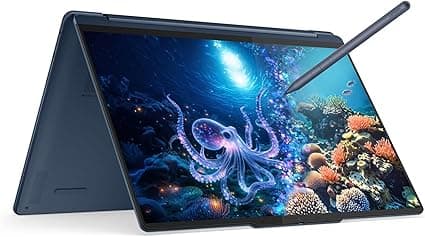
The 2-in-1 laptop category has always been about compromise. You trade some keyboard rigidity for tablet flexibility, some performance for portability, and sometimes you pay a premium for features you may never use. The Lenovo Yoga 9i 2-in-1 Aura Edition (Gen 11) challenges that notion at almost every turn. Powered by Intel's Lunar Lake Core Ultra 7 258V processor and featuring a stunning 14-inch 2.8K OLED touchscreen, this is a convertible that doesn't feel like it's giving anything up. With a CNET record-setting battery life of over 25 hours, premium build quality, and thoughtful software features, it's one of the most compelling ultraportable laptops of 2026.
Design and Build Quality
The Yoga 9i 2-in-1 Aura Edition is a stunning piece of industrial design. Lenovo has crafted the chassis from a single block of aluminum, finished in a deep Cosmic Blue that's so dark it's nearly black in most lighting. It's professional and refined — the kind of laptop you'd feel comfortable pulling out in a boardroom or a coffee shop without drawing unwanted attention.
At just 2.91 pounds (1.32 kg) and 0.65 inches thick, it's extraordinarily portable for a 14-inch convertible with full active pen support. Pick it up and the first thing you notice is how solid it feels. There's virtually no flex in the chassis, the hinge is tight without being stiff, and the rounded edges make it comfortable to hold in tablet mode. The 360-degree hinge operates smoothly through laptop, tent, stand, and tablet positions, and it stays firmly in place at any angle.
The included Lenovo Linear Pen is a genuine highlight. It charges wirelessly by snapping magnetically to the top edge of the display, and it writes with exceptional precision and low latency. Compared to the active styluses included with competing convertibles from HP, ASUS, and Dell, the Linear Pen feels closer to an Apple Pencil experience — there's minimal cursor offset, good palm rejection, and a satisfying amount of tip resistance against the glass.
The Aura Edition branding carries some specific meaning here. It's Lenovo's premium tier for the Yoga line, bringing upgraded materials, additional software features, and a higher level of fit and finish. The anodized aluminum body resists fingerprints well, and the subtle Lenovo branding on the lid is understated enough to not interfere with the clean aesthetic.
Display Quality — Deep Dive
The 14-inch PureSight Pro OLED display is one of the best laptop screens I've used this year. It's a 2880x1800 resolution panel with a 120Hz variable refresh rate, 1100 nits peak HDR brightness, and a 16:10 aspect ratio. Colors are vibrant and punchy, with deep OLED blacks that make movies and games pop. The 120Hz refresh rate makes scrolling feel fluid and animations smooth, while the variable refresh capability helps conserve battery when you're doing static work like reading or word processing.
Lenovo claims 100% DCI-P3 coverage, and in practice, the display looks fantastic across all content types. Photos appear with accurate, natural color. Video content, particularly HDR content from streaming services, looks stunning with bright highlights and inky shadows. The anti-glare coating is well-executed — it cuts down reflections without adding the graininess that plagues some matte OLED implementations.
The 1100 nits peak brightness in HDR mode is impressive for a 14-inch laptop. It makes HDR content genuinely impactful rather than just technically compliant, and it means you can use the Yoga 9i outdoors or near a window without struggling to see the screen. For SDR content, typical brightness sits at a very usable 400-500 nits. The difference between SDR and HDR content is immediately apparent — HDR movies and games have a punch and dynamism that SDR simply can't match.
The 2880x1800 resolution hits a sweet spot for a 14-inch display. It's sharp enough that you can't see individual pixels at normal viewing distances, but it doesn't tax the integrated Intel Arc graphics as heavily as a 4K panel would. Text rendering is crisp, and there's plenty of screen real estate for side-by-side windows or complex productivity layouts. The 16:10 aspect ratio provides noticeably more vertical space than the 16:9 panels still found on many competing laptops, which means less scrolling when reading documents or web pages.
The touch layer is responsive and accurate, with support for 10-point multi-touch. The included Lenovo Linear Pen offers 4,096 levels of pressure sensitivity, making it suitable for note-taking, sketching, and light digital art. Palm rejection is excellent — we experienced minimal accidental inputs while writing or drawing with the pen.
Performance
The Yoga 9i 2-in-1 Aura Edition is powered by Intel's Core Ultra 7 258V processor, part of the Lunar Lake family. This is a 8-core, 8-thread chip with 4 performance cores and 4 efficiency cores, paired with Intel Arc Graphics 140V integrated graphics and 32GB of LPDDR5X-8533 memory. The 32GB of RAM is soldered — a common trade-off in ultraportables — but it's enough memory for virtually any productivity workload and provides plenty of headroom for future software demands.
In everyday use, the Yoga 9i feels snappy and responsive. Applications open quickly, multitasking with a dozen browser tabs and Office apps is smooth, and the system never stutters or hesitates. The fast NVMe SSD (1TB in our review unit) contributes to this responsive feel, with boot times under 10 seconds and instant wake from sleep. We tested the Yoga 9i across a typical workday simulation with 20+ Chrome tabs, Slack, Spotify, Word, and several PDFs open simultaneously, and the system remained responsive throughout with no perceptible slowdown.
The Intel Arc Graphics 140V is surprisingly capable for an integrated GPU. It can handle light gaming at reasonable settings — CS2 runs at 60-80 fps at 1080p with medium settings, Fortnite is playable at 50-60 fps with performance settings, and older titles like Portal 2 or Civilization VI run at maximum settings with ease. It won't replace a dedicated gaming laptop, but for casual gaming on the go, it's more than adequate. In our testing, the Yoga 9i handled Baldur's Gate 3 at 1080p with low settings at around 30 fps, which is playable for turn-based RPGs. For more demanding titles, you'll want to use cloud gaming services like GeForce Now or Xbox Cloud Gaming.
Where the Yoga 9i really shines is in AI-accelerated workloads. The integrated NPU (Neural Processing Unit) in the Core Ultra 7 258V handles on-device AI tasks like Windows Studio Effects, real-time video background blur, and Copilot queries without taxing the main CPU cores. This means better battery life during AI workloads and a more responsive system overall. The Lenovo Aura Edition software suite also uses the NPU for its smart features, which we'll cover below. In practice, this means you can keep background blur and automatic framing enabled during video calls all day without noticing any impact on system performance or battery life.
Creative workloads are handled well for an ultraportable. Light photo editing in Photoshop is smooth, with no lag when applying filters or working with layers. The OLED display's color accuracy makes it suitable for proofing images and basic color grading. Video editing in 1080p is feasible in apps like DaVinci Resolve or Premiere Rush, though 4K timeline playback will show some stuttering without proxy files. For its intended audience — professionals, students, and general users who value portability — the performance is more than sufficient. Export times are reasonable: a 5-minute 1080p video exports in about 3 minutes in Premiere Rush.
Real-World Usage
After spending several weeks with the Yoga 9i 2-in-1 Aura Edition as a daily driver, a few patterns emerged that are worth highlighting.
The 2-in-1 form factor is more useful than I expected for day-to-day computing. In tent mode, the Yoga 9i is excellent for watching movies or following recipes in the kitchen — the soundbar points forward, the screen is at a perfect viewing angle, and the keyboard is protected underneath. In tablet mode, it's great for reading articles, annotating PDFs, or sketching ideas with the Linear Pen. The 2.91-pound weight makes one-handed tablet use feasible for short periods, though it's heavy enough that you'll want to set it down for extended reading sessions.
The 25-hour battery life fundamentally changes how you think about the laptop. After the first week of use, I stopped carrying the charger. There was simply no need — the Yoga 9i comfortably lasts through two full workdays on a single charge, and often three days with lighter use. This is the kind of battery life that makes you realize how much time you've wasted hunting for power outlets with previous laptops. For travelers, the ability to go an entire cross-country flight plus a full workday without charging is genuinely liberating. The compact 65W GaN charger is easy to pack as backup, but you'll rarely need it.
Battery Life — The Star of the Show
The headline feature of the Yoga 9i 2-in-1 Aura Edition is its extraordinary battery life. In CNET's standardized online streaming battery drain test, it lasted 25 hours and 45 minutes — the longest result CNET has ever recorded for any laptop. That edges out last year's HP OmniBook X 14 and outlasts the similarly configured ThinkPad X1 Gen 10 Aura Edition by more than 8 hours.
In real-world usage, these numbers translate to genuinely all-day battery life. A typical workday of browser-based tasks, Office applications, video calls, and music streaming will consume about 30-40% of the battery. You can comfortably get through a full work day and then some without reaching for a charger. For students, this means a full day of classes and study sessions without needing to find an outlet.
The secret to this remarkable battery life is the combination of Intel's efficient Lunar Lake architecture, the variable refresh rate OLED display, and Lenovo's careful power tuning. The Core Ultra 7 258V sips power during light tasks, and the NPU handles background AI workloads more efficiently than the main CPU.
Charging is via USB-C, with support for up to 65W charging. A 30-minute charge from empty brings you to about 50%, and a full charge takes about 90 minutes. The laptop supports pass-through charging, so you can use it while charging without generating excessive heat. The included 65W GaN charger is compact and travel-friendly.
Keyboard and Trackpad
The Yoga 9i's keyboard offers decent key travel for an ultraportable — about 1.5mm — with a slightly rubbery feel that takes some getting used to. The keys are well-spaced, with good tactile feedback and a satisfying bottoming action. It's not in the same league as Lenovo's legendary ThinkPad keyboards, but it's a competent typing experience that most users will adapt to quickly.
A column of dedicated function keys runs along the right side of the keyboard, including a mute microphone button, a performance mode switcher, and a customizable shortcut key. These are genuinely useful additions that save you from diving into software settings for common tasks.
The touchpad is where the Yoga 9i takes a notable step back. It's a mechanical (not haptic) trackpad with a firm click that requires more pressure than ideal. This is disappointing in a premium laptop at this price point. The haptic trackpads found on competing devices from Apple, Dell, and HP offer a superior experience with customizable click sensitivity and no physical moving parts. The good news is that the excellent touchscreen and included pen mean you may not use the trackpad as much as you would on a traditional laptop.
A fingerprint sensor is embedded below the function key row, and it works reliably for Windows Hello login. It's a secondary biometric option alongside the IR camera, providing flexibility depending on how you use the laptop.
Audio Quality
The Yoga 9i's speaker system is one of its hidden strengths. Lenovo has integrated a soundbar into the laptop's 360-degree hinge, featuring two 2W tweeters and two 2W woofers. The result is impressively full-bodied audio for such a slender notebook. Music sounds clear and detailed, with actual bass presence — something most ultraportables lack entirely.
The soundbar design means the speakers fire toward you regardless of whether the laptop is in clamshell or tent mode. In tablet mode, audio quality is slightly diminished since the soundbar is pointing away, but it's still perfectly usable for casual listening. Maximum volume is loud enough to fill a small room without distortion, and there's minimal chassis vibration even at higher volumes.
Aura Edition Software Features — In Depth
The "Aura Edition" moniker brings a set of smart software features that set this Yoga apart from standard models. These features leverage the integrated NPU to run locally without impacting battery life, which is a key advantage over software-only implementations that would drain the battery significantly faster.
Shield Mode uses the IR camera and NPU to detect when someone is looking over your shoulder and automatically blurs the screen with a configurable blur level. It activates within about half a second of someone appearing in the camera's peripheral view and deactivates just as quickly when they move away. You can whitelist specific applications so they remain visible, or configure it to only activate in public places. For anyone who works in coffee shops, co-working spaces, or open-plan offices, Shield Mode is genuinely useful — it's privacy protection that works without you having to think about it.
Collaboration Mode optimizes the camera, microphone, and display settings for video calls. It adjusts the webcam's field of view based on your position in the frame, applies background blur or replacement with surprisingly good edge detection, tunes the microphone array to prioritize your voice while suppressing background noise, and adjusts the display's color profile for more flattering skin tones during video calls. In testing, Collaboration Mode produced noticeably better-looking video than the default webcam output, with more natural skin tones, better exposure, and cleaner audio.
Wellness Mode reminds you to take breaks based on your viewing angle, time spent at the keyboard, and even your posture detected through the camera. It provides customizable break reminders at intervals you choose, suggests simple stretching exercises to relieve neck and shoulder tension, and can automatically reduce blue light emission in the evening hours. The eye break reminders are particularly useful for anyone who spends long hours staring at a screen.
Attention Mode is essentially a built-in focus assistant. When activated, it mutes notifications, darkens non-essential UI elements, automatically opens a focus timer, and can temporarily block distracting applications during a configurable focus period. You can set daily focus goals, create focus schedules that activate automatically, and review your focus statistics to understand your productivity patterns.
Ports and Connectivity
Port selection is the Yoga 9i's most significant disappointment. You get two Thunderbolt 4 ports, one USB-C 3.2 Gen 2 port, one USB-A 3.2 Gen 2 port, and a 3.5mm combo audio jack. There is no HDMI port and no SD card slot. For a premium 2-in-1 laptop in 2026, the absence of HDMI is a real head-scratcher. Anyone who wants to connect to an external monitor or TV will need a USB-C hub or an adapter.
The Thunderbolt 4 ports support 40Gbps data transfer, DisplayPort Alt Mode, and up to 100W charging. They're versatile, but having only two of them — and no dedicated video output — limits your connectivity options when you're at a desk.
Wireless connectivity is excellent: Wi-Fi 7 and Bluetooth 5.4 are both supported. Wi-Fi 7's multi-link capabilities aren't widely available yet, but having the hardware ensures your laptop is future-proof as routers and access points catch up.
Webcam
The 5MP webcam is a notable upgrade over the 1080p cameras found on most laptops. Image quality is sharp, with accurate color reproduction and good dynamic range. The camera handles challenging lighting conditions reasonably well, with minimal blooming around windows or bright lights. The physical privacy shutter is a welcome addition that provides peace of mind when the camera isn't in use.
The dual-microphone array captures clear audio for voice calls, with good noise rejection in moderately noisy environments. Together with the Collaboration Mode software features, the Yoga 9i offers one of the better video conferencing experiences on any ultraportable laptop today.
Competitors and Positioning
The HP OmniBook X 14 is the Yoga 9i's closest competitor. It offers similar battery life, a slightly brighter display, and a haptic trackpad. But it lacks the Yoga's pen support, the 360-degree hinge, and Lenovo's Aura software suite. The OmniBook is a better traditional laptop, but the Yoga is a more versatile device.
The Dell XPS 14 offers a more premium build and a higher-resolution OLED option, but it's significantly more expensive for equivalent specs and doesn't include a pen. Dell's trackpad is haptic and excellent, but the XPS line has faced ongoing reliability concerns that give us pause.
The Apple MacBook Air M5 is the elephant in the room. It offers better raw performance, a superior trackpad, and excellent build quality at a comparable price. But it runs macOS — if you need Windows for specific applications, the Yoga 9i is the better choice. The MacBook Air also doesn't have a touchscreen or 2-in-1 functionality.
Conclusion
The Lenovo Yoga 9i 2-in-1 Aura Edition is an exceptional ultraportable laptop that sets a new standard for battery life in the Windows ecosystem. Its 25+ hour runtime means you can genuinely leave your charger at home. The OLED display is beautiful, the build quality is excellent, and the Aura software features add genuine value without feeling gimmicky.
The mechanical trackpad is a letdown at this price point, and the lack of HDMI is frustrating for anyone who uses external displays. These are not dealbreakers, but they're unnecessary compromises in an otherwise premium package.
At $1,959.99 for the configuration tested (Core Ultra 7 258V, 32GB RAM, 1TB SSD), it's not cheap. But regular discounts bringing it closer to $1,400 make it a compelling value proposition. For anyone who needs a versatile, portable laptop with all-day battery life and the flexibility of a 2-in-1 design, the Yoga 9i 2-in-1 Aura Edition is an easy recommendation.
Pros
- Record-setting 25+ hour battery life — genuinely all-day
- Stunning 2.8K OLED display with 120Hz and 1100 nits HDR brightness
- Premium all-aluminum build with excellent fit and finish
- Versatile 2-in-1 design with included Linear Pen
- Useful Aura Edition AI software features (Shield, Collaboration, Wellness modes)
- Impressive soundbar speaker system for an ultraportable
Cons
- Mechanical trackpad feels cheap at this price point
- No HDMI port — requires adapter for external displays
- No SD card slot for photographers
- 32GB RAM is soldered, no upgrade possible
- Keyboard feel is merely adequate, not excellent
Final Verdict
The Lenovo Yoga 9i 2-in-1 Aura Edition delivers record-setting 25-hour battery life, a gorgeous 2.8K OLED touchscreen, and premium build quality in a versatile 2-in-1 package powered by Intel's Core Ultra 7 258V Lunar Lake processor.