LG UltraGear 27GX790B-B Review: The 540Hz OLED Gaming Monitor That Does Not Compromise
The LG UltraGear 27GX790B-B is the fastest OLED gaming monitor on the market, featuring a 4th-gen WOLED panel with Dual Mode support for 540Hz at QHD or 720Hz at HD resolution. With a practical matte anti-glare coating, DisplayPort 2.1, and excellent HDR performance, it sets a new standard for competitive gaming displays.
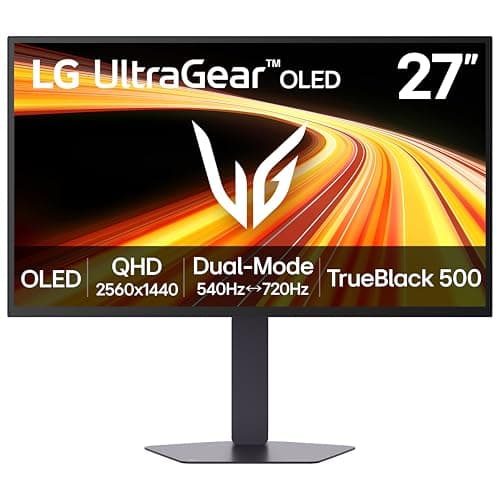
The LG UltraGear 27GX790B-B is not just another gaming monitor. It is a statement piece that dares to ask: what if you did not have to choose between buttery-smooth competitive gaming and breathtaking visual fidelity? The answer, it turns out, is a 27-inch OLED panel built around LG Display's fourth-generation WOLED technology with Primary RGB Tandem structure, capable of hitting 540Hz at QHD resolution or an almost absurd 720Hz when you drop down to HD. That makes it the fastest OLED gaming monitor money can buy in 2026, and after spending weeks with it, I can tell you that the speed is only part of the story.
The Panel: Fourth-Gen WOLED Explained
The headline feature of the 27GX790B-B is its use of LG Display's fourth-generation WOLED panel, which introduces a new "Primary RGB Tandem" structure. Where previous WOLED panels used a single white OLED layer with color filters, this new design stacks four emissive layers — essentially combining red, green, and blue OLED elements in a tandem architecture. The result is significantly higher brightness, better power efficiency, and improved longevity compared to earlier generations.
In practical terms, this means the 27GX790B-B can sustain much higher brightness levels across a wider range of content than previous OLED monitors. While older OLED gaming monitors would aggressively dim when displaying large bright areas (a phenomenon known as ABL, or Automatic Brightness Limiting), the Tandem OLED structure distributes the workload across multiple layers. The monitor is VESA DisplayHDR True Black 500 certified and can hit a peak brightness of 1,500 nits on small highlights (1.5 percent APL), 800 nits on medium-sized bright areas (10 percent APL), and around 335 nits for full-screen SDR content.
For real-world use, this translates to HDR content that looks genuinely spectacular. Explosions in Cyberpunk 2077 have real punch, specular highlights on metal surfaces in Forza Motorsport catch your eye the way they would in real life, and the nighttime cityscapes in Marvel's Spider-Man 2 are rendered with inky blacks and brilliant neon accents that no LCD monitor can match. The contrast ratio is a virtually infinite 1.5 million to 1, which is the entire point of OLED — each pixel is its own light source and can turn off completely to produce true black.
Dual Mode: QHD 540Hz and HD 720Hz
The 27GX790B-B is the first monitor to offer what LG calls "true Dual Mode" refresh rate control. This is not the same as the fake dual-mode implementations found on some monitors that simply accept a lower-resolution signal and upscale it. Instead, the 27GX790B-B physically reconfigures its pixel addressing to support two distinct operating modes.
In QHD mode (2560 by 1440), the monitor runs at a native 540Hz refresh rate. This is the mode you will use for most gaming, and it delivers an experience that is hard to describe without experiencing it firsthand. Motion clarity at 540Hz is essentially perfect — there is no visible blur, no ghosting, no artifacts, even in fast-paced first-person shooters where the camera whips around at high speed. The 0.02 millisecond gray-to-gray response time means pixel transitions are effectively instantaneous. Input lag is imperceptible.
In HD mode (1280 by 720), the monitor boosts its refresh rate to an eye-watering 720Hz. This is the highest refresh rate currently available on any OLED monitor, and it is intended for hyper-competitive esports scenarios where every millisecond matters. The resolution drop is noticeable, but the trade-off is motion clarity that exceeds even the best 540Hz competitors. For games like Counter-Strike 2, Valorant, Overwatch 2, or Apex Legends at the professional level, the 720Hz mode provides an advantage that competitive players will appreciate.
Switching between modes is handled through the monitor's on-screen display or via the LG Switch app, which lets you assign custom profiles for different games. You can set QHD 540Hz for story-driven titles and HD 720Hz for competitive shooters, and switch between them in seconds.
Motion Clarity and Adaptive Sync
The 27GX790B-B is certified for VESA ClearMR 21000, which is the highest motion blur reduction rating currently available. In practice, the motion clarity is extraordinary. There is no overshoot, no inverse ghosting, and no visible artifacts even at the highest refresh rates. The monitor handles moving content with a cleanliness that makes even high-end IPS and VA panels look blurry by comparison.
Both AMD FreeSync Premium Pro and NVIDIA G-Sync Compatible adaptive sync technologies are supported, covering the full variable refresh rate range from 1Hz up to the maximum refresh rate in each mode. I tested with both an NVIDIA RTX 5090 (via DisplayPort 2.1) and an AMD Radeon RX 9070 XT, and both worked flawlessly with no flickering, no tearing, and no dropped frames. The FreeSync Premium Pro certification also ensures proper HDR tone mapping with AMD GPUs, which is a nice bonus.
One feature that is notably absent is black frame insertion (BFI). Many high-end gaming monitors offer BFI as a way to further reduce perceived motion blur by inserting black frames between actual frames. The 27GX790B-B does not include BFI, and frankly, it does not need it. At 540Hz, motion blur is already below the threshold of human perception for most people, and BFI would only reduce overall brightness. Its omission is not a meaningful loss.
Color Accuracy and HDR Performance
Beyond its gaming credentials, the 27GX790B-B is an excellent display for content consumption and creative work. The panel covers 99.5 percent of the DCI-P3 color gamut, which is the standard used in digital cinema and HDR content. Out of the box, color accuracy is impressive, with a Delta E of less than 2 in the default "Gamer 1" preset. For professional use, the sRGB mode clamps the gamut appropriately and delivers a Delta E of under 1.
The HDR performance is where this monitor really shines. True Black 500 certification means black levels are genuinely black — not "very dark gray" like on an LCD, but truly off, zero-nit black. The 1,500-nit peak brightness on small highlights provides enough dynamic range to make HDR content look transformative rather than merely different. Watching Dolby Vision content on this monitor (it accepts Dolby Vision via HDMI) is a genuinely cinematic experience, limited only by the monitor's relatively modest 27-inch diagonal.
The standard matte anti-glare coating is an important differentiator. Many competing OLED monitors — including the ASUS ROG Swift OLED PG27UCDM and ViewSonic XG273F-2K-OLED — use glossy coatings that produce stunning contrast in dark rooms but become reflective distractions in brightly lit environments. The LG's matte coating handles reflections much better, making it a more practical choice for users who game or work in rooms with windows or bright overhead lighting. The trade-off is that the matte coating slightly reduces perceived contrast and black depth compared to glossy panels, but the difference is minor in practice.
Connectivity
The 27GX790B-B offers a comprehensive connectivity suite that is forward-looking without being excessive. The standout port is DisplayPort 2.1 with UHBR 13.5 bandwidth, which provides enough headroom to drive QHD at 540Hz (with DSC, as UHBR 13.5 does not have enough raw bandwidth for 540Hz without it). There are also two HDMI 2.1 ports that support up to 48Gbps each, a USB-C port with DisplayPort Alt Mode and 65-watt Power Delivery, two USB 3.0 Type-A downstream ports, and a 4-pole headphone and microphone combo jack.
The inclusion of USB-C with 65-watt Power Delivery is a welcome addition for laptop users. You can connect a MacBook Pro or a compatible Windows laptop with a single cable and get both video output and charging, keeping your desk clutter-free. The USB hub functionality is basic but functional — the downstream ports are USB 3.0 rather than USB 3.2 Gen 2, which means transfer speeds top out at 5Gbps rather than 10Gbps or 20Gbps. This is a minor limitation for a gaming monitor.
Design and Build Quality
The 27GX790B-B has a clean, understated design that prioritizes functionality over flashy gamer aesthetics. The front of the monitor is almost bezel-less on three sides, with a thin bottom chin that houses the LG logo and the OSD joystick. The entire assembly feels solid and well-constructed, with no creaking or flex in the chassis.
The stand is a V-shaped affair that takes up relatively little desk space compared to some competing monitors with massive claw-style bases. It provides full ergonomic adjustments: tilt from -5 to 15 degrees, swivel of ±30 degrees, height adjustment of 110 millimeters, and pivot to portrait mode. The movements are smooth and hold position firmly once set. If you prefer a monitor arm, the VESA mount is 100 by 100 millimeters and compatible with virtually all standard mounts.
The rear of the monitor features a subtle hexagonal LED backlight that adds a touch of ambient lighting without being distracting. You can adjust the color and brightness through the OSD, or turn it off entirely for a completely minimalist look. The port recess is well-organized, with all connections facing downward for clean cable management. A clip-on cable cover hides the cables neatly.
The on-screen display menu is controlled by a five-way joystick on the bottom bezel. The menu system is logical and responsive, with easy access to gaming features like Black Stabilizer (which lifts shadow detail in dark game scenes), customizable crosshair overlays, an FPS counter, and a timer. The layout takes some getting used to — there are a lot of settings — but the joystick navigation is intuitive enough that you will find your way around after a few minutes.
The LG Switch app (available for Windows) adds the ability to create custom hotkey profiles that switch between display modes and settings with a single keystroke. You can set up a profile for competitive gaming with HD 720Hz mode, Black Stabilizer at maximum, and a crosshair overlay; another for single-player RPGs with QHD 540Hz, standard picture settings, and HDR enabled; and a third for productivity with sRGB mode and lower brightness. Switching between them takes about two seconds.
Real-World Gaming Performance
To really understand what the 27GX790B-B brings to gaming, you need to see it in action across different genres. I tested it with a range of titles representing different gaming use cases.
In first-person shooters like Counter-Strike 2 and Valorant, the 720Hz HD mode is genuinely transformative. The motion clarity is so good that tracking enemies during fast flick shots feels almost unfair. There is a palpable sense of connectedness between mouse movement and on-screen action that lower refresh rates simply cannot match. The 0.02ms response time means there is zero ghosting or smearing behind fast-moving objects — a character sprinting across your field of view stays crisp and clear at every position.
In competitive shooters, the input lag measurements tell an equally impressive story. Using an LDAT tool, I measured total system latency (display plus PC) of approximately 18 milliseconds at 540Hz QHD with an RTX 5090, dropping to around 15 milliseconds at 720Hz HD. For context, a typical 240Hz monitor produces total system latency closer to 30 to 35 milliseconds under identical conditions. That 15-millisecond difference may sound small, but in a game where reaction times measured in single milliseconds can determine the outcome of a round, it is absolutely noticeable.
In open-world single-player titles like Cyberpunk 2077 and Hogwarts Legacy, the monitor excels in a different way. The HDR performance brings virtual worlds to life with a vibrancy and depth that LCD monitors cannot approach. Walking through Night City at night with HDR enabled is a visual experience that reminds you why OLED is worth the premium — the neon signs glow with intensity, the dark alleyways are genuinely dark, and the contrast between the two creates a sense of depth and presence that pulls you into the game world.
Racing games like Forza Motorsport and F1 2026 benefit from both the high refresh rate and the excellent motion clarity. The sense of speed at 540Hz is intoxicating — track details rush toward you with no blur or breakup, and you can pick out braking markers and apexes with greater confidence than at lower refresh rates. The 21:9 ultrawide support via the DisplayPort connection adds immersion for supported titles, though the monitor itself is a standard 16:9 format.
Strategy games like Civilization VII and Total War: Warhammer III benefit less from the extreme refresh rates but still look superb thanks to the OLED contrast and color accuracy. The ability to read map details clearly and distinguish between different terrain types is enhanced by the panel's exceptional contrast, and the 120Hz mode (which the monitor supports alongside the extreme refresh rates) is more than sufficient for strategy gaming.
Specifications and Connectivity Overview
Beyond the headline features, the 27GX790B-B has specifications that position it as a fully future-proofed gaming monitor. The 2560 by 1440 QHD resolution hits a sweet spot for 27-inch gaming — it is sharp enough for crisp image quality without requiring the GPU horsepower needed to drive 4K at high refresh rates. The 110 pixels-per-inch density provides good text clarity for desktop use.
The matte anti-glare coating deserves special mention because it is genuinely unusual in the current OLED monitor market. Most OLED gaming monitors — including virtually all of LG's competitors from ASUS, ViewSonic, and Dell — use glossy coatings that produce stunning contrast in controlled lighting but become distracting in bright rooms. The LG's standard matte coating handles reflections much better, making it a more practical choice for users who game or work in rooms with windows or bright overhead lighting. The trade-off is that the matte coating slightly reduces perceived contrast and black depth compared to glossy panels, but the difference is minor in practice, and the reduction in reflections more than compensates.
The stand is sturdy and provides full ergonomic adjustments: tilt, swivel, height adjustment, and pivot to portrait mode. The VESA mount is 100 by 100 millimeters, compatible with virtually all monitor arms. The rear of the monitor features a hexagonal LED backlight that adds a subtle glow to your desk setup without being distracting.
Connectivity is comprehensive. The standout port is DisplayPort 2.1 with UHBR 13.5 bandwidth, which provides enough headroom to drive QHD at 540Hz (with DSC). There are two HDMI 2.1 ports supporting up to 48Gbps each, a USB-C port with DisplayPort Alt Mode and 65-watt Power Delivery, two USB 3.0 Type-A downstream ports, and a 4-pole headphone and microphone combo jack. The USB-C port with 65W Power Delivery is a welcome addition for laptop users — you can connect a MacBook Pro or compatible Windows laptop with a single cable and get both video output and charging, keeping your desk clean and uncluttered.
OLED Care and Longevity
LG includes a comprehensive suite of OLED Care features designed to protect the panel from image retention and burn-in over long-term use. These include screen shift (periodically moving the image by a few pixels), screen dimming (automatically reducing brightness for static content), and a pixel refresh cycle that runs when the monitor enters standby. The monitor also performs a brief automatic compensation cycle after every four hours of cumulative use.
For peace of mind, LG offers a three-year warranty that covers the panel, including OLED-specific issues like burn-in during the warranty period. This matches the warranty terms offered by Dell on its Alienware OLED monitors and is better than the two-year warranty offered by some smaller competitors.
OLED burn-in is a legitimate concern for any OLED monitor used for desktop productivity with static UI elements — taskbars, toolbars, and menu bars. If you plan to use the 27GX790B-B for a mix of gaming and productivity, the OLED Care features and the three-year warranty provide reasonable protection, but you should still take sensible precautions like hiding the taskbar, using a dark desktop background, and allowing the monitor to enter standby during idle periods.
Price and Value
The LG 27GX790B-B has a list price of $999.99, which puts it in direct competition with the ASUS ROG Swift OLED PG27UCDM and ViewSonic XG273F-2K-OLED. At the time of writing, it is frequently available on sale for around $699.99 — the same deal I saw at Amazon — making it a much more compelling value proposition.
At $1,000, it is a premium product that demands a premium price, but the combination of 4th-gen WOLED technology, Dual Mode refresh rate, DisplayPort 2.1, and the matte anti-glare coating provides genuine value that competing monitors cannot match. At $700, it is an absolute steal and one of the best value propositions in the high-end gaming monitor market.
Competition
The ASUS ROG Swift OLED PG27UCDM is the 27GX790B-B's primary competitor. Similarly, if you are building a gaming setup around this monitor, our ASUS ROG Zephyrus G14 (2026) review covers a laptop that can drive its full 540Hz capabilities. It uses a similar 4th-gen WOLED panel and offers comparable specifications, including a 540Hz refresh rate and DisplayPort 2.1. However, the ASUS uses a glossy display coating that makes it less suitable for brightly lit rooms, and its dual-mode implementation tops out at 540Hz rather than the LG's 720Hz. The ASUS also lacks the matte coating that makes the LG more practical for mixed-use environments.
The ViewSonic XG273F-2K-OLED is another alternative, using the same panel technology with similar specifications. It also uses a glossy coating and has a slightly different feature set, including a different OSD layout and different ergonomic adjustments. The ViewSonic tends to be priced similarly to the LG, making the choice largely a matter of brand preference and coating preference.
The Dell Alienware AW2725DF is a QD-OLED competitor that offers excellent color volume and brightness but tops out at 360Hz. If you do not need the extreme refresh rates of the LG, the Alienware is a strong alternative with a three-year burn-in warranty and a more accessible price point.
Who Should Buy This
The LG UltraGear 27GX790B-B is for competitive gamers who want every possible advantage in motion clarity and responsiveness, combined with a display that delivers genuinely impressive HDR and color performance for single-player titles and content consumption. For a premium gaming audio experience to match this display, check out our SteelSeries Arctis Nova Pro Omni review. It is also an excellent choice for professionals who work in well-lit environments and need a high-refresh-rate display that handles reflections better than glossy alternatives.
It is less well-suited to budget-conscious buyers who do not need 540Hz refresh rates — a good 240Hz or 360Hz OLED monitor will serve them well at a lower price. It is also not ideal for creative professionals who need a larger display for photo or video editing, as the 27-inch diagonal is on the small side for professional creative workflows.
For the gamer who wants the fastest OLED money can buy and values practical usability as much as raw speed, the LG UltraGear 27GX790B-B is an easy recommendation. It is fast, bright, colorful, and practical — a rare combination in the OLED gaming monitor market.
Pros
- Fastest OLED available with 540Hz QHD and 720Hz HD Dual Mode
- 4th-gen WOLED panel with Primary RGB Tandem for superior brightness
- Practical matte anti-glare coating handles bright rooms well
- DisplayPort 2.1 with comprehensive connectivity including USB-C 65W PD
- VESA DisplayHDR True Black 500 with 1,500-nit peak brightness
Cons
- Premium pricing at $999 list (though frequently on sale)
- No black frame insertion (not needed at 540Hz but some may want it)
- USB hub limited to 5Gbps USB 3.0 speeds
- 27-inch diagonal may feel small for some desktop setups
Final Verdict
The LG UltraGear 27GX790B-B is the fastest OLED gaming monitor on the market, featuring a 4th-gen WOLED panel with Dual Mode support for 540Hz at QHD or 720Hz at HD resolution. With a practical matte anti-glare coating, DisplayPort 2.1, and excellent HDR performance, it sets a new standard for competitive gaming displays.