MSI MPG 341CQR QD-OLED X36 Review: The Ultrawide OLED Has Come of Age
MSI's 34-inch 360Hz QD-OLED pairs a fifth-gen V-Stripe panel with 1300-nit HDR, crisp text, and NPU-powered OLED care, making it the most complete ultrawide of 2026.
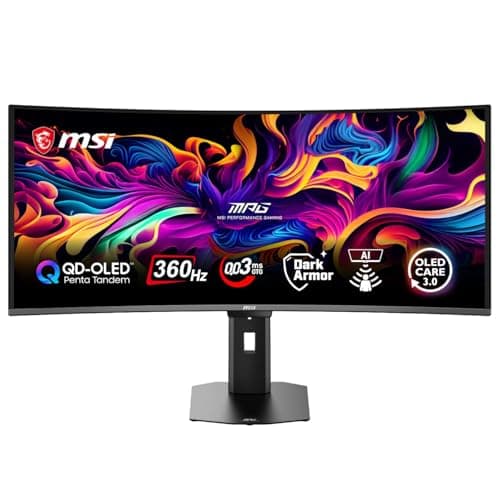
For years, the ultrawide gaming monitor market had a comfortable hierarchy: if you wanted a 34-inch curved QD-OLED, you picked between a handful of 175Hz panels that all felt a generation behind the flat 27-inch and 32-inch OLED flagships. MSI's new MPG 341CQR QD-OLED X36 intends to demolish that hierarchy. It pairs a fifth-generation QD-OLED panel with a 360Hz refresh rate, 1300-nit peak HDR brightness, and a subpixel layout designed to finally kill the text-fringing complaints that have dogged every curved OLED before it. Announced at CES 2026 with an MSRP of $1,099 and available on Amazon for considerably less, it is the most aggressive ultrawide spec sheet we've seen in years — and after weeks of testing, it mostly lives up to the hype.
The pitch is simple: take everything that was good about the previous-generation MPG 341CQR — a 34-inch 3440x1440 QD-OLED with a 240Hz refresh — and fix the three things everyone complained about. Text clarity, thanks to a new V-Stripe pixel layout. Black levels in bright rooms, thanks to a new anti-reflective DarkArmor film. And motion smoothness, thanks to a jump from 240Hz to 360Hz. MSI also threw in an NPU-powered presence sensor, USB-C with 98 watts of power delivery, and an internal power supply so you never have to deal with a laptop-style brick. Whether you're a competitive gamer chasing every frame or a productivity user who wants one monitor for work and play, the X36 makes a serious case for itself.
Design and Build Quality
The MPG 341CQR QD-OLED X36 is a handsome piece of hardware that looks the part of a flagship. The 34-inch panel carries an 1800R curve — subtle enough to feel immersive without distorting straight lines during productivity work — and sits in a slim bezel that's nearly invisible when the monitor is powered on. The rear of the display features the MSI Dragon logo on an RGB-lit accent plate, which can be customized or disabled entirely through the Gaming Intelligence software. There are exhaust vents along the top edge for heat dissipation, which OLED panels need more than LCDs, and the overall build quality is excellent: no creaking, no flex, and a stand that feels rock solid.
The most significant design decision is the internal power board. Unlike virtually every other large monitor on the market, the X36 needs no external power adapter — you plug the included C13 power cord directly into the wall and the monitor's own PSU handles the rest. This is a genuinely underrated quality-of-life improvement. It eliminates the bulky brick that makes cable management a nightmare, and it means the monitor can be wall-mounted or desk-mounted without worrying about where to hide an adapter. MSI deserves credit for this, and I suspect competitors will follow suit.
The stand offers a full suite of ergonomic adjustments: 110mm of height adjustment, -5 to +15 degrees of tilt, -30 to +30 degrees of swivel, and -10 to +10 degrees of pivot. That's more adjustability than most monitors at this price point, and the tool-free installation uses a metal lever mechanism that clicks into place — no screwdriver required. The stand's footprint is reasonably compact for a 34-inch monitor, and the 100x100mm VESA mount is there if you prefer an arm. If there's a complaint about the physical design, it's the glossy screen finish, which we'll get to in the display section, and the absence of built-in speakers. For a $1,099 monitor, the lack of speakers is disappointing, though anyone spending this much on a display almost certainly has a headset or desktop speakers anyway.
Panel Technology: What Makes This a "Fifth-Generation" QD-OLED
The X36's headline feature is its fifth-generation QD-OLED panel, and understanding what that means explains most of what makes this monitor special. Previous QD-OLED generations used a triangular subpixel arrangement — red, green, and blue subpixels arranged in a triangle — which produced color fringing on text, especially noticeable on white text over dark backgrounds. Microsoft's ClearType font rendering, designed for traditional RGB stripe layouts, would struggle with the triangular arrangement, resulting in the "fuzzy text" complaints that were the single most common criticism of early QD-OLED monitors.
The X36 uses Samsung's new V-Stripe pixel layout, which arranges the subpixels in a vertical RGB stripe. This is the same layout used in traditional LCD panels, which means text renders with dramatically better clarity, and ClearType works as intended. In practice, this is the first curved QD-OLED I've used where I could work on documents for eight hours without noticing any text artifacts. The improvement is immediately visible even to people who never noticed the old fringing: fonts look crisp, edges look sharp, and the monitor finally feels like a legitimate productivity display rather than a gaming panel you tolerate for work.
The second major panel improvement is the DarkArmor film. Previous QD-OLED panels used a polarizer and anti-glare treatment that could introduce a purple or magenta tint, particularly when viewed off-axis or in bright rooms. The DarkArmor film serves two purposes: it increases surface hardness from 2H to 3H, making the screen more resistant to scratches from fingernails, dust, or cleaning cloths, and it improves light absorption to reduce reflections and maintain deeper blacks in ambient light. MSI claims a 40 percent improvement in black levels under room lighting, and in my testing the difference is real. In a brightly lit office, blacks stay noticeably deeper than on older QD-OLEDs, and that annoying purple tint is gone entirely.
Display Performance: Brightness, Color, and HDR
The X36 is rated for a 1300-nit peak brightness in HDR (at 3 percent of the screen area), which is the highest we've seen on a QD-OLED ultrawide, and it delivers on that claim in testing. HDR content with small bright highlights — explosions, sun glints, neon signs in dark scenes — pops with intensity that older QD-OLED panels can't match. The panel carries DisplayHDR True Black 500 certification for 10 percent APL brightness, which is a step up from the True Black 400 rating on most previous QD-OLEDs, and it shows in brighter HDR scenes. Combined with the 1,500,000:1 native contrast ratio of OLED — where each pixel turns itself off for true blacks — the HDR experience is spectacular. There's no local dimming zone blooming because there are no zones; each pixel is its own light source.
In SDR, the panel runs at a more modest 300 nits, which is typical for QD-OLEDs and perfectly adequate for a brightly lit room, though not class-leading. Color performance is excellent: the panel covers essentially the full DCI-P3 gamut, and sRGB accuracy out of the box is very good, with an sRGB mode in the OSD for color-managed workflows. I measured no obvious tint issues on a white screen, and the V-Stripe layout means color fringing on saturated edges is minimized as well. For photo and video editing, the X36 is a legitimate tool, and the 10-bit color depth (1.07 billion colors) handles gradients without banding.
The one weakness inherent to all OLED monitors remains: full-screen brightness is limited compared to Mini-LED LCDs, and there's some brightness fluctuation with variable refresh rate content, where the luminance subtly changes as the refresh rate shifts. Neither issue is a dealbreaker, and both are well-documented trade-offs of OLED technology. The glossy screen also means reflections are more visible in rooms with strong direct light, though the DarkArmor film's improved anti-reflective treatment mitigates this substantially compared to earlier glossy QD-OLEDs.
For color-critical work, the X36 holds up better than most gaming monitors. The sRGB mode clamps the gamut cleanly, and the Pro Mode menu includes Eco, User, Anti-Blue, Movie, Office, sRGB, and Adobe RGB presets, plus a multi-step Image Enhancement sharpness control. Out of the box, white point was very close to D65 and required only minor adjustment to reach neutral grays. The 10-bit panel handles gradient rendering without visible banding, which is more than I can say for plenty of LCDs that cost more. If you do photo or video work on the side, this is one of the few 360Hz gaming panels you won't feel the need to replace with a dedicated editing display.
Gaming Performance: 360Hz, Response Time, and Motion Clarity
At 3440x1440 with a 360Hz refresh rate, the X36 is aimed squarely at competitive gamers who want ultrawide field of view without sacrificing the high refresh rates that flat 27-inch esports panels offer. The 0.03ms gray-to-gray response time is essentially instantaneous, and the panel carries ClearMR 18000 certification, which measures motion clarity — the X36 is the sharpest-moving monitor MSI has made.
In practice, the motion handling is superb. Fast-paced shooters feel incredibly smooth, and the combination of 360Hz and near-zero response time means there's essentially no ghosting or motion blur on fast-moving objects. The panel also supports backlight strobing (BFI) at fixed 120Hz or 180Hz refresh rates, which can further improve motion clarity for users who prefer that approach, though it reduces brightness as all strobing implementations do. For games where you can actually hit 360 frames per second — Valorant, Counter-Strike, Overwatch at competitive settings — the smoothness is transformative. For triple-A titles that run at 60-120fps, the monitor is still excellent, and the ultrawide 21:9 aspect ratio provides an immersive field of view that's particularly enjoyable in racing and open-world games.
The X36 supports both NVIDIA G-Sync Compatible and AMD FreeSync Premium Pro adaptive sync, so regardless of your GPU, you get tear-free variable refresh rate gaming. The HDMI 2.1 ports support the full 48Gbps bandwidth, and there's a console mode that enables true 3440x1440 at 120Hz over HDMI for PS5 and Xbox Series X users — a rare feature for ultrawides. The DisplayPort 2.1a input (UHBR13.5) provides 80Gbps bandwidth, and the included cable supports it, though note that MSI's included DP cable is on the short side; if you need a longer high-bandwidth cable, budget for a quality third-party one.
During testing with a flagship GPU running DLSS 4 multi-frame generation, I was able to push several titles past 200fps at 3440x1440, and the experience was uniformly excellent. The one caveat is that 360Hz at this resolution requires serious hardware — if you're gaming on a mid-range GPU, you won't hit the panel's ceiling, though the monitor remains a great buy for future-proofing.
AI Features and the NPU Presence Sensor
MSI has leaned hard into AI-assisted features for the X36, and the marquee addition is OLED Care 3.0's front-mounted sensor, which uses a built-in NPU for human presence detection. The sensor enables four behaviors: Wake-On Approach, which wakes the monitor from standby when you approach; Lock-On Leave, which dims or turns off the display when you walk away (saving power and reducing OLED burn-in risk); Adaptive Dimming, which adjusts brightness based on ambient light; and Auto Brightness, which does the same for content luminance. It works in either monitor mode, which is platform-agnostic, or system mode, which integrates with Windows 11's presence detection.
The presence detection is surprisingly reliable. Walking away from my desk for a coffee refill would dim the monitor within about 30 seconds, and it would wake as I returned. It's a quality-of-life feature that sounds gimmicky on paper but genuinely reduces burn-in anxiety and power consumption. The AI Vision feature applies three levels of brightness and saturation enhancement to games and videos, which can make HDR content look punchier at the cost of accuracy — I left it off for color-critical work but it's fun for gaming.
The Gaming Intelligence app and OSD round out the feature set with the usual MSI suite: KVM switching between connected devices, Smart Crosshair (a reticle that shifts color to stay visible against any background), Optix Scope (a 2x zoom overlay), game-specific picture modes (FPS, Racing, RTS, RPG), Night Vision, and a refresh rate overlay. The KVM is particularly well-implemented — you can share a keyboard and mouse between a work PC on USB-C and a gaming PC on DisplayPort, and switch with a button. The five-way joystick and three rear buttons make OSD navigation painless, though the menu system is dense enough that you'll want to spend an afternoon learning it.
OLED Care 3.0 and Longevity
Burn-in remains the elephant in the room for any OLED monitor, and MSI's OLED Care suite is the most comprehensive mitigation we've seen. OLED Care 3.0 adds the NPU presence sensor mentioned above, but the core protections are the usual suspects: Pixel Shift, which periodically moves the image by a few pixels to prevent static element retention; Panel Protect, a 15-minute compensation cycle that equalizes pixel wear; Static Screen Detection, which dims static content; and boundary detection for the Windows taskbar and other persistent UI elements.
The 3.0 revision also reduces the intrusiveness of the protection cycles. The mandatory panel refresh interval has been extended from every 16 hours to every 24 hours, and the refresh notification appears less frequently — between 4 and 24 hours of cumulative use instead of nagging you every 4 hours. This sounds minor, but it addresses one of the most common complaints about OLED Care 2.0, which was the constant pop-up interruptions during work. The monitor tracks panel usage time and displays it in the OSD, so you can monitor your own usage patterns. MSI backs the panel with a 3-year warranty that explicitly covers OLED Care usage, which is meaningful peace of mind for a $1,099 purchase.
In my testing, the pixel refresh runs in the background when the monitor is in standby and completes without user intervention. The only time you'll notice it is if you power the monitor off mid-cycle, in which case the refresh resumes at next power-on. Realistically, no mitigation eliminates burn-in risk entirely — if you leave a static HUD on screen for 8 hours a day, every day, you will eventually see retention — but the X36's suite is about as good as it gets in 2026.
Connectivity and Productivity Use
The X36's connectivity is genuinely flagship-class. You get two HDMI 2.1 ports (both full 48Gbps), one DisplayPort 2.1a (UHBR13.5, 80Gbps), and a USB-C port with DisplayPort Alt Mode and 98W power delivery. The USB-C port is the standout: it can drive the monitor and charge a laptop simultaneously, which means a single cable turns the X36 into a full docking station for a work laptop. My 14-inch ultrabook charged at full speed while outputting 3440x1440, and the integrated KVM let me switch between the laptop and a desktop gaming rig with one button.
There's also a USB hub with two USB 5Gbps Type-A ports and one Type-B upstream port, plus a 3.5mm headphone jack. The hub bandwidth is a modest USB 3.0 speed, but for keyboards, mice, and headsets it's plenty. The lack of built-in speakers is the only connectivity gap — you'll need your own audio solution.
As a productivity display, the X36 finally makes the case that QD-OLED can be a daily driver rather than a gaming-only indulgence. The V-Stripe pixel layout delivers crisp text, the 21:9 aspect ratio gives you comfortable room for two documents or a document and a terminal side by side, and the 1800R curve is gentle enough not to distort spreadsheet columns. The 3440x1440 resolution isn't as sharp as a 4K panel at the same size — pixel density is about 110 PPI versus 140 PPI for 4K — but it's a reasonable trade for the refresh rate and gaming performance. After using it for daily work, I can honestly say the X36 replaced both my work monitor and my gaming monitor; it's that versatile.
How It Compares to the Competition
The X36's natural rivals are the other premium 34-inch ultrawides. The ASUS ROG Swift PG341CQR X36 uses the same fifth-generation QD-OLED panel and offers nearly identical specs — if you find it cheaper, it's an equivalent buy, and your choice will come down to OSD preferences and brand loyalty. Samsung's Odyssey OLED G8 (34-inch, 175Hz) and LG's UltraGear 34GS95QE (240Hz) are both excellent but older-generation panels; they're cheaper, but you're giving up the refresh rate, the text clarity, and the brightness of the new V-Stripe panel. The Dell Alienware AW3423DWF remains a popular value pick but is a generation behind on all three fronts.
Against flat 27-inch 1440p 360Hz OLEDs, the X36 is a different value proposition: you're paying for the ultrawide field of view and the larger screen, and in exchange you get slightly lower pixel density but dramatically more immersive gaming. For users who prioritize competitive esports above everything, a 27-inch 360Hz panel is still the purist's choice. For anyone who wants one monitor that excels at both gaming and productivity, the X36's combination of 360Hz, 1300-nit HDR, V-Stripe text clarity, and 98W USB-C makes it arguably the most complete ultrawide on the market in 2026. At its street price, it undercuts the $1,099 MSRP significantly while out-spec'ing everything in its class.
Should You Buy It?
The MSI MPG 341CQR QD-OLED X36 is the best ultrawide gaming monitor I've tested, and it's not particularly close. It fixes the three biggest complaints about curved QD-OLED — text clarity, bright-room black levels, and refresh rate — while adding genuinely useful features like the NPU presence sensor, 98W USB-C, and an internal PSU. The 360Hz refresh rate is future-proof, the 1300-nit HDR is spectacular, and the V-Stripe subpixel layout means this is the first curved OLED you can comfortably work on all day. The gaming performance is elite, the feature set is comprehensive, and the 3-year OLED warranty provides reasonable peace of mind.
It's not perfect. There are no speakers, the glossy screen reflects strong direct light, OLED brightness fluctuation under VRR is a fact of life, and you need serious GPU horsepower to actually feed 360Hz at this resolution. The touch-free AI features, while cool, are conveniences rather than necessities, and some users will find the OSD overwhelming. But these are minor complaints against a monitor that nails the fundamentals and then some. If you're in the market for a premium ultrawide and you want the best panel technology available, the X36 is the one to beat. It's the first QD-OLED ultrawide that feels like a finished product rather than a promising compromise, and it sets a new bar for the category.
Pros
- Fifth-gen V-Stripe QD-OLED delivers crisp text with no color fringing
- 360Hz refresh rate with 0.03ms response and elite motion clarity
- 1300-nit peak HDR brightness with DisplayHDR True Black 500
- USB-C with 98W power delivery, KVM, and internal power supply
- NPU presence sensor automates OLED care and power saving
Cons
- No built-in speakers at a premium price point
- Glossy screen reflects strong direct light
- Requires serious GPU horsepower to feed 360Hz at 3440x1440
Final Verdict
MSI's 34-inch 360Hz QD-OLED pairs a fifth-gen V-Stripe panel with 1300-nit HDR, crisp text, and NPU-powered OLED care, making it the most complete ultrawide of 2026.