Razer BlackShark V3 Pro Review: Competitive Gaming’s New Benchmark
The Razer BlackShark V3 Pro delivers exceptional low-latency wireless performance, excellent positional audio for competitive shooters, and a massive 70-hour battery life, but treble distortion and a loose yoke design prevent it from being the well-rounded premium option some gamers need.
The premium wireless gaming headset market has never been more competitive. With the SteelSeries Arctis Nova Pro Omni, Audeze Maxwell 2, and Sony InZone H9 II all vying for your attention, Razer needed to deliver something exceptional with its latest flagship. Enter the Razer BlackShark V3 Pro, a headset that builds on the solid foundation of the popular V2 Pro with significant upgrades including active noise cancellation, simultaneous wireless connectivity, and a massive 70-hour battery life. After spending extensive time with this headset across PC, Xbox, and PlayStation gaming sessions, as well as daily music listening and voice calls, I can say with confidence that Razer has created a specialized tool for competitive gamers that gets a lot right, even if it stumbles in a few critical areas.
Design and Build Quality
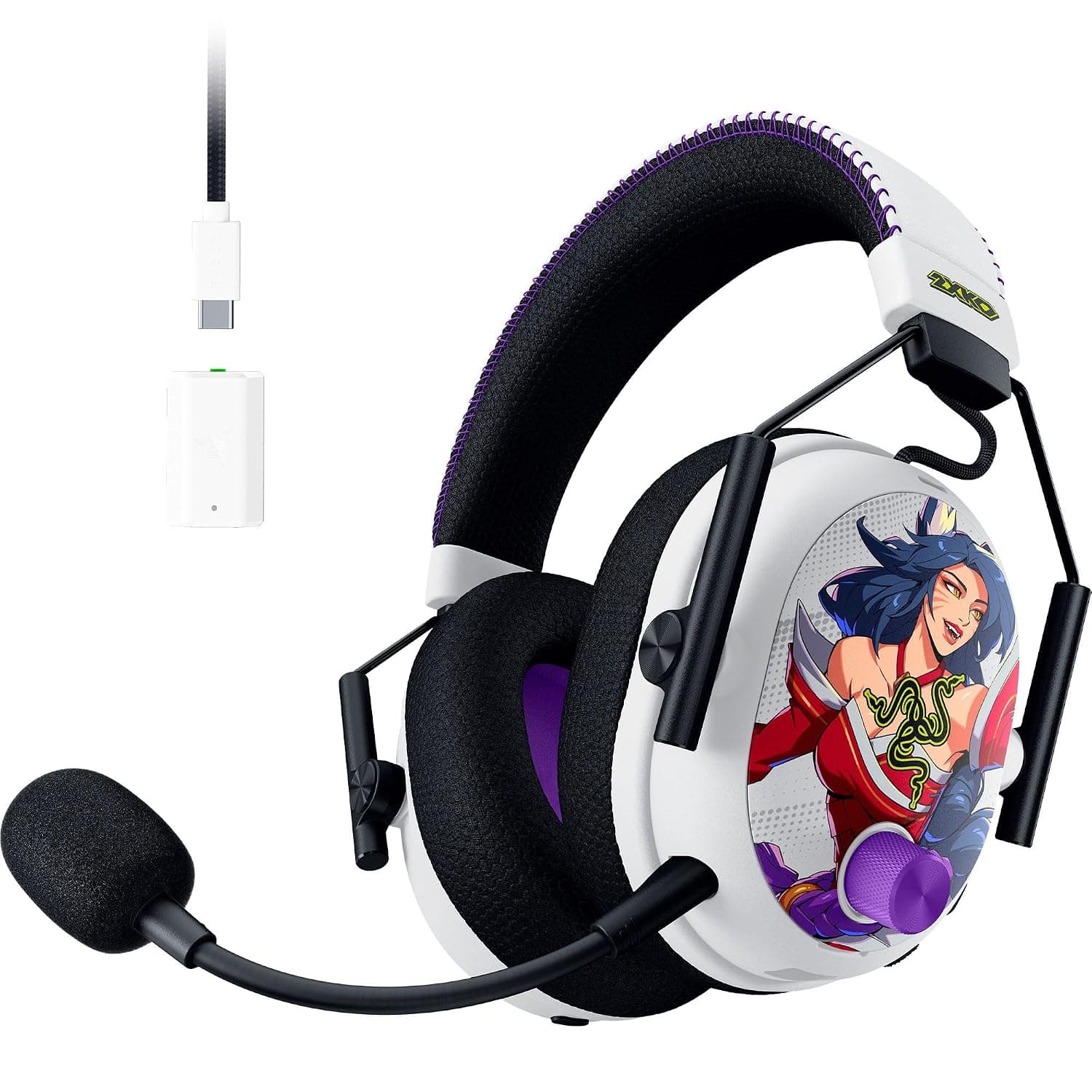
The BlackShark V3 Pro adopts a familiar design language that clearly screams "gaming headset" without being overly flashy. The circumaural over-ear design features a sleek matte finish with a prominent volume knob on the right earcup and a large detachable boom microphone on the left. The steel wire yokes that connect the ear cups to the headband feel durable enough to withstand the occasional drop, though the overall construction leans more toward lightweight practicality than premium indulgence.
At 367 grams, the BlackShark V3 Pro is relatively lightweight for a wireless gaming headset with ANC. It's lighter than the Audeze Maxwell 2's 490 grams and comparable to the SteelSeries Arctis Nova Pro Wireless. The weight distribution is generally good, though the clamping force is noticeably higher than I'd prefer for extended sessions. During my testing, I found the headset comfortable for sessions of two to three hours, but beyond that, the pressure around the ears became noticeable.
The ear cushions are plush and generously sized at 66 by 45 millimeters, using Razer's FlowKnit fabric that breathes reasonably well. However, heat buildup is still an issue during longer gaming sessions in warmer environments. The headband padding is adequate but not exceptional, with a suspension-style design that distributes weight reasonably well across the top of the head.
One of the most significant design issues I encountered relates to the yoke mechanism. The earcups slide somewhat loosely on their yokes, which makes it difficult to maintain a consistent seal against your head. This is particularly problematic for the ANC performance, which depends heavily on a proper acoustic seal. I found myself frequently adjusting the earcups, pushing them up from the bottom while holding the yoke band in place to get a good fit. For a premium headset at this price point, this level of adjustment shouldn't be necessary.
Connectivity and Setup
Razer has significantly improved the wireless connectivity on the V3 Pro compared to its predecessor. The headset now supports simultaneous 2.4GHz and Bluetooth 5.3 connections, which is enormous for multitasking gamers. You can be connected to your PC via the ultra-low-latency HyperSpeed Gen-2 wireless dongle while simultaneously taking calls from your phone via Bluetooth. This dual-connection capability is one of the headset's standout features and works flawlessly in practice.
The HyperSpeed Gen-2 wireless technology is genuinely impressive, delivering a claimed 10-millisecond latency that puts it among the best in class. In my testing, I could not perceive any audio delay, whether playing fast-paced shooters like Call of Duty or rhythm games where timing is critical. For competitive gamers, this near-zero latency is a genuine advantage that can make the difference between hearing and missing a crucial audio cue.
The included USB-C dongle provides the primary wireless connection. It works with PC, PlayStation 5, and Nintendo Switch out of the box. An Xbox-specific variant is available for those gaming on Microsoft's consoles. One minor annoyance is that the dongle is USB-C only, requiring a USB-C to USB-A cable if you're plugging into older ports, which adds an unnecessary cable to your setup. For handheld gaming on the Steam Deck or Nintendo Switch, the dongle protrudes awkwardly and can get in the way.
Bluetooth 5.3 provides secondary connectivity with support for AAC and SBC codecs. The range is excellent, extending well beyond 30 feet through walls. Pairing is straightforward, and the headset can remember multiple paired devices. The ability to have the 2.4GHz dongle connected to your PC while maintaining a Bluetooth connection to your phone is genuinely useful for taking calls without removing the headset.
Active Noise Cancellation
The addition of active noise cancellation is a first for the BlackShark series, and it's a welcome feature that makes the V3 Pro more versatile than its predecessors. The hybrid ANC system uses both feedforward and feedback microphones to cancel ambient noise, and in testing, it achieved approximately 77 percent average total attenuation. This is excellent for blocking low-frequency noises like air conditioning hum, computer fan noise, and the general rumble of daily life.
However, the ANC performance is entirely dependent on the quality of the acoustic seal between the ear cushions and your head. As mentioned earlier, the loose yoke design makes it difficult to maintain a consistent seal, which means the ANC effectiveness varies depending on how the headset sits on your head at any given moment. When the seal breaks, even momentarily, you'll hear a noticeable increase in ambient noise, particularly voices and mid-frequency sounds.
Compared to dedicated ANC headphones like the Sony WH-1000XM6 or Bose QuietComfort Ultra Headphones, the BlackShark V3 Pro's noise cancellation is adequate but not class-leading. It does a good job of removing the distractions that would interfere with gaming focus, but it won't give you the library-quiet isolation that premium ANC headphones deliver. That's a reasonable compromise considering this is primarily a gaming headset, not a travel headphone.
The transparency mode, which pipes in ambient sound through the microphones, is functional but not particularly natural-sounding. Voices come through with a slight metallic quality, and there's a noticeable hiss floor when no audio is playing. It works well enough for quick conversations or hearing announcements, but I wouldn't want to use it for extended periods.
Sound Quality and Audio Performance
The Razer BlackShark V3 Pro uses 50 millimeter TriForce Bio-Cellulose drivers with a frequency response of 12Hz to 28kHz. On paper, these look promising, and in practice, they deliver a mixed bag of impressive strengths and notable weaknesses.
Let me start with the positives. The default sound signature is tuned for gaming with a noticeable bass lift around 60Hz that gives explosions and gunfire satisfying weight. The positional audio is genuinely excellent, with clear left-right separation and reasonably good front-back imaging. In competitive shooters like Valorant, Counter-Strike 2, and Call of Duty, I could accurately pinpoint enemy locations based on footsteps and gunfire direction. The THX Spatial Audio on PC adds an extra dimension with 7.1.4 channel virtualization that enhances immersion without muddying the positional cues.
The soundstage is reasonably wide for a closed-back gaming headset, though it doesn't match the expansive presentation of open-back alternatives. For competitive gaming, this focused soundstage actually works in the headset's favor, as it helps isolate and identify specific audio cues without being distracted by ambient spaciousness.
However, the audio quality has some significant issues that prevent it from being a truly premium listening experience. The most notable problem is treble distortion. The headset's MDAQS Multidimensional Audio Quality Score shows a distortion score of 2.5 out of 5, which falls into the "concerning" range. In practice, this manifests as harshness in the upper frequencies, particularly between 3kHz and 6kHz. High-hat cymbals can sound splashy, female vocals can become sibilant, and the overall presentation can be fatiguing during extended listening sessions.
The default tuning also has a significant treble peak in the 3-6kHz region that emphasizes sibilance. While this can help with voice clarity in games, making footsteps and vocal callouts more distinct, it comes at the cost of musical enjoyment. Music sounds aggressive and forward rather than natural and engaging. The headset rolls off sharply after 10kHz, which limits air and sparkle in the treble.
Thankfully, Razer's Synapse software provides a comprehensive 10-band EQ that can tame some of these issues. I found that lowering the 4kHz band by 3-4dB while raising the 500Hz and 2kHz bands significantly improved the tonal balance. This helped reduce the harshness while maintaining good clarity for gaming. The headset can store up to nine EQ presets onboard, which is useful for console gamers who don't have access to the Synapse software during gameplay.
One surprising finding is that turning off the ANC actually improves the bass response by approximately 3-6dB in the sub-bass region. This suggests the ANC processing is affecting the driver performance, and gamers who prioritize bass impact may prefer to disable noise cancellation for the best audio experience.
The built-in game presets are a mixed bag. The Game EQ preset is actually quite good, improving the overall timbre score to 4.5 out of 5 while maintaining immersive qualities. The Music EQ preset, unfortunately, makes things worse, with an overall score of 3.1 that sounds boomy and fatiguing. The specialized Valorant eSports EQ preset scored the worst in testing, with an overall 2.4 rating due to an extreme midrange scoop that makes voices sound distant and unnatural. I strongly recommend creating a custom EQ profile rather than relying on the presets.
Compared to the Audeze Maxwell 2, which uses planar magnetic drivers for exceptional clarity and low distortion, the BlackShark V3 Pro falls short in raw audio quality. The Maxwell 2 delivers noticeably cleaner mids and treble with better instrument separation. However, the BlackShark V3 Pro matches or exceeds the Maxwell 2 in wireless latency and positional accuracy for competitive gaming. This trade-off reflects the different priorities of each headset: the Maxwell 2 targets audiophile-minded gamers, while the BlackShark V3 Pro is optimized purely for competitive performance.
Microphone Quality
The BlackShark V3 Pro features a 12mm detachable boom microphone with 48kHz sampling rate. On the hardware side, this is a significant step up from the V2 Pro's smaller capsule. The microphone is mounted on a flexible boom that can be positioned precisely, and it stays where you put it without sagging.
Out of the box, however, the microphone quality is disappointing for a headset at this price point. The sound is muffled and hollow, lacking the clarity and presence that serious gamers and streamers expect. The noise rejection is also subpar, with keyboard clatter and ambient sounds bleeding through clearly even at moderate noise rejection levels.
The good news is that these issues can be partially addressed through the Synapse software. Raising the 4kHz and 8kHz bands by 3-4dB adds much-needed presence and clarity to the voice. Cutting the low frequencies helps reduce the muddy quality. Increasing the noise rejection level to around 30 significantly improves background noise suppression without overly aggressive gating.
Once EQ'd properly, the microphone becomes serviceable for in-game communication and Discord calls. It still doesn't match the outstanding microphone quality of the SteelSeries Arctis Nova Pro Omni or the Audeze Maxwell 2, but it's good enough for competitive play and casual streaming. For professional content creators or serious streamers, a dedicated USB microphone remains the better choice.
Battery Life
The battery life claims are genuinely impressive. Razer rates the BlackShark V3 Pro at up to 70 hours on PC and 48 hours on consoles. In my testing, these figures proved largely accurate. I managed approximately 65 hours of mixed use on PC with the ANC enabled about half the time, which is outstanding for a wireless gaming headset with ANC.
The significant variance between PC and console battery life is worth noting. The headset draws less power from the PC's USB port, while console USB ports provide different power profiles. If you primarily game on Xbox or PlayStation, expect around 48 hours of real-world usage, which is still excellent but notably less than the PC experience.
One of the headset's most impressive features is the user-replaceable battery. Behind a magnetic faceplate on the left earcup is a standard lithium-ion battery that can be swapped out when it eventually degrades. This is a rare and welcome feature in a market where most headsets have sealed batteries that make the product disposable after two to three years of use. The replaceable battery, combined with replaceable ear cushions, gives the BlackShark V3 Pro a significantly longer usable lifespan than virtually any competitor at this price point.
Charging is via USB-C, and a full charge takes approximately three hours. The headset can be used while charging, which is essential for marathon gaming sessions. There's no quick-charge feature, which would have been a nice addition, but the already impressive battery life makes this a minor omission.
Software and Controls
The Razer Synapse software provides comprehensive control over the BlackShark V3 Pro's features. You get a full 10-band EQ, THX Spatial Audio configuration, microphone settings, and ANC controls. The software is functional but can feel bloated, requiring an account login and periodic updates. The headset stores settings onboard, so you only need Synapse for initial configuration.
The physical controls on the headset are a mixed experience. You get six buttons plus a volume knob, all identical in shape and feel. This makes them very difficult to operate by touch, especially in the heat of gaming. I frequently found myself pressing the wrong button and either toggling the ANC instead of adjusting the volume or skipping a track instead of muting the microphone. The volume knob itself is smooth and provides satisfying tactile feedback, but it lacks a physical stop at minimum and maximum volume, making it easy to overshoot your desired level.
The microphone mute button is conveniently located on the left earcup and provides a physical click when toggling mute. The ANC toggle button lets you cycle through ANC on, transparency mode, and ANC off. The power button requires a long press to turn on and off, which prevents accidental activation. A multi-function button handles play/pause, track skipping, and voice assistant activation.
Gaming Performance
This is where the BlackShark V3 Pro truly shines. For competitive gaming, this headset delivers exceptional performance that justifies its premium price tag for the right audience. The combination of ultra-low latency, excellent positional audio, and capable ANC creates an immersive gaming environment that helps you stay focused on the action.
In Call of Duty: Black Ops 7, footstep audio was clear and directional, allowing me to track enemies through walls and predict their movement patterns. Gunfire had satisfying weight without overwhelming other audio cues. Explosions and environmental sounds were well-balanced, creating a convincing battlefield atmosphere.
In Valorant, the headset's strengths became even more apparent. The ability to precisely locate opponents based on the faintest footstep sounds is critical in this game, and the BlackShark V3 Pro delivered consistently. I could tell not just which direction sounds were coming from but also approximate distance and elevation. The THX Spatial Audio on PC added an extra layer of immersion without muddying the competitive clarity.
For single-player games like Starfield and Cyberpunk 2077, the headset performs well but doesn't match the immersive quality of more balanced-sounding competitors. The treble-forward tuning can make dialogue sound slightly harsh, and the bass emphasis, while fun for action sequences, can overwhelm quieter atmospheric moments. The ANC does an excellent job of blocking out real-world distractions, helping you stay immersed in the game world.
The microphone's in-game communication quality, once EQ'd, is clear enough for effective team coordination. Your teammates will hear you clearly, though they'll know you're using a gaming headset rather than a professional microphone. The simultaneous Bluetooth feature is genuinely useful for taking Discord calls or listening to music from your phone while gaming, and switching between audio sources is seamless.
Comparisons to Competitors
The BlackShark V3 Pro competes in a crowded premium segment. Against the SteelSeries Arctis Nova Pro Omni, the Razer headset offers better battery life and lower wireless latency, but the SteelSeries delivers superior microphone quality and more versatile connectivity options with its GameDAC base station.
Against the Audeze Maxwell 2, the BlackShark V3 Pro wins on battery life, weight, and wireless latency, but the Maxwell 2 offers vastly superior audio quality for music and immersive gaming thanks to its planar magnetic drivers. The Maxwell 2's microphone is also noticeably better out of the box.
The Sony InZone H9 II is a direct competitor that matches the BlackShark V3 Pro's feature set with excellent ANC and a comfortable design. Sony's headset has better default sound tuning for music and a more refined build quality, but the Razer offers longer battery life and a lower-latency wireless connection.
For Xbox gamers, the Xbox-specific variant of the BlackShark V3 Pro is a strong choice, offering simultaneous wireless and Bluetooth connectivity that many Xbox-focused headsets lack. PlayStation gamers get similar benefits with full support for Tempest 3D AudioTech.
Who Should Buy the Razer BlackShark V3 Pro
This headset is purpose-built for competitive and esports gamers who prioritize low latency and positional accuracy above all else. If you play first-person shooters competitively and need every millisecond advantage you can get, the BlackShark V3 Pro delivers where it matters most.
You should buy this headset if you're a PC gamer who wants ultra-low wireless latency, excellent positional audio for competitive shooters, and the flexibility of simultaneous Bluetooth connectivity. The long battery life and replaceable battery are compelling advantages for anyone who games for extended sessions and wants a headset that will last for years.
You might want to look elsewhere if you primarily play single-player games and value balanced, natural sound quality for music and movies. The treble distortion and forward tuning make this a less enjoyable headset for non-gaming content compared to similarly priced alternatives. If microphone quality is critical for streaming or content creation, the SteelSeries and Audeze options are better choices.
The Razer BlackShark V3 Pro is a specialized tool, not a general-purpose headset. For its intended audience of competitive gamers, it delivers exceptional performance in the areas that matter most. For everyone else, there are better-rounded options at similar price points that deliver a more balanced experience across gaming, music, and communication.
Pros
- Best-in-class 10ms HyperSpeed wireless latency
- Excellent positional audio for competitive FPS gaming
- 70-hour battery life with user-replaceable battery
- Simultaneous 2.4GHz and Bluetooth 5.3 connectivity
- Comfortable for multi-hour gaming sessions at 367g
Cons
- Noticeable treble distortion and harshness in upper frequencies
- Loose yoke design compromises ANC seal and fit consistency
- Microphone sounds muffled out of the box without EQ adjustment
- Identically-shaped buttons difficult to operate by touch
- Music preset sounds significantly worse than default
Final Verdict
The Razer BlackShark V3 Pro delivers exceptional low-latency wireless performance, excellent positional audio for competitive shooters, and a massive 70-hour battery life, but treble distortion and a loose yoke design prevent it from being the well-rounded premium option some gamers need.