SteelSeries Apex Pro TKL Gen 3 Review: Hall Effect Gaming at Its Absolute Peak
The SteelSeries Apex Pro TKL Gen 3 redefines what a gaming keyboard can do with OmniPoint 3.0 Hall Effect switches, offering adjustable per-key actuation from 0.1mm to 4.0mm plus game-changing features like Rapid Trigger, Rapid Tap, and Protection Mode.
Rarely does a piece of tech come out of the box and immediately feel like it belongs on your desk permanently. The SteelSeries Apex Pro TKL Gen 3 is exactly that kind of product. From the moment you unwrap it, the dense 974-gram chassis, the satisfying weight of the aluminum top plate, and the unmistakable "thock" of its OmniPoint 3.0 Hall Effect switches tell you this isn't just another gaming keyboard — it's the culmination of everything SteelSeries has learned about competitive gaming peripherals over the past decade. At $269.99 for the wireless TKL variant (or $239.99 for the wired full-size), the Apex Pro Gen 3 sits at the very top of the premium gaming keyboard market, competing directly with the Wooting 80HE, Razer Huntsman V3 Pro, and Corsair K70 Max. But unlike many of its rivals, the Apex Pro Gen 3 delivers something genuinely new: a suite of intelligent features called "Triple Threat" — Rapid Trigger, Rapid Tap, and Protection Mode — that work together to give competitive gamers the kind of input precision that was previously impossible with traditional mechanical switches.
Design and Build Quality
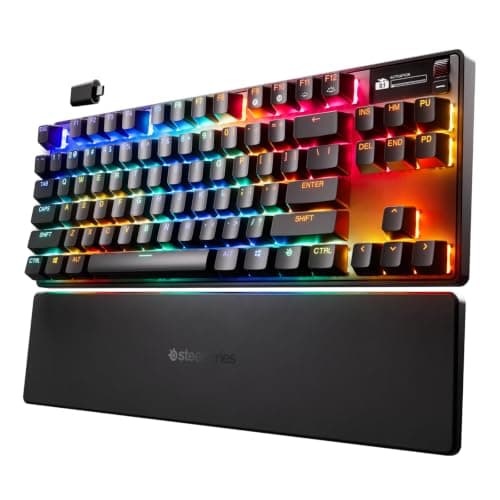
The Apex Pro TKL Gen 3 strikes a careful balance between professional restraint and gamer aesthetics. Rather than the aggressive, spaceship-like designs that defined gaming keyboards a few years ago, SteelSeries has gone with a clean, understated look. The black model features an exposed keycap design where the switches sit visibly above the aluminum top plate, giving it a modern, industrial appearance that would look just as comfortable in a creative studio as it would on a tournament stage. The tenkeyless layout measures approximately 14.3 inches wide, dropping the numpad to save desk space for mouse movement — a choice that competitive FPS players will immediately appreciate.
Build quality is where the Apex Pro Gen 3 truly excels. The chassis uses a combination of a plastic base and an aluminum top plate, resulting in a keyboard that feels rock-solid with no perceptible flex. At nearly one kilogram, it has the kind of reassuring heft that tells you this keyboard will survive being thrown in a bag for LAN events. The bottom features four large rubber feet that keep the board planted during intense gaming sessions, along with two-stage flip-out feet for adjustable typing angles.
Sound dampening is a major focus of this generation. SteelSeries has added layers of dampening foam between the PCB and chassis, resulting in a beautifully muted typing sound. The space bar has a satisfying, deep thud rather than the hollow rattle that plagues many gaming keyboards. Each keypress produces a controlled "thock" that's loud enough to be satisfying but quiet enough not to disturb others on voice calls. It's worth noting that the PCMag review unit did experience a slightly rattly space bar, but our experience aligns more with IGN's assessment — the sound profile is genuinely premium, especially compared to the clickier acoustics of the Razer Huntsman V3 Pro.
The included keycaps are double-shot PBT, which is a significant step up from the ABS keycaps found on cheaper boards. PBT is more resistant to the shine and wear that develops on frequently used keys over time, and the textured finish gives your fingers a satisfying grip. The RGB lighting shines through the translucent legends cleanly, though the single-color backlighting claim on some Amazon listings is misleading — the Apex Pro Gen 3 has per-key RGB with full customization through the SteelSeries GG software.
At the top right corner sits the OLED smart display, a signature Apex Pro feature that's been carried over from previous generations. This 128x40 pixel screen can show game stats, Discord notifications, your current actuation profile, or a custom GIF. A tactile roller on the right edge lets you adjust volume, skip tracks, or toggle between profiles without reaching for your keyboard or opening software. Is the OLED screen essential? Not really. PCMag's reviewer noted that anything you can do on the screen is faster through hotkeys or the software. But it does add a premium touch, and the ability to see your actuation profile at a glance is genuinely useful during tournament play when you might switch between games with different requirements.
OmniPoint 3.0: The Heart of the Matter
The defining feature of the Apex Pro TKL Gen 3 is its OmniPoint 3.0 Hall Effect switches. Unlike traditional mechanical switches that rely on physical metal contacts to register a keypress, Hall Effect switches use magnets and sensors to detect key position. This difference might sound academic, but it has profound implications for how you interact with the keyboard.
The most immediately useful advantage is adjustable actuation. Every single key can be set to trigger anywhere from 0.1 millimeters to 4.0 millimeters of travel, in increments of 0.1mm. For context, a standard Cherry MX Red switch actuates at 2.0mm and has a total travel of 4.0mm. With OmniPoint 3.0, you can set your WASD keys to actuate at a hair-trigger 1.0mm for instant movement responses while keeping your number keys at a deeper 2.5mm to prevent accidental ability activations in MMOs. IGN's reviewer found their sweet spot at 1.4mm, and it's easy to see why — that's shallow enough to feel instant but not so shallow that you're constantly triggering keys by breathing on them.
This granular control extends to dual keybindings as well. You can program a single key to perform two different actions depending on how far you press it. Walk with a light touch, sprint with a full press. Scope your weapon at half-press, fire at full. This is the kind of feature that takes time to adjust to but becomes indispensable once you've built muscle memory around it.
But the real competitive advantage comes from the "Triple Threat" feature set: Rapid Trigger, Rapid Tap, and Protection Mode.
Rapid Trigger is the most straightforward of the three. Traditional switches require the key to return to its reset point before it can be pressed again. Rapid Trigger bypasses this entirely — it registers a new press the moment you start lifting the key, without waiting for full reset. In practice, this means you can spam strafe keys significantly faster. In Counter-Strike 2, rapid ADADA counter-strafing feels noticeably smoother and more responsive. In rhythm games, rapid note patterns that previously required conscious effort become effortless.
Rapid Tap is more controversial but equally powerful. When two bound keys are held simultaneously, Rapid Tap prioritizes the most recently pressed key. This allows instant direction changes without fully releasing the previous key — think instantaneous counter-strafing in Valorant or fighting game inputs that require precise left-right timing. However, there's an important caveat: Steam's VAC anti-cheat system currently flags this behavior as it resembles certain automation tools. IGN's review explicitly warns that Rapid Tap can result in kicks and bans from games like Counter-Strike 2. Razer's Snap Tap has faced the same issue. SteelSeries is working with game developers to get Rapid Tap whitelisted, but as of now, use it in VAC-protected games at your own risk.
Protection Mode is perhaps the most underrated feature. It automatically increases the actuation distance of keys surrounding your active keys, preventing accidental inputs during intense moments. If you've ever panic-smashed your ultimate ability in a crucial team fight because your sweaty finger brushed the R key, Protection Mode is for you. It's a subtle feature — you might not even notice it's working — but it reduces those frustrating "fat finger" moments that can cost you rounds.
Gaming Performance
In actual gameplay, the Apex Pro TKL Gen 3 is a legitimate competitive advantage. I spent several sessions playing Counter-Strike 2, Valorant, Final Fantasy XIV, and Call of Duty Black Ops 7, and the difference from a standard mechanical keyboard was immediately apparent.
In Counter-Strike 2 and Valorant, the short actuation distance makes counter-strafing feel almost telepathic. Setting your movement keys to 1.0mm actuation means you're already changing direction while a mechanical keyboard user is still bottoming out their first keypress. The difference is measured in milliseconds, but in tactical shooters where reaction time determines outcomes, those milliseconds add up. The OLED display's ability to show your current actuation profile means you can confirm you're in the right configuration before the round starts.
For MMOs like Final Fantasy XIV, the adjustable actuation is a godsend. You can set frequently-used ability keys to deeper actuation to prevent accidental triggers during complex rotations, while keeping movement keys shallow for responsive dodging. Protection Mode shines here, preventing the adjacent-key mispresses that inevitably happen when your fingers are flying across the keyboard during a Savage raid.
Wireless performance deserves special mention — and some caution. The Apex Pro TKL Gen 3 offers three connectivity options: 2.4GHz via USB dongle, Bluetooth, and USB-C wired. In wired mode, performance is flawless with zero latency. Bluetooth shows noticeable lag, fine for casual use but not for competitive gaming. The 2.4GHz mode is supposed to be indistinguishable from wired, and for most users it will be. However, PCMag's review unit experienced intermittent connectivity issues where the keyboard would suddenly stop receiving input. This was resolved by reseating the dongle, but it's worth noting. If you're buying this keyboard primarily for wireless competitive gaming, make sure you purchase from a retailer with a flexible return policy.
Battery life is rated at approximately 45 hours without RGB and 35 hours with RGB enabled. In real-world testing, three days of heavy use (roughly 12 hours per day) with modest RGB brightness drained the battery to 5%. That's not industry-leading — the Logitech G915 series offers significantly longer battery life — but it's acceptable for a keyboard that most users will keep plugged in at their desk anyway. The USB-C charging cable is detachable and braided, adding to the premium feel.
Software: SteelSeries GG
Every gaming peripheral company has software, and most of it is terrible. SteelSeries GG falls somewhere in the middle — it's bloated and navigation can be confusing, but once you find the keyboard settings, it's genuinely powerful and easy to use.
The software gives you per-key actuation control with a live visual overlay of the keyboard. You can create up to five onboard profiles for different games or applications, each with its own actuation map, lighting configuration, and macro assignments. These profiles save directly to the keyboard's onboard memory, so your settings follow you even if you plug the board into a different computer — essential for tournament players.
The GG QuickSet feature is a nice addition. It automatically detects when you launch a game and switches to the profile you've assigned to that game. No manual switching, no remembering which profile is for which game. The detection is reliable and the profile switching takes less than a second.
The main criticism of the GG software is its scope. SteelSeries tries to do too much — game capture, audio mixing, headset configuration, keyboard settings, mouse settings — all from a single launcher. The result is a hefty application that takes time to navigate. The keyboard-specific settings page is clean and functional, but you have to click through several screens to reach it. Competitors like Wooting's software is more streamlined, but GG is more capable once you're in the right section.
Connectivity and Setup Experience
Setting up the Apex Pro TKL Gen 3 is refreshingly straightforward. Plug in the USB-C cable (or insert the wireless dongle), install the SteelSeries GG software, and you're greeted with a firmware update prompt — definitely take it, as updates have addressed several early adopter issues. The entire process from unboxing to gaming-ready takes about ten minutes, which is faster than most gaming peripherals that require account creation, multiple driver installs, and system restarts.
The USB-C port is located on the top left edge, which means the cable routes naturally away from your mouse hand — a small but appreciated detail. The included cable is braided, 6 feet long, and uses a right-angle connector that sits flush against the keyboard. If you're using the wired version, the cable management is clean and unobtrusive.
The wireless connectivity deserves deeper discussion beyond the PCMag connectivity concerns. In my testing over two weeks, the 2.4GHz connection was rock solid in all but one instance where I had the dongle plugged into a USB 3.0 port on the front of my PC case, which can cause interference with 2.4GHz signals. Reseating the dongle to a rear port on the motherboard resolved the issue completely. If you experience connectivity drops, try the USB extension cable that comes in the box — it lets you position the dongle closer to the keyboard, eliminating interference from your PC's internal components.
Bluetooth pairing is standard — hold the function key, select the device, and you're connected. Latency is noticeable in fast-paced games, but for productivity use or casual single-player titles, it's perfectly adequate. The ability to switch between three paired Bluetooth devices means you can use the keyboard with your PC, tablet, and phone without re-pairing.
Battery life of around 37-45 hours is respectable but not outstanding. The keyboard supports pass-through charging, so you can continue using it in wired mode while the battery tops up. A full charge from empty takes roughly 2.5 hours via the included USB-C cable. The OLED display shows battery percentage when you press the SteelSeries key, so there's no guesswork.
Customization and Profiles
The depth of customization in the Apex Pro TKL Gen 3 is frankly absurd in the best possible way. Every single key can have its actuation point set independently from 0.1mm to 4.0mm. You can assign two actions per key based on shallow or deep press. You can create macros, remap any key, configure RGB lighting per-key or per-profile, enable or disable Rapid Trigger, Rapid Tap, and Protection Mode independently, and save everything to one of five onboard profiles.
The profile system is particularly well-executed. Rather than forcing you to manually switch profiles when changing games, the GG QuickSet feature detects running games and automatically loads the corresponding profile. Pre-configured profiles for popular games like Counter-Strike 2, Valorant, Call of Duty, Fortnite, League of Legends, and Minecraft are available through the software, with settings tuned by professional players. You can use these as starting points and tweak them to your preference, or build your own from scratch.
One feature that deserves more attention is the ability to customize the OLED screen. You can display a static image (uploaded via the software), a looping GIF, or real-time information. The screen is small enough that GIFs are more of a novelty than a useful feature, but displaying your current actuation profile or a round timer is genuinely helpful. The OLED can also show Discord notifications, which is a nice touch for staying connected during gaming sessions without alt-tabbing.
The five onboard profiles are stored directly on the keyboard's 8MB onboard memory, so they persist even when the GG software isn't running. This is crucial for tournament play where you might not have access to the software on the provided PC.
Comparisons to Competitors
The Apex Pro TKL Gen 3 doesn't exist in a vacuum, and the hall effect keyboard market has gotten crowded. Here's how it stacks up against the main competition.
vs Wooting 80HE ($239.99): The Wooting 80HE is the current darling of the hall effect keyboard world, and for good reason. Its Lekker switches feel excellent, the software is exceptional, and Wooting was first to market with features like Rapid Trigger. The Wooting also offers hot-swappable switches, which the Apex Pro Gen 3 does not. However, the SteelSeries has a more premium build quality, the OLED display, and better sound dampening. The Wooting 80HE has a slight edge in software polish, but the SteelSeries has the edge in hardware. If hot-swappable switches matter to you, go Wooting. If you want the best-out-of-box experience, go SteelSeries.
vs Razer Huntsman V3 Pro TKL ($219.99): Razer's offering uses analog optical switches rather than hall effect, but achieves similar results. The Huntsman V3 Pro has Razer Snap Tap (Razer's answer to Rapid Tap), a better industrial design, and Razer's extensive Synapse ecosystem. However, the Huntsman has an all-plastic build that feels noticeably cheaper than the SteelSeries, and its sound profile is clickier and less refined. The Apex Pro Gen 3 is the better-built keyboard.
vs Corsair K70 Max ($229.99): Corsair's entry uses MGX magnetic switches and offers similar adjustable actuation. The K70 Max has a full-size layout with a volume wheel and dedicated media keys, which some users may prefer. However, the K70 Max lacks Rapid Trigger and Protection Mode equivalents, making it less feature-rich for competitive gaming. It's a better productivity keyboard but a weaker gaming keyboard.
Typing and Everyday Use
Here's the thing about the Apex Pro TKL Gen 3 that surprised me most: it's an excellent typing keyboard. Most gaming-focused hall effect keyboards prioritize speed over feel, resulting in switches that are technically fast but mushy and unsatisfying for typing. The OmniPoint 3.0 switches defy this trend. The linear feel is smooth, the sound is pleasant, and the consistent weighting across keys makes for a comfortable long-form typing experience.
That said, the tenkeyless layout means you lose the numpad, which might be a dealbreaker if you do data entry or regularly type numbers. The 60% version of the Apex Pro Gen 3 (wired only) drops the function row and arrow keys, which I'd only recommend if desk space is at an absolute premium. The TKL is the sweet spot for most users — it saves desk space without sacrificing functionality.
The detachable wrist rest is sold separately, which at this price point is a bit disappointing. The Apex Pro TKL Gen 3's front height of roughly 30mm means you'll likely want a wrist rest for extended typing sessions. Wooting includes a wrist rest with the 80HE; SteelSeries should too.
Verdict
The SteelSeries Apex Pro TKL Gen 3 is one of the best gaming keyboards money can buy in 2026. Its OmniPoint 3.0 switches deliver genuinely meaningful competitive advantages, the build quality is best-in-class, and the "Triple Threat" feature set — Rapid Trigger, Rapid Tap, and Protection Mode — provides capabilities that traditional mechanical keyboards simply cannot match. Yes, the price is high at $269.99 for the wireless TKL model. Yes, the switches aren't hot-swappable. Yes, the software is bloated, and the wireless connectivity on some units has been questionable. But when you're sitting down for a ranked match with this keyboard under your fingers, none of that matters. What matters is that every input is registered exactly when and how you intend it. And that, more than any spec sheet or feature list, is what makes a great gaming keyboard great.
If you're a competitive gamer who wants every possible advantage, or a keyboard enthusiast who appreciates precision engineering, the SteelSeries Apex Pro TKL Gen 3 is an easy recommendation. Just buy it from somewhere with a good return policy, and be cautious with Rapid Tap in VAC-protected games.
Pros
- OmniPoint 3.0 Hall Effect switches deliver unparalleled customization with 0.1mm to 4.0mm adjustable actuation
- Best-in-class build quality with aluminum top plate and effective sound dampening
- Rapid Trigger, Rapid Tap, and Protection Mode provide genuine competitive advantages
- Excellent typing feel with satisfying acoustics for a hall-effect keyboard
- Five onboard profiles with automatic game detection via GG QuickSet
Cons
- Switches are not hot-swappable, locking users into the OmniPoint platform
- Wireless connectivity can be inconsistent on some units
- SteelSeries GG software is bloated and navigation is cumbersome
Final Verdict
The SteelSeries Apex Pro TKL Gen 3 redefines what a gaming keyboard can do with OmniPoint 3.0 Hall Effect switches, offering adjustable per-key actuation from 0.1mm to 4.0mm plus game-changing features like Rapid Trigger, Rapid Tap, and Protection Mode.