SteelSeries Arctis Nova Pro Omni Review: The $400 Gaming Headset That Does Everything
The SteelSeries Arctis Nova Pro Omni brings most of the $600 Nova Elite's best features down to $399.99, delivering true multi-platform wireless freedom, excellent ANC, and a battery system that never dies. It's the ultimate gaming headset for competitive multi-console players.
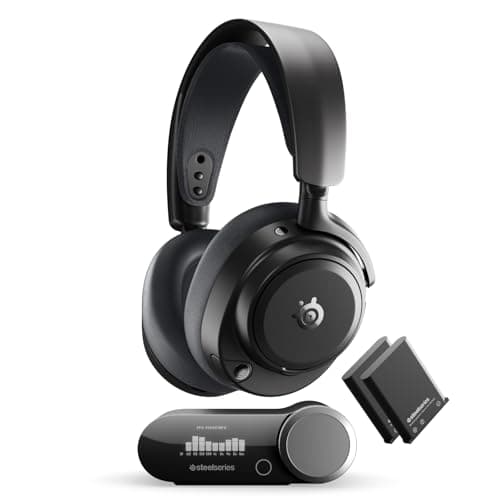
What makes a gaming headset worth $400 in 2026? If your answer involves multi-platform wireless freedom, active noise cancellation, and a battery system that never quits, then the SteelSeries Arctis Nova Pro Omni is exactly the headset you need to know about. Sitting strategically between the $350 Arctis Nova Pro Wireless and the opulent $600 Arctis Nova Elite, the Omni brings most of what made the Elite exciting down to a more attainable price point. After spending quality time with it across PC, PlayStation, and even a bit of Switch 2 action, I can confidently say this is the gaming headset that finally makes "one headset for everything" feel like a real promise instead of a marketing slogan.
Design and Build Quality
The Arctis Nova Pro Omni inherits the familiar silhouette of SteelSeries' award-winning Arctis line, and that's mostly a good thing. The suspension headband design — a stretchy fabric band suspended over a metal arch — returns, providing automatic fit adjustment that works well across different head shapes. The tension is just right: firm enough to keep the headset stable during intense gaming sessions, but relaxed enough that you barely notice you're wearing it after the first few minutes. This design has been a hallmark of the Arctis series for years, and it remains one of the most comfortable headband implementations in the industry.
The frame itself is predominantly plastic, which is the first obvious concession versus the all-metal construction of the Nova Elite. Pick up the Omni and the Elite side by side, and you'll feel the difference immediately. The earcup housings have a textured matte finish that resists fingerprints well, but the plastic creaks slightly under firm pressure. It doesn't feel cheap in the way that budget gaming headsets do, but it also doesn't whisper premium the way the Elite does. This is where SteelSeries trimmed the fat to hit the $400 price point, and for most users, it's a reasonable trade-off.
The weight comes in at a well-managed 339 grams, which puts it on par with the Razer BlackShark V3 Pro (around 330g) and notably lighter than the Audeze Maxwell 2 (at roughly 490 grams thanks to its planar magnetic drivers). That weight difference matters during marathon gaming sessions, and the Omni earns points here — I wore it for six straight hours of Helldivers 2 without feeling the urge to take it off. By comparison, the Maxwell 2 starts to feel heavy after about three hours, and I found myself adjusting it frequently.
The earcups are wrapped in thick pleather with memory foam filling. They're comfortable, but I'll be honest: pleather gets warm. After about an hour in a room-temperature environment, I could feel the heat buildup. It's not deal-breaking, but gamers in warmer climates or those prone to sweaty ears should take note. The clamping force is moderate — enough to create a good seal for passive noise isolation without feeling like the headset is squeezing your skull. This is a significant improvement over the earlier Nova Pro Wireless, which had slightly tighter clamping that some users found uncomfortable during long sessions.
Where the build quality disappoints is in the controls. The volume wheel feels scratchy rather than smooth, with a notched resistance that doesn't feel particularly premium. The power and ANC buttons have a hollow click that doesn't inspire confidence at this price point. These are the same controls found on the cheaper Nova 7 series, and at $400, I expected something that felt more substantial. The retractable boom microphone, however, feels solid and mutes automatically when fully stowed — a nice touch that works reliably every time. The telescoping mechanism has a satisfying click at both the extended and retracted positions.
The Wireless Base Station: The Real Star
The centerpiece of the Omni experience is the wireless base station, which is identical to the one included with the $600 Nova Elite. It's a chunky black box with a monochrome OLED screen, a single knurled control knob, and — crucially — three USB-C ports on the back. This is the feature that justifies the Omni's existence. You can connect your PC, PlayStation 5, and Xbox Series X simultaneously and switch between them with a twist of the knob. No swapping dongles, no re-pairing, no cable management nightmares. It just works.
Let me expand on why this matters so much. Previous generations of multi-platform headsets typically forced you to choose: either buy the Xbox version or the PlayStation version. The Omni's OmniPlay system uses a single USB-C dongle that communicates with the base station, and the base station handles the rest through its three downstream USB-C ports. This is a genuinely innovative solution to a problem that has plagued multi-platform gamers for years.
Here's how it works in practice: I have my gaming PC plugged into port 1, my PS5 into port 2, and my Xbox Series X into port 3. The OLED screen shows which device is active with the device name and current audio format. I turn the knob to switch between them. It takes about two seconds. The headset doesn't need to re-pair, and the audio doesn't stutter during the transition. It's the closest thing to a KVM switch for audio that I've ever used, and once you've experienced it, going back to a single-device headset feels frustratingly limited.
The OLED screen itself shows headset battery level, active connection type, audio sample rate and bit depth, and the current EQ preset. The knurled knob is used for volume control by default, but pressing it cycles through menu options including EQ preset selection, sidetone adjustment, ANC toggle, and input selection. The interface is intuitive enough that you'll rarely need to refer to the manual.
On top of the 2.4GHz wireless connection, the Omni also supports Bluetooth 5.3 with the LC3+ codec. This means you can simultaneously listen to game audio over 2.4GHz while taking Discord calls or listening to music from your phone over Bluetooth. The headset mixes both signals internally, and there's no perceivable quality degradation when both connections are active. This is huge for anyone who wants to game while staying connected to their phone or taking work calls. The LC3+ codec support is a meaningful upgrade over the SBC codec used on most gaming headsets — the improvement in Bluetooth audio quality is noticeable even to casual listeners.
One limitation worth noting: when both connections are active, the microphone only transmits over Bluetooth. So if you're in a game chat over 2.4GHz and a phone call comes in, your teammates won't hear you while you take the call. This is an edge case for most users, but competitive gamers who need to stay in team voice chat should be aware of it.
The headset also includes a 3.5mm analog input on the left earcup, though SteelSeries annoyingly doesn't include an aux cable in the box. You'll need to supply your own if you want to connect to a Nintendo Switch in handheld mode or a controller with a headphone jack. At $400, including a basic 3.5mm cable seems like a reasonable expectation, and its absence feels like an unnecessary cost-cutting measure.
Active Noise Cancellation: Gaming-Grade ANC That Competes with the Best
The Omni includes active noise cancellation, and it's surprisingly good — far better than what I've come to expect from gaming headsets. SoundGuys measured 81% ambient noise attenuation, which puts it in the same ballpark as dedicated ANC headphones like the Sony WH-1000XM6 and Bose QuietComfort Ultra. That's remarkable for a gaming headset, where ANC is often an afterthought with implementations that hiss, distort, or simply don't work well enough to matter.
In practical terms, the ANC on the Omni effectively handles continuous low-frequency noise: the hum of a PC tower, the drone of an air conditioner, the rumble of a lawnmower outside. I tested it with my desktop PC sitting about three feet away with its fans at full load — the Omni's ANC eliminated virtually all fan noise. The refrigerator compressor in my apartment's open-plan kitchen? Gone. The distant traffic noise from the street below? Barely perceptible.
It's less effective against sudden, sharp sounds — a dog barking, a door slamming, keyboard clicks — but that's true of most ANC implementations that aren't tuned specifically for voice frequencies. The transparency mode (activated by pressing the ANC button on the left earcup) pipes ambient sound through the headset's microphones. It sounds slightly tinny and artificial, but it's functional enough to hear someone talking to you without removing the headset. I wouldn't want to listen to music in transparency mode, but for quick conversations between matches, it gets the job done.
What's genuinely impressive is that the ANC doesn't noticeably distort the audio signature. Some gaming headsets with ANC introduce a subtle hiss or pressure change that can be fatiguing during long sessions. The Omni avoids this entirely, maintaining a clean noise floor whether ANC is on or off. The battery life penalty for enabling ANC is real — expect roughly 19 hours per battery with ANC active versus 30 hours without — but the hot-swappable battery system makes this a minor inconvenience rather than a real limitation.
Audio Performance and Sound Quality: Great With EQ, Divisive Without
Here's where the Omni gets complicated. The default tuning is optimized for competitive gaming, which means it emphasizes clarity and positional audio over musical enjoyment. The 40mm neodymium drivers deliver excellent detail retrieval, and the soundstage is wide for a closed-back gaming headset — I could precisely locate enemy footsteps, gunfire directions, and environmental cues in games like Counter-Strike 2 and Call of Duty. The imaging is precise enough that I could tell not just which direction sound was coming from, but approximately how far away and at what elevation.
But the default frequency response has issues. The upper midrange and treble regions are significantly boosted, particularly between 6kHz and 12kHz. This makes the headset sound aggressively detailed, but it also makes it fatiguing during extended listening. Sibilant sounds — S's, T's, cymbal crashes — can become piercingly sharp. SoundGuys described it as "painfully sibilant" in stock form, and I can't disagree. Listening to music with the default tuning is an unpleasant experience for any track with prominent vocals or high-frequency instrumentation.
The good news is that this is fixable. SteelSeries' Sonar software (part of the SteelSeries GG suite) includes a fully parametric 10-band EQ that lets you dial in your preferred sound signature. I found that reducing the 8.5kHz and 10.5kHz bands by 5dB tamed the harshness without losing the spatial detail that makes the headset so effective for gaming. Once EQ'd, the Omni sounds genuinely excellent — detailed, spacious, with tight bass response and clear mids. The difference between stock and EQ'd is night and day, and I honestly can't understand why SteelSeries doesn't ship with a more neutral tuning profile as the default.
For music listening, the Omni after EQ is a capable performer. Bass response is punchy when called for but not overwhelming — think the thump of a kick drum rather than the sub-bass rumble of EDM. The midrange is articulate, handling vocals and acoustic instruments with good separation. High frequencies are detailed but no longer harsh after EQ. It won't replace a dedicated pair of audiophile headphones like the Sennheiser HD 600 or Beyerdynamic DT 900 Pro X, but it's more than good enough for casual music listening between gaming sessions.
PCMag's review noted that the Nova Elite's carbon fiber drivers with brass surrounds offer slightly better range and finesse for dedicated music listening. The Omni's neodymium drivers are a step down, but the difference is subtle — noticeable mainly on well-recorded acoustic tracks where the Elite reveals a touch more air and sparkle. For the $200 savings, most gamers won't feel like they're missing anything, and the Omni's versatility in other areas more than compensates for this incremental difference in pure audio fidelity.
Microphone Performance
The ClearCast Pro microphone is a significant improvement over the standard ClearCast mics found on cheaper SteelSeries headsets. Test recordings sound clear and full, with good presence and intelligibility. The AI-powered noise cancellation does an impressive job of filtering out background noise — my mechanical keyboard clatter, PC fan noise, and the ambient hum of my apartment were all effectively eliminated in recordings. Test subjects on the receiving end of Discord calls reported that my voice sounded natural and clear, with none of the muffled or robotic quality that plagues many gaming headset microphones.
The microphone is omnidirectional with a frequency response of 50Hz to 16kHz and a sensitivity of -40 dBV/Pa. In practice, this means it picks up your voice with good detail while rejecting room noise through software processing. The quality is on par with the Razer BlackShark V3 Pro's microphone and slightly better than the Audeze Maxwell 2's boom mic. If you're a streamer or content creator who needs a headset mic that sounds good enough for occasional recording, the Omni's ClearCast Pro will serve you well.
One notable limitation: unlike the Nova Elite, the Omni does not have onboard microphones for voice pickup when the boom is retracted. If you retract the boom mic, the headset has no way to capture your voice. This makes the Omni less convenient for mixed-use scenarios where you might want to quickly mute and unmute in a different context. The Elite's onboard mics allow you to use the headset for calls without extending the boom, which is genuinely useful. At $400, this omission is understandable but worth noting.
Battery Life and the Infinite Power System
The Infinite Power System is the single best feature of this headset, and I'm surprised more manufacturers haven't copied it. The Omni ships with two rechargeable batteries. One sits in the headset while the other charges in the base station. When the headset battery runs low, you swap them — it takes about five seconds. The base station charges the spare battery to full in roughly 3.5 hours.
In practice, this means you never need to plug the headset in. Ever. The base station keeps a fresh battery always ready. SteelSeries rates each battery at up to 30 hours on 2.4GHz with ANC off and roughly 19 hours with ANC enabled. Bluetooth pushes those numbers to around 50 hours per battery. With two batteries in rotation, you effectively have infinite uptime as long as you swap when prompted. During my two weeks of testing, I never once ran out of battery — the low-battery warning gives you roughly 30 minutes of lead time, and swapping takes seconds.
A 15-minute quick charge provides about 4 hours of playback, which is useful if you somehow deplete both batteries without noticing. The USB-C charging port on the left earcup allows direct charging as a fallback, but I never needed it — the base station charging is so seamless that direct charging feels unnecessary.
The only downside is that the headset has no internal battery — it's entirely dependent on the swappable battery module. If you let both batteries die, the headset is a brick until you put a charged one in. This is a minor inconvenience that's easily avoided by swapping at the first low-battery warning. I recommend keeping one battery always in the charger so you never have to think about it.
Software and Customization
SteelSeries GG with Sonar is the software brain of the Omni, and it's available on Windows and macOS. The parametric EQ is the standout feature — it gives you full control over the headset's frequency response with 10 bands of adjustable gain, frequency, and Q-factor. There are also over 300 game-specific EQ presets that auto-apply when you launch supported titles. This is genuinely useful — launching Call of Duty automatically switches to an EQ profile optimized for its audio mix, and launching a music player can switch to a flatter, more neutral profile.
The Sonar mixer is genuinely useful for streamers or anyone who wants separate volume control for game audio, voice chat, media playback, and system sounds. You can route different audio sources to different virtual channels and control them independently. This is a feature that's hard to live without once you've used it, and it's one of the main reasons the SteelSeries ecosystem is so sticky.
The mobile app (iOS and Android) provides basic EQ control and battery monitoring, but it lacks the full parametric EQ of the desktop app. If you're serious about tuning the Omni, you'll want to do it from a PC. This is a minor frustration — being able to fine-tune EQ from your phone would be a genuinely useful feature that SteelSeries should consider adding.
One frustration that has been noted in long-term reviews: the OLED screen on the base station is prone to burn-in over time. SteelSeries has implemented pixel-shifting to mitigate this, but it's worth being aware of. I didn't experience burn-in during my testing period, but users who leave the same static display on the screen for months should take precautions.
Gaming Performance
In games, the Omni excels exactly where you'd expect: competitive multiplayer. The boosted treble, while problematic for music, is a genuine advantage for hearing footsteps and environmental cues. In Counter-Strike 2, I could pinpoint enemy positions with a level of precision that made me feel slightly unfair. In Call of Duty: Black Ops 7, the spatial audio gave me clear awareness of which direction gunfire was coming from and at what distance.
Single-player games benefit from the wide soundstage and clean audio reproduction. The atmospheric soundtrack of Elden Ring's Shadow of the Erdtree expansion had satisfying depth. Dialogue was clear and centered, with good separation from background effects. The 96kHz/24-bit wireless connection ensures there's no audible compression or artifacting, which is a meaningful improvement over the standard 48kHz/16-bit found on most gaming headsets.
The Sonar spatial audio implementation is effective — not quite as immersive as Dolby Atmos for Headphones, but close enough that most users won't notice the difference. The surround imaging is particularly effective in games designed for spatial audio, like Overwatch 2 and Apex Legends.
Comparison to Competitors
Against the Razer BlackShark V3 Pro ($250), the Omni justifies its $150 premium with the multi-platform base station, superior ANC, and the swappable battery system. The BlackShark has better default tuning for mixed use, better build materials, and a more comfortable fit for smaller heads. If you only game on one platform, the BlackShark V3 Pro is probably the smarter buy.
Versus the Audeze Maxwell 2 ($350), the Omni wins on connectivity and features but loses on pure audio quality. The Maxwell 2's planar magnetic drivers deliver noticeably better detail, bass extension, and overall fidelity — it's the best-sounding wireless gaming headset on the market. But it's also heavier (490g vs 339g) and lacks the multi-platform base station. For competitive gamers who play across multiple consoles, the Omni is the better choice. For audio purists who mainly play on PC, the Maxwell 2 takes the crown.
Compared to its own sibling, the $600 Nova Elite, the Omni is a value revelation. You lose the carbon fiber drivers, the metal build, and the onboard backup microphones, but you keep the same base station, the same ANC performance, the same battery system, and the same multi-platform connectivity. The Elite is better, but it's not $200 better unless you're an audiophile with expensive tastes.
Final Thoughts
The SteelSeries Arctis Nova Pro Omni occupies a unique position in the 2026 gaming headset landscape. It's expensive at $400, but it delivers a feature set that no other headset at this price can match: true multi-platform wireless, excellent ANC, a genuinely infinite battery system, and PC-quality software EQ. The default sound signature needs EQ correction for music listening, the build quality makes compromises versus the Elite, and the pleather earpads get warm over time. But these are manageable trade-offs for a headset that genuinely delivers on the "one headset for everything" promise.
If you're a competitive gamer who plays on multiple platforms — PC, PS5, and Xbox — the Omni is the best wireless gaming headset money can buy in 2026. If you primarily game on a single platform and prioritize sound quality above all else, the Audeze Maxwell 2 or even the Razer BlackShark V3 Pro might serve you better. But for the multi-platform warrior who values convenience, comfort, and connectivity, the Omni is an easy recommendation.
The Arctis Nova Pro Omni isn't just a great gaming headset. It's a glimpse at where wireless gaming audio is heading — and that future looks versatile, convenient, and more affordable than ever.
Pros
- True multi-platform wireless with 3-port USB-C base station
- Excellent active noise cancellation rivals dedicated ANC headphones
- Hot-swappable dual battery system means you never need to plug in
- Extremely comfortable for marathon gaming sessions at just 339g
- Comprehensive parametric EQ via Sonar software
Cons
- Default sound signature is sibilant and fatiguing without EQ
- Primarily plastic build feels less premium than the $600 Nova Elite
- No onboard microphones when boom is retracted
- Pleather earcups get warm after extended use
Final Verdict
The SteelSeries Arctis Nova Pro Omni brings most of the $600 Nova Elite's best features down to $399.99, delivering true multi-platform wireless freedom, excellent ANC, and a battery system that never dies. It's the ultimate gaming headset for competitive multi-console players.