XREAL 1S AR Glasses Review: A Portable Cinema for Your Face
The XREAL 1S delivers a 500-inch virtual screen experience through lightweight AR glasses with 120Hz micro-OLED displays, 3DoF tracking, and electrochromic dimming for $449.
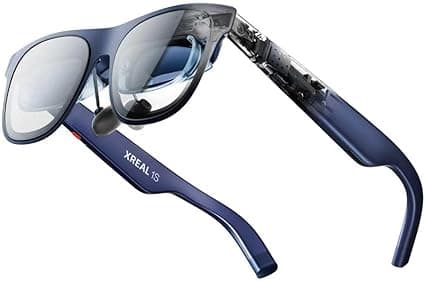
The augmented reality landscape has matured considerably over the past few years, moving from bulky, developer-focused headsets to sleek, consumer-ready wearable displays. Among the most compelling entries in this space is the XREAL 1S, a pair of AR glasses that promises to deliver a 500-inch virtual screen experience directly to your eyeballs. Priced at $449, these glasses occupy an interesting middle ground in XREAL's lineup, sitting below the flagship One and One Pro models while offering a significant upgrade over the older Air 2 series. After spending several weeks with the XREAL 1S across multiple devices and use cases, I am ready to share whether this portable cinema lives up to its ambitious marketing claims.
What the XREAL 1S Actually Is
Before diving into the review, it is important to understand exactly what the XREAL 1S delivers. These are not standalone AR glasses with onboard processing, cameras, and spatial computing capabilities like the Apple Vision Pro or Meta Quest 3. Instead, the XREAL 1S functions as a wearable external display, connecting to your existing devices via USB-C DisplayPort Alt Mode. Think of it as a portable monitor that you wear on your face, capable of mirroring or extending the screen of your smartphone, laptop, gaming console, or handheld device.
This distinction matters because it shapes the entire user experience. The XREAL 1S does not augment your physical environment with holographic overlays or interactive digital objects. It creates a private, immersive viewing environment where a massive virtual screen floats in your field of vision. For travelers, gamers, and content consumers who want a big-screen experience without the physical bulk, this approach makes a lot of sense. For those seeking true augmented reality with world-anchored digital content, the 1S will likely disappoint.
Design and Comfort
At approximately 82 to 84 grams depending on your chosen nose pad configuration, the XREAL 1S is noticeably heavier than regular eyeglasses but impressively light for a device that packs two micro-OLED displays, onboard processing for spatial tracking, and built-in speakers. XREAL has clearly prioritized weight distribution, and the result is a pair of glasses that remains comfortable for extended viewing sessions.
The frame design is sleek and modern, resembling slightly oversized sunglasses rather than a tech gadget. Three interchangeable nose pads ship in the box, allowing users to adjust the fit for different nose bridge shapes and sizes. The arms offer three positional adjustments, effectively raising or lowering the display to align properly with your eyes. The supported interpupillary distance range spans 59.5mm to 70.5mm, which covers the vast majority of users but may exclude those with particularly wide or narrow eye spacing.
During my testing, I wore the XREAL 1S for sessions ranging from 45 minutes to over three hours. Comfort remained consistent throughout, with no significant pressure points on the nose or temples. The glasses are well-balanced, and the weight distributes evenly across the contact points. Heat buildup near the top of the frame is present but mild, reaching around 96 degrees Fahrenheit during intensive use. Because the warm area does not contact skin directly, it never becomes uncomfortable or distracting.
One design element worth noting is the electrochromic dimming system built into the lenses. Unlike earlier models that required attaching physical light shields to block ambient light, the 1S features automatic and manual transparency control. The lenses can transition from fully transparent to significantly dimmed with a button press or automatically based on ambient lighting conditions. This is genuinely useful when using the glasses in bright environments, as it dramatically improves perceived contrast and screen visibility without requiring additional accessories.
Display Quality and Visual Experience
The XREAL 1S features dual Sony micro-OLED displays with a combined resolution of 1920 by 1200 pixels, presented in a 16:10 aspect ratio. While this does not match the full 1080p width of a traditional monitor, the effective resolution feels surprisingly sharp in practice. The 52-degree field of view creates the perception of a 147-inch virtual screen at a typical viewing distance, or up to a 500-inch display if you configure the software to push the perceived distance further away.
Peak brightness reaches up to 700 nits, which is excellent for a wearable display. Even in moderately bright rooms, the screen remains clearly visible and vibrant. Color accuracy is rated at a Delta E of less than 3, meaning the displays produce colors that are perceptually accurate without visible tinting or shifts. For watching movies, playing games, and consuming visual content, the color reproduction is genuinely impressive.
The 120Hz refresh rate is a standout feature that elevates the XREAL 1S above many competitors still stuck at 60Hz. Motion appears smoother and more natural, particularly when gaming or watching fast-paced content. The reduced motion blur contributes significantly to comfort during extended sessions, as your eyes strain less to track moving objects across the virtual display.
One of the most technically impressive aspects of the 1S is the motion-to-photon latency of approximately 3 milliseconds. This near-instantaneous response means that head movements translate to display adjustments with virtually no perceivable delay. When using the 3DoF anchor mode, the virtual screen remains locked in space as you move your head, creating a stable and convincing sense of a fixed display floating in your environment. This stability dramatically reduces the motion sickness and discomfort that plagued earlier generations of wearable displays.
Spatial Tracking and Screen Modes
The XREAL 1S includes native 3 degrees of freedom tracking, handled entirely by the onboard X1 spatial computing chip rather than offloading processing to the connected device. This dedicated hardware enables smooth, drift-free tracking that keeps the virtual display precisely anchored in space regardless of how you move your head.
Several screen modes are available through the companion application. Follow Mode keeps the display centered in your vision at all times, which works well for passive viewing while lying down or reclining. Anchor Mode locks the screen to a fixed point in space, allowing you to look around and return your gaze to the same position. This mode is particularly effective when using the glasses while seated at a desk or on an airplane, as it creates a convincing sense of a real monitor positioned in front of you.
Ultrawide and Side View modes offer additional flexibility for productivity and multitasking scenarios. The real-time 2D to 3D conversion feature is an interesting addition that works without requiring special app support or content formatting. While the effect is not as refined as native 3D content, it adds an extra layer of immersion when watching compatible movies or playing supported games.
For users seeking full 6DoF tracking with spatial anchors and depth perception, the optional XREAL Eye accessory adds camera-based inside-out tracking. However, this accessory is sold separately and significantly increases the total cost of ownership.
Audio Performance
The built-in speakers are tuned by Bose, which sets expectations high for a device of this size. In practice, the audio quality is functional and decent for casual listening but falls short of immersive. Dialogue in movies comes through clearly, and music is listenable for background ambiance. However, the speakers lack the bass response and spatial separation that would make them genuinely impressive.
For private listening in public spaces like airplanes or coffee shops, the speakers leak enough sound that nearby people can hear your content at moderate volumes. Using wireless earbuds or headphones provides a superior audio experience and maintains the privacy that makes these glasses appealing for travel. The glasses do not include a headphone jack, so wireless audio is your only option if you prefer not to use the built-in speakers.
Device Compatibility and Setup
The XREAL 1S connects via USB-C with DisplayPort Alt Mode support. This means compatibility varies significantly depending on your device. Modern smartphones, tablets, laptops, and handheld gaming consoles with USB-C DP Alt Mode work plug-and-play with no additional setup required. The glasses draw power from the connected device, so no separate battery or charging is needed for basic operation.
iPhone users with Lightning ports or older iPhones will need an adapter, and iPhone 17 or newer models with USB-C work natively. The Steam Deck, ASUS ROG Ally, and Nintendo Switch 2 all connect seamlessly, making the 1S an excellent companion for portable gaming. Windows and Mac laptops with USB-C video output also work immediately.
For devices that lack USB-C DP Alt Mode, the XREAL Neo battery dock provides an alternative connection method while also extending battery life for handheld devices. This accessory is particularly useful for gaming consoles like the Nintendo Switch, which require additional hardware to output video through USB-C.
Real-World Use Cases
The XREAL 1S excels in specific scenarios where portability and privacy are paramount. Long-haul flights transform from cramped, uncomfortable viewing experiences into immersive cinema sessions. The glasses completely replace the need to angle your neck toward a small airplane screen or balance a laptop on a tray table. You can recline fully, rest your head against the seat, and enjoy a massive virtual display that follows your gaze.
For portable gaming with the Steam Deck or ROG Ally, the 1S offers a screen upgrade that feels genuinely transformative. Instead of squinting at a 7-inch LCD panel, you get a massive virtual display with better colors, higher contrast, and a more immersive field of view. The 120Hz refresh rate syncs well with the 120Hz panels on modern handheld consoles, creating a smooth and responsive gaming experience.
Bedroom movie watching is another natural fit. Lying down with the XREAL 1S creates a private theater experience without disturbing a sleeping partner or requiring any screen positioning. The glasses are comfortable enough to wear through a full feature film, and the display quality rivals many mid-range televisions.
Where the 1S struggles is productivity and text-heavy work. While the 1200p resolution produces sharp images for video content, small text in spreadsheets, documents, and web browsers requires more eye strain than a physical monitor. Reading is possible and functional, but extended work sessions feel fatiguing compared to a real desk setup.
Comparison to Competitors
The wearable display market has several compelling options, and the XREAL 1S faces stiff competition from both within XREAL's own lineup and from rival manufacturers. The XREAL One and One Pro offer superior build quality, better optics, and more refined tracking, but they cost significantly more at $599 and $699 respectively. For most users, the 1S delivers roughly 85 percent of the flagship experience at a 25 percent lower price point, making it the smarter value proposition.
Compared to the Viture Pro and similar birdbath optics competitors, the XREAL 1S holds advantages in tracking stability, refresh rate, and ecosystem maturity. The 120Hz display and 3ms latency give it a noticeable edge for gaming and fast content. However, competitors like the Viture Pro offer slightly larger fields of view and different weight distributions that some users may prefer.
The RayNeo Air 4 Pro, another major competitor in the $400 to $500 range, offers similar core functionality with different design priorities. The XREAL 1S wins on tracking smoothness and software polish, while the RayNeo emphasizes audio quality and a slightly wider perceived screen.
For users considering true augmented reality headsets like the Meta Quest 3 or Apple Vision Pro, the comparison is less direct. Those devices offer standalone processing, spatial computing, world-anchored digital content, and far more advanced interaction methods. They also cost three to eight times more, weigh significantly more, and deliver substantially shorter battery life. The XREAL 1S is not trying to compete with those products directly. It serves a different need as a lightweight, affordable, portable display solution.
Software and Ecosystem
XREAL's companion application for smartphones and desktops provides configuration options for screen modes, display positioning, brightness, and transparency levels. The app is functional and reasonably intuitive, though it lacks the polish of first-party apps from larger technology companies. Regular firmware updates have improved stability and added features since launch, which suggests XREAL is committed to ongoing software support.
The glasses support standard mirroring and extended display modes on all compatible operating systems. On Windows and Mac, they function as a standard external monitor with no special drivers required. On Android and iOS, screen mirroring works through the operating system's native casting functionality.
One minor frustration is the limited customization of the on-glasses controls. The buttons on the right arm handle brightness, transparency, and mode switching, but their functions cannot be remapped. A future firmware update adding customizable controls would improve the user experience for power users who prefer different button layouts.
Setup and Calibration Process
Getting started with the XREAL 1S is refreshingly simple compared to the complex setup rituals required by full AR and VR headsets. After unboxing, the process involves selecting the appropriate nose pad size, adjusting the arm position for optimal screen alignment, and connecting the USB-C cable to a compatible device. No account creation, app installation, or calibration wizard is strictly necessary for basic operation.
For users who want to unlock the full feature set, the XREAL companion app guides you through a brief calibration process that measures your interpupillary distance and preferred screen positioning. This takes under two minutes and noticeably improves image clarity and comfort. The app also checks for firmware updates, and during my review period, one update arrived that improved anchor mode stability in low-light environments.
Prescription lens wearers can order custom inserts through XREAL's official partners. The inserts attach magnetically to the frame and do not require tools or permanent modification. Turnaround time for prescription lenses is typically one to two weeks, and pricing varies based on prescription complexity. This system is far more elegant than the adhesive inserts or clip-on solutions offered by some competitors.
Gaming Performance and Latency
For gamers, display latency can make or break a wearable screen. The XREAL 1S delivers exceptional performance in this area thanks to its dedicated X1 spatial computing chip and optimized signal path. When connected to a Steam Deck or ASUS ROG Ally, the perceived input lag is minimal and does not interfere with fast-paced games like first-person shooters, racing simulators, or fighting games.
The 120Hz refresh rate provides a tangible advantage in competitive gaming scenarios where smooth motion tracking matters. Compared to 60Hz wearable displays, the 1S produces less motion blur and more responsive visual feedback. Games that support high refresh rates, such as Rocket League, Apex Legends, and Forza Horizon, feel noticeably more fluid.
Console gaming with the Nintendo Switch 2 via the XREAL Neo dock is equally impressive. The dock handles video output and power delivery simultaneously, creating a seamless big-screen experience for portable console gaming. The ability to play Breath of the Wild or Mario Kart on what feels like a theater screen while lying in bed is genuinely delightful and difficult to replicate with traditional displays.
Travel and Commute Use
The XREAL 1S truly shines during travel. In airplanes, the glasses eliminate the neck strain and limited viewing angles of seatback screens. You can recline fully, rest your head to the side, or lean forward without losing sight of the virtual display. The privacy factor is significant as well. Your seatmates cannot see what you are watching, making the 1S ideal for sensitive work documents or mature content that you would not want displayed on a visible laptop screen.
Train and bus commutes benefit similarly. A compact smartphone paired with the 1S creates a mobile entertainment center that occupies virtually no space in a bag. Commuters can catch up on shows, review presentations, or play games during transit without balancing a tablet on their lap or angling a laptop around fellow passengers.
Hotel rooms, where television quality varies wildly, become more predictable. The 1S delivers consistent display quality regardless of the hotel's amenities. Business travelers who need to review spreadsheets or presentations before meetings can do so on a large virtual screen without unpacking a portable monitor.
Content Consumption: Movies, Sports, and Streaming
Watching movies on the XREAL 1S is one of its most compelling use cases. The perceived screen size rivals many home theater setups, and the OLED panels produce deep blacks and vibrant colors that make cinematic content pop. HDR content looks particularly impressive, with specular highlights and shadow detail rendered faithfully.
Sports viewing benefits from the 120Hz refresh rate, which reduces motion blur during fast action like hockey, soccer, and basketball. The large perceived screen makes it easier to follow the ball and track player movement across the field of play. For sports fans who travel frequently, the 1S offers a viewing experience that no tablet or laptop can match.
Streaming services work without any special configuration. Netflix, Disney Plus, HBO Max, YouTube, and all major platforms function as they would on any external monitor. The only limitation is digital rights management on some mobile apps that block external display output for certain titles. This is a platform restriction rather than a flaw of the 1S itself, and it affects all external displays equally.
Limitations and Trade-Offs
No product is perfect, and the XREAL 1S has several meaningful limitations that prospective buyers should understand. The most significant is its dependence on USB-C DisplayPort Alt Mode. Devices without this capability require adapters or the Neo dock, adding cost and complexity. Older laptops, many desktop PCs, and iPhones with Lightning ports fall into this category.
The 1200p resolution, while sharp for video and gaming, produces text that is readable but not as crisp as a native 1080p or 1440p monitor. Small fonts in spreadsheets, code editors, and dense web pages require slightly more effort to read. For productivity-heavy users who plan to use the 1S as a primary work display, this limitation is worth considering carefully.
The built-in speakers, while tuned by Bose, lack the dynamic range and bass response that movie enthusiasts and music listeners expect. They are adequate for dialogue-heavy content and casual listening but do not deliver an immersive audio experience. Most users will want to pair the glasses with wireless earbuds or headphones for serious content consumption.
Heat buildup, though mild and non-contact, is present during extended sessions. Users in warm climates or non-air-conditioned spaces may notice the warmth more than those in climate-controlled environments. It never reaches uncomfortable levels but is perceptible during use.
Price Comparison and Market Position
At $449, the XREAL 1S sits in a competitive position against several alternatives. The XREAL Air 2, the previous generation model, now sells for approximately $299 and offers a similar core experience with lower resolution, 60Hz refresh rate, and inferior tracking. The $150 premium for the 1S is justified by the 120Hz display, 3DoF tracking, and electrochromic dimming for users who value these upgrades.
The XREAL One at $599 adds superior optics, more refined build quality, and additional software features. The 1S delivers roughly 85 percent of the One's experience at a 25 percent lower price, making it the value champion in XREAL's lineup for most buyers.
Competitors like the Viture Pro and RayNeo Air 4 Pro occupy similar price points with different strengths. The Viture Pro offers a slightly wider field of view at 46 degrees versus 52 degrees, while the RayNeo emphasizes audio quality with more robust built-in speakers. The 1S counters with superior tracking stability, higher refresh rate, and a more mature software ecosystem.
For users considering a portable monitor instead, options like the Arzopa or Cocopar 15.6-inch portable displays cost between $150 and $250. These provide larger physical screens with higher resolutions but lack privacy, portability, and the immersive viewing experience of wearable displays. The choice between a portable monitor and AR glasses ultimately depends on whether you prioritize screen quality and ergonomics or privacy and packability.
Who Should Buy the XREAL 1S
The ideal buyer for the XREAL 1S is someone who values portable, private, immersive screen time and already owns compatible devices. Frequent travelers, handheld gaming enthusiasts, remote workers in shared spaces, and content consumers who want a big-screen experience without the physical bulk will find genuine utility here.
Casual users who only occasionally need a larger screen may find the $449 investment difficult to justify. If you primarily work from a dedicated home office with a quality monitor and only travel once or twice per year, a portable monitor or tablet may serve your needs at a lower cost.
Tech enthusiasts curious about wearable displays but unwilling to spend $600 or more on the XREAL One will find the 1S an excellent entry point. It delivers a polished, capable experience that satisfies curiosity without requiring flagship-level investment.
Final Thoughts
The XREAL 1S represents a meaningful step forward in consumer wearable display technology. It successfully balances performance, comfort, and price in a way that makes immersive portable viewing accessible to a broader audience than previous generations. The 120Hz micro-OLED displays, 3ms motion-to-photon latency, and rock-solid 3DoF tracking combine to create an experience that feels polished and genuinely useful rather than gimmicky.
The glasses are not without compromises. They require a compatible device with USB-C DP Alt Mode, the built-in audio is merely adequate, and text readability for productivity work lags behind video and gaming performance. These limitations are real but contextually acceptable given the form factor and price point.
For anyone who has been curious about AR glasses but intimidated by the cost and complexity of high-end headsets, the XREAL 1S offers an excellent entry point. It delivers a practical, enjoyable, and surprisingly immersive big-screen experience in a package that fits in your pocket. After several weeks of use across planes, trains, couches, and desks, the XREAL 1S has earned a permanent spot in my travel bag. It may not be the augmented reality future that science fiction promised, but it is a genuinely useful piece of technology that solves real problems for mobile content consumption.
Pros
- 120Hz micro-OLED displays with 700 nits peak brightness
- 3ms motion-to-photon latency for smooth tracking
- Comfortable for extended sessions up to several hours
- Electrochromic dimming eliminates need for light shields
- Plug-and-play with USB-C DP Alt Mode devices
Cons
- Requires compatible device with USB-C DisplayPort Alt Mode
- Built-in speakers lack bass and immersive audio quality
- 1200p resolution makes small text less readable than monitors
Final Verdict
The XREAL 1S delivers a 500-inch virtual screen experience through lightweight AR glasses with 120Hz micro-OLED displays, 3DoF tracking, and electrochromic dimming for $449.