The Xreal One Pro AR Glasses Deliver the Best Wearable Display Experience Money Can Buy — If You Can Afford It
The Xreal One Pro AR Glasses offer the best wearable display experience you can buy, with a wider 57-degree FOV, Sony Micro-OLED optics, and X1 spatial tracking — but the $649 price demands serious commitment from all but the most dedicated users.
There comes a moment in every long-haul flight when the novelty of a seatback screen wears off, the audio jack is loose, and the person in front of you has reclined their seat so far that the touchscreen is approximately three inches from your nose. It was during exactly one of those moments — somewhere over the Atlantic, ten hours into a twelve-hour flight — that the Xreal One Pro AR Glasses earned a permanent spot in my carry-on.
I had been testing Xreal's latest flagship AR glasses for three weeks before that flight, using them across a range of scenarios: desktop productivity sessions plugged into a MacBook Pro, gaming marathons connected to a Steam Deck, and casual streaming from my iPhone 17 Pro. The One Pro is not just another pair of AR glasses in a market that has seen dozens of forgettable entries over the past few years. Xreal has made a genuinely compelling case that wearable displays are ready for mainstream adoption, provided you are willing to pay the premium.
The Xreal One Pro carries a retail price of $649, though it has been spotted on Amazon for as low as $599 during promotional periods. That is a significant investment for what essentially amounts to a wearable external monitor. But that characterization, while technically accurate, undersells what these glasses actually do. The One Pro is a spatial display device that transforms whatever you plug it into — phone, laptop, gaming handheld — into a 171-inch personal cinema, complete with head tracking, spatial audio, and a level of visual clarity that simply did not exist in this form factor before now.
Design and Build Quality
Design & Comfort
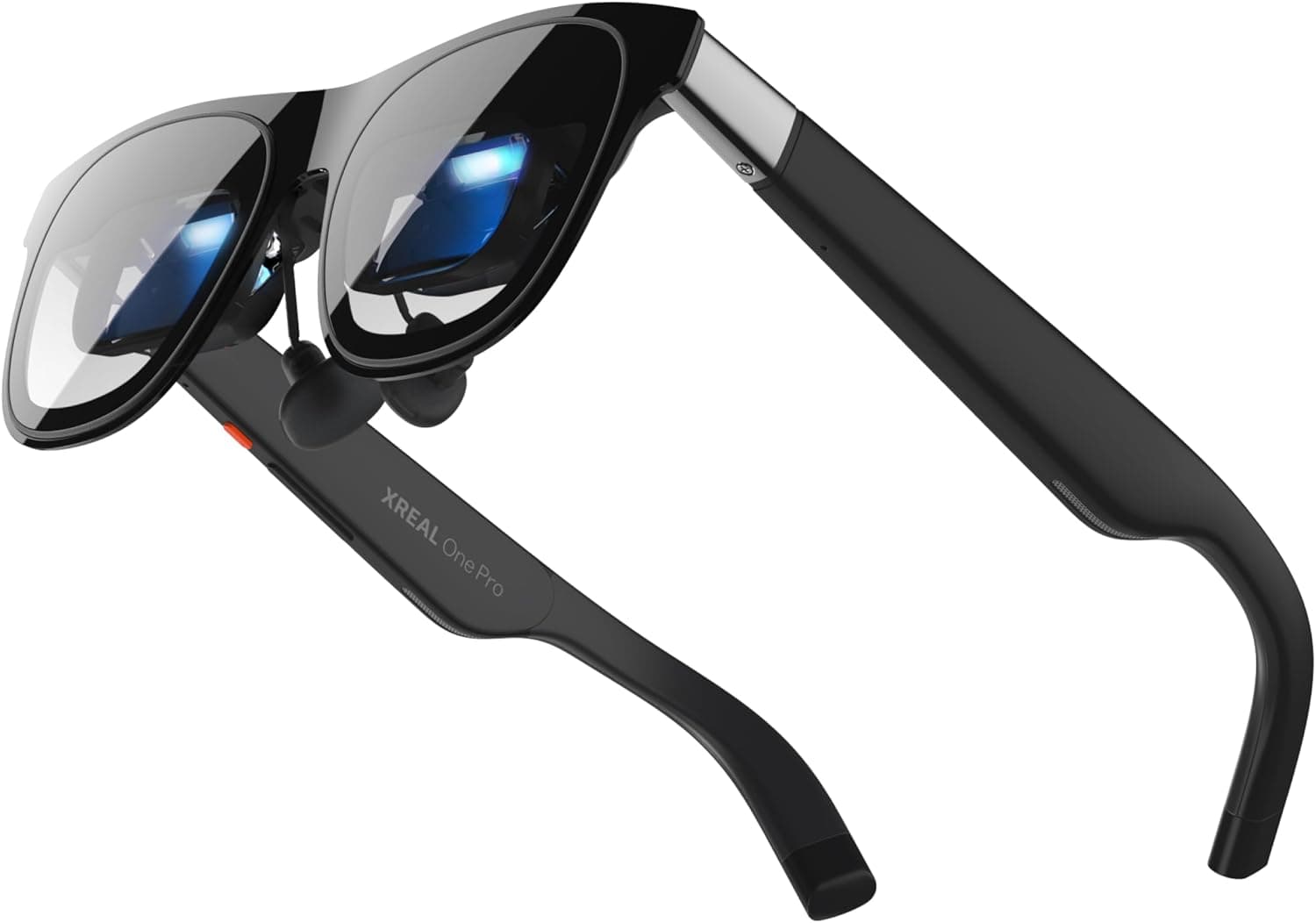
The first thing you notice about the One Pro compared to its predecessor, the Xreal One, is the refined front frame. The thick bird-bath prism lenses that defined earlier AR glasses have been replaced by Xreal's new X-Prism Optic system, which uses flat prism lenses that are dramatically smaller and more inconspicuous. When you are wearing these on a plane or in a coffee shop, the One Pro looks far more like an ordinary pair of chunky sunglasses than a piece of futuristic headgear. Flight attendants have commented that they look nice. Nobody stares. That is a genuinely new experience for AR glasses, which historically have drawn sidelong glances and curious questions in public settings.
The frames are made from aluminum and composite materials, weighing just 85 grams — slightly heavier than the Xreal One's 82 grams, but still light enough to wear for extended sessions without discomfort. The arms house the electronics and the Bose-tuned speakers, which deliver surprisingly full audio for their size. There are three interpupillary distance (IPD) options available — S (53-62mm) and M (57-66mm) — and the software also offers adjustable IPD settings for fine-tuning. This is a meaningful improvement over competitors that force you into a single optical configuration, and it means the One Pro can accommodate a wider range of face shapes and sizes without resorting to prescription lens inserts, though those are also available through Xreal's partner program.
One design detail that deserves more attention is the electrochromic lens system. With a button press, you can darken the lenses to block out ambient light, turning an open-air AR experience into something closer to a VR headset in terms of immersion. This is particularly useful during daytime use or in bright environments where the virtual screen competes with sunlight. The transition is quick and effective, and it means you do not need to carry a separate light shield accessory — a significant practical advantage over earlier Xreal models that required you to clip on a plastic shading attachment.
Display Quality
The build quality feels premium throughout. The hinges have a satisfying snap, the USB-C port on the right arm is snug and secure, and the included carrying case is compact enough to toss in a messenger bag without taking up too much room. There is no creak or flex in the frame, and after weeks of daily use — including being shoved into crowded backpack pockets — the One Pro emerged without a scratch. The included USB-C cable is braided and feels durable, and Xreal also includes a nose pad adjustment kit for dialing in the fit. This is a product that has clearly gone through multiple refinement iterations, and the attention to detail in the packaging and accessories reflects that.
Display and Optics: The Real Upgrade
Here is where the One Pro justifies its existence over the cheaper Xreal One. The original One uses bird-bath optics with a 0.68-inch micro-OLED display that projects through relatively bulky prism lenses. It is a good display — bright, colorful, capable. But the One Pro replaces that entire optical engine with what Xreal calls Optic Engine 4.0, which uses a 0.55-inch Sony Micro-OLED panel projected through those smaller X-Prism lenses.
Spatial Computing
The result is a wider 57-degree field of view compared to the One's 50 degrees. On paper, a 7-degree difference sounds modest. In practice, it is the difference between seeing a complete desktop screen at comfortable reading distance versus needing to turn your head to see the edges. The 57-degree FOV simulates a 171-inch display viewed from approximately four meters, and at a Full HD 1080p resolution running at 120Hz, it is sharp, smooth, and immersive. Text rendering is clean enough for extended reading sessions, and the 120Hz refresh rate eliminates the judder that made earlier 60Hz AR glasses fatiguing during prolonged use.
The wider FOV also makes the 32:9 ultrawide virtual display mode genuinely useful. In the standard One, the ultrawide mode felt cramped because the edges of the virtual screen fell outside your immediate field of view. With the One Pro, you can pin a full ultrawide display to your seatback on a flight and see both ends without moving your head. For productivity work — having a reference document on one side and a writing window on the other — this is transformative. I was able to work with two full browser windows simultaneously, something that was impractical on the original Xreal One.
Viewing angles and eye box are improved over the predecessor. The new optics are far less prone to edge blurring or chromatic aberration, problems that plagued earlier bird-bath designs. Colors are vivid without oversaturation, and the 700-nit perceived brightness holds up well in most indoor environments. Outdoors, the electrochromic dimming helps significantly, though direct sunlight will still wash out the display — this remains a fundamental limitation of the technology, one that all current AR glasses share.
Device Compatibility
Reflection management is where the X-Prism optics truly shine. Earlier AR glasses struggled with internal reflections that created ghost images, especially with bright content on dark backgrounds. The One Pro's flat prism design virtually eliminates this issue. I tested it with high-contrast content — white text on black backgrounds, bright gaming UIs against dark environments — and the reflection artifacts that were clearly visible on the Xreal One were simply gone on the One Pro. This is not a subtle improvement; it fundamentally changes the viewing experience and makes the glasses far more comfortable for extended viewing sessions.
The X1 Chip and Spatial Tracking
Both the Xreal One and the One Pro feature Xreal's custom X1 processing chip, which handles 3 Degrees of Freedom (3 DoF) spatial tracking natively inside the glasses. This means you do not need a separate tracking puck or a connected app to get head-tracking functionality. Plug the glasses into any USB-C DisplayPort device and the 3 DoF tracking works automatically.
Battery & Charging
The tracking quality is solid for static or semi-static use cases. You can pin a virtual screen to a wall or a seatback, and the display stays anchored as you move your head. There is some drift over extended sessions — maybe a degree or two over an hour — but it is easy to recalibrate with a quick head gesture. For gaming, the 3 DoF tracking is adequate but not meant for VR-style head movement. You are steering a cursor or shifting perspective, not ducking behind virtual cover.
The optional Xreal Eye Camera attachment — a 12MP module that snaps into the nose bridge — adds spatial photography from a first-person perspective. It also lays the groundwork for future 6 DoF tracking, which Xreal has promised is coming via a software update. As of now, the camera produces decent but not exceptional photos and 1080p video. Low-light performance is mediocre. The bigger limitation is storage: without a battery in the glasses, photos can only be stored temporarily and must be transferred to a connected device during the same session. It is an interesting preview of what is coming, but not a reason to spend extra today.
One feature worth highlighting that does not get enough attention is the software IPD adjustment. Beyond the physical nose pads that come in different sizes, the One Pro's X1 chip can shift the display output to match your specific interpupillary distance digitally. This means you can fine-tune the alignment without swapping physical components, and the adjustment is precise enough to eliminate eye strain during long sessions. For users who have struggled with single-IPD AR glasses in the past, this is a meaningful quality-of-life improvement.
Software
Audio Performance
The One Pro features dual speakers tuned by Bose — the same partnership that graced the Xreal One. The sound is surprisingly good for wearable speakers. Bass is present if not thunderous, mids are clear and well-defined, and there is enough volume to fill a personal audio bubble in moderately noisy environments. On a plane, you will want to supplement with earplugs or bone-conduction headphones, but for quiet offices or home use, the Bose speakers are more than adequate.
Leakage is well-controlled. People sitting next to you will barely hear what you are watching, even at higher volumes. This is an area where Xreal has clearly refined the directional audio design compared to earlier models. The speakers fire downward and inward, channeling sound toward your ear canals with a surprising degree of precision. In a quiet room, someone sitting three feet away would only hear a faint murmur.
Competition & Value
For music listening, the Bose speakers deliver enjoyable if not audiophile-grade sound. Low frequencies lack the punch you get from dedicated earbuds, but the midrange is warm and natural, making podcasts and dialogue-heavy content a pleasure to listen to. If audio quality is a top priority, pairing the One Pro with a quality pair of wireless earbuds is the best approach — the glasses support simultaneous USB-C display output and Bluetooth audio routing on most devices.
Connectivity and Compatibility
The One Pro connects via USB-C to any device that supports DisplayPort over USB-C. This includes most modern laptops, Android phones, the Steam Deck, ASUS ROG Ally, and certain iPhone models (iPhone 15 and later with USB-C). The compatibility list is broad, and the plug-and-play nature is one of the device's strongest selling points. There is no app required for basic functionality — you just plug in and the display appears within seconds.
For the full spatial experience, including the virtual screen anchoring and the 3 DoF tracking, you will want to use Xreal's Nebula app (available on Windows, macOS, and Android). The app provides a floating control panel where you can adjust screen size, brightness, IPD, and tracking mode. It also enables the ultrawide display mode and multi-screen configurations. The Windows version is the most polished, with smooth screen anchoring and reliable multi-window support. The macOS version has improved since launch but still has occasional hiccups with window layout persistence.
Xreal also sells the Beam Pro, a dedicated Android companion device that runs the full Nebula app natively and provides a touch-friendly interface for managing your virtual screens. It is useful if you want to use the glasses without tethering to a laptop, but it adds another $230 to an already expensive setup. The Beam Pro is worth considering if you plan to use the glasses primarily for media consumption on the go, but most users will find their existing phone or laptop perfectly adequate.
Battery and Power
Here is the catch that comes with every tethered AR display: the One Pro itself has no battery. It draws all its power from the connected device, which means your phone or handheld will drain faster. For a Steam Deck, this is manageable — the Deck has a large battery. For an iPhone, it is more concerning. Xreal includes a USB-C pass-through cable so you can charge your device while using the glasses, but this adds cable clutter.
The lack of a battery is both a blessing and a curse. It keeps the glasses light and compact, and eliminates any concerns about charging the glasses themselves. But it means you are always tethered, and your session length depends on your host device's battery endurance. In practice, I found that a Steam Deck OLED dropped from about 6 hours of battery life to roughly 3.5 hours when powering the One Pro. An iPhone 17 Pro went from a full day to about 4 hours of continuous use.
Gaming With the One Pro
If there is a killer use case for the Xreal One Pro, it is gaming. Connected to a Steam Deck OLED, the glasses transform your handheld into a console experience. The 120Hz refresh rate matches the Steam Deck's output, and the wider FOV means you can see peripheral game elements without squinting. I spent hours playing Cyberpunk 2077, Hades II, and Elden Ring through the One Pro, and the combination of the Steam Deck's controls with the glasses' display is genuinely immersive.
For competitive gaming, the 120Hz refresh rate and low latency keep things responsive. I did not notice any meaningful input lag beyond what the USB-C connection inherently adds, which is negligible. The 1080p resolution is sufficient for most games, though text-heavy strategy games or productivity apps benefit from sitting closer to the virtual screen.
The Switch 2 is also a natural companion for the One Pro. Connected via USB-C, it gives you a massive personal display for Zelda or Mario Kart that is far more immersive than the console's built-in screen. This combination alone justifies the purchase for anyone who travels frequently with a handheld gaming device.
Productivity and Work
As a desktop replacement, the One Pro is more capable than you might expect. The ultrawide mode is genuinely useful for having two windows side by side — a browser on the left, a document editor on the right. Text clarity is good at this resolution and display size, and the 120Hz refresh makes scrolling smooth. I wrote portions of this review using the One Pro as my sole display, connected to my MacBook Pro, and the experience was surprisingly comfortable once I adjusted to the virtual screen real estate.
That said, there are limitations. You need a mouse and keyboard, because the glasses do not provide any input mechanism. You are essentially replacing your monitor, not your computer. And for extended all-day work sessions, the weight on your nose bridge becomes noticeable after about three hours. A counterweight on the rear of the arms helps distribute the mass, but it is not something you would want to use for eight consecutive hours.
Comparisons and Competition
The most obvious comparison is the Xreal One itself, which costs $499 — a $150 discount for a device that shares the same X1 chip, Bose audio, 3 DoF tracking, and software ecosystem. The tradeoff is the older bird-bath optics, a 50-degree FOV, and a slightly dimmer virtual display. If you are primarily watching movies or playing games casually, the standard One is probably sufficient.
The Viture Pro offers a more affordable alternative at under $400, but its display quality and tracking are a step behind both Xreal models. The RayNeo Air 3S slots in at an even lower price point with acceptable but not outstanding optics. Neither approaches the One Pro for visual clarity and FOV width.
On the premium end, the Meta Ray-Ban Display glasses offer smart glasses functionality with a built-in display, but their screen is smaller and their primary use case is different — they are more about notifications and quick interactions than immersive viewing. The Rokid Max remains a solid alternative at a similar price point, but it lacks the native 3 DoF tracking and proprietary chip that make the One Pro's spatial experience so seamless.
Who Should Buy the Xreal One Pro
The One Pro is built for people who already know they want AR glasses and are willing to invest in the best display experience available. If you are a frequent traveler who watches movies on planes, a Steam Deck owner who wants a personal cinema in your backpack, or a remote worker who values portable screen real estate, the One Pro delivers an experience that no competitor currently matches.
If you are AR-curious but unsure, start with the Xreal One. The $150 savings is meaningful, and you get most of the same feature set. The Pro's advantage is real — wider FOV, better optics, reduced reflections, more inconspicuous design — but it is an incremental upgrade rather than a generational leap for casual users.
For the dedicated AR enthusiast, however, the One Pro is the device to beat. Xreal has refined every element of the experience: display, tracking, audio, comfort, and aesthetics. The $649 price (or $599 on sale) is steep, but it reflects the genuine engineering advancement inside these frames. This is the pair of AR glasses that finally feels like it belongs in your everyday carry, not just in a drawer for special occasions.
Related Reviews
Wearables are evolving fast — if you're exploring this space, see how the Apple Watch Ultra 3 pushes adventure watches forward, or check out our Garmin Venu 4 review for the best fitness-first smartwatch. And for another take on smart eyewear, our Meta Ray-Ban Display review is worth a read.
Pricing and Availability
The Xreal One Pro is available on Amazon for $599 (sale price, down from $649 MSRP), at Best Buy, and directly from Xreal's website. It comes in two IPD size options: S (53-62mm) and M (57-66mm). The optional Xreal Eye Camera adds approximately $80 to the sticker, and the Beam Pro companion device runs $230. A bundle including everything is occasionally available at a discount.
The glasses are compatible with iPhone 15 and later (USB-C models), Android phones with DisplayPort alt mode, Mac and Windows laptops via USB-C, the Steam Deck, ASUS ROG Ally, and most USB-C gaming handhelds. No Bluetooth or Wi-Fi connection is needed for basic DisplayPort functionality.
Final Verdict
Pros
- Best-in-class 57-degree FOV with Sony Micro-OLED display
- Sleek, inconspicuous design that passes for regular sunglasses
- X1 chip provides native 3 DoF spatial tracking without external devices
- Bose-tuned speakers with minimal sound leakage
- Electrochromic dimming for adjustable ambient light blocking
- Broad USB-C DisplayPort compatibility across devices
Cons
- $649 MSRP is steep for what is essentially a wearable monitor
- No built-in battery — always tethered to a host device
- Xreal Eye Camera is mediocre and feels like a beta feature
- Not suitable as a VR headset — limited to 3 DoF tracking
Final Verdict
The Xreal One Pro AR Glasses offer the best wearable display experience you can buy, with a wider 57-degree FOV, Sony Micro-OLED optics, and X1 spatial tracking — but the $649 price demands serious commitment from all but the most dedicated users.