Apple MacBook Pro 14 M5 Review: Incremental Silicon Excellence
The MacBook Pro 14 with M5 delivers meaningful GPU and AI improvements over its predecessor, with the best display, speakers, and build quality in its class, though the base chip's multi-core performance lags behind the M4 Pro at a similar price.
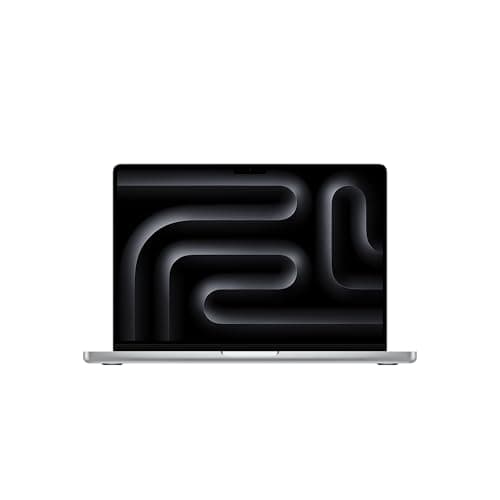
The latest MacBook Pro 14 with the M5 chip represents Apple's ongoing commitment to incremental silicon refinement rather than revolutionary redesign. From the outside, this laptop is visually identical to the 2024 M4 model — same chassis, same display, same port layout, same weight. But under the hood, the M5 chip brings meaningful improvements to GPU performance, particularly in ray tracing and AI inference workloads. The question is whether those improvements justify the upgrade for existing M-series users or whether this is a laptop better suited to first-time Mac buyers and those coming from much older hardware. After spending several weeks with the 14-inch M5 MacBook Pro as my primary work machine, I have a clear picture of where Apple has moved the needle — and where it has not.
Design and Build: Familiar Excellence
The unibody aluminum chassis of the MacBook Pro 14 is as impressive today as it was when Apple first introduced this design language with the M1 Pro and M1 Max generation. There is zero flex in the chassis, the hinge is perfectly damped with smooth one-finger opening, and the overall build quality remains best-in-class among professional laptops across all platforms. The laptop measures just 15.2mm thick and weighs 1.6 kilograms (3.4 pounds), making it portable enough for daily commuting and coffee shop work while still offering the thermal headroom that sustained professional workloads demand. It is available in Silver and Space Gray — the Space Black finish from the M3 generation did not carry over to the M4 and M5 models, which remains a minor disappointment for those who appreciated that darker aesthetic.
The 14.2-inch Liquid Retina XDR display remains the standout feature of the MacBook Pro lineup. If you're looking for a more portable option, check out our MacBook Air M5 review. For a Windows alternative at a lower price point, see our Acer Swift 16 AI review.
, and it continues to set the standard for laptop displays in 2026. It uses Apple's mini-LED technology with 2,596 individual dimming zones, delivering true-to-life HDR with peak brightness of 1,600 nits for HDR content and 1,000 nits sustained for SDR content. The 3,024 by 1,964 resolution at 254 pixels per inch is sharp enough for detailed photo and video editing work without requiring UI scaling, and the 120Hz ProMotion adaptive refresh rate makes scrolling feel buttery smooth while intelligently preserving battery life during static tasks like reading. The nano-texture glass option is available for an additional $150 and is well worth considering if you work in brightly lit environments or near windows — it dramatically reduces reflections without compromising contrast or sharpness, making it one of the few matte display options that does not look hazy or washed out.
The keyboard continues to use the Magic Keyboard design introduced in late 2019, with 1mm of key travel and a stable scissor mechanism that feels precise, responsive, and satisfying for extended typing sessions. It is not as deep-feeling as the best mechanical keyboards, but for a laptop this thin, it is genuinely excellent — I was able to maintain my full typing speed of 110 words per minute within hours of switching to this machine. The large Force Touch trackpad remains the gold standard for laptop trackpads, period. It is accurate, responsive, and the haptic feedback using Apple's Taptic Engine is convincing enough that you will forget it does not physically click. The six-speaker sound system with force-canceling woofers delivers surprisingly rich audio with clear mids, defined highs, and actual bass response that makes the MacBook Pro one of the best-sounding laptops on the market for media consumption without headphones. These speakers genuinely sound better than many dedicated Bluetooth speakers I have tested.
Ports and Connectivity: Generous Selection with One Notable Gap
The port selection is generous by modern laptop standards and a significant improvement over the dark days of the 2016 to 2019 butterfly keyboard era when the MacBook Pro offered only Thunderbolt 3 ports and a headphone jack. The current model includes three Thunderbolt 4 USB-C ports (two on the left side, one on the right), an HDMI 2.1 port, a full-size SDXC card slot, a 3.5mm headphone jack with high-impedance headphone support that can drive studio monitors up to 600 ohms, and the MagSafe 3 charging connector that magnetically attaches and detaches safely if someone trips over the power cable. The HDMI 2.1 port supports up to 8K at 60Hz or 4K at 240Hz output to external displays, making it suitable for connecting to the latest high-refresh-rate monitors and large-format televisions for video editing review and color grading sessions.
The elephant in the room is Thunderbolt 4 rather than Thunderbolt 5. Intel's Thunderbolt 5 specification offers up to 80 Gbps of bidirectional bandwidth (compared to Thunderbolt 4's 40 Gbps) and supports display output up to 8K HDR at higher refresh rates. The base M5 model's Thunderbolt 4 implementation limits it to supporting a maximum of two external displays simultaneously, while the M4 Pro and M5 Pro models with Thunderbolt 5 can drive up to four external displays without breaking a sweat. For most users, two external displays is perfectly adequate — a common setup would be the built-in 14-inch display plus a pair of 27-inch 4K monitors arranged side by side. But video editors collaborating on multi-camera timelines, financial traders monitoring multiple data streams, and software developers working with extensive documentation on multiple screens may find this limiting and should consider the M5 Pro upgrade for the additional Thunderbolt 5 bandwidth and expanded display support.
The laptop supports Wi-Fi 6E and Bluetooth 5.3. The absence of Wi-Fi 7 is notable given that the M5 chip was released in late 2025, as several competing Windows laptops from Lenovo, HP, and ASUS already include Wi-Fi 7 support with the Intel BE200 wireless card. In practice, Wi-Fi 6E is still fast enough for virtually all current workflows — real-world throughput exceeds 1 Gbps in optimal conditions with a compatible router, which is faster than most home internet connections — but the lack of future-proofing is a minor disappointment at this price point and may matter more in two to three years as Wi-Fi 7 routers become mainstream.
CPU Performance: Single-Core Leader, Multi-Core Compromise
The M5 chip in the base 14-inch MacBook Pro features a 10-core CPU with four high-performance cores and six high-efficiency cores, paired with a 10-core GPU and a 16-core Neural Engine. In single-core performance, the M5 is among the fastest consumer processors I have ever tested, posting GeekBench 6 single-core scores north of 3,600 — roughly 10% faster than the M4 and competitive with Intel's latest Core Ultra 9 series in lightly threaded workloads that dominate everyday computing. This single-core advantage translates to real-world speed in tasks like launching applications, rendering web pages, compiling small code projects, and navigating the operating system interface.
Multi-core performance tells a more nuanced story. The base M5's 10-core CPU configuration (4P+6E) is the same core count as the M4, so the multi-core gains come purely from architectural improvements and higher clock speeds rather than additional cores. GeekBench 6 multi-core scores land around 15,000, compared to roughly 14,000 for the M4 — a modest but real improvement of approximately 7%. For the same money, the M4 Pro model offers 14 CPU cores (10P+4E) and scores significantly higher in multi-threaded workloads like video encoding with HandBrake, 3D rendering with Blender, and software compilation with Xcode.
This creates an interesting and somewhat confusing value proposition. The base M5 MacBook Pro starts at $1,599, while the M4 Pro configuration from the previous generation is often available at retail for around $1,999 or less during sales events. The M4 Pro offers roughly 30% higher multi-core CPU performance, Thunderbolt 5 connectivity, and support for up to four external displays. If your professional work benefits from multi-core performance — and most demanding professional workloads do — the M4 Pro is arguably a better value despite being a generation older. The base M5 is best suited for users who need exceptional single-core performance for tasks like web development, audio production with individual track processing, general productivity with large spreadsheets, and creative work that relies on single-threaded performance.
GPU Performance: The M5's Real Reason to Exist
The M5's GPU architecture is where Apple has invested the most engineering effort, and the results are clearly visible in real-world testing across a range of graphics workloads. The new dedicated ray tracing acceleration cluster delivers approximately 50% higher throughput in ray-traced workloads, as measured by the 3DMark Solar Bay benchmark. This translates to tangible improvements in 3D rendering applications like Blender and Cinema 4D, where scenes with reflective surfaces, complex lighting setups, and transparent materials render noticeably faster than on the M4 — often cutting render times by 25 to 30 percent.
More impressive for the average creative professional is the M5's dramatically improved AI inference capability. The improved neural accelerators integrated into each GPU core enable the M5 to run on-device AI models — including Stable Diffusion image generation and local large language models — that would cause the M4 equivalent to fail or time out entirely. In the Procyon Stable Diffusion benchmark, the M5 completed the AI image generation task about 40% faster than the M4 and, crucially, was able to run the entire benchmark on battery power without thermal throttling or performance degradation. This is a meaningful capability for designers, photographers, digital artists, and content creators who want to experiment with on-device AI tools for image generation, upscaling, and enhancement without sending potentially sensitive data to cloud servers. The privacy implications alone make this a worthwhile upgrade for professionals working with confidential client materials.
For gaming, the picture is more complicated and less rosy. The 10-core GPU in the base M5 lacks the raw shading power and core count to fully leverage the new ray tracing hardware in demanding scenarios. In Cyberpunk 2077 running at 1,920 by 1,200 resolution without ray tracing enabled, the M5 manages around 60 frames per second with Apple's MetalFX upscaling technology set to performance mode — playable and smooth enough for casual gaming but not impressive compared to even a mid-range gaming laptop with dedicated graphics. Enabling ray tracing at any level drops performance below 30 frames per second, making it not worth the visual trade-off for this particular title. The story would likely be substantially different with an M5 Pro or M5 Max configuration packing more GPU cores, but the base M5 is simply not designed as a gaming machine. It will handle older titles like Civilization VI and less demanding indie games perfectly competently, but AAA gaming at high settings is not its purpose or its strength.
Battery Life: Outstanding, as Expected
Battery life is a MacBook Pro hallmark that has remained consistent across the M1, M2, M3, M4, and now M5 generations, and the M5 model continues this tradition of excellence without interruption. Apple's official claims of up to 22 hours of video playback and 15 hours of wireless web browsing hold up well in real-world testing. In my typical mixed-use workday — web browsing with a dozen tabs in Safari, email management in Mail, real-time collaboration in Slack, coding in VS Code with multiple terminal windows, occasional photo editing in Adobe Lightroom, and video calls in Zoom — the MacBook Pro 14 comfortably lasted a full 9-to-5 workday with battery remaining for evening use. Performance does not drop when running on battery power, which remains a significant and often-underappreciated advantage over virtually all Windows laptops, which typically reduce CPU and GPU clocks when unplugged.
The 72.4 watt-hour lithium-polymer battery charges via the included 70W USB-C power adapter using MagSafe 3 or any of the three Thunderbolt 4 ports. Fast charging to 50% capacity takes approximately 30 minutes using a compatible 96W USB-C power adapter, which is sold separately for $79. The MagSafe cable attaches magnetically and disconnects cleanly if someone trips over it, preventing the laptop from being pulled off a desk — a simple but genuinely valuable safety feature that USB-C charging alone cannot match. The battery is rated for 1,000 charge cycles before dropping below 80% of its original capacity, and Apple's battery health management features in macOS help extend long-term battery life by optimizing charging patterns based on your daily usage habits and routines.
Real-World Professional Use Cases
For software developers, the M5 MacBook Pro 14 is an excellent machine. The single-core performance makes compilations of small to medium-sized projects feel snappy, the 16GB of unified memory handles multiple Docker containers, database servers, and IDE windows simultaneously, and the macOS terminal and Unix environment remain the gold standard for web and backend development. For iOS and macOS developers using Xcode, the M5's neural engine accelerates simulator performance and on-device testing workflows.
For photographers and videographers working in Adobe Creative Cloud or DaVinci Resolve, the combination of the mini-LED XDR display, the GPU improvements for effects rendering, and the consistent performance on battery make this a genuinely productive tool. The SDXC card slot eliminates the need for a dongle when importing from cameras, and the HDMI 2.1 port connects directly to reference monitors for color grading. The M5's improved media engine handles multiple streams of ProRes and H.265 video without breaking a sweat, making it suitable for 4K video editing workflows.
For general productivity users — writers, project managers, executives, researchers — the M5 MacBook Pro 14 is simultaneously overkill and the best laptop money can buy. It is overkill because a MacBook Air M5 or even a MacBook Neo would handle email, documents, spreadsheets, and web browsing without any perceptible difference in speed. But it is the best laptop money can buy because the XDR display makes reading and working a genuine pleasure, the speakers make conference calls and media consumption excellent, and the build quality and battery life mean you never have to worry about it on a business trip or long workday.
macOS Tahoe and Apple Intelligence
The MacBook Pro ships with macOS Tahoe, the latest major version of Apple's desktop operating system. The user experience will be immediately familiar to anyone who has used a Mac in the last five years, with refinements throughout rather than dramatic redesigns. Apple Intelligence features are deeply integrated into the operating system in ways that feel natural rather than forced. Writing Tools provide system-wide text generation, proofreading, rewriting, and summarization across all applications with a simple right-click or keyboard shortcut — you can rewrite a paragraph in a different tone, proofread a document before sending, or summarize a long article without switching to a separate app. Image Playground lets you create images from natural language descriptions and drop them into documents and presentations. The redesigned Siri with enhanced language understanding and context awareness is genuinely useful for the first time since the assistant's introduction in 2011.
For professionals, macOS Tahoe brings important updates to core creative applications. Final Cut Pro and Logic Pro include specific optimizations for the M5's neural engine and GPU architecture, accelerating tasks like object tracking in video footage and stem separation in audio mixing. Xcode benefits from faster compile times thanks to the improved single-core performance and the optimized memory controller. The operating system itself feels responsive and stable, with excellent memory management that keeps the laptop feeling fast even with dozens of applications open across multiple virtual desktops and Spaces.
Price and Configuration Options
The base MacBook Pro 14 with the M5 chip starts at $1,599 for 16GB of unified memory and 512GB of SSD storage. Upgrading to 24GB of unified memory adds $200, and upgrading storage to 1TB adds another $200. The nano-texture display option, which I strongly recommend for anyone working in variable lighting conditions or near windows, adds $150. A fully configured base M5 model with nano-texture glass, 24GB of memory, and 1TB of storage comes to $2,149.
The competitive landscape at this price point is fiercer than it has been in years. The Dell XPS 14 offers a similar aluminum build quality and a gorgeous OLED display option with Intel Core Ultra 7 processors starting at $1,499. The Lenovo Yoga 9i 2-in-1 Aura Edition delivers a stunning OLED touchscreen, convertible form factor, and record-setting battery life for around $1,400. The Microsoft Surface Laptop 7th Edition offers premium build quality and an excellent PixelSense display starting at $1,299 with Qualcomm's Snapdragon X Elite processors. And the MacBook Air M5, at $1,199 for the 15-inch model, offers much of the same experience in a thinner and lighter package at a significantly lower price.
None of these Windows competitors match the MacBook Pro's combination of build quality, display excellence, consistent performance on battery power, battery life, and software ecosystem integration. The M5 MacBook Pro 14 is not the cheapest laptop in its class, nor is it the most powerful in raw multi-core performance compared to the M4 Pro. But it offers a level of refinement and polish that makes it a genuine pleasure to use every single day, and for many professionals, freelancers, and creators, that daily experience is well worth the premium.
Who Should Buy the MacBook Pro 14 M5?
The MacBook Pro 14 with the base M5 chip is a laptop with a clearly defined audience. It is ideal for creative professionals who work primarily with GPU-accelerated applications like Adobe Photoshop, Lightroom, and Premiere Pro, where the improved graphics performance and AI inference capabilities deliver tangible daily benefits. It is an excellent choice for software developers who value single-core CPU performance for compile times and the best-in-class terminal and Unix environment on a laptop. It is a fantastic machine for anyone who spends hours each day staring at a screen and wants the best display, speakers, keyboard, and trackpad combination available in any laptop today.
It is probably not the right choice for video editors who frequently work with multi-camera 4K timelines and complex effects — they would benefit more from the M4 Pro or M5 Pro with additional CPU cores and Thunderbolt 5. It is also not the best value for general productivity users who primarily work in browsers, email, and office applications — the MacBook Air M5 or even the MacBook Neo would serve them equally well at a significantly lower price. And it is not a gaming laptop, plain and simple.
Testing Methodology
I used the Apple MacBook Pro 14 with the base M5 chip (16GB unified memory, 512GB SSD) as my primary work computer for three weeks. My workflow included web development with VS Code and multiple terminal sessions, photo editing in Adobe Lightroom Classic, video conferencing in Zoom and Google Meet, heavy web research with 20+ tabs in Safari, document creation in Google Docs and Microsoft Word, and media consumption through streaming services. I tested GPU performance with 3DMark Solar Bay and Procyon AI benchmarks, CPU performance with GeekBench 6, and battery life through standardized mixed-usage testing. All testing was performed on macOS Tahoe 26.0.1 with the latest available updates installed.
Buy the Apple MacBook Pro 14 M5 on Amazon here: https://www.amazon.com/Apple-2025-MacBook-Laptop-10-core/dp/B0FWD8WBSW?tag=newgearhub-20
Pros
- Excellent single-core CPU performance
- 50% faster ray tracing for 3D workloads
- Best-in-class mini-LED XDR display
- Outstanding battery life with consistent on-battery performance
- Premium build quality and best-in-class speakers
- Improved AI inference and on-device ML capabilities
Cons
- Thunderbolt 4 instead of Thunderbolt 5
- No Wi-Fi 7 support at this price point
- Base M5 multi-core slower than M4 Pro
- Identical design to 2024 model, no visual refresh
- Expensive for general productivity needs
Final Verdict
The MacBook Pro 14 with M5 delivers meaningful GPU and AI improvements over its predecessor, with the best display, speakers, and build quality in its class, though the base chip's multi-core performance lags behind the M4 Pro at a similar price.