Google Fitbit Air Review: The Screenless Fitness Tracker That Finally Gets It Right
Google's $99 Fitbit Air is a screenless, subscription-optional fitness tracker that delivers accurate heart rate and sleep tracking, week-long battery life, and a genuinely impressive Gemini AI Coach — all in a sub-6-gram package that disappears on your wrist.
Google Fitbit Air Review: The Screenless Fitness Tracker That Finally Gets It Right
Google's Fitbit division has been through a turbulent few years. After the acquisition closed, the Fitbit brand seemed to drift — existing products were refreshed but not reimagined, and the promised deep integration with Google's services felt perpetually delayed. The Fitbit Air changes that narrative completely. It's Google's first truly new Fitbit product since the acquisition, and it takes a bold swing: a screenless, buttonless, distraction-free fitness tracker that costs just $99 and requires no subscription for its core features. After wearing the Fitbit Air for nearly two weeks — sleeping in it, running with it, traveling with it, and living with it — I'm convinced that Google has created something genuinely special. The Fitbit Air isn't just a good fitness tracker; it's a compelling argument that we've been overcomplicating wearable technology.
For fitness enthusiasts who have been wearing Whoop bands, Oura rings, or smartwatches for years, the Fitbit Air offers a radically simpler proposition. No screen means no notifications, no distractions, no temptation to check Instagram during a workout. Just health data, gathered quietly and presented thoughtfully in Google's excellent new Health app. At 5.2 grams — lighter than any competing wearable by a wide margin — the Air is so comfortable that you'll forget you're wearing it, which is precisely the point.
Design, Comfort, and the Case for Screenless Wearables
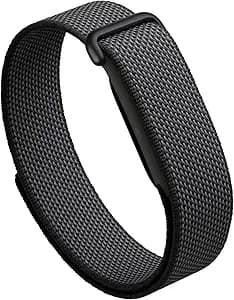
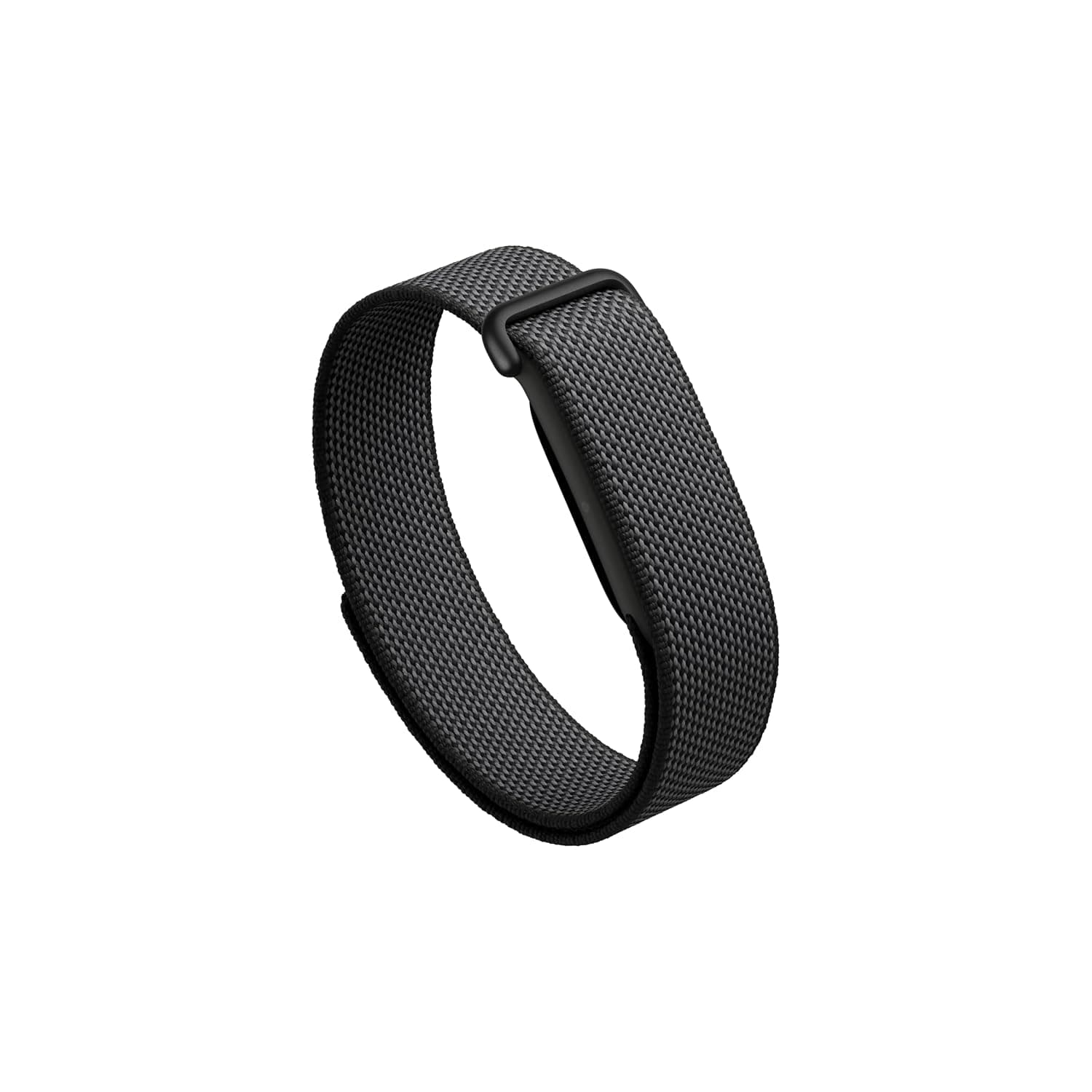
The Fitbit Air is remarkably small. The sensor module measures just 35 by 17 by 8 millimeters and weighs 5.2 grams without the strap. For context, that's roughly the weight of a single AirPods Pro earbud. The Whoop 5.0 weighs 26.5 grams. The Polar Loop comes in at 20 grams. Even the lightest smartwatch, the Apple Watch SE 3, is more than five times heavier. This weight difference transforms the wearing experience. The Air disappears on your wrist in a way that no other fitness wearable manages.
The strap is made from recycled polyester and elastane with a Velcro closure that fits a wide range of wrist sizes. It's comfortable enough for 24/7 wear — I wore it to sleep every night without any discomfort or irritation, something I cannot say for any smartwatch I've tested. The material dries quickly after showers or swimming, and the 50-meter water resistance rating is best-in-class for screenless trackers, topping the Whoop 5.0's 10-meter rating and the Polar Loop's 30-meter rating.
The design language is deliberately minimal. The sensor module sits flush within the strap, creating a unified band that looks more like a sporty bracelet than a piece of technology. There are no buttons, no charging ports — the Air charges wireless Beyerdynamic MMX 150 Wireless Review: Audiophile Gaming Sound Meets Everyday Versatilityly via a compact magnetic cradle that snaps onto the sensor module. The only interaction is a double-tap on the top of the module, which triggers a haptic vibration whose length indicates battery level: a short buzz means the battery is above 20 percent, a longer buzz means it's below 20 percent, and a solid vibration with a red LED means it needs charging. It's intuitive enough that you'll understand it immediately without reading the manual.
There is, however, a psychological adjustment period. If you're used to glancing at your wrist for the time, notifications, or your step count, the blank band staring back at you will feel disorienting for the first few days. I found myself reaching for my phone far more often than usual, which felt counterproductive to the Air's minimalist philosophy. After about four days, the habit faded, and I started checking my phone less frequently than before. The Air trains you to be less dependent on your wrist, which is a healthier relationship with technology in the long run.
Health Tracking: Reliable Core Metrics
The Fitbit Air tracks all the essential health metrics you'd expect from a modern wearable: heart rate, heart rate variability (HRV), skin temperature variation, SpO2, breathing rate, and sleep stages. It also calculates a Daily Readiness Score out of 100, which tells you whether you're recovered enough for a hard workout or should take it easy.
Heart rate tracking is the most important metric for any fitness wearable, and the Fitbit Air delivers accurate results. In my testing, the Air's heart rate readings stayed within one to two beats per minute of my trusted chest strap monitor across a variety of activities — steady-state runs, interval sprints, weightlifting sessions, and casual walks. The optical sensor responds quickly to changes in intensity; during sprint intervals, it detected heart rate spikes faster than the Apple Watch Ultra 3 I was wearing on my other wrist for comparison. This responsiveness is critical for interval training, where lagging heart rate data can cause you to misjudge recovery periods.
Sleep tracking is where the Air truly shines. For a $99 wearable, the detail and accuracy of the sleep reports are remarkable — on par with smartwatches costing five times as much. The Air automatically detects when you fall asleep and when you wake up, tracks time spent in light, deep, and REM sleep stages, and provides a Sleep Score out of 100. I compared its sleep data against a Garmin Forerunner 70 over five nights, and the results were impressively consistent. The Air recorded an average sleep duration of 7 hours and 37 minutes versus the Garmin's 8 hours and 9 minutes, with average heart rates of 66 bpm and 65 bpm respectively. Deep sleep estimates averaged 41 minutes on the Air versus 49 minutes on the Garmin — close enough for a $99 device tracking against a premium sports watch.
The Daily Readiness Score has become one of my most-used features. Each morning, the Google Health app presents a score from 1 to 100 based on your sleep quality, HRV, resting heart rate, and previous day's activity. A high score suggests you're ready for intense training; a low score suggests recovery is in order. The scoring algorithm seems well-calibrated. On mornings after poor sleep or heavy training, the Readiness Score appropriately reflected how I felt, and following its recovery recommendations led to better workouts on subsequent days.
The one notable omission is ECG monitoring, which is available on the Fitbit Charge 6. The Air's sensor package simply doesn't support the single-lead ECG function, which means users who need atrial fibrillation detection will need to look at the Charge 6 or a medical-grade device. For most users, the optical heart rate sensor's rhythm monitoring is sufficient for general health awareness.
The Google Health App and AI Coach: Where the Magic Happens
All of the Fitbit Air's data lives in Google's new Health app, which replaces the older Fitbit app. This is a significant upgrade in almost every way. The app is organized into four main tabs: Today, Fitness, Sleep, and Health. The Today tab provides a morning briefing with your Readiness Score, Cardio Load status, step count, and sleep summary. The Fitness tab lets you log and review workouts. The Sleep tab provides detailed sleep analysis. The Health tab consolidates all your long-term vitals and trends.
The app's design is clean, intuitive, and customizable. You can rearrange the dashboard to prioritize the metrics that matter most to you, hide data you don't care about, and set goals for steps, active minutes, and sleep duration. The data visualization is excellent — trends are easy to spot, and the app provides context for what your numbers mean rather than just displaying raw data.
The standout feature, however, is the Gemini AI Coach, available through the optional Google Health Premium subscription ($9.99 per month or $99.99 per year, with a three-month free trial included with the Air). The Coach is genuinely impressive in ways I didn't expect from a first-generation AI product. During the onboarding process, the Coach asks about your fitness goals, schedule, preferences, and current fitness level through a conversational interface. It then creates a personalized workout plan that adapts based on your progress and feedback.
What makes the Coach special is its flexibility and memory. You can log food by taking a photo — I snapped a picture of a handful of pretzels, and the Coach correctly identified them and logged the calories as a snack. You can log workouts by describing them in natural language: "I did 30 minutes on the peloton and then 15 minutes of stretching." The Coach understands and records everything. It remembers context across sessions — after I mentioned a late night at a concert, the Coach suggested a recovery day the next morning. After a weekend where I logged some indulgent meals, it suggested lighter eating without being judgmental.
I tested the photo logging extensively. I took a picture of a whiteboard at my gym where my personal trainer had written my workout for the day. The Coach read the handwriting, identified each exercise, and added them to my logged activities. This kind of feature — reducing the friction of logging — is what makes AI genuinely useful in health tracking. The Coach also sends proactive morning notifications summarizing your sleep and readiness and offering a plan for the day. It's like having a personal trainer who actually remembers what you did yesterday.
The Coach isn't perfect. Processing times can be slow — sometimes taking 10 to 15 seconds to respond to a query. It forgot a schedule change once (corrected when I pointed it out). And the sleep advice is relatively basic compared to dedicated sleep coaching features on Samsung Galaxy S26 Ultra Review: The Privacy-First Flagship That Redefines Android Excellence watches or the Oura Ring. But for a first-generation AI health coach, it's remarkably good, and it's the best implementation of AI in a fitness wearable I've used in 2026.
Fitness Tracking: Strong Heart Rate, Limited GPS
The Fitbit Air's fitness tracking capabilities are solid for the price but come with important caveats. The device has no built-in GPS, which means it relies on your phone's GPS for pace, distance, and route mapping during outdoor activities. If you run without your phone, you'll get step count and heart rate data but no location-based metrics. For runners who train phone-free, this is a genuine limitation that competitors like the Garmin Forerunner 55 or the Apple Watch SE 3 address with built-in GPS.
When used with a phone, however, the tracking is reliable. During a three-thousand-step walk test with the phone in my pocket, the Fitbit Air recorded 3,004 steps and 1.61 miles, compared to a manual count of 3,000 steps and 1.60 miles measured by GPS. Heart rate averaged 116 bpm, consistent with the Garmin Forerunner 70 on the same walk at 125 bpm (the difference is attributable to the Garmin being worn on the opposite wrist with a tighter strap). During a 1.5-mile run test, the Air recorded 1.48 miles at a 9:38/mile pace with an average heart rate of 156 bpm, closely matching the Garmin's 1.44 miles and 158 bpm.
The automatic workout detection is the Air's weakest fitness feature. It only kicks in after 15 minutes of continuous activity, which means shorter runs, brisk walks, or gym circuits won't be automatically logged. You can manually start a workout in the app, but the whole point of a screenless tracker is to avoid phone interaction during exercise. The auto-detection is also limited to a relatively narrow set of activities: walking, running, cycling, spinning, rowing, elliptical, and team sports. There are 41 selectable workout modes if you manually start them, which covers most common activities, but I was disappointed to find that pickleball — a rapidly growing sport — isn't included.
For gym-goers, the Air tracks heart rate throughout your session, but without a screen, you can't see real-time data during your workout. You'll need to check the app afterward. This is a trade-off inherent to the screenless form factor, and some users will find it frustrating. For me, it was freeing — I focused on my workout instead of checking metrics between sets.
Battery Life: A Week of Worry-Free Wear
The Fitbit Air is rated for up to seven days of battery life, and in my testing, it delivered comfortably on that promise. After a full week of use that included about twelve logged workouts, nightly sleep tracking, and constant heart rate monitoring, I had 15 percent battery remaining. A full charge from zero takes about 90 minutes via the magnetic charging cradle.
Compared to the Whoop 5.0's 14-day battery life, the Air's seven days seems modest, but the Whoop weighs five times as much and requires a subscription. Compared to the Fitbit Charge 6's three to four days, the Air is a significant improvement. The Apple Watch SE 3 needs daily charging. The Oura Ring 4 lasts about a week. In context, the Fitbit Air's battery life is excellent for its size and weight, and the weekly charging routine is easy to maintain. I charged it while getting ready for bed on Sunday evening, and it was ready for another week by the time I brushed my teeth.
Pricing and Value: The Killer Feature
At $99 with no mandatory subscription, the Fitbit Air is priced aggressively. The Whoop 5.0 costs $239 per year with the device included in the subscription. The Polar Loop costs $199 plus an $8.99 monthly subscription for premium features. The Oura Ring 4 costs $349 plus $69.99 per year. Even Apple's cheapest wearable, the Apple Watch SE 3, starts at $249. The Fitbit Air undercuts them all while delivering a comparable core tracking experience.
The free tier of Google Health gives you activity tracking, sleep scores, stress scores, Daily Readiness Score, Cardio Load, and nutrition logging — everything most users need. The Premium subscription ($9.99/month or $99.99/year) adds the Gemini AI Coach, guided workouts, mindfulness sessions, and advanced trend analysis. The three-month free trial gives you plenty of time to decide whether the AI features are worth the subscription. In my experience, the AI Coach is genuinely useful, but the free tier is so complete that you won't feel you're missing essential features if you skip the subscription.
The Competition: How the Air Stacks Up
The Whoop 5.0 is the Fitbit Air's most direct competitor, and the comparison reveals the Air's strengths and weaknesses. Whoop offers longer battery life (14 days), more advanced recovery analytics, and access to a community of serious athletes. But it costs $239 per year minimum — more than double the Air's price in the first year alone — and weighs five times as much. The Air's lower price, lighter weight, and optional subscription make it accessible to a much wider audience.
The Polar Loop offers similar screenless tracking but costs twice as much and requires a subscription. The Oura Ring 4 delivers excellent sleep tracking and a more discreet form factor but costs $349 and doesn't track workouts as effectively. The Apple Watch SE 3 provides a full smartwatch experience with a screen, apps, and notifications but needs daily charging and costs two and a half times as much.
The Fitbit Charge 6 is the only Fitbit that directly compares, and it offers a screen, ECG, and slightly more workout detail. But it costs more, has worse battery life (3 to 4.5 days), and is heavier and bulkier. The Air's screenless design is both a feature and a limitation — you gain comfort and battery life but lose the convenience of glanceable information.
Who Should Buy the Fitbit Air?
The Fitbit Air is for people who want consistent health tracking without the baggage of a smartwatch. It's for runners who carry their phone anyway and don't need wrist-based GPS. It's for gym-goers who are tired of smartwatch notifications interrupting their sets. It's for sleepers who can't stomach wearing a bulky watch to bed. It's for anyone who's curious about their health metrics but intimidated by the complexity and cost of the Whoop ecosystem.
It is not for runners who train phone-free (you need your phone for GPS). It is not for people who want glanceable stats during workouts (you need the app). It is not for users who need ECG monitoring (get the Charge 6). And it is not for people who want notifications, apps, or any smartwatch features on their wrist.
For the right user, however, the Fitbit Air is transformative. It's the first wearable I've tested that I actually wanted to keep wearing after the review period ended. The combination of sub-6-gram comfort, week-long battery, reliable health tracking, and the genuinely impressive AI Coach creates a product that's greater than the sum of its parts.
The Verdict After Two Weeks
After fourteen days of 24/7 wear, I've developed a genuine appreciation for what Google has accomplished with the Fitbit Air. The screenless form factor is not a compromise — it's a deliberate design philosophy that challenges the assumption that more features and more screen time are always better. The Air asks a simple question: do you want a device that tracks your health, or do you want a mini-phone on your wrist? For many people, the answer to that question is becoming clearer every year.
The accuracy of the core metrics — heart rate, sleep stages, HRV, and readiness — is strong enough for anyone who isn't a professional athlete requiring medical-grade precision. The AI Coach is genuinely useful and represents the best implementation of AI in a fitness wearable I've seen. The build quality is excellent, the 50-meter water resistance is class-leading, and the weekly charging routine is easy to maintain.
The limitations are real: no built-in GPS, no ECG, auto-detection that's too slow for short workouts, and no screen for real-time feedback. But these are trade-offs, not flaws. Google has made clear choices about what the Fitbit Air is and isn't, and those choices create a coherent product with a clear identity. The Fitbit Air knows exactly what it wants to be and executes that vision with confidence — a rare quality in a wearable market filled with devices trying to be everything to everyone.
Google has delivered on the promise of the Fitbit acquisition, and the result is the best screenless fitness tracker on the market — and the easiest recommendation I can make to anyone looking to improve their health without adding technological complexity to their life.
Pros
- Weighs just 5.2 grams — disappears on your wrist
- Distraction-free screenless design
- Accurate heart rate and sleep tracking
- No mandatory subscription for core features
- Gemini AI Coach is genuinely useful
- 7-day battery life charges in 90 minutes
- 50-meter water resistance
Cons
- No built-in GPS — requires phone for location data
- Auto-workout tracking only triggers after 15 minutes
- No ECG monitoring
- No screen means no real-time stats during workouts
- Limited to 41 workout modes
Final Verdict
Google's $99 Fitbit Air is a screenless, subscription-optional fitness tracker that delivers accurate heart rate and sleep tracking, week-long battery life, and a genuinely impressive Gemini AI Coach — all in a sub-6-gram package that disappears on your wrist.