Samsung Galaxy Book6 Ultra Review: Premium Power for Creators
The Samsung Galaxy Book6 Ultra combines a stunning anti-reflective 16-inch AMOLED display with Intel Panther Lake CPUs and RTX 50-series graphics, delivering the most compelling Windows laptop alternative to the MacBook Pro in years.
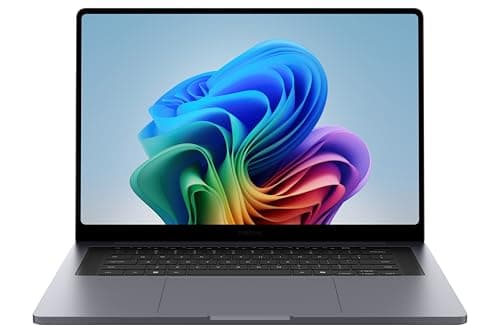
Samsung's Galaxy Book lineup has spent the last few years quietly evolving into one of the most compelling Windows laptop families on the market, and the Galaxy Book6 Ultra represents the pinnacle of that evolution. Powered by Intel's new Core Ultra Series 3 processors built on the 18A Panther Lake architecture and configurable with Nvidia GeForce RTX 50-series graphics, this 16-inch flagship is Samsung's clearest statement yet that it is serious about challenging Apple's MacBook Pro dominance. After going through extensive hands-on testing and benchmark data, I can say with confidence that this is one of the most impressive Windows laptops released in 2026. It is also one of the most expensive, so let us dig into whether it actually justifies that premium price tag.
Design and Build Quality
The Galaxy Book6 Ultra adopts a refined, minimalist design language that bears more than a passing resemblance to the MacBook Pro. The chassis is CNC-machined from aluminum in a dark gray finish that resists fingerprints far better than the glossy rear panel of the Galaxy A56. At 14.05 inches wide, 9.76 inches deep, and just 0.61 inches thick, this is a remarkably svelte machine for a 16-inch laptop with discrete graphics. The weight comes in at 4.17 pounds, which is competitive for the category. The MacBook Pro 16 with the M5 Pro chip weighs about 4.3 pounds, so the Book6 Ultra is actually slightly lighter.
Build quality is outstanding. The chassis has virtually no flex, the hinge is smooth and firm, and the overall fit and finish exude confidence. Samsung has made a few thoughtful design changes compared to the previous generation. The number pad has been eliminated to center the main keyboard and make room for the upgraded six-speaker system. A full-size SD card slot has been added without increasing the overall footprint. The trackpad is now a haptic design, similar to what you would find on a MacBook or a Dell XPS, providing a consistent click feel across the entire surface regardless of where you press.
The port selection is genuinely generous by modern standards. You get two Thunderbolt 4 ports, one USB-A port, a full-size HDMI 2.1 port that supports 8K at 60Hz or 5K at 120Hz, a 3.5mm headphone jack, and that welcome SD card slot. The absence of Thunderbolt 5 support is a minor disappointment for a flagship in 2026, but Thunderbolt 4's 40Gbps bandwidth is still sufficient for the vast majority of peripherals and external displays.
Display
The 16-inch Dynamic AMOLED 2X display is, without exaggeration, one of the best laptop panels money can buy. It runs at WQXGA+ resolution, which is 2,880 by 1,800 pixels, with a 120Hz variable refresh rate. The 16:10 aspect ratio provides extra vertical space compared to the more common 16:9, which is genuinely useful for document editing, web browsing, and coding.
The numbers speak for themselves. In testing, the display hit 451 nits of sustained SDR brightness and peaked at 564 nits in HDR mode. That is not quite as bright as the MacBook Pro 16's Liquid Retina XDR display, which reaches about 558 nits SDR and 1,109 nits HDR, but it is more than adequate for indoor use and most outdoor scenarios. What really sets the Book6 Ultra's display apart is the anti-reflective coating. Samsung applies this as a standard feature, whereas Apple charges $150 extra for the nano-texture glass option on the MacBook Pro. The coating dramatically reduces glare and reflections, making the display much more usable in bright environments or under direct overhead lighting.
Color accuracy is exceptional. The display covers 121.2 percent of the sRGB gamut and 85.8 percent of DCI-P3, with a Delta-E color accuracy rating of just 0.20. For context, Delta-E values below 1 are considered excellent, and values under 0.5 are effectively indistinguishable from perfect to the human eye. This display is accurate enough for professional photo and video editing work right out of the box.
The 120Hz refresh rate is a significant quality-of-life improvement over traditional 60Hz displays. Scrolling feels fluid, cursor movement appears smoother, and the overall sense of responsiveness is noticeably better. The variable refresh rate technology also helps preserve battery life by dialing down to lower refresh rates for static content like reading documents or viewing photos.
Keyboard and Trackpad
The Galaxy Book6 Ultra features a backlit keyboard with scissor-switch mechanisms. The key travel is on the shallower side, which is a common characteristic in thin-and-light laptops. Typing feel is snappy and responsive, with a crisp bottom-out action, but heavy typists who exceed 90 words per minute may find themselves wishing for more travel distance. The keyboard layout is largely standard, though the deletion of the number pad may frustrate users who rely on it for data entry or spreadsheet work.
The haptic trackpad is excellent. It uses vibration motors to simulate a physical click, and the implementation is convincing enough that you will forget it is not a mechanical mechanism. Multi-touch gestures are smooth and accurate, with support for all standard Windows 11 gestures including three-finger swipe, four-finger tap, and pinch-to-zoom. The surface is coated with a smooth glass finish that provides just the right amount of glide.
A fingerprint scanner is integrated into the power button, and it works reliably with Windows Hello. There is no IR camera for facial recognition, which is a minor omission at this price point, but the fingerprint sensor is fast enough that you will not miss it.
Performance
The Galaxy Book6 Ultra is available in several configurations, and the performance story changes dramatically depending on which one you choose. There are effectively two CPU options and two GPU configurations.
The base model uses the Intel Core Ultra X7 358H processor with integrated Intel Arc Graphics (third generation). This CPU is the more powerful of the two in terms of raw processing, but it relies on integrated graphics, which limits GPU-intensive tasks like gaming and 3D rendering.
The step-up model uses the Intel Core Ultra 7 356H processor paired with an Nvidia GeForce RTX 5070 discrete GPU. This is the configuration most buyers will want, and it is the one that Tom's Guide and TechRadar tested. The trade-off is that the 356H CPU is slightly less powerful than the 358H, but the addition of the RTX 5070 more than compensates for GPU workloads.
In Geekbench 6.5, the RTX 5070 configuration scores approximately 2,852 in single-core and 16,655 in multi-core. That multi-core score is competitive with the MacBook Pro 16's M5 Pro chip, which scores around 16,850, and edges out the Dell XPS 16's 16,927. Single-core performance, however, tells a different story. The MacBook Pro's M5 Pro scores 4,306 in single-core, which is roughly 50 percent higher than the Intel chip. Apple's architectural advantage in single-threaded performance remains substantial.
Gaming performance is where the Book6 Ultra's discrete GPU really flexes its muscles. In Cyberpunk 2077 at 1080p with High settings and DLSS Quality enabled, the RTX 5070 configuration delivers 111.86 frames per second. Compare that to the MacBook Pro 16 M5 Pro, which manages about 22 fps in the same title at similar settings, or the Dell XPS 16 with Intel Arc graphics at 16 fps. With DLSS, the Book6 Ultra is genuinely capable of high-refresh-rate gaming at 1080p and solid 60 fps gameplay at the display's native resolution with some settings dialed back.
In Assassin's Creed Shadows at 1080p with Medium settings, the Book6 Ultra hits 54 fps, compared to 40 fps on the MacBook Pro and 30 fps on the Dell XPS 16. Shadow of the Tomb Raider is even more impressive, with the Book6 Ultra reaching 115 fps at 1080p on High settings, and up to 164 fps with some settings tweaked. For creative professionals, the 3DMark Time Spy score of 12,309 and Port Royal score of 7,687 indicate strong ray tracing performance for 3D rendering and visualization workloads.
There is, however, a significant caveat. Under sustained heavy load, the chassis gets hot. Temperatures above the keyboard deck become uncomfortable to the touch during extended gaming sessions or long video exports. The redesigned vapor chamber cooling system does an admirable job of keeping the components within thermal limits without excessive fan noise, but that heat has to go somewhere, and unfortunately some of it ends up where your palms rest. The fans themselves are impressively quiet even under load, which is a welcome improvement.
Battery Life
Battery life on the Galaxy Book6 Ultra is excellent for a laptop with these specifications. In Tom's Guide's web surfing test at 150 nits of brightness, the Book6 Ultra lasted 15 hours and 12 minutes. That is outstanding for a Windows laptop with a discrete GPU and a high-resolution OLED display. It falls well short of the MacBook Pro 16 M5 Pro's 21 hours and 10 minutes, but it beats the Dell XPS 16's 13 hours and 8 minutes handily.
TechRadar's video playback test yielded 13 hours and 39 minutes, while their Battery Informant benchmark recorded 15 hours and 11 minutes. Samsung's own claim of up to 30 hours of video playback is clearly measured under idealized conditions, but even the real-world results are more than sufficient for a full workday away from an outlet. In mixed usage with productivity apps, web browsing, and some light photo editing, you can expect somewhere between 10 and 14 hours depending on screen brightness and workload.
The 80.2 watt-hour battery supports 100W USB-C charging via the included adapter. Samsung claims a 63 percent charge in 30 minutes, which aligns with real-world testing. It is worth noting that like many modern laptops, no charging brick is included in the box in some regions to reduce e-waste. Check your specific SKU before purchasing, and factor in the cost of a 100W USB-C charger if one is not included.
Audio and Speakers
The six-speaker Dolby Atmos system is a major upgrade over previous Galaxy Book models. It consists of four woofers and two tweeters, and it sounds genuinely impressive for a laptop. The system can fill a medium-sized room with sound without distortion, and there is enough low-end presence that you will not immediately reach for external speakers or headphones.
Compared to the MacBook Pro's six-speaker system, the Book6 Ultra holds its own. The MacBook Pro may have slightly better clarity at maximum volume, but the Book6 Ultra produces more bass and feels more immersive for movie watching and casual music listening. The speakers also handle the chassis resonance well, with no noticeable vibration or buzzing even at higher volume levels.
The webcam is a 1080p unit with decent image quality for video calls. It is not going to rival a dedicated mirrorless camera or even an iPhone's front-facing camera, but it is perfectly adequate for Zoom calls, Microsoft Teams meetings, and Google Meet sessions. The microphone array does a solid job of picking up your voice while rejecting background noise, though it struggles in very noisy environments like coffee shops.
Software and Ecosystem
The Galaxy Book6 Ultra runs Windows 11 Pro and is certified as a Copilot+ PC, meaning it includes the dedicated NPU (neural processing unit) for on-device AI acceleration. Samsung has pre-installed its usual suite of Galaxy ecosystem applications, and there are about 16 Samsung-branded apps in total. Some are genuinely useful, like Samsung Gallery, Samsung Notes, and Samsung Flow for phone integration. Others feel like unnecessary bloatware that you will likely uninstall on day one.
The ecosystem integration with Samsung phones and tablets is the closest any Windows manufacturer has come to replicating the Apple ecosystem experience. Multi Control lets you use the Book6 Ultra's keyboard and trackpad to control your Samsung phone, with the cursor seamlessly transitioning between the two screens as if they were one continuous desktop. Second Screen turns a Samsung tablet into a wireless external display. File sharing between devices is smooth and fast. It is not quite as polished as Apple's Handoff and Universal Control, with occasional input focus bugs and connection drops, but it is genuinely useful for anyone already invested in the Samsung ecosystem.
The AI features are the least compelling part of the package. Microsoft Copilot integration provides access to GPT-4-powered assistance, text generation, and image creation, and Samsung's own Galaxy AI features add photo editing tools and text translation. These features work fine, but none of them feel like must-have capabilities in their current form. They are nice to have and future-proof the device, but they are not a primary reason to buy this laptop.
Comparison to Competitors
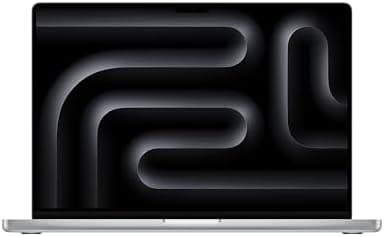
vs Apple MacBook Pro 16 M5 Pro ($2,499): The MacBook Pro offers better single-core performance, significantly longer battery life, a brighter display, and a more mature ecosystem. The Book6 Ultra counters with a gorgeous anti-reflective OLED display, much stronger GPU performance for gaming and 3D work, a wider port selection including USB-A and SD card, and a slimmer, lighter chassis. The MacBook Pro is the better choice for creative professionals who work in macOS-optimized applications. The Book6 Ultra is the better choice for Windows users who need GPU power or want to game.
vs Dell XPS 16 (2026, $2,199): The Dell XPS 16 is a strong competitor with a similar design philosophy. The Book6 Ultra offers a superior OLED display with anti-reflective coating, better GPU performance with the RTX 5070, and longer battery life. The XPS 16 has a more traditional keyboard with deeper key travel and starts at a lower price. For most buyers, the Book6 Ultra is the better machine, but the XPS 16's lower starting price makes it worth considering if you are on a tighter budget.
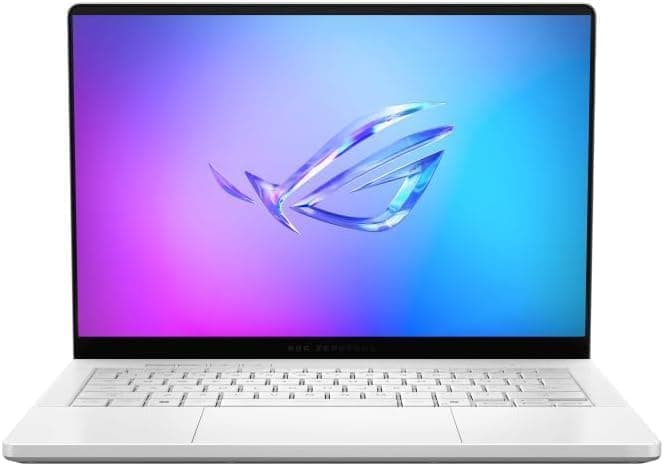
vs ASUS ROG Zephyrus G16 ($1,999): If gaming is your primary use case, the Zephyrus G16 offers comparable GPU performance in a similar form factor at a lower price. The Book6 Ultra wins on display quality, battery life, and build quality. The Zephyrus wins on gaming-specific features like higher wattage GPU configurations and better thermal management for sustained gaming sessions. Choose based on whether you need a work laptop that can also game (Book6 Ultra) or a gaming laptop that can also work (Zephyrus G16).
Real-World Usage Scenarios
Content Creation: The Galaxy Book6 Ultra excels here. The combination of the Intel Core Ultra processor, 32GB of RAM, and RTX 5070 GPU makes short work of 4K video editing in Premiere Pro, photo editing in Lightroom and Photoshop, and 3D modeling in Blender. The accurate OLED display ensures that what you see is what you get in terms of color. The full-size SD card slot is a godsend for photographers who need to ingest footage from cameras without carrying a dongle.
Software Development: The powerful CPU and ample RAM handle compilation tasks, running multiple containers or VMs, and managing large codebases with ease. The 16-inch display provides enough screen real estate for split-screen editing with documentation or terminal windows alongside your IDE. The shallow keyboard is a minor frustration for extended typing sessions, but it is not a dealbreaker.
Business Travel: At just over four pounds with a slim profile, the Book6 Ultra is easy to slip into a bag and carry through airports. The 15-hour battery life is sufficient for most cross-country flights, and the fast charging means you can top up during a layover. The Thunderbolt 4 ports support docking stations for a single-cable office setup. The anti-reflective display is genuinely useful for working in brightly lit airplane cabins or coffee shop windows.
Gaming on the Go: The RTX 5070 handles modern games at 1080p with high settings and playable frame rates, and with DLSS enabled, many AAA titles run smoothly at the display's native resolution. This is not a dedicated gaming laptop, and the thermals will limit extended sessions, but it is more than capable of serving as a weekend gaming machine for someone who primarily needs a professional workstation.
Value and Pricing
There is no sugarcoating it: the Galaxy Book6 Ultra is expensive. The base model with the Core Ultra X7 358H and integrated graphics starts at $2,449.99. The RTX 5060 configuration is $2,899, the RTX 5070 configuration that most reviewers tested is $3,799, and higher-end configurations can push past $3,600. That is MacBook Pro money and then some.
Whether it is worth the price depends entirely on your requirements. If you need a Windows laptop with a gorgeous OLED display, strong CPU performance, a discrete GPU for creative work or occasional gaming, long battery life, and a premium build, the Book6 Ultra delivers on all fronts. If you do not need the GPU, the Galaxy Book6 Pro at $1,799 offers most of the same experience at a significantly lower price point.
The pricing situation has also been complicated by the ongoing RAM crisis, which has pushed component costs higher. Samsung has historically offered aggressive discounts on its Galaxy Book lineup, and it is worth watching for sales if the current prices are outside your budget.
Verdict
The Samsung Galaxy Book6 Ultra is a remarkable achievement. It combines one of the best laptop displays on the market with strong performance, excellent build quality, long battery life, and genuinely useful ecosystem features for Samsung device owners. The anti-reflective OLED panel alone is reason enough for creative professionals to take notice, and the addition of a full-size SD card slot shows that Samsung is listening to its target audience.
The compromises are not trivial. The high price limits its audience to those with significant budgets. The keyboard is too shallow for comfortable extended typing sessions. The chassis gets uncomfortably hot under sustained load. The pre-installed software could be trimmed down. And the single-core CPU performance still trails Apple's M-series chips by a significant margin.
But for Windows users who need a powerful, portable, and beautiful machine for creative work, the Galaxy Book6 Ultra is currently the best option available. It is the Windows laptop that finally feels like it belongs in the same conversation as the MacBook Pro, and that alone is worth acknowledging.
Related Reviews
For more laptop coverage, check out our in-depth reviews:
- HP OmniBook Ultra 14 Review — The best Windows laptop of 2026
- Apple MacBook Air M5 Review — Familiar design, seriously faster performance
You can find the Samsung Galaxy Book6 Ultra on Amazon at the link below. Configurations and pricing vary, so check the current listings for the model that fits your needs and budget.
https://www.amazon.com/Samsung-Computer-Processor-Advanced-Warranty/dp/B0GML5ZP6Q?tag=newgearhub-20
Pros
- Stunning anti-reflective 16-inch AMOLED display with excellent color accuracy
- Strong GPU performance with RTX 5070 for creatives and gamers
- Excellent battery life for a discrete GPU laptop (15+ hours)
- Premium aluminum build with full-size SD card slot and great port selection
- Impressive 6-speaker Dolby Atmos audio system
Cons
- Very expensive starting at $2,449 and up to $3,800+ for fully configured models
- Shallow keyboard may not suit heavy typists
- Chassis gets uncomfortably hot under sustained load
- Single-core CPU performance still trails Apple M-series significantly
Final Verdict
The Samsung Galaxy Book6 Ultra combines a stunning anti-reflective 16-inch AMOLED display with Intel Panther Lake CPUs and RTX 50-series graphics, delivering the most compelling Windows laptop alternative to the MacBook Pro in years.