Google TV Streamer 4K Review: The Best Premium Android TV Device Yet
The Google TV Streamer 4K delivers premium streaming performance, built-in Matter smart home hub, and excellent voice controls at $99.99.
Google has been trying to crack the premium streaming device market for years. The original Chromecast was a brilliant concept that democratized casting, but it was limited by its dongle form factor and the need for a phone to control it. The Chromecast with Google TV tried to fix that by adding a proper remote and interface, but it was hobbled by sluggish performance and a processor that could not quite keep up with the demands of 4K HDR streaming. With the Google TV Streamer 4K, Google has finally delivered the premium Android TV experience that users and reviewers have been asking for. This is not just a spec bump — it is a rethinking of what a Google streaming device should be, with a premium design, a powerful processor, a smart home hub built in, and an interface that finally justifies the Google TV branding. At $99.99 on Amazon (ASIN B0D8WJYSF9), it undercuts the Apple TV 4K by a meaningful margin while matching or exceeding it in most areas that matter to most users. For premium audio to pair with your new streaming device, see our JBL Tour One M3 review.
Google TV Interface
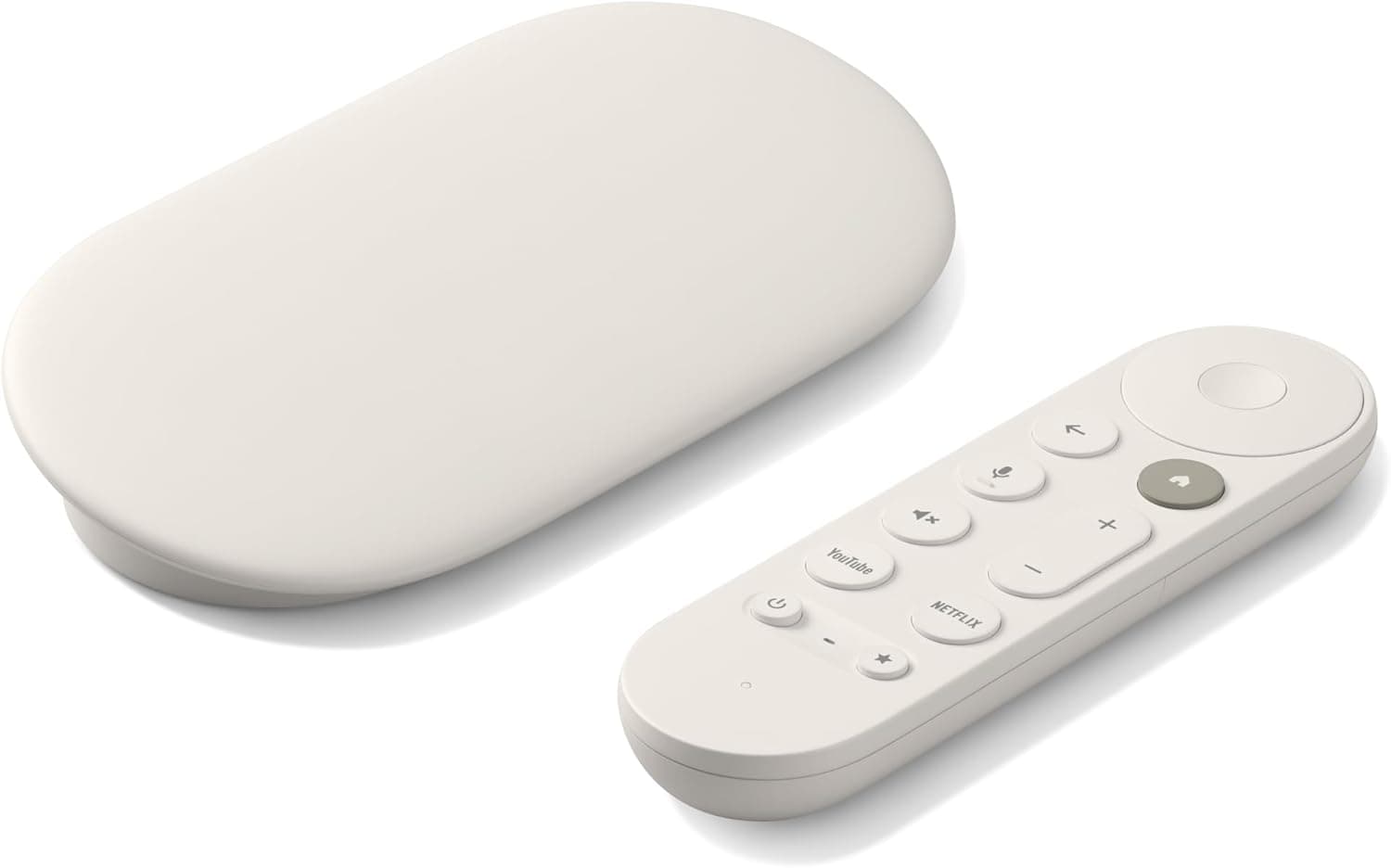
The most immediately noticeable thing about the Google TV Streamer 4K is its design. Where previous Chromecast devices were small, nondescript dongles designed to disappear behind your TV, the Streamer 4K is a substantial set-top box that is clearly meant to be seen. The low-profile, pill-shaped chassis measures approximately 6.5 by 3.2 by 1 inches and sits flat on your media console or shelf, with a soft-touch finish in a Porcelain color that will blend in with most home theater setups. The design is clearly inspired by the Nest Thermostat and other Google Home hardware — minimal, geometric, and unapologetically tech-forward. There is a small LED indicator on the front that glows white when the device is active and orange when it is in standby, and that is about it for visual elements. The included remote is a match for the device — a slim, oval-shaped clicker with a matte finish, a comfortable weight, and a well-thought-out button layout.
Streaming Performance
The processor inside the Streamer 4K is a significant upgrade from the Chromecast with Google TV. Google has not officially disclosed the chip, but it is widely believed to be a MediaTek MT8696 or equivalent, paired with 4GB of RAM and 32GB of storage. The difference in performance is immediately apparent from the moment you set it up. Navigation through the Google TV interface is smooth and responsive, with none of the stuttering and lag that plagued previous Chromecast models. Apps launch quickly, menus scroll fluidly, and the device handles demanding 4K HDR content without dropping frames or buffering. This is the first Google streaming device that feels as fast and responsive as an Apple TV, and for anyone who has used both, that is high praise.
Matter Hub Capabilities
The Google TV interface itself is the same platform that Google has been refining since 2020, but it has matured considerably. The home screen is organized around content discovery, with rows of recommendations from your subscribed streaming services, personalized based on your viewing habits, and curated watchlists that aggregate content across platforms. The Discover tab surfaces trending and recommended content, and there is a dedicated Live tab that shows live TV options if you have a TV tuner or live TV subscription integrated. The interface supports multiple user profiles, which is genuinely useful for households with different viewing preferences — each profile gets its own personalized recommendations, watchlist, and settings. Parental controls are robust, with the ability to set content ratings limits and require a PIN for mature content.
The search functionality remains one of Google TVs strongest features. Using the remote microphone button or Google Assistant voice commands, you can search across all installed apps for specific titles, actors, directors, genres, or even broad concepts like feel-good movies from the 90s. The natural language understanding is excellent — you can say things like show me action movies with car chases or find me a movie with Tom Hanks that is on Netflix and get accurate, useful results. The search also surfaces pricing information, so you immediately know which streaming service has the content you want and how much it costs if it is not included in your subscription.
Voice Control
The voice remote is genuinely excellent, and it is worth discussing in detail because Google has clearly put real thought into it. The remote is slim and ergonomic, with a comfortable grip and well-spaced buttons that are easy to find by feel. The D-pad at the top provides precise navigation, and below it are dedicated buttons for Back, Google Assistant voice search, Home, Mute, Volume (which can be programmed to control your TV or AV receiver via HDMI-CEC), YouTube, Netflix, and a customizable shortcut button. There is also a Find My Remote button on the device itself — pressing it causes the remote to emit a sound so you can locate it if it has slipped between the couch cushions. The remote uses Bluetooth for most functions and infrared for volume and power control, which means it works reliably regardless of line-of-sight to the TV.
Competition & Value
The integration between the remote and the Streamer 4K hardware extends beyond simple button presses. The device supports HDMI-CEC fully, which means the Streamer 4K can control your TV and AV receiver power and volume through the remote without any additional setup in most cases. When you turn on the Streamer 4K, it can be configured to automatically turn on your TV and switch to the correct HDMI input. When you press the volume button on the remote, the signal goes to your AV receiver or TV without you needing to manually switch the CEC control target. This is the kind of seamless, invisible integration that premium devices should deliver, and the Streamer 4K nails it.
Final Verdict
Google Assistant voice control on the Streamer 4K is genuinely useful in ways that Alexa on the Fire TV Cube is not, because Google has the full power of its search knowledge graph behind it. You can ask natural questions like who directed this movie and what else have they made during a Netflix browse, or find me a movie with Tom Hanks that is on Netflix and get accurate, useful results. The voice recognition is excellent even in a noisy room, and the ability to chain commands together — pause, rewind 30 seconds, and turn up the volume — is genuinely convenient once you get used to it. The Assistant also handles smart home commands fluently, so you can say dim the living room lights to 50 percent or set the thermostat to 72 degrees without needing to pick up your phone.
One of the standout features of the Google TV Streamer 4K is its integration with Google Home as a Matter smart home hub. Matter is the new smart home standard designed to ensure compatibility between devices from different manufacturers, and the Streamer 4K can act as a Thread border router, which means it can directly communicate with Thread-based smart home devices without needing a separate hub. This is a genuine differentiator — while many streaming devices claim smart home integration, the Streamer 4K actually delivers a hub experience that is comparable to dedicated options like the Apple HomePod or Amazon Echo Show. You can view and control compatible smart home devices directly from the Google TV home screen, see camera feeds from compatible doorbell and security cameras, and control lights, thermostats, and locks without needing to reach for your phone.
The smart home panel feature brings controls directly into the Google TV interface. From the home screen, you can see the status of your connected devices, view live feeds from compatible cameras and doorbells, adjust lights and thermostats, and control other Matter and Thread devices — all without leaving your streaming experience. For households that have adopted smart home devices, this integration is genuinely useful, eliminating the need to switch between apps or reach for a separate smart speaker to check who is at the door or adjust the temperature.
The streaming performance of the Streamer 4K is exactly what you would expect from a modern premium device in 2025. It supports 4K resolution at 60fps, High Dynamic Range (HDR10, HDR10+, and Dolby Vision), and Dolby Atmos audio pass-through. Every major streaming service — Netflix, Amazon Prime Video, Disney Plus, Apple TV Plus, Max, Peacock, Paramount Plus, and countless others — is available and performs flawlessly. The device supports Wi-Fi 6E for fast, reliable wireless connectivity, and there is also an Ethernet port on the back for those who prefer a wired connection for maximum stability. The Ethernet port is a thoughtful inclusion that many competitors have dropped in favor of wireless-only designs.
The picture quality from the Streamer 4K is excellent, and it represents the state of the art for streaming devices in this price range. The upscaling of lower-resolution content to 4K is handled smoothly, and the device correctly negotiates with supported TVs to deliver the best possible picture mode for the content being played. Dolby Vision content looks spectacular on compatible TVs, with bright highlights, deep blacks, and rich color gradations that make the most of modern panel technology. The device also supports AV1 decoding, which is becoming increasingly important as streaming services migrate to this more efficient codec to deliver higher quality at lower bitrates. Lower-resolution streaming content from services that cap their bitrates gets upscaled to 4K using algorithms that preserve detail and minimize artifacts. The results are genuinely impressive — streaming content from Netflix at 25Mbps 4K looks substantially better on the Streamer 4K than it does directly on many built-in TV apps, because the Streamer processor is more capable than the ARM chipsets embedded in most televisions.
The audio passthrough is equally impressive. Dolby Atmos soundtracks from Netflix, Apple TV Plus, and other supported services are passed through to compatible AV receivers and soundbars without any processing or downmixing, preserving the full immersive audio experience. When you connect the Streamer 4K to a compatible AV receiver or soundbar, the Atmos metadata is passed through intact rather than being decoded and re-encoded. This means your AV receiver handles the full immersive audio processing, preserving the artistic intent of the sound mix. The device also supports DTS passthrough for those with legacy AV equipment that has not yet migrated fully to Dolby.
Setting up the Google TV Streamer 4K is about as painless as it gets. Download the Google Home app on your phone, plug in the device, and follow the prompts — the phone app transfers your Wi-Fi credentials and Google account information to the Streamer 4K via Bluetooth, which is much faster and more reliable than manually typing passwords on a remote. Within five minutes of unboxing, I had the device connected, my streaming apps installed and signed in, and was watching my first 4K HDR movie. The Google Home app also provides access to advanced settings, network diagnostics, and the ability to manage your smart home devices alongside the streaming functionality.
The Streamer 4K runs on a fork of Android TV that Google has been refining for years, and it benefits from a large and growing app ecosystem. Virtually every streaming service, video platform, and media app is available in the Google Play Store, and the interface makes it easy to organize your favorites on the home screen. The device also supports Google Cast, which means you can cast content from your phone, tablet, or laptop directly to the TV — a feature that has been part of Googles streaming DNA since the original Chromecast and remains genuinely useful for sharing photos, videos, or web pages on the big screen. Google Cast has the advantage of working across platforms — iPhone users, Android users, Windows laptops, Macs, and Chromebooks can all cast to the Streamer 4K without any setup or app installation.
For YouTube TV or other live TV streaming services, the Live tab in the Google TV interface brings everything together in a surprisingly useful way. You can see what is currently airing across your subscribed live TV services, get program recommendations based on your viewing history, and quickly jump to live channels. The integration is not quite as seamless as a traditional cable guide, but it is close enough that most cord-cutters will find it workable. The ability to see all your live TV options alongside your on-demand streaming content in a unified interface is one of the underappreciated strengths of the Google TV platform.
For gaming, the Streamer 4K supports Google Play Games on TV, which offers a selection of Android games optimized for the big screen. The selection is not as extensive as what you would get on a dedicated gaming console or even the Amazon Fire TV Cube, and the lack of a game controller in the box means it is clearly positioned as casual gaming rather than a serious alternative to dedicated gaming hardware. This is not a criticism — the device is not trying to be a game console, and it is honest about what it is.
Wi-Fi 6E support is another forward-looking feature. While many homes still use Wi-Fi 5 or even Wi-Fi 6 routers, Wi-Fi 6E is increasingly common in new router purchases, and the benefits are real for streaming. Wi-Fi 6E uses the 6GHz band, which is much less congested than the 2.4GHz and 5GHz bands used by older standards. In practice, this means more stable 4K HDR streaming without buffering, particularly in crowded apartment buildings or neighborhoods where many nearby networks are competing for spectrum. If you have a Wi-Fi 6E router and a TV that is not adjacent to your router, the Streamer 4K Wi-Fi 6E capability is a genuine advantage over devices limited to older Wi-Fi standards.
The power management on the Streamer 4K is thoughtful. The device has a proper low-power standby mode that keeps it connected to the network so you can wake it with voice commands or the remote. In standby, the device draws minimal power — a meaningful consideration for households where devices are left on 24/7. The startup time from standby is fast, typically under three seconds, so you are not waiting for the device to boot when you want to watch something. The device can also be configured to go into a deeper sleep after a period of inactivity, which further reduces power consumption.
Google TV also integrates with your Google account in useful ways beyond just recommendations. Your watch history and preferences sync across devices, so if you start watching a movie on your phone YouTube app, it appears in your Continue Watching row on the Streamer 4K. The For You tab learns your preferences over time, and the recommendations genuinely improve as the system learns what you like. The Watchlist feature, which lets you save content you want to watch later from any app or browser, is genuinely cross-platform in a way that competitors watchlists are not.
The remote experience on the Google TV Streamer 4K deserves a deeper dive, because it is genuinely one of the best television remotes I have used in recent years. Previous Google TV and Chromecast remotes were functional but often felt like an afterthought — cheap-feeling buttons, mediocre build quality, and a button layout that took getting used to. The remote bundled with the Streamer 4K is in a different class. The oval shape fits comfortably in the hand, and the weight is substantial without being heavy — it has a premium feel that matches the device itself. The D-pad provides precise, tactile navigation through menus, and the buttons have a satisfying click that is neither too mushy nor too stiff. The dedicated Netflix and YouTube buttons are genuinely useful if those are among your most-used services — one press and you are straight into the app without navigating through the home screen. The customizable shortcut button can be programmed to launch any app or trigger any routine you have set up in the Google Home app, which is a nice touch for power users.
Compared to the competition, the Google TV Streamer 4K holds its own remarkably well. Against the Apple TV 4K ($129 for the 128GB model), the Google device is $30 cheaper while offering more storage than the base Apple TV 4K (32GB), matching its 4K HDR and Dolby Atmos capabilities, and offering a more content-centric interface that surfaces recommendations across multiple services rather than focusing primarily on Apple TV Plus. The Apple TV has the edge in gaming (with Apple Arcade and more powerful hardware) and ecosystem integration if you are deep in the Apple world, but for everyone else, the Google TV Streamer 4K offers better value.
Against the Amazon Fire TV Cube (3rd Gen) at $109.99, the Google device wins on processor performance and the clean, ad-free interface — Amazon Fire OS still includes prominent advertising on the home screen, which is intrusive and distracting. The Fire TV Cube has the advantage of including a built-in speaker for Alexa voice assistant commands even when the TV is off, but the Google TV Streamer 4K smart home hub functionality is more broadly compatible and more integrated into the streaming experience.
Against the Roku Ultra, the comparison is more nuanced. Roku interface is fast and straightforward, and Roku platform has the advantage of not favoring any particular streaming service in its recommendations — it is the most neutral platform in that regard. But the Google TV Streamer 4K voice search is more powerful, its smart home integration is more comprehensive, and its content discovery is more personalized and intelligent.
The Google TV Streamer 4K is not without minor weaknesses. The 32GB of storage is adequate for apps but will fill up quickly if you install many games or store media locally. The lack of a built-in speaker means you cannot use the device for voice commands when the TV is off, unlike the Fire TV Cube. The Google TV interface still surfaces some recommendations that feel like paid placements, although they are less aggressive about it than Amazon Fire OS. The remote uses a non-rechargeable coin cell battery rather than a built-in rechargeable battery, which is a minor environmental and convenience drawback.
But these are nitpicks in the context of what is otherwise an excellent streaming device that hits the right notes across the board. The Google TV Streamer 4K is fast, beautifully designed, packed with features, and priced aggressively. It is the best premium Android TV streaming device Google has ever made, and it is the one I would recommend to anyone in the market for a new streaming device in 2025.
For cord-cutters who subscribe to multiple streaming services, the Google TV interface cross-service recommendations and unified watchlist are genuinely useful features that simplify content discovery. For smart home enthusiasts, the built-in Matter hub functionality adds real value that most competitors cannot match. For anyone who wants a premium streaming experience without paying Apple TV prices, the Google TV Streamer 4K delivers the goods. It is the rare product that feels like it was designed by people who actually used streaming devices daily and understood what was frustrating about the existing options. Google has finally made a streaming box worthy of the Google TV name, and it is an easy recommendation.
Pros
- Fast, responsive interface matches Apple TV performance
- Built-in Matter/Thread hub for smart home integration
- Excellent voice remote with Google Assistant
- 4K HDR, Dolby Vision, Dolby Atmos support
- Wi-Fi 6E and Ethernet for reliable connectivity
Cons
- 32GB storage fills up quickly with games
- No built-in speaker for voice commands when TV is off
- Remote uses coin cell battery instead of rechargeable
- Some recommendations feel like paid placements
Final Verdict
The Google TV Streamer 4K delivers premium streaming performance, built-in Matter smart home hub, and excellent voice controls at $99.99.