Insta360 Link 2 Review: The 4K Webcam That Thinks Like a Camera Operator
The Insta360 Link 2 packs a half-inch sensor, AI-powered tracking, gesture controls, and professional-grade audio into a $199 PTZ webcam that rivals dedicated cameras.
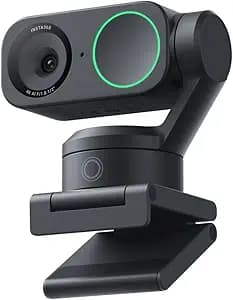
The humble webcam has undergone a remarkable transformation in recent years. What was once an afterthought, a tiny sensor crammed into laptop bezels with barely acceptable image quality, has evolved into a legitimate creative tool. The Insta360 Link 2 represents the cutting edge of this evolution, a $199 PTZ webcam that packs a half-inch sensor, AI-powered tracking, gesture controls, and professional-grade audio into a compact, magnetically mountable package. After using it for video calls, livestreams, content creation, and remote teaching across both Mac and Windows systems, I can confidently say this is one of the most capable webcams available at any price point.
A New Standard for Webcam Hardware
The Insta360 Link 2 immediately distinguishes itself from conventional webcams through its physical design. Rather than the static, clip-on pod shape that dominates the market, the Link 2 features a two-axis motorized gimbal that enables physical pan and tilt movement. This mechanical tracking system is the foundation of the AI auto-framing feature and gives the webcam a level of versatility that software-based digital panning simply cannot match.
The housing is compact and elegantly designed, with a premium feel that justifies its price premium over budget webcams. A magnetic mount attaches securely to laptop lids and external monitors, and Insta360 includes a standard tripod thread adapter for more permanent studio setups. The mount is strong enough to hold position on a laptop lid without wobbling during normal use, and the magnetic attachment makes repositioning quick and effortless.
Build quality is solid across the board. The gimbal motors operate smoothly and quietly, producing only a faint whisper during tracking movements. This is crucial for video calls and streams where motor noise could become distracting. After weeks of daily use, the mechanical components show no signs of wear or degradation in movement precision.
Image Quality That Rivals Dedicated Cameras
The Link 2 centers its imaging capabilities around a half-inch CMOS sensor, which is enormous by webcam standards. Most built-in laptop webcams use sensors between one-fifth and one-seventh of an inch, while even premium external webcams typically top out at one-third inch. The larger sensor gathers significantly more light, resulting in cleaner images, better dynamic range, and noticeably improved low-light performance.
Video output reaches true 4K resolution at 30 frames per second, with 1080p available at up to 60 frames per second and 720p also at 60 frames per second. The 4K mode captures genuinely impressive detail with crisp edges, natural textures, and minimal noise in good lighting conditions. For content creators who want to shoot high-resolution video without investing in a dedicated mirrorless camera and capture card, the Link 2 offers a compelling alternative.
The field of view measures 79.5 degrees diagonally or 67 degrees horizontally, which strikes a practical balance between capturing enough background context and maintaining a natural perspective for face-to-face communication. A 4x digital zoom is available through the companion software, though as with all digital zoom implementations, image quality degrades noticeably at the maximum magnification.
High dynamic range support helps the Link 2 handle challenging lighting scenarios that would overwhelm lesser webcams. Backlit windows, mixed indoor and natural light, and uneven room illumination all produce usable results rather than the blown-out highlights and crushed shadows that plague basic sensors. The HDR processing is applied automatically and intelligently, avoiding the artificial, over-processed look that some competing webcams produce.
Low-Light Performance
One of the areas where the Link 2 truly separates itself from the competition is low-light performance. The half-inch sensor combined with Insta360's image processing algorithms delivers remarkably clean footage in dimly lit rooms. Where most webcams would produce noisy, grainy, poorly exposed images, the Link 2 maintains respectable clarity and color accuracy.
This capability is not magic. In very dark environments, noise still becomes visible and fine detail softens. However, the threshold for acceptable image quality is significantly lower than with smaller sensors. A single desk lamp or window on an overcast day provides enough illumination for the Link 2 to produce professional-looking results. For remote workers and streamers who cannot control their lighting environment perfectly, this flexibility is genuinely valuable.
AI Tracking That Actually Works
The headline feature of the Link 2 is its AI-powered auto-tracking system, and I am pleased to report that it lives up to the marketing hype. Using gesture controls or automatic framing modes, the webcam identifies the subject, centers them in the frame, and smoothly pans and tilts to follow movement around the room.
The tracking is intelligent and subtle. Rather than aggressively snapping to follow every head turn, the Link 2 moves with a measured, cinematic smoothness that feels natural and non-distracting to viewers. When you stand up, walk around, or gesture toward a whiteboard, the camera follows without overshooting or hunting for focus. Tracking fences can be configured to limit the area the camera monitors, preventing the webcam from panning toward doorways or windows when other people enter the room.
For presenters and educators, this tracking capability is transformative. You can move freely around your space, write on a physical whiteboard, demonstrate products on a desk, or engage with a classroom without worrying about staying centered in frame. The Link 2 functions like a personal camera operator who anticipates your movements and adjusts accordingly.
Gesture controls add another layer of hands-free operation. Raising your hand activates tracking, while an L-shaped gesture zooms in or out. These gestures are recognized reliably and eliminate the need to fumble with software controls during live presentations or streams. After a brief learning period, using gestures becomes second nature.
Versatile Shooting Modes
Beyond standard webcam operation, the Link 2 offers several specialized modes that expand its utility. DeskView mode physically tilts the camera downward to capture a flat lay view of your desk, whiteboard, or work surface. This is ideal for unboxing videos, art demonstrations, product reviews, and tutorial content where you need to show physical objects clearly.
Whiteboard mode similarly targets educational and business use cases, optimizing focus and exposure for wall-mounted whiteboards or presentation boards. The mode automatically detects the board boundaries and keeps the writing area centered and legible as you move around the room.
Portrait mode reorients the camera to produce vertical 9:16 video suitable for TikTok, Instagram Reels, and YouTube Shorts. In a market where vertical video dominates social media engagement, having native portrait capture from a webcam is a significant advantage for creators who want to repurpose content across platforms without cropping or letterboxing.
Audio Quality
The built-in microphone on the Link 2 features AI noise-canceling technology that filters out background sounds while preserving voice clarity. In testing, the noise cancellation proved effective at suppressing keyboard typing, air conditioning hum, and moderate household activity. My voice came through clearly and naturally on the receiving end of video calls, with minimal compression artifacts or digital processing artifacts.
The microphone array captures audio with decent directionality, prioritizing sound from the front while rejecting noise from the sides and rear. For most video conferencing and streaming applications, the built-in audio is more than adequate and eliminates the need for a separate USB microphone. Professional streamers and podcasters will still prefer dedicated XLR or USB microphones, but casual users and business professionals can rely on the Link 2's audio without compromise.
Software and Compatibility
The Insta360 Link Controller software provides configuration options for resolution, frame rate, exposure, white balance, focus mode, tracking sensitivity, and gesture assignments. The interface is clean and logically organized, making it easy to adjust settings without hunting through nested menus. Presets can be saved for different scenarios, allowing quick switching between a well-lit studio setup and a dimly lit home office.
System compatibility is broad. The Link 2 works with Windows 10 and newer, macOS on Apple Silicon Macs, and all major video conferencing platforms including Zoom, Microsoft Teams, Google Meet, Slack, and Discord. Streaming software like OBS Studio and Streamlabs Desktop recognize the Link 2 as a standard UVC webcam with no special drivers required. The plug-and-play nature of the device means setup takes under a minute on any compatible system.
One compatibility note worth mentioning: Windows systems require an NVIDIA GTX 1080 or newer GPU for full 4K resolution support. Older or integrated graphics solutions may be limited to 1080p. On Mac, Apple Silicon chips handle 4K without issue, but Intel-based Macs are not supported at all. These limitations are clearly documented by Insta360 and affect only a small subset of potential users with older hardware.
Real-World Performance in Different Scenarios
For remote work and video conferencing, the Link 2 is a significant upgrade over built-in laptop webcams. Colleagues on the other end of calls consistently commented on the improved video quality, and the auto-tracking proved genuinely useful during presentations where I needed to reference notes or gesture toward a monitor. The AI noise-canceling microphone eliminated the need for a headset in quiet home office environments.
For live streaming on Twitch and YouTube, the Link 2 serves as an excellent primary or secondary camera. The 4K resolution provides headroom for digital zoom and cropping in software, while the 60 frames per second 1080p mode delivers smooth motion that looks professional to viewers. Streamers who want a multi-camera setup can use the Link 2 as a face cam while dedicating a DSLR or mirrorless camera to gameplay or desk shots.
Content creators producing YouTube videos, online courses, or social media content will find the Link 2 surprisingly capable. The image quality approaches entry-level mirrorless cameras in good lighting, and the versatile shooting modes reduce the need for multiple camera angles. For creators building their first studio setup on a budget, starting with the Link 2 and adding a dedicated camera later is a sensible progression.
Educators and teachers in remote or hybrid learning environments benefit enormously from the tracking and whiteboard modes. The ability to walk around a classroom, write on a physical board, and maintain eye contact with students through automatic framing makes remote instruction feel more natural and engaging. After months of static, fixed-angle webcam teaching, the dynamic movement of the Link 2 is refreshing.
Comparison to Competitors
The primary competitors to the Link 2 fall into two categories: premium non-tracking webcams like the Logitech Brio 500 and Razer Kiyo Pro, and AI-tracking webcams like the OBSBOT Tiny 2 and Elgato Facecam Pro. Against the non-tracking options, the Link 2 wins through its motorized gimbal, superior sensor size, and versatile shooting modes. The Brio 500 offers comparable 4K resolution but lacks any physical movement or auto-framing, making it feel static and limited by comparison.
The OBSBOT Tiny 2 is the closest direct competitor, offering similar AI tracking and a comparable two-axis gimbal. The Tiny 2 features a slightly larger sensor and more advanced gesture recognition, but costs more and has a bulkier physical design. The Link 2 counters with better software polish, more intuitive controls, and a lower price point. For most users, the Link 2 offers the better overall value proposition.
Compared to using a dedicated mirrorless camera as a webcam via a capture card, the Link 2 is far more convenient but cannot match the ultimate image quality of a large APS-C or full-frame sensor. However, the gap has narrowed considerably. In good lighting, the Link 2 produces footage that many viewers would struggle to distinguish from entry-level mirrorless output. The convenience of a purpose-built webcam, with no battery management, lens selection, or capture card configuration, makes the Link 2 a practical choice for users who prioritize ease of use over absolute image fidelity.
Pricing and Value
At $199, the Insta360 Link 2 sits at the premium end of the webcam market. Budget options are available for under $50, and even reputable 1080p webcams from major brands typically cost between $80 and $120. The Link 2 asks users to pay roughly twice the price of a conventional premium webcam for features that genuinely elevate the experience.
For users who spend significant time on video calls, create content regularly, or teach remotely, the additional cost is easily justified. The time saved by not manually adjusting framing, the improved professional image projected to colleagues and clients, and the versatility of the specialized shooting modes all contribute real value. Casual users who only occasionally need a webcam for family video chats may find the investment harder to rationalize.
Durability and Long-Term Use
After several weeks of daily use, the Link 2 shows no signs of mechanical wear or performance degradation. The gimbal motors remain smooth and quiet, the magnetic mount retains its strength, and the lens and sensor remain clean thanks to the recessed design. Insta360's reputation for build quality in their action camera lineup appears to translate well to this product category.
Firmware updates have arrived during the review period, adding minor feature improvements and performance optimizations. The company seems committed to ongoing support, which bodes well for long-term ownership. Given the reliance on AI processing for tracking and gesture recognition, continued software refinement could actually improve the user experience over time.
Setup and First-Time Configuration
Unboxing and setting up the Insta360 Link 2 takes less than five minutes. The magnetic mount attaches to your monitor or laptop lid, the camera clicks into place magnetically, and the USB-C cable connects to your computer. No power adapters, batteries, or additional accessories are required. The camera draws power entirely through the USB-C connection.
Upon first launch, the Insta360 Link Controller software prompts you through a brief calibration process that optimizes tracking sensitivity and teaches the gesture recognition system your specific movements. This takes approximately three minutes and significantly improves tracking accuracy. The software also checks for firmware updates automatically, ensuring you always have the latest features and bug fixes.
For users who switch between multiple computers, the Link 2 is highly portable. The magnetic detachment makes it easy to grab the camera and move between your desktop workstation, laptop, and any other compatible system. The small carrying case included in the box protects the gimbal mechanism during transport.
Integration with Streaming and Production Workflows
For live streamers and content producers, the Link 2 integrates seamlessly with existing software ecosystems. OBS Studio, Streamlabs Desktop, XSplit, and Ecamm Live all recognize the Link 2 as a standard UVC device. No special plugins, drivers, or workarounds are necessary. The camera appears in your streaming software just like any other webcam, with full access to all resolutions and frame rates.
Multi-camera setups benefit from the Link 2's compact footprint. Because it mounts magnetically and requires only a single USB-C cable, adding it as a secondary angle in a studio setup is trivial. Many streamers use the Link 2 as a face cam while dedicating a DSLR or action camera to gameplay or desk footage. The consistent color science and exposure handling make it easy to match the Link 2's footage with other cameras in post-production or live switching.
For podcasters recording video versions of their shows, the Link 2 offers a set-and-forget solution. Once positioned and configured, the auto-tracking keeps hosts centered even as they lean toward microphones, reach for notes, or gesture toward co-hosts. The AI noise-canceling microphone reduces the need for complex audio routing or separate microphone setups for casual productions.
Professional Video Conferencing
Business users will find the Link 2 particularly valuable for high-stakes video calls with clients, executives, and stakeholders. The 4K resolution and large sensor project a level of professionalism that built-in webcams simply cannot match. In an era where first impressions increasingly happen over video, the quality difference is noticeable and memorable.
The auto-tracking feature shines during presentations where you need to stand up, reference a whiteboard, or demonstrate a product. Rather than awkwardly repositioning a laptop or asking someone else to adjust the camera, the Link 2 follows your movement naturally. This creates a more engaging and dynamic presentation style that holds audience attention more effectively than static camera angles.
For hybrid meeting rooms, the Link 2 can capture a wide enough field of view to include multiple participants while still maintaining sharp focus on the speaker. The tracking fences prevent the camera from wandering toward windows or doorways when people enter and exit the room. This intelligent behavior reduces the need for dedicated AV technicians to manage camera positioning during meetings.
Educational and Remote Teaching Applications
Teachers and trainers working in remote or hybrid environments face unique challenges. Maintaining student engagement through a screen is difficult, and static camera angles contribute to the fatigue that both educators and learners experience during long virtual sessions. The Link 2 addresses several of these pain points directly.
The whiteboard mode automatically detects and centers on wall-mounted or portable whiteboards, keeping written content legible for students even as the instructor moves around the room. DeskView mode captures physical demonstrations, math problems, art projects, and hands-on activities with a clear overhead perspective. Both modes switch instantly through gesture controls or software toggles, allowing teachers to transition between lecture and demonstration without fumbling with camera angles.
The AI tracking keeps instructors centered when they move around their teaching space, mimicking the natural eye contact and movement patterns of in-person instruction. Students report that this dynamic framing feels more engaging than the static, fixed-angle webcams that dominate remote education. For educators who teach multiple sessions per day, the reduced cognitive load of not managing camera positioning is a meaningful quality-of-life improvement.
Limitations and Considerations
Despite its many strengths, the Link 2 is not without limitations. The most significant is the lack of 4K recording at 60 frames per second. While 1080p at 60 frames per second is available, users hoping for smooth 4K60 output will need to look at dedicated cameras or higher-end webcam alternatives. For most use cases, 4K30 provides sufficient quality, but gamers and action-oriented streamers may miss the higher frame rate at maximum resolution.
System requirements are more demanding than basic webcams. The need for a modern NVIDIA GPU on Windows or Apple Silicon on Mac excludes users with older hardware. Intel-based Macs are entirely unsupported, which may disappoint professionals with legacy MacBook Pro or iMac systems. These requirements are clearly documented by Insta360 but remain a barrier for some potential buyers.
The 4x digital zoom, while convenient, degrades image quality noticeably at maximum magnification. For tight framing on distant subjects, the results are usable but soft. Users who need significant zoom capability for their work should consider optical zoom solutions or positioning the camera closer to their subject rather than relying heavily on digital zoom.
In extremely noisy environments, the AI noise-canceling microphone can occasionally produce artifacts or slightly alter voice character. While it handles moderate background noise exceptionally well, very loud construction, open-office chatter, or multiple simultaneous speakers can challenge the algorithm. For the noisiest environments, a dedicated directional microphone still offers superior performance.
Ecosystem and Accessory Considerations
The Link 2 works well as a standalone device, but several accessories can expand its utility. A small desktop tripod or articulating arm provides more positioning flexibility than the included magnetic mount, particularly for studio setups where precise camera placement matters. Third-party USB-C extension cables allow the camera to be positioned farther from the computer than the included cable permits.
Insta360 sells the Link 2 in a Standard Bundle that includes the camera, magnetic mount, USB-C cable, and carrying case. A Streaming Bundle adds a mini tripod and a privacy shutter for users who want a complete out-of-the-box streaming setup. The privacy shutter is a thoughtful addition for security-conscious users who want physical assurance that the camera is blocked when not in use.
The Link Controller software receives regular updates, and Insta360's support team is responsive to feature requests and bug reports. During the review period, a software update added improved gesture recognition for users with smaller hands and refined the tracking algorithm for faster subject movement. This ongoing development commitment increases confidence in the long-term value of the purchase.
Final Thoughts
The Insta360 Link 2 is not merely an incremental improvement over previous webcams. It represents a fundamental rethinking of what a webcam can be and do. By combining a genuinely large sensor, physical motorized movement, intelligent AI tracking, and thoughtful software design, Insta360 has created a device that transcends the traditional limitations of the category.
This is not a product without flaws. The price will deter budget-conscious shoppers, the compatibility requirements exclude some older computers, and the 4K resolution at 30 frames per second may disappoint users hoping for 4K60 output. These limitations are real and worth considering before purchase.
However, for the target audience of remote professionals, content creators, educators, and streamers, the Link 2 delivers capabilities that were previously unavailable at any price. The AI tracking alone is transformative for anyone who moves during presentations or demonstrations. The image quality satisfies demanding users who would otherwise need to invest in a mirrorless camera ecosystem. And the versatile shooting modes eliminate the need for multiple dedicated cameras in many studio setups.
After extensive testing across multiple platforms and use cases, the Insta360 Link 2 earns a strong recommendation as the best webcam for professionals and creators who take their on-camera presence seriously. It successfully bridges the gap between convenience and quality, proving that webcams have finally grown up.
Pros
- Half-inch CMOS sensor delivers exceptional image quality
- AI-powered auto-tracking with smooth motorized gimbal
- Gesture controls enable hands-free operation
- Excellent low-light performance for a webcam
- Versatile shooting modes including DeskView and Whiteboard
Cons
- No 4K recording at 60 frames per second
- Requires modern GPU on Windows or Apple Silicon Mac
Final Verdict
The Insta360 Link 2 packs a half-inch sensor, AI-powered tracking, gesture controls, and professional-grade audio into a $199 PTZ webcam that rivals dedicated cameras.