LG 27G550B-B Ultragear Review: 300Hz IPS Gaming Monitor Delivers Elite Competitive Performance
The LG 27G550B-B 27-inch Ultragear monitor offers a 300Hz refresh rate and 1ms response time in an IPS panel at $299.99, making high-refresh competitive gaming accessible to mainstream buyers.
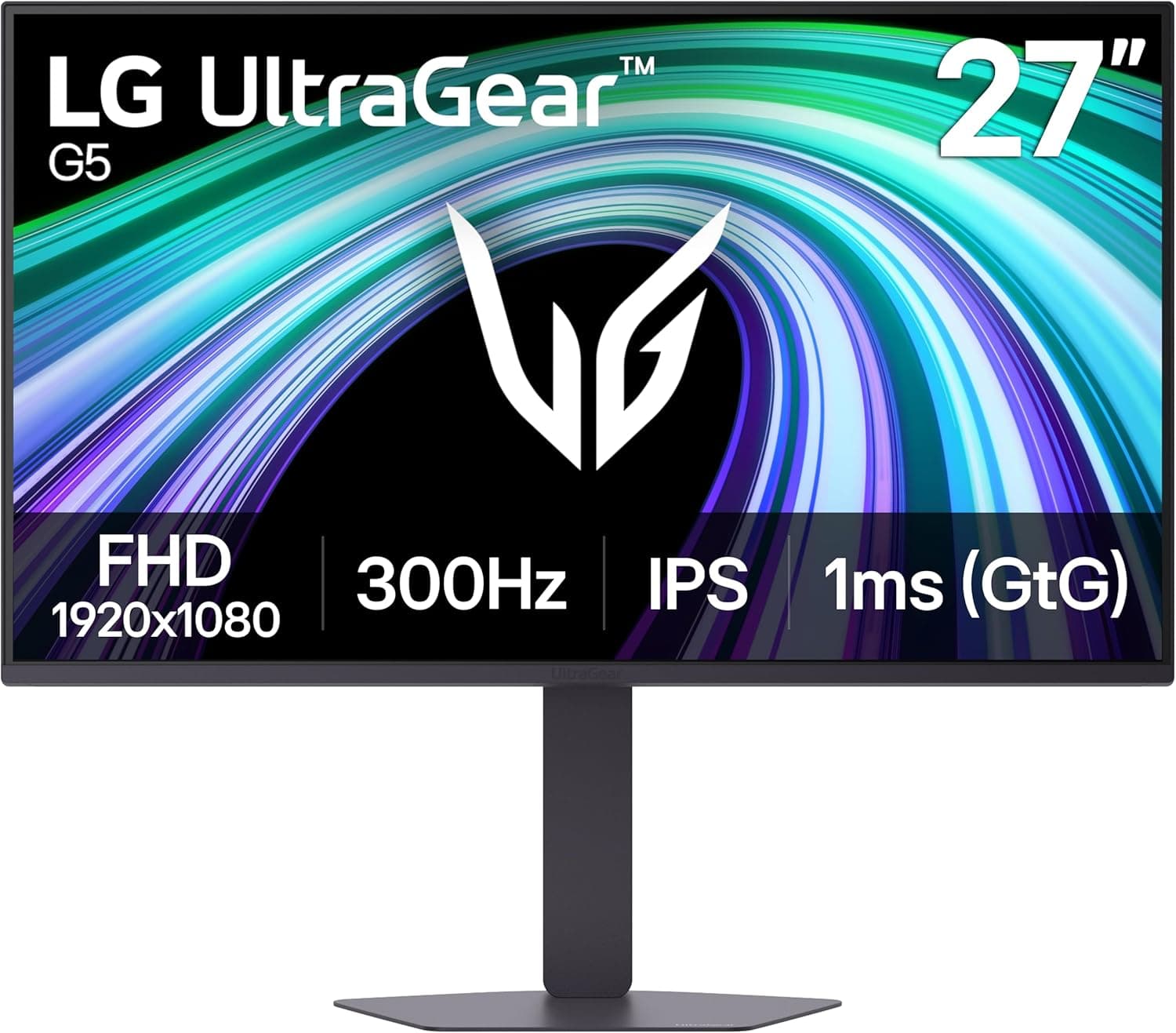
The gaming monitor market in 2026 has reached a level of specialization and performance that would have been difficult to imagine just a few years ago, with refresh rates, response times, and color accuracy figures that rival professional production monitors while maintaining the responsiveness and visual smoothness that competitive gaming demands. The LG 27G550B-B 27-inch Ultragear Full HD gaming monitor represents LG's latest entry in the high-refresh-rate IPS gaming category, offering a 300Hz refresh rate, 1ms response time, NVIDIA G-Sync Compatible certification, AMD FreeSync Premium support, HDR10 support with 99 percent sRGB coverage, and a fully adjustable ergonomic stand. At $299.99 on Amazon, the 27G550B-B positions itself in the sweet spot of the gaming monitor market, delivering enthusiast-level performance at a price that remains accessible to mainstream buyers who want high-refresh-rate gaming without the premium attached to 4K resolution or MiniLED backlight technology.
300Hz Refresh Rate
To understand where the 27G550B-B fits in the current monitor landscape, it helps to examine the competitive context of the 27-inch 1080p high-refresh-rate IPS gaming monitor category. For a higher-end OLED alternative, see our LG UltraGear GX7 review. Monitors like the ASUS TUF Gaming VG279QM, the Acer XB273 GX, and the MSI Oculux NXG251R have established the performance expectations for this category, with 240Hz to 280Hz refresh rates, sub-1ms response times, and IPS panels that deliver the color accuracy and wide viewing angles that IPS technology is known for. The LG 27G550B-B's 300Hz refresh rate represents an advancement over these earlier competitors, offering the smoothest possible frame delivery for competitive gaming where every millisecond of input lag matters and visual clarity during fast motion directly affects reaction time and accuracy. The 1080p resolution on a 27-inch panel produces a pixel density of approximately 82 pixels per inch, which is lower than 1440p or 4K alternatives but remains sharp enough for gaming at typical viewing distances and places less demanding requirements on the graphics card, enabling higher frame rates in graphically intensive titles.
G-Sync & FreeSync Premium
The 300Hz refresh rate is the headline specification of the 27G550B-B and deserves detailed examination of what it actually means for gaming performance. Refresh rate measures how many times per second the monitor can draw a new image, with higher rates enabling smoother visual motion and reducing the perceived lag between input and visual feedback. At 300Hz, the monitor can display up to 300 frames per second, which dramatically exceeds the 60Hz refresh rate of standard monitors and even surpasses the 144Hz refresh rate that was considered high-end just two years ago. The practical benefit of 300Hz is most apparent in fast-paced competitive games like Counter-Strike 2, Valorant, Apex Legends, and Call of Duty Warzone, where enemies appear and disappear from view rapidly and precise timing of shots depends on seeing the most current frame possible. In these games, the difference between a 300Hz and a 144Hz monitor is perceptible even to less experienced players, manifesting as noticeably smoother motion during rapid camera movements and slightly faster apparent responsiveness when flicking to targets.
The 1ms response time specification uses the GtG measurement standard, which measures how long a pixel takes to transition from one shade of gray to another and back. IPS panel technology historically struggled with response times compared to TN panels, which were faster but offered inferior color accuracy and viewing angles. The 27G550B-B uses what LG describes as an "Ultra Fast IPS" panel that reduces the liquid crystal transition time through optimized pixel architectures and overdrive circuits that apply higher voltages during transitions to accelerate pixel changes. The 1ms GtG rating places the 27G550B-B's response time in the same territory as TN panels while maintaining IPS-level color accuracy and viewing angles, representing a meaningful technological achievement that benefits gaming without sacrificing visual quality. Response time overlap and ghosting, where fast-moving objects leave trailing artifacts on screen, are minimized by the fast response time, though monitors with response times faster than their refresh rate cycle can still exhibit subtle artifacts in the most demanding fast-motion scenarios.
Dynamic Action Sync
The NVIDIA G-Sync Compatible certification and AMD FreeSync Premium support represent adaptive sync technologies that synchronize the monitor's refresh rate to the graphics card's frame rate output, eliminating screen tearing artifacts that occur when the graphics card and monitor are out of step. G-Sync Compatible is NVIDIA's program for monitors that use the standard VESA Adaptive-Sync protocol but have been validated by NVIDIA to work properly with G-Sync functionality, providing similar tearing elimination and smoothness benefits to full G-Sync modules at a lower price point. FreeSync Premium adds low framerate compensation to the base FreeSync specification, ensuring that the monitor can maintain adaptive sync even when frame rates drop temporarily during graphically intensive scenes. Both technologies are now standard expectations for gaming monitors, and the 27G550B-B's dual certification ensures compatibility with both NVIDIA and AMD graphics cards without performance compromises.
Software & Features
HDR10 support with 99 percent sRGB color gamut coverage provides the 27G550B-B with meaningful visual capabilities that extend beyond competitive gaming into content consumption and creative work. HDR10 is the most widely supported high dynamic range format in gaming and video content, and while the monitor's peak brightness specifications are not at the level of premium HDR displays with MiniLED or full-array local dimming, the HDR10 support ensures compatibility with HDR content and games that use the format. The 99 percent sRGB coverage means the monitor can display the vast majority of the standard web and gaming color space accurately, which is essential for content that relies on precise color representation. The IPS panel's wide viewing angles of approximately 178 degrees both horizontally and vertically ensure that color accuracy remains consistent even when viewing the monitor from off-center positions, which is important for multi-monitor setups or when sharing the screen with others during gameplay or content viewing.
Competition & Value
The ergonomic stand is a practical feature that is sometimes overlooked in monitor purchasing decisions but significantly affects daily usability. The 27G550B-B's stand supports height adjustment over approximately 110 millimeters, tilt adjustment from -5 to 20 degrees, swivel adjustment from -20 to 20 degrees, and pivot rotation to portrait orientation for tasks that benefit from vertical screen real estate like code editing, document review, or social media browsing. The stand's stability is important for gaming monitors, where the lower center of gravity from the larger panels and heavier chassis can cause lighter stands to wobble during intense gaming sessions. The stand attaches via a standard 100x100 millimeter VESA mount pattern, which means users who prefer alternative monitor arms or stands can easily replace the included stand with third-party solutions.
Final Verdict
LG Switch software represents LG's attempt to provide additional utility through a desktop application that lets users adjust monitor settings, manage screen layouts, and apply configurations instantly through hotkeys. The screen splitting capability supports up to 11 different layout configurations for the monitor, enabling users to divide the screen into multiple windows for productivity multitasking without additional software. The video call integration through the software allows one-click launching of video conference applications in a preferred window layout, which is a thoughtful feature for the growing number of users who work from home and need to manage both work applications and gaming from the same setup. The ability to save and recall monitor profiles through hotkeys enables quick switching between gaming-optimized settings and color-accurate productivity settings without navigating the on-screen display menu.
Dynamic Action Sync is LG's input lag reduction technology that minimizes the delay between graphics card output and monitor display by shortening the internal video processing pipeline. This feature is particularly valuable in competitive gaming where even small input delays can affect reaction times and competitive performance. Black Stabilizer enhances visibility in dark game environments by brightening shadow areas without overexposing brighter regions, which helps players spot enemies hiding in dark corners or shadow areas before those enemies become visible through movement or direct line of sight. The Crosshair feature provides center-display crosshairs that assist with aim precision in first-person shooter games, with multiple crosshair styles and colors that can be selected based on personal preference and game requirements.
The 27-inch screen size and 1080p resolution combination represents a practical balance that has proven enduringly popular in the gaming monitor market because it enables high frame rates on mid-range graphics hardware. A GeForce RTX 4060 or AMD Radeon RX 7600 can reliably drive 300 frames per second in competitive titles at 1080p, while even the more demanding titles at high graphical settings typically achieve frame rates well above 144Hz that take full advantage of the 300Hz panel. This means the 27G550B-B does not require the most expensive graphics card on the market to achieve its performance potential, making the total system cost more manageable for buyers who want high-refresh-rate gaming without the GPU upgrade cycle that 1440p or 4K resolution would demand. The 300Hz refresh rate is most fully leveraged with competitive esports titles where frame rates consistently exceed 300 frames per second, but it also benefits graphically demanding games where frame rates fluctuate and the monitor's high refresh rate ensures smooth animation even during irregular frame delivery.
LG's Ulragear branding represents the company's gaming-focused monitor lineup that prioritizes performance specifications relevant to competitive and enthusiast gamers. The 27G550B-B continues this tradition with specifications that target the most demanding competitive gaming requirements while maintaining the color accuracy and feature set that makes the monitor suitable for broader use cases. The monitor's physical design uses thin bezels on the top and sides that minimize visual distraction during gameplay and enable relatively seamless multi-monitor setups for users who want a wider field of view. The rear housing contains the standard port array including two HDMI 2.1 ports and one DisplayPort 1.4 port, providing sufficient connectivity for multiple input sources without requiring users to swap cables when switching between devices.
The color accuracy of IPS panels makes them suitable for content creation work beyond gaming, and the 27G550B-B's 99 percent sRGB coverage supports photo editing, video editing, and graphic design workflows that require accurate color reproduction. While professional creative work would benefit from a higher-resolution monitor for increased detail visibility, the 27G550B-B provides a viable secondary monitor for creative work in addition to its primary gaming role. The high refresh rate also benefits creative applications where smooth scrolling and interface responsiveness contribute to a more comfortable workflow, particularly in applications like video editing software where timeline scrubbing and preview playback are more fluid at higher refresh rates.
For buyers deciding between the 27G550B-B and higher-resolution alternatives like 1440p or 4K monitors at similar price points, the choice involves a fundamental tradeoff between resolution and refresh rate. A 1440p monitor at 27 inches offers significantly more detail and screen real estate but typically maxes out at 240Hz to 280Hz refresh rates with current panel technology, meaning competitive gamers who prioritize maximum frames over visual detail will prefer the 1080p 300Hz option. The lower resolution also reduces the GPU performance requirement for achieving the monitor's maximum refresh rate, which is a meaningful consideration for buyers who have not upgraded to the latest graphics cards. Users who split their time evenly between competitive gaming and single-player titles that benefit from higher resolution may find 1440p 240Hz monitors to be a better fit for their mixed usage patterns.
The monitor's power consumption is reasonable for its performance class, with typical power draw of approximately 35 to 45 watts during gaming depending on brightness settings and content type. The external power supply design keeps the monitor housing cooler and thinner than a internal power supply would allow, though it does require a separate power brick that needs placement consideration on the desk. The monitor's built-in power management features including sleep mode and energy-saving options help reduce power consumption during periods of inactivity, which is standard for modern monitors but worth noting for users concerned about energy usage.
LG's warranty and support for the 27G550B-B follows the standard coverage for consumer gaming monitors, with a limited warranty that covers defects in materials and workmanship for the standard warranty period. LG's customer support can be reached through standard channels for troubleshooting and warranty claims, though as with most consumer electronics products, the actual support experience can vary based on issue complexity and location. The monitor's reliability track record for LG's Ulragear line has been generally positive in consumer reports, with the main failure modes typically related to backlight issues or power supply failures that are covered under warranty.
The 27G550B-B fills a specific niche in the gaming monitor market as the option for buyers who prioritize maximum competitive performance at 1080p resolution. The 300Hz refresh rate represents the current ceiling for consumer gaming monitors in this resolution class, providing the smoothest possible gameplay experience for competitive titles where every frame matters. The 1ms response time ensures that pixel transitions do not introduce blur or ghosting that could interfere with target acquisition during fast motion. The G-Sync Compatible and FreeSync Premium certifications ensure adaptive sync functionality with both major graphics card platforms. The ergonomic stand and LG Switch software add practical usability features that extend the monitor's appeal beyond pure gaming performance. At $299.99, the monitor delivers meaningful value for competitive gamers who have graphics hardware capable of driving 300 frames per second and who want the best possible refresh rate at an accessible price point.
The practical experience of using the LG 27G550B-B in daily gaming sessions reveals several dimensions of performance that specifications alone do not capture. The first and most immediately noticeable aspect is the sheer smoothness of motion at 300Hz compared to the 144Hz monitors that most gamers currently use. Fast camera movements in first-person shooters feel qualitatively different, with none of the subtle stepping or frame judder that can occur at lower refresh rates. This smoothness translates into a more immersive experience that reduces eye strain during extended gaming sessions, which is an important consideration for competitive players who spend hours practicing and competing. The 300Hz experience is most clearly beneficial in games where reaction time is the primary determining factor in success, but it also enhances single-player gaming experiences where smooth animation contributes to visual polish and immersion.
The input lag performance of the 27G550B-B deserves particular attention because it represents the total system delay from graphics card output to photon emission from the monitor. While the 1ms response time specification addresses pixel transition speed, the total input lag includes additional components from signal processing, scaler delays, and other internal monitor operations. Dynamic Action Sync reduces these delays by bypassing certain processing steps that introduce latency, resulting in an input lag that competitive gamers consistently report as feeling noticeably more responsive than non-sync monitors at the same refresh rate. In practical terms, players who are already highly skilled and near the ceiling of their reaction time capabilities may find that the lower input lag of a high-refresh-rate monitor with sync technology provides a small but meaningful competitive advantage in head-to-head matches.
The IPS panel's color performance extends beyond the 99 percent sRGB specification to include good grayscale performance and reasonable Adobe RGB coverage that places the monitor in a usable range for enthusiast photo editing and video color work. The color temperature out of the box is reasonably close to the 6500K daylight standard, though most users will want to adjust the RGB balance through the on-screen display menu to achieve optimal color accuracy for their specific environment and preferences. The monitor's contrast ratio of approximately 1000:1 is typical for IPS panels and lower than the contrast ratios achievable with VA panel technology or the MiniLED-backlit LCD panels found in premium gaming monitors. This means that while the monitor's HDR10 support ensures compatibility with HDR content, the actual HDR viewing experience is limited by the panel's contrast ratio compared to displays that can achieve much deeper blacks and brighter highlights simultaneously.
The stand adjustment range is adequate for most desk setups, with height adjustment of approximately 110 millimeters providing sufficient range to position the monitor at eye level for users with typical desk chair heights and monitor placement distances. The tilt range of -5 to 20 degrees allows fine-tuning of the vertical viewing angle, while the 20-degree swivel in each direction enables adjustment for users who view the monitor from off-center positions or who need to share the screen with someone sitting beside them. The pivot function to portrait orientation is smooth and well-damped, staying in position reliably once adjusted. The stand's cable management system routes cables through a channel in the stand neck, which keeps the desk area cleaner and reduces cable clutter without fully hiding the cables from view.
Gaming at 300Hz requires graphics hardware that can consistently deliver frame rates above the monitor's refresh rate to take full advantage of the panel's capabilities. For competitive esports titles like Valorant, Counter-Strike 2, and Overwatch 2, current-generation mid-range graphics cards like the NVIDIA GeForce RTX 4060 and AMD Radeon RX 7600 can achieve frame rates well above 300 frames per second at 1080p with medium to high graphical settings, making the 27G550B-B an excellent pairing with these more affordable GPU options. For graphically demanding single-player titles at maximum settings, achieving 300 frames per second may require faster graphics cards like the RTX 4070 Super or RTX 4080 Super, which means the monitor represents a partial upgrade that may need to be paired with GPU upgrades to achieve its full potential. Users who are already running high-end graphics hardware will see the most benefit from the 300Hz panel, as their existing systems are most likely to consistently hit frame rates that fully exploit the monitor's refresh capabilities.
The monitor's connectivity options through HDMI 2.1 and DisplayPort 1.4 provide sufficient flexibility for modern gaming setups. HDMI 2.1 supports the full 300Hz refresh rate at 1080p and is the preferred connection for gaming consoles like the PlayStation 5 and Xbox Series X that can output 1080p at high refresh rates. DisplayPort 1.4 provides the bandwidth required for 300Hz at 1080p with full color depth and HDR metadata, making it the preferred connection for PC gaming where DisplayPort is universally supported on modern graphics cards. Having two HDMI ports alongside one DisplayPort is a practical configuration that allows connection of a gaming PC, a gaming console, and potentially a secondary device without cable swapping, which is a meaningful convenience for users with multiple gaming systems.
The monitor's anti-glare coating is effective at reducing reflections from ambient light sources without introducing the grainy haze that some anti-glare coatings produce. This balance is important because gaming setups are often in rooms with variable lighting conditions, and a monitor that performs well under both bright and dim conditions provides more consistent visual quality. The coating's effectiveness in reducing glare without compromising image clarity is a key factor in the monitor's suitability for rooms with windows or overhead lighting that might otherwise create distracting reflections on the screen surface.
For content creators who use their gaming monitor for creative work, the 27G550B-B's color accuracy provides a workable experience for photo editing, video editing, and graphic design, though the 1080p resolution limits its suitability for professional color-critical work where higher resolution provides more detail for evaluating fine adjustments. The sRGB color space coverage ensures compatibility with web content and standard dynamic range video, while the HDR10 support enables editing of HDR video content, though the panel's contrast limitations mean that HDR editing should be validated on a proper HDR reference monitor before final delivery. The monitor's fast refresh rate also benefits creative applications where smooth timeline scrubbing and preview playback improve the editing workflow, particularly for video editing where dropped frames during preview can disrupt the creative process.
The LG Switch software adds practical productivity features that extend the monitor's value beyond pure gaming performance. The screen splitting layouts support up to 11 configurations that can organize multiple application windows on screen without requiring additional software. The hotkey functionality allows instant switching between saved monitor profiles, which is useful for quickly changing from gaming settings with maximum refresh rate and aggressive response time to color-accurate settings for content work. The video call launching feature is a thoughtful addition for the work-from-home gaming demographic, allowing one-click access to video conference applications in a predefined window layout that keeps the call visible while other applications are used.
The 27G550B-B's physical design uses relatively thin bezels on the top and sides that minimize the visual footprint of the monitor frame and enable relatively clean multi-monitor setups for users who want an expanded field of view. The bottom bezel is slightly thicker to accommodate the LG logo and monitor controls, but this asymmetry is not distracting during normal use. The rear housing is matte black plastic with subtle angular design elements that give the monitor a gaming aesthetic without the aggressive RGB lighting that some competing products feature. The absence of RGB lighting is a deliberate design choice that makes the monitor more suitable for professional environments and mixed-use spaces where a gaming-focused aesthetic would be inappropriate.
The monitor's burn-in resistance is a practical consideration for users who plan to use the monitor for productivity work with static elements like windows, toolbars, and application interfaces. IPS panels are generally more resistant to burn-in than OLED panels, and the 27G550B-B's panel technology does not exhibit the vulnerability to static image retention that affects some other display types. This makes the monitor more suitable for mixed-use scenarios where gaming sessions alternate with productivity work without concern for image retention effects.
The monitor's built-in menu system provides access to all adjustment options through a joystick-style control on the bottom bezel. The menu organization is logical and responsive, with settings organized into Gaming, Picture, Color, and General categories that provide intuitive navigation to the most commonly adjusted parameters. Gaming-specific options include the adaptive sync toggle, response time settings, black stabilizer level, and crosshair selection. The Picture menu provides brightness, contrast, and sharpness adjustments. The Color menu enables fine-tuning of individual color channels for users who want to calibrate the monitor to their specific environment. The General menu covers language, power, and connectivity settings.
For buyers comparing the 27G550B-B against other options in the gaming monitor market, several key decision factors stand out. The 300Hz refresh rate is currently among the highest available at 1080p resolution, which makes the monitor the clear choice for competitive esports players who prioritize maximum frame rate over resolution or visual richness. The 1080p resolution is both a strength and a limitation depending on use case: it enables high frame rates on mid-range hardware but limits detail visibility compared to 1440p or 4K alternatives. The IPS panel technology provides superior color accuracy and viewing angles compared to TN panels and competitive response times compared to VA panels, positioning the monitor as the all-around performer in its category rather than the specialist in any one dimension.
The $299.99 price point reflects the current state of the gaming monitor market where high refresh rate IPS panels have become increasingly affordable while maintaining strong performance specifications. This price positions the 27G550B-B as accessible to mainstream buyers who want enthusiast-level gaming performance without the premium attached to 4K resolution, MiniLED backlights, or full G-Sync modules. The monitor's value proposition is strongest for competitive gamers who have or plan to have graphics hardware capable of driving 300 frames per second and who want the smoothest possible gaming experience. For broader gaming and content use cases, the monitor delivers solid performance with the main limitation being the 1080p resolution's constraint on visual detail and workspace real estate compared to higher-resolution alternatives.
Related: Google TV Streamer 4K Review · Razer Atlas Pro Review
Pros
- 300Hz refresh rate provides the smoothest competitive gaming experience available
- 1ms GtG response time matches TN panel speed with IPS color accuracy
- NVIDIA G-Sync Compatible and AMD FreeSync Premium dual certification
- 99 percent sRGB coverage with IPS wide viewing angles
- Fully ergonomic stand with height, tilt, swivel, and pivot adjustments
- HDR10 support with LG Switch productivity software included
Cons
- 1080p resolution limits detail compared to 1440p or 4K alternatives
- Peak brightness and contrast ratio trail MiniLED HDR displays
- Requires high-end GPU to consistently achieve 300fps for full benefit
Final Verdict
The LG 27G550B-B 27-inch Ultragear monitor offers a 300Hz refresh rate and 1ms response time in an IPS panel at $299.99, making high-refresh competitive gaming accessible to mainstream buyers.