NexiGo PJ40 Pro Review: The Best Budget Google TV Projector for Big-Screen Entertainment
The NexiGo PJ40 Pro brings big-screen entertainment within reach with native Google TV, 800 ANSI lumens of brightness, built-in 20W stereo speakers, and a 10ms gaming mode — all for around $300.
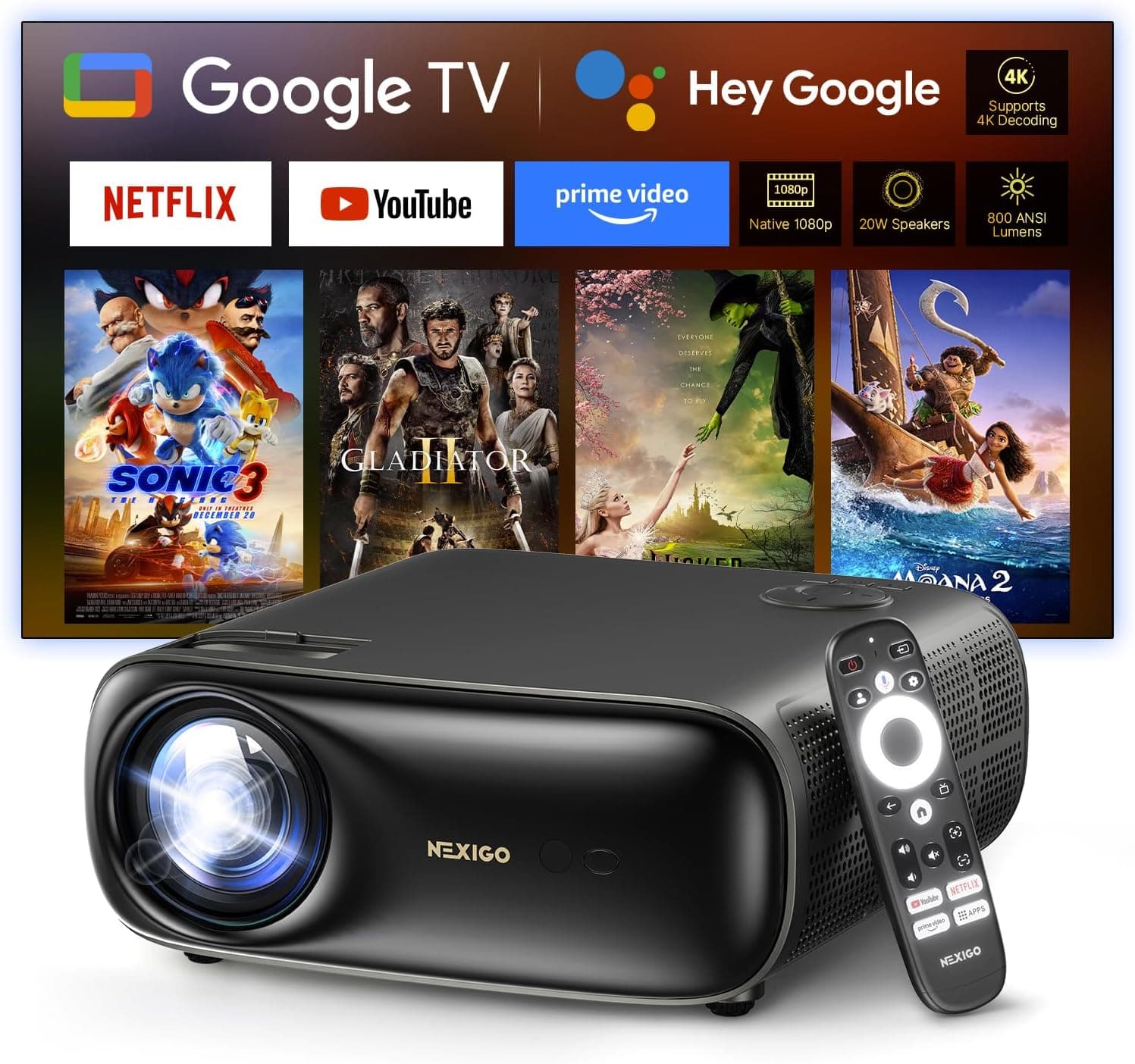
The NexiGo PJ40 Pro represents a compelling entry point into the world of big-screen projection without the four-figure price tag typically associated with quality home theater setups. With native Google TV built in, 800 ANSI lumens of brightness, and a price that hovers around $300, this LCD projector aims to bring the cinema experience to living rooms, bedrooms, and backyard movie nights without demanding a dedicated home theater room or a professional installation. After thoroughly examining its specifications, performance characteristics, and how it stacks up against the competition, I can say that the PJ40 Pro delivers genuinely impressive value — with some important caveats that potential buyers need to understand.
Design and Build Quality
The NexiGo PJ40 Pro adopts a functional aesthetic that prioritizes practicality over flash. The projector body is constructed primarily from matte black plastic with clean lines and a compact footprint that measures approximately 10 by 8 by 7 inches. It's not going to win any design awards sitting on your coffee table, but it's unobtrusive enough to blend into most entertainment setups without drawing attention to itself.
The top panel features a subtle NexiGo logo and a row of basic control buttons — power, navigation, and input selection — which are useful for initial setup but will likely gather dust once you start using the included remote. The lens sits prominently on the front panel, surrounded by the infrared sensor and ventilation grilles. The dual cooling vents on the sides and rear handle thermal management, and while the fan is audible during operation, it's not intrusive in most listening environments — though it may be noticeable in smaller bedrooms during quiet movie scenes.
Build quality is solid for the price point. The plastic panels fit together cleanly with no noticeable gaps or creaking when handled. The lens housing feels secure, and the adjustable rubber feet at the bottom provide stability on various surfaces. A standard tripod mount on the underside allows for flexible placement options, which is essential since this projector lacks any kind of adjustable lens shift.
The included accessories are well-considered. The backlit remote control is a genuine highlight — it's comfortable to hold, the buttons are well-spaced, and the backlight makes it usable in a completely dark room. Dedicated shortcut buttons for YouTube, Netflix, Prime Video, and Google Assistant make one-click access to streaming services effortless. The remote connects via Bluetooth for full functionality or IR for basic control, and the setup process takes about ten seconds.
One design note worth mentioning: the power adapter is external and reasonably compact, but the power cable could be longer for more flexible placement options. You'll want to factor in proximity to an outlet or plan for an extension cable depending on where you set up.
Image Quality and Brightness
The PJ40 Pro's image quality is where the value proposition really shines — literally. With 800 ANSI lumens of brightness, this projector is significantly brighter than many budget projectors in the sub-$300 category, which typically struggle to reach 300-500 lumens. The practical impact is substantial: you can get a watchable image even with ambient light in the room, something that's simply not possible with cheaper projectors.
In a completely dark room, the PJ40 Pro produces a vibrant, detailed 1080p image that can scale from 50 inches up to a massive 300 inches diagonally. The native 1080p resolution (1920 by 1080) delivers genuine Full HD clarity, not the "supported 1080p" you often see on budget projectors that actually run at lower native resolutions. Text is readable, details in movies are discernible, and gaming visuals are clear enough for an enjoyable experience.
The 3,000:1 native contrast ratio produces better-than-average black levels for an LCD projector in this price range. Black bars in widescreen movies are closer to dark gray than the washed-out gray you get on cheaper projectors, and shadow detail in darker scenes is surprisingly decent. It's not going to compete with a good OLED TV or a premium DLP projector, but within its price bracket, the contrast performance exceeds expectations.
Color accuracy benefits from D65 daylight calibration out of the box, which means colors aren't wildly oversaturated or flat as they often are on uncalibrated budget projectors. The AI image enhancement processing applies noise reduction and tone mapping that generally improves the viewing experience, though it can occasionally be slightly aggressive with older or lower-quality content. HDR10 and HLG support means you get improved dynamic range from compatible content, though the 800 ANSI lumen brightness ceiling limits the real-world impact of HDR compared to what you'd see on a high-end TV.
The auto keystone correction is genuinely useful for quick setup. When you move the projector, it automatically adjusts vertical keystone to square up the image. Manual horizontal and vertical keystone correction (±25 degrees) is available for fine-tuning, along with digital zoom that lets you resize the image from 60% to 100% without moving the projector. The 1.47:1 throw ratio means you need about 8 to 9 feet of distance for a 100-inch image, which is typical for this class of projector.
Smart Platform: Google TV
Native Google TV integration is arguably the PJ40 Pro's killer feature. Rather than relying on a clunky, slow smart platform or requiring an external streaming device, this projector runs genuine Google TV with access to over 10,000 streaming apps from the Google Play Store. The interface is smooth and responsive, with none of the lag or stuttering that plagues cheaper integrated smart TV platforms.
The Google TV interface provides personalized content recommendations across your subscribed services, a universal watchlist, and Google Assistant voice control via the remote. Setting up the projector is as simple as signing into your Google account, and all your preferences and watch history sync automatically. The home screen surfaces content from Netflix, Disney+, HBO Max, YouTube, Prime Video, and dozens of other services, making content discovery effortless.
Google Cast support means you can stream content directly from your phone, tablet, or laptop to the projector with a single tap. This works seamlessly with YouTube, Chrome, and many other Cast-enabled apps. One important limitation to note: Netflix and Disney+ content cannot be cast due to copyright restrictions — you need to launch those apps directly on the projector. This is standard across most smart platforms, but it's worth knowing if you primarily consume content through casting.
The Bluetooth 5.1 connectivity adds another layer of flexibility. You can connect wireless headphones or speakers for private listening, pair a Bluetooth game controller for gaming, or use a Bluetooth keyboard for search and text entry. The dual-band WiFi handles streaming reliably, though a wired Ethernet connection via the RJ45 port provides the most stable experience for 4K content.
Audio Performance
The built-in audio system consists of dual 10-watt speakers (20 watts total) that deliver surprisingly capable sound for a projector of this size. Dialogue is clear and centered, music has reasonable presence, and the overall volume is sufficient to fill a medium-sized room without distortion. For casual viewing — YouTube videos, TV shows, casual movie watching — the built-in speakers are perfectly adequate and save you the expense and clutter of an external sound system.
Where the internal audio falls short is in bass response and soundstage width. Explosions in action movies lack the visceral impact you'd get from even a basic soundbar, and the stereo separation is limited by the speakers' close proximity within the projector chassis. For serious movie watching or gaming, an external audio solution makes a meaningful difference. The HDMI ARC port allows you to connect a soundbar or AV receiver with a single cable that carries both audio and control signals, which is a welcome inclusion at this price point.
The cooling fan is worth mentioning because it's the most consistent audio distraction. In a living room or large bedroom with ambient sound, the fan noise fades into the background. In a small, quiet bedroom during a dialogue-heavy scene, it becomes noticeably present. It's not loud enough to drown out dialogue, but it prevents the projector from achieving the "dead silent" theater experience that more expensive projectors with sophisticated thermal management can deliver.
Gaming Performance
The PJ40 Pro's 10ms low-latency mode makes it a surprisingly capable gaming projector. When enabled, it reduces input lag to the point where most games feel responsive and playable. This is a significant step up from budget projectors that typically have 30-50ms of input lag, which makes precision platformers and fast-paced shooters feel sluggish.
It's important to note that enabling Game Mode disables keystone correction, which means the projector needs to be positioned perpendicular to the screen for a square image. This is a meaningful limitation if you're using the projector in a living room where it needs to sit on a side table or shelf at an angle. For dedicated gaming setups where the projector can be centered on the screen, it's less of an issue.
The 1080p resolution at 60Hz is sufficient for console gaming on PlayStation 5, Xbox Series X, and Nintendo Switch. The HDMI 2.0 inputs support CEC (Consumer Electronics Control), so your game console can power on the projector and switch inputs automatically. Two HDMI ports mean you can keep a game console and streaming device connected simultaneously without swapping cables.
Setup and Ease of Use
Setting up the PJ40 Pro is refreshingly straightforward. Power it on, connect to WiFi, sign into your Google account, and you're streaming content within minutes. The auto keystone and digital zoom make it easy to get a properly sized and squared image without manual adjustments. Focus is manual, which requires a moment of attention but isn't difficult to dial in.
The on-screen setup wizard guides you through language selection, network configuration, Google account sign-in, and app installation. The whole process takes about ten minutes for a complete setup. Firmware updates download and install automatically over the network, keeping the projector current without any manual effort.
The remote's backlit feature is a small touch that makes a big difference in daily use. In a dark room — which is where projectors are most often used — being able to see the remote buttons without turning on a light or fumbling in the dark feels like a luxury that every projector should offer.
Competition and Value
The PJ40 Pro competes in a crowded field of budget projectors that includes offerings from brands like WiMiUS, Yowhick, Happrun, and VOPLLS. What distinguishes the NexiGo is the combination of native Google TV, 800 ANSI lumens brightness, and the 10ms gaming mode — features that are individually available on competing products but rarely found together at this price point.
The BenQ TH575 is a step up in brightness and image quality but costs nearly twice as much and lacks a built-in smart platform. The XGIMI MoGo 2 Pro offers similar features in a more portable package but at a higher price with lower brightness. The Hisense C2 Ultra is in a completely different class — superior in every measurable way — but costs ten times as much. If you are considering stepping up to a premium home theater setup, our Valerion VisionMaster Max Review covers a high-end projector option, while the Samsung S95H OLED TV Review explores the best OLED TV available in 2026.
For buyers deciding between the PJ40 Pro and a similarly priced television, the calculus comes down to size versus convenience. A $300 TV will have better contrast, brighter HDR, and zero fan noise. But the PJ40 Pro can project a 120-inch image that no TV under $2,000 can match. If screen size is your priority and you have a dark enough room, the projector wins.
The Verdict
The NexiGo PJ40 Pro is an exceptional value proposition for anyone looking to dip their toes into the world of projection without making a significant financial commitment. The built-in Google TV platform eliminates the need for a separate streaming device, the 800 ANSI lumens provide usable brightness in controlled lighting, and the image quality punches well above its weight class for the price.
The compromises are real but manageable. The cooling fan noise prevents a truly immersive theater experience in quiet settings. The black levels, while decent for LCD, don't match OLED or DLP projectors. The lack of optical zoom or lens shift limits placement flexibility. And the 1080p native resolution means this isn't the projector for 4K enthusiasts.
But for its intended use case — affordable big-screen entertainment for movie nights, casual gaming, and everyday TV viewing — the PJ40 Pro delivers where it counts. For those prioritizing TV over projection, our LG C6 OLED TV Review covers a fantastic mid-range OLED alternative. It's easy to set up, simple to use, and produces an image that will impress guests who aren't used to seeing a 120-inch screen in a living room. The included backlit remote, HDMI ARC support, and Bluetooth connectivity show that NexiGo paid attention to the details that matter in daily use.
If you're looking for a way to get a massive screen experience without spending thousands of dollars, and you have a room where you can control the lighting, the NexiGo PJ40 Pro should be near the top of your list. It proves that budget projectors have come a long way, and that you don't need to spend a fortune to enjoy the magic of a big-screen projection experience at home.
The lamp life deserves a dedicated discussion because it directly impacts the long-term cost of ownership. The PJ40 Pro uses an LED light source rated for 30,000 hours of operation. To put that in perspective, watching four hours of content every single day would take over 20 years to reach that rating. The LED light source maintains consistent brightness throughout its lifetime rather than gradually dimming like traditional lamp-based projectors, so you don't have to worry about image degradation over time. There are no replacement bulbs to purchase, no expensive maintenance intervals, and no sudden failure that leaves you in the dark. This makes the PJ40 Pro a set-it-and-forget-it device that will serve reliably for years without additional investment.
The fan and thermal management system keeps the internal components at safe operating temperatures even during extended viewing sessions. After a four-hour movie marathon, the projector body remains warm but not hot to the touch, and the internal temperature stays well within safe ranges. The fan speed adjusts dynamically based on load and ambient temperature, so it's quieter during less demanding content like TV shows and ramps up slightly during bright HDR content or gaming sessions.
Internet connectivity options are flexible. The dual-band WiFi handles 1080p streaming without buffering issues in most home networks, maintaining a stable connection even when the router is in another room. For situations where WiFi performance is inconsistent — or for streaming 4K content from a local media server — the RJ45 Ethernet port provides a wired connection that eliminates wifi variability entirely. The Bluetooth 5.1 is useful not just for audio but also for connecting peripherals like game controllers, wireless keyboards, and mice.
The PJ40 Pro's HDMI 2.0 ports support HDCP 2.2, which means they're compatible with copy-protected content from streaming services and Blu-ray players. Both ports support CEC, so you can control connected devices with a single remote. This is a small detail that has an outsized impact on daily use — being able to power on your streaming device or game console and have the projector automatically switch to the correct input eliminates a surprising amount of friction in the viewing experience.
For outdoor movie nights, the PJ40 Pro's combination of 800 ANSI lumens and compact design makes it a capable companion. The tripod mount on the bottom allows for easy setup on a standard camera tripod, and the auto keystone means you don't have to spend fifteen minutes adjusting the image every time you move the projector. The 20-watt speakers are loud enough for outdoor use in a backyard setting, though adding a portable Bluetooth speaker would enhance the experience for larger gatherings. The compact size means the projector fits easily in a backpack alongside a laptop and a few accessories, making it genuinely portable for trips to a friend's house, camping excursions, or outdoor cinema events.
Maintenance requirements are minimal. The air filter should be gently cleaned with a soft brush every few months to prevent dust buildup that could affect cooling performance. The instruction manual explicitly warns against rinsing the filter with water or using cleaning solvents, so a dry brush or compressed air is the recommended approach. The lens can be cleaned with a standard microfiber cloth when fingerprints or dust accumulate, which they will over time in any home environment.
The included documentation is clear and well-organized, with illustrated setup instructions that walk through the physical installation, network configuration, and Google TV setup. This is a welcome change from the notoriously poor documentation that often accompanies budget electronics, where instructions are frequently translated into awkward English or omitted entirely. NexiGo includes a quick-start guide that gets you up and running in minutes, with more detailed troubleshooting information available on their website.
Comparing the PJ40 Pro to other projectors in its price class reveals where NexiGo made smart trade-offs. The WiMiUS P62 offers similar brightness but lacks native Google TV, relying instead on an external dongle or screen mirroring from a phone. The Yowhick J6 Pro matches the Google TV integration but falls short in brightness at around 500 ANSI lumens. The Happrun H1 Pro offers comparable hardware specifications but has a significantly worse remote control experience and less reliable auto keystone. The PJ40 Pro's combination of genuine Google TV, competitive brightness, and quality-of-life features like the backlit remote and reliable auto keystone make it the most polished package in its segment.
For buyers coming from the budget projector world where every model seems to be a variation on the same generic Chinese reference design, the PJ40 Pro feels like a genuine step forward. The software experience is head and shoulders above what you get from the no-name brands that populate the lower end of Amazon's projector listings. Google TV is a mature, well-supported platform that receives regular updates, security patches, and app compatibility improvements. You're not dependent on the manufacturer for software fixes — Google handles the platform, and NexiGo has proven willing to push firmware updates for projector-specific functions.
The overall impression the PJ40 Pro leaves is one of genuine value rather than corner-cutting. Every compromise feels intentional and justified by the price point rather than arbitrary or penny-pinching. The fan noise could be quieter, but quieter projectors typically cost twice as much. The black levels could be deeper, but true deep blacks require DLP or laser technology that starts at $1,000. The 1080p native resolution could be 4K, but 4K projectors with this feature set start at $800.
You can purchase the NexiGo PJ40 Pro from Amazon at https://www.amazon.com/dp/B0FFP3RG53?tag=newgearhub-20.
Pros
- Native Google TV platform with access to 10,000+ streaming apps
- 800 ANSI lumens delivers watchable brightness even with ambient light
- Excellent value at around $300 for a complete smart projector
- 10ms low-latency mode makes gaming surprisingly responsive
- Backlit remote and HDMI ARC support at this price point
Cons
- Fan noise is noticeable in quiet rooms during dialogue-heavy scenes
- Black levels typical of LCD projectors — not OLED or DLP quality
- Auto keystone and zoom are digital, reducing effective resolution
- Game Mode disables keystone correction
Final Verdict
The NexiGo PJ40 Pro brings big-screen entertainment within reach with native Google TV, 800 ANSI lumens of brightness, built-in 20W stereo speakers, and a 10ms gaming mode — all for around $300.